

ProductPRODUCT
Featured products
Contact Us
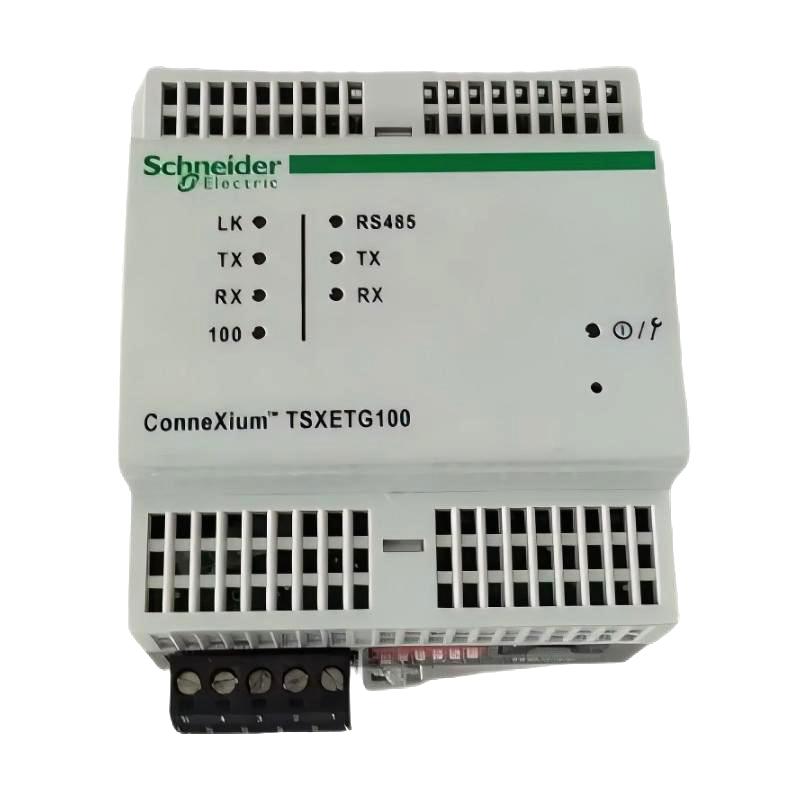
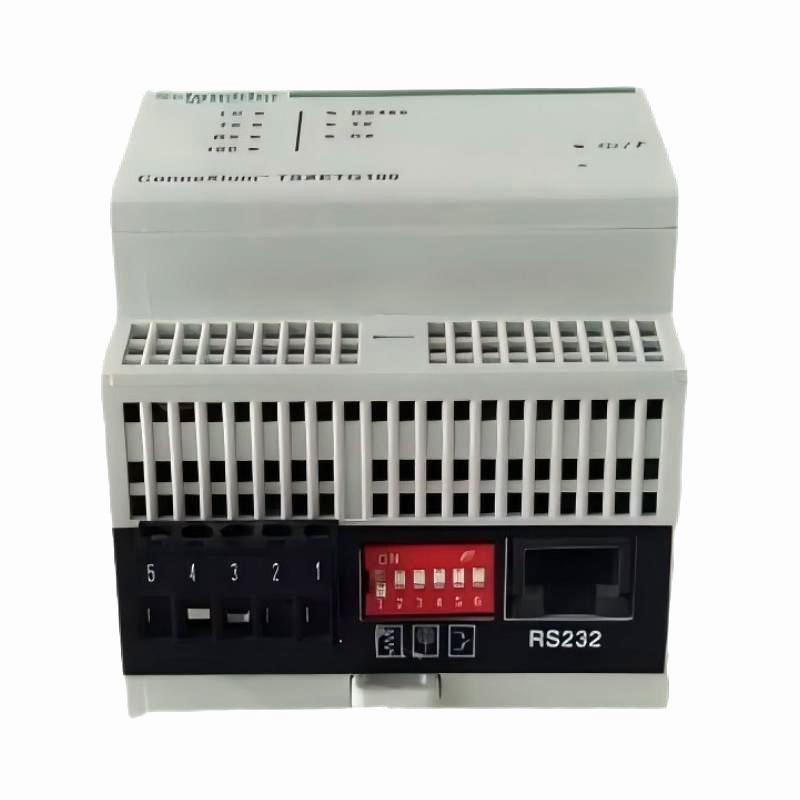
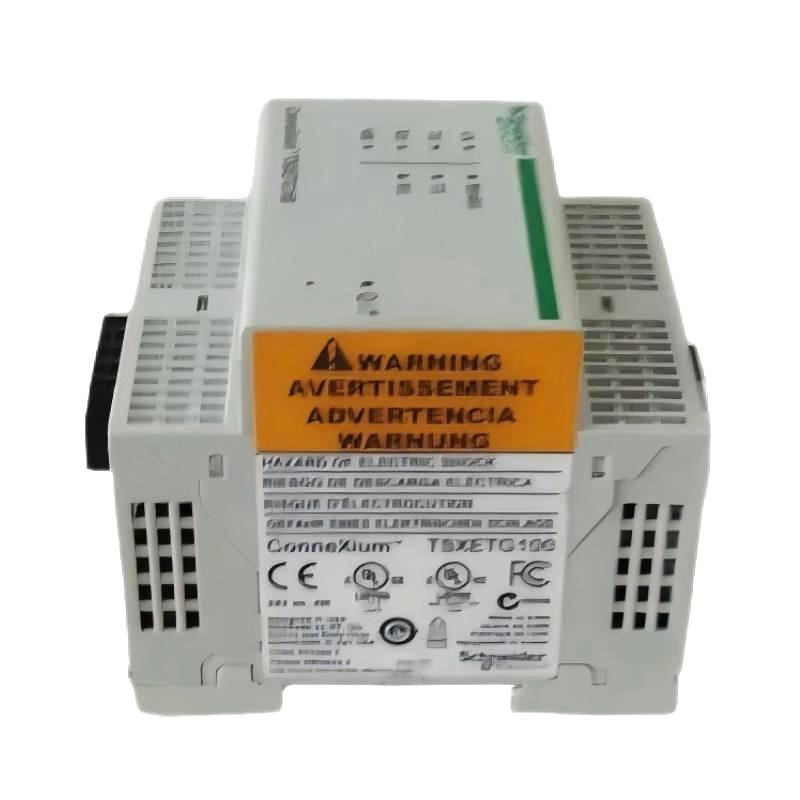
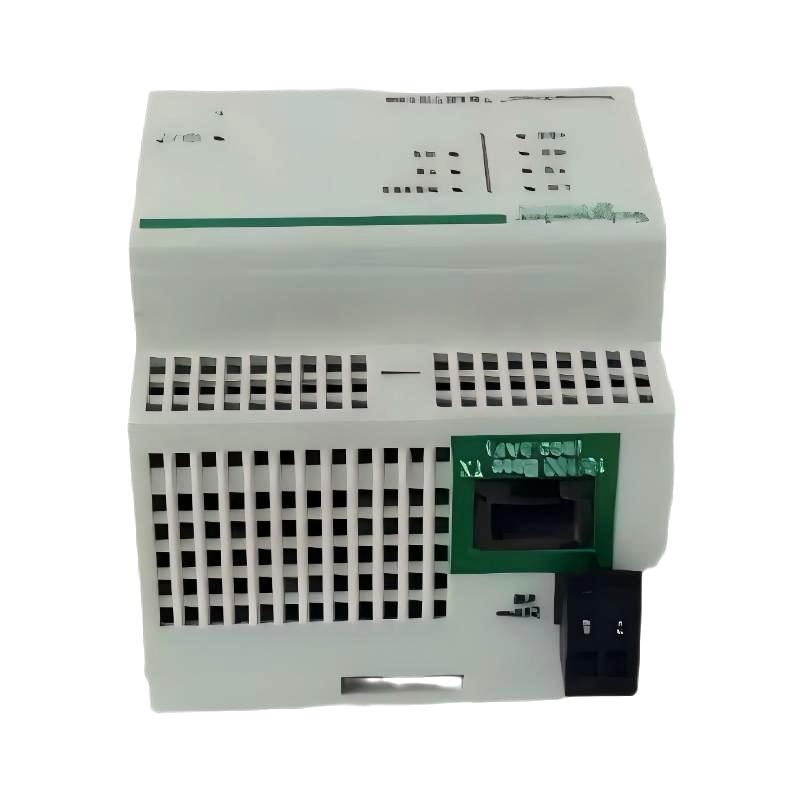
- Schneider
- TSXETG100
- Ethernet Modbus Gateway
- France
- 81 x 76 x 72 mm
- 0.17 kg
- Xiamen, China
- New & In Stock
- T/T, PayPal, Western Union
- 1 Year
- 1-3 Working Days
- DHL, UPS, TNT, FedEx and EMS.
- 24-Hour Service
- COO
- 1
Our advantage

Global Logistics
We have a 10-year logistics and express cooperation agreement, so our products can be shipped to any place in the world.

Brand new and original
Our products are imported in bulk from the place of origin. Because of the cooperative relationship, our products are all original and 100% new.

24-hour service
We provide 7*24 hours service to our customers. We will be there whenever you need us.

Price advantage
All our products are priced very favorably because we have our own warehouse and supply.
| Company Information | |||
| [email protected] | |||
| Mobile | +8615980777398 | ||
| +8615980777398 | |||
| 15980777398 |
1. Product Overview
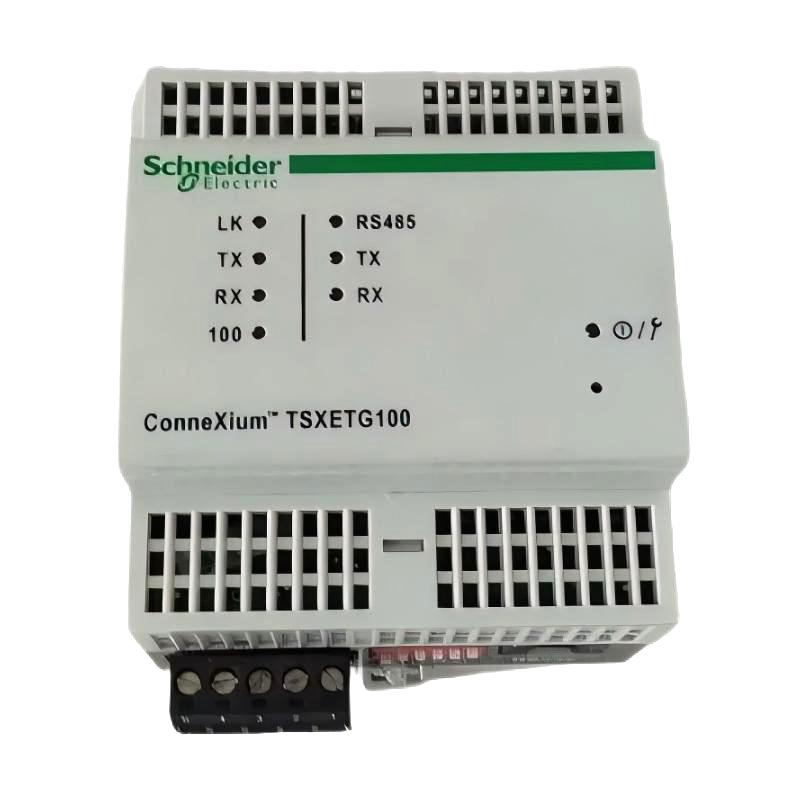
The Schneider Electric TSXETG100 Ethernet Modbus Gateway is an industrial communication device designed to support connectivity between Ethernet-based networks and Modbus devices in industrial automation systems. It helps integrate compatible automation equipment into a networked control environment, allowing industrial controllers, monitoring systems, and supervisory applications to exchange operational data.
In modern industrial facilities, communication between PLCs, remote equipment, monitoring platforms, and supervisory control systems is essential for reliable operation. A communication gateway can simplify the integration of devices that use different network interfaces or communication arrangements, helping engineers build more flexible automation architectures.
The Schneider TSXETG100 is intended for applications where Modbus communication and Ethernet connectivity are required. By providing a communication interface between supported devices and network infrastructure, it can help improve access to equipment data and simplify system-level monitoring.
With compact dimensions of 81 × 76 × 72 mm and a weight of 0.17 kg, the TSXETG100 is suitable for installations where control cabinet space and equipment organization are important considerations. Its compact form can help integrators incorporate communication hardware into existing automation panels, subject to the applicable mounting and environmental requirements.
When selecting this gateway for a new installation or replacement project, users should verify its exact communication modes, supported protocols, interface configuration, power requirements, and compatibility with the target automation system.
2. Technical Specifications
| Parameter | Specification |
|---|---|
| Brand | Schneider Electric |
| Model | TSXETG100 |
| Product Type | Ethernet Modbus Gateway |
| Main Function | Industrial network communication and Modbus integration |
| Ethernet Connectivity | Ethernet interface; exact interface characteristics should be verified |
| Supported Protocols | Modbus-related communication; confirm the supported modes for the exact model |
| Dimensions | 81 × 76 × 72 mm |
| Weight | 0.17 kg |
| Installation Environment | Industrial automation and control systems |
| Typical Application | PLC communication, equipment integration, and industrial data exchange |
Technical note: The table lists the product identity and supplied physical specifications. Detailed electrical ratings, Ethernet speed, supported Modbus operating modes, connector types, mounting requirements, and configuration options should be confirmed using the product label and applicable technical documentation before installation.
3. Function and Working Principle
The primary purpose of an Ethernet Modbus gateway is to enable communication between compatible industrial devices and networked automation systems. The TSXETG100 can be considered for applications where Modbus-based equipment needs to communicate through an Ethernet-connected control or monitoring architecture.
3.1 Ethernet Network Connectivity
Ethernet is widely used in industrial automation because it supports networked communication between controllers, computers, supervisory systems, and compatible field equipment. An Ethernet-connected gateway can provide a point of integration between supported devices and the wider industrial network.
This connectivity can help engineering teams access equipment information from centralized monitoring or control applications, depending on the gateway configuration and the capabilities of the connected devices.
3.2 Modbus Communication Integration
Modbus is a common industrial communication protocol used to exchange information between automation devices. Depending on the implementation, Modbus networks may use serial communication or Ethernet-based communication.
A gateway’s role depends on the protocols and interfaces supported by its specific hardware and firmware. Before configuring the TSXETG100, engineers should establish whether the intended application requires Modbus TCP, serial Modbus integration, or another supported arrangement. The required communication mode must not be assumed solely from the product name.
3.3 Industrial Data Exchange
In a correctly configured system, a communication gateway helps make data available between compatible devices and network applications. Typical data may include equipment status, process values, operating conditions, and diagnostic information.
The actual data available depends on the connected equipment, its register map, addressing, communication settings, and the capabilities of the gateway and supervisory software.
3.4 Support for Networked Automation Architectures
Industrial automation systems often contain equipment from different product generations. A suitable gateway may help integrate compatible legacy devices into a broader network architecture without requiring every device to be replaced immediately.
However, successful integration depends on protocol support, hardware interfaces, configuration options, and the communication requirements of the complete system.
4. Role in Industrial Automation Systems
The Schneider TSXETG100 can be considered for communication tasks in industrial environments where Ethernet connectivity and Modbus-related data exchange are required.
4.1 PLC Communication
Programmable logic controllers manage machine sequences, process logic, interlocks, and equipment states. Communication interfaces help PLC-based systems exchange data with compatible devices and higher-level software.
A gateway may be used as part of this architecture when the connected equipment and the intended communication path are supported. Engineers should verify the PLC family, interface requirements, protocol configuration, and software compatibility before deployment.
4.2 Supervisory Monitoring
Supervisory control and data acquisition systems, commonly known as SCADA systems, collect and present information from industrial processes. Network communication can help these systems access data from distributed controllers and compatible field devices.
When correctly integrated, a gateway may support the communication path between equipment and a supervisory application. The gateway does not independently guarantee that a device is compatible with a particular SCADA platform; protocol drivers, register mapping, and network configuration must also be considered.
4.3 Integration of Existing Equipment
Factories frequently operate equipment from different generations, and replacing an entire control system can be expensive or disruptive. Communication gateways may help connect supported devices to an updated network architecture.
Before using the TSXETG100 in a retrofit project, confirm that its supported interfaces match the existing equipment and that the required communication mode is available.
4.4 Centralized Equipment Data
Networked communication can make equipment data more accessible to maintenance personnel and control engineers. Depending on the system design, this can support centralized status monitoring, troubleshooting, and process analysis.
The quality and usefulness of the collected data depend on the underlying devices, network reliability, communication settings, and application software.
5. Industrial Applications
5.1 Factory Automation
In manufacturing facilities, communication gateways can form part of the network infrastructure connecting controllers, machine subsystems, and monitoring applications. They may be considered for production lines that need communication between compatible Modbus equipment and Ethernet-based systems.
Typical use cases include machine status collection, process data exchange, and integration of distributed control equipment.
5.2 Process Automation
Process plants rely on communication between controllers, instrumentation, monitoring systems, and operator interfaces. A suitable gateway may help integrate compatible devices into a networked process-control architecture.
Before installation, engineers should confirm protocol support, required data access, network segmentation, and any applicable process safety requirements.
5.3 Water and Wastewater Treatment
Water treatment and wastewater facilities use automation systems to monitor pumps, valves, tank levels, flow measurements, and other process variables. Modbus communication is used in many industrial monitoring and control applications.
The TSXETG100 may be considered where its documented communication capabilities match the equipment and network requirements. It should not be assumed to support every instrument, controller, or remote monitoring platform.
5.4 Energy and Utility Systems
Industrial energy management systems may collect information from compatible meters, controllers, and monitoring devices. Ethernet-based communication can help make this information available to centralized applications.
The suitability of the TSXETG100 for a particular energy application depends on the supported protocols, the target equipment’s communication interface, and the required data exchange functions.
5.5 Building and Facility Management
Large facilities may use networked automation to monitor mechanical equipment, utility systems, and environmental controls. A gateway can help integrate compatible equipment into a broader monitoring system when the necessary interfaces and protocols are supported.
System designers should verify the complete communication path, including device drivers, register definitions, and network requirements.
6. Installation and System Integration
Correct installation and configuration are essential for stable industrial communication. The following procedure provides a general framework; the exact mounting, wiring, and configuration steps must follow the instructions for the specific TSXETG100 hardware revision.
6.1 Verify the Product Before Installation
Before installing the gateway, check the model number on the device label and compare it with the procurement or maintenance documentation.
Confirm the following:
- The model is TSXETG100.
- The physical condition is acceptable, with no visible damage.
- The device matches the intended communication application.
- The required interfaces and accessories are available.
- The power supply and environmental requirements match the installation.
- The unit’s firmware and configuration requirements are understood.
For replacement work, compare the original unit and replacement unit carefully. Similar product names do not necessarily indicate identical communication capabilities.
6.2 Plan the Network Architecture
Determine which devices will communicate through the gateway and identify the intended data flow. This may involve a PLC, compatible Modbus equipment, an Ethernet switch, an engineering workstation, or a supervisory system.
The design should document device addresses, network settings, communication roles, and the source and destination of the required data.
Avoid assigning network settings without first checking for address conflicts. Duplicate IP addresses can cause intermittent or complete communication failures.
6.3 Connect the Required Interfaces
Use the interface types specified for the exact product version. Confirm connector assignments and cable requirements before connecting power or communication wiring.
For Ethernet connections, verify the cable condition, network port, switch configuration, and applicable network settings. If the application uses a serial interface, confirm the supported electrical standard, wiring arrangement, termination requirements, and communication parameters from the product documentation.
Never assume a serial port or connector pinout based only on the gateway’s model name.
6.4 Configure Communication Parameters
Depending on the supported configuration options, the integration process may require settings such as:
- IP address and subnet configuration.
- Network gateway settings, where applicable.
- Modbus device addresses.
- Communication speed and serial parameters, if a serial interface is involved.
- Register or data mapping.
- Communication timeout settings.
- Required protocol or access settings.
Only configure parameters supported by the specific device. Keep a record of the final settings so that future maintenance and replacement work can be completed more efficiently.
6.5 Test Communication
After installation, perform a controlled communication test before returning the equipment to normal operation.
Recommended checks include:
- Confirm that the gateway receives the correct power supply.
- Check available status indicators against the product documentation.
- Verify the physical network connection.
- Confirm that the configured network address is reachable, where applicable.
- Test communication with the intended device or application.
- Verify that returned data matches the expected register definitions and device values.
- Check for communication errors, timeouts, or repeated connection loss.
For control-critical applications, testing should be performed under the site’s approved commissioning and operational procedures.
7. Common Problems and Troubleshooting
Communication issues can originate from power, wiring, network configuration, protocol settings, device addressing, or incompatible hardware. A systematic troubleshooting process helps isolate the cause.
7.1 Gateway Cannot Be Reached on the Network
Possible causes:
- Incorrect IP address or subnet configuration.
- Duplicate IP address.
- Damaged Ethernet cable.
- Faulty switch port.
- Incorrect network segmentation or access rules.
- Power supply or hardware fault.
Recommended checks:
Verify the product’s power status and Ethernet connection first. Confirm the configured network parameters and check whether another device is using the same address. If necessary, test with a known-good cable and network port in accordance with site procedures.
7.2 Modbus Communication Fails
Possible causes:
- Unsupported protocol mode.
- Incorrect device address.
- Incorrect communication parameters.
- Incorrect register mapping.
- Mismatched master and server/client roles.
- Wiring or termination problems, if serial communication is used.
Recommended checks:
Confirm the exact protocol implementation supported by the gateway. Compare device addresses and communication parameters at both ends. Validate the register definitions against the connected device’s documentation and inspect the physical connection where applicable.
7.3 Data Values Are Incorrect
Incorrect values do not always indicate a faulty gateway. They may result from incorrect register addresses, data types, byte or word ordering, scaling factors, or signed-versus-unsigned interpretation.
Compare the requested register with the device’s register map. Verify the data format and engineering-unit conversion in the monitoring application. If possible, compare the received value with a trusted local reading from the source device.
7.4 Communication Is Intermittent
Intermittent communication may be caused by unstable power, poor cable connections, network congestion, electromagnetic interference, duplicate addresses, or configuration errors.
Inspect the installation environment and cable routing. Review available network and device diagnostics, and check whether communication failures coincide with changes in machine operation or electrical loads.
7.5 Replacement Gateway Does Not Work
A replacement unit may have different configuration settings, firmware, interface characteristics, or communication capabilities.
Before declaring the replacement defective, compare the model identification, hardware revision, required interfaces, and configuration with the original installation. Do not assume that a physically similar gateway is a direct functional replacement.
8. Preventive Maintenance
Preventive maintenance helps reduce unplanned downtime and preserve reliable communication between industrial devices.
8.1 Periodic Visual Inspection
Inspect the gateway and surrounding wiring for visible damage, loose connectors, contamination, or signs of overheating. Ensure that the installation remains within the specified environmental conditions.
8.2 Check Network Reliability
Review communication errors, connection interruptions, and relevant diagnostic records. Where supported, monitor network performance and confirm that the gateway remains reachable by the intended applications.
8.3 Back Up Configuration
Keep a documented record of network settings, device addresses, communication parameters, and any supported configuration files. Protect configuration records in accordance with the facility’s cybersecurity and change-management policies.
A reliable backup can shorten recovery time after a device replacement or control cabinet modification.
8.4 Review Firmware and Compatibility
If firmware updates are available for the exact model, assess their relevance and compatibility before applying them. Firmware changes should follow the manufacturer’s documented procedure and the facility’s change-control requirements.
Do not interrupt power or communication during a firmware update unless the applicable procedure explicitly permits it.
8.5 Maintain Spare-Parts Readiness
For critical installations, maintaining a suitable spare can reduce downtime. The spare should be verified for model, hardware revision, interface requirements, and configuration compatibility before it is needed.
9. Compatibility and Replacement Considerations
Selecting a replacement Ethernet Modbus gateway requires more than matching its dimensions or product category.
9.1 Confirm the Exact Model
Check that the original device is identified as TSXETG100. Record any hardware revision, firmware information, and relevant configuration details available from the unit and its documentation.
9.2 Compare Communication Requirements
A replacement must support the interfaces and protocols required by the application. Confirm the required Modbus mode, Ethernet configuration, device addressing, and data mapping.
9.3 Verify Controller and Software Compatibility
Check that the intended PLC, engineering software, monitoring platform, and communication drivers can work with the replacement. Compatibility can depend on software versions and the overall network architecture.
9.4 Review Physical and Electrical Requirements
Confirm dimensions, mounting arrangements, power requirements, connector types, environmental limits, and any required accessories.
The TSXETG100 has supplied dimensions of 81 × 76 × 72 mm and a weight of 0.17 kg. These physical specifications should be checked alongside the electrical and communication requirements.
9.5 Preserve the Existing Configuration
Where possible, document the original configuration before replacement. After installation, restore only settings supported by the replacement device and verify communication with each required system component.
A successful replacement should be confirmed through functional testing rather than visual similarity alone.
10. Key Benefits of the Schneider TSXETG100
Compact Design
With dimensions of 81 × 76 × 72 mm and a weight of 0.17 kg, the gateway offers a compact form factor for suitable industrial communication installations.
Industrial Communication Integration
Its Ethernet Modbus gateway role makes it relevant to applications that require communication between supported Modbus equipment and an Ethernet-based automation network.
Support for Networked Monitoring Architectures
When correctly integrated, a gateway can help make compatible equipment data available to PLCs, supervisory applications, and other authorized network participants.
Potential for Existing-System Integration
Communication gateways can be useful in modernization projects where compatible equipment must be integrated into a larger automation architecture.
Maintenance and Troubleshooting Support
A properly documented gateway configuration can help maintenance teams identify network problems, preserve communication settings, and reduce the effort required during replacement.
The realized benefits depend on the exact product capabilities, system configuration, connected equipment, and application requirements.
11. Frequently Asked Questions
Q1: What is the Schneider TSXETG100?
The Schneider Electric TSXETG100 is an Ethernet Modbus gateway intended for industrial communication and integration applications. Its suitability depends on the protocols, interfaces, and configuration options supported by the specific unit.
Q2: What are the dimensions and weight of the TSXETG100?
The supplied dimensions are 81 × 76 × 72 mm, and the supplied weight is 0.17 kg.
Q3: Is the TSXETG100 suitable for PLC systems?
It may be suitable for PLC-based automation systems when the PLC, connected equipment, communication interfaces, and required protocol modes are compatible. The exact controller and software requirements should be checked before installation.
Q4: Does the TSXETG100 support Modbus TCP?
The exact supported Modbus modes should be confirmed using the technical documentation for the specific TSXETG100 version. The product name alone should not be used to infer every supported protocol function.
Q5: Can the TSXETG100 be used to connect legacy industrial equipment?
Potentially, provided that the gateway supports the legacy device’s communication interface and protocol requirements. Engineers should verify the complete communication path and any required configuration or software drivers.
Q6: What should be checked before purchasing a replacement?
Confirm the model number, hardware revision, interface requirements, protocol compatibility, power requirements, configuration options, and the intended system’s software compatibility. Physical dimensions alone are not sufficient to establish interchangeability.
Q7: What causes communication failures with an Ethernet Modbus gateway?
Common causes include incorrect network settings, duplicate IP addresses, cable faults, unsupported protocol modes, incorrect device addresses, register mapping errors, and unstable power. Troubleshooting should begin with power and physical connections before moving to network and protocol configuration.
Q8: Is the TSXETG100 suitable for a new automation project?
Its suitability depends on the requirements of the project and the product’s documented capabilities. Before selecting it for a new design, verify availability of technical support, protocol compatibility, environmental requirements, and long-term maintainability.
Q9: Can a used TSXETG100 be installed in an existing system?
A used unit may be suitable if its hardware is in good condition and it meets the system’s technical requirements. Before commissioning, inspect the device, verify its configuration, confirm communication with connected equipment, and perform the required operational tests.
12. Conclusion
The Schneider Electric TSXETG100 Ethernet Modbus Gateway is an industrial communication product to consider when integrating compatible Modbus equipment into an Ethernet-based automation environment. Its compact dimensions of 81 × 76 × 72 mm and weight of 0.17 kg make it a practical candidate for suitable control cabinet installations.
For engineers, maintenance teams, and industrial spare-parts buyers, the key selection criteria are protocol compatibility, interface requirements, network configuration, and reliable integration with the existing control system. Confirming these details before installation or replacement helps reduce commissioning problems and supports dependable industrial communication.
When sourcing a TSXETG100, verify the exact model identification, product condition, and required technical documentation to ensure that the gateway matches the intended application.