

ProductPRODUCT
Featured products
Contact Us
- GE
- IC697ACC724
- Rack Fan Assembly
- USA
- 331 × 150 × 60 mm
- 1.36 kg
- Xiamen, China
- New & In Stock
- T/T, PayPal, Western Union
- 1 Year
- 1-3 Working Days
- DHL, UPS, TNT, FedEx and EMS.
- 24-Hour Service
- COO
- 39
Our advantage

Global Logistics
We have a 10-year logistics and express cooperation agreement, so our products can be shipped to any place in the world.

Brand new and original
Our products are imported in bulk from the place of origin. Because of the cooperative relationship, our products are all original and 100% new.

24-hour service
We provide 7*24 hours service to our customers. We will be there whenever you need us.

Price advantage
All our products are priced very favorably because we have our own warehouse and supply.
| Company Information | |||
| [email protected] | |||
| Mobile | +8615980777398 | ||
| +8615980777398 | |||
| 15980777398 |
Product Overview
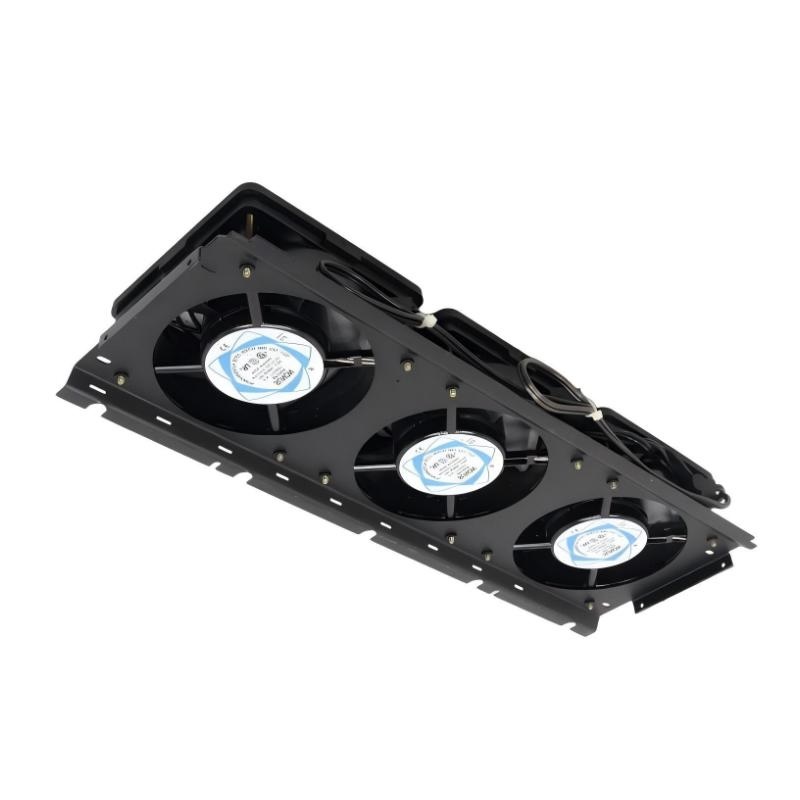
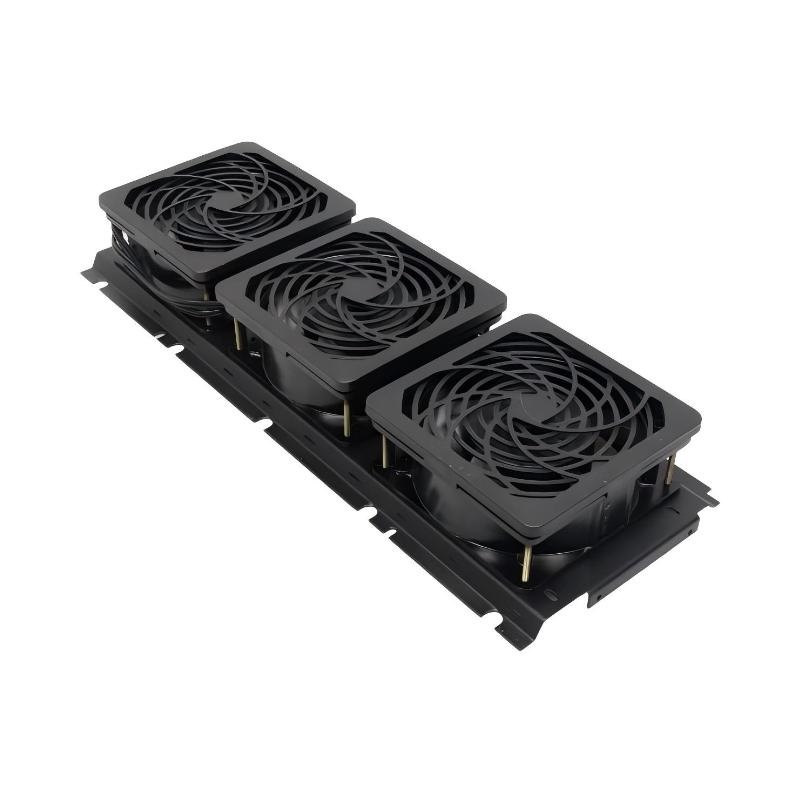
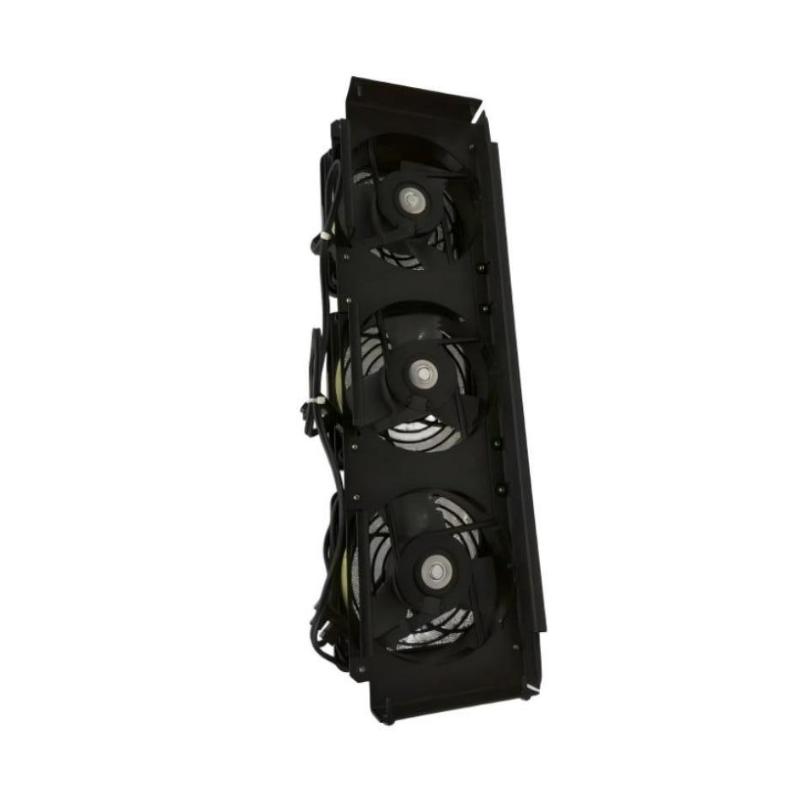
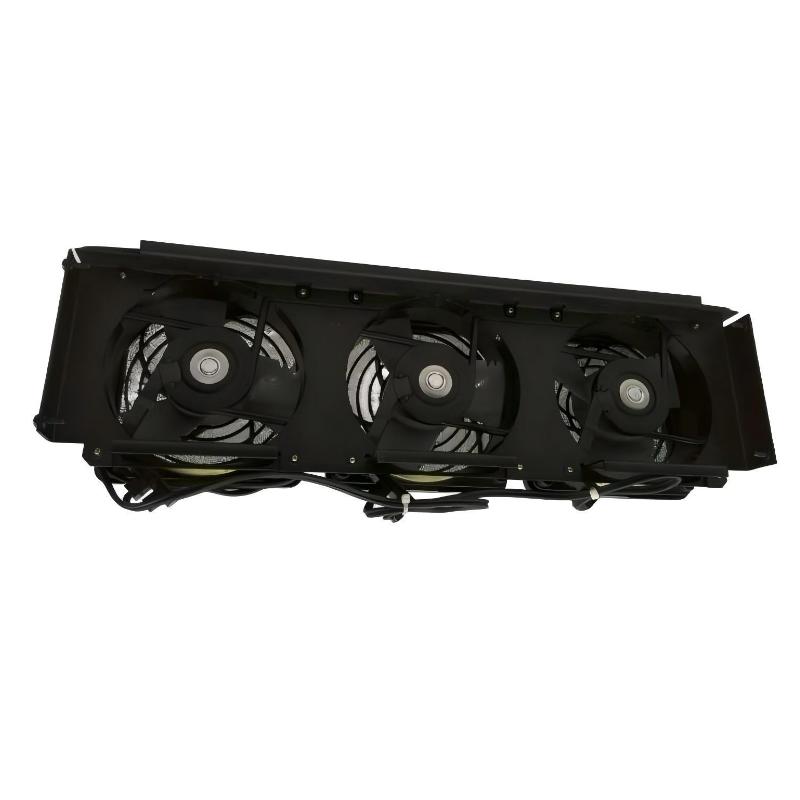
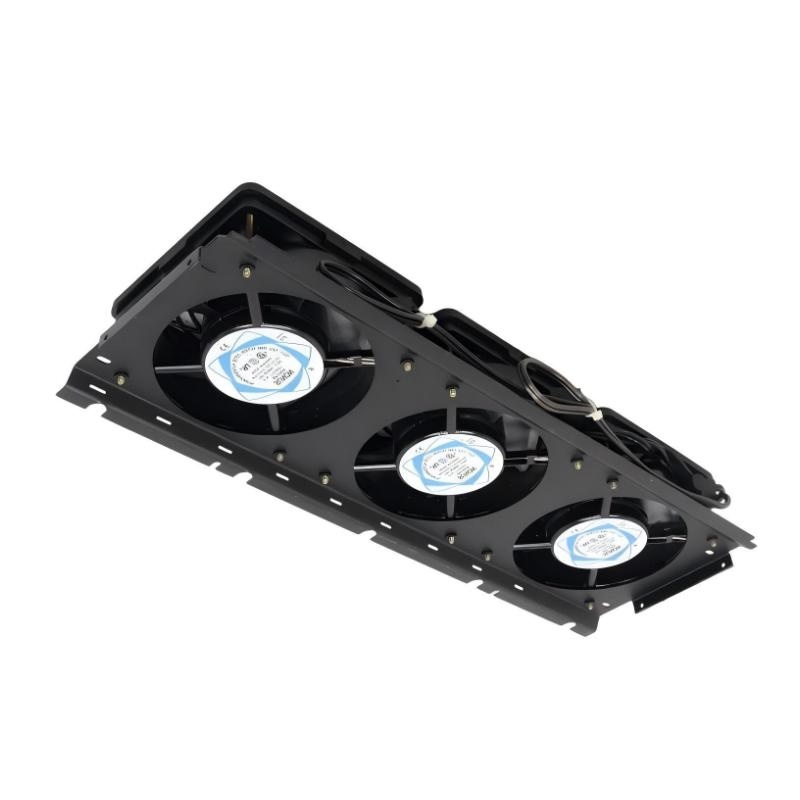
The GE IC697ACC724 Rack Fan Assembly is a dedicated cooling component designed for compatible GE industrial automation and PLC rack systems. Its primary purpose is to provide forced-air circulation around rack-mounted electronic equipment, helping remove heat generated during continuous controller operation.
Industrial PLC racks can contain CPUs, power supplies, communication modules, I/O modules, and other electronic devices operating simultaneously. As system density and operating load increase, effective airflow becomes increasingly important. A properly functioning rack fan helps prevent excessive heat accumulation and supports stable operation of sensitive electronic components.
The supplied specifications for the GE IC697ACC724 are 331 × 150 × 60 mm, with a listed weight of 1.36 kg. The relatively large fan assembly is intended for rack-level thermal management rather than cooling a single small electronic component.
Product Identification
| Parameter | Specification |
|---|---|
| Manufacturer | GE |
| Model | IC697ACC724 |
| Product Type | Rack Fan Assembly |
| Product Category | PLC Rack Cooling Component |
| Primary Function | Forced-Air Rack Cooling |
| Cooling Method | Forced Air Circulation |
| Dimensions | 331 × 150 × 60 mm |
| Weight | 1.36 kg |
| Installation | PLC Rack / Control Cabinet |
| Application | Industrial Automation |
| Maintenance | Fan, Airflow, and Mechanical Inspection |
Technical Specifications
| Technical Item | Specification |
|---|---|
| Brand | GE |
| Model Number | IC697ACC724 |
| Product Type | Rack Fan Assembly |
| Function | Rack Cooling |
| Cooling Principle | Forced-Air Circulation |
| Dimensions | 331 × 150 × 60 mm |
| Weight | 1.36 kg |
| Installation Type | Rack Mounted |
| Application | Industrial PLC / Control Systems |
| Service Requirement | Periodic Inspection |
| Main Maintenance Areas | Fan, Wiring, Airflow, Mounting |
What Is the GE IC697ACC724?
The IC697ACC724 is a rack-level fan assembly used to improve airflow around industrial control hardware.
Unlike a small component cooling fan, a rack fan assembly is intended to support the thermal environment of an entire equipment area.
A simplified cooling path is:
PLC Rack Components
↓
Heat Generation
↓
IC697ACC724 Rack Fan
↓
Forced Air Movement
↓
Heat Dissipation
↓
Lower Internal Rack Temperature
Stable thermal conditions are important because excessive temperature can negatively affect electronic component reliability, communication stability, and overall system availability.
Main Functions
Rack-Level Cooling
The fan assembly circulates air through the PLC rack area to help remove accumulated heat.
Thermal Management
It helps maintain a more suitable operating environment for rack-mounted electronic equipment.
Hot-Spot Reduction
Forced airflow can reduce localized heat accumulation around high-load components.
Continuous Industrial Operation
A properly maintained rack cooling system supports PLC equipment operating continuously under industrial workloads.
Why Rack Cooling Matters
Industrial control equipment is often installed in enclosed cabinets where natural convection alone may not provide sufficient heat removal.
Heat can be generated by:
- PLC CPUs
- Power supplies
- Communication modules
- I/O modules
- Network equipment
- Interface modules
- Other electronic devices
If heat cannot escape efficiently, cabinet temperature can rise.
Potential consequences include:
- Increased electronic component stress
- Intermittent controller faults
- Communication instability
- Unexpected shutdowns
- Reduced component service life
The rack fan therefore forms part of the overall thermal-management system.
Typical Industrial Applications
The GE IC697ACC724 may be suitable for compatible GE industrial control installations such as:
Manufacturing Automation
- Production lines
- Assembly systems
- Packaging machinery
- Material handling
- Automated machine control
Process Automation
- Process monitoring
- Pump control
- Valve control
- Instrumentation systems
Power and Utilities
- Plant automation
- Generator control
- Electrical monitoring
Water and Wastewater
- Pump stations
- Treatment plants
- Control panels
- Remote automation systems
Large PLC Cabinets
- High-density rack installations
- Communication-intensive systems
- Continuous-duty control systems
Installation Guide
1. Verify the Fan Assembly
Before installation, confirm:
- Model number
- Rack compatibility
- Physical dimensions
- Mounting arrangement
- Electrical connection
- Required airflow direction
The supplied dimensions of the IC697ACC724 are:
331 × 150 × 60 mm
The supplied weight is:
1.36 kg
Do not select a replacement solely because its physical dimensions appear similar.
2. Prepare the System
Before servicing the rack:
- Stop the controlled process.
- Shut down the controller according to plant procedures.
- Isolate applicable power sources.
- Follow lockout/tagout requirements.
- Verify the equipment is safe to access.
Fan assemblies may contain moving mechanical components and electrical connections, so safe isolation is important.
3. Allow the Rack to Cool
If the system has been operating under high load, allow sufficient cooling time before working inside the cabinet.
Hot surfaces and components may remain above normal ambient temperature after shutdown.
4. Inspect the Existing Fan
Before replacement, inspect the existing fan for:
- Dust buildup
- Broken blades
- Bearing noise
- Excessive vibration
- Loose mounting
- Damaged wiring
- Reduced airflow
These observations can help determine whether the problem is mechanical, electrical, or environmental.
5. Record Airflow Direction
Before removing the existing fan, determine the direction in which air is being moved.
Incorrect airflow direction after replacement can reduce cooling performance even when the fan itself operates normally.
6. Disconnect the Existing Fan
Disconnect the fan’s electrical connection using the applicable equipment maintenance procedure.
Avoid pulling directly on wires.
Inspect the connector and wiring for:
- Loose terminals
- Damaged insulation
- Corrosion
- Heat discoloration
- Broken conductors
7. Remove the Existing Assembly
Support the fan assembly while removing its mounting hardware.
Because the listed weight is 1.36 kg, support the assembly properly to prevent it from falling onto adjacent PLC equipment.
8. Install the IC697ACC724
Position the new fan assembly in the designated rack location.
Verify:
- Correct orientation
- Correct airflow direction
- Proper alignment
- Secure mounting
- Adequate clearance
Do not allow the fan housing or cables to interfere with adjacent modules.
9. Connect the Fan
Reconnect the electrical connection according to the original system arrangement.
Check:
- Connector seating
- Wiring condition
- Correct connection
- Cable routing
- Clearance from moving fan components
10. Inspect Airflow Paths
Before restoring power, make sure:
- Fan intake is unobstructed
- Fan exhaust is unobstructed
- Cabinet ventilation openings are clear
- Air filters are not excessively dirty
- Cables are not blocking airflow
A functioning fan cannot provide adequate cooling if its air path is blocked.
11. Restore Power
After completing the installation:
- Confirm all hardware is secure.
- Check that no tools remain inside the cabinet.
- Restore power.
- Start the control system.
- Observe the fan.
12. Verify Operation
Confirm:
- Fan starts normally
- Rotation is smooth
- Airflow is present
- No unusual noise occurs
- No excessive vibration is present
- PLC modules operate normally
- Rack temperature remains acceptable
Commissioning Checklist
| Item | Verification |
|---|---|
| IC697ACC724 Model Verified | Confirmed |
| Host Rack Compatibility Checked | Confirmed |
| Power Isolated | Confirmed |
| Existing Fan Inspected | Confirmed |
| Airflow Direction Identified | Confirmed |
| Fan Removed Safely | Confirmed |
| Replacement Installed | Confirmed |
| Electrical Connection Secured | Confirmed |
| Airflow Path Checked | Confirmed |
| Fan Rotation Verified | Confirmed |
| Rack Temperature Monitored | Confirmed |
Troubleshooting Guide
Fan Does Not Start
If the IC697ACC724 does not operate after installation, inspect:
- Power supply
- Electrical connector
- Wiring
- Control circuit
- Fan motor
- Mechanical obstruction
First verify whether electrical power reaches the fan before concluding that the fan motor has failed.
Fan Runs Intermittently
Intermittent operation may be caused by:
- Loose connector
- Damaged wiring
- Motor wear
- Bearing degradation
- Power instability
- Thermal protection
Observe the fan during both startup and normal operating conditions.
Fan Produces Excessive Noise
Possible causes include:
- Bearing wear
- Damaged fan blade
- Foreign object
- Loose mounting
- Mechanical imbalance
A noisy fan should be inspected promptly because continued operation may eventually result in complete failure.
Excessive Vibration
Possible causes include:
- Damaged blades
- Fan imbalance
- Worn bearings
- Loose mounting hardware
- Incorrect installation
Check the mechanical mounting before replacing other PLC hardware.
Airflow Is Weak
A weak airflow condition may result from:
- Dirty fan blades
- Blocked intake
- Blocked exhaust
- Dirty cabinet filter
- Fan degradation
- Incorrect installation orientation
Check the complete airflow path.
PLC Rack Temperature Is Too High
Possible causes include:
- Fan failure
- Insufficient airflow
- Dirty ventilation filter
- Blocked cabinet openings
- High ambient temperature
- Excessive equipment heat load
- Incorrect fan direction
The fan should be evaluated as part of the complete cabinet cooling system.
Fan Runs but Cooling Is Insufficient
Fan rotation alone does not guarantee adequate thermal performance.
Check:
- Airflow direction.
- Air intake.
- Air exhaust.
- Cabinet ventilation.
- Filter condition.
- Internal temperature.
- Heat load.
If airflow is normal but temperature remains excessive, the cabinet cooling design may require further investigation.
Fan Stops During Operation
Possible causes include:
- Motor overheating
- Electrical interruption
- Mechanical obstruction
- Bearing failure
- Wiring problem
Monitor the fan during extended operation to determine whether the failure is continuous or intermittent.
Multiple PLC Modules Show Temperature-Related Faults
When multiple modules exhibit similar thermal symptoms, investigate common cooling components first.
Possible causes include:
- Rack fan failure
- Cabinet ventilation problem
- High ambient temperature
- Blocked airflow
- Dirty filters
Replacing individual PLC modules without correcting the cooling problem may result in repeated failures.
Preventive Maintenance
Monthly Inspection
Check:
- Fan rotation
- Airflow
- Noise
- Vibration
- Dust accumulation
Quarterly Inspection
Inspect:
- Fan blades
- Mounting hardware
- Electrical connections
- Air filters
- Cabinet ventilation
Annual Inspection
Perform:
- Complete fan assembly inspection
- Cabinet cleaning
- Airflow verification
- Thermal performance review
- Electrical connection inspection
- Mechanical mounting inspection
Maintenance frequency should be increased in dusty, humid, or high-temperature environments.
Maintenance Checklist
| Inspection Item | Status |
|---|---|
| Fan Housing Inspected | ✓ |
| Fan Blades Checked | ✓ |
| Motor Operation Checked | ✓ |
| Electrical Connection Checked | ✓ |
| Mounting Hardware Checked | ✓ |
| Airflow Verified | ✓ |
| Air Filter Inspected | ✓ |
| Cabinet Ventilation Checked | ✓ |
| Vibration Checked | ✓ |
| Noise Checked | ✓ |
| Rack Temperature Monitored | ✓ |
Replacement Considerations
When replacing the GE IC697ACC724, verify the complete installation requirements.
| Check Item | Purpose |
|---|---|
| Exact Model | Confirms correct replacement |
| Dimensions | Ensures physical compatibility |
| Mounting Arrangement | Ensures secure installation |
| Electrical Connection | Prevents wiring mismatch |
| Airflow Direction | Maintains cooling efficiency |
| Fan Capacity | Ensures adequate air movement |
| Cabinet Clearance | Prevents airflow restriction |
| Environmental Conditions | Supports reliable operation |
Compatible System Components
The rack fan assembly forms part of a larger control-system thermal environment.
| Component | Function |
|---|---|
| PLC CPU | Main Control Processing |
| Power Supply | System Power |
| I/O Modules | Field Signal Processing |
| Communication Modules | Network Communication |
| Rack / Backplane | Module Interconnection |
| Rack Fan Assembly | Forced-Air Cooling |
| Cabinet Filter | Air Contamination Control |
| Cabinet Ventilation | Heat Removal |
The exact compatibility should always be confirmed against the host rack and equipment configuration.
Key Advantages
Rack-Level Thermal Management
The IC697ACC724 provides forced-air circulation across the rack environment rather than cooling only one individual component.
Supports Continuous Operation
Effective airflow helps maintain a more stable thermal environment for PLC equipment operating continuously.
Helps Reduce Hot Spots
Moving air through the rack can reduce localized heat accumulation.
Compact Industrial Assembly
The supplied dimensions are 331 × 150 × 60 mm, providing a dedicated cooling assembly suitable for rack-level installation.
Easy to Maintain
Routine inspection can focus on fan rotation, airflow, noise, vibration, electrical connections, and cleanliness.
Frequently Asked Questions
What is the GE IC697ACC724?
The GE IC697ACC724 is a Rack Fan Assembly designed to provide forced-air cooling for compatible GE industrial PLC and automation rack systems.
What are its dimensions?
The supplied dimensions are:
331 × 150 × 60 mm
What is its weight?
The listed weight is:
1.36 kg
Why is a rack fan necessary?
A PLC rack can contain several heat-generating electronic components. A rack fan improves airflow and helps remove accumulated heat.
What are the most common symptoms of a failing rack fan?
Typical symptoms include:
- Fan does not rotate
- Intermittent operation
- Excessive noise
- Excessive vibration
- Weak airflow
- Increasing rack temperature
Can a dirty cabinet cause fan-related problems?
Yes. Dust can accumulate on fan blades, filters, and ventilation openings, reducing airflow and increasing thermal stress.
Does fan rotation guarantee proper cooling?
No. The fan may rotate while airflow is restricted by blocked filters, incorrect orientation, dirty blades, or cabinet ventilation problems.
Should the fan be replaced immediately if it becomes noisy?
A noisy fan should be inspected promptly. Bearing wear, blade damage, loose mounting, or foreign objects can cause abnormal noise and may eventually lead to fan failure.
Can the IC697ACC724 be serviced while the PLC is powered?
Unless the host equipment specifically provides an approved live-maintenance procedure, power should be isolated before servicing the fan assembly.
Installation Checklist
| Item | Status |
|---|---|
| Correct IC697ACC724 Identified | ✓ |
| Compatible Rack Verified | ✓ |
| Maintenance Procedure Reviewed | ✓ |
| Power Isolated | ✓ |
| Existing Fan Inspected | ✓ |
| Airflow Direction Recorded | ✓ |
| Fan Removed Safely | ✓ |
| Replacement Fan Installed | ✓ |
| Mounting Secure | ✓ |
| Electrical Connection Verified | ✓ |
| Airflow Path Clear | ✓ |
| Fan Rotation Verified | ✓ |
| Noise and Vibration Checked | ✓ |
| Rack Temperature Verified | ✓ |
Conclusion
The GE IC697ACC724 Rack Fan Assembly is an important thermal-management component for compatible GE industrial PLC and automation systems. By providing forced-air circulation around rack-mounted equipment, it helps control heat accumulation and supports stable operation of CPUs, power supplies, communication modules, and I/O hardware.
The supplied dimensions are 331 × 150 × 60 mm, with a listed weight of 1.36 kg. During replacement, technicians should verify not only physical dimensions but also mounting configuration, electrical connection, airflow direction, and available cabinet clearance.
Troubleshooting should begin with basic physical and electrical checks. A fan that does not rotate, operates intermittently, produces excessive noise, vibrates excessively, or provides weak airflow should be investigated before thermal problems spread to other rack components.
Preventive maintenance is equally important. Regular inspection of the fan, air filters, ventilation openings, electrical connections, and cabinet temperature can identify cooling problems before they become PLC shutdowns or system-level failures.
When properly installed and maintained, the GE IC697ACC724 provides dependable rack-level forced-air cooling and contributes to the long-term reliability of compatible GE industrial automation equipment.