

ProductPRODUCT
Featured products
Contact Us
- Emerson
- TREX2CHPNA9S1S
- Device Communicator
- USA
- 5.7 inch
- 1.33 kg
- Xiamen, China
- New & In Stock
- T/T, PayPal, Western Union
- 1 Year
- 1-3 Working Days
- DHL, UPS, TNT, FedEx and EMS.
- 24-Hour Service
- COO
- 5
Our advantage

Global Logistics
We have a 10-year logistics and express cooperation agreement, so our products can be shipped to any place in the world.

Brand new and original
Our products are imported in bulk from the place of origin. Because of the cooperative relationship, our products are all original and 100% new.

24-hour service
We provide 7*24 hours service to our customers. We will be there whenever you need us.

Price advantage
All our products are priced very favorably because we have our own warehouse and supply.
| Company Information | |||
| [email protected] | |||
| Mobile | +8615980777398 | ||
| +8615980777398 | |||
| 15980777398 |
Product Overview
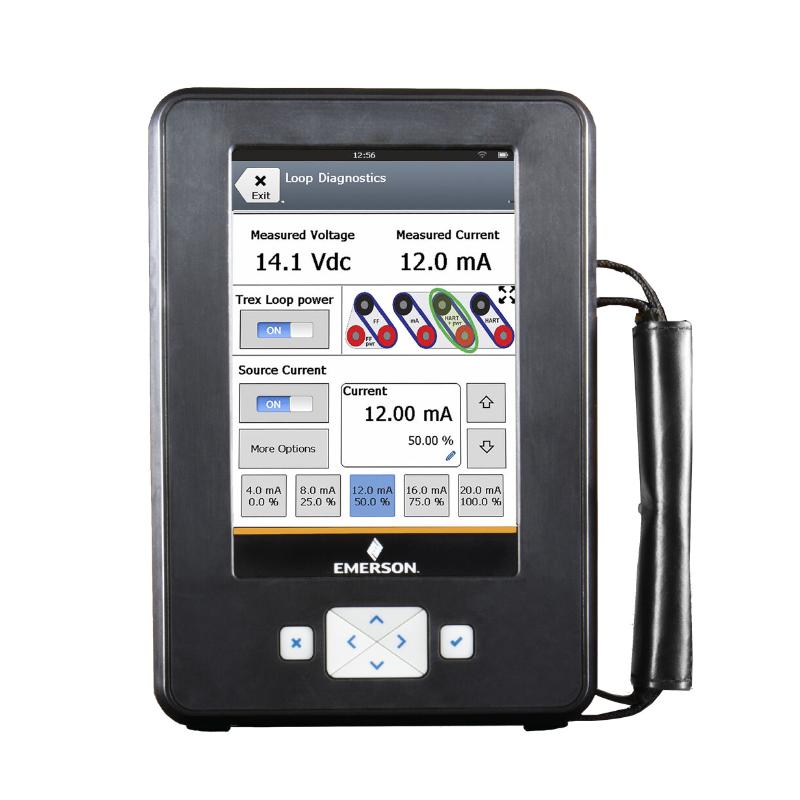
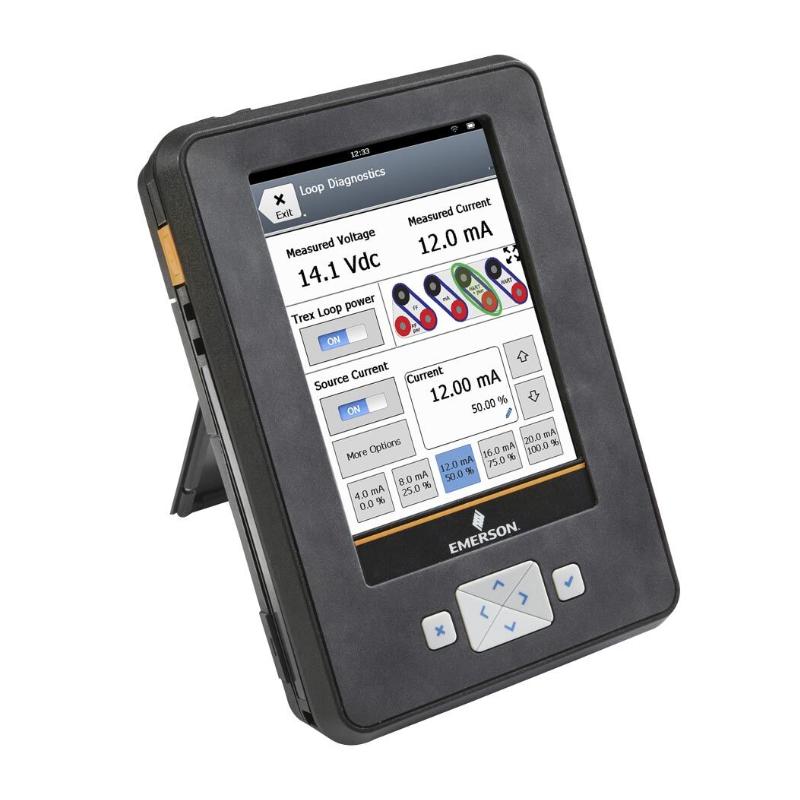
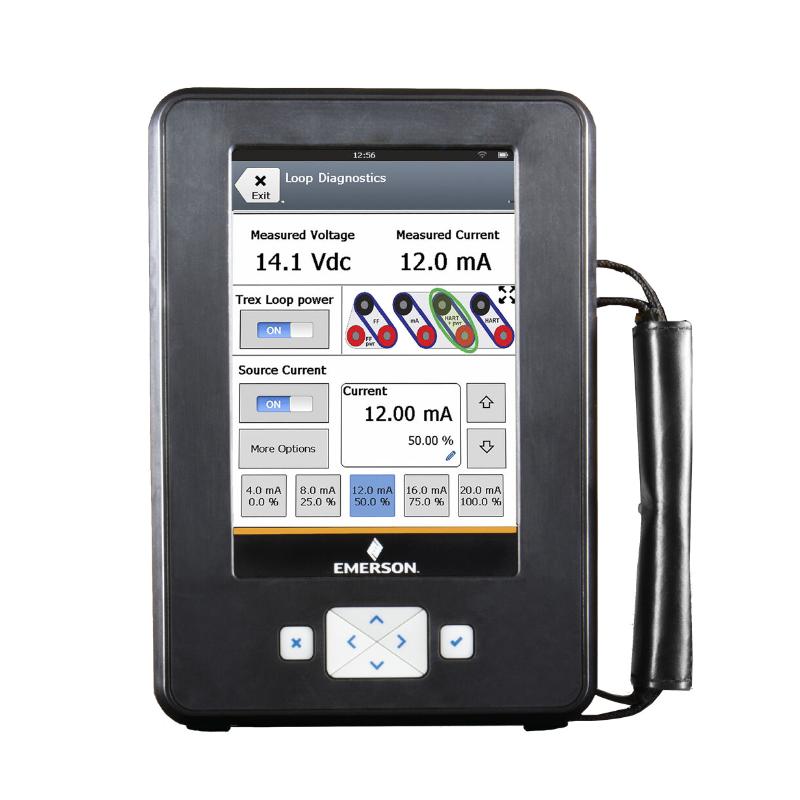
The Emerson TREX2CHPNA9S1S AMS Trex 2 Device Communicator is a handheld field instrument communicator used for configuring, checking and troubleshooting intelligent process instruments. It belongs to the AMS Trex 2 platform, which combines field-device communication, diagnostic applications and portable instrument maintenance functions in one unit.
The HART application is particularly useful when commissioning or servicing transmitters connected to conventional 4–20 mA control loops. A technician can connect the communicator to a compatible instrument, inspect its configuration, review device status and adjust supported parameters without removing the instrument from its installed position.
Consider a pressure transmitter that has been replaced during a plant shutdown. Before returning the instrument to service, the technician needs to verify its measurement range, engineering units and device identification. The Trex 2 allows these checks to be performed at the field instrument, reducing the need to carry the device back to a workshop for routine configuration work.
The communicator also supports field troubleshooting workflows involving process transmitters and control-valve instrumentation. Its touchscreen interface provides access to the functions available for the connected device, while its rechargeable power module supports portable operation around industrial facilities.
The exact ordering configuration matters when selecting a replacement. HART application availability, communication-module configuration, battery arrangement and applicable safety approvals should match the requirements of the instrumentation team. The TREX2CHPNA9S1S is a maintenance and configuration tool; it does not replace the plant’s PLC, DCS or permanent field instrumentation.
Technical Specifications
| Parameter | Specification |
|---|---|
| Manufacturer | Emerson |
| Model / Order Number | TREX2CHPNA9S1S |
| Product Family | AMS Trex 2 |
| Product Type | Handheld Device Communicator |
| Application Configuration | HART |
| Display Type | Color VGA resistive touchscreen |
| Display Size | 5.7 inch |
| Display Resolution | 640 × 480 pixels |
| Processor | 1.2 GHz quad-core Cortex-A53 / NXP i.MX 8M Mini |
| RAM | 4 GB LPDDR4 SDRAM |
| Internal Storage | 64 GB NAND flash |
| Operating System | Custom Android 14 platform |
| Battery Type | Rechargeable lithium-ion power module |
| Typical Operating Time | 8+ hours |
| Typical Charging Time | 3–4 hours |
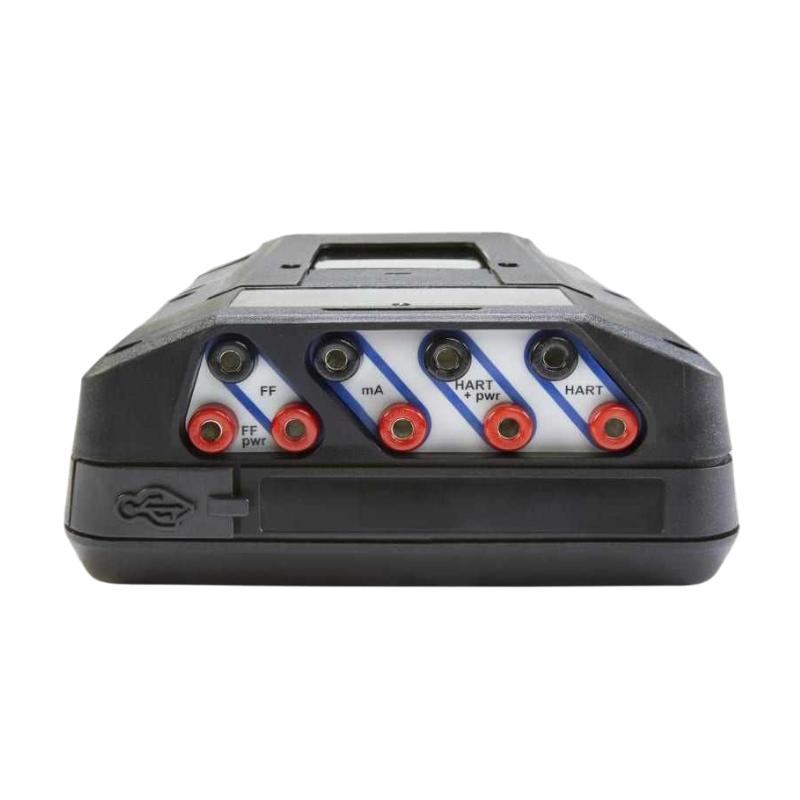
| USB Interface | Micro USB, USB 2.0 |
| Enclosure Rating | IP54 |
| Operating Temperature | −20 to +55°C |
| Communication Application | HART instrument configuration and diagnostics |
| Weight | 1.33 kg |
Product Features
- HART instrument communication: Accesses supported parameters and diagnostic information from compatible HART field devices.
- Application-based operation: Provides a touchscreen interface for field-device configuration and maintenance applications.
- High-capacity internal storage: Stores applications and device-related data within the communicator.
- Rechargeable power module: Supports portable field work without continuous external power.
- Rugged enclosure: IP54 protection supports use in appropriate industrial environments.
- Diagnostic access: Helps technicians investigate instrument status, configuration errors and communication problems.
- USB connectivity: Supports applicable data-transfer and maintenance workflows.
- Device configuration management: Can support configuration synchronization with compatible AMS software and workflows.
- Field-service portability: Allows technicians to carry a communication and diagnostic tool between instruments and plant areas.
Working Principle
The AMS Trex 2 communicates digitally with compatible field instruments through the supported device communication interface. Once connected, it identifies the instrument and presents the functions available for that device and its installed device description.
For HART instruments, digital communication takes place over the applicable instrument loop. The communicator can read supported configuration parameters, display device status and apply permitted configuration changes. These functions are useful when commissioning a transmitter, checking a replacement instrument or diagnosing an unexpected measurement.
For example, a flow transmitter may be reporting a value that does not match the expected process reading. A technician can connect the Trex 2 and inspect the configured range, engineering units and available diagnostic information. If the settings are incorrect, they can be corrected where the device supports the required operation. If the settings are already correct, further investigation may be needed to check the sensor, process conditions, wiring and control-system scaling.
The communicator’s results depend on the connected instrument, its supported communication functions and the quality of the field connection. It does not independently verify the physical accuracy of every measurement or replace calibration procedures requiring appropriate reference equipment.
Role in a Process Instrumentation Maintenance System
The TREX2CHPNA9S1S provides a portable interface between instrumentation personnel and compatible intelligent field devices. It complements the plant’s automation and asset-management systems by allowing configuration and troubleshooting tasks to be performed at the instrument.
Field Instrument → HART Communication Connection → AMS Trex 2 → Device Configuration and Diagnostics → Maintenance Records
| System Component | Function | Relationship to the Trex 2 |
|---|---|---|
| HART Pressure Transmitter | Measures process pressure | Allows technicians to inspect supported settings and diagnostics |
| HART Temperature Transmitter | Measures temperature through a compatible sensor and transmitter | Supports configuration and troubleshooting |
| HART Flow Transmitter | Measures process flow | Provides access to available device parameters |
| HART Level Instrument | Measures liquid or material level | Helps investigate instrument configuration and device status |
| Digital Valve Controller | Monitors and controls valve position | Can be accessed when the required communication application and device support are available |
| 4–20 mA Instrument Loop | Carries the analog process signal | Provides the electrical path associated with HART communication |
| Field Wiring and Terminals | Connect instruments to the control system | Must be checked when communication fails |
| Plant PLC or DCS | Executes control logic and processes field signals | Continues to manage the operating process |
| AMS Device Manager | Maintains supported instrument information and configuration records | Can support configuration-management workflows |
| Instrument Power Supply | Powers the installed field device | Supplies the instrument according to its electrical requirements |
| Maintenance Database | Records service work and configuration changes | Preserves instrument history and maintenance findings |
Industrial Applications
| Application | Typical Equipment | Role of the Trex 2 |
|---|---|---|
| Oil and Gas Processing | Pressure, temperature and flow transmitters | Supports field configuration and troubleshooting |
| Chemical Manufacturing | Intelligent process instruments | Helps technicians inspect device settings and diagnostic information |
| Water and Wastewater Treatment | Level and flow measurement instruments | Supports instrument checks during maintenance |
| Power Generation | Pressure and temperature measurement systems | Assists with commissioning and field-device diagnosis |
| Pharmaceutical Production | Process transmitters and compatible control-valve instruments | Supports configuration checks and maintenance documentation |
| Food and Beverage Processing | Flow, pressure and temperature instruments | Allows technicians to access supported device functions at the installation |
| Pulp and Paper Production | Process transmitters and control-valve equipment | Helps investigate instrument faults and configuration issues |
| Industrial Utilities | Steam, water and compressed-air instrumentation | Supports routine field-device maintenance |
Installation and Maintenance
- Verify the order code: Confirm that TREX2CHPNA9S1S matches the required communicator configuration and HART application.
- Check the instrument protocol: Identify the connected device and confirm that it supports the communication functions required for the maintenance task.
- Inspect the power module: Check the battery condition and connection before taking the communicator into the field.
- Review safety requirements: Verify the equipment’s certification markings and applicable conditions before use in a hazardous area.
- Identify the field instrument: Record the instrument model, tag number and intended maintenance operation.
- Check the connection point: Select the correct terminals and connection method for the instrument’s HART interface.
- Verify loop conditions: Ensure the electrical loop arrangement is suitable for the intended communication procedure.
- Establish communication: Connect the communicator according to the applicable instrument and communicator instructions, then confirm that the device is identified correctly.
- Review instrument settings: Check the measurement range, engineering units, identification and other parameters relevant to the maintenance task.
- Investigate communication faults: If the instrument cannot be accessed, inspect the wiring, terminals, loop conditions and protocol configuration before changing device parameters.
- Validate configuration changes: Confirm that the intended settings have been applied and that the instrument responds as expected.
- Record maintenance results: Document the instrument identification, changes made, diagnostic findings and any follow-up work required.
Compatible System Components
| Component | Function | Compatibility Consideration |
|---|---|---|
| HART Pressure Transmitter | Measures pressure and communicates digitally | Confirm HART support and the required device functions |
| HART Temperature Transmitter | Converts temperature sensor signals into process measurements | Check the available communication parameters |
| HART Flow Transmitter | Measures flow and provides instrument information | Verify device compatibility and supported operations |
| HART Level Transmitter | Measures liquid or material level | Confirm the device description and required configuration functions |
| Digital Valve Controller | Monitors and adjusts control-valve position | Check support for the required communication application |
| Instrument Loop Wiring | Carries the analog signal and associated HART communication | Verify connection conditions and wiring integrity |
| Instrument Power Supply | Provides power to the installed field device | Match the instrument’s electrical requirements |
| USB Cable | Supports applicable connection and data-transfer tasks | Use the required interface and follow the communicator’s connection procedure |
| AMS Device Manager | Maintains supported device configuration records | Verify the software environment and applicable synchronization workflow |
| Replacement Power Module | Supplies operating power to the communicator | Select a compatible module for the Trex 2 platform |
Recommended Related Models
| Model / Product | Product Type | Relationship | Selection Consideration |
|---|---|---|---|
| Emerson TREX2CHPNA9S1S | AMS Trex 2 Device Communicator | Requested HART-configured communicator | Match the complete ordering code and application requirements |
| Emerson TREX2 Device Communicator | Handheld Device Communicator | Same product platform with other configurations | Compare communication applications and included options |
| Emerson TREXLFPKLWS3S | AMS Trex Device Communicator | Previous-generation Trex communicator configuration | Compare platform generation, software environment and communication-module requirements |
| Emerson AMS Device Manager | Instrument Asset Management Software | Related device configuration-management software | Check compatibility with the plant’s installed environment |
| Emerson HART Field Transmitters | Intelligent Field Instruments | Instruments accessed through the HART application | Confirm supported device descriptions and functions |
| Emerson Digital Valve Controllers | Valve Control and Diagnostic Instruments | Related field-maintenance equipment | Verify the required application and communication support |
Key Advantages
- Provides handheld access to supported HART instrument configuration and diagnostics.
- Supports commissioning and troubleshooting at the field device.
- Combines a touchscreen interface with rechargeable portable operation.
- Supports maintenance workflows for compatible intelligent instruments.
- Can integrate with applicable AMS configuration-management processes.
Technical FAQs
What is the main difference between AMS Trex 2 and the earlier AMS Trex communicator?
AMS Trex 2 uses a newer hardware and software platform, including a faster processor, more memory and a different operating environment. When replacing an earlier communicator, check application availability, device support and compatibility with existing maintenance workflows.
Can the TREX2CHPNA9S1S communicate with every HART instrument?
Not every instrument supports identical functions. Communication depends on the device’s HART implementation, available device description and the operations supported by the installed communicator application. Confirm the required functions for the specific instrument before use.
What should be checked if the communicator detects a device but cannot change its settings?
Check the instrument’s access permissions, supported configuration functions and communication conditions. Some parameters may be read-only or subject to device-specific restrictions, even when basic communication is successful.
Can the Trex 2 replace a calibrator during instrument maintenance?
The communicator supports device configuration and diagnostic tasks, but these functions are not equivalent to every calibration procedure. When measurement accuracy must be verified against a reference standard, use the appropriate calibration equipment and follow the instrument’s required procedure.