

ProductPRODUCT
Featured products
Contact Us
- Schneider
- PFXGP6300TAD
- Touchscreen
- France
- 169.5 x 59.5 x 137 mm
- 0.8 kg
- Xiamen, China
- New & In Stock
- T/T, PayPal, Western Union
- 1 Year
- 1-3 Working Days
- DHL, UPS, TNT, FedEx and EMS.
- 24-Hour Service
- COO
- 1
Our advantage

Global Logistics
We have a 10-year logistics and express cooperation agreement, so our products can be shipped to any place in the world.

Brand new and original
Our products are imported in bulk from the place of origin. Because of the cooperative relationship, our products are all original and 100% new.

24-hour service
We provide 7*24 hours service to our customers. We will be there whenever you need us.

Price advantage
All our products are priced very favorably because we have our own warehouse and supply.
| Company Information | |||
| [email protected] | |||
| Mobile | +8615980777398 | ||
| +8615980777398 | |||
| 15980777398 |
Product Overview
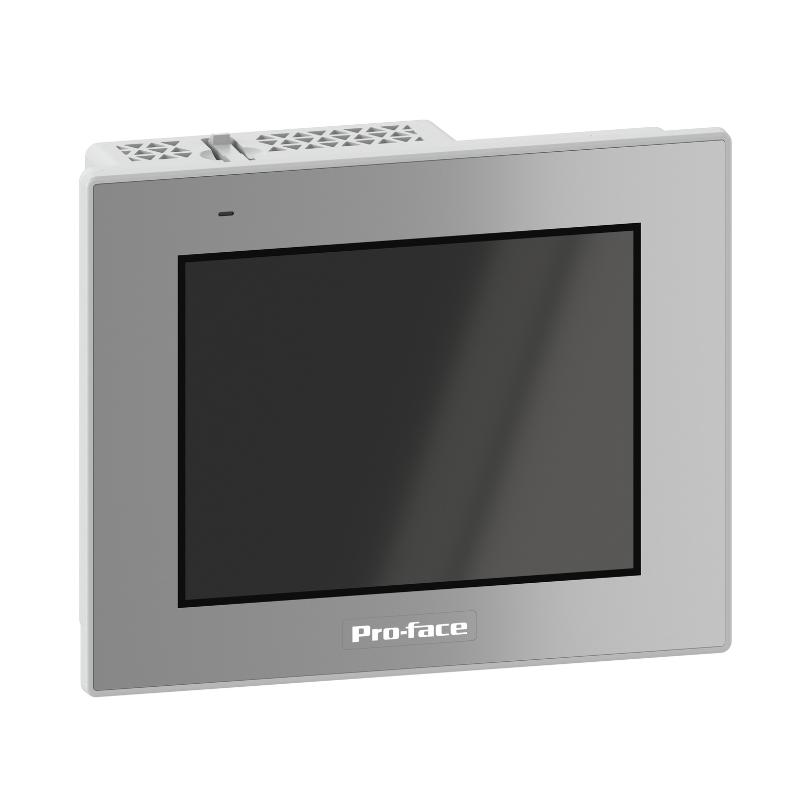
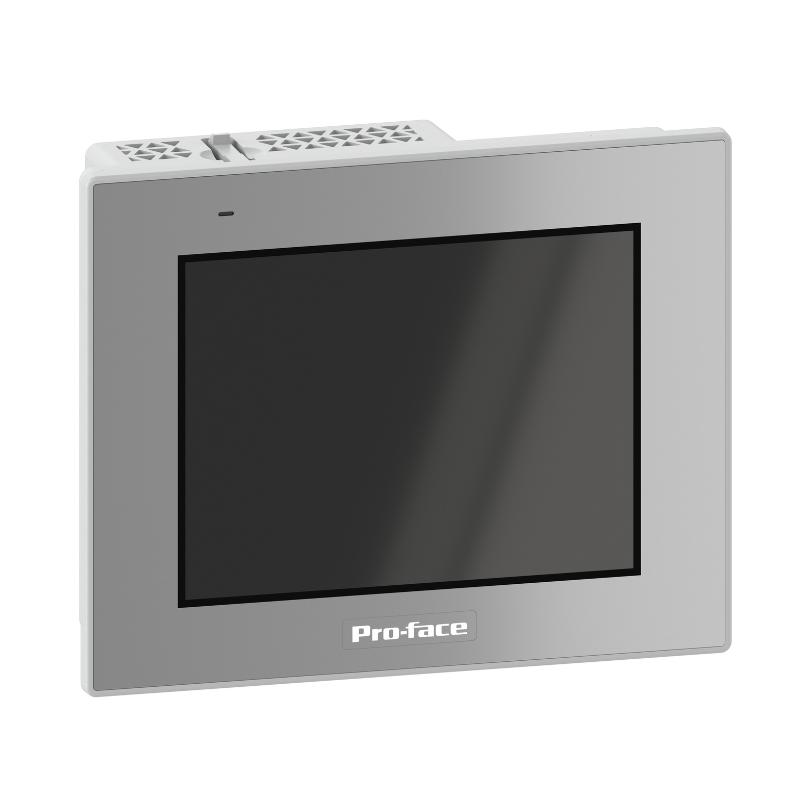
The Schneider Electric PFXGP6300TAD Pro-face GP6000 Touchscreen HMI is an industrial human-machine interface designed to provide operators with a visual connection to automated machinery, PLC systems, and industrial processes. As part of the Pro-face GP6000 Series Standard Model range, this touchscreen terminal combines a compact display, touch-based operation, and multiple communication interfaces for industrial monitoring and control applications.
Human-machine interfaces play an important role in modern automation systems. They allow operators to view machine status, monitor production data, acknowledge alarms, adjust permitted operating parameters, and interact with control applications. Instead of relying entirely on physical push buttons and indicator lamps, an HMI provides a configurable graphical interface that can present multiple process functions on one screen.
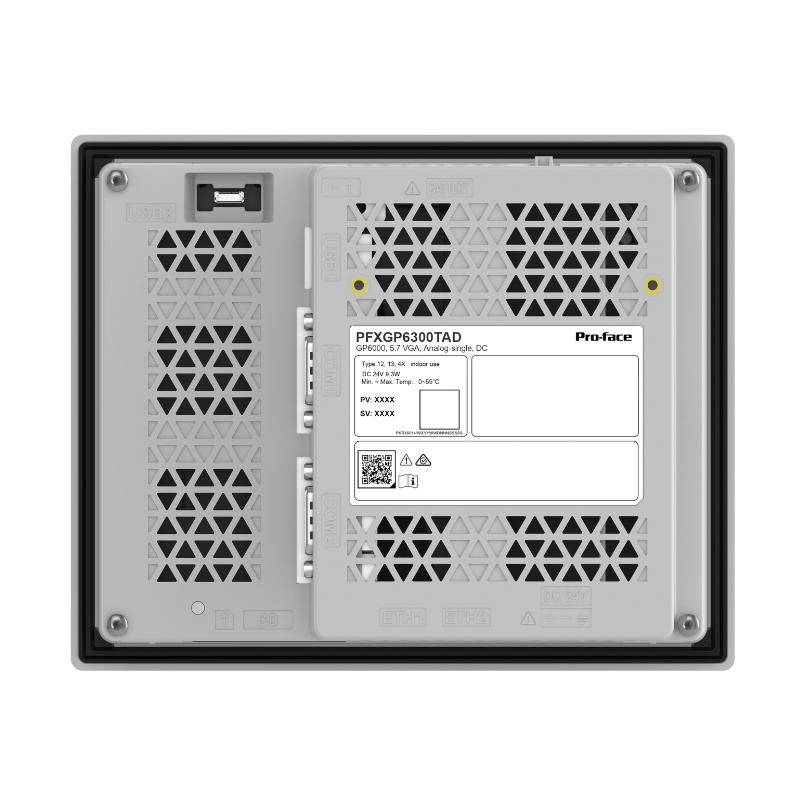
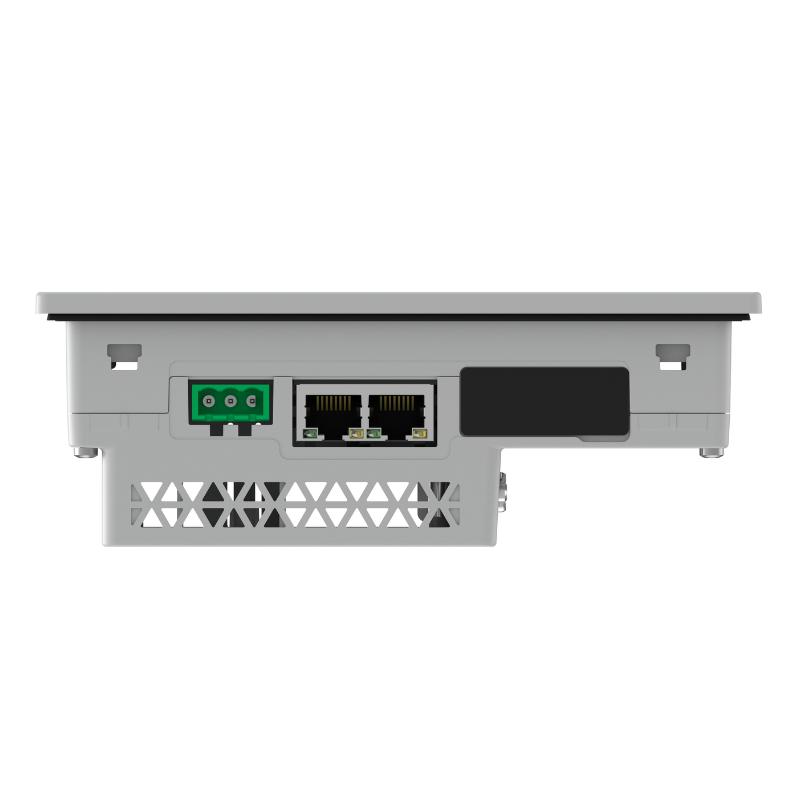
The PFXGP6300TAD features a 5.7-inch TFT color LCD with a VGA resolution of 640 × 480 pixels. Its single-touch analog resistive panel supports direct operator input through the display. The terminal uses a 24 V DC power supply and includes two Ethernet ports, two serial communication interfaces, USB connections, and an SD card slot.
The device is designed for use with Pro-face GP-Pro EX software. Its communication options allow it to be incorporated into suitable PLC-based automation systems, depending on the controller protocol, project configuration, and available drivers.
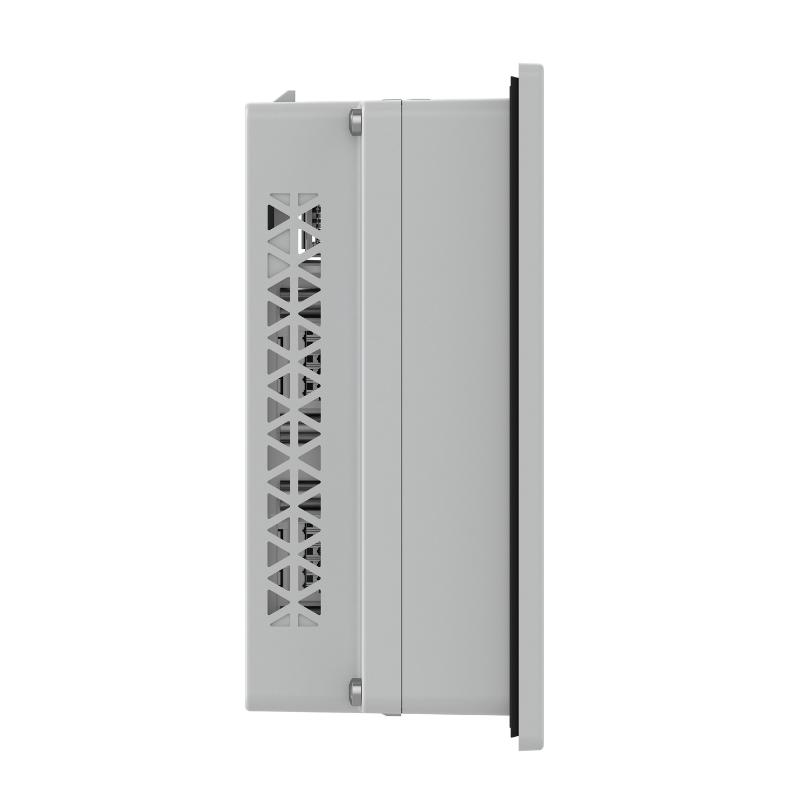
With external dimensions of 169.5 × 137 × 59.5 mm and a net weight of approximately 0.8 kg, the PFXGP6300TAD is suitable for panel-mounted installations where a compact operator interface is required. Its front-panel protection is rated IP65f when correctly installed in an enclosure, subject to the manufacturer’s installation conditions.
Technical Specifications
| Parameter | Specification |
|---|---|
| Brand | Schneider Electric / Pro-face |
| Model | PFXGP6300TAD |
| Product Series | GP6000 Series Standard Model |
| Product Type | Industrial Touchscreen HMI |
| Display Size | 5.7 inches |
| Display Type | TFT Color LCD |
| Display Resolution | 640 × 480 pixels (VGA) |
| Display Colors | 262,144 colors |
| Touch Technology | Analog resistive, single touch |
| Rated Supply Voltage | 24 V DC |
| Input Voltage Range | 19.2–28.8 V DC |
| Maximum Power Consumption | 9.3 W |
| COM1 Interface | RS-232C |
| COM2 Interface | RS-422/RS-485 |
| Ethernet | 2 × RJ45, 10BASE-T/100BASE-TX |
| USB Interfaces | USB Type-A and USB Micro-B |
| Memory | 4 GB built-in flash |
| Backup Memory | 512 KB NVRAM |
| Storage Interface | SD/SDHC/SDXC card slot |
| Programming Software | GP-Pro EX |
| Cooling Method | Natural air cooling |
| Front Protection | IP65f when installed in an enclosure |
| Operating Temperature | 0–55 °C |
| Storage Temperature | -20–60 °C |
| External Dimensions | 169.5 × 59.5 × 137 mm |
| Panel Cut-Out Dimensions | 156 × 123.5 mm |
| Weight | 0.8 kg |
| Typical Application | PLC monitoring, machine operation, and industrial process visualization |
Specifications are based on the manufacturer’s published information. Confirm the complete model designation and installation conditions before ordering.
Function and Working Principle
The PFXGP6300TAD operates as the operator-facing interface of an industrial automation system. It exchanges information with connected controllers and presents that information through graphical screens.
Its main functions include displaying process information, accepting operator commands, presenting alarms, and providing access to configured machine settings.
1. Real-Time Process Visualization
The HMI can display information received from a connected PLC or other supported controller. Depending on the application program, the screen may show:
- Machine operating status.
- Motor start and stop conditions.
- Production counters.
- Temperature and pressure readings.
- Process setpoints.
- Equipment alarms and warnings.
- Operating modes and sequence progress.
The information shown depends on the variables configured in the HMI project and the communication established with the controller.
2. Touchscreen Operator Input
The PFXGP6300TAD uses an analog resistive single-touch panel. Operators can interact with graphical buttons, numerical input fields, selection controls, and other configured screen objects.
For example, an operator may select a machine operating mode, enter a production setpoint, acknowledge an alarm, or navigate between equipment screens.
The resistive touch technology supports operation through direct physical pressure. This makes it suitable for many industrial environments where operators interact with the panel during routine machine operation.
3. Controller Communication
The HMI exchanges data with compatible automation controllers through its available communication interfaces.
The two Ethernet ports support 10BASE-T/100BASE-TX connections. The serial interfaces provide RS-232C and RS-422/RS-485 communication options.
The actual communication protocol depends on the connected PLC, configured driver, software version, and project settings. The presence of a physical interface does not automatically guarantee compatibility with every controller.
4. Alarm and Event Display
An HMI project can be configured to display alarm messages when the PLC detects abnormal operating conditions.
Typical examples include:
- Motor overload alarms.
- Sensor faults.
- Communication errors.
- Low-pressure warnings.
- High-temperature conditions.
- Machine safety interlock status.
The display can help operators identify abnormal conditions and follow the appropriate response procedures. Alarm detection and machine protection remain the responsibility of the underlying control and safety systems.
5. Data Storage and Project Management
The terminal includes built-in flash memory and backup NVRAM. Its SD card interface supports compatible memory cards for supported storage and maintenance operations.
Depending on the project and system configuration, these resources can support application storage, data handling, and maintenance workflows.
Role in Industrial Control Systems
The PFXGP6300TAD acts as an operator interface within a broader automation architecture. It generally works alongside PLCs, motor drives, sensors, communication networks, and other control equipment.
PLC Monitoring and Control
A PLC performs machine-control logic, processes input signals, and controls output devices. The HMI provides a visual interface through which operators can monitor selected PLC variables and enter permitted commands.
For example, an operator may use the touchscreen to request a conveyor start. The HMI transfers the configured command to the PLC, and the PLC checks operating conditions before controlling the motor starter or drive.
This arrangement keeps machine-control logic in the controller while allowing operators to interact with the process through a graphical interface.
Machine Status Visualization
The HMI can present multiple equipment conditions on a single screen. Operators may view whether a machine is running, stopped, waiting for material, or reporting a fault.
This helps reduce the need to inspect individual electrical devices or indicator lamps throughout a control cabinet.
Production Parameter Management
In suitable applications, authorized operators can use the HMI to enter production parameters such as speed references, temperature setpoints, batch quantities, or operating modes.
The PLC or process controller validates and applies these values according to the programmed control strategy.
Alarm Handling and Maintenance Support
Alarm screens can help maintenance personnel identify the source of a machine problem. Historical or event-related information may also be displayed when the application has been configured to support it.
The quality of this diagnostic information depends on the PLC program, HMI project, and system architecture.
Industrial Applications
The PFXGP6300TAD is designed for industrial operator-interface applications where a compact touchscreen is sufficient for process monitoring and machine interaction.
1. Manufacturing and Assembly Lines
Manufacturing equipment often requires operators to monitor production status, select operating modes, and respond to machine alarms.
The PFXGP6300TAD can provide graphical screens for machine operation, production counters, equipment status, and configured process parameters.
2. Packaging Machinery
Packaging systems may include conveyors, filling stations, sealing equipment, labeling units, and product inspection devices.
An HMI can provide operators with access to production settings and machine status. It can also display alarms and operating instructions to support routine production activities.
3. Pumping and Water Treatment Systems
Industrial pumping systems use sensors and controllers to monitor pressure, flow, tank levels, and pump status.
The touchscreen can display selected process values and provide access to permitted operating commands. The PLC remains responsible for executing the control logic and responding to field signals.
4. HVAC and Building Equipment
Industrial ventilation and auxiliary equipment may require operator access to operating status, temperature readings, fan conditions, and alarm information.
A configured HMI can consolidate these functions into a local operator panel.
5. Material Handling Systems
Conveyors, lifting equipment, transfer systems, and automated storage machinery often require clear operator feedback.
The PFXGP6300TAD can display equipment status, operating modes, and configured fault messages to help operators supervise material movement.
6. Industrial Process Equipment
Small process machines may use a touchscreen for parameter entry, process visualization, and alarm display.
The available display resolution and communication interfaces make the unit suitable for applications where a compact 5.7-inch operator panel meets the visualization requirements.
Installation and System Integration
Correct installation is important for touchscreen reliability, electrical safety, and stable communication with connected controllers.
1. Panel Mounting
The external dimensions of the PFXGP6300TAD are 169.5 × 137 × 59.5 mm. Its specified panel cut-out dimensions are 156 × 123.5 mm.
The unit is installed using mounting fasteners and is designed for panel thicknesses between 1.6 and 5 mm.
Before cutting the control cabinet, verify the mounting drawing, panel thickness, clearance, and space required for rear connectors and wiring.
2. Power Supply Connection
The HMI operates from a rated 24 V DC supply, with an input voltage range of 19.2–28.8 V DC.
Use a suitable regulated industrial power supply with sufficient capacity for the terminal and any permitted external loads. Confirm polarity and grounding requirements before energizing the device.
The maximum published power consumption is 9.3 W. Actual consumption depends on operating conditions and connected external devices.
3. Ethernet Communication
The PFXGP6300TAD provides two RJ45 Ethernet ports supporting 10BASE-T/100BASE-TX.
These interfaces can be used for supported controller communication and network integration. Network addressing, controller settings, and communication drivers must be configured correctly in the HMI project.
Use suitable industrial Ethernet cables and follow the network design requirements for cable routing, grounding, and electromagnetic interference management.
4. Serial Communication
The terminal provides two serial interfaces:
- COM1: RS-232C.
- COM2: RS-422/RS-485.
These interfaces allow connection to supported PLCs and other serial devices. Confirm pin assignments, wiring topology, baud rate, parity, data bits, stop bits, and protocol settings before commissioning.
For RS-485 installations, pay particular attention to network topology, termination, and signal reference requirements.
5. HMI Project Configuration
The PFXGP6300TAD uses GP-Pro EX software. Engineers can develop screen layouts, define communication settings, configure PLC variables, and create operator navigation.
When replacing an existing HMI, review the original project before downloading it to the new terminal. Differences in screen resolution, communication drivers, hardware interfaces, and software versions may require project conversion or modification.
6. Environmental Protection
The front panel is rated IP65f when installed in an enclosure under the specified conditions. This protection depends on correct panel mounting and the condition of the installation gasket.
The published operating temperature range is 0–55 °C. Provide adequate cabinet ventilation and avoid installation locations exposed to excessive heat, condensation, or corrosive gases.
Compatible System Components
The PFXGP6300TAD can be integrated into industrial automation systems containing compatible controllers, networks, and field devices.
| Component | Function | Integration Considerations |
|---|---|---|
| PLC | Executes machine and process logic | Confirm supported communication driver and protocol |
| Industrial Ethernet switch | Connects HMI and controller network devices | Check network topology and port configuration |
| 24 V DC power supply | Supplies HMI operating power | Ensure suitable voltage and current capacity |
| Variable frequency drive | Controls AC motor speed | Connect through a supported PLC or communication interface |
| Temperature controller | Regulates process temperature | Verify serial or Ethernet communication compatibility |
| Sensors and transmitters | Provide process measurements | Values are normally processed by the PLC before display |
| Remote I/O modules | Collect field signals and control outputs | Integration depends on PLC architecture |
| SD memory card | Supports compatible storage operations | Verify supported card type and capacity |
| Industrial control cabinet | Houses the HMI and control equipment | Confirm cut-out, mounting, ventilation, and environmental requirements |
The components listed are examples of equipment that may be used in a complete automation system. They are not necessarily included with the HMI.
Alternative Models and Replacement Considerations
The PFXGP6300TAD belongs to the Pro-face GP6000 Series Standard Model range. When selecting an alternative, compare display size, resolution, touch technology, power supply, communication interfaces, software compatibility, and panel dimensions.
| Alternative Model | Product Series | Replacement Considerations |
|---|---|---|
| PFXGP6400TAD | GP6000 | Larger display; requires a different panel layout |
| PFXGP6500TAD | GP6000 | Larger display and different mounting dimensions |
| PFXGP6600TAD | GP6000 | Larger display; verify cabinet space and project requirements |
| PFXGP4301TAD | GP4000 | Older 5.7-inch model; check interface and software compatibility |
| PFXGP3310TAD | GP3000 | Legacy model; resolution and hardware differences must be reviewed |
When replacing an older Pro-face terminal with the PFXGP6300TAD, do not assume that the existing project can be transferred without modification.
For example, Pro-face’s replacement guidance identifies differences between GP3000 and GP6000 models in external dimensions and serial interface specifications. The PFXGP6300TAD also uses a 640 × 480 VGA display, so older projects with a different resolution may require software conversion.
Before approving a replacement, verify:
- Display resolution and screen dimensions.
- Panel cut-out and mounting requirements.
- Power supply voltage.
- Ethernet and serial communication interfaces.
- PLC driver and protocol compatibility.
- GP-Pro EX software version.
- Existing project conversion requirements.
- USB and SD card usage.
- Required operator functions and alarm displays.
A newer HMI may provide improved hardware and software capabilities, but it should be treated as an engineered replacement rather than assumed to be a direct plug-in substitute.
Key Advantages
Compact Industrial Design
The 5.7-inch display and compact external dimensions make the PFXGP6300TAD suitable for control panels where installation space is limited.
VGA Color Display
The 640 × 480 resolution supports clear presentation of machine graphics, process values, status indicators, and operator controls.
Multiple Communication Interfaces
Two Ethernet ports and two serial interfaces provide flexible options for connecting supported controllers and industrial equipment.
Resistive Touch Operation
The analog resistive touchscreen supports direct operator interaction through configured graphical controls.
GP-Pro EX Software Support
The terminal is designed for application development using Pro-face GP-Pro EX software, allowing engineers to create customized operator screens and communication settings.
24 V DC Power Supply
The DC supply configuration is compatible with many industrial control-panel power architectures.
Front-Panel Protection
The front panel provides IP65f protection when correctly installed in an enclosure and maintained according to the manufacturer’s instructions.
Compact Weight and Mounting
With a net weight of approximately 0.8 kg, the terminal can be installed in suitable machine-control panels without requiring a large mounting structure.
Technical FAQs
1. What is the Schneider PFXGP6300TAD?
The PFXGP6300TAD is a Pro-face GP6000 Series industrial touchscreen HMI designed for PLC monitoring, machine operation, and process visualization.
2. What is the display size?
It has a 5.7-inch TFT color LCD with a resolution of 640 × 480 pixels.
3. What type of touchscreen does it use?
It uses an analog resistive single-touch panel. Operators interact with configured screen controls through direct touch.
4. What power supply does the PFXGP6300TAD require?
It uses a nominal 24 V DC supply, with an allowable input range of 19.2–28.8 V DC.
5. Which communication interfaces are available?
The terminal provides two Ethernet ports, one RS-232C serial interface, one RS-422/RS-485 serial interface, USB Type-A, USB Micro-B, and an SD card slot.
6. Which software is used to program this HMI?
The PFXGP6300TAD is designed for use with Pro-face GP-Pro EX software. Confirm the required software version and project compatibility before commissioning.
7. Can it communicate with Siemens or other PLC brands?
Communication may be possible when a supported driver or protocol is available and correctly configured. Check the specific PLC model, communication interface, and GP-Pro EX driver support before planning integration.
8. What are the panel cut-out dimensions?
The specified panel cut-out is 156 × 123.5 mm. The external dimensions are 169.5 × 137 × 59.5 mm.
9. What is the operating temperature range?
The published operating temperature range is 0–55 °C. Ensure that the control cabinet maintains suitable thermal conditions.
10. Can the PFXGP6300TAD replace a GP3000 Series HMI?
It may be a suitable replacement for certain GP3000 models, but project conversion and hardware checks may be necessary. Display resolution, external dimensions, serial interfaces, and software requirements should be reviewed before replacement.
Procurement and Maintenance Recommendations
When purchasing the PFXGP6300TAD, verify the complete model number and confirm that the product is the standard DC-powered analog-touch configuration. Check the display condition, touch response, front-panel surface, rear connectors, mounting hardware, and overall physical condition.
For used or refurbished units, request clear photographs of the model label and connectors. Where possible, confirm that the display powers on, the touchscreen responds correctly, and Ethernet and serial interfaces function as expected.
During installation, use a suitable 24 V DC power supply and follow the specified panel cut-out and mounting requirements. Inspect the installation gasket regularly, particularly where the HMI is exposed to dust, cleaning agents, or moisture.
Keep the cabinet interior clean and maintain suitable operating temperatures. Avoid applying excessive pressure to the touchscreen or using cleaning chemicals that are not approved for the display surface.
For replacement projects, back up the existing HMI application and review the PLC communication settings before making changes. Confirm that the new terminal’s hardware interfaces and software requirements match the intended system design.
Conclusion
The Schneider Electric PFXGP6300TAD Pro-face GP6000 Touchscreen HMI is a compact industrial operator terminal featuring a 5.7-inch TFT color display, 640 × 480 VGA resolution, analog resistive touch operation, and 24 V DC power.
Its Ethernet, serial, USB, and SD interfaces support integration into suitable PLC-based automation systems. With a compact mounting profile and front-panel protection when correctly installed, it can serve as an operator interface for manufacturing machinery, packaging equipment, pumping systems, and other industrial applications.
For procurement and replacement projects, verify the complete model number, panel dimensions, communication compatibility, and GP-Pro EX project requirements to ensure reliable integration with the existing automation system.