

ProductPRODUCT
Featured products
Contact Us
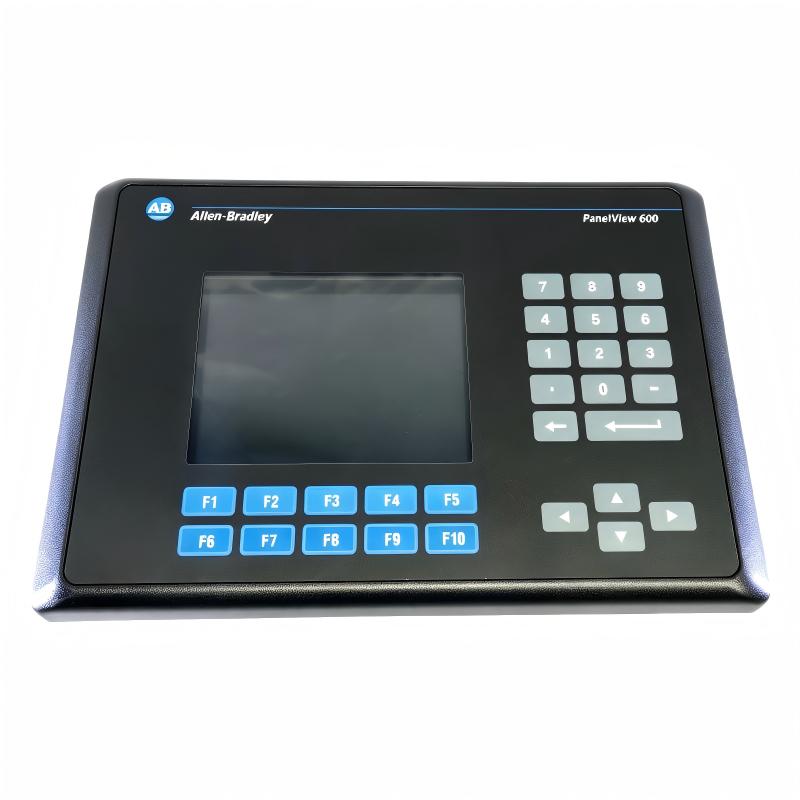
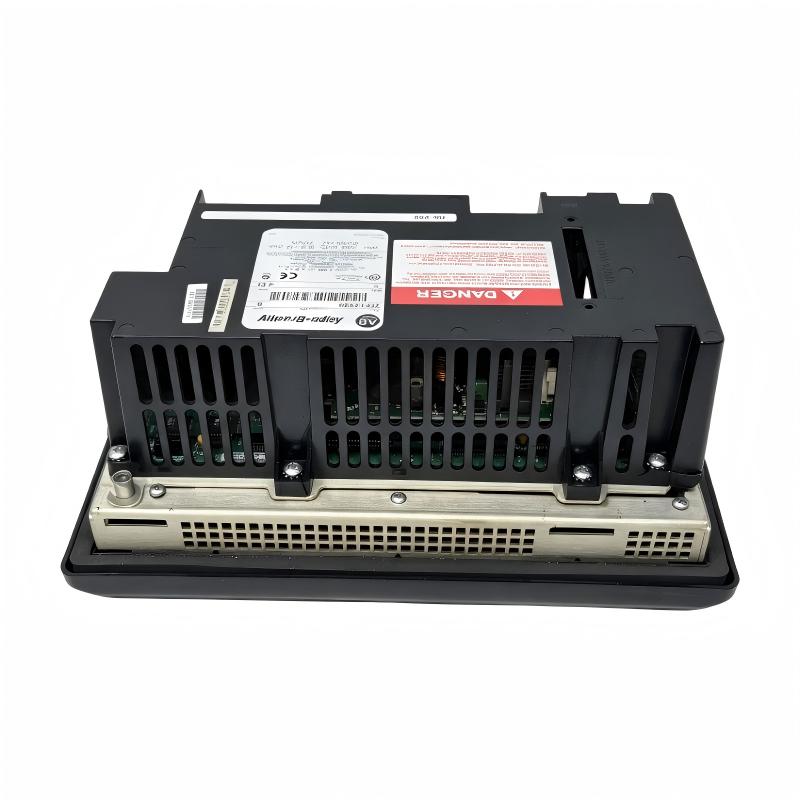
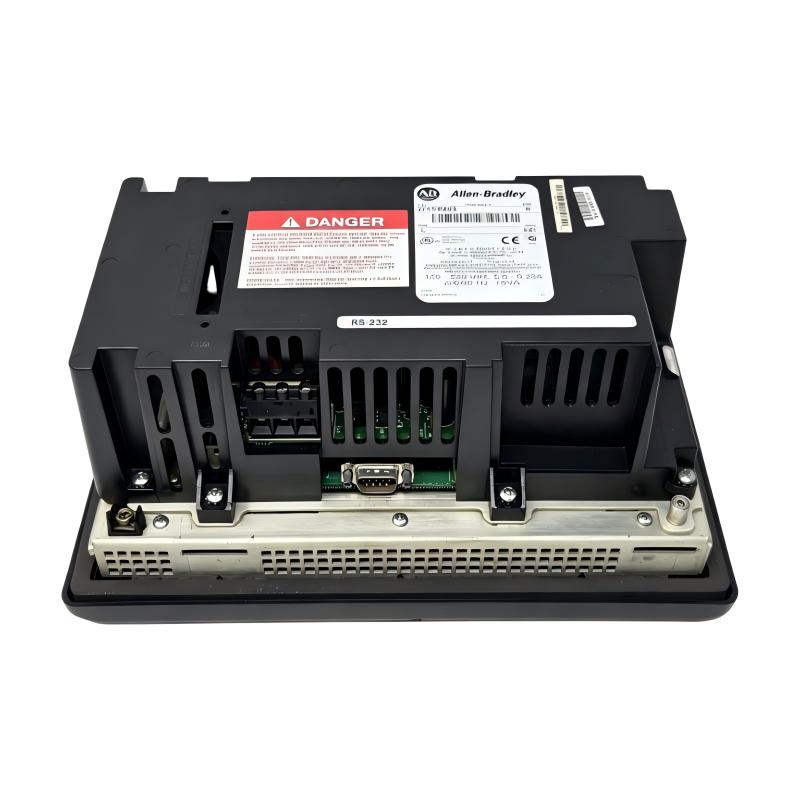
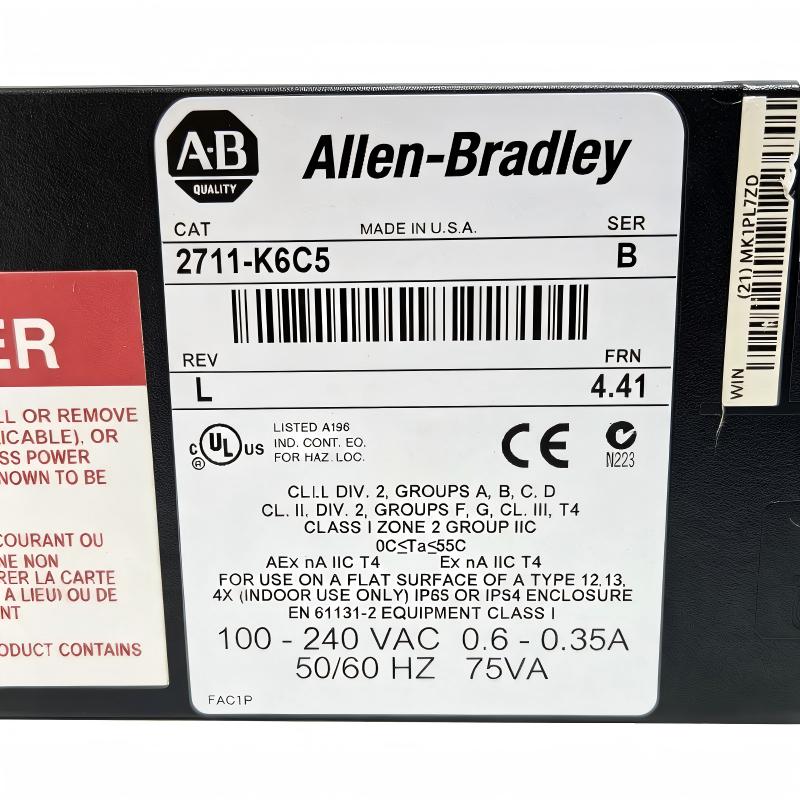
- Allen Bradley
- 2711-K6C5
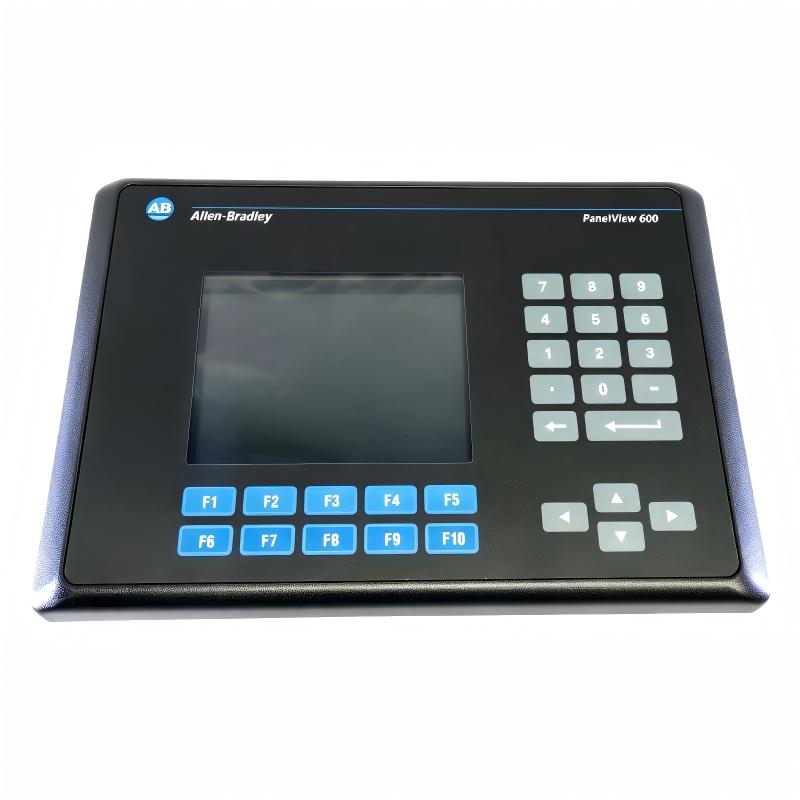
- PanelView 600 Operator Interface
- USA
- 290 x 116 x 192 mm
- 2 kg
- Xiamen, China
- New & In Stock
- T/T, PayPal, Western Union
- 1 Year
- 1-3 Working Days
- DHL, UPS, TNT, FedEx and EMS.
- 24-Hour Service
- COO
- 6
Our advantage

Global Logistics
We have a 10-year logistics and express cooperation agreement, so our products can be shipped to any place in the world.

Brand new and original
Our products are imported in bulk from the place of origin. Because of the cooperative relationship, our products are all original and 100% new.

24-hour service
We provide 7*24 hours service to our customers. We will be there whenever you need us.

Price advantage
All our products are priced very favorably because we have our own warehouse and supply.
| Company Information | |||
| [email protected] | |||
| Mobile | +8615980777398 | ||
| +8615980777398 | |||
| 15980777398 |
1. Product Overview
The Allen-Bradley 2711-K6C5 PanelView 600 Operator Interface is an industrial human-machine interface (HMI) terminal manufactured by Rockwell Automation. It belongs to the PanelView Standard 600 family and is designed to provide operators with a local interface for monitoring and controlling PLC-based machinery and industrial processes.
The 2711-K6C5 features a color active-matrix TFT display and a physical keypad with function keys. It allows operators to access configured application screens, review equipment status, monitor process values, and issue authorized commands through an established industrial control system. The keypad-based design is particularly relevant to machinery installations where operators rely on physical keys for navigation and routine operation.
This model uses an AC power supply and an RS-232 communication interface configured for DH-485. These specifications are important when selecting a replacement for an existing PanelView installation because other PanelView 600 models may use different power arrangements or communication interfaces.
The terminal is designed for applications developed with PanelBuilder32, the engineering software associated with the PanelView Standard platform. Depending on the installed application and connected controller, the HMI can display process information, alarm messages, operating modes, production data, and machine status.
The 2711-K6C5 is a legacy industrial product that has been discontinued. It remains relevant to maintenance teams, system integrators, and industrial spare-parts suppliers supporting existing automation installations. When purchasing this terminal, buyers should verify the complete catalog number, hardware series, communication configuration, and condition of the unit.
2. Technical Specifications
| Parameter | Specification |
|---|---|
| Brand | Allen-Bradley |
| Manufacturer | Rockwell Automation |
| Model | 2711-K6C5 |
| Product Family | PanelView Standard 600 |
| Product Type | Human-Machine Interface (HMI) |
| Display Type | Color active-matrix TFT |
| Display Size | Approximately 5-inch visible display area within the PanelView 600 family |
| Display Area | Approximately 115 × 86 mm |
| Display Resolution | 320 × 234 pixels |
| Operator Input | Physical keypad |
| Function Keys | 10 function keys, F1–F10 |
| Application Runtime Memory | Approximately 190 KB |
| Nonvolatile Memory | Approximately 240 KB |
| Application Development Software | PanelBuilder32 |
| Power Supply Type | AC |
| AC Input Voltage | 85–264 V AC |
| AC Input Frequency | 47–63 Hz |
| Maximum AC Power Consumption | Approximately 60 VA |
| Communication Interface | RS-232 configured for DH-485 |
| Printer Interface | RS-232 printer port |
| Communication Cable | Verify the required cable against the installed interface and system configuration |
| Enclosure Protection | Published family specifications include NEMA Type 12/13 and Type 4X indoor-use ratings; verify the specific unit and installation |
| Dimensions | 290 × 116 × 192 mm, as provided |
| Weight | 2 kg, as provided |
| Product Lifecycle | Discontinued |
| Typical Applications | Machine operation, process visualization, PLC monitoring, and legacy automation maintenance |
Specification note: Manufacturer documentation commonly lists the terminal dimensions in height × width × depth order as approximately 192 × 290 × 116 mm. The dimensions above follow your supplied width × depth × height listing. Confirm the exact hardware series and nameplate before finalizing the product specification.
3. Function and Working Principle
3.1 Human-Machine Interface
The main purpose of the 2711-K6C5 is to provide an operator-facing interface for a compatible industrial control system.
The HMI displays information defined by its application, allowing production personnel to review machine conditions without directly accessing the PLC programming environment. Typical screens may contain numeric process values, operating status, alarms, production counters, and equipment-control menus.
Operators interact with the terminal through the physical keypad. Function keys can be assigned to application-specific actions, while navigation keys support movement between screens and selection of configured options.
The exact functions available depend on the application installed in the terminal. The HMI does not independently determine machine operating logic; it communicates operator input to the control system according to the configured application.
3.2 Color TFT Display
The 2711-K6C5 uses a color active-matrix TFT display with a resolution of 320 × 234 pixels. This display supports color-based status indications, text, numeric values, and simple graphics.
Color visualization can help operators distinguish between different machine conditions, identify alarm states, and interpret process information. The effectiveness of the display depends on how the original HMI application was designed.
Although the display technology is older than that used by modern industrial terminals, it can remain adequate for legacy machines whose applications rely on established screen layouts and straightforward visualization.
3.3 Keypad and Function-Key Operation
The physical keypad is a defining feature of the 2711-K6C5. Its ten function keys, F1 through F10, can be assigned to different operations within the HMI application.
For example, an application may use function keys to access a machine overview, open an alarm screen, select a production mode, or display diagnostic information. The actual assignment is determined by the application rather than by the terminal alone.
A physical keypad can be useful in industrial environments where operators prefer tactile controls or where an established machine design was developed around function-key navigation.
3.4 PLC Communication
The 2711-K6C5 uses an RS-232 interface configured for DH-485. This provides a communication path for compatible controllers and system configurations.
For reliable operation, the HMI interface, communication cable, controller hardware, protocol settings, and application configuration must match. A visually similar PanelView terminal with another communication option may not be a direct substitute.
When communication is established, the terminal can exchange configured data with the controller. It can display selected controller values and send authorized operator commands, while the PLC continues to execute the control program and manage field devices.
3.5 Application Runtime
The PanelView Standard 600 platform uses PanelBuilder32 to create HMI applications. The application defines the screens, text, graphics, tags, navigation, alarms, and operator-input behavior.
A compatible application is essential when commissioning a replacement terminal. If the original project file or application backup is unavailable, additional engineering work may be required to recover the correct configuration.
For long-term maintenance, keeping a verified application backup and recording the communication settings can reduce downtime when a terminal fails.
4. Role in Industrial Control Systems
4.1 Local Machine Operation
The 2711-K6C5 can serve as the local operator station for machinery controlled by a compatible PLC. Operators may use it to monitor equipment status, view operating parameters, select configured modes, and access permitted commands.
This arrangement helps separate routine operator interaction from the PLC’s control logic. The HMI provides the interface, while the controller executes the machine sequence.
4.2 Process Visualization
Industrial equipment may generate a large amount of operating information, including sensor values, motor status, operating modes, and fault indicators. The HMI organizes selected data into application screens that operators can understand.
A well-designed interface helps personnel identify abnormal conditions and navigate between related information. The 2711-K6C5 supports this approach through its color display and physical function keys.
4.3 Alarm and Fault Monitoring
A PanelView application can be configured to display alarm messages and fault conditions based on controller data. These messages can help operators recognize abnormal operation and follow established troubleshooting procedures.
The terminal displays the information supplied by the application and control system. Alarm detection, equipment interlocks, and protective responses must be implemented in the appropriate controller or dedicated safety system.
4.4 Legacy Automation Support
Many manufacturing facilities continue to operate established PLC systems because the machinery remains productive and replacing the entire control architecture can be expensive.
Maintaining a compatible PanelView 600 terminal may reduce the need for immediate application redesign. This makes the 2711-K6C5 relevant to spare-parts management, equipment repair, and maintenance of older industrial installations.
5. Industrial Applications
5.1 Manufacturing and Assembly Equipment
Manufacturing machines use PLCs to coordinate sensors, motors, actuators, and production sequences. An HMI allows operators to review machine status and access configured operating functions.
The 2711-K6C5 may be found in established assembly stations, production machines, and industrial equipment where the original application was designed for the PanelView 600 platform.
5.2 Packaging Machinery
Packaging lines often require operators to review production counts, machine states, operating parameters, and alarm information. A keypad-based HMI can provide access to these functions through dedicated application screens.
When a packaging machine already uses the 2711-K6C5, maintaining the correct terminal can help preserve its original operating interface.
5.3 Material Handling Systems
Conveyors and automated material handling equipment use PLCs to coordinate movement and sequencing. The HMI may display conveyor status, drive conditions, fault information, and other configured data.
The terminal can support local monitoring when its communication interface and application are compatible with the control system.
5.4 Water and Wastewater Equipment
Pumping stations, filtration systems, and auxiliary treatment equipment may use local HMIs to display pump status, process values, and alarms. Operators can access the configured information from the equipment control panel.
The terminal’s suitability depends on the installation environment, cabinet design, electrical requirements, and condition of the individual unit.
5.5 Industrial Utility Systems
Industrial utility systems may include pumps, fans, compressors, and other equipment controlled by PLCs. An operator interface provides access to selected status and operating information.
For legacy installations using the PanelView 600 platform, a compatible replacement terminal may help maintain existing operation without immediately redesigning the entire HMI system.
6. Installation and System Integration
Correct installation and configuration are essential for reliable operation of the 2711-K6C5.
6.1 Confirm the Full Catalog Number
Before purchasing a replacement, check the complete model designation on the terminal’s nameplate. Verify the catalog number, hardware series, power supply type, and communication interface.
PanelView 600 terminals were available in different configurations. Similar-looking models may differ in communication ports, display characteristics, or electrical requirements.
6.2 Verify AC Power Requirements
The 2711-K6C5 is an AC-powered terminal. The published supply range is 85–264 V AC at 47–63 Hz, with a maximum power consumption of approximately 60 VA.
Verify the rating of the actual unit before connecting power. Disconnect power during installation and follow the electrical safety procedures applicable to the control cabinet.
6.3 Prepare the Panel Mounting Location
The supplied dimensions are 290 × 116 × 192 mm. Manufacturer documentation commonly presents these dimensions in height × width × depth order as approximately 192 × 290 × 116 mm.
The external dimensions should not be used as the panel cutout dimensions. Consult the appropriate installation drawing for the required opening, mounting clearance, and rear access.
Allow sufficient space for wiring, connectors, and maintenance access. Confirm that the enclosure provides the required environmental protection.
6.4 Check Communication Wiring
The 2711-K6C5 uses RS-232 communication configured for DH-485. Verify the controller interface, required cable, communication settings, and network arrangement before commissioning.
Do not assume that a cable used with another PanelView model will necessarily be suitable. Confirm the cable and pinout against the actual terminal and controller documentation.
6.5 Restore the Correct Application
Where available, obtain a verified copy of the original PanelBuilder32 application. Confirm that the application matches the machine and controller configuration.
After transferring the application, check screen navigation, tag references, communication settings, and operator functions. If the original application is unavailable, assess the engineering effort required to reconstruct or migrate the HMI configuration.
6.6 Commission the Complete System
Before returning the machine to production, verify the following:
- Correct AC supply and stable terminal startup.
- Clear display and reliable keypad response.
- Successful communication with the intended controller.
- Correct display of process values and equipment status.
- Correct operation of configured alarms and navigation.
- Proper response to operator commands under approved test conditions.
Commands that can affect machine movement or process operation should be tested according to the site’s commissioning and safety procedures.
7. Compatible System Components
The following product families and accessories may be relevant to a PanelView 600 installation. Actual compatibility depends on the terminal’s communication configuration and the installed controller.
| Component or Product Family | Description | Integration Consideration |
|---|---|---|
| Allen-Bradley SLC 500 | Legacy PLC family | Verify DH-485 support and the complete communication arrangement |
| Allen-Bradley MicroLogix | Compact PLC family | Confirm the specific controller model and communication requirements |
| Allen-Bradley PLC-5 | Legacy programmable controller family | Requires a compatible interface and network configuration |
| PanelBuilder32 | HMI application development software | Used to create and maintain compatible PanelView Standard applications |
| RS-232 communication cable | Serial communication connection | Must match the terminal and controller interface |
| DH-485 network equipment | Communication hardware for supported DH-485 systems | Verify topology, cabling, and node configuration |
| RS-232 printer connection | Printer interface on supported terminal configurations | Confirm port availability and printer requirements |
| Industrial AC power source | Power supply for the terminal | Must meet the specified voltage and frequency range |
| Industrial control cabinet | Mounting and environmental protection | Panel cutout and clearances must match the terminal |
This table identifies relevant system categories rather than guaranteeing that every listed controller can connect directly to the 2711-K6C5. Confirm the actual hardware, communication path, and application before procurement.
8. Alternative Models and Replacement Considerations
The 2711-K6C5 is a discontinued PanelView 600 terminal. If an exact replacement is unavailable, the replacement decision should consider communication compatibility, application requirements, physical mounting, and power supply.
| Model or Family | Description | Replacement Consideration |
|---|---|---|
| 2711-K6C5 | PanelView 600 color keypad terminal, AC power, RS-232 DH-485 | Preferred when maintaining an installation designed for this exact configuration |
| Other 2711-K6C variants | PanelView 600 color keypad terminals with different communication options | Verify the complete catalog number and interface before substitution |
| 2711-B6C variants | PanelView 600 color terminals with keypad and touchscreen options, depending on model | Confirm input method, communication, and power configuration |
| PanelView Plus 7 | Newer-generation HMI family | May require application migration, communication changes, and panel modifications |
| PanelView 800 | HMI family for selected automation applications | Verify controller support, engineering software, communications, and mounting requirements |
Replacement Planning
An HMI with a similar display size is not necessarily a direct replacement. The new device must be evaluated for communication protocol, application software, input method, panel cutout, power supply, and controller compatibility.
An exact replacement may reduce engineering effort when the original system remains in service. A newer HMI can provide updated features but may require application redevelopment and additional commissioning.
For legacy machinery, preserve the original application and document the current hardware configuration before replacing the terminal whenever possible.
9. Key Advantages of the Allen-Bradley 2711-K6C5
Color Display
The color TFT display supports visual differentiation between process states, alarm conditions, and operating information defined by the application.
Physical Keypad
The keypad and F1–F10 function keys provide a consistent input method for established operator workflows and applications designed around physical controls.
Dedicated Industrial HMI Design
The terminal is designed for panel-mounted industrial applications rather than general-purpose desktop use.
Established PanelView Standard Platform
The terminal supports legacy applications developed using PanelBuilder32, which can be valuable for facilities maintaining existing PanelView installations.
Defined AC Power and Communication Interfaces
The specified AC supply range and RS-232 DH-485 interface help maintenance personnel identify the required electrical and communication configuration.
Support for Legacy Spare-Parts Requirements
For plants that still depend on PanelView 600 equipment, obtaining the correct model can help reduce downtime and preserve established operator workflows.
10. Frequently Asked Questions
Q1: What is the Allen-Bradley 2711-K6C5?
The 2711-K6C5 is a PanelView 600 Standard color operator interface with a physical keypad. It is used to monitor and interact with compatible PLC-based industrial control systems.
Q2: What type of display does the 2711-K6C5 use?
It uses a color active-matrix TFT display with a resolution of 320 × 234 pixels and a display area of approximately 115 × 86 mm.
Q3: Does the 2711-K6C5 use AC or DC power?
The 2711-K6C5 is an AC-powered version. Its published supply range is 85–264 V AC at 47–63 Hz. Verify the unit’s nameplate before connecting it to a power source.
Q4: Which communication interface does this model use?
The 2711-K6C5 is associated with an RS-232 interface configured for DH-485. Confirm the actual terminal configuration and required cabling before installation.
Q5: Which software is used to configure the 2711-K6C5?
PanelBuilder32 is the application development environment associated with the PanelView Standard 600 family. The original project and compatible engineering setup are important when restoring or modifying a legacy HMI.
Q6: What are the dimensions and weight of the 2711-K6C5?
The supplied dimensions are 290 × 116 × 192 mm, and the supplied weight is 2 kg. Manufacturer documentation commonly expresses the dimensions as 192 × 290 × 116 mm in height × width × depth order.
Q7: Is the 2711-K6C5 still manufactured?
The model is discontinued. Replacement units may be available through industrial spare-parts suppliers, depending on stock and condition. Verify whether a unit is new old stock, used, or refurbished.
Q8: Can any PanelView 600 terminal replace the 2711-K6C5?
No. PanelView 600 variants may differ in communication interfaces, power requirements, input methods, and hardware revisions. Verify the full catalog number and system compatibility before selecting a substitute.
Q9: What should be checked before purchasing a replacement?
Confirm the full catalog number, AC power rating, RS-232 DH-485 interface, display and keypad condition, application availability, mounting requirements, and hardware series. For used equipment, request clear identification and evidence of functional testing where available.
11. Procurement and Maintenance Recommendations
The 2711-K6C5 is primarily relevant to facilities maintaining legacy PanelView 600 installations. Because the product has been discontinued, accurate identification and condition verification are important parts of the procurement process.
Recommended checks include:
- Verify the complete catalog number and hardware series.
- Confirm the AC supply voltage and frequency.
- Check the RS-232 DH-485 interface and required communication cable.
- Inspect the color display for missing pixels, uneven illumination, or physical damage.
- Test the keypad and function keys for reliable response.
- Inspect the housing, connectors, mounting hardware, and sealing surfaces.
- Confirm whether the original PanelBuilder32 project is available.
- Verify the application and controller communication settings.
- Confirm the panel cutout and overall dimensions before installation.
- Establish whether the unit is new old stock, used, or refurbished.
- Test the terminal with the intended control system before returning the machine to service.
For international procurement, clarify the product’s condition, included accessories, packaging, and identification labels before shipment. Accurate dimensions and weight also help support freight planning and inventory management.
12. Conclusion
The Allen-Bradley 2711-K6C5 PanelView 600 Operator Interface is a legacy color HMI terminal designed for keypad-based interaction with compatible industrial control systems. Its color TFT display, physical function keys, AC power supply, and RS-232 DH-485 communication interface make it relevant to established PLC-based machinery and process applications.
For maintenance engineers and industrial spare-parts buyers, the most important selection criteria are the full catalog number, hardware configuration, communication interface, power requirements, and availability of the original HMI application.
Because the 2711-K6C5 is discontinued, confirming the product’s condition and compatibility is especially important. Selecting the correct terminal can help preserve existing operator workflows and support the continued operation of legacy automation equipment.