

ProductPRODUCT
Featured products
Contact Us
- Allen Bradley
- 2711-T5A8L1
- PanelView 550 Operator Interface
- USA
- 266 x 106 x 167 mm
- 1.2 kg
- Xiamen, China
- New & In Stock
- T/T, PayPal, Western Union
- 1 Year
- 1-3 Working Days
- DHL, UPS, TNT, FedEx and EMS.
- 24-Hour Service
- COO
- 10
Our advantage

Global Logistics
We have a 10-year logistics and express cooperation agreement, so our products can be shipped to any place in the world.

Brand new and original
Our products are imported in bulk from the place of origin. Because of the cooperative relationship, our products are all original and 100% new.

24-hour service
We provide 7*24 hours service to our customers. We will be there whenever you need us.

Price advantage
All our products are priced very favorably because we have our own warehouse and supply.
| Company Information | |||
| [email protected] | |||
| Mobile | +8615980777398 | ||
| +8615980777398 | |||
| 15980777398 |
1. Product Overview
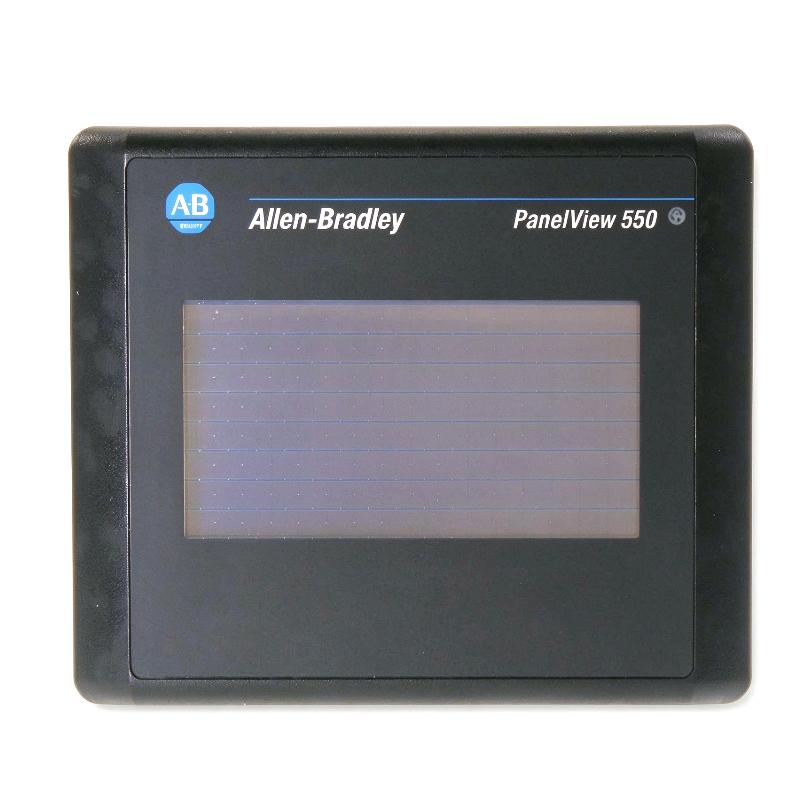
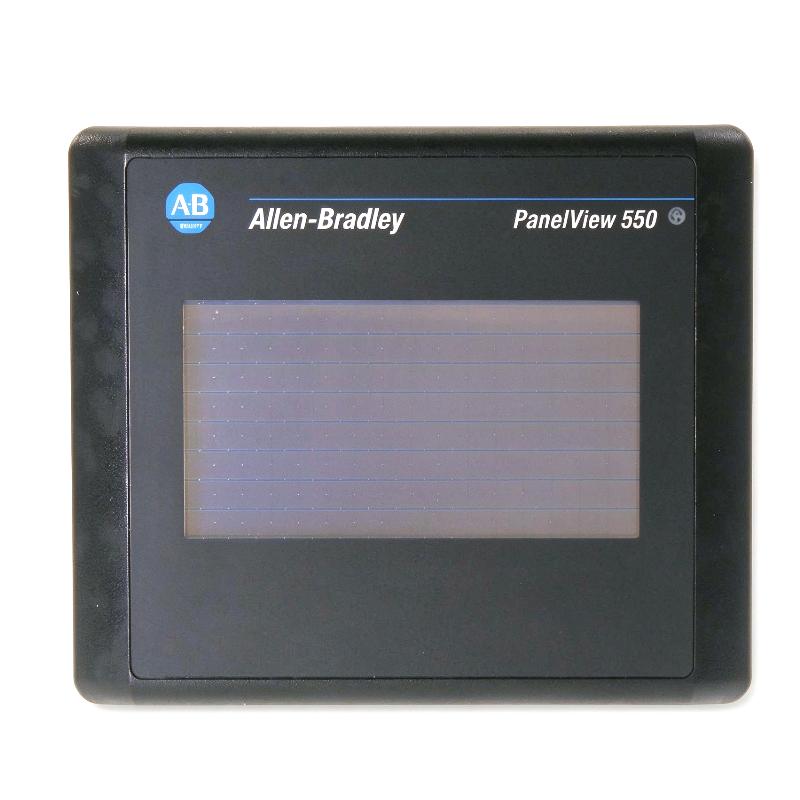
The Allen-Bradley 2711-T5A8L1 PanelView 550 Operator Interface is an industrial human-machine interface (HMI) terminal developed by Rockwell Automation for monitoring and operating PLC-based machinery and industrial processes. As part of the PanelView Standard 550 family, it provides a compact touchscreen interface through which operators can view process information, navigate application screens, and interact with configured control functions.
The 2711-T5A8L1 features a 5.5-inch monochrome LCD touchscreen with a resolution of 256 × 128 pixels. Its touchscreen design allows operators to select on-screen controls, access status displays, and enter information without a separate physical keypad. The terminal is designed for legacy industrial automation systems that require a dedicated operator interface rather than a general-purpose computer.
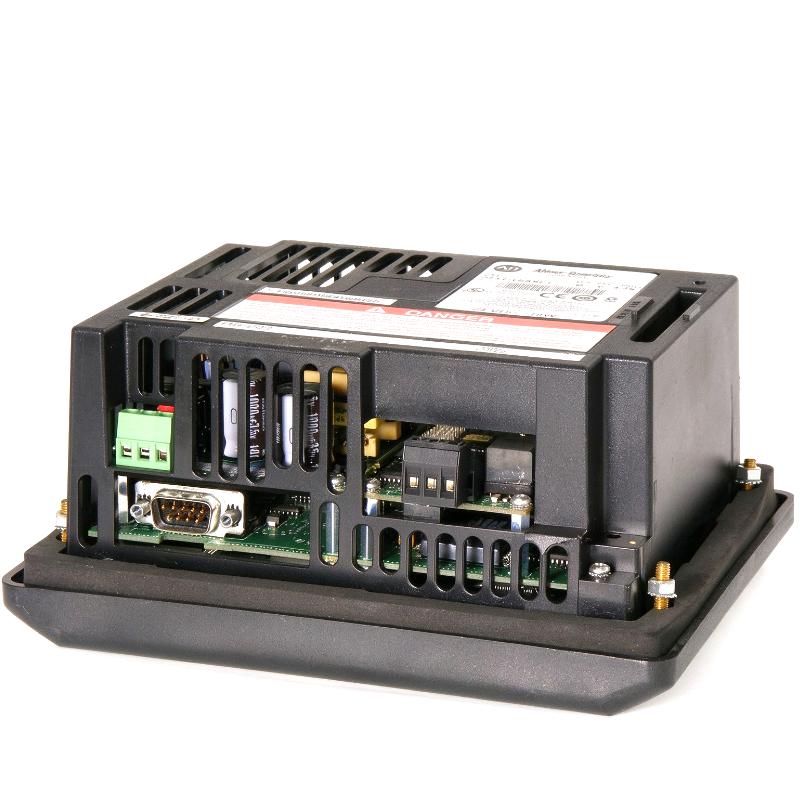
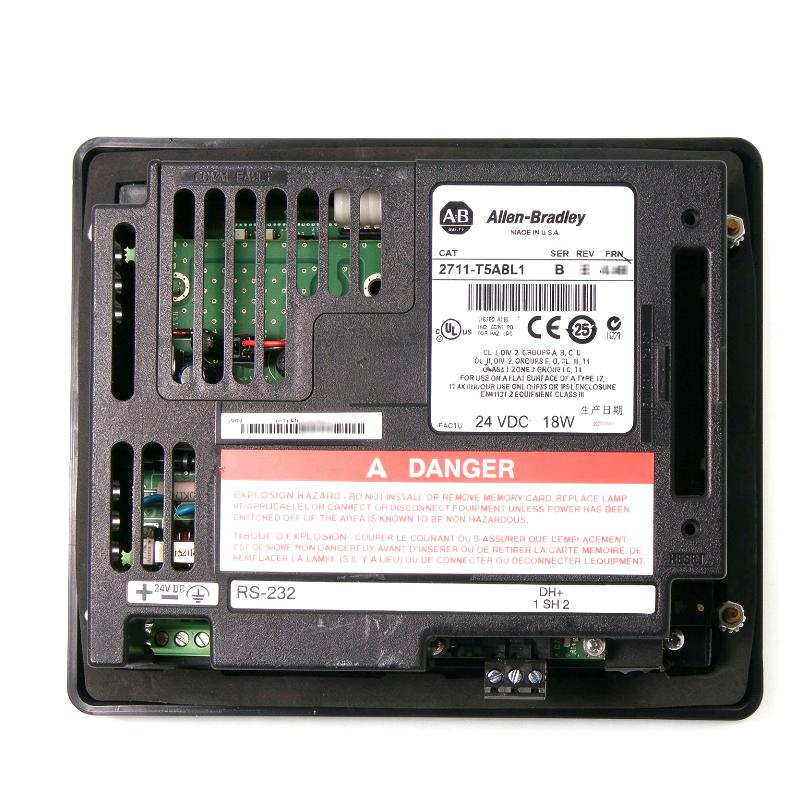
This model uses a 24 V DC power supply and supports an RS-232 communication interface configured for DH-485, together with an RS-232 printer port. These interfaces distinguish it from other PanelView 550 catalog variants, which may use different communication options. The complete catalog number must therefore be checked before ordering a replacement.
The terminal is intended to run compatible PanelView Standard applications developed with PanelBuilder32. Depending on the application and controller configuration, it can display operating status, process values, alarm messages, equipment conditions, and operator instructions. It can also provide access to configured operator commands, while the PLC remains responsible for executing the control logic.
The 2711-T5A8L1 is a legacy product, making it particularly relevant to industrial plants that maintain existing PanelView 550 installations. For maintenance engineers and spare-parts buyers, confirming the communication interface, power requirements, dimensions, and application compatibility is essential before purchasing this model.
2. Technical Specifications
| Parameter | Specification |
|---|---|
| Brand | Allen-Bradley |
| Manufacturer | Rockwell Automation |
| Model | 2711-T5A8L1 |
| Product Family | PanelView Standard 550 |
| Product Type | Human-Machine Interface (HMI) |
| Operator Input | Touchscreen |
| Display Size | 5.5 inches |
| Display Type | Monochrome LCD, blue-mode display |
| Display Resolution | 256 × 128 pixels |
| Display Area | Approximately 120 × 60 mm |
| Touchscreen | 128 touch cells |
| Power Supply Type | DC |
| Nominal Supply Voltage | 24 V DC |
| Input Voltage Range | 18–32 V DC |
| Maximum Power Consumption | Approximately 18 W |
| Primary Communication Interface | RS-232 configured for DH-485 |
| Printer Interface | RS-232 printer port |
| Application Development Software | PanelBuilder32 |
| Application Runtime Memory | Approximately 170 KB |
| Nonvolatile Application Memory | Varies by hardware series; verify the installed revision |
| Published Terminal Dimensions | Approximately 152 × 185 × 82 mm |
| Published Terminal Weight | Approximately 0.93 kg |
| Dimensions in Supplied Listing | 266 × 106 × 167 mm — requires verification |
| Weight in Supplied Listing | 1.2 kg — requires verification |
| Typical Applications | Machine operation, PLC status visualization, process monitoring, and legacy automation maintenance |
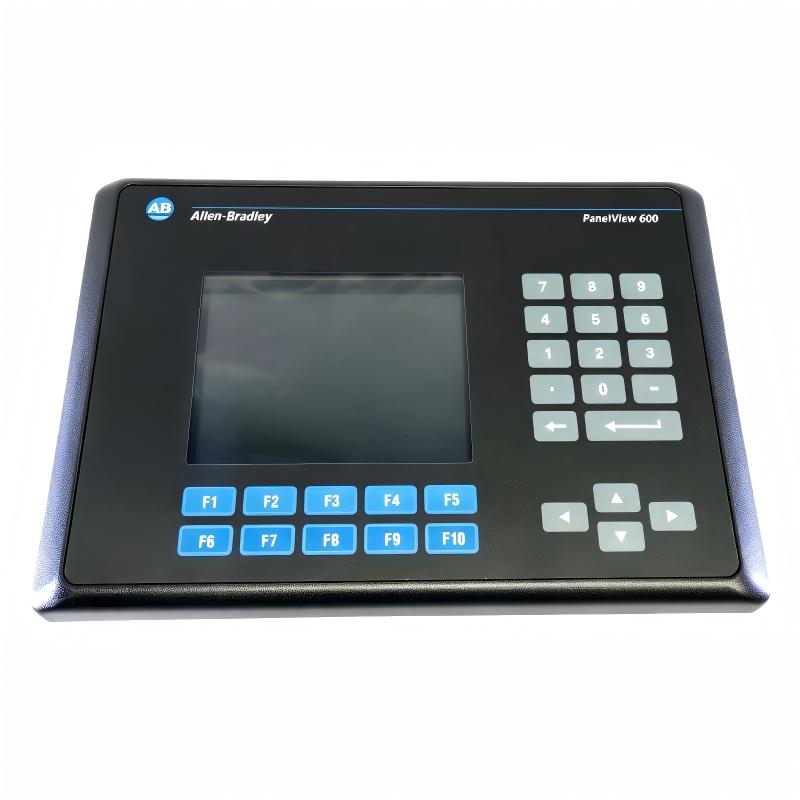
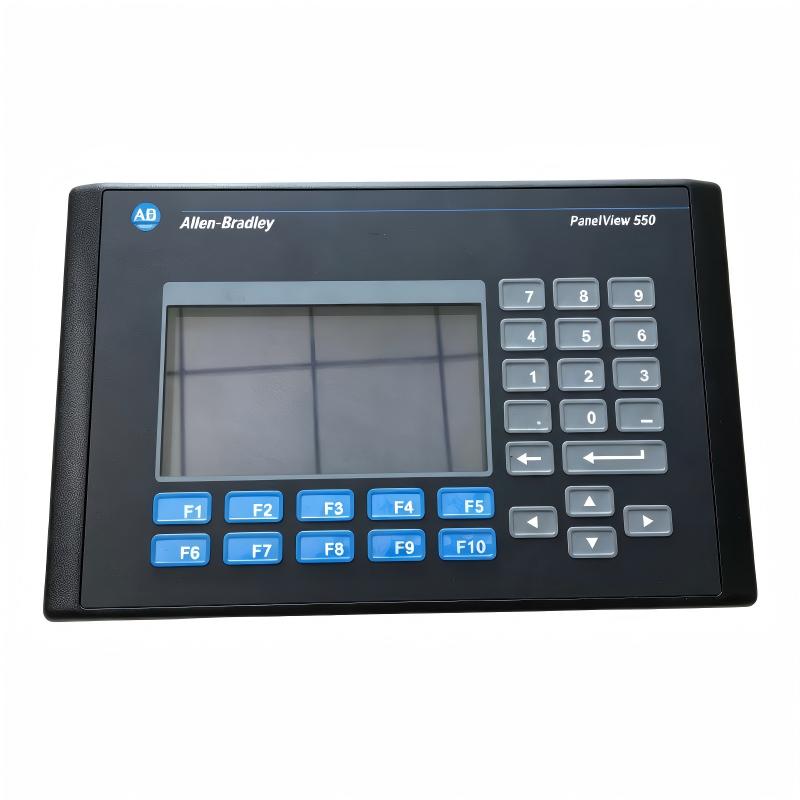
Dimensional note: The supplied dimensions and weight do not match the commonly published specifications for the 2711-T5A8L1 touchscreen terminal. The dimensions of approximately 266 × 106 × 167 mm and weight of 1.2 kg are associated with larger keypad-style PanelView 550 models. Confirm the nameplate and physical unit before publishing final dimensions or ordering a replacement.
3. Function and Working Principle
3.1 Touchscreen Operator Interaction
The primary function of the 2711-T5A8L1 is to provide a local touchscreen interface between machine operators and an industrial control system.
The application loaded into the terminal determines the information displayed and the functions available to operators. Typical screens may contain process values, equipment status, alarm messages, operating modes, and navigation buttons.
Operators interact with these screens by touching configured areas of the display. Depending on the application, a touch action may open another screen, acknowledge an alarm, select an operating mode, or send a command request to a PLC.
The HMI does not independently determine whether machinery can safely start or stop. The control program and appropriate interlocks must validate commands and manage equipment operation.
3.2 Monochrome Display Technology
The terminal uses a 5.5-inch monochrome LCD with a resolution of 256 × 128 pixels. This display is intended for straightforward industrial visualization rather than high-resolution graphics or multimedia applications.
Although the display technology is older than that of modern HMI panels, it can remain effective for applications that primarily use text, numeric values, status indicators, and simple graphics.
For legacy machines, retaining the original display format may also reduce the need to redesign operator screens or retrain production personnel.
3.3 Communication with PLC Controllers
The 2711-T5A8L1 uses an RS-232 communication interface configured for DH-485. This interface supports communication with compatible automation equipment when the correct controller, cabling, network arrangement, and application settings are used.
The communication configuration must match the existing control system. A terminal with a different interface may look similar but may not connect directly to the same controller.
Once communication is established, the HMI can exchange configured data with the controller. It can display values read from the control system and transmit operator input where the application permits it.
The PLC remains responsible for running the control program, processing field inputs, controlling outputs, and enforcing programmed operating conditions.
3.4 Application Runtime and Screen Configuration
The PanelView Standard platform uses applications created with PanelBuilder32. The engineering project defines the display screens, text, graphics, tags, navigation, operator input, and communication settings.
The application is therefore a critical part of the complete HMI installation. A replacement terminal may power up correctly but still fail to operate as expected if the correct application or communication configuration is missing.
Before replacing an installed unit, maintenance personnel should determine whether the original project file is available and whether the replacement hardware supports the existing application.
4. Role in Industrial Control Systems
4.1 Local Machine Monitoring
The 2711-T5A8L1 can provide operators with access to machine conditions and configured process information at the equipment location.
Depending on the application, the display may show motor status, operating modes, process setpoints, production counters, alarms, or other PLC data. This information helps operators understand the current state of the machine without connecting a programming computer.
4.2 Operator Command Entry
A touchscreen HMI can provide buttons and input fields for configured operator actions. These may include selecting an operating mode, entering a setpoint, acknowledging an alarm, or requesting a machine sequence.
The actual commands available depend on the application and PLC program. Critical functions must remain subject to the control system’s interlocks and safety design.
4.3 Process Visualization and Troubleshooting
An HMI helps organize selected control-system data into screens that are easier for operators to interpret. Clear display of status information and alarms can support troubleshooting and reduce the time needed to identify the source of an operating problem.
The terminal presents information supplied by the controller and configured application. Alarm detection, equipment protection, and process control functions generally reside in the PLC or dedicated control and safety equipment.
4.4 Maintaining Legacy Automation Systems
Many industrial facilities operate machinery that was commissioned years ago and continues to perform an important production function. Replacing an HMI may involve more than selecting a new display: the application, communication protocol, controller compatibility, panel cutout, and operator workflow may all need to be considered.
Maintaining a compatible 2711-T5A8L1 can be a practical approach when an existing machine relies on this specific PanelView 550 configuration.
5. Industrial Applications
5.1 Manufacturing and Assembly Lines
Manufacturing equipment often relies on PLCs to coordinate sensors, motors, actuators, and production sequences. A compatible HMI provides operators with access to machine status, operating modes, production information, and alarms.
The 2711-T5A8L1 may be used in existing assembly machines and production stations where the original control architecture was designed around the PanelView 550 platform.
5.2 Packaging Machinery
Packaging equipment commonly requires operator access to operating parameters, machine status, fault messages, and production counts. A touchscreen HMI can provide a convenient way to navigate between these functions.
When a packaging machine already uses the 2711-T5A8L1, maintaining a compatible terminal can help preserve the established application and operator workflow.
5.3 Material Handling Systems
Conveyors, transfer stations, and automated handling equipment use PLC-based sequences to coordinate product movement. An HMI may display equipment status, fault conditions, and configured operating commands.
The terminal can support these functions when the application and communication interface are compatible with the machine controller.
5.4 Water and Wastewater Equipment
Pumping stations, filtration equipment, and auxiliary treatment systems may use local HMIs to show equipment status and selected process values. Operators can use the configured interface to review conditions and access permitted commands.
The terminal’s suitability depends on the installation environment, enclosure protection, and electrical design.
5.5 Industrial Utility Systems
Industrial utility equipment, including pumps, fans, and compressors, may require a local interface for monitoring and basic operation. The PanelView 550 can support this role in established installations that use compatible PLCs and applications.
For any replacement, communication settings and application compatibility should be verified before the machine is returned to service.
6. Installation and System Integration
Correct installation and configuration are essential for the reliable operation of the 2711-T5A8L1.
6.1 Confirm the Exact Catalog Number
Check the complete model designation on the terminal nameplate before ordering or installing a replacement. The 2711-T5A8L1 is a touchscreen and DC-powered variant with a defined communication configuration.
Do not select a replacement solely by screen size or external appearance. Other PanelView 550 models may use different communication interfaces, power supplies, or operator-input arrangements.
6.2 Verify the DC Power Supply
The 2711-T5A8L1 uses a nominal 24 V DC supply with a specified input range of 18–32 V DC. Confirm the rating of the actual unit and use a suitable supply with appropriate protection.
Disconnect power before carrying out installation or wiring work. Follow the applicable electrical safety procedures and manufacturer instructions.
6.3 Check Panel Mounting Dimensions
The touchscreen terminal’s published dimensions differ from those of the keypad versions of the PanelView 550 family. Verify the correct panel cutout, mounting clearance, and installed depth before modifying an enclosure.
Do not use the overall dimensions as a substitute for the manufacturer’s panel-cutout template. Ensure there is adequate room for the rear connectors and communication cables.
6.4 Verify Communication Wiring
The 2711-T5A8L1 uses RS-232 communication configured for DH-485. Confirm that the PLC or network equipment supports the required interface and that the correct cable and communication settings are available.
Check the communication path, connector condition, controller configuration, and application settings before assuming that a terminal fault is caused by hardware failure.
6.5 Restore the Correct Application
Where possible, obtain and preserve a verified copy of the original PanelBuilder32 project. Confirm that the application corresponds to the intended machine and controller.
After transferring the application, verify the terminal configuration and communication parameters. A mismatched project may result in missing screens, incorrect tag references, or communication errors.
6.6 Perform Commissioning Checks
Before returning the equipment to normal operation, verify:
- Correct DC supply voltage and polarity.
- Stable display and touchscreen response.
- Successful communication with the intended controller.
- Correct display of process values and status information.
- Operation of configured alarms and navigation.
- Correct behavior of operator commands under approved test conditions.
Any command that can affect machine movement or process operation should be tested under the facility’s commissioning and safety procedures.
7. Compatible System Components
The following products and software are relevant to the broader PanelView 550 environment. Actual compatibility depends on the terminal’s interface, controller model, application, and network configuration.
| Component or Product Family | Description | Integration Consideration |
|---|---|---|
| Allen-Bradley SLC 500 | Legacy PLC family | Verify the controller’s DH-485 support and communication arrangement |
| Allen-Bradley MicroLogix | Compact PLC family | Confirm the specific model, supported interface, and cable requirements |
| Allen-Bradley PLC-5 | Legacy programmable controller family | Requires a compatible communication architecture; direct compatibility is not universal |
| PanelBuilder32 | PanelView Standard application development software | Used to create and maintain compatible applications |
| RS-232 communication cable | Serial communication connection | Must match the terminal and controller interface |
| Compatible DH-485 network equipment | Communication hardware for supported DH-485 systems | Verify topology, cabling, and node configuration |
| 24 V DC power supply | Power source for the terminal | Must meet the specified voltage and current requirements |
| Industrial control cabinet | Mechanical mounting and environmental protection | Panel cutout and clearance must match the touchscreen model |
This list is intended as a system-planning reference, not a guarantee that every listed controller connects directly to the terminal. Confirm the full hardware configuration before procurement or integration.
8. Alternative Models and Replacement Considerations
The 2711-T5A8L1 belongs to an older generation of HMI equipment. Selecting an alternative requires checking the operator interface, power supply, communication protocol, application environment, and physical mounting requirements.
| Model or Family | Description | Replacement Consideration |
|---|---|---|
| 2711-T5A8L1 | PanelView 550 touchscreen terminal with DC power and RS-232 DH-485 communication | Preferred when the existing system requires this exact configuration |
| Other 2711-T5A PanelView 550 variants | PanelView 550 touchscreen models with different communication options | Confirm the complete catalog number and communication interface |
| 2711-K5A15 | PanelView 550 keypad operator terminal | Different operator-input configuration; not a direct touchscreen replacement |
| PanelView Plus 7 | Newer-generation HMI family | May require application redevelopment, communication changes, and panel modifications |
| PanelView 800 | HMI family for selected industrial automation applications | Confirm controller support, engineering software, communication, and mounting requirements |
Replacement Planning
For an existing machine, the first decision is whether to obtain an exact replacement or migrate to a newer HMI platform.
An exact replacement may reduce application conversion and commissioning effort, provided the hardware configuration is correct. A newer terminal may offer additional capabilities, but it can require application redevelopment, controller communication changes, and physical modifications to the operator panel.
Before ordering, confirm the terminal label, installed hardware revision, application backup, and original communication arrangement. Do not assume that a similarly sized HMI will be a direct substitute.
9. Key Advantages of the Allen-Bradley 2711-T5A8L1
Dedicated Touchscreen Operation
The touchscreen interface allows operators to select on-screen controls and navigate configured application pages without a separate physical keypad.
Compact Panel-Mount Design
The terminal is intended for installation in an industrial operator panel, providing a dedicated local interface for compatible machinery and control systems.
Defined DC Power Requirements
The 24 V DC nominal supply simplifies integration into industrial control cabinets designed for low-voltage DC equipment.
Established PanelView Standard Platform
The terminal supports legacy PanelView Standard applications developed for the PanelBuilder32 environment, making it relevant to maintenance of existing automation installations.
Serial Communication for Compatible Systems
The RS-232 DH-485 interface provides a communication option for control architectures designed around the corresponding protocol and compatible equipment.
Support for Legacy Equipment Maintenance
For facilities that continue to operate machines using PanelView 550 terminals, sourcing the correct replacement can help preserve existing operator workflows and reduce unnecessary redesign.
10. Frequently Asked Questions
Q1: What is the Allen-Bradley 2711-T5A8L1?
The 2711-T5A8L1 is a PanelView 550 Standard touchscreen HMI terminal used for industrial machine operation, process visualization, and interaction with compatible control systems.
Q2: Is the 2711-T5A8L1 a touchscreen or keypad model?
It is a touchscreen model. It differs from keypad-only PanelView 550 models such as the 2711-K5A15.
Q3: What power supply does the 2711-T5A8L1 use?
It uses a nominal 24 V DC supply with a specified input range of 18–32 V DC. Confirm the individual unit’s nameplate before connecting power.
Q4: Which communication interface does this model use?
The catalog number 2711-T5A8L1 is associated with an RS-232 interface configured for DH-485 and an RS-232 printer port. Verify the actual unit’s identification and connectors before installation.
Q5: What is the display resolution?
The PanelView 550 touchscreen family uses a monochrome LCD with a resolution of 256 × 128 pixels and an approximate display area of 120 × 60 mm.
Q6: Which software is used to configure this terminal?
The PanelView Standard 550 family uses PanelBuilder32 for application development. Before modifying or replacing a terminal, verify that the available project file and engineering environment support the installed model.
Q7: What are the dimensions and weight of the 2711-T5A8L1?
Published specifications commonly list the touchscreen terminal at approximately 152 × 185 × 82 mm and 0.93 kg. The supplied listing of 266 × 106 × 167 mm and 1.2 kg appears to correspond to a different PanelView 550 form factor and should be verified against the actual product.
Q8: Is the 2711-T5A8L1 suitable for a new automation project?
It may be appropriate when maintaining an existing machine designed around this model. For a new project, evaluate lifecycle support, application software availability, communication requirements, and newer HMI options.
Q9: What should be checked when purchasing a replacement?
Verify the full catalog number, power rating, communication interface, display condition, touchscreen response, application availability, and mounting dimensions. If purchasing used or refurbished hardware, confirm the actual unit’s revision and operating condition.
11. Procurement and Maintenance Recommendations
The 2711-T5A8L1 is primarily relevant to facilities maintaining legacy PanelView 550 systems. Because several variants look similar but use different communication and power configurations, precise model verification is important.
Before purchasing, consider the following checks:
- Confirm the complete catalog number from the product nameplate.
- Verify the DC power supply requirement.
- Confirm the RS-232 DH-485 communication interface and required cabling.
- Check the touchscreen response and display for damaged areas or missing pixels.
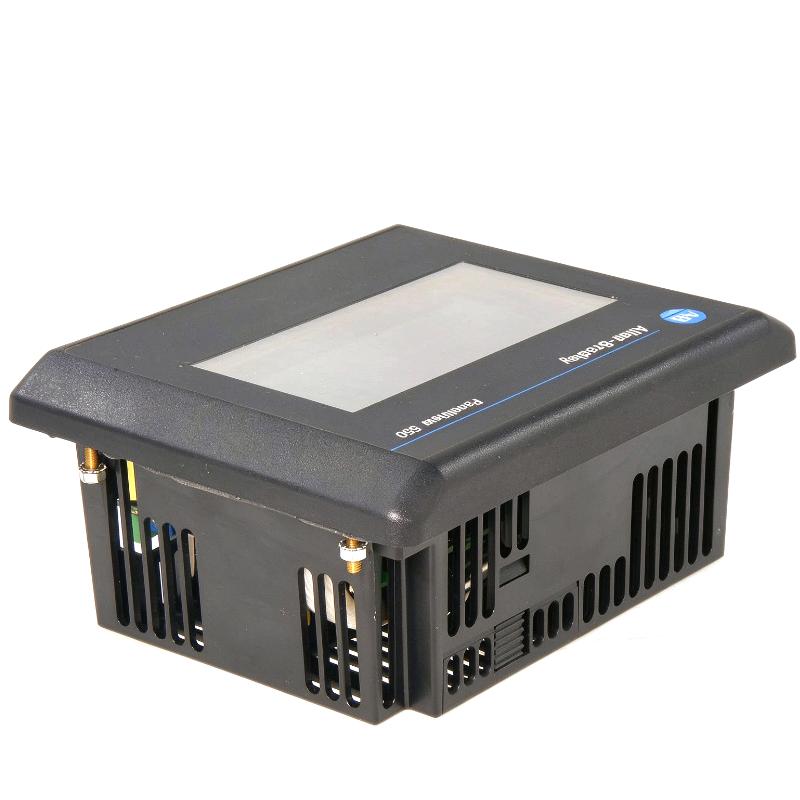
- Inspect the housing, mounting hardware, and rear connectors.
- Verify the original PanelBuilder32 application and controller configuration.
- Confirm dimensions and panel-cutout requirements for the touchscreen version.
- Establish whether the unit is new, unused surplus, used, or refurbished.
- Request clear product identification and confirmation of included accessories.
- Test the HMI-to-controller communication path before returning equipment to production.
For export procurement, dimensions and weight should be confirmed using the actual unit or its verified manufacturer documentation. Accurate product data helps avoid incorrect freight calculations, unsuitable replacements, and unnecessary returns.
12. Conclusion
The Allen-Bradley 2711-T5A8L1 PanelView 550 Operator Interface is a legacy industrial touchscreen HMI designed for operator interaction with compatible PLC-based automation systems. Its 5.5-inch monochrome display, 256 × 128 resolution, 24 V DC power supply, and RS-232 DH-485 communication configuration make it relevant to existing industrial installations that rely on the PanelView Standard platform.
For maintenance teams and spare-parts buyers, the most important selection criteria are the exact catalog number, communication interface, power rating, application compatibility, and physical mounting requirements. Particular care should be taken with dimensions and weight because the supplied listing does not match commonly published specifications for this touchscreen model.
By verifying the hardware configuration and preserving the correct application, industrial facilities can make more informed replacement decisions and reduce the risk of integration problems when maintaining legacy automation equipment.