

ProductPRODUCT
Featured products
Contact Us
- Schneider
- XBTGT5230
- Advanced Touchscreen Panel
- France
- 313 x 239 x 56 mm
- 3 kg
- Xiamen, China
- New & In Stock
- T/T, PayPal, Western Union
- 1 Year
- 1-3 Working Days
- DHL, UPS, TNT, FedEx and EMS.
- 24-Hour Service
- COO
- 9
Our advantage

Global Logistics
We have a 10-year logistics and express cooperation agreement, so our products can be shipped to any place in the world.

Brand new and original
Our products are imported in bulk from the place of origin. Because of the cooperative relationship, our products are all original and 100% new.

24-hour service
We provide 7*24 hours service to our customers. We will be there whenever you need us.

Price advantage
All our products are priced very favorably because we have our own warehouse and supply.
| Company Information | |||
| [email protected] | |||
| Mobile | +8615980777398 | ||
| +8615980777398 | |||
| 15980777398 |
Product Overview
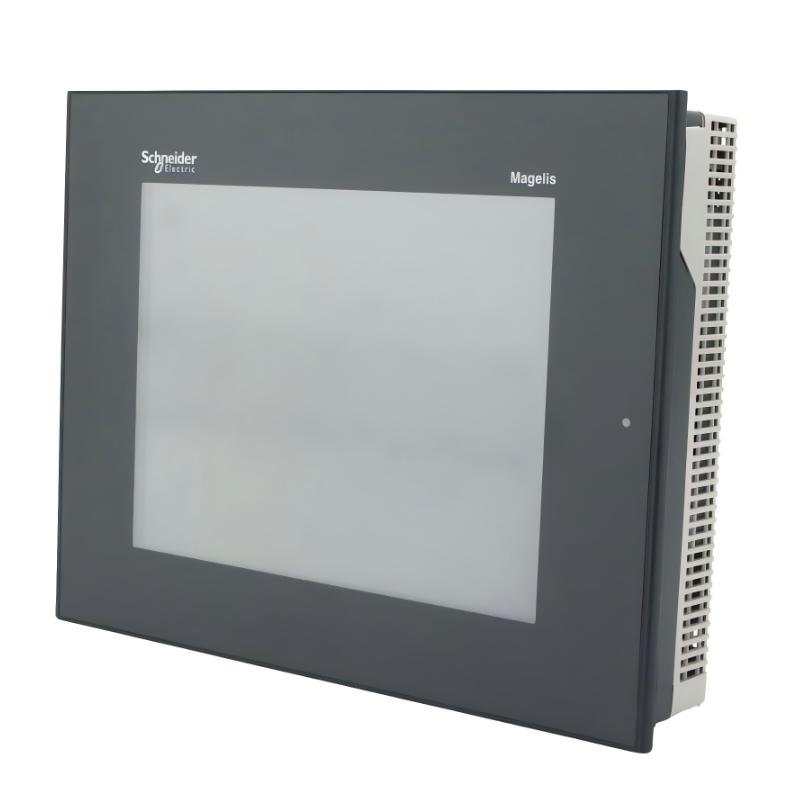
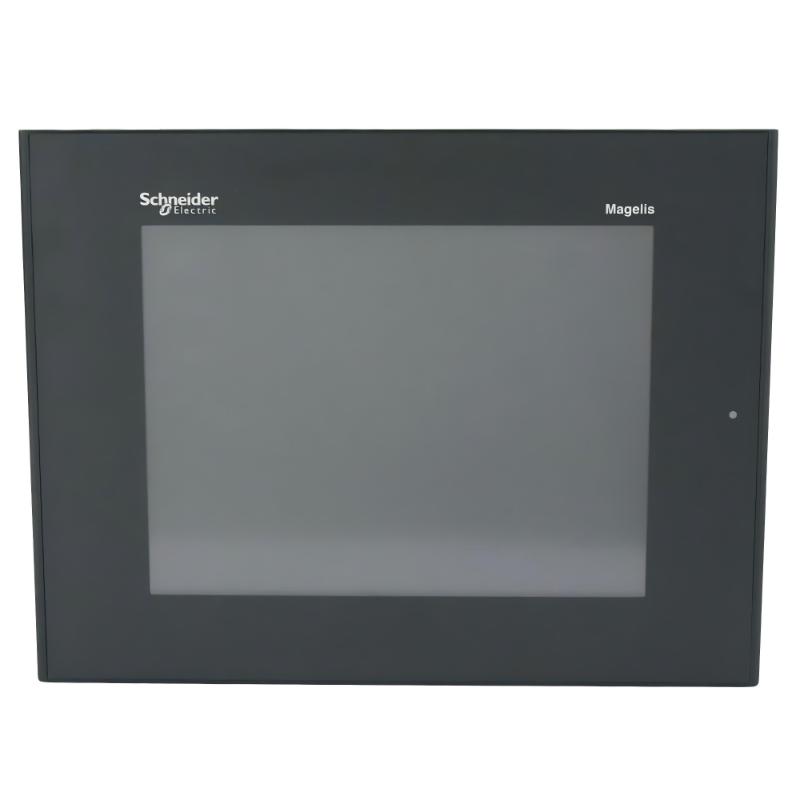
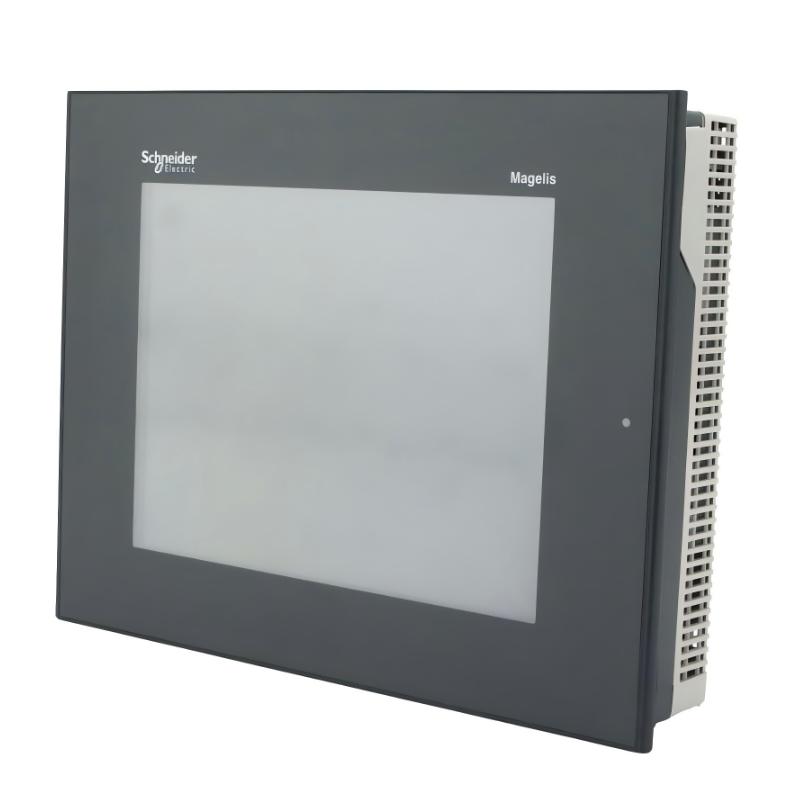
The Schneider Electric XBTGT5230 Advanced Touchscreen Panel is an industrial human-machine interface (HMI) designed to provide operators with a visual interface for monitoring and interacting with automated machinery and industrial processes. Belonging to the Magelis XBTGT product family, this panel combines a color touchscreen, communication interfaces, and application memory in a compact unit designed for control cabinet installation.
With a 10.4-inch display and 640 × 480 VGA resolution, the XBTGT5230 allows machine operators to view process information, equipment status, alarms, and operating parameters through a configured graphical interface. The panel supports applications developed using Schneider Electric Vijeo Designer software and can communicate with compatible PLCs, drives, and other automation devices through supported interfaces and protocols.
The XBTGT5230 is particularly relevant to industrial facilities operating established Schneider Electric automation systems. In these installations, the HMI serves as the operator-facing layer of the control architecture, allowing production personnel and maintenance technicians to access information generated by controllers and connected equipment.
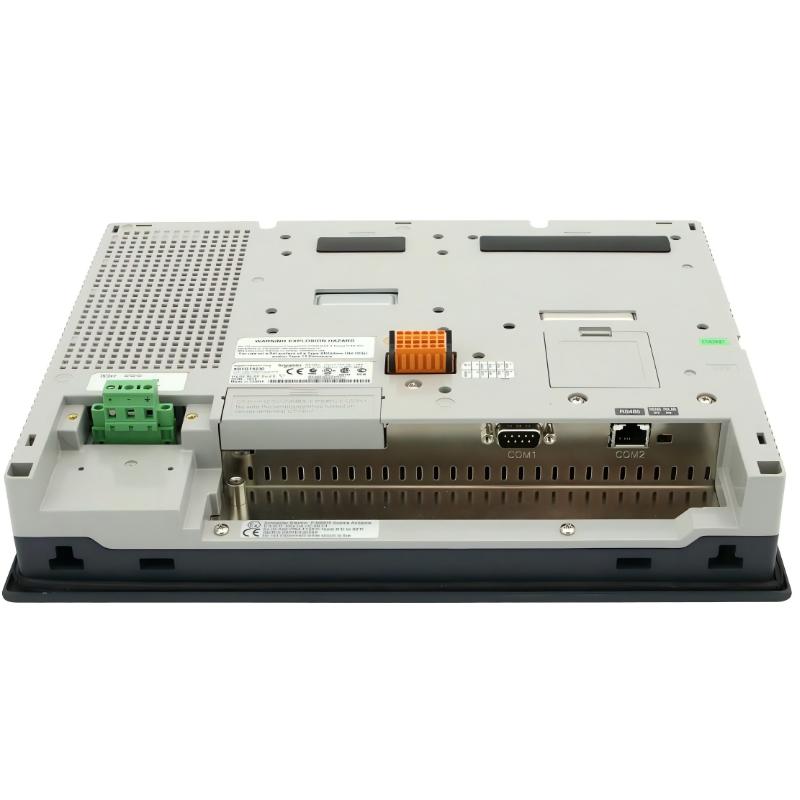
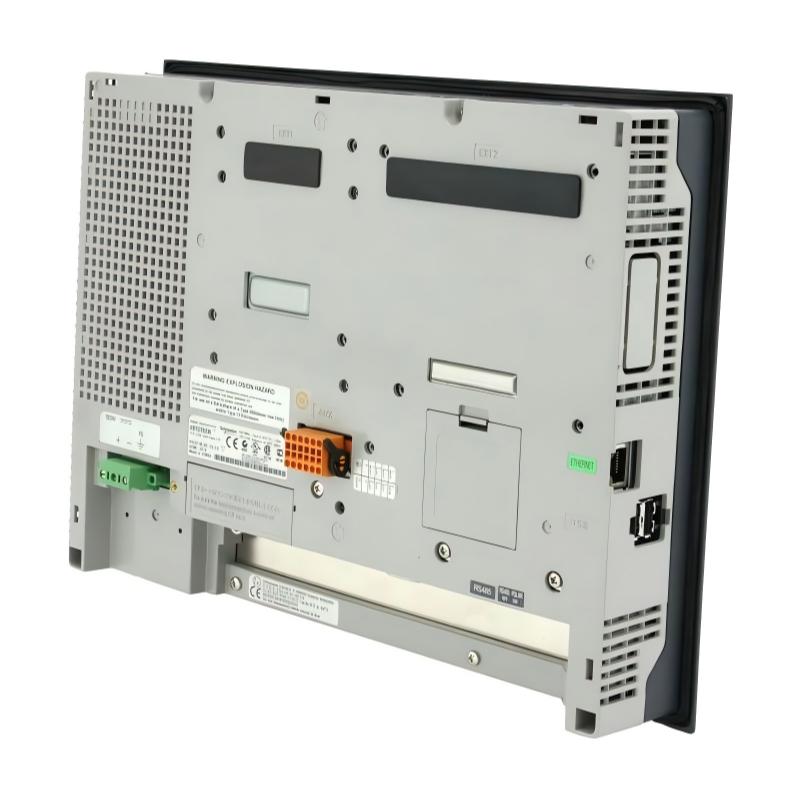
The product has external dimensions of 313 × 239 × 56 mm and a stated weight of 3 kg. It uses a 24 V DC external power supply and incorporates serial communication ports, Ethernet TCP/IP connectivity, and USB interfaces. These features support integration into a range of legacy industrial control architectures, subject to the capabilities of the connected equipment and the application configuration.
The panel is now a discontinued product. Schneider Electric lists replacement configurations involving Harmony GTU and Harmony GTO products. Organizations maintaining existing installations should therefore evaluate whether to source an original XBTGT5230 for maintenance purposes or undertake a planned migration to a newer HMI platform.
Technical Specifications
| Parameter | Specification |
|---|---|
| Manufacturer | Schneider Electric |
| Model | XBTGT5230 |
| Product type | Advanced touchscreen panel |
| Product family | Magelis XBTGT |
| Display size | 10.4 inches |
| Display type | Backlit color STN LCD |
| Display resolution | 640 × 480 pixels, VGA |
| Display colors | 4,096 colors |
| Touch technology | Analog touch panel |
| Touch-sensitive resolution | 1,024 × 1,024 |
| Rated supply voltage | 24 V DC |
| Supply voltage range | 19.2–28.8 V DC |
| Power consumption | 26 W |
| External dimensions | 313 × 239 × 56 mm |
| Stated weight | 3 kg |
| Processor | RISC CPU |
| Processor frequency | 266 MHz |
| Application memory | 32 MB flash EPROM |
| Backup memory | 512 KB SRAM with lithium battery backup |
| Configuration software | Vijeo Designer |
| Operating system | Magelis |
| COM1 interface | Male SUB-D 9; RS232C/RS422/RS485, up to 115.2 kbit/s |
| COM2 interface | RJ45 serial link; RS485, up to 187.5 kbit/s; Siemens MPI support at 187.5 kbit/s |
| Ethernet | RJ45 Ethernet TCP/IP |
| USB | Two USB Type-A host ports, USB 1.1 |
| Other integrated interfaces | Digital input, digital output, and audio output connections |
| Backlight service life | Approximately 54,000 hours under specified conditions |
| Mounting | Panel-mounted installation |
| Product status | Discontinued |
| Replacement options | Selected Harmony GTU and Harmony GTO configurations; migration assessment required |
Specifications are based on product documentation. Actual performance and compatibility depend on the installed application, connected equipment, configuration software version, and operating conditions.
Function and Working Principle
The XBTGT5230 operates as the visualization and operator-interaction layer of an industrial automation system. It does not replace the PLC or machine controller. Instead, it communicates with supported control devices and presents information through a graphical interface designed for the particular machine or process.
1. Graphical process visualization
The 10.4-inch color display provides a visual area for presenting machine diagrams, process values, equipment status, alarm messages, and operator controls. Application designers can organize information into screens that correspond to production stages, machine sections, or maintenance functions.
The 640 × 480 VGA resolution is suited to many traditional machine-interface layouts. Its 4,096-color STN display can distinguish interface elements such as status indicators, warnings, and operating modes when these are configured appropriately in the application.
The actual appearance and usability of the interface depend on the project created in Vijeo Designer, including screen layouts, fonts, symbols, and navigation logic.
2. Touchscreen operator input
The analog touchscreen allows operators to interact directly with configured screen elements. Depending on the application, these may include navigation buttons, numerical entry fields, operating commands, alarm acknowledgments, and parameter screens.
The panel translates touch input into interface events handled by the configured application. The application then communicates with the relevant controller or device when an operation requires a change in machine state.
Safety-critical functions should not rely solely on an HMI touchscreen. Emergency stops, safety interlocks, and other protective functions must be implemented through appropriate safety-rated hardware and validated control architecture.
3. Communication with PLCs and automation devices
The XBTGT5230 provides serial and Ethernet communication interfaces. These allow it to exchange data with supported automation devices according to the selected protocol and system configuration.
Serial communication can be used in installations based on RS232C, RS422, or RS485, subject to the selected port’s capabilities. Ethernet TCP/IP provides a network connection for compatible devices and supported application configurations.
The availability of a physical port does not guarantee compatibility with every controller. Protocol support, driver configuration, addressing, cable pinout, and firmware or software requirements must all be verified.
4. Application execution and memory
The panel contains 32 MB of flash EPROM application memory and 512 KB of SRAM with lithium battery backup. These resources support the operation and storage of the HMI application within the platform’s design limits.
Application size, screen complexity, data handling, and communication requirements should be evaluated during project development. When servicing an existing unit, technicians should preserve the original project files and confirm the correct Vijeo Designer environment before making changes.
5. Alarm and status presentation
An HMI can present alarms and operating conditions received from a connected controller. Depending on the application design, the XBTGT5230 can help operators identify abnormal conditions, review equipment status, and follow established troubleshooting procedures.
Alarm quality depends on the logic and data supplied by the control system. The panel itself does not independently determine the complete safety or operational state of the machine.
Role in Industrial Automation Systems
The XBTGT5230 occupies an important position between machine operators and the underlying automation architecture. It provides a common interface for viewing process information and issuing authorized commands through configured applications.
Human-machine interface for PLC systems
In a typical architecture, the PLC executes control logic and processes field inputs and outputs, while the HMI presents selected data to operators. The XBTGT5230 can display controller values, machine modes, alarms, and other information made available through supported communications.
This arrangement allows operators to work with the machine without accessing the PLC program directly for routine operations.
Equipment monitoring
Industrial machinery may require continuous observation of operating states, cycle progress, temperatures, pressures, speeds, or production counts. Where these values are made available by the controller, an HMI can organize them into readable screens.
The XBTGT5230’s color display and touch interface support this type of operator visualization in compatible installations.
Parameter access
Some automation applications allow operators or maintenance personnel to access device parameters through the HMI. Such functionality must be deliberately implemented in the project and supported by the connected equipment.
Access control and authorization should be configured appropriately, especially where a parameter change could affect equipment performance or process safety.
Troubleshooting support
Alarm screens, diagnostic pages, and equipment status indicators can help maintenance personnel identify the location and nature of a problem. This may reduce the time needed to locate a fault, provided the application has been designed to expose useful diagnostic information.
The HMI should be considered one source of diagnostic information rather than a substitute for PLC diagnostics, drive fault records, electrical testing, or the manufacturer’s service procedures.
Industrial Applications
1. Manufacturing and assembly machinery
Assembly lines often require operators to select operating modes, monitor cycle status, review faults, and coordinate production tasks. An HMI such as the XBTGT5230 can provide these functions when integrated with the machine’s PLC and configured application.
Typical examples include automated assembly stations, component handling equipment, and dedicated manufacturing machines.
2. Packaging equipment
Packaging machinery may use PLC-controlled conveyors, filling systems, sealing mechanisms, indexing units, and material-handling equipment. The HMI can present operating parameters, production counts, alarm messages, and operator commands.
The actual functions available depend on the machine program and the devices connected to the panel.
3. Process monitoring
Industrial processes may involve pumps, valves, motors, temperature control, and other equipment. A compatible HMI application can present selected process values and equipment states in an organized format.
The XBTGT5230 can be used in legacy systems where its communication interfaces and application software remain compatible with the installed control architecture.
4. Motor and drive systems
Industrial drives are often integrated with PLCs and operator interfaces to provide monitoring and authorized parameter access. The XBTGT5230 can serve as the operator interface for a supported application that communicates with compatible drives.
Engineers should verify the relevant drive protocol, communication interface, and project configuration before implementing this arrangement.
5. Water treatment and utility equipment
Pumping stations, treatment skids, and utility systems may use HMI panels to display equipment status, alarms, and process measurements. Where supported by the installed PLC and project, the XBTGT5230 can provide a local operator interface.
The panel should not be assumed to provide a specific control or reporting feature unless that feature is implemented in the application.
6. Legacy industrial control systems
The XBTGT5230 may be especially relevant to facilities that continue operating established machinery built around Magelis XBTGT hardware. In these environments, replacing a failed HMI with a verified compatible unit can help preserve the existing interface while reducing the immediate need for a complete control-system redesign.
Because the product is discontinued, long-term maintenance planning should include spare-part availability, project backups, and a potential migration strategy.
Installation and System Integration
Correct installation is important for reliable operation, adequate cooling, and safe maintenance.
1. Confirm the panel cutout
The documented cutout dimensions for the XBTGT5230 are approximately 301.5 × 227.5 mm, with the specified tolerances and corner-radius requirements to be confirmed in the installation drawing. The panel’s external dimensions are 313 × 239 × 56 mm.
Before fitting a replacement, measure the existing cabinet opening and verify panel thickness, mounting clearance, gasket condition, and the mechanical requirements in the product manual.
A similar-looking HMI may have different mounting dimensions, even when its screen size is also 10.4 inches.
2. Provide the correct power supply
The panel is rated for 24 V DC, with a documented supply range of 19.2–28.8 V DC. Confirm that the power supply can support the panel’s load and that the polarity and wiring meet the manufacturer’s requirements.
The documented power consumption is 26 W. The technical documentation also lists an inrush current of up to 30 A, so the supply and protection arrangement should be evaluated according to the manufacturer’s specifications rather than sized from steady-state power alone.
Isolate power before installation or wiring work, and follow the relevant electrical safety procedures.
3. Connect the appropriate communication interface
Select the serial or Ethernet interface according to the application design and connected device. For serial links, confirm whether RS232C, RS422, or RS485 is required and use the correct cable and pin assignment.
For Ethernet communication, verify the network configuration, addressing, protocol driver, and connected device support. Do not assume that a working physical link guarantees successful application-level communication.
4. Verify the application software
The XBTGT5230 is associated with Vijeo Designer. When commissioning a replacement panel, confirm the application version, project compatibility, required communication drivers, and any dependencies on the original hardware.
Keep a verified copy of the application project before making changes. If the original project is unavailable, rebuilding the HMI may require access to the machine’s functional specification, controller tags, screen definitions, and communication settings.
5. Maintain ventilation and mounting clearance
Schneider Electric installation guidance specifies keeping the unit at least 100 mm away from adjacent structures and other equipment for maintenance, operation, and ventilation. Confirm the applicable installation instructions for the exact mounting environment.
Avoid placing heat-generating devices directly against the rear of the panel, and ensure that cabinet temperature and ventilation remain within the permitted operating conditions.
6. Test after installation
After mounting and wiring, verify the power supply, display operation, touch response, communication status, and expected application behavior.
Test screen navigation, alarm presentation, and any authorized operator commands under controlled conditions. Before returning the machine to production, confirm that the HMI communicates correctly with the intended PLC or devices and that safety functions remain independent and operational as designed.
Compatible System Components
| Component | Function | Integration considerations |
|---|---|---|
| Schneider Electric Modicon PLCs | Execute machine or process control logic | Confirm supported protocol, port, and application driver |
| Compatible Schneider Electric drives | Control motor speed or motion | Verify drive communication options and project configuration |
| RS232C/RS422/RS485 devices | Provide serial communication | Match interface type, pinout, and communication settings |
| Ethernet TCP/IP devices | Exchange data over an industrial network | Confirm network settings and supported protocol |
| 24 V DC power supply | Supplies panel operating power | Confirm voltage range, load capacity, and protection |
| Vijeo Designer software | Develops and maintains HMI applications | Check project compatibility and software version |
| Industrial control cabinet | Provides mechanical installation and environmental protection | Verify cutout, panel thickness, clearance, and temperature |
| Approved communication cables | Connect the HMI to controllers and devices | Select the cable specified for the relevant interface and equipment |
Compatibility should be assessed for the complete system. A supported physical interface alone does not establish that a particular PLC, drive, or protocol will work with the panel’s application.
Recommended Replacement Models and Migration Considerations
The XBTGT5230 is discontinued. Schneider Electric lists replacement configurations based on the Harmony GTU and Harmony GTO product families.
| Replacement configuration | General description | Important considerations |
|---|---|---|
| HMIDT542 + HMIG3U | Harmony GTU display and base-unit configuration | Confirm display compatibility, mounting requirements, software migration, and supported interfaces |
| HMIGTO5310 | Harmony GTO advanced touchscreen panel | Compare display characteristics, project conversion requirements, communications, and physical installation |
| HMIDT542 + HMIG3U + associated accessories | Alternative GTU-based configuration as applicable | Confirm the complete bill of materials and required accessories with the supplier |
These are manufacturer-listed replacement configurations, not guaranteed direct drop-in substitutes. The appropriate choice depends on the machine, existing HMI project, communication drivers, cabinet layout, and required functionality.
Before planning a migration, review the following points:
- Application conversion: Determine whether the existing Vijeo Designer project can be migrated or requires modification.
- Communication compatibility: Confirm support for the installed PLC, drives, protocols, and cable arrangements.
- Mechanical fit: Compare cutout dimensions, mounting depth, and clearance.
- Power requirements: Check the new panel’s supply and wiring requirements.
- Operator interface: Evaluate screen layout, touch behavior, and operator workflow.
- Commissioning and validation: Plan testing of alarms, commands, interlocks, and communication behavior before returning the machine to service.
For a production-critical installation, a controlled migration plan is preferable to selecting a replacement based on screen size alone.
Key Advantages
Clear operator visualization
The 10.4-inch color display provides a dedicated screen area for machine status, alarms, operating values, and configured control functions.
Multiple communication options
The combination of serial interfaces and Ethernet TCP/IP supports integration with compatible automation devices, depending on the protocol and application design.
Established Magelis platform
For existing machinery built around the XBTGT family, the XBTGT5230 may help preserve the original operator-interface arrangement when a compatible replacement unit is available.
Compact panel-mounted design
The 313 × 239 × 56 mm external dimensions and panel-mounted construction make it suitable for installations designed around the original unit’s mechanical footprint.
Application-based flexibility
Vijeo Designer allows the HMI interface to be organized around the needs of the machine or process, within the hardware and software capabilities of the platform.
Useful for legacy equipment support
Although discontinued, the model remains relevant to maintenance teams that need to identify, service, or replace hardware in existing Magelis-based installations.
Technical FAQs
1. What is the Schneider Electric XBTGT5230?
The XBTGT5230 is an advanced touchscreen HMI from the Magelis XBTGT product family. It is designed to provide an operator interface for compatible industrial automation systems.
2. What is the display size and resolution?
It features a 10.4-inch backlit color STN LCD with a 640 × 480 VGA resolution and 4,096 display colors.
3. What are the dimensions and weight?
The stated external dimensions are 313 × 239 × 56 mm, and the stated weight is 3 kg. Check the mounting drawing for the cutout dimensions before installation.
4. What power supply does the XBTGT5230 require?
The panel uses a nominal 24 V DC external power supply. The documented operating range is 19.2–28.8 V DC.
5. Which software is used to configure the panel?
The XBTGT5230 is associated with Schneider Electric Vijeo Designer. Confirm software version and project compatibility before attempting to edit or download an application.
6. Does the XBTGT5230 support Ethernet?
Yes. Product documentation lists an RJ45 Ethernet TCP/IP interface. The actual communication functions depend on the connected equipment, supported protocols, and application configuration.
7. Which serial interfaces are available?
Documentation lists a male SUB-D 9 COM1 interface supporting RS232C, RS422, and RS485 up to 115.2 kbit/s, and an RJ45 COM2 RS485 interface up to 187.5 kbit/s. Siemens MPI at 187.5 kbit/s is also listed for COM2. Verify the relevant port settings in the product manual.
8. Is the XBTGT5230 discontinued?
Yes. Schneider Electric’s regional product listings show the model as discontinued, although the listed dates vary by region. Buyers should confirm local availability and service status before ordering.
9. What replaces the XBTGT5230?
Schneider Electric lists configurations involving the Harmony GTU HMIDT542 display and HMIG3U base unit, as well as the Harmony GTO HMIGTO5310 panel. The appropriate configuration depends on the application and installation requirements.
10. Can a newer HMI use the original project directly?
Not necessarily. Project conversion, communication-driver changes, screen adjustments, or other engineering work may be required. Confirm compatibility with the target hardware and software before beginning a migration.
11. What should be checked when replacing a failed unit?
Check the exact model number, project backup, cutout dimensions, supply requirements, communication cables, controller compatibility, and replacement-panel documentation. Validate the application and machine functions after installation.
12. Is the HMI suitable for safety-critical control?
The HMI may present safety-related status information when appropriately integrated, but it should not be treated as a substitute for safety-rated control hardware. Safety functions must be implemented and validated using the appropriate safety architecture.
Procurement and Maintenance Recommendations
When sourcing the Schneider Electric XBTGT5230, confirm the exact model reference, product condition, included accessories, and regional availability. Since the product is discontinued, availability may depend on remaining stock and industrial spare-parts suppliers.
For used or refurbished units, request clear photographs of the model label, front display, rear connectors, and mounting surface. Where possible, ask the supplier to confirm that the touchscreen, display backlight, communication ports, and power input have been tested.
Maintenance teams should preserve the original Vijeo Designer project and record the PLC models, communication settings, cable references, and relevant firmware information. These records can significantly reduce recovery time if the HMI fails.
If an original replacement is unavailable, assess the manufacturer’s listed replacement configurations as part of a planned engineering review. Confirm mechanical fit, communication compatibility, application conversion, and commissioning requirements before committing to a replacement.
A successful HMI replacement involves more than restoring the display. The operator screens, alarm behavior, commands, communication links, and safety-related interfaces must all be checked to ensure that the machine behaves as intended.
Conclusion
The Schneider Electric XBTGT5230 Advanced Touchscreen Panel is a 10.4-inch Magelis HMI designed for industrial visualization and operator interaction. With a 640 × 480 VGA color STN display, 24 V DC supply, serial communication interfaces, Ethernet TCP/IP, and Vijeo Designer support, it can serve as the operator interface for compatible PLC-based automation systems.
Its stated dimensions of 313 × 239 × 56 mm and weight of 3 kg are useful for identifying the original unit and planning maintenance or replacement work.
Because the XBTGT5230 is discontinued, organizations should verify availability and preserve the existing application project. When replacement is necessary, the Harmony GTU and Harmony GTO configurations listed by Schneider Electric provide options for further evaluation, but the final choice should be based on the complete application, communication, and installation requirements.