

ProductPRODUCT
Featured products
Contact Us
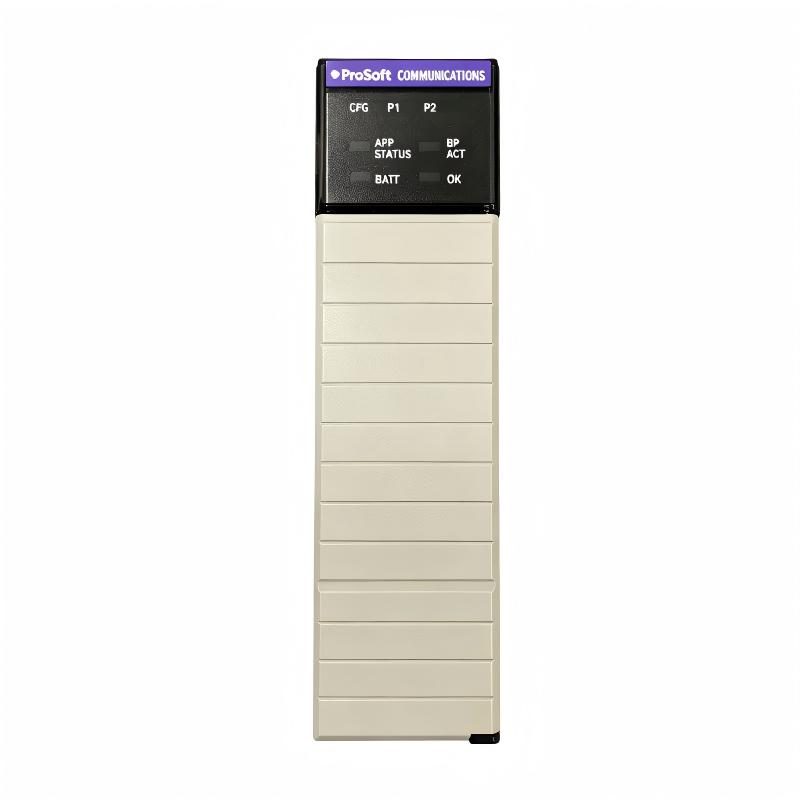
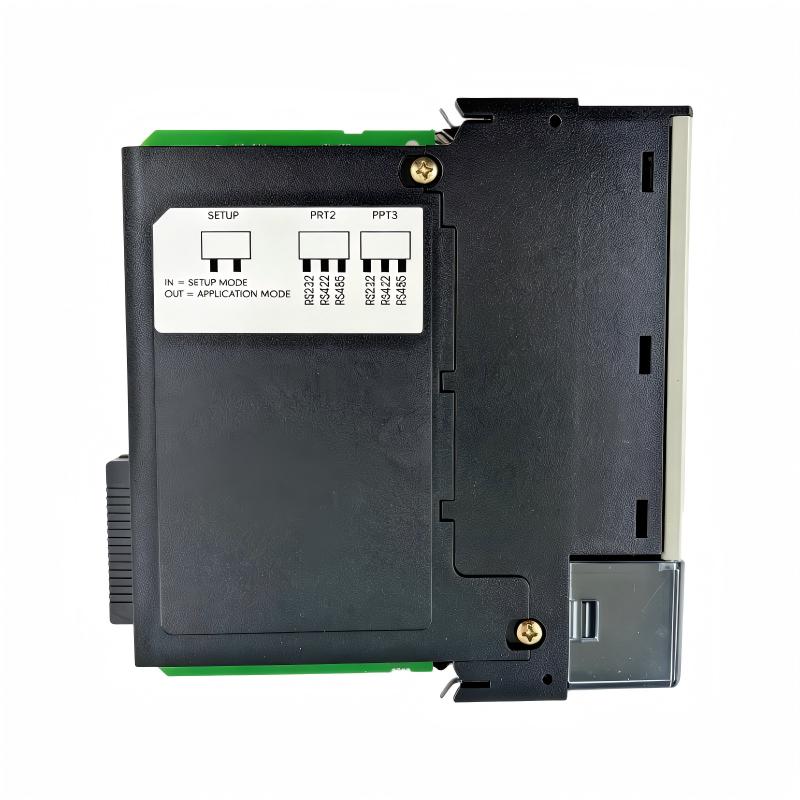
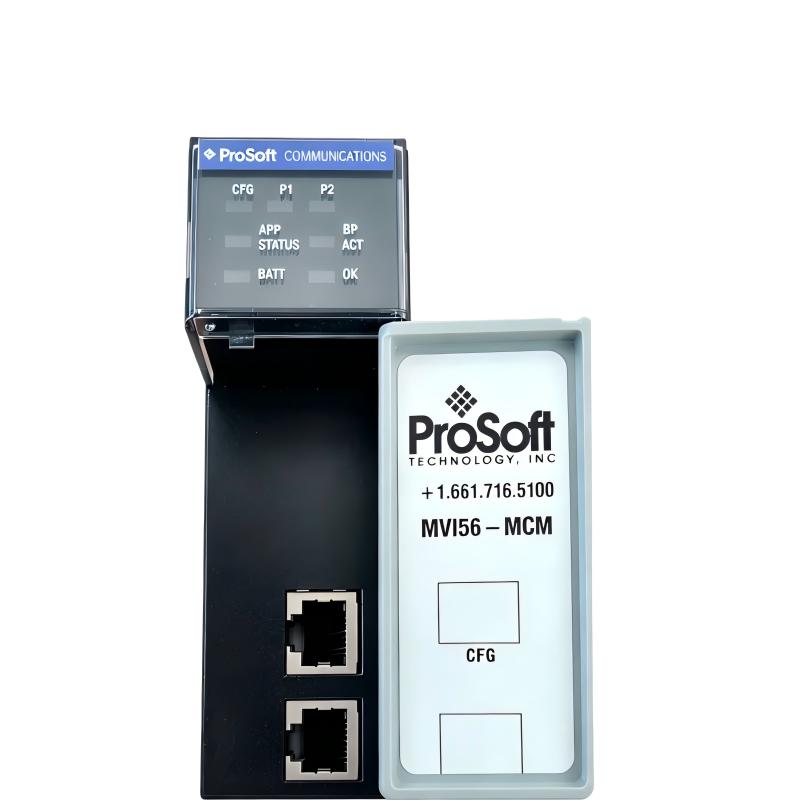
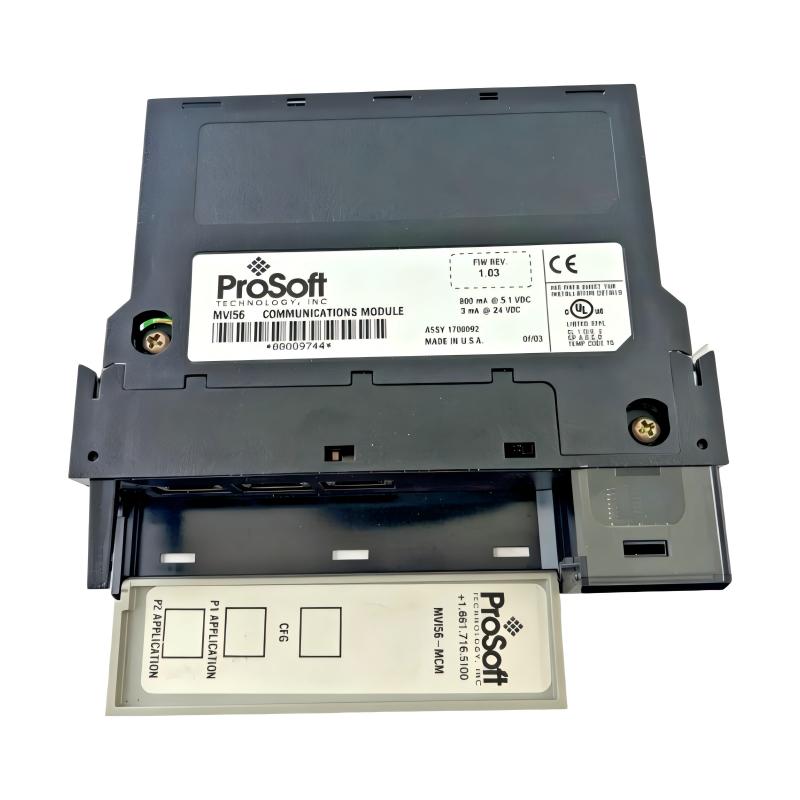
- Allen Bradley
- MV156-MCM
- Modbus Communication Module
- USA
- 139 x 34 x 145 mm
- 0.23 kg
- Xiamen, China
- New & In Stock
- T/T, PayPal, Western Union
- 1 Year
- 1-3 Working Days
- DHL, UPS, TNT, FedEx and EMS.
- 24-Hour Service
- COO
- 3
Our advantage

Global Logistics
We have a 10-year logistics and express cooperation agreement, so our products can be shipped to any place in the world.

Brand new and original
Our products are imported in bulk from the place of origin. Because of the cooperative relationship, our products are all original and 100% new.

24-hour service
We provide 7*24 hours service to our customers. We will be there whenever you need us.

Price advantage
All our products are priced very favorably because we have our own warehouse and supply.
| Company Information | |||
| [email protected] | |||
| Mobile | +8615980777398 | ||
| +8615980777398 | |||
| 15980777398 |
1. Product Overview
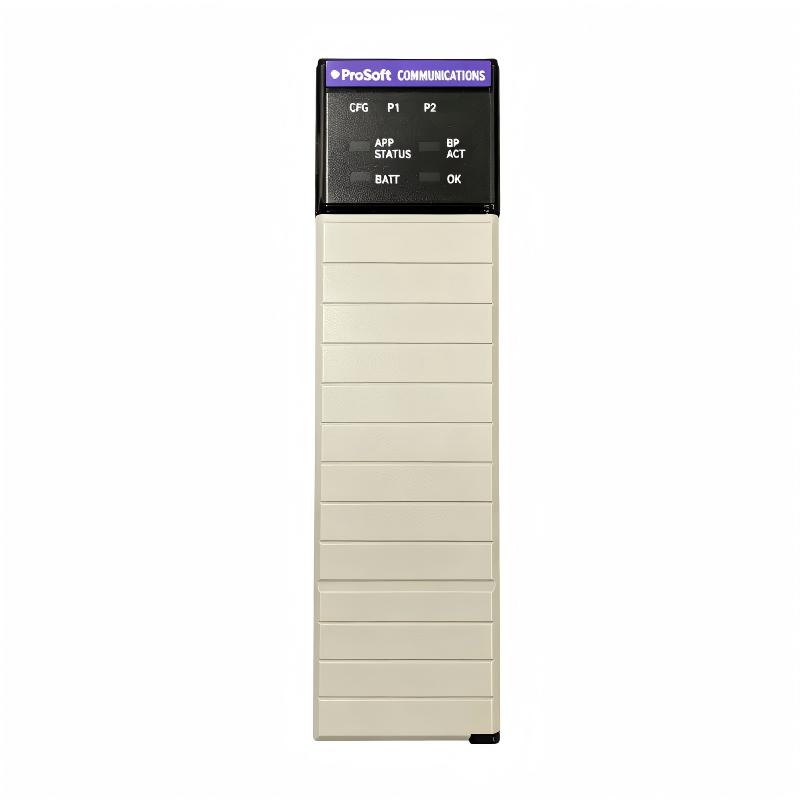
The ProSoft MV156-MCM Modbus Communication Module is an industrial communication interface designed to connect compatible Rockwell Automation FLEX I/O systems with devices that use the Modbus serial communication protocol. It helps integrate equipment from different manufacturers into a coordinated automation architecture, allowing controllers to exchange process data with field devices and legacy systems.
In industrial environments, different devices may use different communication protocols. A PLC may communicate with a supervisory system through one network while instruments, power meters, drives, or other controllers use Modbus RTU or Modbus ASCII over serial connections. A compatible communication module helps bridge these systems, reducing the need for extensive changes to existing field equipment.
The MV156-MCM is designed for integration with the FLEX I/O platform. Depending on the configured application and system architecture, it can support Modbus master and slave communication, enabling data exchange between the control system and compatible Modbus devices.
The module can be useful in industrial process monitoring, equipment integration, utilities, manufacturing, and automation modernization projects. Its role is not to perform the primary control function of a PLC, but to provide a communication interface that makes external device data available to the automation system.
The product is identified as MV156-MCM, with supplied physical dimensions of 139 × 34 × 145 mm and a stated weight of 0.23 kg. Buyers should confirm the exact mechanical envelope and whether the quoted weight represents the module alone or the complete supplied assembly before installation or shipment.
For maintenance engineers and system integrators, confirming the module’s platform compatibility is essential. The MV156-MCM should not be assumed to be interchangeable with similarly named Modbus modules designed for ControlLogix or other hardware platforms.
2. Technical Specifications
| Parameter | Specification |
|---|---|
| Manufacturer | ProSoft Technology |
| Model Number | MV156-MCM |
| Product Type | Modbus Communication Module |
| Compatible Automation Platform | Rockwell Automation FLEX I/O, subject to exact system compatibility |
| Communication Protocols | Modbus RTU and Modbus ASCII |
| Communication Role | Modbus master and/or slave, according to configuration |
| Serial Communication | Serial interface; confirm port and physical-layer details against the module documentation |
| Dimensions | 139 × 34 × 145 mm, as supplied |
| Weight | 0.23 kg, as supplied |
| Typical Application | Data exchange between FLEX I/O-based control systems and Modbus-compatible devices |
| Configuration | Module-specific software and controller configuration |
| Installation | Compatible FLEX I/O mounting arrangement; verify the required base and system hardware |
Important specification note: The dimensions and weight above are based on the supplied product information. Published product listings for MV156-MCM may provide different shipping-weight figures, so the module’s net weight and installed dimensions should be verified for the specific unit. Electrical ratings, serial-port wiring, supported communication settings, and terminal-base compatibility should also be confirmed using the documentation for the exact model.
3. Function and Working Principle
3.1 Modbus Communication
Modbus is an industrial communication protocol used to exchange data between controllers, instruments, drives, meters, and other automation devices. It provides a structured method for reading and writing data such as operating status, measured values, command registers, and alarms.
The MV156-MCM provides a communication interface between compatible FLEX I/O control hardware and a Modbus network. When configured correctly, it can help the control system access data from external devices without requiring each device to use the same communication architecture.
Two common Modbus serial formats are Modbus RTU and Modbus ASCII. RTU represents messages in a compact binary format and typically uses CRC-based error checking. ASCII represents message information using readable hexadecimal characters and uses its own message framing and error-checking method.
The correct protocol must be selected according to the configuration of the connected device. A master and its slave devices must use compatible communication parameters, including baud rate, parity, data bits, and stop bits.
3.2 Master and Slave Operation
Modbus master and slave roles describe how devices initiate and respond to communication requests.
In a typical master configuration, the module initiates requests to other Modbus devices. It may read data registers, obtain equipment status, or write permitted values to remote devices according to the configured command and device address.
In a slave configuration, the module responds to requests from a remote Modbus master. The information made available to the master depends on the module configuration and the data mapping implemented in the automation system.
These roles make the module useful in different system designs. For example, an automation controller may need to collect measurements from several power meters, or a supervisory system may need to access selected values provided by a control system.
The actual communication capabilities and configuration options must be checked against the exact MV156-MCM documentation before implementation.
3.3 Data Mapping Between Systems
Communication alone is not sufficient to make data useful to a PLC. The controller must know where incoming information is stored and how that information relates to the external device’s register map.
Data mapping defines the relationship between Modbus registers or coils and the tags, variables, or memory locations used by the automation application.
A typical integration process includes:
- Identifying the required values from each external device.
- Confirming the device’s Modbus address and register map.
- Selecting the correct read or write operations.
- Configuring the communication parameters.
- Mapping received information into controller-accessible data.
- Testing the values against the actual device.
- Implementing appropriate error handling and data-quality checks.
Incorrect register offsets, data types, word order, or scaling can cause a system to display incorrect measurements even when serial communication is functioning normally.
3.4 Communication Diagnostics
Industrial communication modules typically provide status indicators or diagnostic information that helps engineers identify operating conditions and communication problems. The exact indicators and diagnostic functions available should be confirmed for the MV156-MCM revision in use.
During troubleshooting, engineers may need to check module status, serial activity, communication parameters, slave addresses, wiring polarity, grounding, and the quality of the received data.
Diagnostics are particularly valuable in installations with several devices on the same serial network. A communication fault may affect only one device, a group of devices, or the entire network depending on the cause.
A structured diagnostic process can help distinguish configuration errors from physical-layer problems and controller-side data-mapping issues.
4. Role in Industrial Automation Systems
The MV156-MCM functions as a communication interface within a larger industrial control architecture. It enables data exchange between compatible FLEX I/O systems and Modbus-compatible equipment, supporting integration between control hardware and field devices.
4.1 PLC and Field Device Integration
A PLC-based control system may need to obtain operating information from devices that communicate through Modbus serial interfaces. These devices can include meters, instruments, drives, and third-party controllers.
The communication module provides a path for exchanging information so that the controller can use external measurements and status data in its application logic.
For example, a PLC may use a meter’s measured voltage or current as an input to monitoring logic, or read the operating status of a drive before allowing a production sequence to continue.
4.2 Legacy Equipment Modernization
Industrial facilities often retain equipment that remains mechanically reliable but uses an older communication interface. Replacing all such equipment may be costly or operationally disruptive.
A compatible Modbus interface can help integrate selected legacy devices into a newer automation architecture. This may allow operators to retain existing field equipment while making relevant process information available to a controller or supervisory system.
The feasibility of such an upgrade depends on the legacy device’s protocol implementation, register documentation, electrical interface, and the capabilities of the communication module.
4.3 Supervisory Monitoring
Data exchanged through the module may be used by supervisory applications for monitoring, alarm processing, reporting, or operational analysis.
The communication module does not independently create a complete SCADA system. Instead, it provides an interface through which compatible controller and field-device data can become available to the wider automation architecture.
Appropriate controller programming, data validation, alarm logic, and supervisory configuration remain necessary.
4.4 Interoperability Between Manufacturers
Industrial plants often contain equipment from several manufacturers. A communication interface that supports a common protocol such as Modbus can help reduce integration complexity.
Interoperability still requires careful configuration. Devices may differ in register layout, data representation, supported function codes, and the meaning of individual values. Engineers must verify these details before using external data in control logic.
5. Industrial Applications
5.1 Process Automation
Process facilities use a wide range of instruments and controllers to monitor variables such as temperature, pressure, flow, and equipment status.
Where these devices support compatible Modbus communication, the MV156-MCM may be evaluated as an interface for transferring selected process information to a FLEX I/O-based control system.
Applications can include process monitoring, auxiliary equipment integration, and the collection of operational data from third-party instruments.
5.2 Power Distribution and Energy Monitoring
Power meters and selected electrical monitoring devices commonly provide measurement and status information through industrial communication interfaces.
A suitable Modbus integration may allow the automation system to read values such as electrical measurements, energy counters, and alarm states. These values can support operational monitoring, reporting, and maintenance analysis.
The exact information available depends on the connected meter’s register map and supported communication functions.
5.3 Variable Frequency Drives and Motor Systems
Some variable frequency drives expose control and monitoring registers through Modbus. A compatible communication arrangement can allow a controller to read selected drive status values or issue permitted commands.
Before using Modbus for drive control, engineers must verify the drive’s protocol implementation, control-word definitions, operating modes, fault behavior, and safety architecture.
A standard communication module should not be treated as a replacement for a required safety-rated control system.
5.4 Water and Wastewater Systems
Water treatment and wastewater installations may contain instruments, analyzers, packaged equipment, and remote controllers from different suppliers.
Where compatible Modbus devices are used, the MV156-MCM may help bring selected equipment data into a FLEX I/O-based automation system. This can support monitoring and process integration without requiring every device to use the same communication interface.
Network design should account for cable routing, electrical noise, device addressing, and the impact of communication loss on process operation.
5.5 Manufacturing and Production Lines
Manufacturing systems often combine PLC-controlled machinery with meters, drives, temperature controllers, and other specialized devices.
A Modbus communication interface can help exchange operating information between these devices and the primary control system. Such data may be used for production monitoring, machine sequencing, maintenance alarms, and operational reporting.
Successful integration requires accurate register mapping and testing under representative operating conditions.
5.6 Oil, Gas, and Industrial Utilities
Utility and process installations may use Modbus-capable instruments and controllers to expose measurements, operating status, or alarm information.
The MV156-MCM can be considered for suitable system architectures where the required FLEX I/O hardware and Modbus interface are compatible. Environmental conditions, electrical isolation, network reliability, and application safety requirements should be reviewed before deployment.
6. Installation and System Integration
Correct installation and configuration are important for stable communication and reliable control-system operation. The module should be installed by qualified personnel in accordance with the applicable product documentation and site procedures.
6.1 Verify Platform Compatibility
Before installation, confirm that the MV156-MCM is supported by the intended FLEX I/O system and that the required mounting base, adapter, power arrangement, and controller configuration are available.
Do not assume that modules with similar model names are interchangeable. Products intended for FLEX I/O, ControlLogix, and other platforms can have different mechanical interfaces, backplane requirements, and configuration procedures.
6.2 Mounting and Mechanical Inspection
Inspect the module housing, connectors, mounting features, and any supplied accessories before installation.
Confirm the dimensions of the physical unit and the available enclosure space. The supplied dimensions are 139 × 34 × 145 mm, but the required installation envelope may also depend on the terminal base, wiring clearance, adjacent modules, and cable bend radius.
Ensure that the module is properly secured to the compatible mounting hardware and that it can be accessed for maintenance.
6.3 Serial Wiring
The electrical interface and wiring method must be confirmed using the documentation for the exact MV156-MCM version and installation arrangement.
For serial Modbus networks, check the following items:
- Correct physical interface and cable type.
- Appropriate RS-232, RS-422, or RS-485 arrangement where supported.
- Correct signal polarity and terminal assignments.
- Appropriate cable shielding and grounding.
- Device addressing and network topology.
- Cable length and routing requirements.
- Separation from high-voltage and high-noise wiring.
Do not infer the port pinout from another ProSoft communication module. Use the specific wiring diagram for the MV156-MCM and connected devices.
6.4 Communication Configuration
The module and each connected Modbus device must use compatible communication settings. Typical settings include protocol mode, baud rate, parity, data bits, stop bits, and device address.
The correct values should be obtained from the field-device configuration or technical documentation. A mismatch in any of these settings can prevent successful communication.
Where the system supports master operation, configure the required requests and polling behavior. Where slave operation is used, verify the data made available to the remote master and confirm that the expected requests are supported.
6.5 Register Mapping and Data Validation
Before relying on received values in control logic, verify the external device’s register map and the controller’s data mapping.
Particular attention should be paid to:
- Register addressing conventions and offsets.
- Data types and signed or unsigned values.
- 16-bit and 32-bit data arrangements.
- Byte and word ordering.
- Scaling factors and engineering units.
- Read-only and writable register behavior.
- Invalid or stale data during communication faults.
Compare the controller’s values with the device’s local display or another trusted reference. This helps identify mapping errors before the information is used for process decisions.
6.6 Commissioning and Troubleshooting
After installation, perform a structured commissioning procedure. Confirm the module’s operating status, verify serial communication, check representative register values, and test the system response to communication errors.
If communication fails, investigate the problem systematically:
- Confirm the module and FLEX I/O hardware are compatible.
- Check the power supply and module seating.
- Verify serial wiring and terminal assignments.
- Confirm protocol settings and device addresses.
- Review register addresses and data formats.
- Examine available module and controller diagnostics.
- Test the connection with a known-good device or cable where appropriate.
Before returning the system to service, confirm that the controller handles communication loss safely and that the application does not rely on stale or invalid data.
7. Compatible System Components
The MV156-MCM must be integrated with compatible hardware and software. The following table outlines component categories commonly evaluated during system design.
| Component | Function | Selection Considerations |
|---|---|---|
| Compatible FLEX I/O mounting base | Provides the module’s physical and electrical installation interface | Confirm exact base compatibility and mounting arrangement |
| FLEX I/O adapter | Connects the I/O system to the control network or host architecture | Verify the adapter, controller, and backplane arrangement |
| PLC or automation controller | Processes exchanged data and executes control logic | Confirm the supported FLEX I/O architecture and application requirements |
| Modbus-compatible field device | Supplies or receives data over the serial network | Verify protocol mode, register map, device address, and supported functions |
| Serial communication cable | Carries Modbus messages between devices | Match the physical interface, cable type, wiring, and shielding |
| Configuration and programming software | Supports setup and monitoring of the applicable automation system | Use the software and configuration method specified for the module |
| Industrial power supply | Supplies power to the I/O assembly and associated modules | Check system voltage, current capacity, and applicable power-budget requirements |
| Supervisory monitoring system | Uses controller data for visualization, alarms, and reporting | Confirm the controller communication path and data mapping |
This table describes functional component categories, not a guarantee that every product in each category is compatible. Exact catalog numbers and system requirements should be confirmed before procurement.
8. Recommended Alternative Models and Replacement Considerations
When the MV156-MCM is unavailable or a system redesign is being considered, alternative communication modules should be selected according to the host platform, required protocol, serial interface, and data-exchange architecture.
| Candidate | Platform or Role | Important Consideration |
|---|---|---|
| MV156-MCM | FLEX I/O Modbus communication module | Original reference model |
| MVI94-MCM | ProSoft Modbus module for FLEX I/O applications | Different product model; confirm mechanical, electrical, and application compatibility |
| MVI56-MCM | ProSoft Modbus module for ControlLogix | Designed for a different platform and not a direct replacement for FLEX I/O hardware |
| MVI56E-MCM | Enhanced Modbus communication module for ControlLogix | Uses a different platform interface and configuration architecture |
| MVI56E-MCMR | ControlLogix Modbus module with reduced data block | Different host platform and data-transfer architecture |
These candidates are not direct substitutes merely because they support Modbus. The MV156-MCM belongs to a specific product and platform context. A replacement must be checked for mounting compatibility, backplane interface, serial-port characteristics, controller support, configuration software, and data mapping.
Where the original module is used in an established machine, replacing it with a different model may require changes to wiring, controller configuration, and application logic. Engineering validation should be completed before making such a substitution.
9. Key Advantages
Modbus Device Integration
The module supports integration between compatible FLEX I/O control systems and Modbus-compatible equipment. This helps facilitate data exchange across different device types and manufacturers.
Support for Industrial Serial Communication
Modbus RTU and ASCII are used in many industrial devices. A compatible interface can help integrate existing instruments, meters, drives, and controllers into a broader automation system.
Support for Master and Slave Applications
Depending on the exact configuration, master and slave operating roles can support different communication architectures. The required role and supported functions should be verified for the specific application.
Industrial Automation Compatibility
Designed for use in the relevant FLEX I/O architecture, the module can form part of an established industrial control installation when the host hardware and configuration are compatible.
Assistance with Legacy Equipment Integration
The module may help retain useful Modbus-capable equipment during a modernization project, reducing the need to replace every field device simply because the controller architecture differs.
Compact Communication Interface
The supplied dimensions of 139 × 34 × 145 mm provide a reference for planning installation space. Final clearance requirements should include the mounting base, connectors, wiring, and maintenance access.
10. Technical FAQs
Q1: What is the MV156-MCM?
The MV156-MCM is a ProSoft Technology Modbus Communication Module intended for integration with compatible Rockwell Automation FLEX I/O systems.
Q2: What is the main function of this module?
Its main function is to provide a communication interface between compatible FLEX I/O hardware and Modbus-compatible devices, enabling the exchange of process data and status information.
Q3: Does the MV156-MCM support Modbus RTU and ASCII?
The product is listed for Modbus RTU and ASCII applications. The specific configuration, supported functions, and communication parameters should be confirmed using the documentation for the exact module.
Q4: Can it operate as a Modbus master or slave?
The module is described for master and slave communication applications. The required operating role must be configured according to the connected devices and the control-system architecture.
Q5: What are its dimensions and weight?
The supplied product information lists dimensions of 139 × 34 × 145 mm and a weight of 0.23 kg. Verify the exact module dimensions and net weight with the physical unit or supplier, particularly if shipping weight is required.
Q6: Can the MV156-MCM be installed in any Allen-Bradley rack?
No. It is associated with the FLEX I/O platform and must be installed using compatible hardware. It should not be assumed to fit ControlLogix chassis or other Allen-Bradley platforms.
Q7: Can it communicate with devices from other manufacturers?
It can be used with compatible Modbus devices, provided that the protocol mode, serial interface, communication settings, register map, and supported functions match the application.
Q8: What should be checked if communication fails?
Check platform compatibility, module power, physical wiring, serial settings, device address, register mapping, and available diagnostics. Compare the configuration with the connected device’s technical documentation.
Q9: Can the MV156-MCM be replaced with an MVI56-MCM?
Not as a direct drop-in replacement. The MVI56-MCM is designed for the ControlLogix platform, while the MV156-MCM is associated with FLEX I/O. A change of platform may require different hardware, wiring, configuration, and application logic.
Q10: What information should be confirmed before purchasing?
Confirm the complete model number, physical condition, module dimensions, weight, terminal-base compatibility, serial interface, supported protocol modes, and the required accessories. For an existing installation, identify the host adapter and controller architecture as well.
11. Procurement and Replacement Considerations
When sourcing the MV156-MCM for industrial maintenance or automation projects, use the complete model number in the purchase inquiry. Modules with similar product names may be designed for different host platforms, making model verification particularly important.
Request clear photographs of the module label, connectors, mounting features, and overall condition. If the product is used or refurbished, ask the supplier to clarify its test status, warranty terms, return conditions, and included accessories.
For replacement projects, compare the module with the existing installation before ordering. Verify the compatible FLEX I/O base, adapter, controller configuration, serial interface, and software requirements. A module that supports the same communication protocol may still be unsuitable if its host interface differs.
The stated weight of 0.23 kg should be treated as the supplied product value. Confirm the net weight and shipping weight separately when planning freight, packaging, or inventory handling.
For international procurement, protective packaging should prevent damage to connectors and mounting features during transit. Buyers should also confirm lead time, delivery terms, and the documentation required for receiving and installing the module.
12. Conclusion
The ProSoft MV156-MCM Modbus Communication Module provides a communication interface for integrating compatible FLEX I/O-based automation systems with Modbus-compatible industrial devices. Its primary value is enabling data exchange between control hardware and external equipment that uses supported serial Modbus communication.
Potential applications include process monitoring, energy measurement, drive integration, manufacturing, utilities, and legacy-system modernization. Successful deployment depends on selecting compatible FLEX I/O hardware, correctly configuring the communication parameters, validating register mapping, and checking the complete system architecture.
For maintenance and replacement work, the exact module model and platform compatibility should be verified before procurement. Careful selection and commissioning help reduce communication errors, minimize unnecessary system changes, and support reliable industrial automation operation.