

ProductPRODUCT
Featured products
Contact Us
- Siemens
- 6AG1141-5BG37-4FA0
- Rail-Mounted Industrial Computer
- Germany
- 262 × 55.5 × 139.7 mm
- 2.772 kg
- Xiamen, China
- New & In Stock
- T/T, PayPal, Western Union
- 1 Year
- 1-3 Working Days
- DHL, UPS, TNT, FedEx and EMS.
- 24-Hour Service
- COO
- 7
Our advantage

Global Logistics
We have a 10-year logistics and express cooperation agreement, so our products can be shipped to any place in the world.

Brand new and original
Our products are imported in bulk from the place of origin. Because of the cooperative relationship, our products are all original and 100% new.

24-hour service
We provide 7*24 hours service to our customers. We will be there whenever you need us.

Price advantage
All our products are priced very favorably because we have our own warehouse and supply.
| Company Information | |||
| [email protected] | |||
| Mobile | +8615980777398 | ||
| +8615980777398 | |||
| 15980777398 |
Product Overview
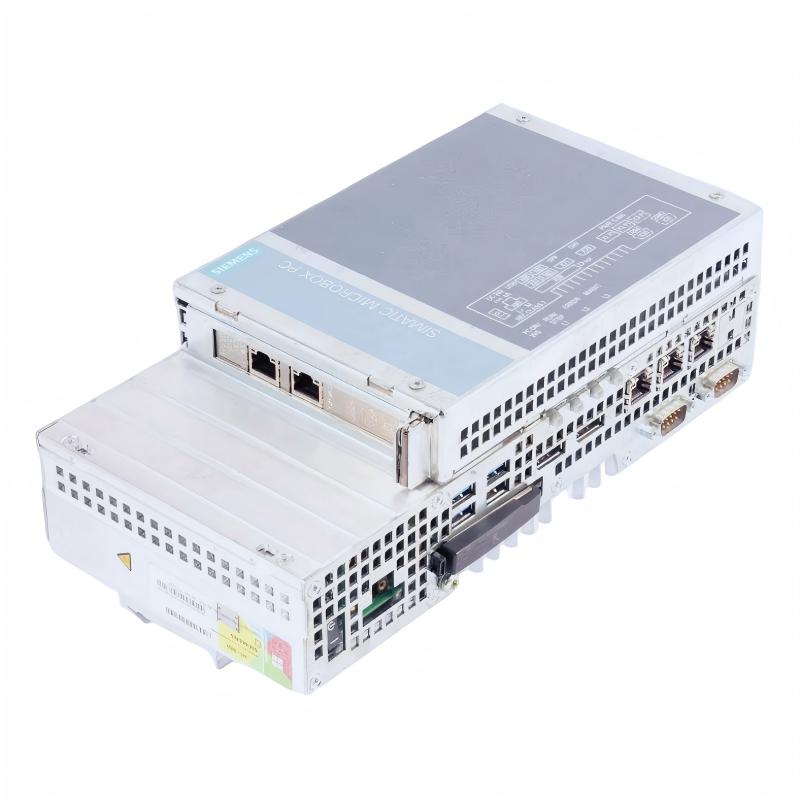
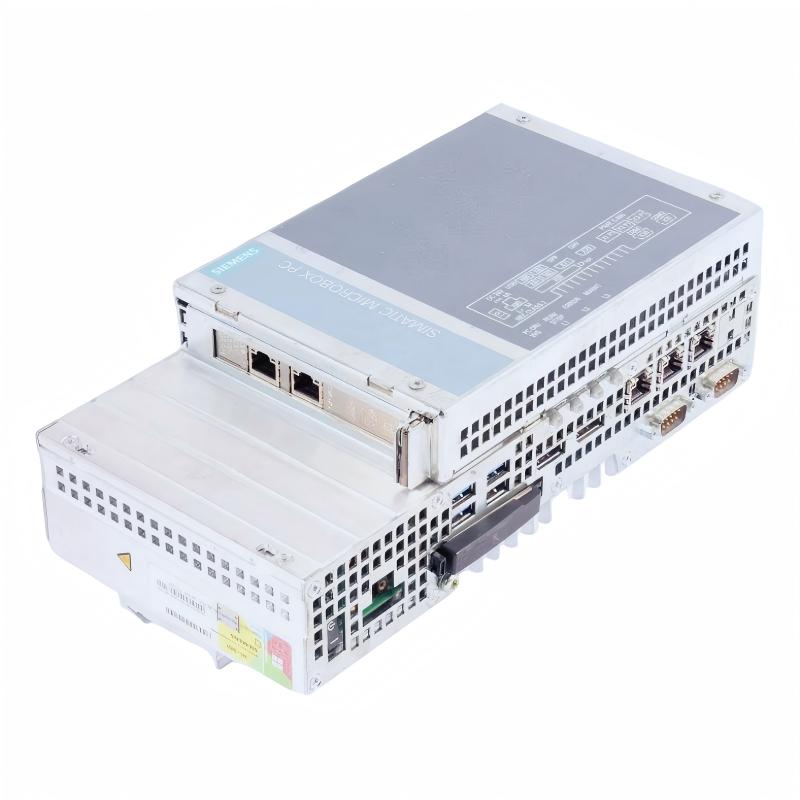
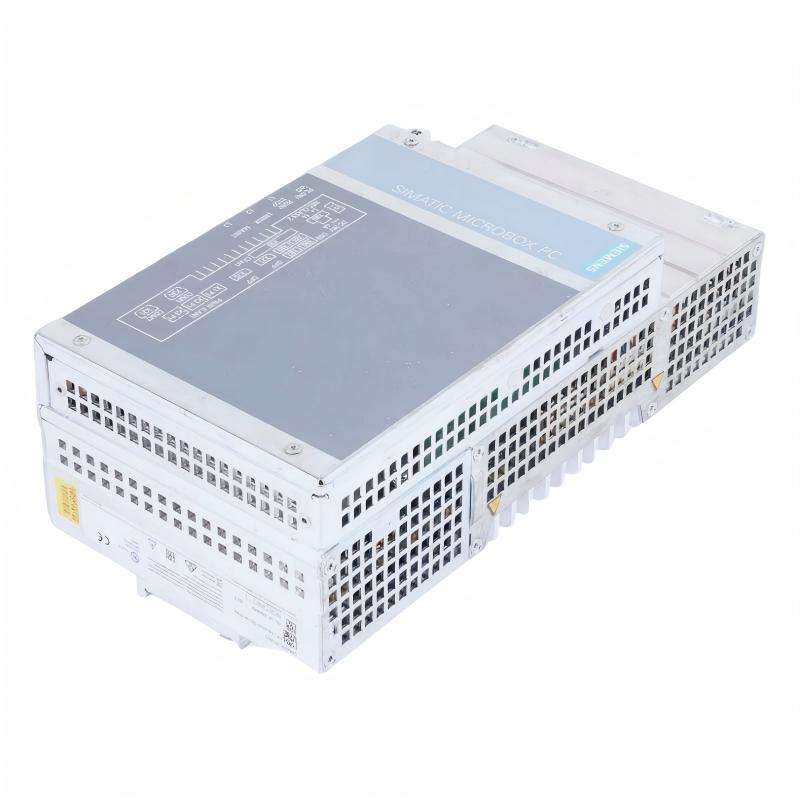
The Siemens 6AG1141-5BG37-4FA0 SIPLUS IPC 427E Industrial Computer is a compact industrial computing platform designed for automation, machine control, industrial communication, and data-processing applications. It belongs to Siemens’ SIPLUS industrial PC range and is based on the SIMATIC IPC 427E platform.
Unlike a conventional PLC CPU, this device provides an industrial computer architecture with a processor, memory, operating system support, and multiple communication interfaces. It can run compatible Windows-based industrial applications and connect with PLCs, HMIs, industrial networks, and other automation equipment.
The 6AG1141-5BG37-4FA0 uses an Intel Core i5-6442EQ processor and is equipped with 8 GB RAM and non-volatile memory (NVRAM). Its computing resources make it suitable for applications involving machine data collection, industrial visualization, communication gateways, and local process information management.
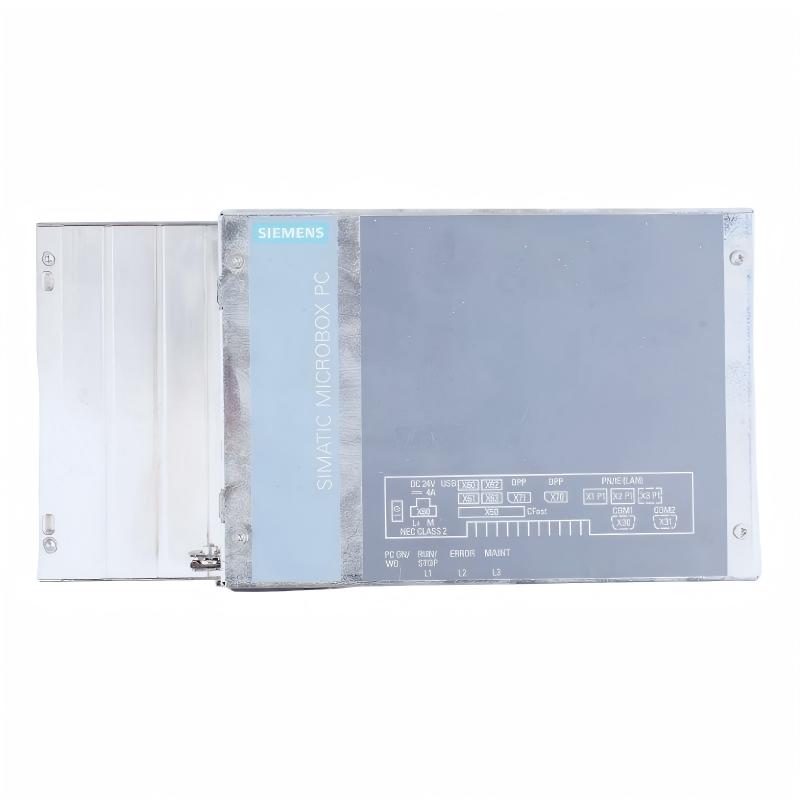
The computer provides three Gigabit Ethernet interfaces for industrial network connectivity, four USB 3.0 high-current interfaces, and two serial interfaces supporting RS232/RS485. It operates from a 24 V DC power supply and supports DIN-rail mounting, making it suitable for installation in industrial control cabinets.
As a SIPLUS product, this configuration includes conformal coating to provide additional protection for electronic assemblies against environmental contamination. Its specified operating temperature range is 0 to +55°C.
The 6AG1141-5BG37-4FA0 is particularly relevant to industrial systems that require more computing flexibility than a conventional PLC alone can provide. It can serve as an industrial PC for data processing, supervisory applications, and communication between different automation devices.
Technical Specifications
| Parameter | Specification |
|---|---|
| Brand | Siemens |
| Product Series | SIPLUS IPC |
| Product Family | SIPLUS IPC 427E |
| Model | 6AG1141-5BG37-4FA0 |
| Base Model | 6AG4141-5BG37-0FA0 |
| Product Type | DIN-Rail Industrial Computer |
| Processor | Intel Core i5-6442EQ |
| Memory | 8 GB RAM |
| Non-Volatile Memory | NVRAM |
| Graphics | Integrated HD Graphics |
| Supply Voltage | 24 V DC |
| Permitted Voltage Range | 19.2–28.8 V DC |
| Industrial Ethernet | 3 × Gigabit Ethernet (IE/PN) |
| USB Interfaces | 4 × USB 3.0, high-current capable |
| Serial Interfaces | 2 × RS232/RS485 |
| Expansion | PCIe option available on selected configurations; this version specified without PCIe |
| Mounting Type | DIN-Rail Mounting |
| Operating Temperature | 0 to +55°C |
| Protective Feature | Conformal Coating |
| Operating System | Windows 10 IoT Enterprise 2016 LTSB 64-bit, as specified for this configuration |
| Replaceable Mass Storage | Not included |
| Dimensions | 262 × 55.5 × 139.7 mm |
| Weight | 2.772 kg |
Note: Operating-system licensing, storage configuration, and installed software should be confirmed against the actual unit. The catalog number identifies a specific configuration, and replacement computers should be checked for matching hardware and software options.
Function and Working Principle
The Siemens SIPLUS IPC 427E functions as an industrial computer that processes information from connected automation equipment and executes compatible industrial software.
Unlike a dedicated PLC, which primarily executes deterministic control logic, an industrial PC can support a wider range of computing tasks, including data management, visualization, communication services, and application-level processing.
1. Industrial Data Processing
The Intel Core i5-6442EQ processor performs the computing tasks required by installed industrial applications. These may include collecting machine information, processing production data, communicating with control devices, and running visualization software.
The 8 GB RAM provides working memory for the operating system and applications. NVRAM supports non-volatile data-retention requirements for compatible functions.
Actual performance depends on the installed software, system configuration, and workload.
2. Industrial Network Communication
The computer provides three Gigabit Ethernet interfaces. These interfaces can be used to connect the IPC to industrial networks, PLCs, engineering stations, visualization systems, and other Ethernet-enabled equipment.
The interfaces support industrial Ethernet and PROFINET-related applications according to the configured system environment.
Separating network connections can help engineers organize communication between machine-level devices, supervisory systems, and plant networks. Network architecture, IP configuration, protocol settings, and cybersecurity policies should be planned before commissioning.
3. Serial Device Communication
Two serial interfaces support RS232/RS485 communication. These interfaces allow the computer to connect with compatible industrial devices that use serial communication.
Typical examples include older controllers, measurement instruments, barcode equipment, and serial communication converters.
The communication standard, baud rate, parity, device addressing, and protocol must be configured according to the connected equipment.
4. USB Peripheral Connectivity
Four USB 3.0 high-current interfaces provide connections for compatible peripherals and service equipment.
Depending on the application, these interfaces may be used for approved USB storage devices, input peripherals, service tools, or industrial accessories.
USB devices should be selected according to the operating system, power requirements, environmental conditions, and application restrictions.
5. Industrial Operating System Support
The specified configuration supports Windows 10 IoT Enterprise 2016 LTSB 64-bit. This allows the IPC to run compatible industrial software, visualization applications, and data-processing programs.
The installed operating system and software license should be verified before deployment. A replacement unit with a different operating-system image may require application migration, driver installation, and system validation.
Role in Industrial Control Systems
The 6AG1141-5BG37-4FA0 can serve as a computing platform within a larger automation architecture. It complements PLCs and other control devices by providing a general-purpose industrial computing environment.
PLC Communication and Data Exchange
A PLC normally handles machine-level control tasks such as sequencing, interlocking, and real-time I/O processing. The industrial computer can communicate with the PLC to collect operating data, display information, and execute higher-level applications.
For example, a PLC may control motors and actuators while the IPC records production values, processes machine information, and provides an interface for supervisory software.
This division of responsibilities allows each device to perform tasks suited to its architecture.
HMI and Visualization Applications
The IPC can run compatible industrial visualization software. Operators and engineers may use these applications to view machine status, production information, alarms, and process trends.
The computer can also support applications that combine information from several controllers or production stations.
Display hardware and software requirements should be checked separately because the precise configuration and peripheral package may vary.
Industrial Data Collection
Manufacturing equipment generates information such as operating status, production counts, temperature values, alarm records, and cycle times.
The IPC can collect and process this information through its Ethernet and serial interfaces. Compatible applications can then organize the data for monitoring, reporting, or transfer to higher-level systems.
Communication Gateway Functions
In installations containing devices with different communication interfaces, the industrial computer may act as a communication gateway when suitable software and drivers are installed.
For example, it may collect information from serial instruments and make selected data available to an Ethernet-based application.
Gateway functions depend on the installed software and communication configuration; they are not automatically provided by the hardware alone.
Industrial Applications
The Siemens SIPLUS IPC 427E is designed for industrial computing tasks where reliable communication, local processing, and compatibility with automation equipment are important.
1. Manufacturing Production Lines
Production lines use PLCs, sensors, drives, and operator interfaces to coordinate equipment. An industrial PC can collect information from these devices and run applications for production monitoring and data management.
The 6AG1141-5BG37-4FA0 can support applications that require multiple network connections and local processing resources.
2. Machine Visualization and Monitoring
Industrial machines often need more advanced visualization and data-processing functions than a basic operator panel can provide.
The IPC can run compatible visualization software and communicate with controllers to display machine status, operating parameters, alarms, and production information.
Its suitability depends on the software’s hardware requirements and the available display and peripheral connections.
3. Industrial Data Acquisition
Manufacturing facilities may need to collect data from PLCs, meters, sensors, and measurement instruments.
The computer’s Ethernet and serial interfaces provide options for connecting different devices. Installed software can process the acquired information and store or forward it according to the plant’s data architecture.
4. Packaging and Processing Machinery
Packaging and processing equipment often combines motion control, product tracking, inspection, and production reporting.
An industrial PC can support higher-level functions such as batch information management, data logging, and communication between machine subsystems.
The PLC remains responsible for the control functions assigned to it, while the IPC handles compatible computing and supervisory tasks.
5. Industrial Network Integration
Facilities may contain equipment from different generations and manufacturers. The IPC’s Ethernet and RS232/RS485 interfaces can help integrate compatible devices into a coordinated information system.
Protocol support depends on the installed software, drivers, and network configuration.
6. Legacy Automation System Modernization
In some plants, older industrial computers continue to run essential machine applications. Replacing them requires attention to operating systems, drivers, application compatibility, and communication interfaces.
The SIPLUS IPC 427E can be considered in industrial computing environments where its hardware and software configuration matches the existing system requirements.
Installation and System Integration
Correct installation is important for reliable operation and long-term equipment stability.
1. Verify the DC Power Supply
The 6AG1141-5BG37-4FA0 uses a nominal 24 V DC supply, with a permitted voltage range of 19.2–28.8 V DC.
Before connecting power, confirm that the supply can provide sufficient current for the computer and its connected peripherals. Check polarity, grounding, wiring protection, and the requirements of the installation.
Avoid connecting the IPC to an unsuitable supply or allowing voltage fluctuations outside the permitted range.
2. DIN-Rail Mounting
The computer is designed for DIN-rail installation in an industrial control cabinet.
The supplied dimensions are 262 × 55.5 × 139.7 mm. Confirm the mechanical drawing and actual mounting arrangement before designing the cabinet.
Allow adequate space for cable connections, ventilation, maintenance access, and the removal of the unit when servicing is required.
3. Environmental Conditions
The specified operating temperature range is 0 to +55°C. The cabinet environment should remain within the permitted operating conditions.
The conformal coating provides additional protection for electronic assemblies against contamination, but it does not make the computer waterproof or suitable for unrestricted exposure to corrosive chemicals.
Avoid installing the IPC in locations with excessive vibration, condensation, conductive dust, or other conditions outside its specified environmental limits.
4. Ethernet Network Configuration
The three Gigabit Ethernet interfaces can be assigned to different network connections according to the automation architecture.
During commissioning, configure IP addresses, subnet masks, gateways, and network services as required. If the interfaces connect to different security zones, ensure that routing and access policies are properly controlled.
Industrial network segmentation can help separate machine-level communication from supervisory and enterprise traffic.
5. Serial Interface Configuration
When connecting RS232 or RS485 equipment, verify the electrical interface, connector pin assignment, cable type, and communication parameters.
For RS485 networks, check wiring topology, termination, and biasing requirements. Incorrect serial wiring can result in intermittent communication or complete communication failure.
6. Operating System and Application Setup
Confirm that the installed Windows 10 IoT Enterprise 2016 LTSB image is appropriate for the required industrial application.
Check software licensing, drivers, security settings, storage availability, and application dependencies. Before replacing an existing IPC, back up application files, configuration data, and communication settings.
7. Commissioning and Functional Testing
After installation, verify the DC supply, network connections, serial communication, USB peripherals, and operating-system startup.
Run the required industrial applications and test communication with connected PLCs and devices. Confirm that data collection, visualization, and other assigned functions operate correctly before returning the system to production.
Compatible System Components
The SIPLUS IPC 427E can be used with a range of industrial automation devices, subject to software and interface compatibility.
| Component | Function | Integration Considerations |
|---|---|---|
| Siemens SIMATIC PLC | Executes machine and process control logic | Confirm supported communication protocols and software drivers |
| Siemens HMI equipment | Provides operator visualization | Check software compatibility and display interfaces |
| Industrial Ethernet switch | Connects network devices | Verify Gigabit Ethernet support and network architecture |
| PROFINET devices | Exchange industrial automation data | Confirm protocol configuration and application requirements |
| RS232 instruments | Provide serial measurement or control data | Verify connector, baud rate, and communication protocol |
| RS485 devices | Support serial multidrop communication | Check topology, termination, addressing, and wiring |
| 24 V DC power supply | Supplies the IPC | Ensure voltage and current capacity meet requirements |
| USB peripherals | Provide additional input or service functions | Confirm operating-system and driver compatibility |
| Industrial storage devices | Support application data storage where supported | Verify the actual storage configuration and available interfaces |
| Industrial control cabinet | Provides mounting and environmental protection | Ensure adequate ventilation and mechanical clearance |
These components are examples of equipment that may be used in a complete installation. They are not necessarily included with the IPC.
Alternative Models and Replacement Considerations
When replacing the 6AG1141-5BG37-4FA0, the closest alternative is not necessarily another IPC with a similar processor or physical size. The replacement must support the same application, interfaces, operating system, and environmental requirements.
| Alternative or Related Model | Replacement Considerations |
|---|---|
| Siemens 6AG4141-5BG37-0FA0 | Base SIMATIC IPC 427E configuration; compare environmental protection and exact hardware options |
| Siemens 6AG1141-5BG34-4FA0 | Related SIPLUS IPC 427E configuration with different operating-system and configuration details |
| Siemens 6AG1141-5BG35-4FA0 | Related SIPLUS IPC 427E configuration; verify the Windows 10 version and hardware options |
| Siemens SIMATIC IPC 427E variants | Compare processor, memory, storage, interfaces, and mounting configuration |
| Newer Siemens SIMATIC IPC platforms | May provide an upgrade path but can require application migration and hardware changes |
Before selecting a replacement, compare the following:
- Processor architecture and performance.
- RAM capacity and NVRAM requirements.
- Operating-system version and license.
- Installed industrial software and drivers.
- Ethernet interface count and speed.
- RS232/RS485 interface availability.
- USB interface count and power capability.
- Storage type and capacity.
- PCIe expansion requirements.
- Power supply and electrical compatibility.
- Mounting dimensions and cabinet clearance.
- Operating temperature and conformal coating requirements.
A replacement computer should be tested with the original automation application before being placed into production.
Key Advantages
Industrial Computing Performance
The Intel Core i5-6442EQ processor and 8 GB RAM provide a computing platform for compatible industrial software, data processing, and visualization applications.
Multiple Network Interfaces
Three Gigabit Ethernet interfaces allow flexible network connections and support industrial communication architectures.
Serial Communication Support
The two RS232/RS485 interfaces help connect compatible legacy equipment and serial industrial instruments.
Compact DIN-Rail Installation
The mounting design supports installation in industrial control cabinets where organized equipment placement is important.
Conformal Coating
The SIPLUS configuration includes conformal coating to provide additional protection for electronic assemblies against environmental contamination.
24 V DC Power
The 24 V DC supply arrangement is suitable for many industrial control cabinet power architectures, provided that the voltage and current requirements are met.
Windows-Based Application Support
The specified operating-system configuration allows compatible Windows-based industrial applications to run directly on the IPC.
Technical FAQs
1. What is the Siemens 6AG1141-5BG37-4FA0?
It is a SIPLUS IPC 427E industrial computer designed for DIN-rail installation. It is used for industrial computing, machine data processing, communication, and compatible visualization applications.
2. What processor does this model use?
The computer uses an Intel Core i5-6442EQ processor and is equipped with 8 GB RAM and NVRAM.
3. What power supply does it require?
It uses a nominal 24 V DC supply with a permitted voltage range of 19.2–28.8 V DC. The power supply must have sufficient capacity for the computer and connected equipment.
4. How many Ethernet ports are available?
The specified configuration provides three Gigabit Ethernet interfaces for industrial network communication.
5. Does the computer support serial communication?
Yes. It has two RS232/RS485 serial interfaces for connecting compatible industrial devices and instruments.
6. What USB interfaces are included?
It provides four USB 3.0 high-current interfaces. Connected peripherals must be supported by the operating system and application.
7. What operating system does it support?
The specified configuration uses Windows 10 IoT Enterprise 2016 LTSB 64-bit. Confirm the installed operating-system image and license on the actual unit before deployment.
8. What is the purpose of conformal coating?
Conformal coating provides an additional protective layer over electronic assemblies, helping protect them against certain forms of environmental contamination. It does not replace a suitable enclosure or make the IPC waterproof.
9. Can it replace a Siemens PLC CPU?
No, not as a direct hardware replacement. An industrial PC and a PLC CPU have different architectures and responsibilities. The IPC can communicate with PLCs and run compatible applications, but replacing a PLC CPU requires a separate control-system engineering assessment.
10. What should be checked before purchasing this model?
Verify the complete order number, processor, RAM, operating-system version, storage configuration, Ethernet and serial interfaces, conformal coating, physical condition, and included accessories. For replacement projects, also confirm that the existing industrial software can run on the supplied configuration.
Procurement and Maintenance Recommendations
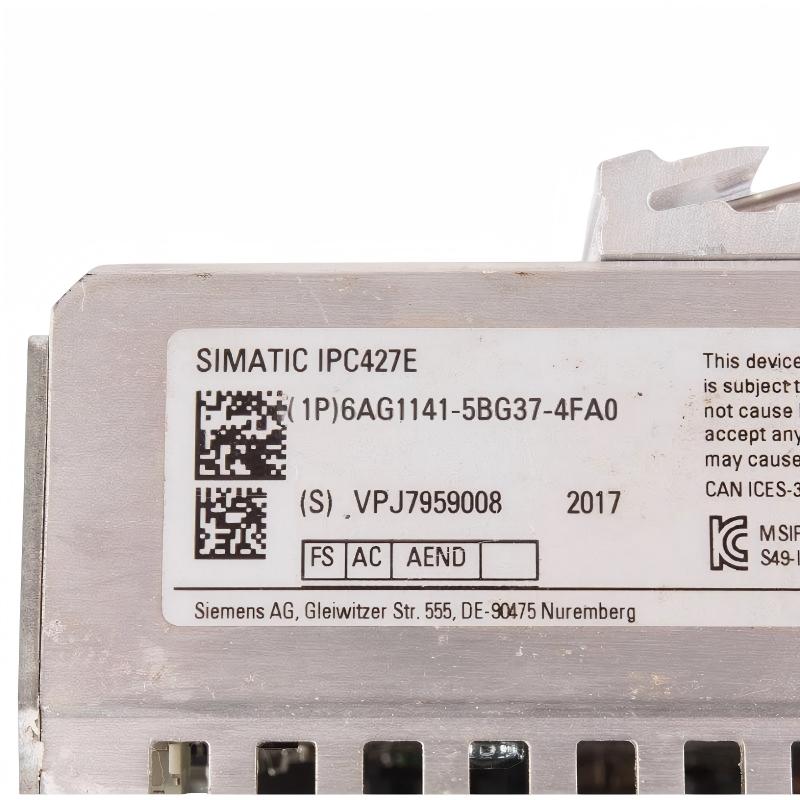
When purchasing the Siemens 6AG1141-5BG37-4FA0, verify the complete order number and compare it with the label on the installed computer. The SIPLUS IPC 427E family includes multiple configurations, and similar product numbers may have different processors, operating systems, storage options, or expansion hardware.
For used or surplus equipment, request clear photographs of the nameplate, connectors, mounting area, and overall housing. Confirm the operating condition, installed memory, storage configuration, and operating-system status. If the computer is intended for a critical production line, request functional testing before installation.
Maintenance personnel should keep the computer’s ventilation openings clear and maintain the cabinet environment within the specified temperature range. Inspect power connections, network cables, serial wiring, and mounting hardware periodically.
Back up the operating system, application files, software licenses, and configuration data according to the plant’s maintenance procedures. For replacement planning, document IP addresses, serial communication settings, network connections, and installed drivers.
When upgrading to a newer industrial computer, evaluate software compatibility and communication requirements before changing the hardware. A successful replacement may require application migration, driver updates, network adjustments, and commissioning tests.
Conclusion
The Siemens 6AG1141-5BG37-4FA0 SIPLUS IPC 427E Industrial Computer is a compact DIN-rail industrial computing platform equipped with an Intel Core i5-6442EQ processor, 8 GB RAM, NVRAM, three Gigabit Ethernet interfaces, four USB 3.0 interfaces, and two RS232/RS485 serial interfaces.
Its 24 V DC power supply, conformal coating, and 0 to +55°C operating temperature specification make it suitable for appropriately designed industrial environments. It can support machine data processing, industrial communication, visualization, and supervisory applications alongside PLC-based automation systems.
For procurement and replacement projects, verifying the exact hardware configuration, operating-system image, software compatibility, and communication interfaces is essential to maintaining reliable industrial operation.