
NewsNEWCENTER
Featured products
Contact Us
Schneider XCC-1510PS05Y Incremental Encoder Troubleshooting and Fault Diagnosis Guide
2026-10-20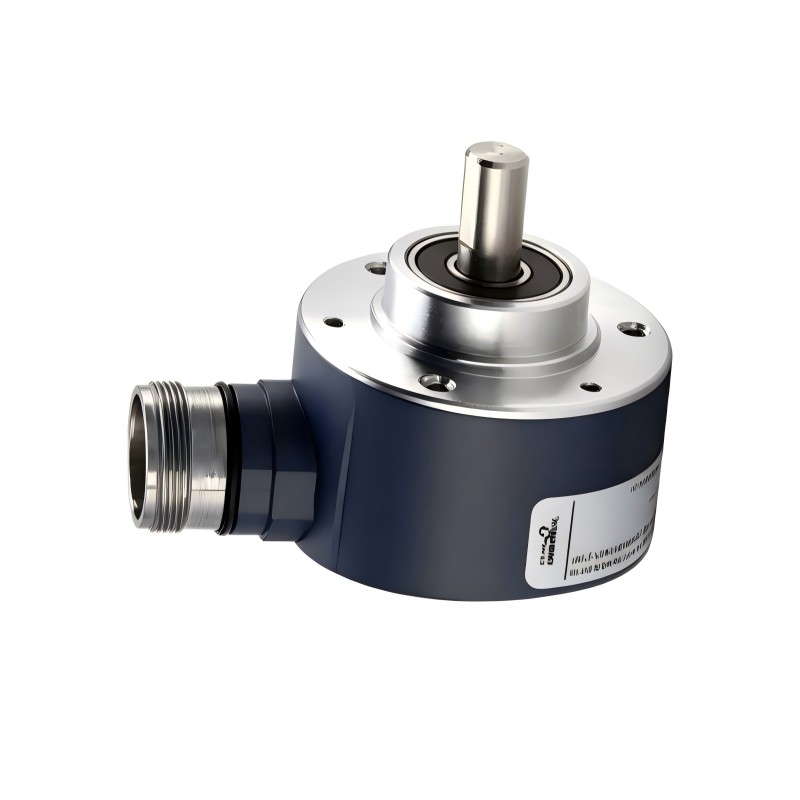
The Schneider Electric XCC-1510PS05Y Incremental Encoder is an industrial rotary feedback device used to measure rotational movement, speed, and relative position. With a 500-point resolution, push-pull output stage, 5–30 V DC supply range, and M23 12-pin connector, this encoder can provide pulse signals to compatible PLC high-speed counters, motion controllers, and industrial monitoring systems.
When the Schneider XCC-1510PS05Y experiences missing pulses, inaccurate speed readings, intermittent feedback, or incorrect position counts, the cause may be electrical, mechanical, or related to controller configuration. This guide explains how to diagnose common problems systematically, inspect signal wiring, verify the power supply, check mechanical alignment, and determine when replacement is appropriate.
Table of Contents
- Common Encoder Fault Symptoms
- Safety Before Troubleshooting
- Power Supply and Voltage Problems
- Missing or Unstable Output Signals
- Incorrect Position and Speed Readings
- Mechanical Installation Problems
- Electrical Noise and Signal Interference
- Step-by-Step Troubleshooting Procedure
- Repair and Replacement
- Frequently Asked Questions
- Technical Summary
1. Common Encoder Fault Symptoms
Incremental encoders generate electrical pulses as their shafts rotate. The receiving controller interprets these signals to calculate movement and speed. A fault in the encoder, wiring, mechanical coupling, or input configuration can therefore affect the entire control system.
| Symptom | Possible Cause | Initial Diagnostic Action |
|---|---|---|
| No pulses detected | Missing supply, incorrect wiring, disconnected connector, or encoder failure | Check the supply and connector using the correct wiring diagram |
| Intermittent counts | Loose connector, damaged cable, electromagnetic interference, or mechanical vibration | Inspect the cable, connector, shielding, and coupling |
| Incorrect speed value | Wrong resolution setting, incorrect scaling, missed pulses, or unsuitable input hardware | Review the controller configuration and input frequency limits |
| Position count does not match movement | Missed pulses, incorrect counting mode, shaft slippage, or mechanical backlash | Compare controlled shaft movement with the accumulated count |
| Signal changes when the cable moves | Damaged conductors, poor connector contact, or cable strain | Inspect the de-energized cable and connector assembly |
| Controller reports feedback errors | Supply problems, wiring errors, signal interference, or an incompatible interface | Check the encoder ratings and controller input specifications |
| Abnormal mechanical noise or vibration | Misalignment, unsuitable coupling, excessive shaft load, or bearing wear | Stop the machine and inspect the mechanical installation |
These symptoms do not automatically indicate an internal encoder failure. Diagnose the complete feedback circuit before replacing the device.
2. Safety Before Troubleshooting
Encoder troubleshooting may involve rotating machinery, electrical cabinets, and connected drive systems. Incorrect intervention can cause injury, unexpected machine movement, or damage to the controller and encoder.
- Stop the machine and isolate hazardous energy before disconnecting the encoder or adjusting its mounting.
- Apply lockout/tagout procedures where required and secure rotating components against unexpected movement.
- Verify a safe electrical condition before handling connector pins or exposed conductors.
- Use appropriately rated instruments and approved testing procedures.
- Never short signal outputs together or apply an unverified voltage to a signal pin.
- Do not bypass machine safety interlocks or feedback monitoring to continue operation.
- Restore guards and protective devices before returning the machine to service.
If live signal measurements are required, they should be carried out only by qualified personnel using suitable equipment and site-approved procedures. Do not remove or reconnect the encoder connector while energized unless an explicitly approved procedure permits it.
3. Diagnosing Power Supply and Voltage Problems
3.1 Verify the Encoder Supply
The Schneider XCC-1510PS05Y has a specified supply range of 5–30 V DC. The selected supply must be compatible with the encoder and the receiving controller. A supply voltage that is missing, unstable, or outside the permitted range may prevent the encoder from producing usable signals.
Check the supply at the designated encoder power terminals using the exact product wiring diagram. Where an approved measurement procedure permits it, compare the supply at the source with the voltage delivered at the encoder to identify excessive cable voltage drop.
3.2 Check Supply Polarity
Incorrect polarity can prevent normal operation and may damage connected equipment. Before restoring power, verify the positive supply and 0 V connections against the connector diagram for the XCC-1510PS05Y.
Although the product specifications include reverse-polarity protection, this feature should not be treated as permission to connect the supply incorrectly. Correct the wiring before further testing.
3.3 Inspect the Supply Circuit
Inspect the DC supply, protective devices, terminal connections, and cable condition. If other devices share the same supply, check whether their startup or operating current affects the voltage delivered to the encoder.
The encoder’s listed no-load current consumption is 0–75 mA. The complete supply calculation must also account for other connected devices, cable losses, and the actual electrical characteristics of the circuit.
3.4 Check for Excessive Voltage Ripple
Electrical noise or excessive ripple on the supply can affect signal quality. Inspect the power supply and wiring arrangement if the encoder becomes unreliable when nearby motors, contactors, or switching devices operate.
Use an appropriate measurement method to assess supply stability. Do not conclude that the encoder is defective until the input power and grounding arrangement have been checked.
4. Diagnosing Missing or Unstable Output Signals
4.1 Inspect the M23 Connector
The XCC-1510PS05Y uses a radial M23 12-pin male connector. A loose mating connector, damaged contact, contamination, or cable strain can interrupt the supply or signal paths.
- Inspect the connector body for cracks, impact damage, or deformation.
- Check the mating connector for damaged or contaminated contacts.
- Inspect the cable jacket for cuts, crushing, or excessive bending.
- Confirm that the connector is correctly aligned and secured according to its design.
- Check that cable strain is not transferred directly to the connector.
Disconnect the circuit safely before inspection. Use a compatible mating connector and the correct pin assignment when repairing or replacing a cable assembly.
4.2 Verify Signal Wiring
Incorrect signal wiring is a common reason for missing counts or unreliable feedback. Confirm each signal conductor using the model-specific connection diagram and the controller’s input documentation.
The encoder’s push-pull output stage is designed to provide electrical transitions compatible with suitable receiving circuits. The controller input must support the signal voltage levels and output characteristics. Do not assume that a push-pull encoder can connect directly to every PLC input module.
4.3 Check the Controller Input
If the encoder supply is correct but no counts appear, check whether the receiving input is enabled, configured for the correct signal type, and capable of detecting the expected pulse frequency.
Some ordinary digital inputs cannot reliably process high-speed encoder pulses. A compatible high-speed counter or encoder interface may be necessary, depending on the application.
4.4 Test at a Controlled Speed
Where safe and supported by the machine procedure, test the encoder at a low, controlled shaft speed. Observe the controller’s input status or diagnostic counter and confirm whether the count changes as the shaft rotates.
If the signal is absent, investigate the supply, connector, wiring, input configuration, and mechanical rotation before concluding that the encoder electronics have failed.
5. Diagnosing Incorrect Position and Speed Readings
5.1 Confirm the Resolution Setting
The XCC-1510PS05Y has a specified resolution of 500 points per revolution. The controller’s reported count per revolution depends on how its input hardware interprets the encoder signals.
For example, if a controller counts 500 events per revolution and the shaft rotates at 600 rpm, the expected event rate is:
500 × 600 ÷ 60 = 5,000 events per second.
If the controller uses a different counting mode, such as counting multiple edges of the signal channels, the effective count per revolution may be higher. Verify the configured counting method before changing the scaling factor.
5.2 Check Engineering-Unit Scaling
A correct pulse count can still produce an incorrect speed or position value if the controller uses an incorrect scaling factor. Review the application settings for counts per revolution, gear ratio, wheel circumference, travel distance, and engineering-unit conversion, as applicable.
Change one configuration parameter at a time and verify the result using a controlled test. Keep a record of the original settings so that they can be restored if necessary.
5.3 Investigate Missed Pulses
If the position error grows as the machine operates, the controller may be missing pulses. Possible causes include excessive signal frequency, an unsuitable input module, electromagnetic interference, damaged cables, or poor connections.
Compare the expected pulse rate with the receiving hardware’s maximum frequency. The encoder’s specified maximum output frequency is 300 kHz, but the practical operating limit is determined by the complete signal path, including cable, interface, and controller.
5.4 Check Direction Interpretation
If position counts change in the wrong direction, review the controller’s channel assignment and direction interpretation. If direction detection is required, confirm that the interface supports the required phase-related signals and that the relevant conductors are correctly connected.
Do not swap wires at random. Follow the correct wiring diagram and controller instructions, particularly when other equipment shares the same feedback circuit.
6. Diagnosing Mechanical Installation Problems
6.1 Inspect Shaft Coupling and Alignment
The XCC-1510PS05Y has a 10 mm solid shaft. An unsuitable coupling or poor alignment between the encoder and driven shaft can cause vibration, excessive bearing load, and intermittent feedback.
Stop the machine and isolate hazardous energy before inspecting the coupling. Check for looseness, wear, slippage, and misalignment. Confirm that the coupling is suitable for the shaft dimensions and operating speed.
6.2 Check for Excessive Shaft Loading
The published mechanical load limits for this model are up to 10 daN radial and 5 daN axial under the specified conditions. These are limits, not recommended continuous loading targets. The actual permissible load may depend on operating speed and other conditions stated in the product documentation.
Excessive radial or axial force can shorten bearing life and contribute to unstable operation. Correct the mechanical arrangement rather than attempting to compensate for mechanical defects through controller software.
6.3 Inspect for Vibration and Bearing Wear
Unusual noise, vibration, shaft play, or inconsistent rotation may indicate a mechanical issue. Inspect the mounting bracket, driven shaft, coupling, and surrounding machine components.
Do not continue running the encoder if the shaft is visibly damaged, the housing is loose, or mechanical resistance is abnormal. Arrange qualified inspection or replacement as appropriate.
6.4 Verify Operating Speed
The published maximum rotational speed for the XCC-1510PS05Y is 9,000 rpm. Confirm that the actual operating speed remains within the encoder’s specified limits and that the coupling and driven equipment are rated for the same conditions.
7. Diagnosing Electrical Noise and Signal Interference
Electrical interference can introduce false counts, missing transitions, or unstable speed readings. This is especially important when encoder cables run near motor leads, variable-frequency drives, contactors, solenoids, or high-current switching circuits.
7.1 Inspect Cable Routing
- Separate encoder wiring from high-current motor and switching cables where practical.
- Avoid long parallel runs alongside noisy power conductors.
- Use suitable industrial cable and connectors for the application.
- Protect cables from crushing, abrasion, excessive bending, and vibration.
- Keep cable lengths within the limits of the encoder and receiving interface design.
7.2 Review Shielding and Grounding
Check that the cable shield is installed according to the encoder and controller instructions. Poor shield termination or an unsuitable grounding arrangement can reduce noise immunity.
Do not disconnect protective earth or make unverified grounding changes as a troubleshooting experiment. If interference is suspected, review the cabinet’s grounding, bonding, and cable-routing design as a complete system.
7.3 Correlate Faults with Machine Events
Record whether the encoder problem occurs when a motor starts, a contactor switches, or another high-current device operates. A repeatable relationship may indicate electromagnetic interference or a disturbance in the shared DC supply.
Correct the identified interference source or wiring weakness, then repeat the signal test under the same operating conditions.
8. Step-by-Step Troubleshooting Procedure
The following workflow helps distinguish encoder faults from external wiring, mechanical, and controller problems.
- Document the symptom: Record whether the fault involves missing pulses, unstable counts, incorrect speed, position drift, or mechanical noise.
- Verify the model: Confirm that the installed device is the XCC-1510PS05Y and check its nameplate.
- Isolate hazardous energy: Apply the required safety procedures before handling the connector, cable, or mounting arrangement.
- Inspect the mechanical installation: Check shaft alignment, coupling security, mounting stability, and visible damage.
- Inspect the connector and cable: Look for contamination, damaged contacts, cable strain, or conductor damage.
- Verify the supply: Confirm that the DC voltage and polarity comply with the encoder specifications.
- Check the wiring diagram: Verify the signal connections using the exact model-specific pin assignment.
- Review the controller: Confirm input compatibility, counting mode, resolution, scaling, and maximum input frequency.
- Test the signal: Use an approved diagnostic method to verify pulse detection at a controlled shaft speed.
- Check for interference: Review shielding, cable routing, grounding, and the relationship between the fault and machine switching events.
- Evaluate the encoder: If the supply, wiring, controller, and mechanical arrangement are verified but the fault remains, arrange qualified testing or replacement.
- Record the results: Document the identified cause, corrective action, test conditions, and final operating result.
Illustrative Diagnostic Flow
Encoder feedback fault
          |
          v
Stop machine and apply safety procedure
          |
          v
Check mechanical coupling and cable
          |
          v
Verify DC supply and connector wiring
          |
          v
Check controller input and configuration
          |
          v
Test signal at controlled shaft speed
          |
     +----+----+
     |         |
 Signal OK   Signal abnormal
     |         |
Review scaling Check wiring, interference,
and application supply, and encoder condition
     |         |
     +----+----+
          |
          v
Correct fault and repeat verification
          |
          v
Document and release equipment safely
This workflow is a general diagnostic aid. It is not a substitute for the product-specific wiring diagram, controller manual, or approved machine maintenance procedure.
9. Repair and Replacement
9.1 Correct External Faults First
Many encoder faults originate outside the encoder itself. Correcting a damaged cable, loose connector, unsuitable input module, incorrect scaling setting, or misaligned coupling may restore reliable feedback without replacing the device.
After making an external correction, repeat the electrical and mechanical checks. Verify that the encoder produces stable counts and that the controller reports the expected position or speed under normal operating conditions.
9.2 When Replacement Is Appropriate
Consider replacing the encoder when the housing or shaft is damaged, mechanical wear is confirmed, the output remains absent despite verified power and wiring, or qualified testing identifies an internal electronic fault.
Do not open the encoder or attempt unauthorized internal component replacement. Internal repair may compromise mechanical integrity, sealing, and signal performance.
9.3 Select a Compatible Replacement
When choosing a replacement, verify all relevant characteristics rather than matching only the housing diameter. Important parameters include:
- Resolution of 500 points per revolution or the exact resolution required by the application.
- 5–30 V DC supply compatibility.
- Push-pull output stage and compatibility with the receiving controller.
- 10 mm solid shaft and compatible mechanical mounting.
- M23 12-pin connector arrangement and correct pin assignment.
- Maximum rotational speed and output frequency.
- Environmental protection and operating temperature requirements.
Other XCC encoders may have different resolutions, output stages, or connection arrangements. Confirm the exact variant before ordering or installing a replacement.
9.4 Verify Operation After Replacement
After installation, verify the supply voltage, signal wiring, mechanical alignment, and controller configuration. Test pulse counting at a controlled speed, compare measured speed with an independent reference where practical, and confirm that position counts change consistently with shaft movement.
Return the machine to service only after the required functional checks and safety checks have been completed.
10. Frequently Asked Questions
Why does the Schneider XCC-1510PS05Y produce no output signal?
Possible causes include missing supply voltage, incorrect connector wiring, a damaged cable, incompatible controller inputs, lack of shaft rotation, or an internal encoder fault. Check these areas systematically before replacing the device.
What supply voltage should I measure?
The specified operating supply range is 5–30 V DC. Verify the exact supply requirements and measure at the designated power terminals using the correct wiring diagram.
Why is the measured speed consistently incorrect?
Check the 500-point resolution setting, controller counting mode, gear ratio, and engineering-unit scaling. A consistent factor error often points to configuration rather than a defective encoder.
Why does the position error increase over time?
Possible causes include missed pulses, excessive signal frequency, electrical interference, loose wiring, or mechanical coupling slippage. Investigate the signal path and mechanical installation under the conditions that produce the error.
Can a standard PLC digital input read this encoder?
Only if the input supports the required push-pull signal characteristics and pulse frequency. Applications operating at higher frequencies may require a dedicated high-speed counter or encoder interface.
Does the encoder’s maximum output frequency guarantee that my controller can count at that rate?
No. The encoder’s published maximum output frequency is 300 kHz, but the complete system must also account for the controller input limit, cable characteristics, signal quality, and counting mode.
Should I replace the encoder immediately if the signal is unstable?
No. First verify the supply, wiring, connector, mechanical alignment, cable shielding, and controller configuration. Replace the encoder when external causes have been eliminated and a device fault is confirmed or strongly indicated.
11. Technical Summary
The Schneider XCC-1510PS05Y Incremental Encoder provides rotational feedback through a 500-point incremental output, with a push-pull output stage, 5–30 V DC supply range, and radial M23 12-pin male connector. Reliable operation depends on a compatible receiving interface, correct wiring, stable supply voltage, sound mechanical coupling, and effective control of electrical interference.
When diagnosing missing pulses, inaccurate speed, or position drift, begin with safe inspection of the mechanical installation and connector, then verify supply voltage, signal wiring, controller settings, pulse frequency, and shielding. Avoid unverified pin assignments and unauthorized internal repair.
A structured troubleshooting process helps identify the true source of encoder faults, reduce unnecessary replacement, and restore reliable feedback for industrial automation and motion control applications.