

ProductPRODUCT
Featured products
Contact Us
- Schneider
- HMIPELCZLSPAZZ
- EcoStruxure Operator Terminal Expert Professional Buildtime License
- France
- 1280 × 720 pixels
- 3 kg
- Xiamen, China
- New & In Stock
- T/T, PayPal, Western Union
- 1 Year
- 1-3 Working Days
- DHL, UPS, TNT, FedEx and EMS.
- 24-Hour Service
- COO
- 7
Our advantage

Global Logistics
We have a 10-year logistics and express cooperation agreement, so our products can be shipped to any place in the world.

Brand new and original
Our products are imported in bulk from the place of origin. Because of the cooperative relationship, our products are all original and 100% new.

24-hour service
We provide 7*24 hours service to our customers. We will be there whenever you need us.

Price advantage
All our products are priced very favorably because we have our own warehouse and supply.
| Company Information | |||
| [email protected] | |||
| Mobile | +8615980777398 | ||
| +8615980777398 | |||
| 15980777398 |
Product Overview
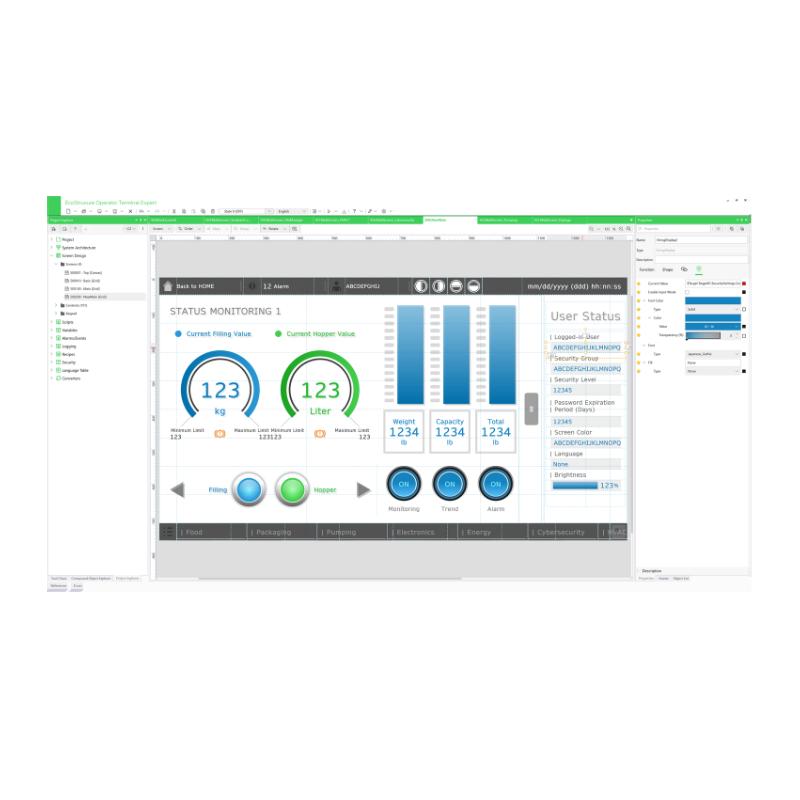
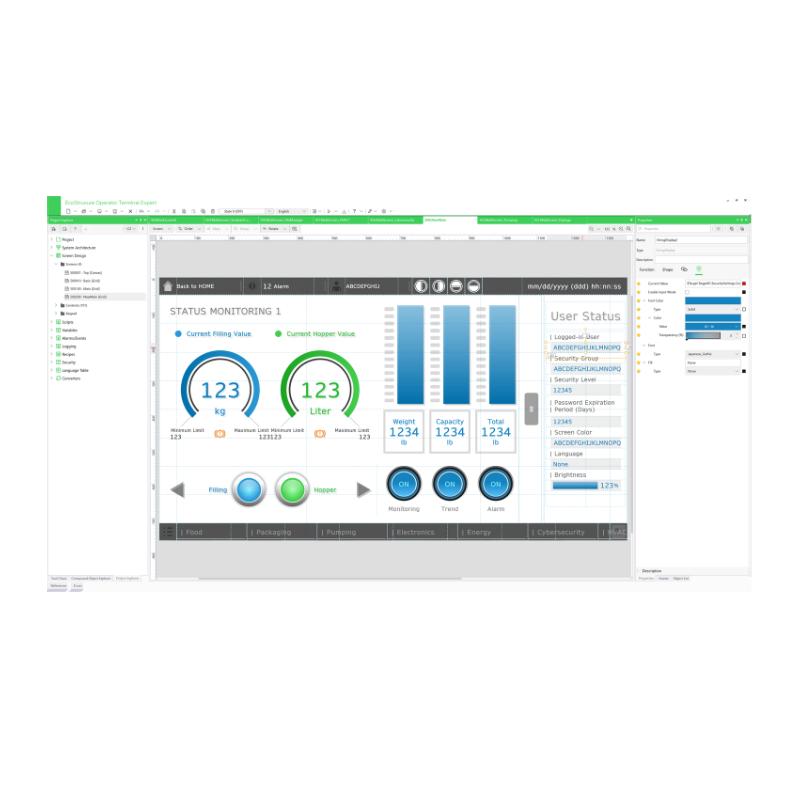
The Schneider Electric HMIPELCZLSPAZZ is a Professional Buildtime License for EcoStruxure Operator Terminal Expert, Schneider Electric’s industrial HMI configuration software. Unlike a physical operator panel, this product provides the engineering environment required to develop, configure, and edit HMI runtime applications for compatible Harmony operator terminals and industrial PCs.
This is a single-station perpetual digital license. It allows the software to be installed and used on one engineering workstation for developing HMI projects. Engineers can create operator screens, configure communication drivers, organize machine information, and develop graphical interfaces for industrial automation applications.
The Professional edition offers more than basic screen construction. Its development environment includes graphical objects, flexible scripting, screen navigation, themes, alarm functions, sampling and trending, and other tools used to build operator interfaces. It also supports features such as Web Viewer and Web Server API, depending on the target hardware, software version, and applicable runtime licensing.
The software is particularly useful for OEM machine builders and system integrators working with Schneider Electric Harmony HMIs. A typical project may involve creating a machine overview screen, configuring PLC communication, displaying process values, setting up alarms, and organizing operator access to different machine functions.
The HMIPELCZLSPAZZ license supports EcoStruxure Operator Terminal Expert Professional Buildtime functionality for one engineering station. It is suited to applications involving packaging machinery, food and beverage equipment, textile machines, compressor systems, pumps, fans, and HVAC equipment.
Technical Specifications
| Parameter | Specification |
|---|---|
| Manufacturer | Schneider Electric |
| Model | HMIPELCZLSPAZZ |
| Product Type | Professional Buildtime License |
| Software Name | EcoStruxure Operator Terminal Expert |
| Software Edition | Professional |
| Software Variant | Buildtime |
| License Type | Single Station / Node-Locked |
| License Category | Perpetual |
| License Format | Digital |
| Installation Scope | 1 Engineering Station |
| Software Version | V3.5 SP1 |
| Display Resolution | 1280 × 720 pixels (HD) |
| Operating System Requirement | Windows 10 64-bit |
| RAM Requirement | 8 GB |
| Hard Drive Space | 30 GB |
| Supported Languages | English, Italian, Chinese, Spanish, French, German, Portuguese, Korean |
| HMI Development | Screen Design and Runtime Application Configuration |
| Communication Support | Multiple Industrial Device Drivers |
| Application Functions | Navigation, Scripting, Alarms, Sampling and Trending |
| Dimensions | Not Applicable – Digital Software License |
| Shipping Weight | 3 kg |
Product Features
- Professional Buildtime Development Environment
The HMIPELCZLSPAZZ provides the Professional edition of EcoStruxure Operator Terminal Expert. It gives automation engineers access to the tools required to create, edit, and configure HMI runtime applications for compatible operator terminals and industrial PCs.
- Single-Station Perpetual License
This license is intended for one engineering workstation and provides perpetual licensing rather than a time-limited subscription. Its node-locked arrangement is relevant when allocating software licenses across an engineering department.
- Graphical HMI Screen Design
Engineers can build operator interfaces using graphical objects and screen-layout tools. Machine diagrams, numerical displays, operating buttons, status indicators, and other interface elements can be arranged according to the actual equipment workflow.
- Flexible Scripting Capabilities
The Professional environment supports scripting for application functions that require more than standard graphical configuration. This allows developers to implement customized screen behavior and application logic within the supported HMI environment.
- Multiple Communication Drivers
The software supports communication with different automation devices through available device drivers. This is useful when an HMI project needs to exchange data with PLCs or other equipment using different industrial communication protocols.
- Alarm Management
Alarm functions allow engineers to configure machine fault messages and operating notifications. The resulting interface helps operators identify abnormal conditions and locate the relevant equipment information.
- Sampling and Trending Functions
Sampling and trending features support the presentation of changing process values over time. They are useful for monitoring variables such as temperature, pressure, speed, and other machine operating parameters.
- Web Viewer Support
The software supports Web Viewer functionality for compatible applications. This can provide additional options for viewing and interacting with HMI information remotely when the required runtime licensing and target hardware are available.
- Web Server API and OPC UA Capabilities
The Professional edition supports advanced integration functions, including Web Server API and OPC UA capabilities on supported hardware and software configurations. Availability depends on the target platform and applicable version.
- Multilingual Engineering Environment
The software supports multiple user languages, including English, Chinese, French, German, Italian, Portuguese, Spanish, and Korean. This is useful for engineering teams working across different regions.
Working Principle
The HMIPELCZLSPAZZ operates at the engineering level of an industrial automation system. It is not responsible for directly controlling motors, processing sensor signals, or executing PLC logic. Instead, it provides the software environment in which the operator interface is developed and configured.
The engineering process begins with creating a project for the intended Harmony HMI or compatible industrial PC. The developer defines the target device, organizes the screen structure, and establishes the communication drivers required by the connected automation equipment.
Next, the engineer creates the operator interface. Typical screen elements include machine status indicators, numerical process values, alarm lists, operating buttons, and navigation controls. Scripts and application functions can be added where more customized behavior is required.
Communication variables are then associated with the relevant PLC data points. For example, a temperature display can be linked to a controller variable, while an operator input field can be configured to write an authorized setpoint to the PLC.
Once the project has been configured, it is transferred to the compatible target HMI or industrial PC for runtime execution. During machine operation, the HMI application exchanges data with the PLC and presents the information to the operator.
The PLC continues to execute the actual machine control program. The HMI runtime application handles visualization, operator interaction, and configured information display.
Typical HMI Engineering Workflow:
Engineering Workstation → EcoStruxure Operator Terminal Expert → HMI Screen Development → Communication Configuration → Application Compilation → Target HMI
Typical Runtime Communication Path:
PLC / Controller → Industrial Communication Network → HMI Runtime Application → Operator Display → Operator Input → PLC
Typical Application Development Stages:
- Select the target Harmony HMI or compatible industrial PC.
- Create the HMI project and configure its device settings.
- Develop screens, navigation, and graphical objects.
- Configure PLC drivers and communication variables.
- Add alarms, sampling, trending, and application functions.
- Test the project and transfer it to the target runtime platform.
Role in EcoStruxure HMI Control Architecture
Within Schneider Electric’s EcoStruxure HMI architecture, HMIPELCZLSPAZZ serves as the engineering software license rather than a runtime hardware component.
It occupies the development stage of the automation project. Engineers use it to prepare the HMI application before transferring the configured project to a compatible operator terminal or industrial PC.
The distinction between buildtime and runtime is important. Buildtime refers to the engineering environment used to create and modify the application, while runtime refers to the environment that executes the finished HMI project on the target device.
In a typical machine automation architecture, the PLC manages equipment logic and field signals. The HMI runtime presents machine information and receives operator commands. HMIPELCZLSPAZZ supplies the professional development environment used to configure that operator interface.
| Control System Component | Function |
|---|---|
| HMIPELCZLSPAZZ | Provides Professional Buildtime engineering capabilities |
| EcoStruxure Operator Terminal Expert | Develops and configures HMI runtime applications |
| Harmony ST6 | Compatible operator terminal platform |
| Harmony STO7 | Compatible operator terminal platform |
| Harmony STM6 | Compatible operator terminal platform |
| Harmony GTU | Compatible operator terminal platform |
| Harmony GTO | Compatible operator terminal platform |
| Harmony iPC | Industrial PC platform for compatible HMI applications |
| PLC / Logic Controller | Executes machine control logic |
| Industrial Communication Network | Exchanges data between HMI and automation devices |
| Engineering Workstation | Hosts the buildtime software and HMI projects |
Industrial Applications
| Application | Software Development Function |
|---|---|
| Packaging Machinery | Creates production overview screens, machine controls, and alarm displays |
| Food and Beverage Equipment | Configures process monitoring, operating parameters, and equipment status screens |
| Textile Machinery | Develops machine operation interfaces and production monitoring pages |
| Compressor Systems | Creates pressure monitoring, operating status, and alarm interfaces |
| Pumping Equipment | Configures pump status displays, operating controls, and process-value monitoring |
| HVAC Systems | Develops temperature, equipment status, and operating-mode screens |
| Marine Automation | Organizes operator interfaces for compatible marine automation equipment |
| OEM Machine Building | Develops reusable HMI applications for different machine configurations |
| Industrial System Integration | Configures communication drivers and operator interfaces for multi-device automation systems |
Installation and Maintenance
- Verify the License Reference: Confirm that the license is HMIPELCZLSPAZZ and that the required edition is Professional Buildtime rather than Basic Buildtime or a runtime license.
- Check the Engineering Workstation: Verify that the computer meets the applicable operating system, processor, memory, and storage requirements before installing the software.
- Prepare the Installation Environment: Ensure that the workstation has sufficient available storage and the necessary Windows permissions for software installation.
- Complete Digital License Activation: Follow the applicable digital licensing procedure and verify that the Professional Buildtime entitlement is correctly associated with the intended workstation.
- Check Software Version Compatibility: Confirm that the installed EcoStruxure Operator Terminal Expert version supports the target Harmony HMI or industrial PC.
- Configure the Target Device: Select the correct target terminal or industrial PC when creating the project. Incorrect target-device selection can affect available functions and project compatibility.
- Verify Communication Drivers: Check that the required PLC and device drivers are available in the installed software version before configuring the application.
- Organize Project Files: Keep HMI project files, scripts, graphics, communication settings, and related engineering documents in an organized project directory.
- Test Communication Settings: Verify PLC addresses, communication protocols, network parameters, and data mappings before transferring the application to the target device.
- Validate Alarm and Data Functions: Test configured alarms, sampling, trending, and operator input functions to ensure that the HMI displays the expected information.
- Maintain Project Backups: Keep backup copies of the original engineering project and each approved application revision. This simplifies recovery after workstation replacement or project modification.
- Document License and Project Allocation: Maintain records of the licensed engineering workstation, software version, project files, and target HMI configurations for future maintenance.
Compatible System Components
| Component | Product Type | Application |
|---|---|---|
| Harmony ST6 | HMI Operator Terminal | Executes compatible EcoStruxure HMI applications |
| Harmony STO7 | HMI Operator Terminal | Provides operator visualization |
| Harmony STM6 | HMI Operator Terminal | Supports compatible HMI runtime applications |
| Harmony GTU | Advanced HMI Terminal | Provides machine-level visualization |
| Harmony GTO | Advanced HMI Terminal | Executes compatible operator interface projects |
| Harmony iPC | Industrial PC | Hosts compatible HMI runtime applications |
| Modicon M221 | Logic Controller | Provides PLC machine control |
| Modicon M241 | Logic Controller | Handles machine automation and communication |
| Modicon M251 | Logic Controller | Supports distributed machine control |
| EcoStruxure Operator Terminal Expert Runtime License | Runtime License | Supports applicable HMI runtime licensing requirements |
| Engineering Workstation | Industrial Engineering Computer | Hosts the Professional Buildtime environment |
| Industrial Ethernet Network | Communication Infrastructure | Connects compatible HMI and PLC devices |
Recommended Related Models
| Model | Product Description |
|---|---|
| HMIEELCZLSPAZZ | EcoStruxure Operator Terminal Expert Basic Buildtime License |
| HMIPELCZLGPAZZ | EcoStruxure Operator Terminal Expert Professional Buildtime Group License |
| HMIPELCZLTPAZZ | EcoStruxure Operator Terminal Expert Professional Buildtime Team License |
| HMIEOTEBTP1P | EcoStruxure Operator Terminal Expert Professional Buildtime Single-Station Perpetual License |
| HMIEOTEBTP3P | EcoStruxure Operator Terminal Expert Professional Buildtime Group Perpetual License |
| HMIEOTEBTP1SY | EcoStruxure Operator Terminal Expert Professional Buildtime Single-Station Subscription License |
Key Advantages
- Professional HMI application development environment.
- Single-station node-locked license.
- Perpetual digital license category.
- Graphical screen design and application configuration.
- Flexible scripting capabilities.
- Multiple industrial communication drivers.
- Alarm management and event visualization.
- Sampling and trending functions.
- Web Viewer support for compatible configurations.
- Web Server API and OPC UA capabilities on supported platforms.
- Multilingual engineering environment.
- Compatibility with multiple Harmony HMI and industrial PC platforms.
Technical FAQs
What is the difference between HMIPELCZLSPAZZ and a Harmony HMI panel?
HMIPELCZLSPAZZ is an engineering software license, not a physical touchscreen terminal. It is used to develop and configure HMI runtime applications. A Harmony HMI panel is the target hardware that executes the finished application and provides the operator with a physical interface.
Can HMIPELCZLSPAZZ be used to develop applications for different Harmony HMI models?
Yes, the software supports multiple compatible Harmony HMI platforms, including ST6, STO7, STM6, GTU, and GTO ranges. However, project compatibility and available functions depend on the target device, hardware capabilities, and installed software version.
Does the Professional Buildtime license include HMI runtime licensing?
Buildtime and runtime are different licensing functions. HMIPELCZLSPAZZ covers the Professional engineering environment used to develop applications. Certain runtime-related functions, including applicable Web Viewer capabilities, may require additional runtime licensing depending on the target platform and application requirements.
What should be considered when moving an HMI project to another engineering computer?
The engineering project, software version, target-device configuration, communication drivers, and license entitlement should all be checked. Since HMIPELCZLSPAZZ is a single-station node-locked license, the licensing arrangement must also be considered when changing the workstation used for development.