

ProductPRODUCT
Featured products
Contact Us
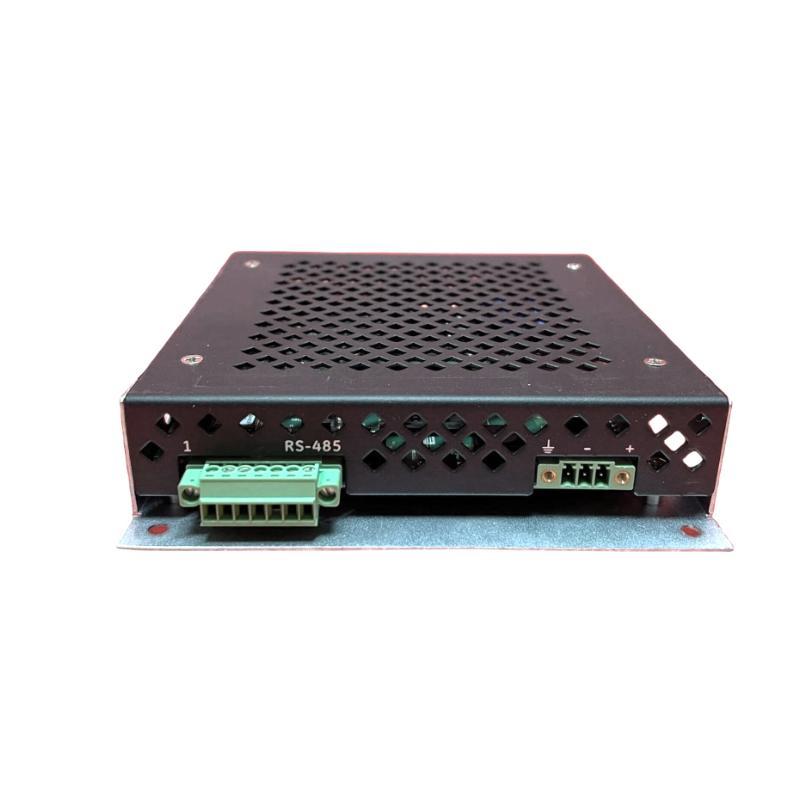
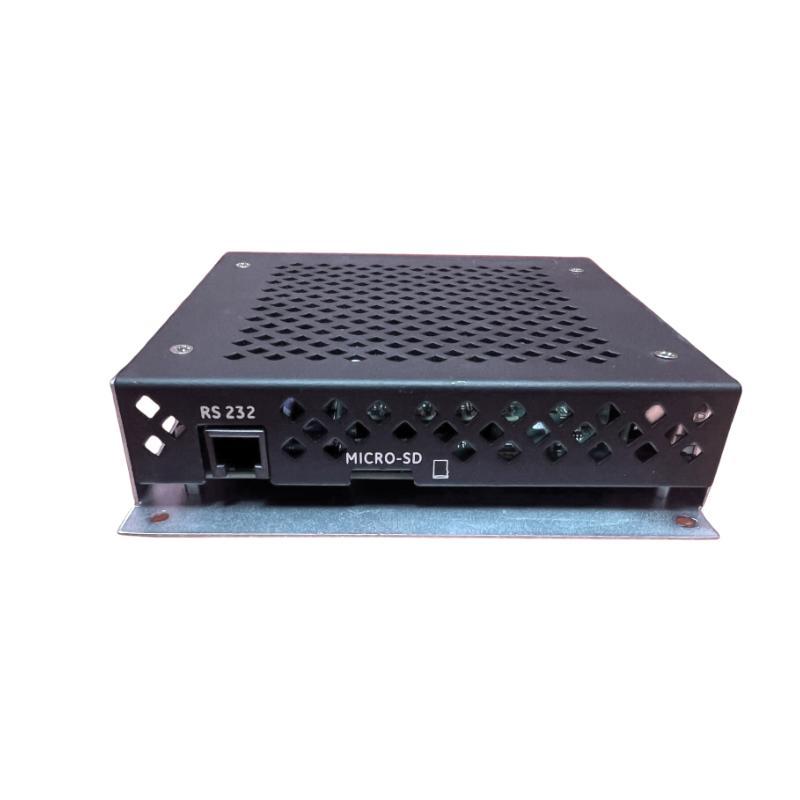
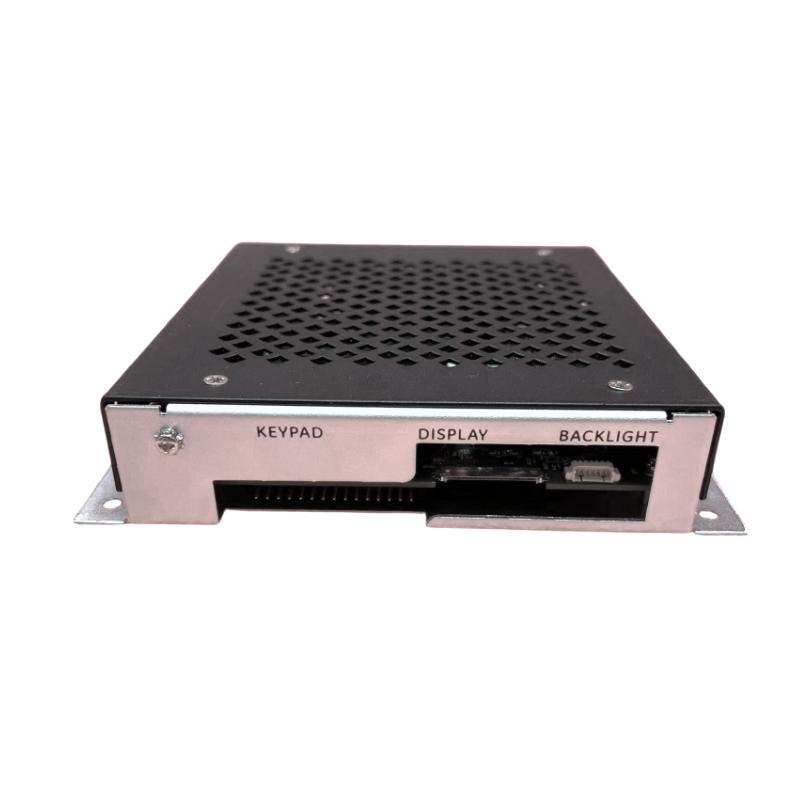
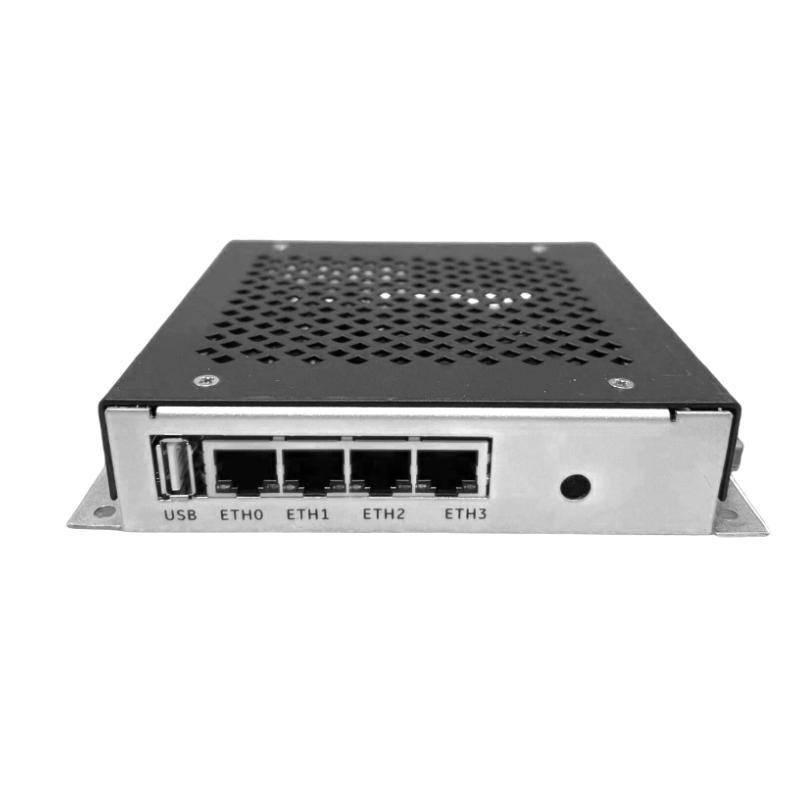
- GE
- IS420CCGAH2A
- Control and Communication Gateway
- USA
- 200×115×57 mm
- 0.788 kg
- Xiamen, China
- New & In Stock
- T/T, PayPal, Western Union
- 1 Year
- 1-3 Working Days
- DHL, UPS, TNT, FedEx and EMS.
- 24-Hour Service
- COO
- 4
Our advantage

Global Logistics
We have a 10-year logistics and express cooperation agreement, so our products can be shipped to any place in the world.

Brand new and original
Our products are imported in bulk from the place of origin. Because of the cooperative relationship, our products are all original and 100% new.

24-hour service
We provide 7*24 hours service to our customers. We will be there whenever you need us.

Price advantage
All our products are priced very favorably because we have our own warehouse and supply.
| Company Information | |||
| [email protected] | |||
| Mobile | +8615980777398 | ||
| +8615980777398 | |||
| 15980777398 |
Product Overview
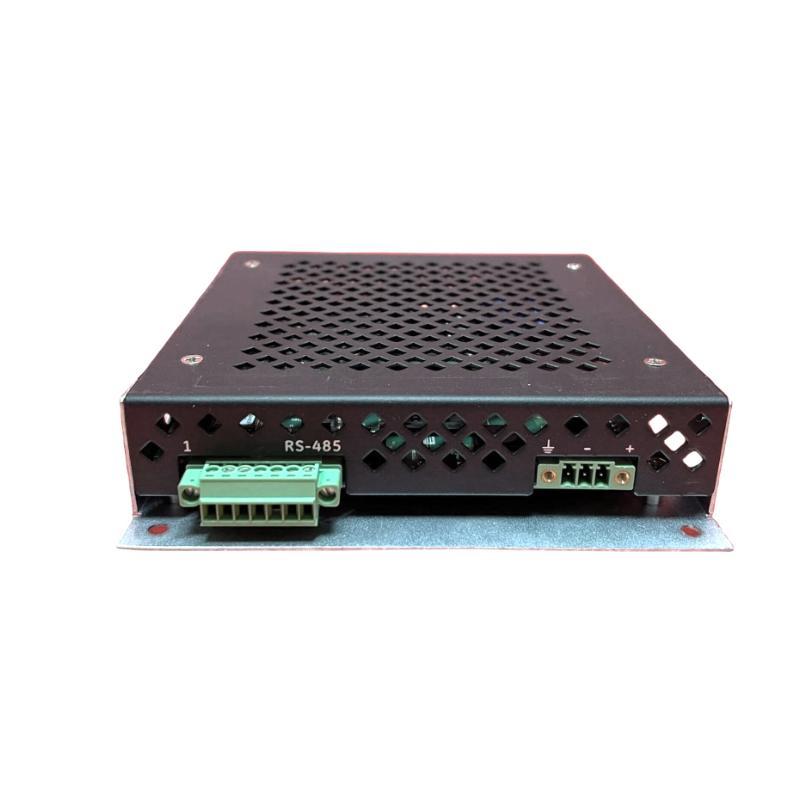
The GE IS420CCGAH2A Control and Communication Gateway is an industrial automation component designed for use in compatible control-system architectures. Communication gateways play an important role in industrial environments by supporting the exchange of information between different control devices, electronic assemblies, and automation networks. Depending on the system configuration, a gateway can help coordinate data transfer between connected equipment and facilitate communication across designated interfaces.
Modern industrial facilities often contain multiple layers of automation hardware, including controllers, remote I/O assemblies, operator interfaces, monitoring equipment, and supervisory control systems. These devices may use different communication interfaces or serve different operational purposes. A properly selected gateway helps connect the designated parts of the architecture, allowing process information and equipment status to move through the intended communication path.
The GE IS420CCGAH2A has listed dimensions of 200 × 115 × 57 mm and a weight of approximately 0.788 kg. These physical specifications are useful for equipment identification, cabinet planning, shipping arrangements, and replacement logistics. Before installation, the complete part number and hardware revision should be checked against the original equipment documentation to confirm that the device is suitable for the intended application.
For industrial maintenance teams and system integrators, the IS420CCGAH2A should be evaluated as part of the wider control and communication architecture. Correct configuration, compatible connections, and verification of the intended network role are essential for reliable system operation.
Technical Specifications
| Parameter | Specification |
|---|---|
| Manufacturer | General Electric (GE) |
| Model | IS420CCGAH2A |
| Product Type | Control and Communication Gateway |
| Product Family | GE IS420 Series |
| Primary Role | Control-system communication gateway |
| Dimensions | 200 × 115 × 57 mm |
| Weight | 0.788 kg |
| Installation | Compatible industrial control equipment |
| Application | Industrial automation and control-system integration |
| Communication Interfaces | Verify against the applicable hardware documentation |
| Power Requirements | Confirm from the product-specific technical documentation |
| Network Compatibility | Verify against the host-system configuration |
| Replacement Identification | Complete model number and applicable hardware revision |
Note: Only the product identification, general product category, dimensions, and weight are specified here. Electrical ratings, supported protocols, connector assignments, and detailed system compatibility should be confirmed before procurement or installation.
What Is the GE IS420CCGAH2A Control and Communication Gateway?
The IS420CCGAH2A is identified as a GE control and communication gateway. In an industrial automation architecture, a gateway is generally used to support communication between designated devices, subsystems, or network segments.
A gateway’s role differs from that of a general-purpose controller. A controller primarily executes its assigned control logic, while a gateway is generally associated with the transfer or coordination of information between connected systems. The actual division of responsibilities depends on the architecture and the capabilities of the installed hardware.
In a typical industrial environment, information may originate from sensors, field devices, I/O assemblies, or controllers. The information is processed by the appropriate equipment and may then be made available to other components through an established communication path. A gateway can form part of this path when the connected devices and interfaces are supported.
For the IS420CCGAH2A, the precise communication architecture, supported interfaces, and designated host equipment should be confirmed from the relevant GE documentation. The model designation alone should not be used to infer specific Ethernet ports, protocols, network speeds, or controller compatibility.
Function and Working Principle
The operation of a control and communication gateway depends on its hardware design and the communication functions supported by the host system. The following describes the general role of an industrial gateway rather than asserting undocumented features specific to the IS420CCGAH2A.
Communication Between Connected Devices
Industrial automation systems contain devices that exchange process values, operating states, diagnostic information, and control-related data. A gateway may provide a defined connection between these devices when the relevant interfaces and communication arrangements are compatible.
Correct network configuration is important because connected devices must agree on the communication method, addressing scheme, and data structure required by the system.
Data Transfer and Coordination
A gateway may support the transfer of information between designated parts of an automation architecture. Depending on the implementation, this can involve forwarding data, organizing communications, or providing an interface between compatible system components.
The precise behavior of the IS420CCGAH2A must be established from its approved functional description and system configuration.
Integration With Control Equipment
Industrial gateways are commonly installed alongside controllers, interface assemblies, and other electronic equipment. Their operation may depend on the correct connection of supporting hardware, suitable power, and the communication settings required by the application.
If one connected device is unavailable or incorrectly configured, the resulting communication problem may appear to originate from the gateway even when the underlying fault is elsewhere.
System Diagnostics
Communication-related equipment is typically maintained through a combination of status indications, host-system diagnostics, network checks, and inspection of the associated wiring. The diagnostic features available on the IS420CCGAH2A should be confirmed from its product-specific documentation before troubleshooting.
Role in Industrial Automation Systems
Reliable communication is essential to modern industrial control. Controllers, I/O assemblies, operator stations, and supervisory systems need to exchange information so that equipment can be monitored and managed as intended.
The IS420CCGAH2A is categorized as a control and communication gateway, making its intended role within the approved system architecture an important consideration during installation and maintenance.
Connecting Control-System Components
A gateway may form a communication link between designated control-system components. Its function is determined by the network design, supported interfaces, and configuration of the connected equipment.
Supporting Process Monitoring
Industrial systems exchange information about operating states, process measurements, alarms, and equipment conditions. When the gateway is part of the relevant data path, communication integrity helps ensure that connected systems receive the information required for monitoring.
Facilitating System Integration
Large automation installations may contain several interconnected subsystems. A properly configured gateway can support the intended exchange of data between compatible parts of the architecture.
Supporting Maintenance and Fault Isolation
Communication problems can affect multiple devices simultaneously. Understanding the gateway’s location in the network helps technicians determine whether an issue is associated with the gateway, the connected equipment, network cabling, configuration, or another system component.
Industrial Applications
The exact approved applications of the IS420CCGAH2A should be confirmed against the host equipment documentation. The following examples describe common environments in which industrial control and communication gateways may be used.
Industrial Process Control
Process facilities rely on connected control equipment to coordinate operations and exchange system information. Gateways may form part of the communication infrastructure used to link designated control components.
Power Generation and Utility Systems
Power and utility facilities use specialized automation hardware for equipment monitoring and operational coordination. Any gateway installed in these environments must be confirmed as suitable for the particular control architecture and service requirements.
Manufacturing Automation
Production facilities depend on communication between controllers, operator interfaces, I/O systems, and supervisory equipment. Gateways may help connect compatible devices within a defined industrial network.
Distributed Control Environments
Large control installations often contain several hardware groups distributed across cabinets or equipment locations. Communication gateways may support the exchange of information between designated subsystems, subject to the network design.
Industrial Equipment Maintenance
Maintenance teams may need to replace or inspect communication hardware during planned shutdowns or fault investigations. Accurate identification of the installed gateway is essential to avoid configuration errors and unintended network interruptions.
Installation and System Integration
Installing a control and communication gateway requires careful attention to equipment compatibility, electrical safety, wiring, and network configuration. The IS420CCGAH2A should be installed only in a configuration approved for the specific host system.
1. Confirm the Product Identification
Check the complete model number IS420CCGAH2A and record any additional revision or assembly markings. Compare these details with the original device and the applicable system documentation.
Do not select a replacement based solely on a similar enclosure, connector arrangement, or product-family name.
2. Review the Existing System Architecture
Before removing the existing unit, determine its location within the control system. Identify the connected equipment, communication paths, cable destinations, and any configuration information needed for restoration.
Record the original arrangement so that the replacement can be installed according to the approved design.
3. Follow Electrical Safety Procedures
Apply the host equipment’s shutdown and isolation procedures before accessing the device or its connections. Confirm that the installation is in the required safe state and follow applicable electrostatic discharge precautions when handling electronic assemblies.
Never connect or disconnect equipment under power unless the specific system documentation explicitly permits that operation.
4. Inspect the Mounting and Connections
Check the mounting surface, connectors, cable condition, and surrounding enclosure for visible damage or contamination. Verify that the device fits the intended mounting arrangement and that all required connections are compatible.
The physical dimensions of 200 × 115 × 57 mm can assist with installation planning, but they do not establish electrical or network compatibility.
5. Verify Communication Settings
Depending on the host architecture, commissioning may involve network settings, device identification, addressing, communication parameters, or system-specific configuration. The required settings for the IS420CCGAH2A must be obtained from the applicable documentation.
Do not assume a particular protocol, port assignment, or configuration method without confirmation.
6. Perform Functional Checks
After installation, complete the prescribed startup and diagnostic checks. Verify that the intended connected devices can communicate and that the host system reports normal operation.
If communication is incomplete or unstable, investigate the network configuration, connections, and connected devices before concluding that the gateway itself is defective.
Troubleshooting the GE IS420CCGAH2A
Communication faults can arise from several points in an industrial network. A structured diagnostic approach helps identify the cause without unnecessarily replacing functioning equipment.
Gateway Not Communicating With the Host System
If the gateway cannot communicate with the host equipment, check:
- Whether the installed model and revision are correct.
- Whether the device is installed in its designated position.
- Whether the required power and connections are present.
- Whether network cables and connectors are secure and undamaged.
- Whether the communication configuration matches the approved system design.
- Whether the host system reports relevant diagnostic messages.
Use the prescribed troubleshooting sequence for the equipment rather than relying on assumptions about undocumented indicators or interfaces.
Intermittent Communication
Intermittent communication may result from loose connections, damaged cables, unstable power, configuration mismatches, network congestion, or faults in another connected device.
Inspect the relevant network path and review the available diagnostic information. Where practical and safe, compare the behavior of the affected connection with the system’s documented normal operating conditions.
Connected Devices Are Not Responding
If one or more connected devices cannot be reached, determine whether the problem affects a single device, a network segment, or the entire communication path.
Check the device’s operating condition, its connection to the network, and its configuration. A failure at a connected controller, interface assembly, or network component may produce symptoms similar to a gateway fault.
Communication Fault After Replacement
If the problem begins after installing a replacement, verify that the complete part number and hardware revision are correct. Review the original configuration records and confirm that all cables have been returned to their intended positions.
Also check whether the replacement requires system-specific configuration or commissioning. Do not assume that a physically compatible unit will automatically operate correctly in every installation.
Repeated Network or System Alarms
Repeated alarms should be evaluated using the host system’s diagnostic records and the applicable maintenance procedures. Determine whether the alarm indicates a local connection problem, an unavailable device, a configuration issue, or a broader system condition.
Record the sequence of events and any changes made during troubleshooting. This information helps prevent unnecessary component replacement and supports more accurate fault isolation.
Maintenance Recommendations
A planned maintenance approach can help preserve communication reliability and reduce avoidable downtime.
Inspect the Physical Installation
Check the gateway’s enclosure, mounting arrangement, connectors, and surrounding equipment for visible damage, contamination, or loose hardware.
Check Cable Condition
Inspect relevant communication and power cables for damage, poor routing, excessive strain, and insecure connections. Maintain cable routing according to the system design and applicable electrical requirements.
Monitor System Diagnostics
Review available communication alarms and diagnostic records during routine maintenance. Recurring communication errors may indicate a developing issue in the gateway, the network, or another connected component.
Maintain Environmental Conditions
Keep the control cabinet within the environmental limits specified for the installed equipment. Excessive heat, moisture, dust, and vibration can affect electronic hardware and its connections.
Preserve Configuration Records
Document device identification, hardware revisions, network settings, connection arrangements, and commissioning results where applicable. Store configuration information according to the facility’s maintenance and cybersecurity procedures.
Use Proper Handling Procedures
When handling or storing a replacement unit, protect it from electrostatic discharge, moisture, impact, and contamination. Avoid touching exposed electronic components or contact surfaces unnecessarily.
Compatible System Components
The IS420CCGAH2A should be matched to the specific control architecture for which it is intended. The following table identifies general component categories that may be relevant when reviewing a gateway installation. It does not establish direct compatibility with any particular model.
| Component Category | Typical Function | Verification Requirement |
|---|---|---|
| Industrial Controller | Executes assigned control logic | Confirm supported communication arrangement |
| Network Interface | Provides a connection to an industrial network | Verify interface type and configuration |
| Remote I/O Assembly | Exchanges process signals with the control system | Confirm that the system supports the required data path |
| Operator Interface | Presents equipment status and process information | Verify the approved connection and data exchange method |
| Supervisory Control System | Monitors and coordinates industrial operations | Confirm network architecture and integration requirements |
| Communication Cabling | Carries data between connected devices | Check cable type, termination, and routing requirements |
| Control Power Supply | Provides power to the relevant equipment | Verify electrical requirements for the installed hardware |
Specific GE controller, network, or I/O model numbers should be selected only after the host-system configuration has been confirmed.
Replacement and Procurement Considerations
Selecting the correct replacement for the GE IS420CCGAH2A requires attention to product identity, condition, revision, and the intended application.
Exact Part Number
Verify IS420CCGAH2A against the original equipment label and relevant maintenance records. A single character difference may identify a different hardware variant.
Revision and Configuration
Check any revision information available on the existing unit. Determine whether the host system requires a particular revision or an approved replacement configuration.
Physical Compatibility
The listed dimensions are 200 × 115 × 57 mm, and the listed weight is 0.788 kg. These values can assist with packaging, storage, and physical installation planning.
Functional Compatibility
Confirm that the replacement performs the required gateway function within the actual system architecture. Similar dimensions or a related model designation do not prove functional interchangeability.
Product Condition
When purchasing a replacement, establish whether it is new, refurbished, or previously used. For refurbished equipment, request appropriate inspection and functional-test information where available.
Documentation and Traceability
Maintain records of the purchased part number, revision, condition, supplier information, installation date, and commissioning results. Traceable records make future maintenance and replacement decisions more efficient.
Key Advantages
Dedicated Gateway Product Category
The IS420CCGAH2A is identified as a control and communication gateway, making its designated communication role a central consideration when matching it to an industrial control system.
Compact Installation Footprint
With listed dimensions of 200 × 115 × 57 mm, the unit’s physical size can be used to support cabinet planning and replacement logistics.
Support for System Integration
When correctly matched to the approved architecture, a communication gateway can help provide the intended information path between compatible control-system components.
Maintenance-Friendly Identification
The full part number provides a clear reference for spare-parts inventory, equipment records, and replacement checks.
Structured Troubleshooting
Treating the gateway as one part of a complete communication path helps technicians distinguish device faults from cabling, configuration, power, and connected-equipment issues.
Technical FAQs
What is the GE IS420CCGAH2A?
The GE IS420CCGAH2A is identified as a Control and Communication Gateway for compatible industrial control equipment.
What are the dimensions of the IS420CCGAH2A?
The listed dimensions are 200 × 115 × 57 mm.
How much does the IS420CCGAH2A weigh?
The listed weight is approximately 0.788 kg.
What is the function of a control and communication gateway?
In general, a gateway supports communication between designated devices or subsystems in an automation architecture. The exact function and supported interfaces of the IS420CCGAH2A should be confirmed from the product-specific technical documentation.
Which communication protocols does the IS420CCGAH2A support?
The supported protocols have not been established by the product information provided here. Confirm the available interfaces and protocols from the applicable hardware documentation before connecting the device to a network.
Can the IS420CCGAH2A replace another GE IS420-series product?
Not automatically. Compatibility depends on the exact model, hardware revision, intended function, and host-system requirements. A similar series designation does not guarantee interchangeability.
What should be checked if the gateway stops communicating?
Inspect the relevant connections, cable condition, power requirements, configuration, connected devices, and host-system diagnostics. Follow the approved troubleshooting procedure before replacing the gateway.
Does replacing the gateway require reconfiguration?
That depends on the host system and the replacement procedure. Review the applicable documentation to determine whether settings must be restored or additional commissioning is required.
How should the IS420CCGAH2A be stored?
Store the unit in suitable protective packaging under the specified environmental conditions. Protect it from electrostatic discharge, moisture, dust, impact, and contamination.
Conclusion
The GE IS420CCGAH2A Control and Communication Gateway is an industrial automation component intended to support the communication architecture of compatible control equipment. Its listed dimensions of 200 × 115 × 57 mm and weight of 0.788 kg provide useful information for identification, spare-parts management, and installation planning.
Reliable operation depends on matching the gateway to the correct host system, maintaining sound electrical and communication connections, and completing the required configuration and commissioning checks. Supported protocols, electrical specifications, and direct compatibility with other GE hardware should be confirmed from the applicable technical documentation rather than inferred from the product name.
For maintenance engineers, system integrators, and industrial spare-parts purchasers, verifying the complete IS420CCGAH2A designation and its intended system role is the most important step toward selecting a suitable replacement and maintaining reliable industrial communication.