
NewsNEWCENTER
Featured products

Contact Us
GE Fanuc IC693ALG223D Analog Input Module Troubleshooting Guide
2026-10-20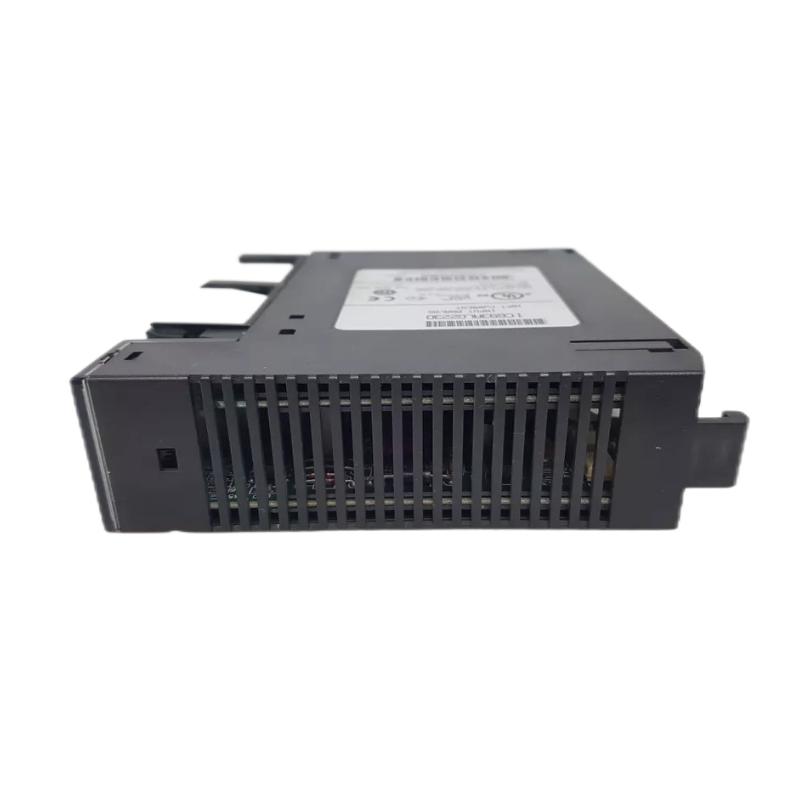
The GE Fanuc IC693ALG223D Analog Input Module is a 16-channel analog current input module designed for Series 90-30 PLC control systems. It converts field current signals into digital values that the PLC can process for monitoring, control logic, alarms, and process regulation. When the module reports abnormal status, fails to read a transmitter, or delivers unstable or incorrect values, a systematic troubleshooting procedure can help identify whether the problem originates in field wiring, loop power, channel configuration, PLC data handling, or the module hardware itself.
This guide explains common IC693ALG223D faults, diagnostic methods, signal verification, and corrective actions. Always verify the exact module revision and applicable wiring documentation before testing, because terminal assignments and configuration details must match the installed hardware.
Table of Contents
- 1. Product Overview and Troubleshooting Scope
- 2. Safety Precautions Before Diagnosis
- 3. Common Fault Symptoms and Possible Causes
- 4. Module LED Status Diagnosis
- 5. Power Supply and Field Loop Checks
- 6. Analog Signal Testing and Verification
- 7. PLC Configuration and Data Troubleshooting
- 8. Single-Channel and Multi-Channel Fault Isolation
- 9. Unstable Readings and Signal Noise
- 10. Repair and Replacement Recommendations
- 11. Preventive Maintenance
- 12. Technical FAQs
- 13. Technical Summary
1. Product Overview and Troubleshooting Scope
The IC693ALG223D belongs to the GE Fanuc Series 90-30 PLC analog input family. It supports up to 16 single-ended current input channels and is used to collect analog measurements from industrial instruments such as pressure transmitters, flowmeters, level transmitters, and other current-output devices.
The IC693ALG223 family supports configurable current ranges including 0–20 mA, 4–20 mA, and enhanced 4–20 mA. The enhanced range can support low-current fault detection when the PLC configuration and alarm logic are designed accordingly. The exact range, scaling, active channels, and diagnostic behavior should be confirmed against the installed revision and project configuration.
Typical troubleshooting tasks include:
- Investigating a module OK indicator that remains off or flashes abnormally.
- Diagnosing all channels reading zero or a fixed value.
- Finding one channel that does not respond to changes in input current.
- Checking readings that exceed the configured engineering range.
- Identifying fluctuating readings caused by wiring, grounding, or electrical interference.
- Determining whether the fault is in the transmitter, current loop, PLC configuration, or input module.
2. Safety Precautions Before Diagnosis
Industrial analog inputs may be connected to equipment operating at hazardous voltages or controlling safety-critical processes. Troubleshooting must be performed by qualified personnel under the site’s electrical safety procedures.
- Review the electrical drawings and the process consequences of disconnecting each transmitter.
- Apply lockout/tagout and isolate hazardous energy whenever required before removing modules or changing field wiring.
- Do not insert or remove the module under power unless the exact hardware documentation explicitly permits the action.
- Use a calibrated digital multimeter and a suitable current-loop calibrator rated for the circuit.
- Never connect a voltage source directly to a current input unless the test arrangement is specifically designed for that purpose.
- Do not short input terminals or bypass process interlocks to force a test result.
- Back up the PLC program and configuration before making changes.
If a test requires temporarily disconnecting a process signal, first establish an approved process-safe condition. Restore all wiring, alarms, interlocks, and operating settings after testing.
3. Common Fault Symptoms and Possible Causes
| Observed symptom | Possible causes | Recommended first check |
|---|---|---|
| Module OK LED is off | Missing backplane power, module fault, watchdog condition, or system-level issue | Check rack power, CPU status, and diagnostic fault records |
| Module status flashes continuously | Configuration not received or startup diagnostic problem, depending on flash pattern | Record the pattern and review the applicable hardware manual |
| All channels read zero | Missing external supply, interrupted loop power, incorrect wiring, inactive channels, or incorrect scaling | Check the user-supply status and measure loop current safely |
| Only one channel reads incorrectly | Transmitter fault, open circuit, reversed polarity, loose terminal, or damaged channel | Compare the channel with a known-good signal source |
| Reading remains at a maximum or abnormal fixed count | Out-of-range current, wiring error, configuration mismatch, or input-channel failure | Measure actual loop current and verify the configured range |
| Readings fluctuate | Electrical interference, poor connections, unstable transmitter output, or grounding problems | Check wiring, shielding, loop stability, and nearby electrical equipment |
| PLC value does not match the instrument display | Scaling mismatch, wrong reference address, different measurement points, or signal fault | Compare raw input data with the engineering-unit calculation |
A symptom alone does not prove that the module has failed. Confirm the external supply, current signal, configuration, and PLC data path before replacing hardware.
4. Module LED Status Diagnosis
The module’s status indicators provide an initial indication of whether the hardware and its external supply are operating normally. Interpret the LEDs together with the CPU status and diagnostic records.
4.1 Module OK indicator is off
- Check whether the PLC rack is powered and the CPU is operating normally.
- Review the rack’s power-supply status and confirm that the installed modules remain within the power budget.
- Inspect the PLC fault table or programming software for module, configuration, or watchdog-related messages.
- If the site procedure permits, isolate power and inspect the module seating and backplane connector for contamination or damage.
- After correcting any identified power or configuration problem, restart the system only under an approved procedure and observe the status indicator.
If the indicator remains off after verified power and configuration checks, test the module in a suitable approved setup or arrange specialist evaluation.
4.2 User supply status is abnormal
The analog circuitry requires an appropriate external user supply in addition to backplane power. If the user-supply indicator is off or abnormal, verify the supply voltage at the designated points using the correct wiring documentation. Check the supply output under load, protective devices, terminal tightness, polarity, and the total demand from connected current loops.
4.3 Configuration-related flashing
A flashing indicator may indicate that configuration data has not been received, or that startup diagnostics have failed. Flash patterns can have specific meanings, so do not rely on a generic interpretation. Record the pattern, read the PLC fault records, and confirm that the configured module type and slot match the installed hardware.
5. Power Supply and Field Loop Checks
Insufficient power or an interrupted current loop can make multiple input channels appear faulty even when the module hardware is serviceable.
5.1 Verify backplane power
Check the PLC power supply for normal status and confirm that the combined load of the CPU and installed modules is within the rated capacity. The IC693ALG223 family draws current from the rack’s 5 VDC backplane supply. Use the exact revision’s specifications when calculating the rack power budget.
5.2 Verify external user supply
Confirm that the required external supply is present at the designated module terminals and remains within the permitted range under operating conditions. Do not assume that a supply reading taken without the field loops connected proves the supply is adequate under load.
5.3 Inspect the current loop
- Identify the affected transmitter and trace its loop wiring against the electrical drawings.
- Check for an open circuit, loose connection, damaged cable, blown fuse, or disconnected supply.
- Verify transmitter polarity and the current input connection arrangement.
- Measure loop current using a meter or calibrator method suitable for the circuit.
- Compare the measured current with the transmitter’s expected output and the PLC channel reading.
For a two-wire 4–20 mA transmitter, the loop requires a complete current path. An open wire or missing loop supply can cause a low or invalid input value. Confirm whether the specific application uses an externally powered transmitter, a loop-powered transmitter, or another wiring arrangement before changing connections.
6. Analog Signal Testing and Verification
A calibrated current source is useful for determining whether an input channel responds correctly independently of the field transmitter. The test must follow the module’s actual wiring diagram and an approved isolation procedure.
6.1 Check the configured range
Confirm whether the channel is configured for 0–20 mA, standard 4–20 mA, or enhanced 4–20 mA. The same current can produce different raw values under different configurations. Enhanced-range diagnostics may also represent below-range current differently from standard scaling.
6.2 Perform a controlled current-input test
- Place the process in an approved test condition and isolate the field transmitter as required.
- Connect a calibrated current source using the correct module terminal diagram.
- Apply several known current values within the selected input range, for example 4 mA, 12 mA, and 20 mA when testing a standard 4–20 mA configuration.
- Allow the PLC scan and input update to settle, then record the raw analog value for each test point.
- Confirm that the value changes proportionally and agrees with the configured scaling.
- Repeat the procedure for other channels only when necessary and safe.
The following relationship is illustrative for a standard 4–20 mA channel scaled from 0 to 32,000 counts:
Raw count = (Measured current - 4 mA)
            / (20 mA - 4 mA) × 32,000

4 mA  → approximately 0 counts
12 mA → approximately 16,000 counts
20 mA → approximately 32,000 counts
This example is not a substitute for the actual PLC configuration. The project’s configured range, reference addresses, scaling, alarms, and raw-data representation determine the expected result.
6.3 Interpret the results
- Reading changes proportionally: The tested channel is responding to the applied current; investigate the field transmitter, wiring, or application scaling if the process value remains wrong.
- Reading remains unchanged: Confirm that the test current is reaching the correct input and that the channel is active and addressed correctly.
- Reading is fixed at an abnormal limit: Verify the actual current, range selection, wiring, and raw-data interpretation before suspecting a failed channel.
- Reading is unstable: Check current-source stability, connection quality, shielding, and grounding.
7. PLC Configuration and Data Troubleshooting
A healthy analog module can still appear faulty when the PLC program reads the wrong address or interprets raw values incorrectly.
7.1 Confirm module configuration
- Verify that the configured module type matches the installed IC693ALG223D.
- Check the physical rack and slot against the hardware configuration.
- Confirm that the intended input channels are enabled and assigned the expected references.
- Verify the current range and any configured high or low alarm thresholds.
- Confirm that configuration changes have been stored and are active according to the site’s change-control procedure.
7.2 Check analog reference addresses
Monitor the appropriate analog input reference table using the PLC programming software. Make sure the program reads the correct channel address and does not overwrite the value through an intermediate variable or data conversion routine.
7.3 Validate engineering-unit scaling
Compare the raw input count with the conversion formula used by the application. Incorrect low and high engineering limits, integer conversion, offset handling, or data-type interpretation can cause the displayed process value to disagree with the physical signal.
For example, if a calibrated 12 mA signal produces a plausible raw value but the HMI displays an implausible pressure, the problem may be in the PLC scaling or HMI tag configuration rather than the analog input channel.
8. Single-Channel and Multi-Channel Fault Isolation
The pattern of affected channels is an important diagnostic clue.
8.1 All channels are affected
If all channels fail together, investigate shared causes first: external user supply, rack power, module status, common wiring arrangements, configuration errors, and PLC reference mapping. Multiple independent channel failures are less likely than one shared problem, although hardware damage remains possible.
8.2 One channel is affected
If only one channel is abnormal, inspect the associated transmitter, field cable, terminals, and channel configuration. Where the process permits, compare the channel with another known-good channel using a controlled test source. Follow the approved wiring diagram and do not move live conductors between channels.
8.3 Several channels are affected intermittently
Look for shared field power, common return paths, cable routing near high-current equipment, terminal-block problems, and grounding differences. Check whether the failures occur when a motor, drive, heater, or other electrical load starts or stops.
9. Unstable Readings and Signal Noise
Unstable analog readings may result from electrical interference, poor connections, fluctuating transmitter output, or incorrect grounding. The following checks help separate signal-quality issues from module faults.
- Inspect the field cable for damaged insulation, loose terminals, corrosion, or moisture.
- Check whether analog signal cables are routed separately from motor, drive, contactor, and other high-interference wiring where practicable.
- Verify shield termination against the site’s grounding standard and the system design. Do not add multiple shield-ground points without checking the grounding scheme.
- Measure the transmitter output using an appropriate calibrated instrument and compare it with the PLC input trend.
- Review the PLC sampling, filtering, and application logic to determine whether the apparent fluctuation is physical or software-generated.
- Record whether the issue correlates with specific equipment switching or environmental conditions.
Do not apply arbitrary filtering to conceal a real process disturbance. If filtering is necessary, confirm that it does not compromise response time, alarms, or control-loop stability.
10. Repair and Replacement Recommendations
After completing external checks, decide whether the problem can be corrected in the field or requires module repair or replacement.
| Finding | Recommended action |
|---|---|
| Incorrect or missing external supply | Correct the supply fault and verify operation under load. |
| Open loop or damaged field cable | Repair the cable or connection using approved electrical procedures. |
| Incorrect channel range or address | Correct the PLC configuration and verify the stored configuration. |
| Transmitter output is incorrect | Inspect, calibrate, or replace the field instrument as appropriate. |
| One channel fails a controlled signal test | Repeat the test after checking wiring and configuration; escalate for module evaluation if the failure persists. |
| Module status remains abnormal with verified power and configuration | Arrange specialist diagnosis or replacement with a verified compatible unit. |
Before replacing the IC693ALG223D, confirm the complete part number, revision, system compatibility, channel requirements, and configuration behavior. A replacement may require configuration validation and commissioning checks before returning the process to service.
Do not attempt component-level repair on an energized module. If board-level repair is required, use a qualified industrial electronics service provider and perform a documented functional test before reinstalling the module.
11. Preventive Maintenance
Routine maintenance can reduce unexpected analog input failures and shorten fault-finding time.
- Inspect terminals and field wiring during planned maintenance shutdowns.
- Check rack power and external supply status when adding or replacing modules.
- Keep an updated copy of the PLC program, hardware configuration, and electrical drawings.
- Record baseline readings for representative input channels during commissioning.
- Trend important analog signals and investigate recurring deviations before they affect process control.
- Verify transmitter calibration according to the site’s maintenance schedule.
- Keep the module’s revision information and diagnostic history in the maintenance record.
- After any intervention, verify channel readings, alarms, scaling, and the affected control functions.
12. Technical FAQs
Why does the IC693ALG223D show zero on every channel?
Possible causes include missing external user supply, interrupted current loops, incorrect module configuration, inactive channels, or an incorrect PLC reference mapping. Check module status and loop current before replacing the module.
What does it mean if the module OK LED is off?
It may indicate missing backplane power, a watchdog condition, or a module startup fault. Check rack power, CPU status, configuration, and the applicable diagnostic records. Use the documented LED behavior for the exact revision.
How can I determine whether an input channel has failed?
After verifying wiring, supply, and configuration, apply a calibrated current source using an approved test procedure. If the raw value does not respond correctly to multiple known current levels, the channel may be defective and should be evaluated further.
Can an incorrect current range cause a wrong process value?
Yes. The configured range determines how current is represented in the PLC data. Confirm the channel range and scaling before diagnosing a hardware fault.
Why is one channel incorrect while the others work?
Investigate the individual transmitter, cable, terminal connection, channel configuration, and reference address. A controlled comparison with a known-good signal source can help isolate the fault.
Should the module be replaced whenever readings are unstable?
No. Unstable readings can result from field wiring, electrical interference, grounding, or transmitter problems. Verify the signal at the source and check the wiring environment before replacing the module.
Can I use a voltage source to test this module?
The IC693ALG223 family is designed for current inputs. Use a suitable calibrated current source and the correct test circuit. Never apply voltage directly to the input unless the approved test arrangement specifically requires it.
13. Technical Summary
The GE Fanuc IC693ALG223D Analog Input Module is a 16-channel current input module used in Series 90-30 PLC applications. Effective troubleshooting begins with safety, module status, rack and external power, field-loop integrity, channel configuration, and PLC data interpretation. Controlled current testing can then help distinguish field-device problems from channel or module faults.
When several channels fail together, prioritize shared supplies, configuration, and common wiring. When only one channel fails, focus on that channel’s transmitter, terminals, and input response. Replace or repair the module only after external causes have been investigated and the fault has been reproduced under controlled conditions.
Always verify the exact IC693ALG223D revision and applicable technical documentation before performing electrical tests, modifying configuration, or returning the PLC system to service.