

ProductPRODUCT
Featured products
Contact Us
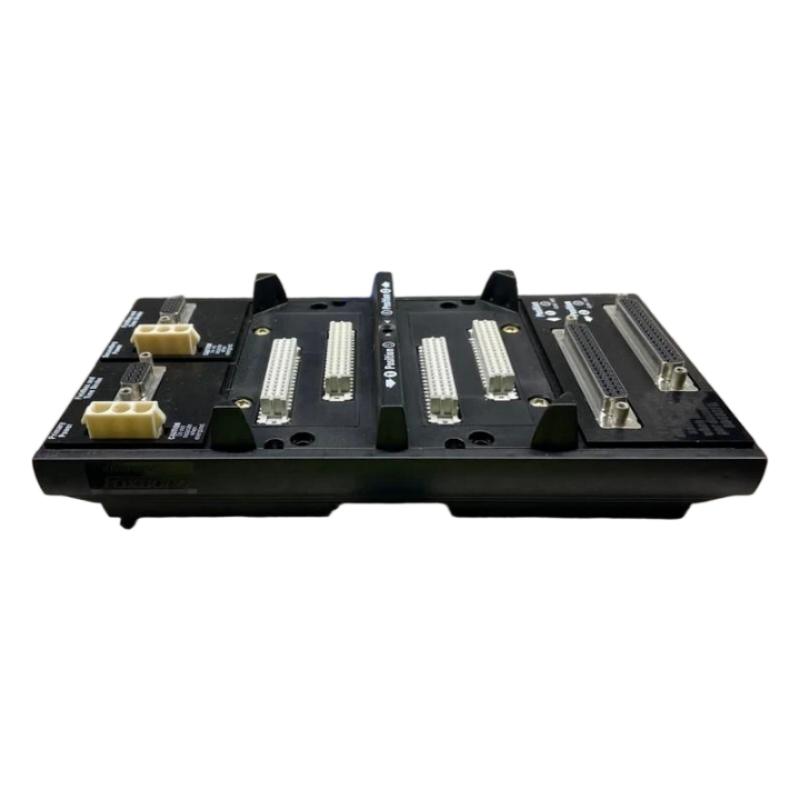
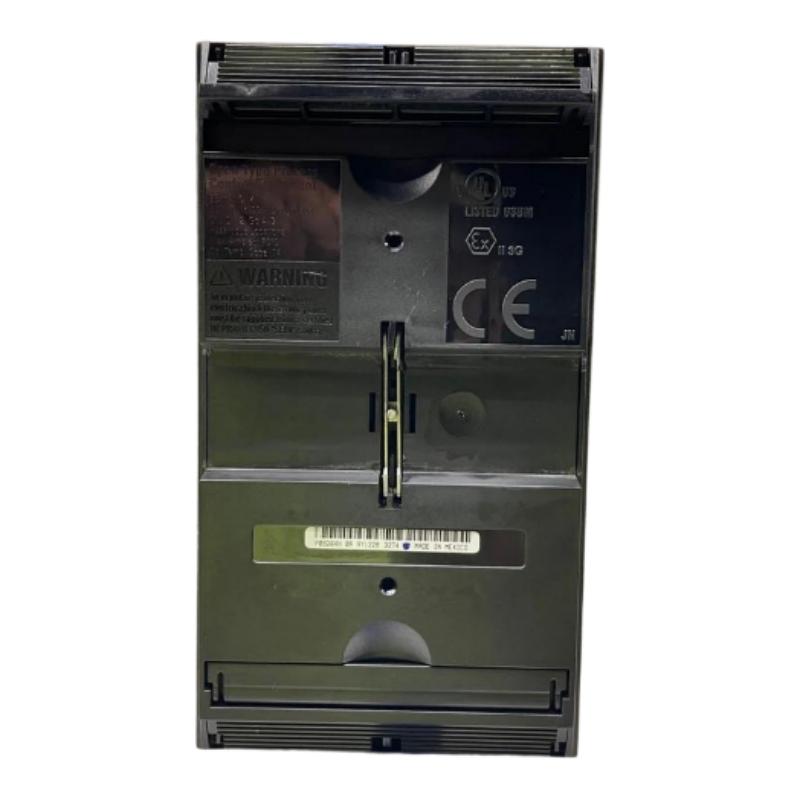
- Foxboro
- P0926KH
- Vertical DIN Rail Mounting Modular Base Plate
- USA
- 216 x 27.1 x 120.3 mm
- 0.39 kg
- Xiamen, China
- New & In Stock
- T/T, PayPal, Western Union
- 1 Year
- 1-3 Working Days
- DHL, UPS, TNT, FedEx and EMS.
- 24-Hour Service
- COO
- 58
Our advantage

Global Logistics
We have a 10-year logistics and express cooperation agreement, so our products can be shipped to any place in the world.

Brand new and original
Our products are imported in bulk from the place of origin. Because of the cooperative relationship, our products are all original and 100% new.

24-hour service
We provide 7*24 hours service to our customers. We will be there whenever you need us.

Price advantage
All our products are priced very favorably because we have our own warehouse and supply.
| Company Information | |||
| [email protected] | |||
| Mobile | +8615980777398 | ||
| +8615980777398 | |||
| 15980777398 |
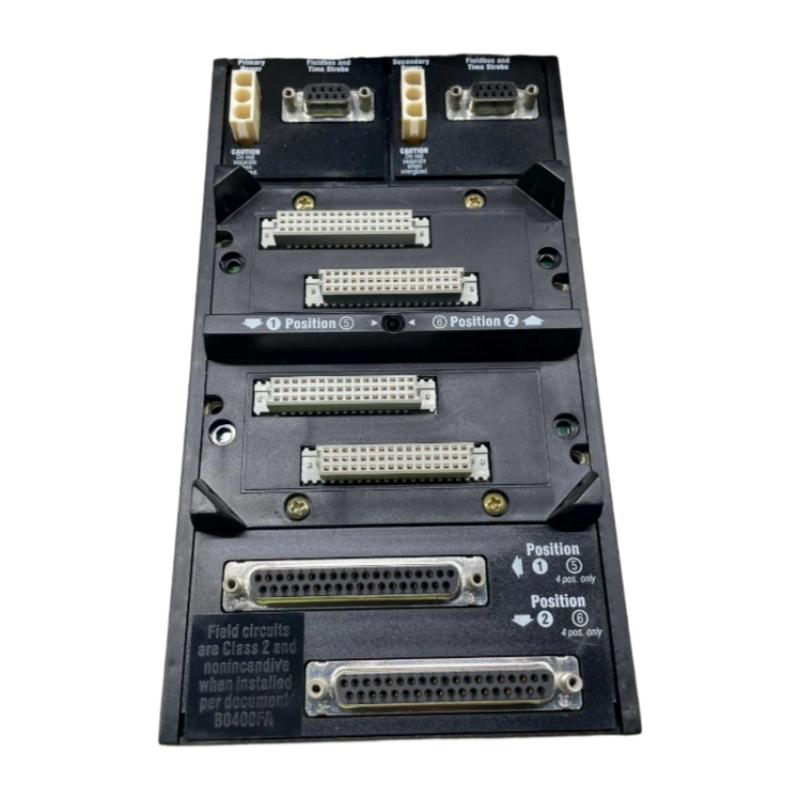
Product Overview
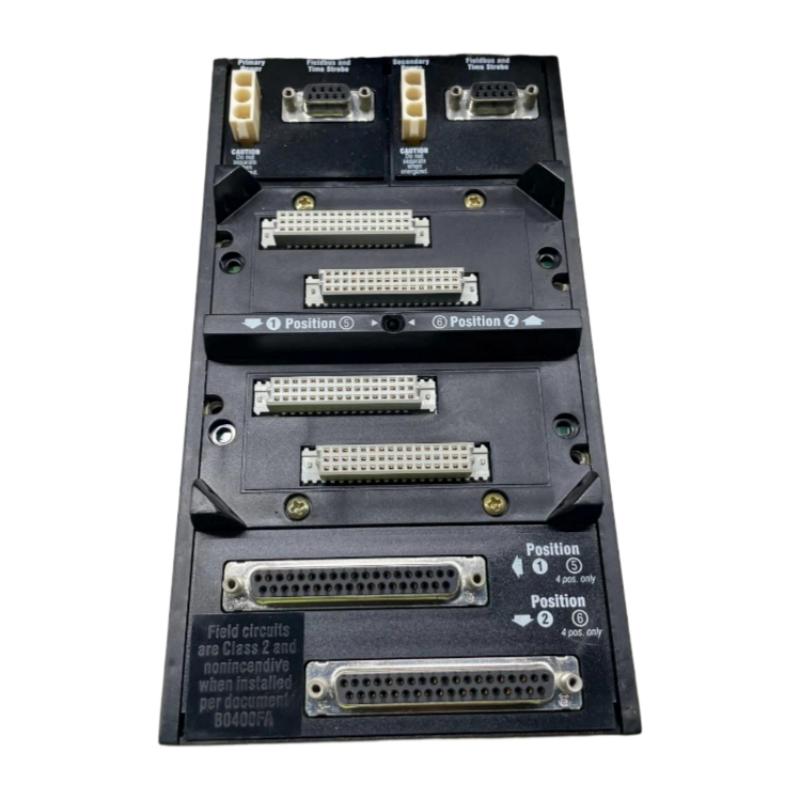
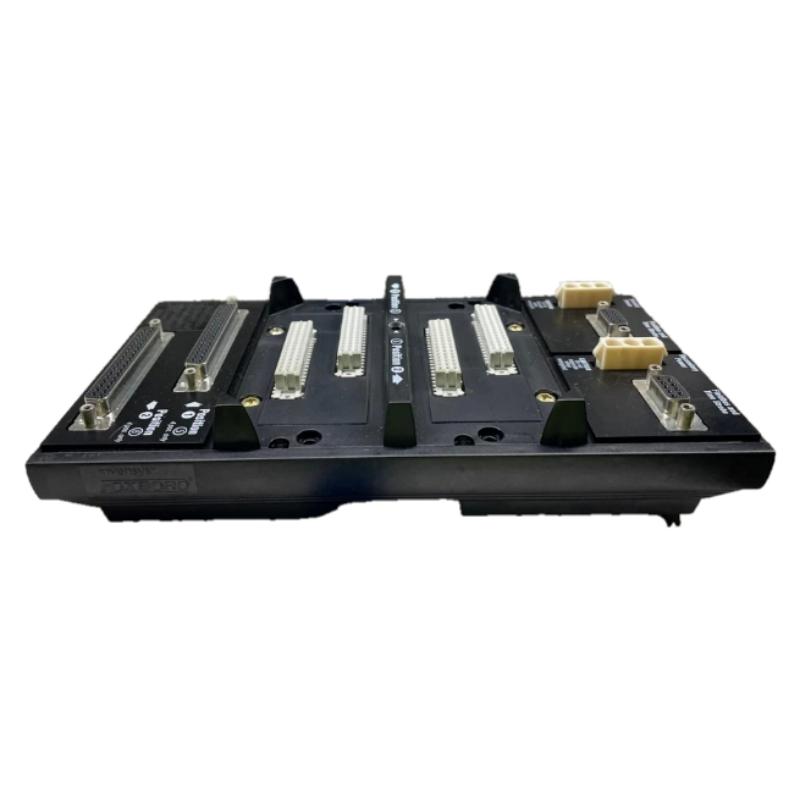
The Foxboro P0926KH Vertical DIN Rail Mounting Modular Base Plate is a mounting and interconnection component used in Foxboro I/A Series distributed control systems. It provides the physical mounting structure and electrical backplane required for compatible Fieldbus Modules and associated communication modules.
The P0926KH is designed for vertical DIN rail installation, making it suitable for compact industrial control cabinets where modular field I/O must be organized in a structured and serviceable arrangement.
The baseplate provides more than mechanical support. It also establishes the internal electrical and communication connections between installed modules and the associated control-system fieldbus infrastructure. Depending on the system configuration, modular baseplates can support redundant power connections and fieldbus connections.
The product information supplied for this model is:
- Manufacturer: Foxboro
- Model: P0926KH
- Product Type: Vertical DIN Rail Mounting Modular Base Plate
- Mounting Method: Vertical DIN Rail
- Dimensions: 216 × 27.1 × 120.3 mm
- Weight: 0.39 kg
- Application: Industrial Automation and Distributed Control Systems
The P0926KH is therefore best viewed as the mechanical and electrical foundation for a modular Foxboro I/O installation, rather than as an active controller or I/O module.
Technical Specifications
| Parameter | Specification |
|---|---|
| Manufacturer | Foxboro |
| Model | P0926KH |
| Product Type | Vertical DIN Rail Mounting Modular Base Plate |
| Application | Foxboro I/A Series DCS |
| Mounting | Vertical DIN Rail |
| Function | Module Mounting and Backplane Interconnection |
| Module Type | Compatible Fieldbus / Communication Modules |
| Power Architecture | Primary and Secondary Power Connections |
| Fieldbus Architecture | Modular Fieldbus Interconnection |
| Dimensions | 216 × 27.1 × 120.3 mm |
| Weight | 0.39 kg |
| Installation Environment | Industrial Control Cabinet |
| Maintenance Function | Module Support and Interconnection |
The P0926KH belongs to the modular-baseplate family used to organize distributed Foxboro I/O and communication hardware.
Function and Working Principle
The P0926KH performs three fundamental functions:
- Mechanical mounting
- Electrical interconnection
- Fieldbus communication interconnection
A simplified system structure is:
Control Processor
↓
Fieldbus / Communication Network
↓
P0926KH Base Plate
↓
Fieldbus Modules
↓
Termination Assemblies
↓
Field Devices
The individual modules plug into the baseplate rather than being wired independently for every internal connection.
This significantly simplifies cabinet construction and maintenance.
The baseplate provides the internal connections required for installed modules while allowing technicians to remove and replace individual modules without rebuilding the entire control-network wiring system.
Role in the Foxboro DCS
In a distributed control system, field I/O modules are often installed close to the process equipment.
The P0926KH provides a compact platform for installing these modules inside a control cabinet.
A typical arrangement is:
DCS Control Processor
↓
Fieldbus
↓
Baseplate Group
↓
P0926KH
↓
FBM / FCM Modules
↓
Termination Assemblies
↓
Transmitters / Sensors / Actuators
This arrangement reduces cabinet wiring complexity and makes the I/O architecture easier to expand and maintain.
Modular Architecture
One of the major advantages of the Foxboro modular baseplate concept is that individual Fieldbus Modules can be installed directly onto the baseplate.
The modules use dedicated connectors to establish the required communication and power connections.
This means that the P0926KH acts as an interface between:
- Installed modules
- Fieldbus infrastructure
- Power distribution
- Termination wiring
- External control-system communication
The baseplate itself does not perform process-control calculations.
Vertical DIN Rail Installation
The P0926KH is designed for vertical DIN rail mounting.
This provides several advantages:
- Efficient cabinet utilization
- Compact installation
- Easy module access
- Simple expansion
- Structured wiring
- Convenient maintenance
- Flexible cabinet layout
The DIN rail must be mechanically supported.
A weak or poorly supported rail can introduce mechanical movement, connector stress, and long-term reliability problems.
Installation Guide
1. Verify the Model
Before installation, confirm the part number:
Foxboro P0926KH
Check the product label and verify that the baseplate is intended for the required Foxboro control-system architecture.
Do not substitute a visually similar baseplate without confirming electrical and mechanical compatibility.
2. Inspect the Baseplate
Before mounting, inspect:
- Housing
- DIN rail mounting mechanism
- Module connectors
- Backplane contacts
- Power connectors
- Fieldbus connectors
- Mounting hardware
Look for:
- Cracks
- Bent contacts
- Broken locking components
- Corrosion
- Contamination
- Mechanical deformation
Connector damage should be corrected before modules are installed.
3. Prepare the DIN Rail
The DIN rail should be:
- Straight
- Securely mounted
- Properly supported
- Free from excessive vibration
- Clean
- Correctly aligned
The rail must be capable of supporting the complete installed assembly.
Do not rely on the baseplate itself to compensate for a mechanically unstable rail.
4. Mount the P0926KH
Position the P0926KH against the DIN rail.
Engage the mounting mechanism carefully.
Verify:
- Correct orientation
- Full engagement
- Secure locking
- Proper alignment
- No excessive movement
After installation, gently check the baseplate for unwanted movement.
5. Connect the Power Infrastructure
Depending on the system architecture, the baseplate provides the required power connections for installed modules.
Before connecting power:
- Verify the power supply.
- Check primary power wiring.
- Check secondary/redundant power wiring if used.
- Verify polarity.
- Inspect terminals.
- Check protective devices.
Incorrect power wiring can damage modules installed on the baseplate.
6. Connect Fieldbus Wiring
Connect the fieldbus wiring according to the system design.
Check:
- Correct fieldbus port
- Correct cable
- Correct polarity where applicable
- Cable shielding
- Termination
- Cable routing
Do not mix unrelated communication cables simply because their connectors appear physically similar.
7. Install Fieldbus Modules
Install compatible modules onto the P0926KH.
For each module:
- Align the connectors.
- Insert the module carefully.
- Verify complete seating.
- Secure the module mechanically.
- Confirm the module position.
- Repeat for additional modules.
Never force a module into the baseplate.
8. Connect Termination Assemblies
Connect the field wiring to the appropriate termination assemblies.
Typical field signals may include:
- Analog input
- Analog output
- Digital input
- Digital output
- Pulse signals
- Process transmitter signals
- Control signals
Verify every termination connection against the system wiring documentation.
9. Check Cable Routing
Keep fieldbus and signal cables organized.
Avoid unnecessary proximity to:
- Motor cables
- High-voltage wiring
- Variable-frequency-drive cables
- Transformer wiring
- High-current conductors
Good cable separation helps reduce electrical interference.
Commissioning Procedure
Step 1: Inspect the Complete Assembly
Check:
- P0926KH
- DIN rail
- Modules
- Connectors
- Power wiring
- Fieldbus wiring
- Termination assemblies
Step 2: Verify Power
Check primary and secondary power connections where applicable.
Step 3: Check Module Installation
Confirm every module is fully seated.
Step 4: Check Fieldbus Connections
Verify that the fieldbus wiring is connected to the correct interface.
Step 5: Energize the System
Apply power according to the approved commissioning procedure.
Step 6: Check Module Status
Inspect module status indicators and controller diagnostics.
Step 7: Verify Communication
Confirm that the control processor can communicate with the modules installed on the P0926KH.
Step 8: Verify I/O
Check representative process points:
- Digital inputs
- Digital outputs
- Analog inputs
- Analog outputs
Step 9: Verify Alarms
Confirm that module and communication alarms are correctly reported.
Step 10: Check Redundant Communication or Power
Where redundancy is installed, verify the alternate path independently.
Troubleshooting Guide
Problem 1: Installed Modules Are Not Detected
Possible causes include:
- Module incorrectly seated
- Damaged baseplate connector
- Incorrect module type
- Fieldbus wiring problem
- Power failure
- Baseplate fault
- Configuration error
Troubleshooting Procedure
- Check baseplate power.
- Inspect module seating.
- Inspect the module connector.
- Check fieldbus connections.
- Review module status.
- Check controller diagnostics.
- Inspect the P0926KH connector.
Problem 2: Multiple Modules Fail Simultaneously
If several modules connected to the same P0926KH fail simultaneously, investigate common components first.
Possible causes:
- Baseplate power failure
- Fieldbus communication failure
- Baseplate connector problem
- Incorrect wiring
- Common power-supply problem
If multiple modules fail at exactly the same time, replacing each module individually is usually not the best first diagnostic step.
Problem 3: One Module Is Missing from the System
If only one module is unavailable:
- Check module seating.
- Check the module connector.
- Check the module itself.
- Check the corresponding baseplate position.
- Review module configuration.
- Check field wiring.
If another compatible module operates correctly in the same position, the original module may be the source of the problem.
Problem 4: Intermittent Module Communication
Intermittent communication may be caused by:
- Loose module connection
- Dirty connector
- Baseplate vibration
- Damaged fieldbus cable
- Power fluctuation
- Electrical interference
- Faulty module
Check mechanical connections before replacing hardware.
Problem 5: Baseplate Power Failure
If installed modules lose power, inspect:
- Primary power connection
- Secondary power connection
- Power supply
- Terminal connections
- Baseplate contacts
- Protective devices
A failed power supply can produce symptoms across every module installed on the baseplate.
Problem 6: Fieldbus Communication Failure
Possible causes include:
- Incorrect fieldbus wiring
- Damaged cable
- Incorrect termination
- Baseplate connector problem
- Module fault
- Controller-side communication fault
Check the communication path from the controller to the baseplate.
Problem 7: Communication Errors Increase During Equipment Operation
If communication errors appear when large motors or drives operate, inspect the cabinet’s electromagnetic environment.
Check:
- Cable routing
- Shielding
- Grounding
- Separation from power cables
- Drive wiring
- Cabinet bonding
The baseplate itself should not automatically be considered defective.
Problem 8: Replacing a Module Does Not Correct the Problem
If a replacement module produces the same fault, investigate:
- P0926KH baseplate
- Fieldbus cable
- Power supply
- Controller
- Configuration
- Termination assembly
This can indicate that the fault is in the shared infrastructure rather than the module.
Maintenance Recommendations
The P0926KH should be included in regular DCS cabinet inspections.
| Inspection Item | Recommended Check |
|---|---|
| DIN Rail | Secure and mechanically stable |
| Baseplate | No cracks or deformation |
| Module Connectors | Clean and undamaged |
| Power Connections | Secure |
| Fieldbus Connections | Correctly connected |
| Modules | Fully seated |
| Termination Wiring | Secure |
| Cabinet | Clean and dry |
| Cable Routing | Properly organized |
| Vibration | No excessive movement |
| Diagnostics | No recurring baseplate alarms |
Industrial Applications
Oil and Gas
The P0926KH can be used as part of distributed I/O installations in:
- Refineries
- Gas-processing plants
- Pumping systems
- Compressor systems
- Pipeline facilities
- Tank farms
- Utility systems
Chemical Processing
Typical applications include:
- Reactor systems
- Temperature monitoring
- Pressure monitoring
- Flow measurement
- Level measurement
- Valve control
- Batch processing
Power Generation
Potential applications include:
- Cooling systems
- Water treatment
- Auxiliary systems
- Fuel systems
- Turbine support systems
- Plant utilities
Water and Wastewater
The modular baseplate architecture can support distributed I/O for:
- Pump stations
- Filtration
- Water treatment
- Chemical dosing
- Reservoir systems
- Wastewater processing
Compatible System Architecture
| Component Type | Function |
|---|---|
| Foxboro Control Processor | Executes control strategy |
| P0926KH | Provides modular mounting and backplane |
| Fieldbus Modules | Interface process signals |
| Communication Modules | Provide fieldbus communication |
| Termination Assemblies | Connect field wiring |
| Fieldbus Cable | Controller-to-I/O communication |
| 24 VDC Supply | Module power |
| DIN Rail | Mechanical support |
The exact combination of modules should be determined by the control-system configuration.
P0926KH vs Horizontal Modular Baseplate
The main difference between vertical and horizontal baseplate configurations is the mounting orientation.
| Feature | P0926KH | Horizontal Baseplate |
|---|---|---|
| Mounting | Vertical DIN Rail | Horizontal DIN Rail |
| Cabinet Layout | Vertical module arrangement | Horizontal module arrangement |
| Function | Module mounting/backplane | Module mounting/backplane |
| Fieldbus Function | Depends on installed modules | Depends on installed modules |
| Main Difference | Physical orientation | Physical orientation |
The choice should be based on cabinet design and the required module arrangement.
P0926KH vs FCP280 Baseplate
These components should not be confused.
| Component | Primary Function |
|---|---|
| P0926KH | Modular baseplate for compatible fieldbus/communication modules |
| FCP280 Baseplate | Dedicated mounting and interconnection platform for FCP280 controller architecture |
A baseplate is not interchangeable simply because both products use DIN rail mounting.
Key Advantages
- Vertical DIN rail mounting
- Compact modular construction
- Provides a structured module installation platform
- Simplifies cabinet organization
- Provides module interconnection
- Supports distributed I/O architecture
- Facilitates module replacement
- Reduces individual internal wiring
- Suitable for industrial DCS installations
- Supports organized fieldbus architecture
- Suitable for compact control cabinets
- Supplied dimensions of 216 × 27.1 × 120.3 mm
- Supplied weight of 0.39 kg
Technical FAQs
What is the Foxboro P0926KH?
The P0926KH is a vertical DIN rail mounting modular baseplate used within Foxboro distributed control-system architectures.
Is P0926KH a controller?
No. It is a passive mounting and interconnection component. The active control and I/O functions are performed by modules installed on the baseplate.
What is the primary function of P0926KH?
Its primary functions are mechanical module mounting and electrical/communication interconnection.
How is P0926KH mounted?
It is designed for installation on a properly supported DIN rail in a vertical orientation.
What are the dimensions of P0926KH?
The dimensions supplied for this product are:
216 × 27.1 × 120.3 mm
What is the weight?
The supplied weight is:
0.39 kg
Can Fieldbus Modules be installed on P0926KH?
Yes, the P0926KH belongs to the modular baseplate family intended to accommodate compatible Foxboro fieldbus and communication modules.
Does P0926KH provide power to modules?
The baseplate forms part of the module power-distribution architecture, including the applicable primary and secondary power connections.
Does P0926KH perform communication processing?
No. The baseplate provides the physical and electrical communication path. Active communication processing is performed by the installed communication or control modules.
What should I check if several modules stop working?
Check common components first:
- Power supply
- Baseplate power connections
- Fieldbus communication
- Baseplate connectors
- Controller-side communication
What should I check if only one module fails?
Inspect the module seating, connector, module configuration, field wiring, and the corresponding baseplate position.
Can vibration affect P0926KH?
Yes. Excessive vibration can affect DIN rail mounting, module seating, and electrical connections.
Can electrical interference affect the baseplate system?
Electrical interference can affect fieldbus and signal communication. Proper cable routing, shielding, grounding, and separation from high-power cables are therefore important.
Can P0926KH be replaced while powered?
Replacement procedures should follow the specific plant maintenance and system safety procedure. Do not remove or install modules or baseplates under power unless the system architecture and approved maintenance procedure explicitly permit it.
Conclusion
The Foxboro P0926KH Vertical DIN Rail Mounting Modular Base Plate is a foundational component for modular distributed I/O installations. Rather than executing control logic itself, it provides the mechanical mounting structure and internal electrical/communication interconnection required by compatible Foxboro modules.
Its vertical DIN rail design makes it suitable for compact industrial control cabinets, while its modular architecture simplifies the installation and maintenance of distributed Fieldbus Modules and communication components.
With the supplied dimensions of 216 × 27.1 × 120.3 mm and a weight of 0.39 kg, the P0926KH provides a compact platform for organized DCS hardware installation.
During installation, technicians should pay particular attention to DIN rail stability, baseplate alignment, connector condition, power connections, fieldbus wiring, and module seating. During troubleshooting, common infrastructure such as power, fieldbus connections, and the baseplate should be checked before replacing individual modules.
For long-term reliability, the P0926KH should be included in routine cabinet inspections covering mechanical stability, connector condition, power integrity, fieldbus communication, cable routing, and environmental conditions.