

ProductPRODUCT
Featured products
Contact Us
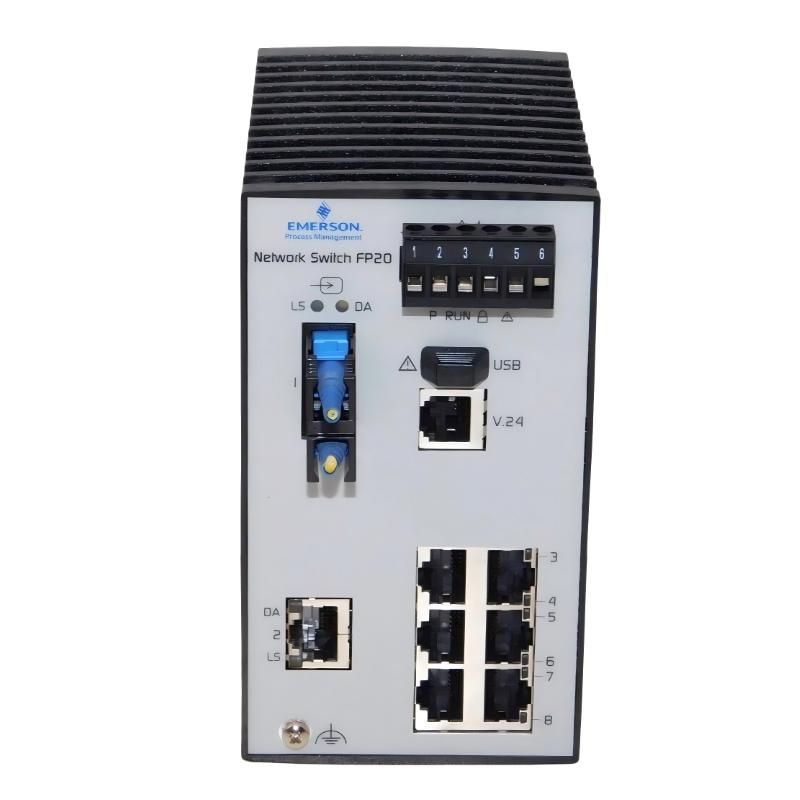
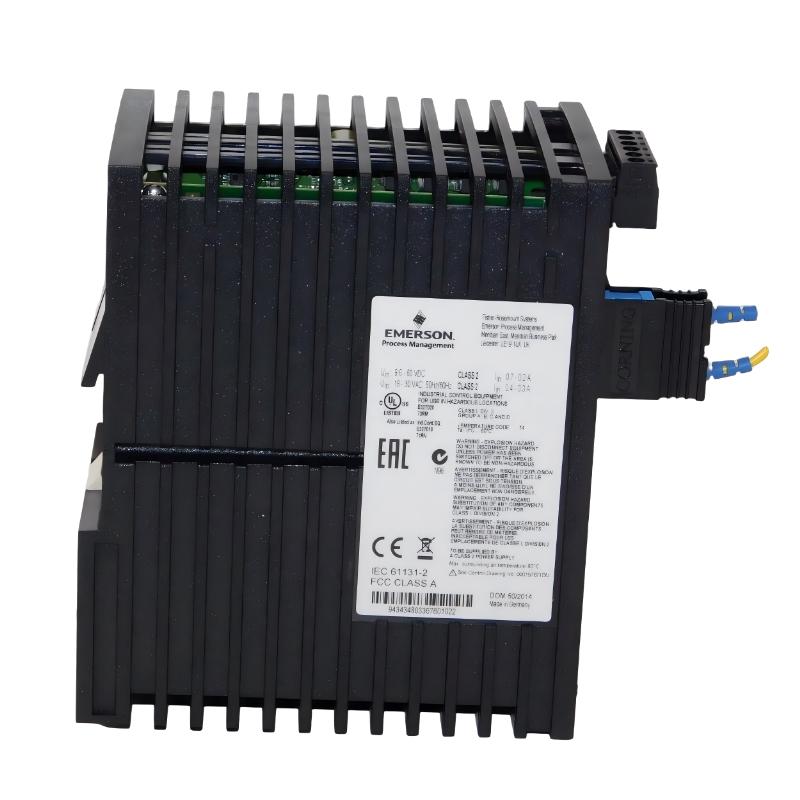
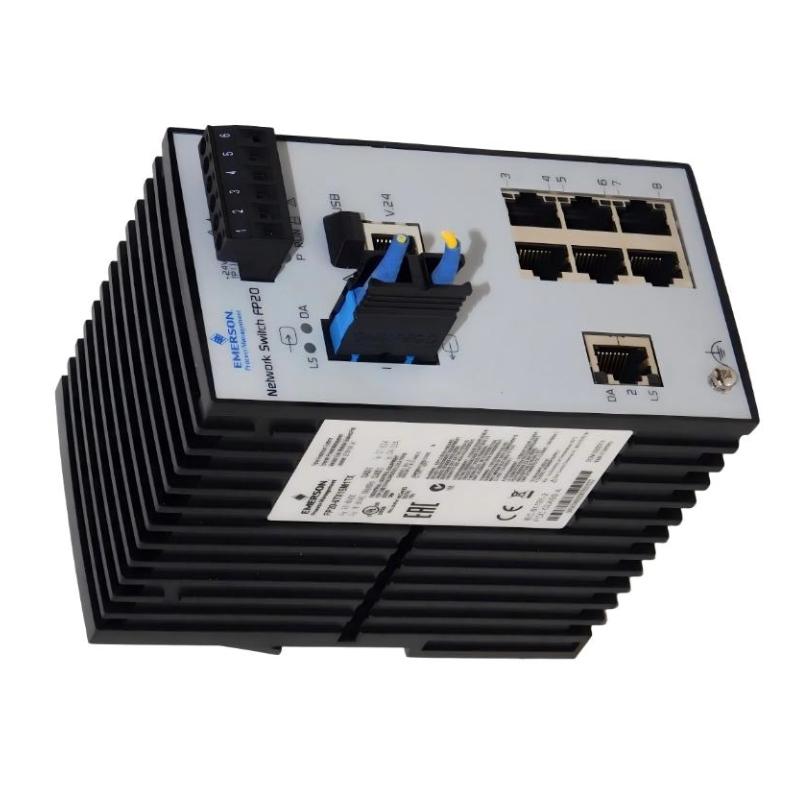
- Emerson
- VE6014P4
- Ethernet Switch
- USA
- 138 x 73 x 115 mm
- 0.57 kg
- Xiamen, China
- New & In Stock
- T/T, PayPal, Western Union
- 1 Year
- 1-3 Working Days
- DHL, UPS, TNT, FedEx and EMS.
- 24-Hour Service
- COO
- 26
Our advantage

Global Logistics
We have a 10-year logistics and express cooperation agreement, so our products can be shipped to any place in the world.

Brand new and original
Our products are imported in bulk from the place of origin. Because of the cooperative relationship, our products are all original and 100% new.

24-hour service
We provide 7*24 hours service to our customers. We will be there whenever you need us.

Price advantage
All our products are priced very favorably because we have our own warehouse and supply.
| Company Information | |||
| [email protected] | |||
| Mobile | +8615980777398 | ||
| +8615980777398 | |||
| 15980777398 |
Product Overview
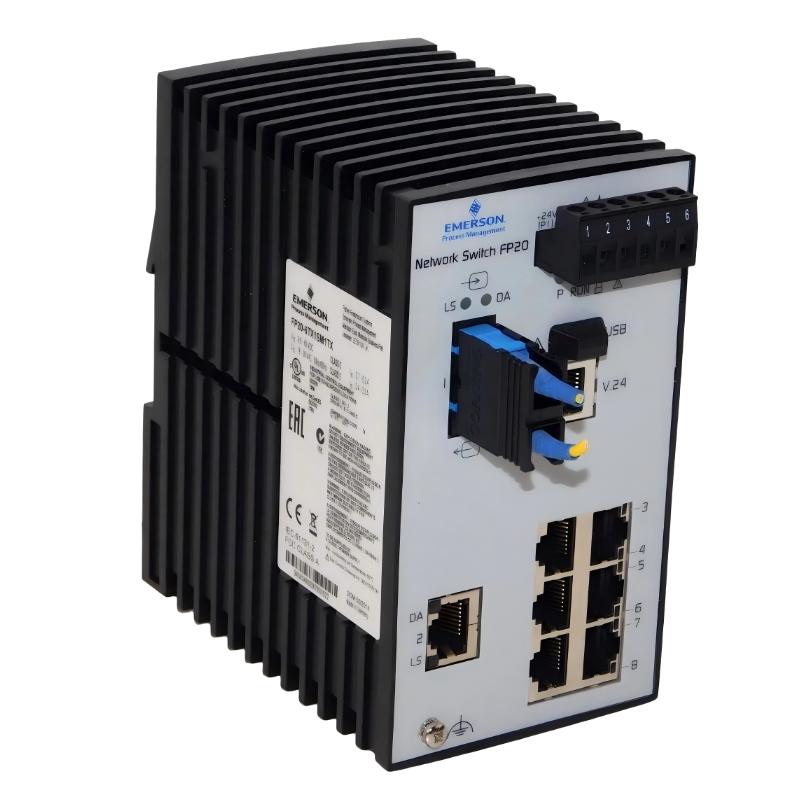
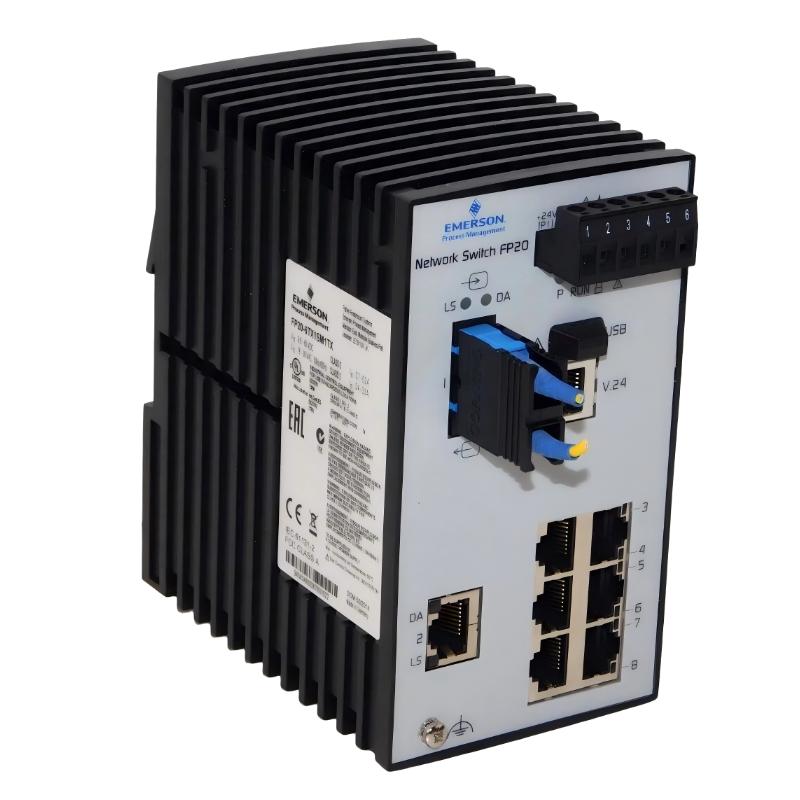
The Emerson VE6014P4 Ethernet Switch is an industrial networking component designed to support reliable Ethernet communication within automation, process control, and distributed control system environments. As part of an industrial automation networking architecture, the VE6014P4 provides a structured connection point for Ethernet-enabled controllers, I/O systems, operator interfaces, engineering workstations, and other network devices.
Industrial automation systems increasingly depend on Ethernet communication to exchange process data between controllers, field devices, supervisory systems, and engineering tools. An industrial Ethernet switch such as the Emerson VE6014P4 helps organize these network connections and provides the physical communication infrastructure required for data exchange.
The VE6014P4 has listed dimensions of 138 × 73 × 115 mm and a weight of approximately 0.57 kg. Its compact form factor allows it to be incorporated into industrial control cabinets and equipment enclosures where space and organized network installation are important considerations.
The switch can be used as part of an automation network where multiple Ethernet devices need to communicate through a centralized network connection. The exact communication characteristics, port configuration, network-management functions, and system compatibility should be confirmed against the specific hardware revision and host-system documentation before installation.
Technical Specifications
| Parameter | Specification |
|---|---|
| Manufacturer | Emerson |
| Model | VE6014P4 |
| Product Type | Ethernet Switch |
| Primary Function | Industrial Ethernet network connectivity |
| Application | Industrial Automation and Process Control |
| Network Role | Ethernet communication and device interconnection |
| Dimensions | 138 × 73 × 115 mm |
| Weight | 0.57 kg |
| Installation | Industrial control cabinet / compatible automation equipment |
| Typical Use | Process control, automation networking, distributed control systems |
| Network Configuration | Dependent on system architecture and installed hardware |
The exact number of Ethernet ports, communication speed, power requirements, redundancy functions, environmental ratings, and managed-network capabilities should be verified from the applicable equipment documentation before engineering or replacement work.
What Is the Emerson VE6014P4?
The Emerson VE6014P4 is an Ethernet switch used to provide network connectivity between compatible industrial automation devices.
In a conventional industrial control architecture, many devices may need to exchange information over Ethernet. These devices can include:
- Controllers
- Remote I/O systems
- Operator workstations
- Engineering stations
- Human-machine interfaces
- Industrial servers
- Communication interfaces
- Supervisory control systems
- Other Ethernet-enabled automation equipment
Rather than connecting every device directly to another device, an Ethernet switch provides a centralized point through which network traffic can be exchanged.
A simplified architecture can be represented as:
Controller → Ethernet Switch → Remote I/O
HMI → Ethernet Switch → Controller
Engineering Workstation → Ethernet Switch → Control Network
The actual architecture depends on the automation platform, network topology, and application requirements.
Ethernet Switching Working Principle
An Ethernet switch receives network frames from connected devices and forwards those frames toward the appropriate destination within the network.
When an industrial controller sends information to another Ethernet-enabled device, the network frame reaches the switch through its communication interface. The switch evaluates the destination information and forwards the frame through the appropriate network path.
This switching process allows multiple devices to share the same industrial Ethernet infrastructure while maintaining organized communication between network nodes.
In an automation environment, this can support communication between:
- Control processors
- Distributed I/O
- Operator stations
- Engineering computers
- Supervisory systems
- Networked instrumentation
- Process control equipment
The switch therefore functions as an important infrastructure component rather than directly executing the application control logic itself.
Role in Industrial Automation Systems
Industrial Ethernet networks form an important communication layer between different levels of an automation system.
The Emerson VE6014P4 can be incorporated into this communication architecture to provide network interconnection between compatible devices.
A typical control architecture may include several layers:
Field Level
Field devices generate process information such as:
- Pressure
- Temperature
- Flow
- Level
- Valve position
- Equipment status
Control Level
Controllers process field information and execute programmed control strategies.
Network Level
Ethernet switches and communication infrastructure connect controllers, I/O systems, operator stations, and other network devices.
Supervisory Level
SCADA systems, HMIs, historians, and engineering workstations provide monitoring, configuration, diagnostics, and data-management functions.
The VE6014P4 can form part of the network infrastructure connecting these automation components.
Industrial Applications
Process Control
Industrial process plants often contain numerous controllers and networked devices. Ethernet switching infrastructure allows these devices to communicate efficiently as part of the overall control architecture.
Typical applications include:
- Chemical processing
- Oil and gas facilities
- Power generation
- Water treatment
- Pharmaceutical production
- Food and beverage processing
- Manufacturing systems
Distributed Control Systems
Distributed control architectures depend on communication between controllers, I/O subsystems, operator stations, and engineering systems.
An Ethernet switch can provide the network connectivity required to organize these devices into an integrated communication system.
Remote I/O Networks
Remote I/O installations may be located away from the main controller. Ethernet infrastructure can provide the communication path between the controller and remote I/O equipment.
HMI Communication
Operator interfaces require reliable communication with control processors to display process variables, alarms, equipment status, and operating information.
Engineering and Maintenance Networks
Engineering workstations may require network access to controllers and other automation equipment for configuration, diagnostics, monitoring, and maintenance activities.
Industrial Ethernet Network Architecture
The VE6014P4 should be considered as one component within a larger network design rather than as an isolated device.
A basic architecture may resemble:
Industrial Controller
↓
VE6014P4 Ethernet Switch
↓
Remote I/O / HMI / Engineering Station / Automation Devices
For larger installations, multiple switches may be incorporated into a structured network.
Network architecture should be designed according to the communication requirements of the automation system. Factors such as network segmentation, redundancy, traffic levels, cable routing, electromagnetic interference, and maintenance access should be considered during system design.
The exact capabilities of the VE6014P4 should be verified before designing advanced network functions around the device.
Installation and Integration Guide
1. Verify the Model
Before installation, confirm that the equipment identification corresponds to:
Emerson VE6014P4
The complete model number should be checked against the existing installation documentation and replacement records.
This is especially important because industrial networking equipment can have visually similar versions with different electrical or communication characteristics.
2. Check Physical Space
The listed dimensions are:
138 × 73 × 115 mm
The control cabinet should provide adequate space for the switch and its associated cabling.
Additional clearance may be required for:
- Ethernet cables
- Power wiring
- Connector access
- Cable bending radius
- Maintenance activities
- Ventilation
3. Plan Cable Routing
Ethernet cables should be routed in an organized manner.
Where possible, communication cables should be separated from high-voltage or high-current power cables to reduce the possibility of electromagnetic interference.
Avoid excessive bending, mechanical stress, and unnecessary cable loops.
4. Connect Network Devices
Connect the compatible Ethernet devices according to the approved network architecture.
Typical devices may include:
- Controllers
- Remote I/O
- HMI systems
- Engineering workstations
- Industrial servers
- Other network switches
The exact port assignment should follow the system documentation.
5. Apply Power
Before energizing the switch, verify the applicable power connection and wiring arrangement.
Do not assume power requirements solely from the model designation. The actual electrical requirements should be confirmed from the equipment documentation associated with the installed hardware.
6. Inspect the Network
After power-up, check the communication connections and available status indications.
A basic verification should confirm that:
- The switch powers correctly.
- Network connections are physically secure.
- Connected devices are recognized by the network.
- Communication paths are available.
- No unexpected network faults are reported.
Commissioning Procedure
A structured commissioning process helps reduce network-related startup problems.
Step 1: Visual Inspection
Inspect the VE6014P4 and surrounding cabinet area.
Check for:
- Mechanical damage
- Loose connectors
- Damaged cables
- Incorrect wiring
- Contamination
- Poor cable routing
Step 2: Power Verification
Verify the applicable supply arrangement before energizing the equipment.
Step 3: Network Connection Verification
Check each connected Ethernet cable and corresponding network device.
Step 4: Communication Test
Confirm communication between the connected devices.
For example:
Controller → VE6014P4 → Remote Device
The communication path should be tested under normal operating conditions.
Step 5: System-Level Test
Verify that HMI, SCADA, engineering, and controller communication functions operate correctly where applicable.
Step 6: Record Configuration
Document the installed network arrangement, cable connections, switch location, and associated equipment.
This information can simplify future troubleshooting and replacement activities.
Troubleshooting the Emerson VE6014P4
Network problems should be investigated systematically because communication failures can originate from the switch, cable, connected device, power supply, or network configuration.
No Network Communication
Possible causes include:
- Incorrect power connection
- Disconnected Ethernet cable
- Damaged cable
- Incorrect network configuration
- Faulty connected device
- Network topology problem
- Switch hardware fault
Begin by checking power and physical connections before investigating more complex configuration issues.
Intermittent Communication
Intermittent network communication may be associated with:
- Loose connectors
- Damaged Ethernet cables
- Electromagnetic interference
- Poor cable routing
- Network configuration problems
- Unstable connected equipment
- Hardware degradation
Monitoring the network while checking physical connections can help isolate the problem.
One Device Cannot Communicate
If only one connected device experiences communication problems, inspect:
- The device itself
- Its Ethernet cable
- The corresponding switch connection
- Network configuration
- The device’s communication interface
This approach helps determine whether the problem is localized to one network node.
Multiple Devices Lose Communication
If several connected devices stop communicating simultaneously, investigate the common infrastructure first.
Potential areas include:
- Switch power
- Switch connections
- Upstream network connection
- Common network equipment
- Network configuration
- Power distribution
A common failure affecting multiple devices may indicate a problem with shared network infrastructure rather than individual field devices.
Preventive Maintenance
Industrial Ethernet infrastructure should be included in routine maintenance programs.
Inspect Ethernet Cables
Check cables for:
- Cuts
- Crushing
- Excessive bending
- Connector damage
- Loose connections
- Mechanical wear
Inspect Connectors
Network connectors should remain securely installed and free from contamination or mechanical damage.
Check Cabinet Conditions
The surrounding control cabinet should be maintained in a suitable condition.
Avoid excessive:
- Dust
- Moisture
- Heat
- Vibration
- Electrical interference
Monitor Communication Performance
Unexpected communication interruptions, repeated network faults, or increasing error conditions should be investigated rather than ignored.
Trend information can help identify developing infrastructure problems.
Maintain Documentation
Maintain an updated record of:
- Switch identification
- Network topology
- Cable connections
- Connected equipment
- Cabinet location
- Replacement information
Good documentation can significantly reduce troubleshooting time.
Replacement and Compatibility Considerations
When replacing an Emerson VE6014P4 Ethernet Switch, the complete model number should be verified.
Important identification information includes:
- Manufacturer
- Full model number
- Hardware revision
- Existing installation position
- Network connections
- Power arrangement
- Associated automation platform
The listed physical characteristics are:
Dimensions: 138 × 73 × 115 mm
Weight: 0.57 kg
Physical dimensions alone should not be used to establish electrical or functional compatibility.
A replacement network device should be evaluated according to the requirements of the complete automation system.
The following characteristics may need to be checked before replacement:
- Ethernet port configuration
- Communication speed
- Network topology
- Power requirements
- Environmental requirements
- Redundancy requirements
- Network-management functions
- System compatibility
Exact specifications should be confirmed against the applicable Emerson documentation and the installed system configuration.
Compatible Industrial Automation Components
The VE6014P4 may form part of an automation network containing several types of equipment.
| Component | Typical Role |
|---|---|
| Industrial Controller | Executes control logic |
| Remote I/O | Interfaces with distributed field signals |
| HMI | Provides operator visualization |
| Engineering Workstation | Configuration and maintenance |
| SCADA System | Supervisory monitoring and control |
| Industrial Server | Data processing and application services |
| Ethernet Switch | Network interconnection |
| Network Cable | Physical communication path |
| Control System Interface | Connects automation subsystems |
The exact combination depends on the control architecture in which the switch is installed.
Network Engineering Best Practices
Use Structured Network Design
Network devices should be arranged according to a documented architecture rather than connected randomly.
A well-organized network simplifies:
- Commissioning
- Maintenance
- Fault diagnosis
- Expansion
- Replacement
Keep Network Cabling Organized
Clearly routed cables make it easier to identify connections during maintenance.
Cable labels can also help technicians identify network paths quickly.
Separate Communication and Power Wiring
Where practical, communication cables should be routed separately from high-power conductors.
This can reduce exposure to electrical interference.
Document Network Connections
Maintain network diagrams showing:
- Switch locations
- Connected devices
- Cable paths
- Network segments
- Controller connections
Plan for Maintenance
The physical installation should allow technicians to access the switch and its connections without unnecessary disruption to surrounding equipment.
Physical Dimensions and Handling
The Emerson VE6014P4 has listed dimensions of:
138 × 73 × 115 mm
Its listed weight is:
0.57 kg
The compact dimensions can be useful when planning control cabinet layouts and replacement inventory.
When handling the switch, technicians should avoid unnecessary mechanical impact and protect connectors from damage.
During transportation or storage, the equipment should be protected from excessive moisture, dust, impact, and other environmental conditions that could affect electronic equipment.
Key Advantages
Industrial Ethernet Connectivity
The VE6014P4 provides an Ethernet switching function for industrial automation network architectures.
Compact Physical Design
With dimensions of 138 × 73 × 115 mm, the unit can be incorporated into appropriately designed industrial control cabinets.
Moderate Weight
At approximately 0.57 kg, the switch is relatively easy to handle during installation, maintenance, and replacement operations.
Automation Network Integration
The switch can form part of communication infrastructure connecting controllers, I/O systems, operator interfaces, and engineering equipment.
Suitable for Distributed Architectures
Ethernet switching infrastructure supports the interconnection of equipment distributed across industrial control systems.
Technical FAQs
What is the Emerson VE6014P4?
The Emerson VE6014P4 is an Ethernet Switch intended for network connectivity within compatible industrial automation and process control environments.
What are the dimensions of the VE6014P4?
The listed dimensions are 138 × 73 × 115 mm.
How much does the VE6014P4 weigh?
The listed weight is approximately 0.57 kg.
What is the function of an Ethernet switch in an automation system?
An Ethernet switch provides network connectivity between multiple Ethernet-enabled devices, allowing controllers, I/O systems, HMIs, engineering workstations, and other network equipment to exchange information.
Can the VE6014P4 be used with distributed control systems?
It can be incorporated into compatible industrial network architectures, including distributed control environments, provided that its communication and system requirements match the host architecture.
What should be checked before replacing a VE6014P4?
The complete model number, hardware revision, network configuration, physical installation, power requirements, connected equipment, and system compatibility should be verified.
What can cause Ethernet communication problems?
Communication failures can result from damaged cables, loose connections, power problems, network configuration issues, connected-device faults, interference, or hardware problems.
What are the physical characteristics of the VE6014P4?
The listed physical characteristics are 138 × 73 × 115 mm and 0.57 kg.
Is the VE6014P4 a PLC?
No. The VE6014P4 is an Ethernet Switch, not a PLC CPU. Its primary role is to provide network connectivity between compatible automation devices.
Conclusion
The Emerson VE6014P4 Ethernet Switch is a compact industrial networking component designed to support Ethernet communication within compatible automation and process-control architectures. By providing a network interconnection point for controllers, remote I/O, HMI systems, engineering workstations, and other Ethernet-enabled devices, it can contribute to an organized industrial communication infrastructure.
With listed dimensions of 138 × 73 × 115 mm and a weight of 0.57 kg, the VE6014P4 is suitable for applications where compact network equipment is required within an industrial control environment.
Successful implementation depends on proper network architecture, correct cabling, appropriate installation, reliable power, and compatibility with the surrounding automation system. For replacement applications, the complete VE6014P4 identification should be verified together with the existing network configuration and equipment requirements.
For long-term reliability, maintenance personnel should regularly inspect network cables, connectors, cabinet conditions, and communication performance. Proper documentation of the network architecture can also simplify commissioning, troubleshooting, and future equipment replacement.