
NewsNEWCENTER
Featured products

Contact Us
Allen-Bradley 1746-OB8/A SLC 500 Digital DC Output Module: Troubleshooting, Fault Diagnosis, and Repair Guide
2026-10-26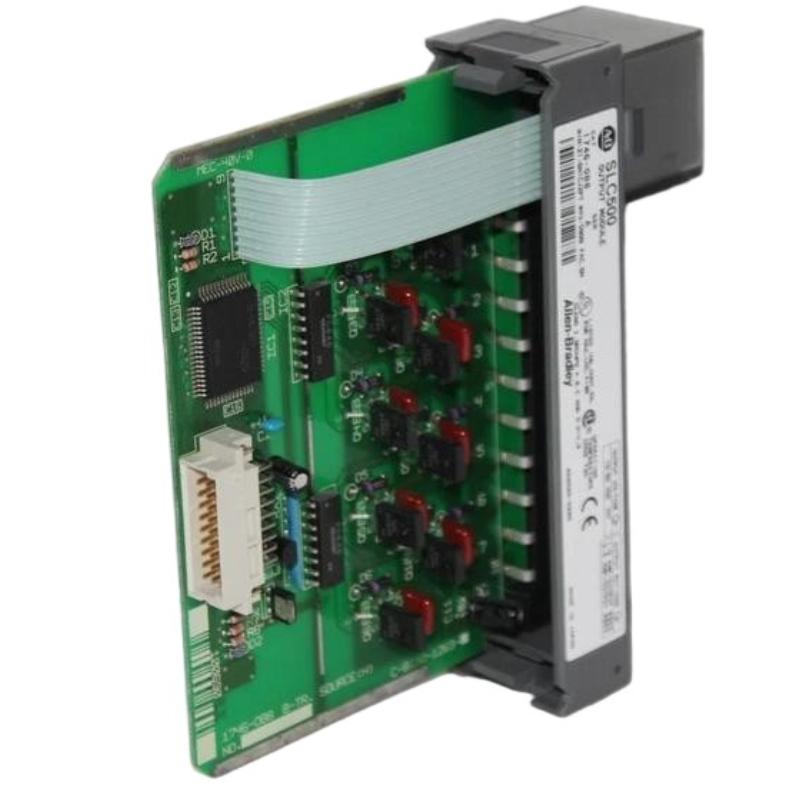
The Allen-Bradley 1746-OB8/A SLC 500 Digital DC Output Module is an eight-point sourcing transistor output module designed for industrial automation and machine control systems. It enables an SLC 500 programmable logic controller to switch compatible DC field devices, including solenoid valves, indicator lamps, relay coils, and other discrete loads.
When an output fails to activate, a field device operates intermittently, or the module indicates a fault, a systematic troubleshooting process helps identify the cause without unnecessary component replacement. This guide explains how to diagnose common output faults, check field power and wiring, verify PLC logic, assess loading conditions, and determine when module replacement may be necessary.
Table of Contents
- Module Overview and Common Symptoms
- Safety Precautions
- Status Indicators and Fault Diagnosis
- Common Faults and Corrective Actions
- Output Channel Testing
- Power Supply and Wiring Troubleshooting
- PLC Logic and Chassis Diagnosis
- Repair and Replacement Procedures
- Preventive Maintenance
- Frequently Asked Questions
- Technical Summary
1. Module Overview and Common Symptoms
The 1746-OB8/A is part of the Allen-Bradley SLC 500 modular I/O family. It provides eight sourcing DC transistor outputs, with field-load power supplied through the external circuit. The module’s internal electronics receive power through the SLC 500 chassis backplane.
Because the module depends on the processor, chassis, field supply, terminal block, wiring, and connected loads, an apparent output-module fault may originate elsewhere in the control system. Diagnosis should therefore begin by identifying whether the problem affects one channel, several channels, or the entire module.
| Symptom | Potential cause |
|---|---|
| One output does not switch on | Incorrect PLC logic, wrong output address, loose wiring, failed load, or damaged output channel. |
| All outputs are inactive | Missing field supply, processor fault, incorrect configuration, poor module seating, or a common wiring problem. |
| Output indicator is on but the load does not operate | Open field circuit, missing common connection, failed load, blown external fuse, or excessive voltage drop. |
| Output operates intermittently | Loose terminal, unstable power supply, damaged cable, vibration, or an overloaded circuit. |
| Output remains on unexpectedly | Incorrect program logic, an active output force, wrong address mapping, wiring short, or a failed output transistor. |
| PLC reports an I/O or chassis fault | Module seating issue, backplane problem, configuration mismatch, or a defective module. |
| Output fails after a load is replaced | Incorrect voltage, excessive startup current, incompatible load type, or incorrect field wiring. |
2. Safety Precautions
The 1746-OB8/A can control actuators and machinery capable of causing injury. Troubleshooting must follow the plant’s electrical safety procedures and the machine’s risk assessment.
- Apply lockout/tagout before removing the module, disconnecting field wiring, or performing work that exposes hazardous energy.
- Isolate both chassis power and external field supplies where applicable.
- Verify that hazardous voltage is absent using an appropriately rated instrument.
- Do not remove or insert the module while energized unless the exact equipment documentation explicitly permits it and approved site procedures authorize it.
- Never bypass safety interlocks or force outputs in a way that could cause unexpected machine movement.
- Use appropriate electrostatic discharge precautions when handling the module.
If energized measurements are permitted, they should be carried out only by qualified personnel following approved procedures. Do not change wiring based solely on an LED indication.
3. Status Indicators and Fault Diagnosis
The module’s front-panel indicators help determine whether the controller is commanding an output and whether the module is reporting a fault. The exact LED names and behavior should be checked against the installed module revision and its applicable documentation.
3.1 Individual output status indicators
| Observed condition | Diagnostic interpretation | Recommended action |
|---|---|---|
| Output indicator off | The output may not be commanded on, or the module may not be receiving valid output data. | Check the PLC logic, output address, processor state, and module configuration. |
| Output indicator on | The module is indicating an active output command or channel state. | If the load does not operate, inspect field power, wiring, common connections, and the load itself. |
| Indicator changes inconsistently with the PLC command | Possible address mismatch, program behavior, communication/backplane issue, or intermittent module operation. | Monitor the PLC output bit and verify the physical slot and channel mapping. |
| Indicator appears normal but no voltage reaches the load | The field circuit may be open, a protective device may have opened, or the output stage may have failed. | Use the approved wiring diagram and test procedure to isolate the fault. |
An output LED is not a substitute for an electrical measurement. A lit indicator does not by itself prove that the expected voltage is reaching the field device under load.
3.2 Chassis and processor indicators
If multiple output points fail together, inspect the processor and chassis status before testing individual channels. A processor fault or chassis problem can prevent normal output operation even when the output module itself is functional.
- Check whether the processor is in the expected operating mode.
- Review the processor fault indicator and controller status information.
- Confirm that the module is fully seated in the correct chassis slot.
- Check whether the PLC project identifies the correct module in that slot.
- Record any fault codes before cycling power or resetting the controller.
Do not assume that a specific fault LED or code has the same meaning across every SLC 500 processor and I/O module. Use the documentation corresponding to the installed hardware.
4. Common Faults and Corrective Actions
4.1 One output fails to activate
If a single channel does not activate, begin with the PLC command and the associated field circuit.
- Monitor the relevant output bit in the controller program.
- Confirm that the program logic conditions for activating the output are satisfied.
- Verify that the logical address corresponds to the correct physical module and channel.
- Inspect the terminal block, conductor termination, and field cable.
- Check the external DC supply and the load’s return path.
- Test the connected field device according to its own maintenance procedure.
- If the program, wiring, supply, and load are verified, investigate the output channel for hardware failure.
Do not replace the module before ruling out a failed actuator, incorrect address, or open circuit. These problems can produce symptoms similar to a defective output transistor.
4.2 All outputs remain off
When all eight channels fail simultaneously, a shared fault is more likely than eight independent channel failures.
- Verify that the PLC processor is operating normally.
- Check the chassis power supply and module seating.
- Confirm that the external field supply is present and correctly connected.
- Inspect common supply and return conductors.
- Review processor diagnostics and the I/O configuration.
- Confirm that the controller is not intentionally holding outputs off during startup, fault handling, or a sequence interlock.
If the processor and module appear normal but the field devices remain inactive, concentrate on the external field supply, terminal block, and common wiring before condemning the module.
4.3 Output indicator is on, but the actuator does not respond
This symptom often indicates that the PLC command is reaching the module but the complete field circuit is not functioning.
- Check the load’s voltage and current requirements.
- Inspect the field supply and protective devices.
- Verify that the load is connected to the correct output terminal.
- Confirm the correct DC common or return connection.
- Inspect the load for an open coil, mechanical jam, or internal failure.
- Measure the relevant circuit voltage using an approved test procedure.
Where the design permits, testing with a known-good compatible load can help distinguish a field-device problem from a module problem. Any substitution must remain within the module’s electrical ratings.
4.4 Output remains active after the command is removed
An output that remains energized can create an unsafe operating condition. First place the machine in a safe state using the approved shutdown or energy-isolation procedure.
Once the equipment is safe, check the controller output bit, program forces, logic conditions, and address mapping. Inspect the field wiring for an unintended connection to the supply. If the command is confirmed off and the wiring is correct but the output remains active, a damaged output transistor may be responsible.
4.5 Output operates intermittently
Intermittent faults can be caused by loose terminals, cable damage, vibration, unstable field power, or loads operating close to their current limits.
- Inspect terminal screws and conductor terminations according to the manufacturer’s tightening requirements.
- Check cable insulation for abrasion, crushing, or intermittent contact.
- Measure the field supply under representative load conditions.
- Inspect the cabinet for excessive temperature or poor ventilation.
- Review fault history to see whether the problem coincides with processor, chassis, or supply disturbances.
4.6 Repeated fuse or protective-device operation
If a field-circuit fuse or external protective device opens repeatedly, do not simply replace it with a higher-rated device. Investigate the cause of the overcurrent.
Check for short circuits, damaged insulation, incorrect load voltage, excessive startup current, and unsuitable inductive-load suppression. Confirm that the protective-device rating is appropriate for the conductor, load, and module. The 1746-OB8/A should not be confused with SLC 500 models that include different electronic protection or fuse arrangements.
5. Output Channel Testing
5.1 Trace the signal from the PLC to the load
Follow the complete signal path to identify where the expected behavior stops.
PLC program logic
       |
       v
Controller output bit
       |
       v
SLC 500 chassis and module slot
       |
       v
1746-OB8/A output channel
       |
       v
Terminal block and field wiring
       |
       v
Compatible DC load and return
This is a conceptual diagnostic sequence, not a model-specific wiring diagram.
5.2 Verify the output address
In an SLC 500 system, output addresses depend on the processor architecture, chassis slot, and the application’s I/O configuration. Confirm the address in the controller project rather than assuming that a particular output bit belongs to a particular physical terminal.
Compare the PLC program, I/O schedule, and actual module position. An address mismatch can cause the wrong field device to operate or prevent the intended channel from activating.
5.3 Check the output circuit
The 1746-OB8/A is a sourcing output module with an operating range of 10–50V DC. When a channel is activated, the output supplies positive DC voltage to a compatible load. The circuit requires the correct supply and return path to complete the load circuit.
When permitted by site procedures, measure the voltage at the designated test points under appropriate conditions. Compare the result with the load requirements and the manufacturer’s specifications. If voltage is present at the module but not at the load, investigate the wiring and terminal connections. If the supply and wiring are correct but the output fails to switch, further module-level diagnosis may be necessary.
5.4 Evaluate the connected load
Confirm that the load is suitable for transistor switching and that its steady-state and startup current remain within the specified limits. The module supports up to 1.0 A per point at 30°C and 0.50 A per point at 60°C, with a total module limit of 8.0 A at 30°C and 4.0 A at 60°C.
These ratings must be considered together. High cabinet temperatures and simultaneous activation of several loads may reduce the available current capacity. Check the complete load schedule rather than evaluating each channel in isolation.
6. Power Supply and Wiring Troubleshooting
6.1 Verify the external DC supply
Check the external field supply for correct voltage, polarity, and adequate capacity. A supply may appear normal when unloaded but drop below the required level when several actuators switch on.
Inspect the supply terminals, distribution wiring, protective devices, and common connections. Confirm that the external field supply is correctly separated from the chassis backplane supply in the system design.
6.2 Inspect the removable terminal block
- Check that the terminal block is fully seated and compatible with the module.
- Look for loose conductors, broken strands, corrosion, or signs of overheating.
- Verify each terminal against the correct wiring diagram.
- Inspect for accidental shorts between adjacent terminals.
- Confirm that conductor sizes and terminal tightening comply with the installation requirements.
Isolate power before removing the terminal block or changing field wiring. Do not rely on wire color alone to identify supply, output, and common conductors.
6.3 Check inductive-load suppression
Solenoid valves and relay coils can generate voltage transients when switched off. Incorrect or missing suppression may contribute to electrical interference or premature component failure.
Verify that the suppression component is suitable for the load and installed with the correct polarity. For a DC coil, a reverse-connected flyback diode may be appropriate, but the actual selection must account for the coil’s voltage, current, release-time requirements, and the equipment manufacturer’s recommendations.
7. PLC Logic and Chassis Diagnosis
7.1 Check processor mode and program logic
Confirm that the processor is in the intended operating mode and that the program is executing normally. Review permissives, interlocks, sequence conditions, manual/automatic mode selection, and fault-handling logic that may intentionally prevent an output from turning on.
If an output is commanded off by the program, replacing the output module will not correct the problem. Confirm the expected logic state before performing hardware tests.
7.2 Verify the module slot and configuration
Check that the 1746-OB8/A is installed in the slot specified by the controller project. Confirm that the chassis configuration and installed hardware agree. If the module was recently replaced or moved, verify that the project and physical layout were updated consistently.
7.3 Investigate backplane or chassis issues
If several modules exhibit abnormal behavior, investigate the chassis power supply, backplane connections, and overall system condition. Inspect the module’s seating and retaining hardware. If a fault persists, follow the manufacturer’s approved diagnostic procedure rather than repeatedly removing and reinserting the module.
8. Repair and Replacement Procedures
8.1 Determine whether the module is defective
Before replacing the 1746-OB8/A, confirm that the fault cannot be explained by PLC logic, incorrect addressing, field power, terminal wiring, or a failed load.
Evidence supporting a possible module fault includes a channel that fails to switch despite verified commands and field wiring, abnormal behavior that remains associated with the same channel after other causes are ruled out, or persistent module-related faults after the chassis and configuration have been checked.
8.2 Replace the module safely
- Place the controlled equipment in a safe condition.
- Apply lockout/tagout and isolate chassis and field power.
- Verify the absence of hazardous voltage.
- Record the catalog number, hardware revision, chassis slot, and output assignments.
- Label the conductors and document the terminal-block arrangement.
- Remove the module according to the applicable SLC 500 installation instructions.
- Inspect the slot and terminal block for damage or contamination.
- Install a verified compatible replacement and secure it correctly.
- Restore power according to the approved procedure and check processor status.
- Test the affected outputs under controlled conditions and document the results.
8.3 Verify replacement compatibility
Do not substitute another SLC 500 output module based only on a similar model number. Verify the output type, operating voltage, current limits, protective features, terminal arrangement, and controller compatibility. A sourcing output module is not automatically interchangeable with a sinking output module or an AC or relay-output model.
Because SLC 500 systems are commonly maintained as legacy installations, module condition and provenance should also be evaluated when sourcing replacement hardware. Used or surplus components should be inspected and functionally tested before being returned to service.
9. Preventive Maintenance
A planned maintenance program can help reduce unplanned downtime and improve the reliability of the 1746-OB8/A in existing SLC 500 systems.
- Inspect terminal blocks and field wiring for loose connections and overheating.
- Check field supply voltage under normal operating load.
- Review output loading after equipment or actuator changes.
- Inspect cabinet temperature and ventilation.
- Check inductive-load suppression components during scheduled maintenance.
- Maintain current PLC projects, output maps, and electrical drawings.
- Record recurring faults, corrective actions, and module replacements.
- Keep compatible spare modules available where continued operation of legacy equipment is critical.
10. Frequently Asked Questions
Why does the 1746-OB8/A output indicator turn on but the load remains inactive?
The output indicator may reflect the commanded channel state, but the field circuit may still be open. Check the external DC supply, common connection, wiring, protective devices, and the connected load.
What is the first step when all eight outputs stop working?
Check the processor state, chassis power, module seating, external field supply, and common wiring. A shared system fault is more likely than simultaneous failure of all eight output channels.
Can the 1746-OB8/A operate solenoid valves?
Yes, compatible DC solenoid valves may be controlled if their voltage and current requirements fall within the module’s limits. Appropriate inductive-load suppression should be selected according to the application.
What is the maximum continuous current per output?
The rated continuous current is 1.0 A per point at 30°C and 0.50 A per point at 60°C. The total module current limits must also be observed.
Why is the output address important during troubleshooting?
An incorrect address can cause the program to command a different output than the one connected to the intended field device. Compare the physical slot, controller project, and I/O schedule.
Should I replace the module immediately if one channel fails?
No. First check the PLC logic, output mapping, field supply, wiring, and load. Replace the module only when the available evidence supports a hardware fault.
11. Technical Summary
The Allen-Bradley 1746-OB8/A SLC 500 Digital DC Output Module provides eight sourcing transistor outputs for industrial control applications. Reliable troubleshooting requires a structured examination of controller logic, output addressing, chassis condition, external field power, terminal-block wiring, load compatibility, and output-channel behavior.
When a single channel fails, focus on its command and field circuit. When several channels fail together, check common power, processor status, module seating, and system configuration. Always follow electrical safety procedures before inspecting or changing connections, and verify current and temperature limits before testing loads.
Accurate diagnostic records and careful compatibility checks help maintenance teams avoid unnecessary replacements and preserve the reliability of existing SLC 500 control systems.