
NewsNEWCENTER
Featured products


Contact Us
Allen-Bradley 1746-OB8/A SLC 500 Digital DC Output Module: Installation, Wiring, Configuration, and Commissioning Guide
2026-10-26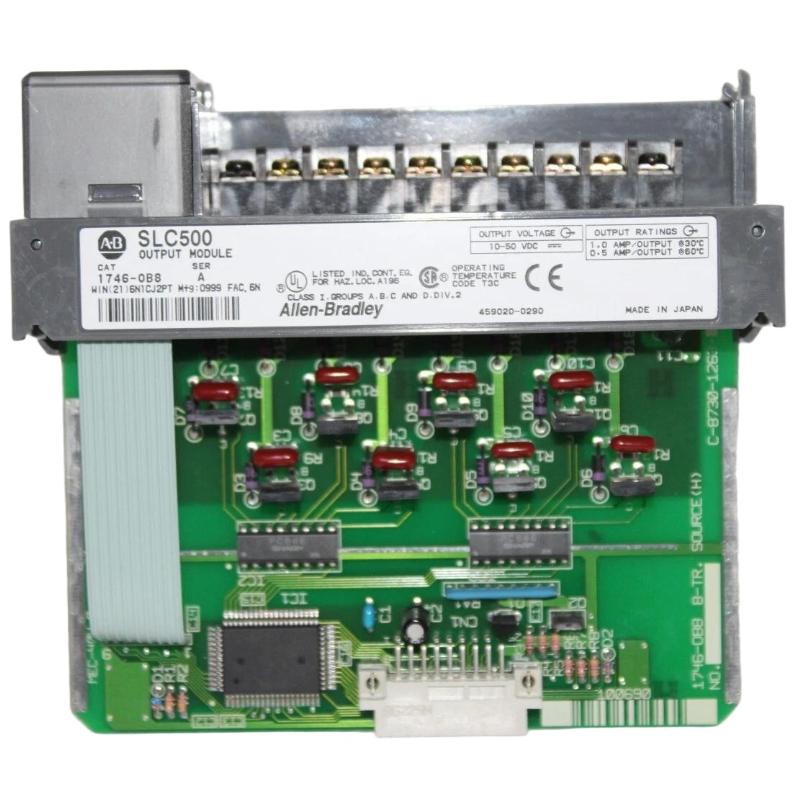
The Allen-Bradley 1746-OB8/A SLC 500 Digital DC Output Module is an eight-point transistor output module designed for industrial control systems that require reliable switching of DC field devices. As part of the SLC 500 programmable logic controller platform, it enables a controller to operate compatible solenoids, indicator lamps, interposing relays, and other discrete loads through a sourcing output interface.
This installation guide covers module preparation, chassis mounting, field wiring, output-load selection, controller configuration, commissioning, and preventive maintenance. It is intended for industrial maintenance engineers, PLC technicians, system integrators, and equipment service professionals working with existing Allen-Bradley SLC 500 installations.
Table of Contents
- Product Overview
- Technical Specifications
- Pre-Installation Preparation
- Module Installation Procedure
- Wiring and Electrical Connections
- PLC Configuration and Output Mapping
- Commissioning and Functional Testing
- Maintenance and Replacement Planning
- Frequently Asked Questions
- Technical Summary
1. Product Overview
The 1746-OB8/A is a digital DC output module in the Allen-Bradley SLC 500 I/O family. It provides eight transistor-based sourcing outputs that allow a PLC program to control external DC loads. The module is installed in a compatible SLC 500 chassis and communicates with the processor through the system backplane.
In a sourcing output circuit, an activated output supplies positive DC voltage to the connected load. The other side of the load connects to the appropriate DC common. This arrangement is commonly used in industrial automation systems for discrete actuators and control interfaces.
The module’s eight outputs share a common output group. Its field-load power must be supplied and wired according to the manufacturer’s terminal diagram and the plant’s electrical design. The chassis backplane powers the module’s internal electronics, while the external field supply provides the energy required by the connected loads.
Typical applications
- Operating compatible 24V DC solenoid valves and pneumatic actuators.
- Controlling indicator lamps and machine status devices.
- Switching suitable interposing relay coils.
- Activating discrete devices on packaging and assembly lines.
- Controlling auxiliary equipment in existing SLC 500 automation systems.
2. Technical Specifications
| Parameter | Specification |
|---|---|
| Manufacturer | Allen-Bradley / Rockwell Automation |
| Model | 1746-OB8/A |
| Product family | SLC 500 |
| Module type | Digital DC transistor output module |
| Number of outputs | 8 |
| Output type | Sourcing transistor outputs |
| Voltage category | 24V DC |
| Operating output voltage | 10–50V DC |
| Backplane current consumption | 135 mA at 5V DC |
| Continuous current per output | 1.0 A at 30°C; 0.50 A at 60°C |
| Maximum total module current | 8.0 A at 30°C; 4.0 A at 60°C |
| Maximum on-state voltage drop | 1.2V at 1.0 A |
| Maximum surge current per point | 3.0 A for 10 ms, subject to specified repeatability conditions |
| Connection method | Removable terminal block |
Important: Confirm the exact catalog number and hardware revision before installation. The 1746-OB8/A designation should not be treated as interchangeable with other SLC 500 output modules, including the OB16, OB16E, OBP8, or relay-output variants. Verify the applicable wiring diagram and all current and temperature derating requirements before connecting loads.
3. Pre-Installation Preparation
3.1 Verify system compatibility
Confirm that the 1746-OB8/A is supported by the installed SLC 500 chassis and the intended processor configuration. Review the available chassis slots, the system power budget, the output load schedule, and the existing electrical drawings. Make sure the module’s sourcing output type is compatible with the loads and the control circuit design.
3.2 Prepare tools and materials
- Approved electrical test meter and insulated hand tools.
- Compatible SLC 500 chassis and removable terminal block.
- Suitable DC field power supply and appropriately rated protective devices.
- Field conductors and ferrules or terminals approved for the installation.
- Current wiring diagrams, I/O lists, and controller project files.
- Electrostatic discharge protection for handling electronic modules.
3.3 Apply electrical safety procedures
Before installing, removing, or wiring the module, isolate the chassis power supply and relevant external field supplies. Follow the site’s lockout/tagout requirements and verify that hazardous voltage is absent. Remember that the external load supply may remain energized even when the PLC chassis is switched off.
Use appropriate electrostatic discharge precautions when handling the module. Do not insert or remove the module with power applied unless the exact equipment documentation explicitly permits the operation and the site’s approved procedures authorize it.
4. Module Installation Procedure
Step 1: Inspect the chassis
Confirm that the SLC 500 chassis is securely mounted and that the intended slot is available. The first slot is normally reserved for the processor or an applicable adapter, so verify the actual chassis layout before selecting the installation position.
Inspect the card guides and backplane connector for damage, contamination, or bent contacts. Check that the cabinet provides adequate ventilation, particularly where several output modules operate at significant load levels.
Step 2: Prepare the module
Inspect the module label to confirm the 1746-OB8/A catalog number. Check the circuit board, connector area, terminal block, and retaining features for visible damage. If a removable terminal block is already wired, label and document its conductors before handling it.
Step 3: Insert the module
- Confirm that the chassis and external field circuits are safely de-energized.
- Align the module’s printed circuit board with the correct chassis card guides.
- Slide the module into the slot without forcing it.
- Ensure that the module is fully seated in the backplane connector.
- Secure the module using the chassis retaining hardware specified by the installation instructions.
If the module does not slide into place smoothly, stop and inspect the alignment. Do not force the board into the backplane, as this may damage the connector or circuit board.
Step 4: Install the terminal block
Confirm that the removable terminal block is compatible and correctly keyed. If it has been removed for installation, reconnect it according to the manufacturer’s instructions and verify that it is securely seated. Make sure the field conductors are identified and that no loose strands can cause short circuits.
5. Wiring and Electrical Connections
5.1 Understand the sourcing output arrangement
The 1746-OB8/A provides sourcing transistor outputs. When a channel is activated, the output supplies positive DC voltage to the connected load. The load’s return must connect to the correct DC common. The external field supply and the common connection must follow the module’s specified wiring diagram.
The following illustration explains the basic sourcing principle. It is not a substitute for the model-specific terminal layout.
External DC supply (+)
          |
          v
1746-OB8/A output channel
          |
          v
Compatible DC field load
          |
          v
DC common / supply return
5.2 Connect the external DC supply
Use a regulated DC supply suitable for the field loads and within the module’s specified operating voltage range. Check supply polarity and verify the protective-device ratings. Ensure that the field supply can support the expected simultaneous load current without excessive voltage drop.
Do not confuse the module’s 5V DC backplane current consumption with the external voltage used to operate the field devices. The chassis backplane supplies the module electronics; the output load circuit requires the correct external field power arrangement.
5.3 Connect output loads
- Identify each output channel from the official wiring diagram.
- Confirm the load voltage, steady-state current, and startup current.
- Connect the output conductor and return conductor to their designated terminals.
- Ensure that all loads are compatible with a sourcing transistor output.
- Use appropriate suppression for inductive loads according to the load and module requirements.
- Secure the terminal connections using the specified conductor preparation and tightening procedure.
Never infer terminal assignments from a similar-looking module. Use the exact wiring diagram for the 1746-OB8/A to identify the outputs, commons, and external DC supply connections.
5.4 Observe output current and temperature limits
The rated continuous current per output is 1.0 A at 30°C and 0.50 A at 60°C. The total module current limit is 8.0 A at 30°C and 4.0 A at 60°C. These limits must be observed simultaneously. A design that operates within the individual channel limit may still exceed the total module limit.
Calculate the combined load current and account for cabinet temperature, startup surges, and the electrical characteristics of inductive loads. Use an interposing relay or a suitable interface when the load requirements exceed the module’s ratings.
5.5 Suppress inductive voltage transients
Solenoids and relay coils can generate voltage transients when switched off. Appropriate suppression helps protect the output circuit and reduce electrical interference. For suitable 24V DC inductive loads, the manufacturer’s guidance identifies a reverse-wired 1N4004 diode as a recommended suppression method. Confirm the suitability, polarity, and impact on release time for the actual load before installation.
5.6 Complete pre-power checks
- Confirm output conductors match the approved I/O schedule.
- Check polarity and DC common connections.
- Verify that no conductor strands bridge adjacent terminals.
- Check that each load’s current is within the permitted limits.
- Verify the external field supply and protective devices.
- Ensure that all terminal-block connections are secure before energizing.
6. PLC Configuration and Output Mapping
6.1 Verify module placement in the chassis
Check the installed slot against the SLC 500 controller configuration and the project’s I/O map. Confirm that the processor recognizes the module and that the slot configuration is consistent with the physical installation.
6.2 Map the eight output channels
Assign clear controller symbols to the eight physical outputs. Each tag should correspond to a specific field device and a documented channel. Avoid reusing tags or changing output addresses without reviewing the electrical drawings and application logic.
| Configuration item | Verification task |
|---|---|
| Catalog number | Confirm the installed module is 1746-OB8/A. |
| Chassis slot | Confirm the module occupies the intended slot in the project. |
| Output addresses | Verify that each logical output maps to the intended field terminal. |
| Field supply | Check voltage, polarity, common wiring, and protective devices. |
| Program logic | Review permissives, interlocks, sequence conditions, and output commands. |
| Load current | Verify channel and total current limits under expected operating conditions. |
6.3 Review output behavior during faults
Confirm the intended behavior when the processor enters a fault state, changes operating mode, or loses normal control. The application’s safe-state design must account for the behavior of the output module and the connected equipment. Do not rely on a standard transistor output module alone to perform safety-rated functions.
7. Commissioning and Functional Testing
Step 1: Inspect before energizing
Verify module seating, retaining hardware, terminal-block installation, conductor identification, supply polarity, and field-device connections. Confirm that the equipment is in a safe state and that unexpected actuator movement cannot injure personnel or damage machinery.
Step 2: Restore power in a controlled manner
Restore chassis and field power according to the approved startup procedure. Observe the processor status and relevant module indicators. Resolve any chassis, processor, or configuration faults before attempting output tests.
Step 3: Test each channel separately
- Place the machine in an approved commissioning or maintenance state.
- Confirm that the selected field device is safe to operate.
- Command one output using the approved PLC test procedure.
- Verify the output indication and the response of the connected device.
- Return the output to its intended safe state.
- Repeat for all eight channels and record the results.
Step 4: Verify the electrical response
Where permitted by site procedures, measure the relevant field voltage under load. If the PLC command and output indication appear correct but the actuator does not respond, investigate the supply, common wiring, field cable, and load condition. Use test instruments rated for the circuit and follow approved electrical safety procedures.
Step 5: Document commissioning results
Record the module catalog number, chassis slot, output assignments, supply measurements, test results, and any corrective actions. Update the I/O schedule and electrical drawings through the site’s approved change-control process.
8. Maintenance and Replacement Planning
Periodic inspection helps maintain reliable operation in legacy SLC 500 systems. Recommended maintenance activities include:
- Inspecting terminal blocks for loose conductors, discoloration, or signs of overheating.
- Checking the field power supply under representative load conditions.
- Reviewing output loads for changes in current demand or startup behavior.
- Inspecting cabinet ventilation and ambient temperature.
- Checking inductive-load suppression components and wiring condition.
- Keeping controller projects, I/O maps, and wiring drawings synchronized.
- Recording recurring faults and module replacements for future diagnostics.
When replacing a module, verify the exact catalog number and revision, sourcing output characteristics, current ratings, terminal arrangement, and controller compatibility. A module with a similar model number may use a different output architecture or have different electrical limits.
9. Frequently Asked Questions
What is the Allen-Bradley 1746-OB8/A used for?
It is an eight-point sourcing transistor output module for the SLC 500 PLC family. It controls compatible DC field devices such as solenoids, indicator lamps, and relay interfaces.
What is the operating voltage range of the 1746-OB8/A?
The documented output operating range is 10–50V DC. The actual field supply must also match the requirements of the connected loads and the approved system design.
How much current can each output handle?
The continuous rating is 1.0 A per point at 30°C and 0.50 A per point at 60°C. The total module current is also limited and must be checked against the applicable temperature rating.
Does the module use an external field power supply?
Yes. The output loads require an appropriate external DC field supply. The module’s backplane current consumption is separate from the power used by the field loads.
Can the 1746-OB8/A drive relay coils and solenoid valves?
It can control compatible DC loads when their voltage and current requirements fall within the module ratings. Inductive loads should use suitable suppression as specified for the load and application.
What should I check if an output does not activate?
Check the PLC logic, slot and output mapping, module seating, field supply, terminal wiring, load return, and actuator condition. If the electrical circuit and program are verified, investigate the module for a possible hardware fault.
10. Technical Summary
The Allen-Bradley 1746-OB8/A SLC 500 Digital DC Output Module provides eight sourcing transistor outputs for industrial automation applications. Reliable operation depends on correct chassis installation, verified terminal-block wiring, a suitable external DC field supply, compatible load selection, accurate PLC output mapping, and controlled commissioning tests.
For long-term reliability, observe the module’s per-point and total-current limits, account for temperature-related derating, and apply appropriate suppression to inductive loads. Careful maintenance and accurate documentation help support existing SLC 500 systems and reduce unnecessary downtime during troubleshooting or module replacement.