

ProductPRODUCT
Featured products
Contact Us
- Schneider
- HMIS5T
- Rear Panel
- France
- 118 × 40.1 × 98.15 mm
- 0.354 kg
- Xiamen, China
- New & In Stock
- T/T, PayPal, Western Union
- 1 Year
- 1-3 Working Days
- DHL, UPS, TNT, FedEx and EMS.
- 24-Hour Service
- COO
- 10
Our advantage

Global Logistics
We have a 10-year logistics and express cooperation agreement, so our products can be shipped to any place in the world.

Brand new and original
Our products are imported in bulk from the place of origin. Because of the cooperative relationship, our products are all original and 100% new.

24-hour service
We provide 7*24 hours service to our customers. We will be there whenever you need us.

Price advantage
All our products are priced very favorably because we have our own warehouse and supply.
| Company Information | |||
| [email protected] | |||
| Mobile | +8615980777398 | ||
| +8615980777398 | |||
| 15980777398 |
Product Overview
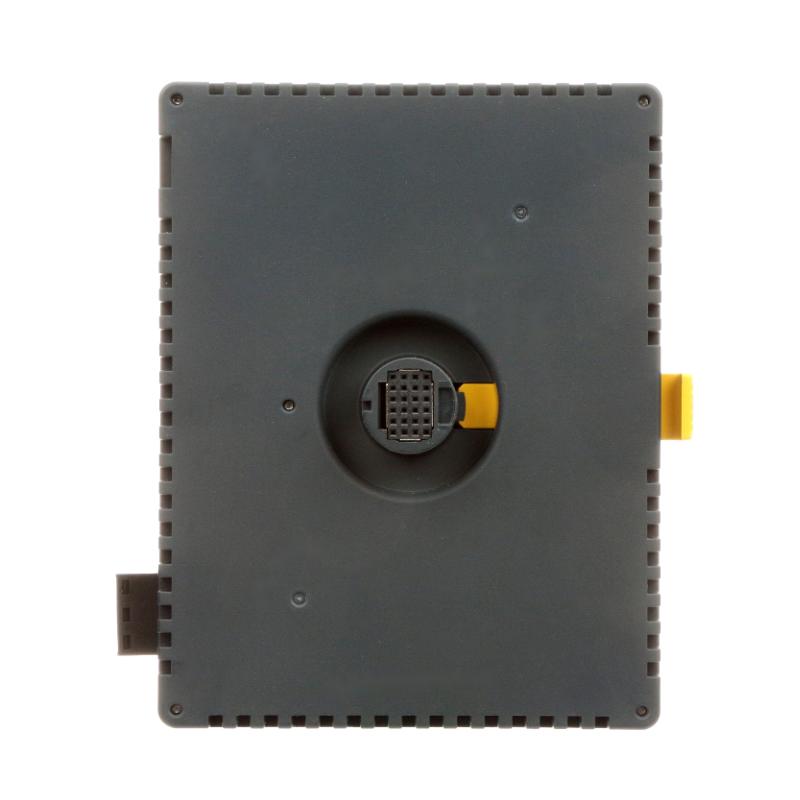
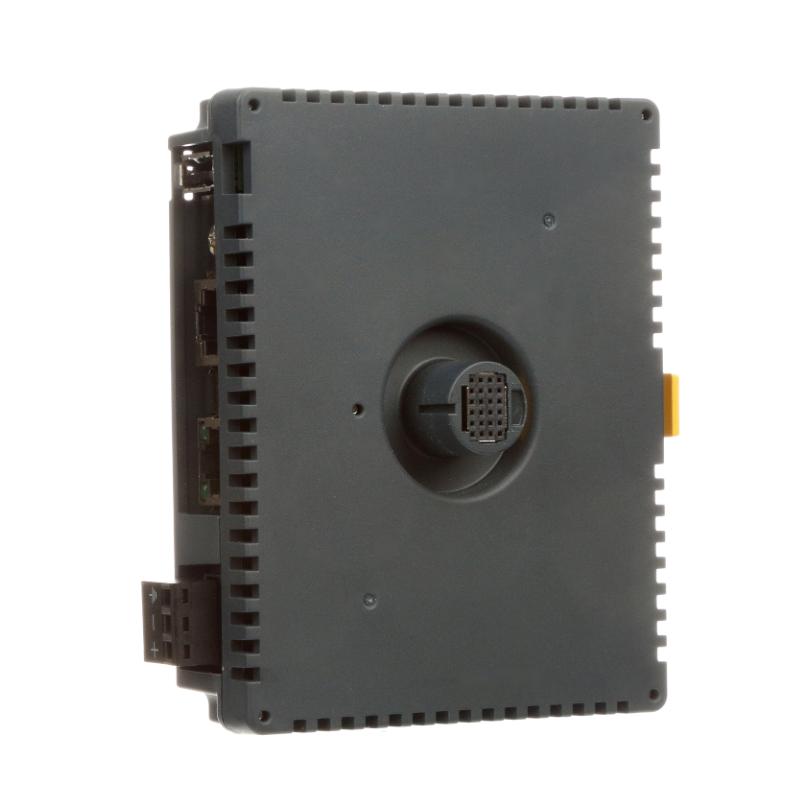
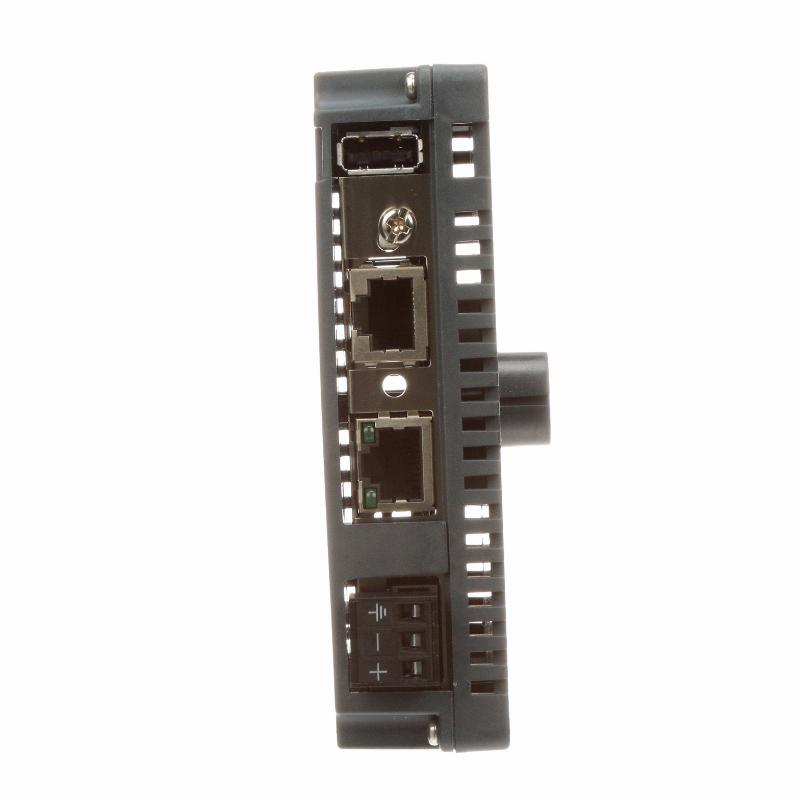
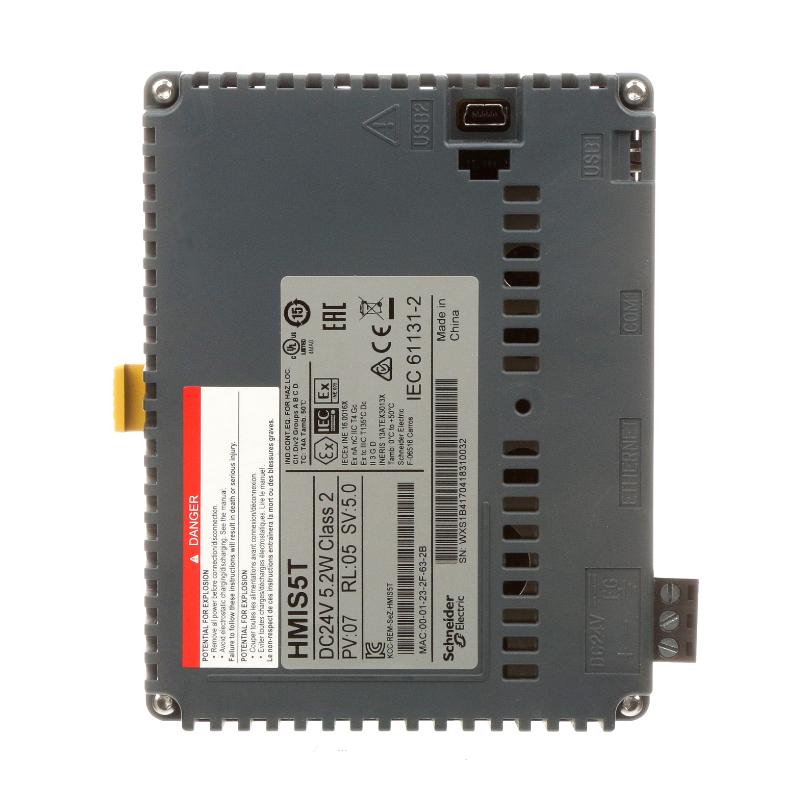
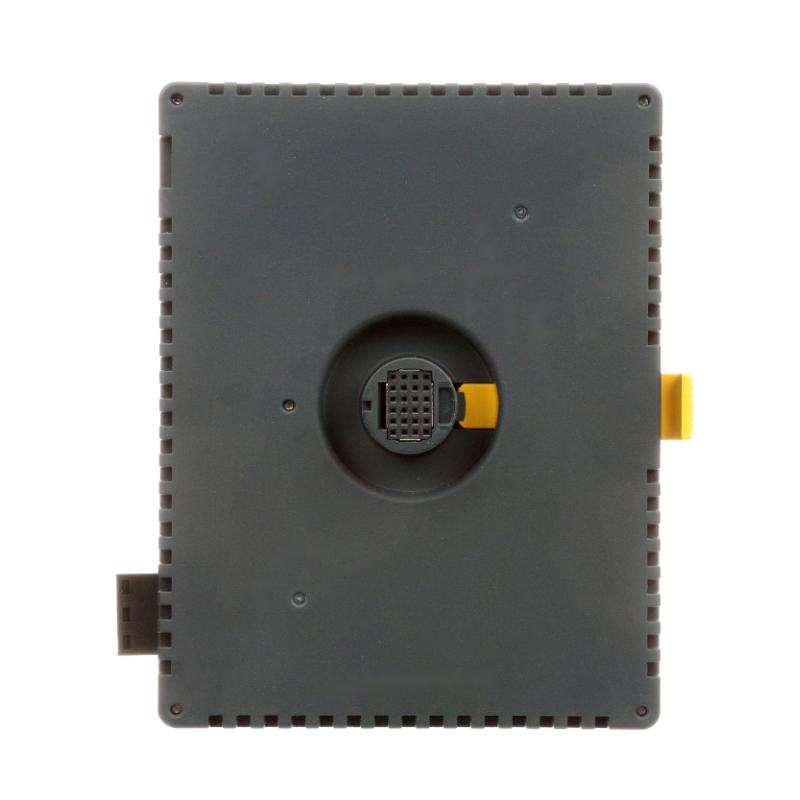
The Schneider Electric HMIS5T is a rear panel module for Harmony STU human-machine interfaces (HMIs). It serves as the rear module assembly of compatible operator terminals, providing the physical housing and connection interface required for the complete HMI installation.
The HMIS5T belongs to the Harmony STU product range and is compatible with the HMISTU655, HMISTU655W, HMISTU855, and HMISTU855W operator terminals. It is intended for applications involving machine operation, equipment monitoring, and operator interaction with industrial automation systems.
Unlike a complete HMI terminal, the HMIS5T is a replacement or component-level rear panel. It is not an independent display controller or standalone operator terminal. Its selection must therefore be based on the installed Harmony STU front panel and the corresponding terminal configuration.
The module features a dark grey PC/PBT enclosure and uses Schneider Electric’s push-button mounting arrangement for STU terminals. This tool-free mounting design simplifies assembly and replacement work, particularly when servicing operator interfaces installed in machine control panels.
The HMIS5T is suitable for simple machine applications and infrastructure equipment where a compatible Harmony STU terminal is used as the operator interface. Its modular construction also makes it relevant to maintenance projects requiring replacement of the rear section without treating the entire HMI assembly as one component.
Technical Specifications
| Parameter | Specification |
|---|---|
| Manufacturer | Schneider Electric |
| Model | HMIS5T |
| Product Series | Harmony STU |
| Product Type | Rear Panel |
| Product Description | Rear Panel Module |
| Application | Human-Machine Interface |
| Compatible HMI Models | HMISTU655, HMISTU655W, HMISTU855, HMISTU855W |
| Enclosure Material | PC/PBT |
| Color | Dark Grey |
| Mounting Type | Push-Button, Tool-Free Mounting |
| Installation | Harmony STU Rear Panel Assembly |
| Product Certifications | UKCA, UKEX |
| Dimensions | 118 × 40.1 × 98.15 mm |
| Weight | 0.354 kg |
Product Features
- Harmony STU Compatibility: Designed for use with HMISTU655, HMISTU655W, HMISTU855, and HMISTU855W operator terminals.
- Rear Panel Construction: Serves as the rear module component of a compatible Harmony STU HMI.
- Tool-Free Mounting: Uses a push-button mounting arrangement to simplify terminal assembly and replacement.
- PC/PBT Enclosure: Features an industrial enclosure material combining polycarbonate and polybutylene terephthalate.
- Dark Grey Finish: Matches the designated Harmony STU rear panel appearance.
- Modular HMI Architecture: Allows the rear panel to be handled as a separate component during maintenance.
- Equipment Communication: Supports the communication arrangement of the compatible Harmony STU terminal with Schneider Electric and third-party products.
- Industrial Application: Suitable for simple machines and infrastructure equipment.
Product Working Principle
The HMIS5T functions as the rear panel assembly of a compatible Harmony STU operator terminal. It forms part of the complete HMI structure rather than performing independent control or display processing.
In a typical installation, the operator interacts with the front display of the Harmony STU terminal. Commands and operating information are handled by the complete HMI assembly, which communicates with the connected PLC or automation equipment.
The HMIS5T provides the rear section of this terminal assembly. It supports the physical integration of the rear module with the corresponding front panel and the terminal’s designated connection arrangement.
A simplified system arrangement is:
Operator → Harmony STU HMI → HMIS5T Rear Panel Assembly → Industrial Automation System
When the operator enters a command through the HMI, the complete terminal processes the interaction and communicates the relevant information to the connected automation equipment. The PLC then executes the programmed control logic and returns operating information to the HMI.
The HMIS5T itself does not execute PLC logic, independently process operator commands, or replace the complete HMI terminal. Its role is to provide the rear panel component within the compatible Harmony STU assembly.
The push-button mounting arrangement allows the rear module to be installed or removed without relying on a conventional tool-intensive mounting procedure. This is particularly useful when replacing the rear panel during HMI servicing.
Role in Schneider Harmony STU Control Architecture
Within the Harmony STU architecture, the HMIS5T serves as the rear panel component of the operator terminal. It forms part of the physical HMI assembly through which operators interact with the underlying automation system.
The complete terminal provides the operator interface, while the HMIS5T supports the rear section of the assembly. This modular arrangement allows the rear panel to be replaced independently when the corresponding terminal configuration permits it.
A typical control arrangement is:
Operator → Harmony STU Terminal → PLC / Controller → Sensors and Actuators
| System Component | Function |
|---|---|
| HMIS5T | Rear panel module for compatible Harmony STU terminals |
| HMISTU655 | Harmony STU operator terminal |
| HMISTU655W | Harmony STU operator terminal |
| HMISTU855 | Harmony STU operator terminal |
| HMISTU855W | Harmony STU operator terminal |
| PLC Controller | Executes machine control logic |
| Industrial Sensors | Provide machine and process information |
| Actuators | Execute commands from the automation system |
| Industrial Communication Network | Transfers information between the HMI and connected equipment |
Industrial Applications
The HMIS5T is used as a component of Harmony STU operator terminals in industrial environments where local machine operation and equipment monitoring are required.
| Application | Typical Use |
|---|---|
| Packaging Machinery | Supporting the rear assembly of operator terminals used for machine control |
| Material Handling | HMI integration for conveyors and automated handling equipment |
| Manufacturing Equipment | Providing a rear panel component for machine operator interfaces |
| Industrial Automation | Supporting operator terminals connected to PLC-based control systems |
| Water Treatment | HMI installation for monitoring pumps and treatment equipment |
| Building Infrastructure | Operator interface integration for utility and infrastructure systems |
| Processing Machinery | Supporting local equipment monitoring and operator interaction |
| Production Lines | Component-level maintenance of Harmony STU operator terminals |
| Machine Control Panels | Rear panel replacement during HMI maintenance |
| Industrial Utilities | Supporting operator terminal installations for auxiliary equipment |
Installation and Maintenance
- Verify Terminal Compatibility: Confirm that the HMIS5T is intended for the installed HMISTU655, HMISTU655W, HMISTU855, or HMISTU855W terminal.
- Inspect the Rear Panel: Check the PC/PBT enclosure, mounting features, and connection areas for cracks, deformation, or visible damage.
- Review the HMI Configuration: Identify the complete terminal model and verify that the replacement rear panel matches the existing assembly.
- Isolate the Equipment: Disconnect the relevant power supply and follow the machine manufacturer’s electrical safety procedures before servicing the HMI.
- Prepare the Installation Area: Ensure that the operator terminal can be accessed safely from the rear of the mounting panel.
- Remove the Existing Module: Follow the designated Harmony STU disassembly procedure to release the existing rear panel without damaging the front assembly.
- Inspect Mounting Features: Check the push-button mounting mechanism and mating surfaces for wear or damage.
- Install the Replacement Panel: Align the HMIS5T with the compatible terminal assembly and engage the designated mounting mechanism.
- Verify Mechanical Engagement: Confirm that the push-button mounting arrangement is properly secured and that the rear panel is seated correctly.
- Reconnect the Terminal: Restore the electrical and communication connections according to the applicable HMI installation documentation.
- Perform Functional Testing: Power up the complete HMI assembly and verify display operation, operator interaction, and communication with the connected automation system.
- Complete Maintenance Inspection: Check the panel mounting, enclosure condition, connector engagement, and overall terminal operation before returning the equipment to service.
When replacing the HMIS5T, particular attention should be paid to the exact Harmony STU terminal model. A rear panel with a similar appearance should not be assumed compatible without checking its part number and mounting arrangement.
Compatible System Components
| Component | Function |
|---|---|
| Schneider HMISTU655 | Compatible Harmony STU HMI terminal |
| Schneider HMISTU655W | Compatible Harmony STU HMI terminal |
| Schneider HMISTU855 | Compatible Harmony STU HMI terminal |
| Schneider HMISTU855W | Compatible Harmony STU HMI terminal |
| Schneider PLC Controllers | Execute the machine’s programmed control logic |
| Industrial Ethernet Devices | Support communication between the HMI and automation equipment |
| Machine Sensors | Supply process and equipment status information |
| Industrial Actuators | Execute machine operating commands |
Recommended Related Models
| Model / Product | Product Type | Typical Application |
|---|---|---|
| Schneider HMISTU655 | Harmony STU HMI Terminal | Operator interface for machine control |
| Schneider HMISTU655W | Harmony STU HMI Terminal | Operator interface for industrial equipment |
| Schneider HMISTU855 | Harmony STU HMI Terminal | Machine monitoring and operation |
| Schneider HMISTU855W | Harmony STU HMI Terminal | Industrial operator interface |
| Schneider HMISTM6B | Harmony ST6 Rear Module | Related HMI rear module replacement |
| Schneider HMIS5T | Harmony STU Rear Panel | Rear panel component for STU terminals |
Key Advantages
- Compatible with four designated Harmony STU terminal models.
- Supports component-level rear panel replacement.
- Uses a tool-free push-button mounting arrangement.
- Features a PC/PBT enclosure.
- Provides a dark grey industrial finish.
- Integrates into Schneider Harmony STU HMI assemblies.
- Suitable for machine and infrastructure applications.
- Supports maintenance of modular operator terminals.
Technical FAQs
1. Which Harmony STU terminals are compatible with the HMIS5T?
The HMIS5T is compatible with HMISTU655, HMISTU655W, HMISTU855, and HMISTU855W. These models should be checked against the existing terminal configuration before ordering a replacement rear panel.
2. Is the HMIS5T a complete HMI or only a rear module?
The HMIS5T is a rear panel module, not a complete HMI. It is installed as part of a compatible Harmony STU terminal assembly and should not be used as a standalone operator interface.
3. What is the advantage of the HMIS5T push-button mounting arrangement?
The push-button mounting system allows tool-free assembly and removal of the designated STU rear module. This simplifies installation and can reduce the work involved in replacing the rear panel during equipment maintenance.
4. Can the HMIS5T be used with a different Harmony HMI series?
Compatibility should not be assumed across different Harmony families. The HMIS5T is specified for the four Harmony STU terminal models listed above. Other HMI series require their own designated rear module and mounting configuration.