

ProductPRODUCT
Featured products
Contact Us
- Siemens
- 6AV2123-2GA03-0AX0
- SIMATIC HMI Basic Panel
- Germany
- 214 × 158 × 39 mm
- 0.988 kg
- Xiamen, China
- New & In Stock
- T/T, PayPal, Western Union
- 1 Year
- 1-3 Working Days
- DHL, UPS, TNT, FedEx and EMS.
- 24-Hour Service
- COO
- 7
Our advantage

Global Logistics
We have a 10-year logistics and express cooperation agreement, so our products can be shipped to any place in the world.

Brand new and original
Our products are imported in bulk from the place of origin. Because of the cooperative relationship, our products are all original and 100% new.

24-hour service
We provide 7*24 hours service to our customers. We will be there whenever you need us.

Price advantage
All our products are priced very favorably because we have our own warehouse and supply.
| Company Information | |||
| [email protected] | |||
| Mobile | +8615980777398 | ||
| +8615980777398 | |||
| 15980777398 |
Product Overview
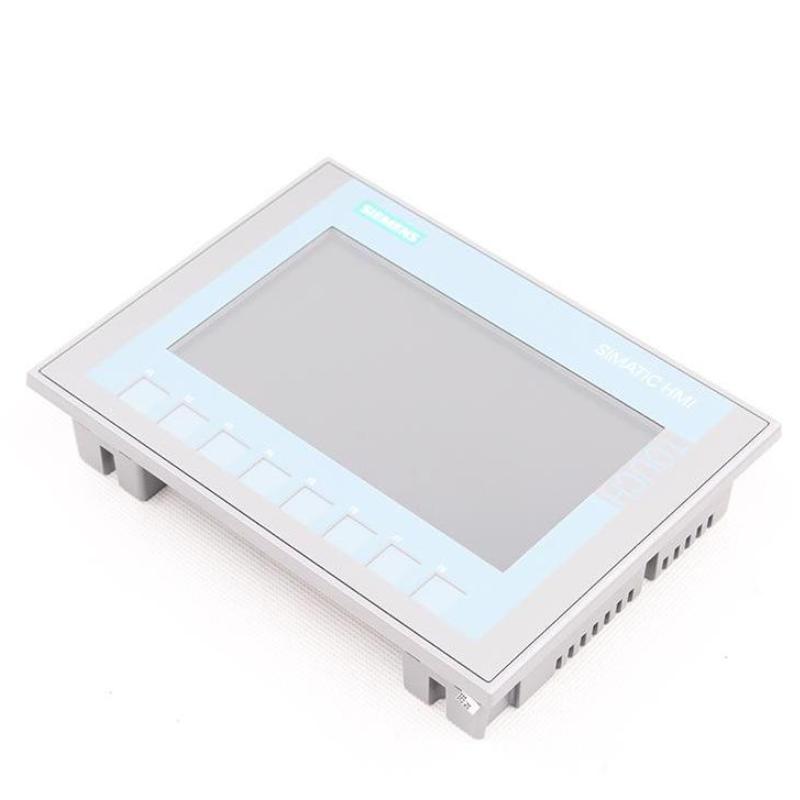
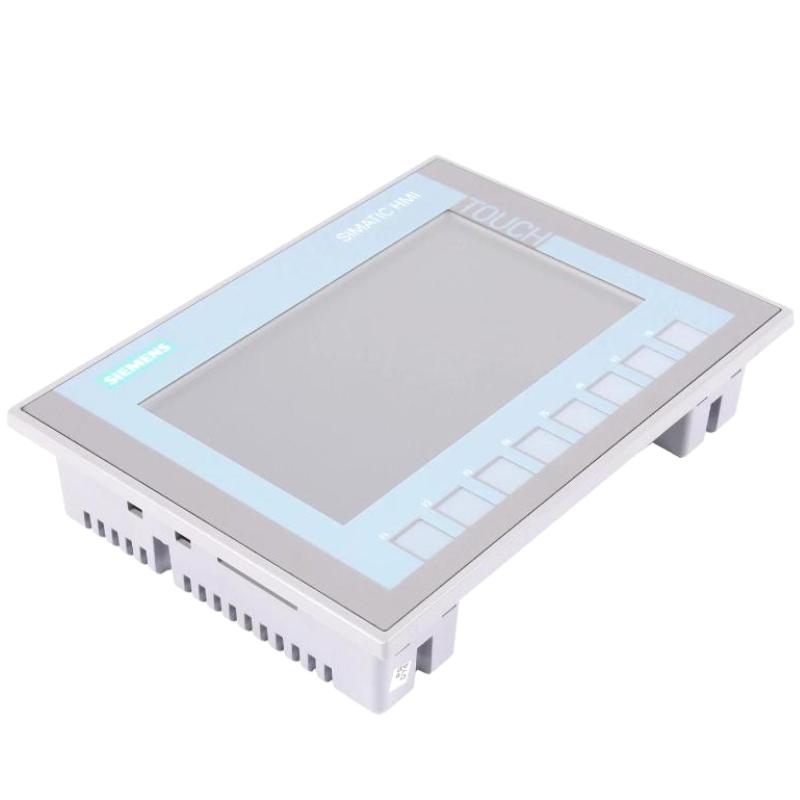
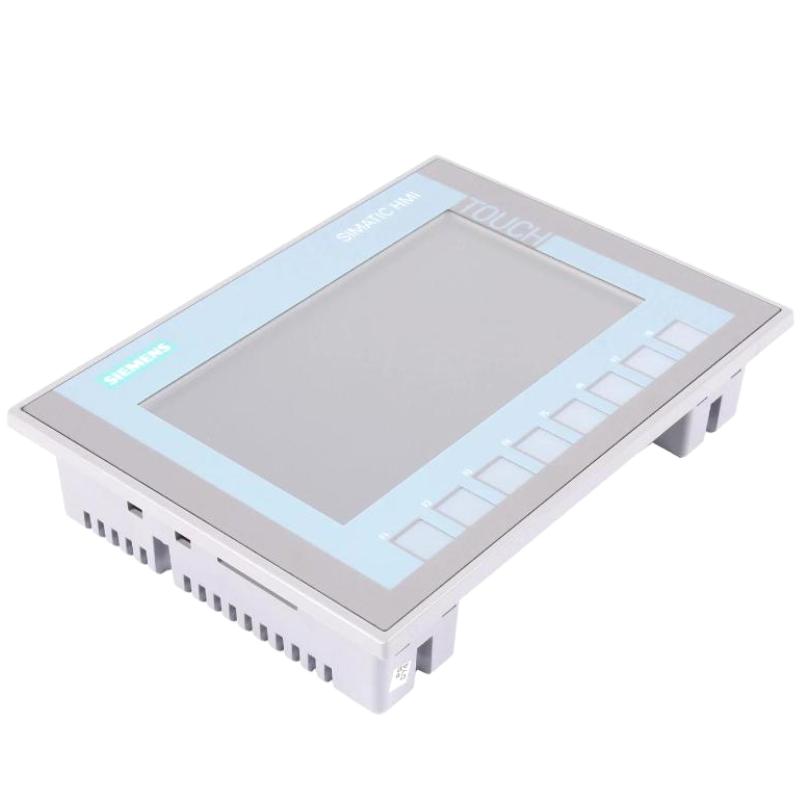
The Siemens 6AV2123-2GA03-0AX0 SIMATIC HMI Basic Panel is a human-machine interface used for local operation and monitoring of industrial automation equipment. This model belongs to the second-generation SIMATIC HMI Basic Panel family and is identified as the KTP700 Basic DP. It combines a 7-inch TFT color display with touchscreen input and physical function keys, giving operators access to machine status, process values, and configured operating commands.
In a PLC-controlled machine, the HMI provides the visual and interactive layer between the automation program and the operator. Rather than relying entirely on separate pushbuttons, indicator lamps, and instruments, a configured panel can consolidate operating information into application-specific screens. Operators can review equipment states, enter process values, navigate between operating pages, and respond to alarms generated by the control system.
The KTP700 Basic DP supports 65,536 display colors and an 800 × 480 pixel resolution. Its widescreen display presents graphical objects, numerical values, status indicators, and configured messages. The analog-resistive touchscreen accepts direct input, while eight physical function keys can be assigned to frequently used operations within the HMI application.
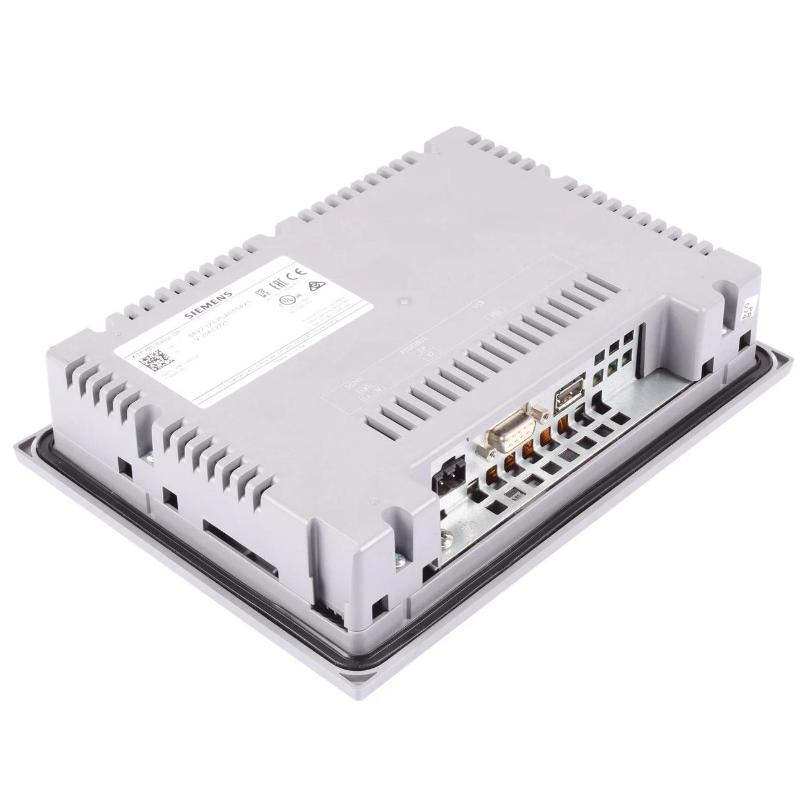
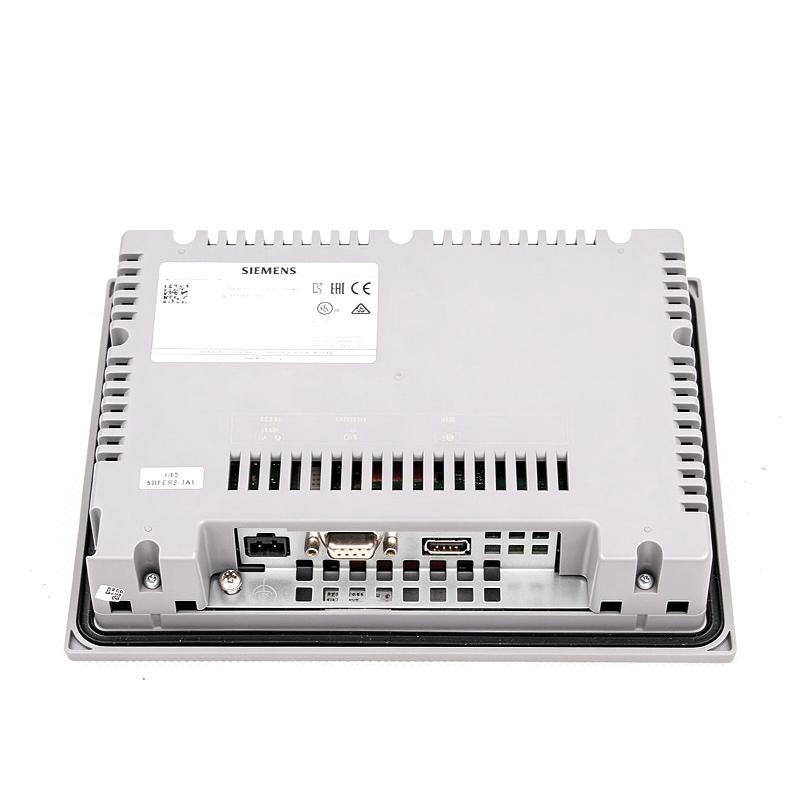
A defining characteristic of this model is its PROFIBUS interface. It is intended for automation architectures that use compatible PROFIBUS communication, making it relevant to existing SIMATIC installations and machines built around established fieldbus networks. PROFIBUS is distinct from PROFINET, so the network interface must be considered when selecting the panel for a new installation or replacing an existing operator terminal.
The panel is configured using WinCC Basic V13 or STEP 7 Basic V13, as specified for this generation of equipment. The engineering project defines screen layouts, navigation, tag assignments, communication settings, and the operating behavior of individual interface objects. The HMI displays and exchanges the information defined by that project; the connected PLC remains responsible for executing the machine-control logic.
Typical functions include displaying machine operating modes, presenting process measurements, allowing authorized value entry, acknowledging configured alarms, and providing access to maintenance screens. The exact functions available to the operator depend on the project and the capabilities of the connected controller.
The KTP700 Basic DP is suitable for applications where a local operator interface is required and PROFIBUS is part of the existing control architecture. It can be used in production machinery, assembly equipment, material-handling systems, and other industrial installations where operators need a dedicated graphical interface.
Successful commissioning requires correct configuration of the communication connection, PLC tags, screen objects, and operator commands. The panel should be integrated according to the machine’s electrical and network design, with the application tested to ensure that displayed values and transmitted commands correspond to the intended control functions.
The Siemens 6AV2123-2GA03-0AX0 SIMATIC HMI Basic Panel provides a practical interface for operating and monitoring compatible automation systems. Its combination of touchscreen input, physical function keys, and PROFIBUS communication supports local machine interaction in applications built around the corresponding SIMATIC HMI and controller architecture.
Technical Specifications
| Parameter | Specification |
|---|---|
| Manufacturer | Siemens |
| Model | 6AV2123-2GA03-0AX0 |
| Product Family | SIMATIC HMI Basic Panels, second generation |
| Product Type | KTP700 Basic DP |
| Display Type | TFT widescreen display with LED backlighting |
| Display Size | 7 inches |
| Display Resolution | 800 × 480 pixels |
| Number of Display Colors | 65,536 |
| Touchscreen Technology | Analog-resistive |
| Operator Control | Key and touch operation |
| Physical Function Keys | 8 |
| Communication Interface | PROFIBUS |
| Rated Supply Voltage | 24 V DC |
| Permissible Supply Voltage | 19.2–28.8 V DC |
| Typical Power Consumption | 5.5 W |
| Engineering Software | WinCC Basic V13 / STEP 7 Basic V13 |
| Primary Function | Industrial machine operation and process visualization |
| Dimensions | 214 × 158 × 39 mm |
| Weight | 0.988 kg |
Product Features
- 7-inch TFT color display: Presents process values, operating states, messages, and graphical interface objects at 800 × 480 pixel resolution.
- Combined key and touch operation: Supports direct touchscreen interaction alongside eight physical function keys.
- PROFIBUS communication: Connects the panel to compatible automation equipment using the designated fieldbus interface.
- Configurable function keys: Allows frequently used operations to be assigned to dedicated physical keys through the HMI project.
- Analog-resistive touchscreen: Supports operator input through direct contact with configured screen objects.
- 65,536 display colors: Provides visual differentiation for machine states, graphical elements, and configured alarm indications.
- SIMATIC engineering integration: Supports configuration using the specified WinCC Basic V13 or STEP 7 Basic V13 environment.
- Application-specific visualization: Allows screen layouts, navigation, and process displays to be tailored to the machine.
- PLC data presentation: Displays configured controller variables and provides input fields for authorized operator interaction.
- Local diagnostic access: Can present configured alarms, equipment status, and maintenance information to assist troubleshooting.
Working Principle
The Siemens 6AV2123-2GA03-0AX0 functions as an operator interface within a compatible industrial control system. It presents information supplied by the controller and transmits configured operator inputs through its PROFIBUS communication connection.
Operator Input → HMI Application → PROFIBUS Communication → PLC Logic → Machine Response
The operating behavior begins with the HMI project created in the engineering environment. This project defines the screens, navigation structure, process tags, graphical controls, and assigned functions of the panel. Once the project is loaded, the HMI uses these definitions to determine what information is displayed and how operator actions are processed.
During normal operation, the panel communicates with the connected controller over PROFIBUS. Configured tags link screen objects to PLC variables. A graphical indicator may display the running state of a motor, while a numerical field may show a temperature, pressure, counter value, or other process measurement supplied by the controller.
When an operator touches a configured object or presses a function key, the panel processes the input according to the application. If the action is associated with a PLC variable or command, the corresponding data is transferred through the communication connection. The PLC program then evaluates the request and determines the appropriate response according to its control logic.
The HMI does not independently replace the PLC’s control functions. The controller remains responsible for executing automation sequences, processing field signals, and managing machine outputs. Interlocks and essential machine-protection functions must be implemented within the appropriate control architecture rather than relying solely on an HMI button or displayed warning.
The display is also updated with information received from the controller. Changes in operating mode, process values, equipment status, and configured alarms can be presented on the corresponding screens. The usefulness of this information depends on correct tag mapping, valid communication, and appropriate handling of communication faults within the application.
The eight physical function keys offer a direct input method for assigned operations. Their behavior is established in the engineering project, allowing the machine designer to align key assignments with the actual operating workflow. Key functions should be tested during commissioning to ensure that they trigger the intended actions.
Because this model uses PROFIBUS, the network configuration must be compatible with the connected automation equipment. Communication settings, device addressing, cabling, and controller configuration should be checked as part of commissioning. A panel cannot exchange data correctly if its communication setup does not match the intended network architecture.
Once the hardware, communication connection, and HMI project have been configured and tested, the KTP700 Basic DP serves as the local point through which operators monitor the process and issue configured commands. Reliable operation depends on the coordination of the HMI application, PLC program, and PROFIBUS connection.
Role in the Industrial Control Architecture
The 6AV2123-2GA03-0AX0 occupies the operator-interface layer of a compatible SIMATIC automation system. It presents information from the control program and accepts operator input, while the PLC processes that input and manages the connected machine.
Operator → KTP700 Basic DP → PROFIBUS Network → PLC → Field Devices
| System Component | Function |
|---|---|
| Siemens KTP700 Basic DP | Provides local machine visualization and operator input |
| SIMATIC PLC | Executes automation logic and manages machine operations |
| PROFIBUS Network | Exchanges configured data between compatible automation devices |
| PLC Digital Input Modules | Acquire discrete signals from sensors and switches |
| PLC Digital Output Modules | Provide control signals to connected equipment |
| Analog I/O Modules | Acquire or output analog process signals where required |
| Sensors | Supply process measurements and machine-state information |
| Actuators | Execute commands issued by the control system |
| Motor Drives | Control motor operation according to the automation program |
| Engineering Software | Defines HMI screens, communication settings, tags, and operating functions |
The HMI provides the operator-facing interface, while the controller and connected field devices perform the underlying automation tasks. The communication network and application configuration determine which process information is available to the panel.
Industrial Applications
| Application | Typical Use |
|---|---|
| Existing SIMATIC Automation Systems | Providing a local operator interface in PROFIBUS-based installations |
| Manufacturing Machinery | Displaying operating modes, process values, and machine status |
| Assembly Equipment | Presenting station information and configured operating commands |
| Packaging Machines | Monitoring production sequences and displaying operator messages |
| Material-Handling Systems | Showing conveyor states and providing configured control inputs |
| Industrial Processing Equipment | Presenting measurements and operating conditions from the PLC |
| Machine Tool Support Systems | Displaying equipment status and selected process information |
| Production Utility Equipment | Providing local monitoring for PLC-controlled utility machinery |
| Control Cabinets | Serving as an operator terminal within a compatible control installation |
| Maintenance Stations | Displaying diagnostic messages and configured maintenance screens |
Installation and Maintenance
- Confirm the application requirements: Ensure that the KTP700 Basic DP provides the required display, operator-input functions, and PROFIBUS communication for the intended system.
- Prepare the mounting location: Check the panel cutout, enclosure arrangement, and installation environment against the equipment documentation.
- Inspect the mounting hardware: Ensure that the required mounting components are present and that the panel can be secured correctly.
- Check the power supply: Verify that the installation provides the specified DC supply within the permitted operating range.
- Connect the PROFIBUS network: Use the appropriate cable and connectors, following the network topology and installation requirements of the control system.
- Configure the HMI project: Prepare the screens, tags, navigation, and operating functions using the applicable engineering environment.
- Check network communication: Confirm that the panel and controller have compatible communication settings and that the intended connection is established.
- Validate PLC tag assignments: Verify that displayed values and operator input fields correspond to the correct controller variables.
- Test the physical function keys: Check all eight keys against their assigned functions and confirm that no unintended operation is triggered.
- Test screens and alarms: Review screen navigation, process displays, alarm presentation, and operator commands under representative operating conditions.
- Inspect the panel during servicing: Clean the front operating surface using an appropriate method and check the connections and mounting arrangement for signs of damage.
- Maintain configuration records: Retain the approved HMI project, communication settings, and relevant backup information for troubleshooting and future maintenance.
If communication problems occur, inspect the PROFIBUS cable, connectors, device configuration, and controller status. If process values appear incorrect, check the tag assignments and PLC data before concluding that the panel hardware is defective.
Related Components
| Component | Function |
|---|---|
| Siemens 6AV2123-2GA03-0AX0 KTP700 Basic DP | Provides the local operator interface with PROFIBUS communication |
| SIMATIC PLC | Executes the control program and processes operator commands |
| PROFIBUS Cable | Carries data between compatible fieldbus devices |
| PROFIBUS Connectors | Provide the required network connections |
| PLC Digital Input Module | Acquires discrete field signals |
| PLC Digital Output Module | Provides discrete control outputs |
| PLC Analog Input Module | Acquires analog process measurements |
| Motor Drive | Controls motor operation in compatible automation applications |
| Industrial DC Power Supply | Supplies power to the panel and associated control equipment |
| HMI Engineering Software | Configures screen layouts, process tags, and operating behavior |
Recommended Related Models
| Model | Product Type | Typical Application |
|---|---|---|
| Siemens 6AV2123-2GA03-0AX0 | SIMATIC HMI KTP700 Basic DP | 7-inch Basic Panel with key/touch operation and PROFIBUS |
| Siemens 6AV2123-2DB03-0AX0 | SIMATIC HMI KTP400 Basic | Compact operator interface with key/touch operation |
| Siemens 6AV2123-2GB03-0AX0 | SIMATIC HMI KTP700 Basic | 7-inch Basic Panel with key/touch operation and PROFINET |
| Siemens 6AV2123-2JB03-0AX0 | SIMATIC HMI KTP900 Basic | Larger-screen Basic Panel for compatible automation systems |
Key Advantages
- Combines touchscreen input and physical function keys for local machine operation.
- Presents PLC process values and configured status information on a color display.
- Supports integration into compatible PROFIBUS-based automation architectures.
- Allows screen layouts and operator workflows to be configured for the machine.
- Provides a dedicated interface for displaying alarms and diagnostic information.
- Supports maintenance and troubleshooting through configured process and equipment displays.
Technical FAQs
What distinguishes the KTP700 Basic DP from the KTP700 Basic PN?
The KTP700 Basic DP uses a PROFIBUS interface, whereas the KTP700 Basic PN uses PROFINET. The communication interface is a key consideration when selecting a panel for an existing automation network or planning a replacement.
How are the eight physical function keys used in a machine application?
The keys can be assigned to application-specific functions through the HMI project. Depending on the configuration, they may support navigation or other operator actions. Each assignment should be tested during commissioning to confirm that it matches the intended machine workflow.
Which engineering software is specified for this panel?
The specified engineering environment is WinCC Basic V13 or STEP 7 Basic V13. The HMI project defines the screen structure, process tags, communication settings, and operator functions used by the application.
Does the KTP700 Basic DP directly control motors and actuators?
The panel transmits configured operator inputs and displays information from the automation system. The PLC executes the control program and manages the outputs that operate motors and actuators. Machine interlocks and essential protection functions should remain within the appropriate control system.