

ProductPRODUCT
Featured products
Contact Us
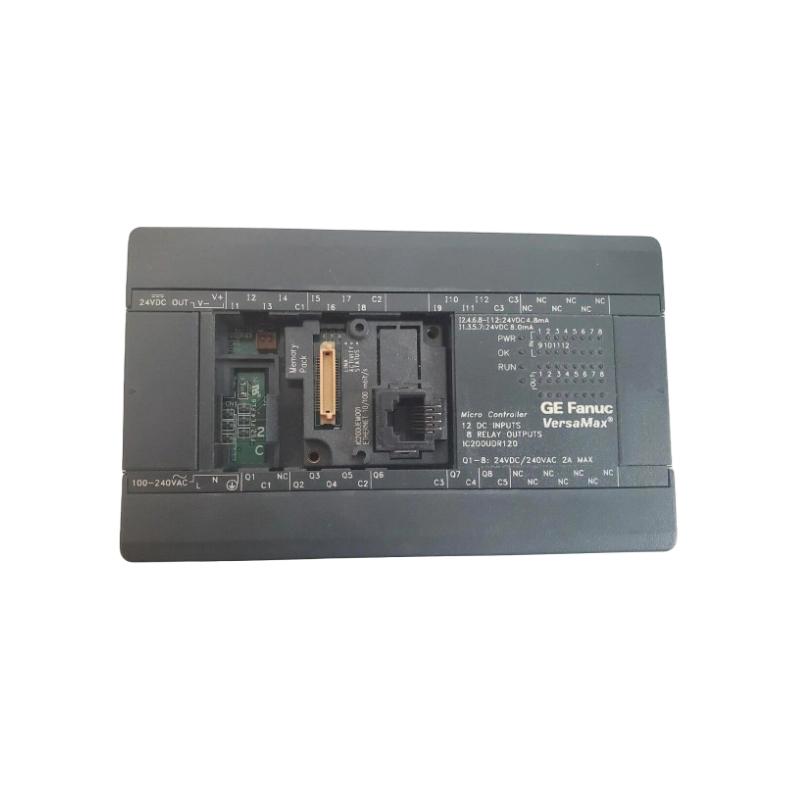
- GE
- IC200UEM001
- VersaMax Miniature Ethernet Module
- USA
- 120 × 60 × 76 mm
- 1.5 kg
- Xiamen, China
- New & In Stock
- T/T, PayPal, Western Union
- 1 Year
- 1-3 Working Days
- DHL, UPS, TNT, FedEx and EMS.
- 24-Hour Service
- COO
- 63
Our advantage

Global Logistics
We have a 10-year logistics and express cooperation agreement, so our products can be shipped to any place in the world.

Brand new and original
Our products are imported in bulk from the place of origin. Because of the cooperative relationship, our products are all original and 100% new.

24-hour service
We provide 7*24 hours service to our customers. We will be there whenever you need us.

Price advantage
All our products are priced very favorably because we have our own warehouse and supply.
| Company Information | |||
| [email protected] | |||
| Mobile | +8615980777398 | ||
| +8615980777398 | |||
| 15980777398 |
Product Overview
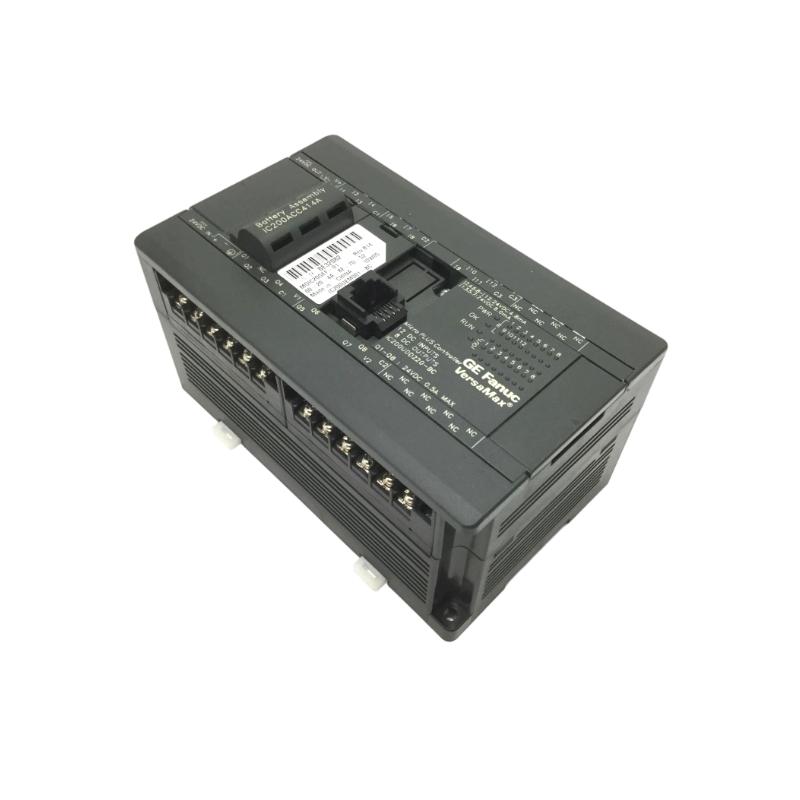
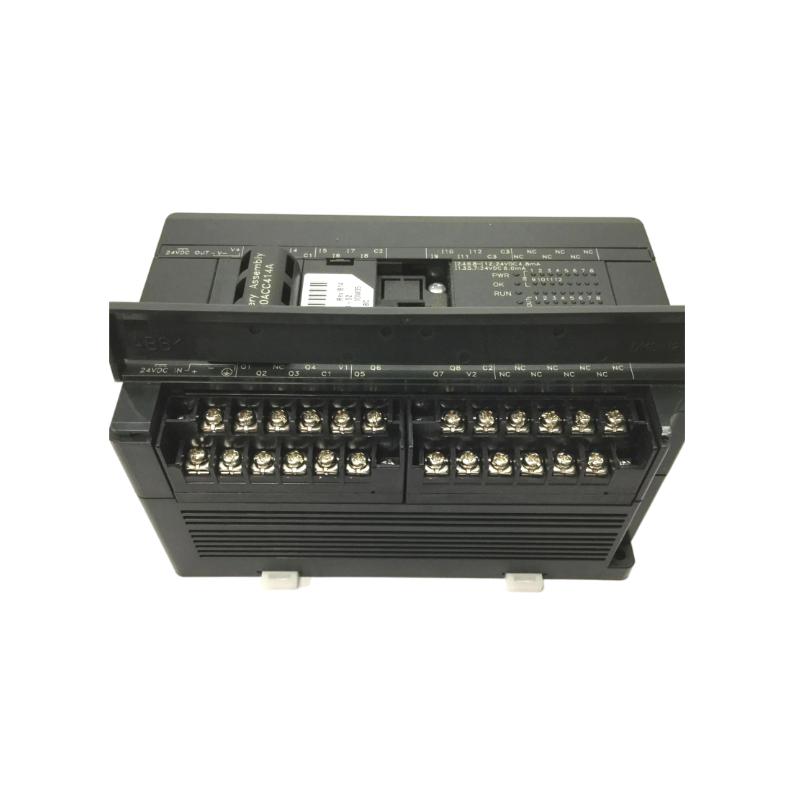
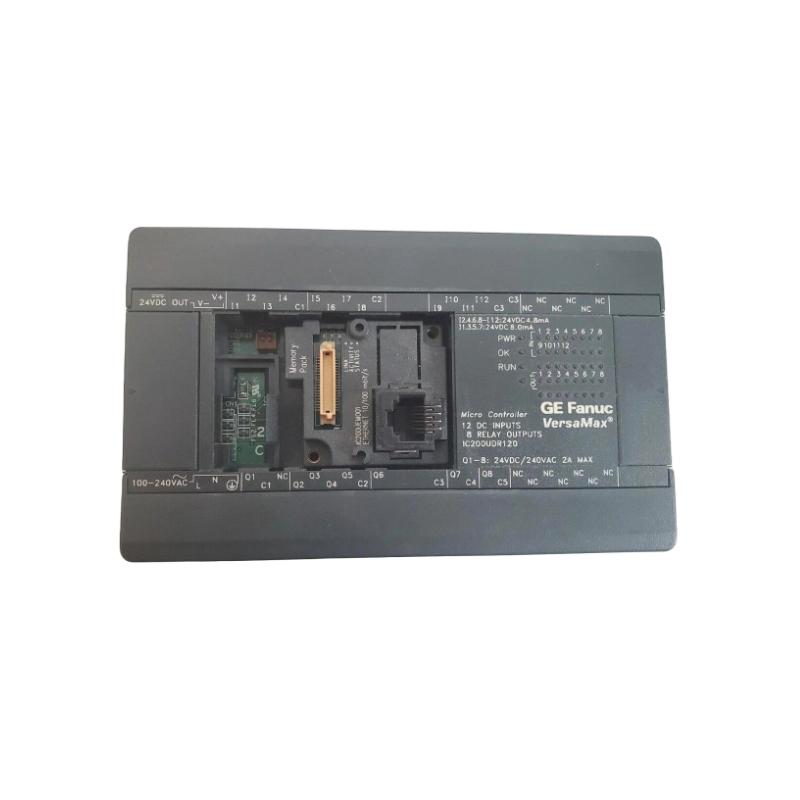
The GE IC200UEM001 VersaMax Miniature Ethernet Module is a communication component designed for industrial automation systems based on the GE VersaMax platform. Its primary purpose is to provide Ethernet communication capability for compatible VersaMax control architectures, allowing controllers and automation equipment to exchange data with other devices over an industrial Ethernet network.
In a typical automation environment, Ethernet communication can connect programmable controllers with operator interfaces, supervisory computers, engineering stations, industrial switches, and other control-system devices. The communication module therefore serves as an important interface between the local VersaMax control system and the broader industrial network.
The supplied product information identifies the GE IC200UEM001 as a VersaMax Miniature Ethernet Module, with dimensions of 120 × 60 × 76 mm and a weight of 1.5 kg.
Product Information
- Manufacturer: GE
- Product Family: VersaMax
- Model: IC200UEM001
- Product Type: Miniature Ethernet Module
- Dimensions: 120 × 60 × 76 mm
- Weight: 1.5 kg
- Application: Industrial Automation
- Primary Function: Ethernet Communication
- System Role: Industrial Network Interface
The IC200UEM001 should be installed as part of a compatible VersaMax architecture, with the communication configuration matched to the controller, network, and connected devices.
Technical Specifications
| Parameter | Specification |
|---|---|
| Manufacturer | GE |
| Product Family | VersaMax |
| Model Number | IC200UEM001 |
| Product Type | Miniature Ethernet Module |
| Communication Type | Ethernet |
| Dimensions | 120 × 60 × 76 mm |
| Weight | 1.5 kg |
| Application | Industrial Automation |
| System Role | Network Communication |
| Installation | Modular Control System |
| Primary Function | Ethernet Data Exchange |
The dimensions and weight are based on the product information supplied.
Function and Working Principle
The IC200UEM001 provides an Ethernet communication path between a compatible VersaMax control system and other devices on the industrial network.
A simplified architecture is:
VersaMax Controller
↓
IC200UEM001 Ethernet Module
↓
Industrial Ethernet Network
↓
PLC / HMI / Engineering Station / Supervisory System
The module manages communication between the local automation system and connected network devices according to the applicable configuration.
Typical communication tasks may include:
- Controller data exchange
- HMI communication
- Supervisory data transfer
- Engineering access
- Network diagnostics
- Remote monitoring
- Control-system integration
- Data exchange with compatible industrial devices
The Ethernet module does not replace the main controller. Instead, it provides communication functionality that allows the controller to participate in a broader automation network.
Role in Industrial Control Systems
Modern industrial automation systems often require communication between different control levels.
A typical architecture can be represented as:
Field Devices
↓
VersaMax I/O
↓
VersaMax Controller
↓
IC200UEM001
↓
Industrial Ethernet
↓
HMI / SCADA / Engineering Computer
The Ethernet connection can make controller data available to supervisory and operator systems while allowing the automation architecture to exchange information with other compatible devices.
This is especially useful in:
- Machine automation
- Production lines
- Material handling
- Packaging systems
- Process equipment
- OEM machinery
- Factory monitoring systems
Ethernet Communication Architecture
The communication path can be divided into several layers.
Controller Layer
The VersaMax controller executes the application logic and manages the machine or process.
Communication Layer
The IC200UEM001 provides the Ethernet interface used to exchange information with the network.
Network Layer
Industrial Ethernet infrastructure connects the controller system to other devices.
Supervisory Layer
HMIs, computers, engineering stations, or supervisory systems can exchange information with the controller.
This separation helps technicians troubleshoot communication problems systematically.
Industrial Applications
Machine Automation
The IC200UEM001 can provide network connectivity for machines requiring communication between the controller and operator or supervisory systems.
Production Lines
Ethernet communication can connect multiple control systems across a production environment.
Packaging Equipment
The module can support communication between a VersaMax controller and external monitoring or operator equipment.
Material Handling
Conveyor and material-handling systems can use Ethernet communication to exchange operational data with higher-level systems.
OEM Equipment
Machine builders can incorporate Ethernet communication into equipment requiring remote monitoring or network integration.
Factory Automation
The module can form part of a larger industrial network connecting controllers, operator interfaces, and supervisory computers.
Installation Guide
1. Verify the Product Model
Before installation, confirm the complete model:
GE IC200UEM001
VersaMax Miniature Ethernet Module
Do not substitute another VersaMax communication module simply because its physical appearance is similar.
Communication functions, configuration requirements, and system compatibility can differ between models.
2. Review the Network Architecture
Before installation, identify:
- VersaMax controller
- IC200UEM001 location
- Ethernet network topology
- Network switch
- HMI
- Engineering workstation
- Supervisory system
- Other connected devices
- Existing IP configuration
A clear network diagram makes commissioning and troubleshooting considerably easier.
3. Back Up the Existing Configuration
Before changing the control system, preserve applicable configuration information.
Record:
- Controller application
- Hardware configuration
- Ethernet settings
- Network addresses
- Device names
- Communication parameters
- HMI configuration
- Supervisory-system settings
A verified backup can significantly reduce recovery time after a communication-module replacement.
4. Place the System in a Safe State
Although Ethernet communication is primarily a data function, loss or restoration of communication can affect machine operation.
Before maintenance:
- Stop automatic operation.
- Identify affected equipment.
- Place the process in a safe state.
- Isolate hazardous energy where required.
- Follow approved maintenance procedures.
- Prevent unexpected machine movement.
5. Inspect the Module
Before installation, inspect the IC200UEM001 for:
- Cracked housing
- Damaged Ethernet interface
- Damaged connectors
- Bent terminals
- Corrosion
- Contamination
- Signs of mechanical impact
- Loose components
Do not install a visibly damaged communication module.
6. Install the Module
Position the IC200UEM001 correctly within the compatible VersaMax control architecture.
Verify:
- Correct orientation
- Correct mounting location
- Secure mechanical installation
- Connector alignment
- Adequate cabinet clearance
- Proper cable routing
Avoid excessive force when installing the module.
7. Connect the Ethernet Network
Connect the Ethernet cable to the appropriate network interface.
Inspect:
- Cable condition
- Connector condition
- Connector engagement
- Cable routing
- Network switch connection
- Network topology
Avoid routing Ethernet communication cables directly alongside high-current motor or power conductors where electrical interference could be introduced.
8. Verify Network Addressing
Before bringing the system online, verify the configured network parameters.
Depending on the application, check:
- IP address
- Subnet configuration
- Network device identification
- Communication settings
- HMI configuration
- Supervisory-system configuration
Two devices should not be configured with the same network address.
9. Verify the Network Switch
If the IC200UEM001 connects through an Ethernet switch, inspect the switch configuration and physical connection.
Check:
- Port selection
- Port status
- Cable connection
- Link indication
- Network segmentation
- Other connected devices
A failed switch port can produce symptoms that initially appear to originate from the Ethernet module.
Commissioning Procedure
Step 1 — Visual Inspection
Inspect the IC200UEM001, network cable, and surrounding equipment.
Step 2 — Verify Power
Confirm stable power to the VersaMax control system.
Step 3 — Check Ethernet Connection
Verify the Ethernet cable and network connection.
Step 4 — Confirm Network Configuration
Check the configured communication parameters.
Step 5 — Check Module Status
Review available status indications and controller diagnostics.
Step 6 — Verify Network Link
Confirm that the physical Ethernet connection is established.
Step 7 — Test Controller Communication
Verify communication between the VersaMax controller and the connected network device.
Step 8 — Test HMI or Supervisory Communication
Confirm that the HMI, engineering computer, or supervisory system can exchange the expected data.
Step 9 — Test Application Functions
Run the machine or process under controlled conditions.
Step 10 — Return to Normal Operation
After successful testing, restore normal automatic operation.
Troubleshooting Guide
Problem 1: IC200UEM001 Does Not Establish Ethernet Communication
Possible causes include:
- Ethernet cable fault
- Loose connector
- Incorrect network configuration
- Network switch problem
- Communication-module fault
- Controller configuration problem
- Duplicate network address
Recommended Checks
- Inspect the Ethernet cable.
- Check the connector.
- Verify network parameters.
- Check the switch port.
- Verify the controller configuration.
- Check available diagnostics.
- Test the network connection from another compatible device.
Problem 2: Ethernet Link Is Not Detected
Possible causes include:
- Damaged cable
- Incorrect cable connection
- Failed network port
- Switch-port problem
- Module hardware fault
Start with the physical layer.
Check:
Module
↓
Ethernet Cable
↓
Switch Port
↓
Network Device
This approach can quickly identify whether the fault is local or network-wide.
Problem 3: Communication Works Intermittently
Intermittent Ethernet communication can be caused by:
- Loose connectors
- Damaged cable
- Electrical interference
- Network congestion
- Unstable power
- Switch problems
- Configuration inconsistencies
- Environmental conditions
Inspect the physical network before replacing the communication module.
Problem 4: HMI Cannot Communicate With the Controller
Possible causes include:
- Incorrect IP address
- Incorrect network settings
- Wrong controller configuration
- Ethernet cable problem
- Switch problem
- HMI configuration error
- Communication service problem
Check the communication path from the HMI to the controller one section at a time.
Problem 5: Engineering Computer Cannot Connect
Check:
- Computer network adapter
- Ethernet cable
- Switch port
- Network address
- Subnet configuration
- Controller communication settings
- IC200UEM001 status
If other network devices communicate successfully, focus on the engineering computer configuration and its network path.
Problem 6: Multiple Devices Lose Communication
When multiple devices lose communication simultaneously, the fault is more likely to be associated with:
- Network switch
- Network power
- Main Ethernet connection
- Network infrastructure
- Common configuration problem
Do not immediately replace the IC200UEM001.
Problem 7: Communication Stops After Maintenance
Possible causes include:
- Ethernet cable disconnected
- Incorrect port connection
- Changed IP settings
- Changed controller configuration
- Loose module connection
- Network switch changes
Compare the post-maintenance configuration with the documented original configuration.
Problem 8: Communication Is Slow or Unstable
Possible causes include:
- Network congestion
- Poor cable condition
- Electrical interference
- Network hardware problem
- Incorrect network architecture
- Excessive communication traffic
Investigate the network as a complete system rather than focusing exclusively on the communication module.
Problem 9: Ethernet Communication Works but Data Is Incorrect
If communication is established but the received data is incorrect, investigate:
- Controller data mapping
- Application logic
- HMI configuration
- Data addresses
- Scaling
- Data types
- Communication configuration
A successful Ethernet link does not necessarily mean that the application-level data configuration is correct.
Problem 10: Replacing the IC200UEM001 Does Not Solve the Problem
If a replacement communication module produces the same fault, investigate:
- Network cable
- Switch
- Controller configuration
- IP addressing
- HMI
- Engineering computer
- Application configuration
- Network infrastructure
The problem may not originate from the module itself.
Network Troubleshooting Strategy
A systematic Ethernet troubleshooting path is:
IC200UEM001
↓
Ethernet Cable
↓
Switch Port
↓
Network Infrastructure
↓
Remote Device
For controller-to-HMI communication:
Controller
↓
IC200UEM001
↓
Ethernet Network
↓
HMI
For configuration problems:
Physical Network
↔
Network Configuration
↔
Application Configuration
This layered approach helps technicians isolate physical, network, configuration, and application-level faults.
Communication Module Replacement Procedure
Phase 1 — Preparation
- Confirm GE IC200UEM001.
- Verify the replacement module.
- Record current network settings.
- Back up the controller configuration.
- Document Ethernet connections.
- Identify all affected equipment.
- Place the machine in a safe state.
Phase 2 — Removal
- Stop the control system according to the approved procedure.
- Isolate power where required.
- Disconnect the Ethernet cable.
- Disconnect applicable module interfaces.
- Remove the existing module carefully.
Phase 3 — Installation
- Inspect the replacement module.
- Confirm the model number.
- Install the module correctly.
- Secure the mounting arrangement.
- Reconnect the Ethernet cable.
- Inspect the connection.
Phase 4 — Configuration
- Restore applicable communication settings.
- Verify network addressing.
- Verify controller configuration.
- Check HMI settings.
- Verify supervisory-system parameters.
Phase 5 — Commissioning
- Apply power.
- Check module status.
- Verify Ethernet link.
- Test controller communication.
- Test HMI communication.
- Test supervisory communication where applicable.
- Run the application.
- Return the system to normal operation.
Preventive Maintenance
| Maintenance Item | Recommended Action |
|---|---|
| IC200UEM001 | Inspect module condition |
| Ethernet Cable | Check for damage |
| Connectors | Verify secure connection |
| Network Switch | Check port operation |
| Network Configuration | Maintain documentation |
| Controller | Maintain configuration backup |
| HMI | Verify communication |
| Engineering Station | Check network access |
| Cabinet | Keep clean and dry |
| Grounding | Verify control-system arrangement |
| Diagnostics | Review recurring communication faults |
| Maintenance Records | Document network changes |
Environmental Considerations
Temperature
Maintain the control cabinet within the appropriate environmental range for the installed equipment.
Dust
Excessive dust can affect connectors and general cabinet reliability.
Moisture
Prevent condensation and moisture exposure.
Vibration
Mechanical vibration can loosen communication connections and mounting hardware.
Electrical Interference
Ethernet cables should be routed appropriately relative to motors, drives, contactors, and high-current conductors.
Common Installation Mistakes
Incorrect Ethernet Connection
A loose or incorrectly connected Ethernet cable can prevent communication even when the module itself is functioning normally.
Duplicate Network Address
Two devices using the same address can create unpredictable communication behavior.
Incorrect HMI Configuration
The controller and HMI communication parameters must correspond.
Poor Cable Routing
Communication cables routed alongside high-power switching conductors can be exposed to unwanted electrical interference.
Replacing the Module Before Checking the Network
A communication failure does not automatically mean that the IC200UEM001 has failed.
Failing to Document Network Settings
Without accurate network documentation, commissioning and troubleshooting can become unnecessarily time-consuming.
Key Advantages
- VersaMax industrial Ethernet communication architecture
- Compact miniature communication-module design
- Enables network connectivity for compatible control systems
- Supports controller-to-network data exchange
- Suitable for HMI integration
- Suitable for supervisory communication
- Suitable for industrial automation networks
- Supports modular VersaMax system architecture
- Supplied dimensions of 120 × 60 × 76 mm
- Supplied weight of 1.5 kg
Technical FAQs
What is the GE IC200UEM001?
The GE IC200UEM001 is a VersaMax Miniature Ethernet Module used to provide Ethernet communication capability within a compatible industrial automation system.
What is the primary function of IC200UEM001?
Its primary function is to provide an Ethernet communication interface between the VersaMax control system and compatible network devices.
What are the dimensions of IC200UEM001?
The supplied dimensions are 120 × 60 × 76 mm.
What is the weight of IC200UEM001?
The supplied product weight is 1.5 kg.
Can IC200UEM001 connect a VersaMax controller to an HMI?
Yes, where the controller, Ethernet module, HMI, and communication configuration are compatible, the Ethernet interface can be used as part of the communication path between the control system and HMI.
Why is the Ethernet link not detected?
Check the Ethernet cable, connectors, module installation, switch port, network equipment, and module status.
Why does Ethernet communication repeatedly disconnect?
Possible causes include damaged cables, loose connectors, electrical interference, unstable power, network equipment problems, or configuration issues.
Why can the HMI not connect to the controller?
Check the controller address, network configuration, Ethernet connection, switch, HMI configuration, and communication parameters.
Why do several devices lose communication simultaneously?
If multiple devices fail at the same time, investigate the network switch, network power, common Ethernet connections, and network infrastructure before replacing the IC200UEM001.
Should the Ethernet module be replaced when communication fails?
Not immediately. First isolate the physical Ethernet layer, network infrastructure, controller configuration, and application configuration.
What should be backed up before replacing IC200UEM001?
Record and preserve the controller application, hardware configuration, network addressing, communication parameters, HMI configuration, and applicable supervisory-system settings.
What is the best way to troubleshoot an Ethernet communication fault?
Start with the physical connection, then check the network switch and network configuration, followed by the controller, IC200UEM001, HMI, and application-level communication.
Conclusion
The GE IC200UEM001 VersaMax Miniature Ethernet Module is a communication component for compatible VersaMax industrial automation systems. It provides an Ethernet interface that can connect the local control architecture with HMIs, engineering stations, supervisory computers, and other compatible network devices.
The supplied product dimensions are 120 × 60 × 76 mm, with a weight of 1.5 kg.
Reliable operation depends on correct module installation, secure Ethernet connections, accurate network configuration, appropriate cable routing, and proper integration with the VersaMax controller and connected devices.
When troubleshooting the IC200UEM001, technicians should use a layered approach beginning with the physical Ethernet connection, followed by the network switch, network configuration, controller, communication module, HMI, and application-level data exchange.
A communication failure should not automatically be attributed to the Ethernet module. Checking the entire communication path helps identify cable faults, switch problems, addressing conflicts, configuration errors, and application-level issues before unnecessary hardware replacement.
With proper installation, configuration, commissioning, and preventive maintenance, the GE IC200UEM001 can provide an effective Ethernet communication interface for compatible VersaMax industrial automation applications.