
NewsNEWCENTER
Featured products
Contact Us
GE 531X175SSBAYM2 Dual-Channel BIU Card Troubleshooting and Fault Diagnosis Guide
2026-10-21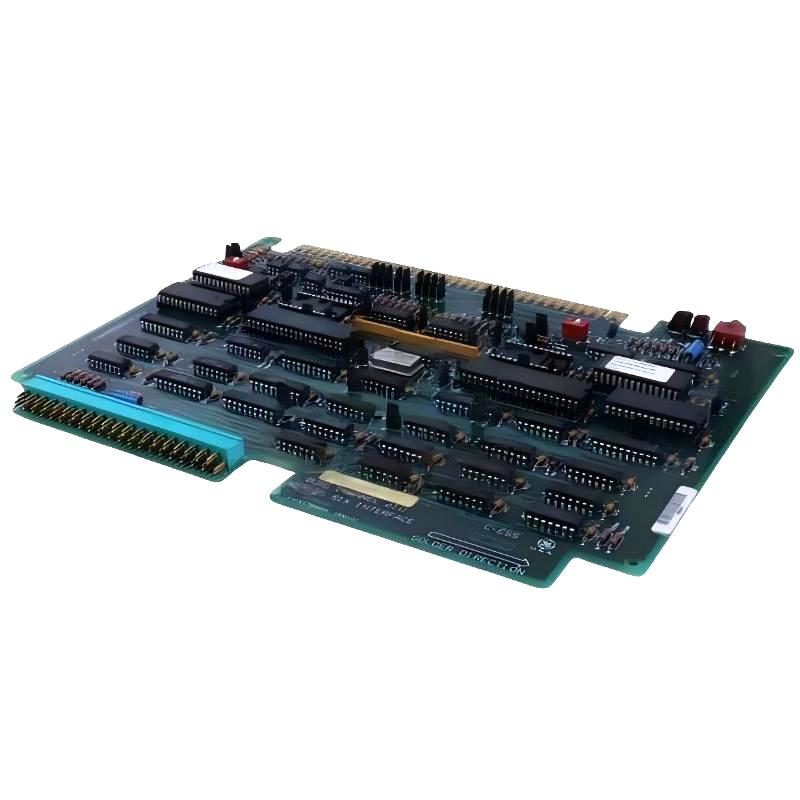
The GE 531X175SSBAYM2 VA-4 Dual-Channel BIU Card is an industrial control circuit board associated with GE’s 531X board family. In a compatible control or drive system, an interface board of this type helps support communication and signal interfacing between system components. Faults involving the board, its connectors, configuration, or surrounding control hardware may lead to communication interruptions, inconsistent system responses, or unsuccessful startup.
This guide explains how to troubleshoot the GE 531X175SSBAYM2 Dual-Channel BIU Card through a structured fault-diagnosis process. It covers common symptoms, initial inspection, connection checks, channel-related fault isolation, replacement considerations, and post-repair verification. Exact functions, switch settings, connector assignments, and diagnostic indicators must be confirmed against the documentation for the specific board revision and host system.
Table of Contents
- 1. Product Overview and Troubleshooting Principles
- 2. Safety Precautions Before Diagnosis
- 3. Common Fault Symptoms
- 4. Initial Inspection Procedure
- 5. Step-by-Step Fault Diagnosis
- 6. Diagnosing Channel-Related Problems
- 7. Component and PCB Inspection
- 8. Repair and Replacement Recommendations
- 9. Post-Repair Testing and Commissioning
- 10. Preventive Maintenance
- 11. Technical FAQs
- 12. Technical Summary
1. Product Overview and Troubleshooting Principles
The GE 531X175SSBAYM2 is identified as a dual-channel BIU circuit board in the VA-4/531X board family. Because board variants within this family may differ, technicians should confirm the complete part number, revision markings, and intended application before carrying out detailed tests.
When a control system develops a fault, the board should not automatically be treated as the source. A similar symptom can be caused by an upstream controller, a power supply, a backplane or mating connector, external wiring, configuration differences, or a downstream device. The objective of troubleshooting is to distinguish a board-level defect from a system-level problem before replacing components.
Recommended diagnostic principles
- Record the original fault message and operating conditions before changing anything.
- Check the surrounding system before concluding that the BIU card has failed.
- Inspect connectors, seating, contamination, and visible damage before attempting component-level repair.
- Compare the installed board with the correct system documentation and an approved configuration record.
- Change one variable at a time and document the result.
- Never assume that a similarly named 531X board is an interchangeable replacement.
2. Safety Precautions Before Diagnosis
Industrial control and drive equipment may contain hazardous voltages, stored electrical energy, moving machinery, and process-related risks. Fault diagnosis must be performed by qualified personnel under the site’s electrical safety and maintenance procedures.
- Place the machine or process in a safe state before beginning maintenance.
- Isolate all relevant energy sources and apply lockout/tagout procedures where required.
- Allow the specified discharge time and verify the absence of hazardous voltage using an appropriately rated instrument.
- Do not insert, remove, reseat, or adjust the board while energized unless the exact system is specifically designed for that operation and the approved procedure permits it.
- Use suitable electrostatic-discharge protection when handling the PCB.
- Do not bypass safety interlocks or force the system to operate with unresolved faults.
Live measurements, where genuinely necessary, must be planned and performed only by authorized personnel using approved methods and appropriate protective equipment. Never use improvised probes or touch exposed conductors while equipment is energized.
3. Common Fault Symptoms
| Observed symptom | Possible causes | Recommended first check |
|---|---|---|
| System fails to initialize | Incorrect board seating, incompatible variant, power or controller problem | Review startup diagnostics and verify board identity |
| Intermittent communication or control response | Loose connector, contamination, unstable power, damaged interface circuitry | Inspect the connector and review fault history |
| One channel appears unavailable | Channel-specific configuration, external connection fault, or board circuitry defect | Confirm the channel assignment and inspect its associated connection path |
| Both channels appear unavailable | Shared power, host interface, common connector, or board failure | Check shared system dependencies before isolating individual channels |
| Fault returns after reset | Persistent hardware problem, incorrect configuration, or an unresolved external fault | Record the recurring fault and identify its triggering conditions |
| Visible PCB damage | Electrical overstress, overheating, contamination, or mechanical damage | Keep the equipment isolated and arrange qualified inspection |
These symptoms are general diagnostic possibilities, not a confirmed fault-code list for every revision of the GE 531X175SSBAYM2. An illuminated or extinguished indicator should be interpreted only according to the applicable board and system documentation.
4. Initial Inspection Procedure
Step 1: Record the system condition
Before resetting the equipment, record the alarm text, fault code, time of occurrence, operating mode, recent maintenance activity, and whether the problem affects one channel or the entire system. This information can reveal whether the fault is persistent, intermittent, or associated with a particular operating condition.
Step 2: Verify the exact board identity
Read the complete part number and any revision, assembly, or configuration markings from the installed card. Confirm that the identification matches the maintenance records and the system’s approved parts list. A close model-number match is not sufficient evidence of compatibility.
Step 3: Inspect the external environment
Check for excessive heat, dust accumulation, conductive debris, moisture, corrosion, vibration, and signs of poor cabinet ventilation. Look for nearby equipment that may have overheated or experienced an electrical fault. Correct environmental problems before reinstalling or testing a board.
Step 4: Inspect connectors and seating
With the equipment safely isolated, inspect the board’s mating connector and the corresponding system connector. Look for bent contacts, damaged keying, discoloration, contamination, loose mounting hardware, or signs of arcing. Do not scrape contacts or apply unapproved cleaning chemicals. Use only an approved cleaning method.
Step 5: Review indicators and switch positions
Record the state of visible LEDs and the positions of switches or jumper links before changing anything. Their meanings and correct settings must be obtained from the applicable technical documentation. Do not toggle switches or move jumpers simply to see whether the fault clears; doing so may change configuration or complicate the diagnosis.
5. Step-by-Step Fault Diagnosis
Step 1: Determine the scope of the failure
Establish whether the fault affects the entire control system, a single subsystem, one channel, or only a particular operating mode. Check the host controller’s diagnostics and any related modules. If several components report faults simultaneously, investigate shared dependencies before assuming that the BIU card is defective.
Step 2: Check the host system and power conditions
Review documented power-supply status, controller readiness, and any relevant rack or backplane diagnostics. Compare available measurements with the limits specified for the actual equipment. Do not infer a supply voltage, connector pinout, or test point from another 531X variant.
Step 3: Examine the connection path
Trace the documented interface path from the host system through the BIU card to the connected subsystem. Check the relevant connectors and cables for secure seating, damage, incorrect routing, or evidence of intermittent contact. Verify cable identity and orientation against the system drawings rather than relying on appearance alone.
Step 4: Verify configuration
Compare the current switch, jumper, and system configuration with an approved record for the installed board and application. Confirm that any replacement card has the correct hardware revision and required configuration. Do not copy settings from a different board revision unless the manufacturer’s instructions explicitly permit it.
Step 5: Check whether the fault is repeatable
If the system can be operated safely, use the approved diagnostic procedure to determine when the fault occurs. Record whether it appears at startup, after a specific command, during a particular operating state, or after the equipment warms up. Avoid repeated resets that erase useful diagnostic information or expose the process to additional risk.
Step 6: Isolate the suspected board
If external connections, configuration, power conditions, and host-system diagnostics have been checked, the BIU card may become a stronger suspect. Where an approved maintenance plan permits it, compare results using a known-good, fully compatible card. Perform any substitution only after safe isolation and with the required configuration and change-control records in place.
Illustrative diagnostic flow
Record alarm and operating conditions
                |
                v
Verify exact board and system compatibility
                |
                v
Inspect power, host diagnostics, and connections
                |
                v
Check approved configuration and channel scope
                |
                v
Fault persists after external causes are excluded?
           /              \
         No                Yes
         |                  |
Correct external issue   Evaluate board-level fault
         |                  |
         v                  v
Re-test system           Approved repair or substitution
                \          /
                 v        v
            Verify operation
This flow is a general troubleshooting aid. It does not represent a manufacturer-specific diagnostic sequence or a confirmed internal logic diagram for the GE 531X175SSBAYM2.
6. Diagnosing Channel-Related Problems
A dual-channel interface board can present different symptoms depending on whether a fault affects one interface path or a shared dependency. The correct interpretation depends on the design of the host system and the board revision.
When only one channel appears to fail
- Confirm the intended channel assignment in the system configuration.
- Inspect the corresponding documented cable and connector path.
- Check the connected device and any upstream or downstream module that shares the same path.
- Review channel-specific alarms and compare them with the system’s diagnostic records.
- Do not swap channel connections unless the design and approved procedure explicitly allow it.
When both channels appear to fail
- Check for a shared host-controller, power, backplane, or connector issue.
- Review whether a common configuration change preceded the failure.
- Look for system-wide alarms that may explain the loss of both channels.
- Consider a board-level fault only after common external causes have been evaluated.
Two-channel behavior alone does not prove that the board contains independent redundant paths, nor does it establish the function of each channel. Verify the actual architecture before making operational or replacement decisions.
7. Component and PCB Inspection
If the card has been removed under an approved procedure, a qualified technician can perform a visual inspection under suitable lighting and magnification.
| Area to inspect | Potential warning signs | Recommended action |
|---|---|---|
| Connector contacts | Bent, recessed, oxidized, or discolored contacts | Check the mating connector and determine whether professional repair is required |
| PCB surface | Cracks, delamination, burned areas, or conductive contamination | Do not reinstall until the damage has been assessed |
| Electronic components | Cracked packages, bulging capacitors, or visible heat damage | Refer the card for qualified electronic inspection |
| Solder joints | Cracks, lifted pads, or signs of previous rework | Use an appropriate PCB inspection and repair process |
| Switches and jumpers | Broken actuators, missing links, or settings inconsistent with records | Verify the correct configuration before making adjustments |
| Mounting points | Damaged holes, loose hardware, or mechanical distortion | Correct the mechanical issue without stressing the PCB |
Visual inspection cannot establish that a circuit board is electrically healthy. A card may have an internal defect even when no damage is visible. Conversely, a discolored area does not by itself identify the failed component or establish the cause of the damage.
Do not replace components based only on appearance. Component-level diagnosis requires suitable test equipment, the correct technical information, and repair practices appropriate for the board. Uncontrolled soldering or modification can damage multilayer traces and reduce reliability.
8. Repair and Replacement Recommendations
When to consider professional repair
Professional board-level evaluation is appropriate when the card has damaged contacts, suspected failed electronic components, intermittent faults that remain after external causes are excluded, or visible evidence of electrical overstress. Provide the repair technician with the complete part number, revision markings, fault history, system application, and results of the initial inspection.
When replacement may be preferable
Replacement may be the more practical option if the PCB is extensively damaged, repair cannot be validated, or downtime requirements favor a tested replacement. Before installation, verify the full part number, revision, mechanical fit, connector arrangement, and approved system compatibility. Similar 531X175SSB-series model numbers must not be treated as proof of interchangeability.
Preserve configuration information
Before removing a card, record switch and jumper positions and retain photographs where site procedures permit. Confirm whether configuration settings are board-specific, application-specific, or established by the host system. Transfer settings only when the correct documentation explicitly supports the procedure.
Do not attempt these shortcuts
- Do not bypass alarms or interlocks to force startup.
- Do not alter undocumented jumpers or switches.
- Do not replace fuses or components with parts of an unverified rating.
- Do not use an incompatible card as a temporary substitute.
- Do not reinstall a board with unresolved burn damage, conductive contamination, or damaged connectors.
9. Post-Repair Testing and Commissioning
After repair or replacement, complete a controlled verification process before returning the equipment to normal service.
- Confirm installation: Verify correct board identity, seating, mounting, and connector engagement.
- Check configuration: Compare switch and jumper positions with the approved record for the exact board revision.
- Review system readiness: Follow the documented startup sequence and confirm that the host system reports the expected status.
- Check diagnostics: Review active and historical alarms to determine whether the original fault has cleared.
- Test affected functions: Use an approved procedure to verify the relevant interface paths and connected equipment.
- Confirm stable operation: Observe the system through the required validation period and under authorized operating conditions.
- Document the result: Record the repair, replacement details, configuration, test results, and any remaining limitations.
Do not return the equipment to production solely because an alarm disappears after a reset. The affected functions must be verified, and any safety-related or unresolved fault must be handled according to site procedures.
10. Preventive Maintenance
Preventive maintenance can reduce the likelihood of connection-related and environmental faults affecting the GE 531X175SSBAYM2 and the surrounding control system.
- Keep the control cabinet clean and within its specified environmental limits.
- Inspect connectors and mounting hardware during scheduled maintenance, with the equipment safely isolated.
- Maintain stable, correctly rated power and investigate recurring supply disturbances.
- Keep approved board configurations and wiring diagrams available to maintenance personnel.
- Record intermittent faults instead of relying on repeated resets.
- Track board revisions, replacement history, and repair outcomes.
- Use qualified repair services for PCB-level work and verify repaired cards before returning them to service.
11. Technical FAQs
What should be checked first if the GE 531X175SSBAYM2 fails to initialize?
Start with the fault record, exact board identity, host-system diagnostics, power conditions, and connector seating. Confirm the correct configuration before concluding that the card itself has failed.
Does a fault affecting one channel mean that the BIU card is defective?
No. A single-channel symptom may originate from an external cable, connected device, configuration setting, or another module in the interface path. Isolate these possibilities using the approved system documentation.
What does it mean if both channels appear unavailable?
Possible causes include a shared power or host-system problem, a common connection fault, incorrect configuration, or a board-level defect. Check common dependencies first, then proceed to board isolation if necessary.
Can the board be removed while the system is running?
Do not assume that live removal is supported. Remove or reseat the card only under the isolation and maintenance procedure approved for the exact host system.
Can another 531X175SSB-series board be used as a replacement?
Not without verification. Confirm the complete part number, revision, connector arrangement, configuration requirements, and documented compatibility with the target system.
Should switches or jumpers be changed to clear a fault?
No. First record their original positions and compare them with the approved configuration. Adjust them only when the relevant documentation identifies the required setting and the maintenance procedure authorizes the change.
Can a visually clean card still be faulty?
Yes. Internal electronic failures, damaged traces, or intermittent connections may not be visible. If external causes have been excluded, further electrical testing or professional board evaluation may be required.
What information should accompany a repair request?
Provide the full part number, revision markings, system application, fault messages, operating conditions, inspection findings, and the diagnostic steps already completed. This information helps narrow the fault without relying on guesswork.
12. Technical Summary
Troubleshooting the GE 531X175SSBAYM2 Dual-Channel BIU Card requires a systematic approach that distinguishes board-level problems from faults in the host system, power supply, connectors, configuration, and connected equipment. Begin by recording symptoms and verifying the exact board variant. Continue with safe visual inspection, documented configuration checks, and diagnosis of the affected interface path.
If the fault persists after external causes have been investigated, arrange qualified board-level testing or use an approved, compatible replacement. Complete post-repair functional checks and document the results before returning the equipment to service. Because exact switch settings, pin assignments, and diagnostic meanings can vary by application or board revision, use the technical documentation for the installed system as the final authority.