
NewsNEWCENTER
Featured products

Contact Us
GE 531X175SSBAYM2 Dual-Channel BIU Card Installation and Commissioning Guide
2026-10-21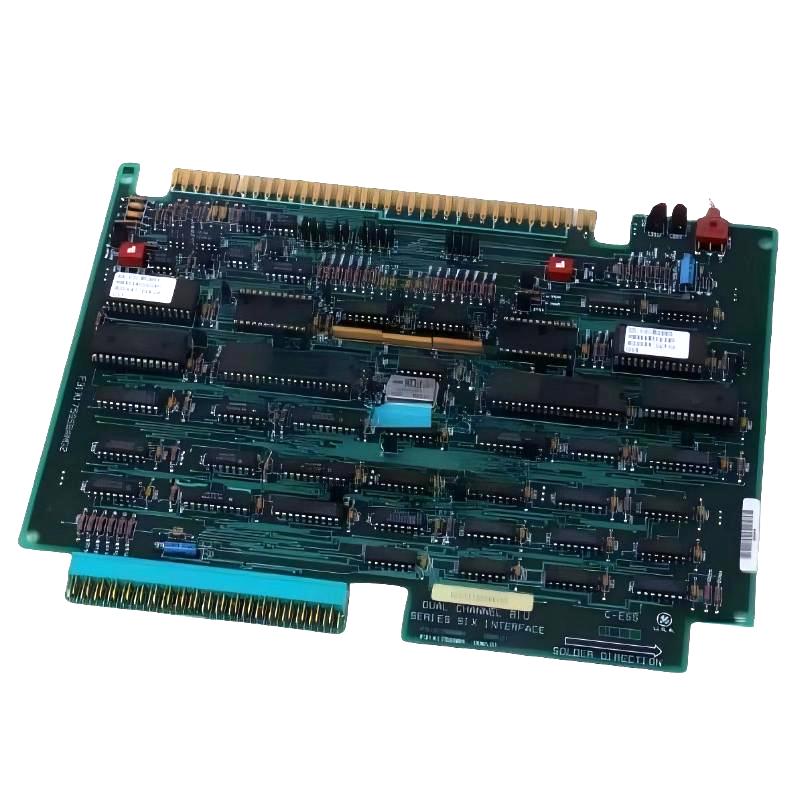
The GE 531X175SSBAYM2 Dual-Channel BIU Card is an industrial control interface board associated with the GE Series Six control system. A Bus Interface Unit (BIU) provides an interface between the controller’s communication or bus architecture and connected system components. Correct installation of the GE 531X175SSBAYM2 is important for reliable communication, proper hardware recognition, and stable operation of the connected automation equipment.
This guide covers installation preparation, board identification, compatibility verification, safe removal, replacement procedures, connector inspection, commissioning, and maintenance. Because the 531X175 family contains multiple board variants, confirm the exact part number, host equipment, connector arrangement, and applicable technical documentation before installation. Do not assume that similar-looking 531X cards have identical electrical functions or pin assignments.
Table of Contents
- 1. Product Overview
- 2. Main Functions of a Dual-Channel BIU Card
- 3. Installation Preparation
- 4. Safety Precautions
- 5. Compatibility and Part Number Verification
- 6. Removing the Existing BIU Card
- 7. Installing the GE 531X175SSBAYM2
- 8. Connector and Interface Checks
- 9. Commissioning and Functional Verification
- 10. System Integration
- 11. Preventive Maintenance
- 12. Technical FAQs
- 13. Technical Summary
1. Product Overview
The GE 531X175SSBAYM2 is identified as a dual-channel BIU card associated with the GE Series Six control system. As an interface-related printed circuit board, it is intended for use within a compatible control-system architecture rather than as a standalone controller or general-purpose power supply.
The exact implementation of the two channels, their supported signals, and the associated interface connections must be verified against the board’s applicable documentation. The complete part number is important because other boards in the 531X175 family may serve different interface or terminal-board functions.
When installing this card, the primary objectives are to:
- Confirm that the replacement board matches the required hardware variant.
- Preserve the original connector and wiring configuration.
- Prevent electrostatic discharge damage during handling.
- Ensure that the board is seated securely in its designated position.
- Verify that the controller recognizes the interface hardware and that connected equipment operates correctly.
2. Main Functions of a Dual-Channel BIU Card
2.1 Interface between control-system components
A BIU provides an interface within the control system’s bus or communication architecture. Depending on the specific implementation, it may support the transfer of signals or data between the controller and associated hardware. The exact interface behavior of the 531X175SSBAYM2 should be confirmed from the correct Series Six documentation.
2.2 Dual-channel architecture
The dual-channel designation indicates a two-channel interface configuration. However, the term alone does not establish whether the channels are independent, redundant, isolated, or assigned to particular signal types. Verify the intended channel functions and wiring requirements before connecting field or system equipment.
2.3 Hardware integration
The board operates as part of a larger system that may include a controller, rack or mounting assembly, interface connections, and associated control modules. Reliable operation depends on compatibility between these components and correct installation of the board.
2.4 Legacy control-system considerations
Series Six equipment may remain in service in established industrial installations. Replacement boards therefore require careful identification and configuration control. A similar connector layout or product-family number is not sufficient evidence that a board is electrically interchangeable.
3. Installation Preparation
Before removing or installing the BIU card, review the system documentation and establish a clear record of the existing configuration.
3.1 Verify the replacement card
- Read the complete part number on the existing board and the replacement.
- Confirm the exact designation: GE 531X175SSBAYM2.
- Compare connector positions, board dimensions, mounting features, and revision markings.
- Check that the intended host control system supports this specific board variant.
- Verify whether configuration, jumpers, switches, or other setup elements apply to the installed version.
3.2 Prepare tools and materials
- ESD-safe wrist strap and approved protective work surface.
- Insulated hand tools suitable for the equipment enclosure.
- Calibrated multimeter for permitted electrical checks.
- Camera or maintenance device for recording the original installation.
- Board handling and storage packaging suitable for sensitive electronics.
- Applicable equipment drawings, installation instructions, and commissioning procedures.
3.3 Record the original configuration
Photograph the board and surrounding assembly before disconnecting anything. Record the cable and connector positions, wire labels, board orientation, mounting hardware, jumper settings, and any configuration switches present.
Where possible, save the controller program and relevant hardware configuration before beginning work. This helps distinguish an installation issue from an existing control-system problem.
4. Safety Precautions
Although a BIU card is an electronic interface board, the surrounding cabinet may contain hazardous voltages and equipment capable of unexpected movement or operation. Follow the site’s electrical and machinery safety procedures.
- Stop the system using the approved shutdown procedure.
- Isolate all relevant power sources and apply lockout/tagout where required.
- Verify absence of hazardous voltage before handling the board or associated wiring.
- Follow the equipment manufacturer’s instructions for removing or inserting circuit boards.
- Use ESD precautions throughout board handling and storage.
- Do not touch connector contacts or exposed electronic components unnecessarily.
- Do not bypass interlocks or manipulate live connections to force the system to start.
Never assume that the entire control cabinet is de-energized because one power indicator is off. Verify the required isolation points and stored-energy conditions before beginning work.
5. Compatibility and Part Number Verification
Compatibility is one of the most important factors when replacing a GE 531X-series interface board. Different variants may have different connector assignments, interface circuitry, or intended applications.
| Verification item | What to confirm |
|---|---|
| Board identity | Full 531X175SSBAYM2 part number and any applicable revision markings |
| Host system | Compatible GE Series Six controller and hardware configuration |
| Mounting position | Correct rack, assembly, or designated board location |
| Connectors | Correct connector type, orientation, and mating components |
| Channel configuration | Documented purpose and configuration of both channels |
| Setup settings | Applicable jumpers, switches, and configuration options |
| System requirements | Power, bus, grounding, and interface requirements defined for the host system |
If the board is being used as a replacement, confirm compatibility through the equipment documentation or a qualified industrial control specialist. Do not substitute another 531X175 variant based solely on a similar appearance or the words “dual-channel BIU.”
6. Removing the Existing BIU Card
6.1 Shut down and isolate the equipment
Place the controlled process in a safe state, stop the controller system according to the approved procedure, isolate the relevant power supplies, and verify that the work area is safe.
6.2 Document connectors and settings
Take clear photographs of the board, connectors, cable routing, and any configuration elements. Label connections that are not uniquely keyed. Record the original board part number and revision.
6.3 Disconnect the board
- Release connector locks or retaining clips using the intended method.
- Remove attached connectors without pulling on the wires.
- Remove the specified mounting hardware or retaining mechanism.
- Withdraw the board carefully from its mounting position.
- Place the removed board in an ESD-safe container.
Do not force the board out of the assembly. Excessive force may damage connector contacts, board guides, adjacent components, or the mounting structure.
6.4 Inspect the surrounding assembly
Check the mounting area and mating connectors for dust, corrosion, bent contacts, loose hardware, overheating, or mechanical damage. If the original board failed, investigate the surrounding system for possible causes before installing a replacement.
7. Installing the GE 531X175SSBAYM2
7.1 Inspect the replacement board
Check the replacement for shipping damage, cracked components, bent pins, contamination, or damaged connector housings. Confirm that the part number matches the approved replacement specification.
7.2 Verify the configuration
Compare any jumpers, switches, or configuration elements with the documented requirements for the target system. Do not assume that the replacement board is configured identically to the removed card.
If configuration settings are present, use the applicable board instructions to determine their function and required positions. Do not change undocumented settings.
7.3 Position and secure the board
- Align the board with its designated mounting guides and connectors.
- Insert it evenly and carefully without forcing the connector or board edges.
- Confirm that the board is fully seated in the intended position.
- Reinstall the specified retaining hardware.
- Verify that the board is stable and that nearby cables are not pinched or strained.
7.4 Reconnect the interface cables
Reconnect each cable according to the recorded layout and the system wiring diagrams. Check connector orientation and engagement, and confirm that each cable returns to its documented destination.
Do not invent pin assignments or assume that connectors with similar physical dimensions have identical electrical functions. If the connector identification is unclear, stop and obtain the correct documentation before proceeding.
8. Connector and Interface Checks
Incorrect or incomplete connections may prevent the controller from recognizing the interface card or may interrupt communication with connected hardware.
8.1 Inspect mating connectors
- Check connector housings for cracks and deformation.
- Inspect contacts for bending, corrosion, or contamination.
- Confirm that retaining clips or locks engage correctly.
- Check cable insulation and strain relief.
- Verify that no loose hardware or conductive debris remains in the assembly.
8.2 Verify grounding and shielding
Check grounding and shielding arrangements against the original system design. Incorrect grounding can introduce electrical interference or communication problems. Do not add extra ground connections or alter shield termination without confirming the system’s grounding scheme.
8.3 Check both channels
Confirm that the connections associated with both channels are installed as specified. The exact signal type, channel assignment, and electrical behavior must be determined from the board and host-system documentation rather than inferred from the dual-channel designation.
9. Commissioning and Functional Verification
After installation, perform a structured commissioning check before returning the system to normal operation.
9.1 Pre-power inspection
Verify that the board is fully seated, mounting hardware is secure, connectors are correctly positioned, configuration settings match the approved setup, and all required protective covers are restored. Remove tools and loose materials from the cabinet.
9.2 Restore power safely
Restore power only after the required checks have been completed and the equipment is cleared for startup. Follow the host controller’s documented startup sequence. Observe system status indicators and diagnostic messages for unexpected conditions.
9.3 Check controller recognition
Use the available controller diagnostics or approved programming tools to determine whether the system recognizes the installed hardware as expected. Review any module, interface, or communication faults that appear during startup.
9.4 Verify interface operation
Where the system provides appropriate diagnostic information, confirm that the intended interface functions are operating normally. Check the documented status or data associated with both channels, if applicable, and compare observed behavior with the expected system configuration.
9.5 Conduct an operational test
- Confirm that the controller and associated hardware complete the startup sequence.
- Check for new interface or communication faults.
- Verify the expected response from connected equipment using the approved test procedure.
- Confirm that both channels operate according to the application’s documented requirements.
- Return the process to service only after the required functional and safety checks pass.
If the system does not recognize the card, do not repeatedly cycle power without investigating the fault records, configuration, connector seating, and compatibility.
10. System Integration
10.1 Controller and hardware configuration
The installed board must match the host controller’s expected hardware arrangement. If the replacement is not recognized, verify the board identity, physical position, interface connections, and any applicable configuration requirements.
10.2 Communication and data handling
For systems that use the BIU to support data or signal exchange, confirm that the relevant communication path is functioning according to the system design. Review diagnostic indicators, controller status information, and the behavior of connected equipment.
10.3 Existing control logic
A board replacement should not automatically require changes to the controller program. If software changes appear necessary, first verify that the replacement hardware is correct and that the original configuration has been restored. Any program modification should follow the site’s change-control and validation procedures.
11. Preventive Maintenance
- Inspect board seating and connector condition during planned maintenance.
- Keep the control cabinet clean and within the environmental limits specified for the equipment.
- Maintain accurate board part-number and revision records.
- Back up controller programs and hardware configuration files.
- Record recurring communication faults and the conditions under which they occur.
- Use ESD-safe packaging when storing spare boards.
- Check cable routing, grounding, and shielding during scheduled inspections.
- After any maintenance intervention, verify that the controller and connected equipment operate normally.
12. Technical FAQs
What is the GE 531X175SSBAYM2?
It is identified as a dual-channel BIU card associated with the GE Series Six control system. Its exact interface functions and connections should be confirmed using the applicable board documentation.
What does BIU mean?
BIU generally stands for Bus Interface Unit. In industrial control systems, a BIU provides an interface within the controller’s bus or communication architecture. The precise function depends on the hardware implementation.
Does dual-channel mean the channels are redundant?
Not necessarily. The designation indicates a two-channel configuration but does not establish redundancy, electrical isolation, or channel independence. Verify these properties in the specific board documentation.
Can I replace this board with another 531X175 model?
Only when compatibility is explicitly confirmed. Different 531X175 variants may have different functions or electrical arrangements even if their physical appearance is similar.
Why might the controller fail to recognize the replacement board?
Possible causes include an incompatible board variant, incomplete connector engagement, incorrect mounting position, configuration mismatch, or a fault elsewhere in the controller system. Check each item systematically before condemning the replacement board.
Should I change jumper settings during installation?
Only when required by the applicable board instructions and host-system configuration. Do not change undocumented settings or assume that settings from another board variant are applicable.
What should I do if the system develops communication faults after replacement?
Review the diagnostic records, verify board compatibility, inspect connectors and cables, and confirm the original hardware configuration. If the problem persists, have the board and associated interface circuitry evaluated by a qualified technician.
13. Technical Summary
The GE 531X175SSBAYM2 Dual-Channel BIU Card is an interface board associated with the GE Series Six control system. Reliable installation depends on correct hardware identification, compatibility verification, ESD protection, careful connector handling, and a controlled commissioning process.
After installation, verify controller recognition, review diagnostic messages, and confirm the expected behavior of both channels where applicable. If communication or interface faults occur, investigate the board variant, connector seating, wiring, configuration, and surrounding system before replacing hardware again.
Because the 531X175 family includes different board variants, use the exact documentation for the GE 531X175SSBAYM2 and its host equipment for all connector assignments, electrical requirements, and functional tests.