
NewsNEWCENTER
Featured products
Contact Us
Allen Bradley 1756HP-TIME ControlLogix Time Synchronization Module Installation Guide
2026-10-29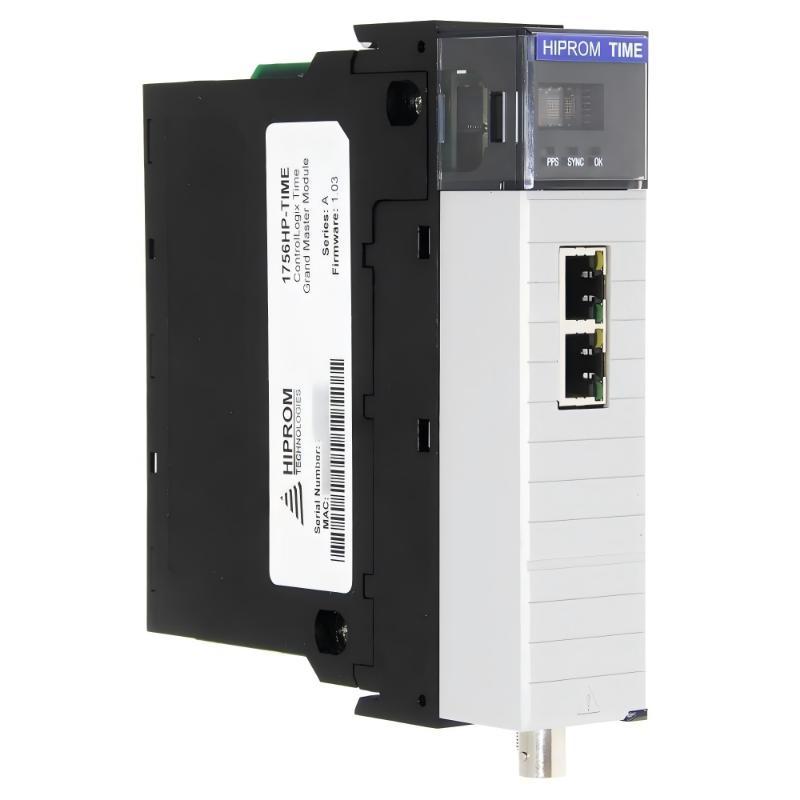
The Allen Bradley 1756HP-TIME ControlLogix Time Synchronization Module is designed to provide precise time information to industrial automation systems using GPS and multiple time synchronization interfaces. It can serve as a time source or synchronization gateway, helping ControlLogix controllers and compatible industrial devices maintain a consistent time reference for event recording, sequence-of-events analysis, and coordinated control operations.
Correct installation of the 1756HP-TIME involves checking ControlLogix chassis compatibility, GPS antenna placement, Ethernet connectivity, IRIG-B signal connections, time-source configuration, and synchronization status. This guide outlines practical installation and commissioning procedures for engineers working with industrial control systems that require reliable time coordination.
Table of Contents
- 1. Product Overview
- 2. Technical Specifications and Interfaces
- 3. Installation Preparation
- 4. Installing the Module in a ControlLogix Chassis
- 5. GPS Antenna Installation
- 6. Ethernet and IRIG-B Connections
- 7. Module Configuration and Time-Source Selection
- 8. Configuring Time Synchronization
- 9. Commissioning and Verification
- 10. Maintenance and Lifecycle Considerations
- 11. Frequently Asked Questions
- 12. Technical Summary
1. Product Overview
The 1756HP-TIME is a ControlLogix time synchronization module manufactured by Hiprom Technologies for use in Allen Bradley ControlLogix systems. It is distinct from the standard Rockwell Automation 1756-TIME module, so the two catalog numbers should not be treated as interchangeable.
The 1756HP-TIME can obtain time information from supported sources and distribute or convert that information through several interfaces. Depending on the configured operating mode, supported methods include GPS, Network Time Protocol (NTP), Precision Time Protocol (PTP), IRIG-B, and ControlLogix Coordinated System Time (CST) and UTC conversion.
These capabilities are useful in industrial applications where records from different controllers and devices must be correlated accurately. Examples include electrical substations, process plants, distributed control systems, production lines, and machinery that generates timestamped events.
2. Technical Specifications and Interfaces
| Parameter | Description |
|---|---|
| Manufacturer | Hiprom Technologies |
| Model | 1756HP-TIME |
| Product type | ControlLogix Time Synchronization Module |
| Platform | Allen Bradley ControlLogix chassis |
| Time source | GPS and supported external time sources |
| Ethernet interfaces | Two Ethernet ports for supported time synchronization and network connectivity |
| GPS interface | Antenna connector for the specified GPS antenna and cable assembly |
| IRIG-B interface | Coaxial connection for supported IRIG-B input/output arrangements |
| Time protocols and services | PTP, NTP/SNTP, IRIG-B, and ControlLogix CST/UTC conversion, according to configuration |
| Power supply | Derived from the ControlLogix backplane |
| Diagnostic interface | Front-panel status indicators and display; configuration and monitoring features depend on software and firmware version |
The precise electrical ratings, supported protocol versions, antenna requirements, and environmental limits should be checked against the documentation for the exact 1756HP-TIME hardware and firmware revision. Do not apply specifications from the Rockwell Automation 1756-TIME module to the Hiprom 1756HP-TIME.
3. Installation Preparation
Before installation, confirm how the module will obtain time and which devices must receive synchronized timestamps. This decision affects antenna placement, network connections, protocol settings, and commissioning tests.
Required equipment and information
- A compatible ControlLogix chassis and correctly rated power supply.
- The 1756HP-TIME module and its required accessories.
- The specified GPS antenna and compatible antenna cable if GPS is used.
- Suitable Ethernet cables and network ports for the intended NTP or PTP configuration.
- Compatible coaxial cable and connectors for the specified IRIG-B interface, if required.
- The current controller project and appropriate programming software.
- IP address information, network topology drawings, and the plant time synchronization plan.
- Electrostatic discharge protection and approved maintenance tools.
Inspect the installation environment
Check the module housing, backplane connector, Ethernet ports, antenna connector, IRIG-B connector, and front-panel indicators for damage. Confirm that the chassis is installed in a suitable industrial enclosure and that environmental conditions meet the product’s specified limits.
Verify that the intended chassis slot is available and that the power supply has sufficient capacity for the complete chassis load. Review any site requirements for network segmentation, GPS antenna installation, lightning protection, and equipment grounding.
Define the time synchronization architecture
Identify the primary time source and the devices that will consume synchronized time. For example, the module may receive GPS time and provide PTP or IRIG-B to other devices, or it may obtain time from an external NTP server and distribute it through a supported output interface.
A clear design prevents conflicting time sources and helps engineers verify that every connected device uses the intended reference.
4. Installing the Module in a ControlLogix Chassis
Step 1: Establish a safe maintenance condition
Determine whether installation will affect controller operation, event recording, or other time-dependent functions. Notify operations personnel and follow the site’s lockout/tagout and electrical safety procedures.
Do not assume that the module can be inserted or removed under power in every configuration. Follow the exact hardware instructions and site authorization requirements.
Step 2: Verify the chassis and slot
Confirm that the selected chassis is compatible with the 1756HP-TIME and that the planned slot matches the controller project and system drawings. Ensure that the chassis power supply has adequate capacity.
Step 3: Insert the module
- Use suitable electrostatic discharge precautions when handling the module.
- Align the module with the chassis guides.
- Insert it carefully and ensure that the backplane connector aligns correctly.
- Seat and secure the module according to the chassis installation procedure.
- Inspect the front panel and adjacent modules to confirm that installation is mechanically sound.
Step 4: Verify power and startup
Restore power according to the approved procedure. Observe the front-panel indicators and display during startup. Record any fault messages before proceeding to network configuration.
If the module does not power up normally, verify the chassis supply and seating before investigating the external GPS or Ethernet connections.
5. GPS Antenna Installation
When GPS is selected as the time source, antenna installation is a critical part of the system. The module cannot reliably obtain GPS time if the antenna has insufficient satellite visibility, the cable is damaged, or the connection is incompatible with the required antenna system.
Antenna installation procedure
- Select a mounting position with a suitable view of the sky and minimal obstruction.
- Keep the antenna away from locations that significantly obstruct satellite reception, where practicable.
- Use the specified antenna type and compatible cable assembly for the 1756HP-TIME.
- Route the cable to minimize mechanical damage, sharp bends, moisture ingress, and interference from nearby equipment.
- Connect the antenna cable to the designated GPS connector according to the product instructions.
- Secure the cable and antenna mechanically, and apply any required environmental protection.
- After startup, verify that the module reports valid GPS reception and a synchronized time state.
Do not assume that a connected antenna is functioning correctly. Antenna status, satellite reception, and time synchronization should be checked using the available module diagnostics.
Common antenna installation problems
- Mounting the antenna inside an enclosure or beneath a structure that blocks satellite signals.
- Using an antenna or cable assembly with incompatible electrical characteristics.
- Allowing water to enter outdoor connectors.
- Routing the cable where it can be crushed, cut, or exposed to excessive heat.
- Failing to check GPS reception after installation.
6. Ethernet and IRIG-B Connections
Ethernet connection
The module provides two Ethernet ports for supported time synchronization and network functions. Use the ports according to the intended architecture and the module’s configuration instructions.
- Confirm the intended network connection for each port.
- Use suitable industrial Ethernet cabling and verify the required cable category.
- Connect the module to the correct switch, server, or device network.
- Record the intended IP address and any required network parameters.
- Check link status and verify that the module can reach the configured time source.
Do not assume that the two Ethernet ports automatically provide redundancy or a particular ring topology. Supported network functions depend on the module revision and firmware. Confirm the intended topology before connecting both ports.
IRIG-B connection
IRIG-B is used in applications that distribute a time reference over a dedicated signal connection. When IRIG-B is part of the design, verify the signal format, input/output role, cable type, and connector requirements of the module and the receiving device.
- Use the specified coaxial cable and compatible connectors.
- Confirm whether the module is configured to receive or transmit the signal.
- Verify compatibility between the configured IRIG-B format and the connected equipment.
- Route signal cables according to the site’s instrumentation and grounding practices.
- After connection, confirm that the receiving device recognizes a valid time reference.
Do not infer the exact IRIG-B signal format or connector assignment from the connector shape alone. Verify these details in the applicable product documentation.
7. Module Configuration and Time-Source Selection
Once the module is installed and connected, configure it using the supported software tools and procedures for the installed revision. The selected source and output protocols must match the plant’s time synchronization design.
Configuration checklist
- Confirm the module identity and hardware revision.
- Verify the controller project and module configuration.
- Set the required Ethernet parameters for the selected network arrangement.
- Choose the intended time source, such as GPS or an approved NTP server.
- Configure supported output methods such as PTP or IRIG-B as required.
- Verify any required CST or UTC conversion settings.
- Check protocol compatibility and network access restrictions.
- Save the configuration and retain a backup of the working settings.
Using GPS as the primary source
When GPS is the primary time source, confirm that the antenna is functioning and the module has acquired a valid time reference. Then configure the required outputs for the connected devices.
Using an external NTP source
If the module is configured as an NTP client, enter the approved NTP server address and update interval using the supported configuration interface. Confirm that the server is reachable and that network policies allow the required traffic.
Do not use an arbitrary public time server without checking plant cybersecurity requirements and network access policies. Industrial control networks commonly require approved, managed time sources.
PTP and IRIG-B distribution
For PTP or IRIG-B distribution, confirm the source, protocol settings, and output interface. Verify that receiving devices support the same synchronization method and compatible configuration. If the plant uses multiple timing technologies, document which interface is responsible for each device group.
8. Configuring Time Synchronization
Time synchronization requires more than connecting a network cable. The source, protocol, network path, and receiving-device configuration must all be correct.
| Synchronization Method | Typical Purpose | Key Checks |
|---|---|---|
| GPS | Obtain time from satellite signals | Antenna visibility, cable integrity, GPS reception, valid time status |
| NTP/SNTP | Obtain or distribute time over an IP network | Server address, reachability, network policy, update interval |
| PTP | Provide precise synchronization across compatible Ethernet devices | PTP configuration, device compatibility, network path, clock status |
| IRIG-B | Distribute a time reference over a dedicated signal connection | Signal format, input/output role, cable type, receiver compatibility |
| CST/UTC conversion | Coordinate time information with ControlLogix system functions | Controller configuration and correct interpretation of timestamps |
For event-recording applications, confirm how timestamps are represented and interpreted by the controller and receiving systems. UTC and local civil time are not interchangeable; daylight-saving changes and time-zone conversions should be handled consistently in the application design.
9. Commissioning and Verification
Commissioning should confirm that the module is powered, the selected time source is valid, and the intended devices receive the correct time information. The test should verify both source acquisition and downstream synchronization.
Commissioning checklist
- Confirm that the module is seated correctly and shows normal startup status.
- Verify the GPS antenna, Ethernet connections, and IRIG-B wiring used by the design.
- Check the module’s display and indicators for startup or configuration errors.
- Confirm that the selected time source is reachable and reports valid time.
- Verify that the module’s time status changes to a synchronized or valid state as defined by its documentation.
- Check the configured output protocol and the synchronization status of representative receiving devices.
- Compare timestamps from different devices and investigate any unexpected offsets.
- Confirm that the controller application interprets UTC, CST, and other time values correctly.
- Record the final configuration, network settings, time source, and test results.
Illustrative commissioning flow
Install module and verify chassis power
                 |
                 v
Connect GPS / Ethernet / IRIG-B as required
                 |
                 v
Configure the selected time source
                 |
                 v
Confirm valid source and module status
                 |
                 v
Verify output synchronization on target devices
                 |
                 v
Record results and release the system
This is a general commissioning sequence. Follow the approved site procedure and the exact manual for the installed hardware and software revision.
10. Maintenance and Lifecycle Considerations
Time synchronization modules should be included in the site’s preventive maintenance and configuration management program, especially when accurate event timestamps are important for incident analysis or process coordination.
- Inspect the module, chassis, connectors, and antenna cable during scheduled maintenance.
- Check GPS reception and time-source status after antenna or network changes.
- Review synchronization alarms and recurring time-offset problems.
- Keep a record of network settings, source configuration, firmware, and module revision.
- Back up configuration information before replacement or system migration.
- Verify time synchronization after controller, network, or receiving-device maintenance.
The 1756HP-TIME is a legacy product, so replacement planning should consider spare-part availability and compatibility with the existing ControlLogix platform. The Rockwell Automation 1756-TIME is a different product despite its similar name. Before selecting a replacement, verify supported protocols, hardware requirements, network architecture, configuration tools, and the needs of downstream devices.
11. Frequently Asked Questions
What is the function of the Allen Bradley 1756HP-TIME?
The 1756HP-TIME is a ControlLogix time synchronization module developed by Hiprom Technologies. It can obtain time from supported sources and distribute or convert time information using interfaces such as Ethernet-based NTP/PTP, IRIG-B, and ControlLogix CST/UTC functions, depending on configuration.
Does the 1756HP-TIME require a GPS antenna?
A GPS antenna is required when GPS is selected as the time source. If the system uses a supported external source such as NTP, the required configuration and interfaces may differ. Follow the documentation for the selected operating mode.
Why is the module not synchronized after installation?
Possible causes include poor GPS reception, an incompatible antenna or cable, incorrect time-source settings, an unreachable NTP server, network configuration errors, or incompatible output settings. Check the module status and verify each part of the configured synchronization path.
Can the module distribute time through both Ethernet and IRIG-B?
The module supports multiple time synchronization interfaces, but the usable combination depends on its configuration and hardware/firmware revision. Verify the required source and output arrangement before commissioning.
Is the 1756HP-TIME the same as the Rockwell Automation 1756-TIME?
No. They are distinct products. Their configuration methods, interfaces, and specifications should not be assumed to be identical. Always use the documentation corresponding to the complete catalog number.
12. Technical Summary
The Allen Bradley 1756HP-TIME ControlLogix Time Synchronization Module is intended for industrial systems that require a common time reference across controllers and compatible devices. It supports multiple time synchronization methods, allowing it to act as a gateway between supported sources and output interfaces.
Successful installation depends on correct chassis mounting, suitable GPS antenna placement where GPS is used, proper Ethernet and IRIG-B connections, accurate source configuration, and verification of downstream synchronization. A documented commissioning process helps engineers identify source failures, network configuration problems, and timestamp interpretation errors before the system is returned to service.
Technical Summary: The 1756HP-TIME is a legacy ControlLogix time synchronization solution for industrial automation. Correctly configured time distribution improves the consistency of event records and supports analysis of events across distributed control systems. Confirm exact model specifications and compatibility before installation, maintenance, or replacement.