
NewsNEWCENTER
Featured products

Contact Us
Allen-Bradley 1746SC-INI4VI Troubleshooting Guide: Analog Input Fault Diagnosis and Maintenance
2026-10-26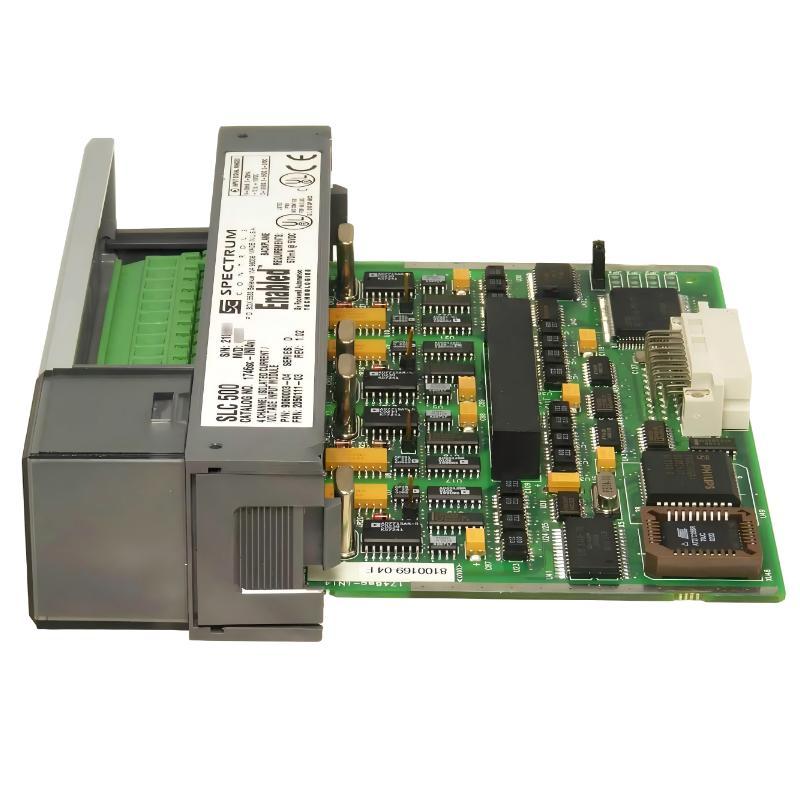
The Allen-Bradley-compatible 1746SC-INI4VI is a four-channel isolated analog input module designed for SLC 500 control systems. Manufactured by Spectrum Controls, this module accepts independently configured current or voltage signals and converts them into digital values that a PLC processor can use for monitoring, alarming, sequencing, and process control. Its isolated input channels support applications where electrical noise and differences in field signal potentials can affect measurement reliability.
When an analog input channel displays an incorrect value, remains at zero, fluctuates unexpectedly, or reports an input fault, the cause may be related to field wiring, transmitter operation, channel configuration, PLC data interpretation, or the module itself. A systematic troubleshooting process helps maintenance personnel identify the source of the problem without unnecessarily replacing components or interrupting production for extended periods.
Table of Contents
- 1. Common Fault Symptoms
- 2. Safety Precautions Before Troubleshooting
- 3. Step-by-Step Diagnostic Procedure
- 4. Signal and Wiring Problems
- 5. Channel Configuration and PLC Data Problems
- 6. Unstable Readings and Electrical Noise
- 7. Channel Status and Module Faults
- 8. Module Replacement and Recovery
- 9. Preventive Maintenance
- 10. Frequently Asked Questions
- 11. Technical Summary
1. Common Fault Symptoms
The 1746SC-INI4VI can monitor up to four isolated analog inputs. Each channel can be configured for an applicable current or voltage range. Troubleshooting should begin by identifying whether the problem affects one channel, several channels, or the entire SLC 500 I/O system.
| Observed symptom | Possible cause | Recommended first check |
|---|---|---|
| Reading remains at zero | Open circuit, disabled channel, incorrect range, or missing transmitter power | Check the field signal, channel enable setting, and wiring |
| Reading is consistently too high or too low | Incorrect input range, PLC scaling, or transmitter configuration | Compare the configured range with the transmitter output |
| Reading fluctuates | Electrical interference, loose connections, unstable process signal, or unsuitable filtering | Check wiring integrity and compare the raw input with the process value |
| Only one channel fails | Channel-specific wiring, configuration, transmitter, or input circuit issue | Inspect the affected channel before investigating the whole rack |
| Multiple channels fail together | Rack power, module seating, configuration, or common field supply problem | Check the module’s status, rack conditions, and shared power sources |
| PLC value does not match the HMI | Scaling, data format, tag addressing, or HMI configuration error | Compare the module data, PLC logic, and HMI engineering units |
| Input fault appears intermittently | Intermittent wiring, out-of-range signal, or a hardware-related issue | Review channel status information and inspect connections safely |
These symptoms are diagnostic clues rather than definitive fault codes. A displayed value alone cannot confirm that the module has failed.
2. Safety Precautions Before Troubleshooting
Analog input modules are often connected to pressure transmitters, temperature transmitters, flow meters, position sensors, and other field instruments. Even when the input signal is low voltage, the associated equipment may operate in a hazardous industrial environment.
- Follow the plant’s lockout/tagout procedures before removing the module, disconnecting field wiring, or working on circuits that require isolation.
- Identify external transmitter power supplies and loop power sources. The module does not provide power for the analog field inputs.
- Use a properly rated meter and suitable personal protective equipment when electrical testing is authorized.
- Do not disconnect or reconnect live wiring unless the installation’s approved procedures explicitly permit the operation.
- Do not bypass safety interlocks, process trips, or protective logic to test a suspected input fault.
- Before removing the module, place the process and equipment in an approved safe state and verify the required power-isolation procedure.
The 1746SC-INI4VI provides channel-to-channel and field-wiring-to-backplane isolation under specified conditions. This isolation does not eliminate the need for correct grounding, wiring practices, or electrical safety procedures.
3. Step-by-Step Diagnostic Procedure
Step 1: Identify the affected channel
Record the channel number, process variable, expected operating range, actual displayed value, and any associated PLC or HMI alarms. Determine whether the fault began after a module replacement, wiring change, instrument calibration, program modification, or process shutdown.
If only one channel is affected, focus first on that channel’s field instrument and configuration. If all four channels are affected, investigate common factors such as module seating, rack operation, field power supplies, and PLC configuration.
Step 2: Confirm that the transmitter is operating
Check the transmitter’s local display, diagnostic indicators, or approved maintenance interface. Confirm that it is measuring the process correctly and that its output type matches the control system design.
For example, a transmitter configured for a 4–20 mA output cannot be expected to produce the correct reading if the PLC channel is configured for a voltage range. Likewise, a voltage-output instrument should not be treated as a current-loop transmitter.
Step 3: Verify the field signal
Use an approved measurement method to confirm that the signal reaching the input circuit is consistent with the transmitter output. Check for open circuits, incorrect polarity, loose terminals, damaged cable insulation, and unintended connections to ground.
For current-loop applications, inspect the complete loop, including the transmitter, external supply, barriers where fitted, terminal connections, and return path. For voltage inputs, verify the signal conductors and reference connections according to the product’s wiring instructions.
Step 4: Review the channel configuration
Check the SLC 500 program and module configuration for the affected channel. Confirm that the channel is enabled and that the selected input range, data format, open-circuit response, and filter setting match the application.
The module supports configurable current ranges, including 4–20 mA and 0–20 mA, and voltage ranges including -10 to +10 VDC, 0–10 VDC, 0–5 VDC, and 1–5 VDC. Available ranges depend on the exact model and configuration. Verify the installed module’s manual before changing settings.
Step 5: Compare raw data with the engineering value
Inspect the value received by the PLC before any application scaling or HMI conversion. If the raw module data is stable and plausible but the displayed engineering value is incorrect, investigate the PLC scaling logic, data format, tag address, and HMI configuration.
Step 6: Review module and channel status
Use the applicable programming software and product documentation to examine module communication, channel status information, and available diagnostics. Check for over-range, under-range, non-fatal channel, or fatal channel indications where supported by the installed module revision and configuration.
Step 7: Test the suspected cause
Change only one variable at a time. Correct a confirmed wiring issue, restore the intended channel configuration, or test the field instrument using an approved procedure. Record the result after each change so the root cause can be identified rather than obscured by multiple simultaneous adjustments.
4. Signal and Wiring Problems
4.1 Current input remains at zero
A zero or near-zero current reading can indicate a broken loop, missing external supply, disconnected transmitter, incorrect terminal connection, disabled channel, or an incorrect input range. Begin with the transmitter and loop power supply, then inspect the wiring path and module configuration.
Do not assume that a zero reading proves the module is defective. Confirm that the intended current signal actually reaches the input before replacing hardware.
4.2 Current input is below the expected value
For a 4–20 mA application, a value below the expected operating level may result from transmitter configuration, loop resistance, poor connections, supply limitations, or a genuine process condition. Check the transmitter’s configured lower range and compare its output with the signal received by the input circuit.
Some instruments intentionally use current values below the normal measurement range to indicate a fault. The meaning of such a signal depends on the instrument and application; it should not be interpreted without checking the control philosophy.
4.3 Voltage input is incorrect
Confirm that the signal is connected to the intended voltage input terminals and that the selected voltage range matches the instrument output. Check the signal reference and polarity, and verify that the instrument’s output is within the configured range.
Where a sensor or transmitter requires a separate power supply, verify that supply independently. Avoid connecting a voltage signal to a current input configuration or applying a signal that exceeds the module’s specified limits.
4.4 Open-circuit response causes confusion
The module provides configurable open-input response behavior for applicable ranges. Depending on the selected configuration, an open circuit may be represented by a configured minimum, maximum, or zero response. Therefore, the value displayed during a wiring fault may not directly represent the actual process measurement.
Confirm the configured response and review channel status information before deciding whether a low, high, or zero reading indicates a hardware fault.
5. Channel Configuration and PLC Data Problems
5.1 Incorrect input range
A channel configured for 0–20 mA will interpret a 4–20 mA transmitter differently from a channel configured for 4–20 mA. The same principle applies to voltage signals. Range mismatches can cause incorrect engineering values, unexpected zero offsets, or values that appear to stop at an incorrect limit.
Review the intended range in the instrument specification, electrical drawings, and PLC configuration. After correcting a setting, verify the result using a known input value or a controlled process condition.
5.2 Incorrect data format
The module supports different data representation options. If the program interprets the selected format incorrectly, the raw input may appear inconsistent with the expected value even though the electrical signal is correct.
Check how the module is configured and how the ladder logic reads the input words. Confirm whether the application expects engineering units, a PID-oriented format, proportional counts, a compatible legacy format, or a user-defined scale. Use the documentation for the installed revision rather than copying configuration values from another module.
5.3 Incorrect PLC scaling
Scaling converts the module’s reported value into a useful process unit such as bar, degrees Celsius, liters per minute, or percent. A correct input can appear incorrect if the PLC uses the wrong lower and upper limits, a reversed range, an incorrect multiplier, or an unintended integer conversion.
For a linear process measurement, the general scaling relationship is:
Engineering Value =
(Electrical Input - Input Low)
× (Engineering High - Engineering Low)
÷ (Input High - Input Low)
+ Engineering Low
This is a general mathematical example, not a model-specific programming instruction. The input limits must match the data format and configuration actually used by the module.
5.4 Incorrect slot or address configuration
The 1746SC-INI4VI uses a module ID code and input/output image data within the SLC 500 architecture. Check the configured slot, module identity, program addressing, and channel mapping. This module is intended for an eligible 1746 I/O slot and should not be installed in slot 0.
If the PLC is reading the wrong address, changing field wiring will not correct the problem. Verify the rack layout and the actual location of the module before editing the program.
6. Unstable Readings and Electrical Noise
Fluctuating analog values may originate from the field instrument, electrical interference, cable routing, grounding, loose terminals, or an unsuitable input filter. Before increasing filtering, determine whether the signal is genuinely unstable or whether noise is being introduced along the measurement path.
- Inspect terminal connections and cable condition during an approved shutdown or maintenance window.
- Separate analog signal cables from high-current conductors, motor cables, and switching equipment where practical.
- Follow the manufacturer’s shield termination and grounding instructions.
- Check for unstable transmitter power or intermittent field connections.
- Review the channel’s input filter setting and balance noise rejection against response speed.
- Compare the raw input trend with the actual process behavior and transmitter diagnostics.
The module offers selectable input filtering. Lower filter bandwidth generally improves rejection of rapid signal fluctuations but can slow the response to a real process change. A higher filter setting can improve response speed while allowing more high-frequency noise through. Select the filter according to the process requirements and the installed module’s specifications.
7. Channel Status and Module Faults
7.1 Over-range and under-range indications
An over-range or under-range indication can occur when the input exceeds the configured measurement range or falls outside its expected limits. Check the transmitter’s configured output, the actual electrical signal, and the selected channel range. Also verify whether the process itself has moved beyond its normal operating range.
7.2 Non-fatal and fatal channel errors
Where supported by the module configuration, channel status information can help distinguish an input-related issue from a more serious channel fault. Record the relevant status information and compare it with the diagnostic definitions for the exact module revision.
Do not assume that a particular status bit always indicates a failed input circuit. The interpretation depends on the module’s documented status definitions and current configuration.
7.3 Module communication or rack-level issues
If the processor cannot access the module correctly, inspect the rack configuration, module seating, backplane condition, processor status, and any reported I/O errors. Check whether other modules in the same chassis are operating normally.
Do not reseat or remove the module until the appropriate power-isolation and equipment-safety procedures have been followed. If rack-level faults persist after basic checks, investigate the chassis and processor system as well as the analog input module.
8. Module Replacement and Recovery
Replacement should be considered only after field wiring, transmitter operation, channel configuration, PLC scaling, and rack-level conditions have been checked. Before installing another module, confirm that the replacement is suitable for the existing SLC 500 system and that its hardware revision and configuration requirements are understood.
- Place the controlled process in a safe state and obtain the required maintenance authorization.
- Isolate electrical energy in accordance with site procedures and verify the safe condition before handling the equipment.
- Record the existing slot assignment, channel settings, wiring arrangement, and relevant PLC configuration.
- Inspect the terminal block, wiring, connector condition, and rack for visible damage or contamination.
- Install the replacement according to the applicable hardware instructions. Do not rely on memory or assumed terminal positions.
- Restore power only after all checks and required inspections are complete.
- Confirm that the PLC recognizes the module and that each channel has the intended range, data format, and filter configuration.
- Verify each input against a known signal or a controlled operating condition before returning the process to normal service.
- Document the cause of the original fault, the corrective action, and the results of functional testing.
If a known-good replacement produces the same symptom, return to the signal source, wiring, configuration, and PLC logic. Repeatedly replacing modules without confirming the external cause may waste maintenance time and leave the original fault unresolved.
9. Preventive Maintenance
Preventive maintenance reduces the likelihood of recurring analog input problems and helps maintain reliable process measurements.
- Inspect terminal blocks, field wiring, cable shields, and cabinet conditions during scheduled maintenance.
- Check transmitter calibration and compare field measurements with PLC readings at appropriate intervals.
- Keep an accurate record of channel ranges, data formats, scaling parameters, and filter settings.
- Maintain backups of the SLC 500 program and relevant configuration records.
- Review recurring alarms and intermittent faults for common wiring or environmental causes.
- Keep spare modules in suitable storage conditions and verify catalog numbers before installation.
- After any program or hardware change, perform a documented input verification test.
10. Frequently Asked Questions
Why does the 1746SC-INI4VI show zero when the transmitter is operating?
Possible causes include an open signal circuit, missing external transmitter power, incorrect wiring, a disabled channel, an incorrect input range, or an addressing problem. Confirm the signal at the input and check the channel configuration before condemning the module.
Can the 1746SC-INI4VI accept both current and voltage signals?
Yes. The INI4VI model supports current or voltage inputs selected by channel within its specified ranges. Each channel must be configured to match the connected instrument. Do not confuse it with the current-only INI4I model.
Why is the PLC value different from the HMI value?
The discrepancy may be caused by PLC scaling, incorrect data interpretation, tag addressing, HMI scaling, or engineering-unit configuration. Compare the raw input data with the value at each stage of the control program.
Does channel isolation prevent all electrical noise?
No. Isolation helps reduce electrical interaction between channels and between field wiring and the backplane under specified conditions. It does not eliminate noise caused by poor cable routing, improper shielding, unstable power, or defective field wiring.
When should the module be replaced?
Consider replacement after confirming that the field signal, wiring, power supply, channel configuration, PLC addressing, and rack conditions are correct. If a documented diagnostic test or a controlled substitution test confirms a hardware problem, replacement may be appropriate.
Can the module be removed while the system is running?
Do not assume that removal is safe during operation. Follow the applicable hardware instructions, the site’s electrical safety procedures, and the process shutdown requirements before removing or replacing the module.
11. Technical Summary
The 1746SC-INI4VI is a four-channel isolated analog input module for Allen-Bradley SLC 500 systems. Effective troubleshooting depends on separating field signal problems from channel configuration errors, PLC data interpretation issues, electrical noise, and genuine hardware faults.
A reliable diagnostic sequence is to identify the affected channel, verify transmitter operation, confirm the electrical signal, inspect the channel configuration, compare raw input data with the scaled process value, and review available status information. Module replacement should be the result of evidence-based diagnosis rather than the first response to an incorrect reading.
For maintenance teams, accurate configuration records, safe testing procedures, routine wiring inspections, and documented functional checks are essential to keeping analog measurement channels reliable and minimizing avoidable downtime.