
NewsNEWCENTER
Featured products
Contact Us
Allen-Bradley 1738-OB8EM12 ArmorPoint Digital Output Module: Troubleshooting, Fault Diagnosis, and Repair Guide
2026-10-23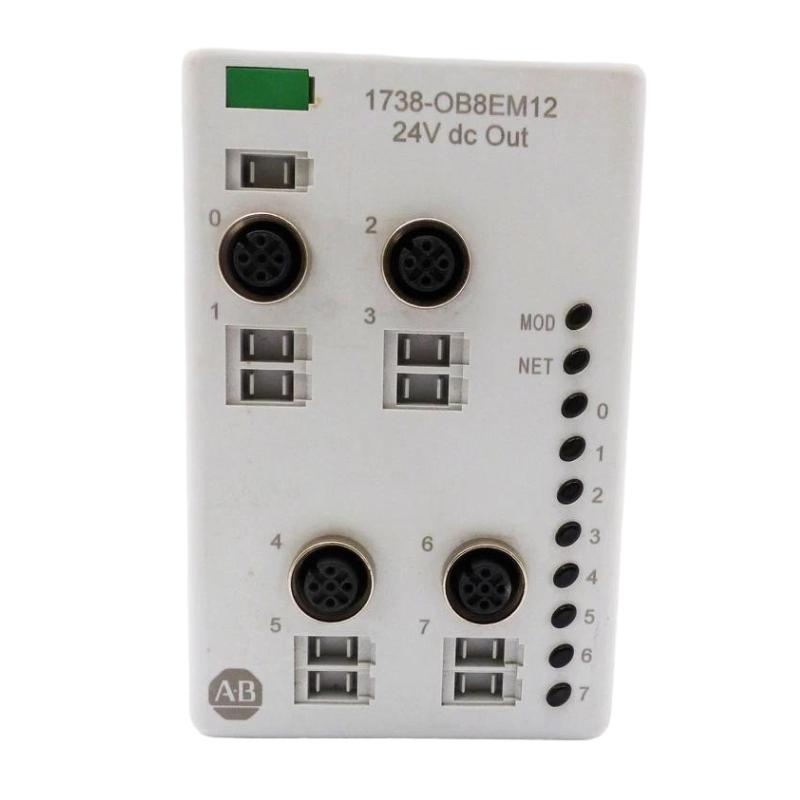
The Allen-Bradley 1738-OB8EM12 ArmorPoint Digital Output Module is an eight-point, 24V DC sourcing output module used in distributed industrial automation systems. When a channel fails to switch, a field actuator does not respond, or the module reports a status fault, systematic troubleshooting can help identify whether the problem originates in the controller program, I/O configuration, field power supply, wiring, connected load, network communication, or module hardware.
This guide provides a practical fault-diagnosis process for maintenance engineers, automation technicians, system integrators, and industrial equipment service teams. It focuses on safe inspection, status-indicator interpretation, channel testing, corrective action, and replacement considerations.
Table of Contents
- Module Overview and Common Fault Symptoms
- Safety Precautions
- Status Indicator Diagnosis
- Common Faults and Corrective Actions
- Output Channel Troubleshooting
- Power Supply and Wiring Checks
- Controller and Communication Diagnosis
- Repair, Replacement, and Verification
- Preventive Maintenance
- Frequently Asked Questions
- Technical Summary
1. Module Overview and Common Fault Symptoms
The 1738-OB8EM12 belongs to the Allen-Bradley ArmorPoint distributed I/O family. It provides eight sourcing digital outputs for controlling compatible 24V DC field devices. The module connects to the control system through a compatible ArmorPoint adapter and uses M12 field connectors.
Faults may affect one output channel, several channels, or the entire module. Identifying the scope of the problem is the first step toward efficient troubleshooting.
| Observed symptom | Possible causes |
|---|---|
| One output does not activate | Incorrect controller command, incorrect channel mapping, loose connector, open circuit, failed load, or damaged output channel. |
| Several outputs fail together | Missing field power, common wiring problem, overloaded supply, configuration issue, or module-level fault. |
| Output indicator changes but the load does not operate | Incorrect field wiring, missing load return, failed actuator, inadequate voltage at the load, or an intermittent connection. |
| Output remains active unexpectedly | Incorrect logic, forced output, wrong tag mapping, wiring short, or an output-stage fault. |
| Module status indicator flashes green | Commissioning or configuration is incomplete or incorrect. |
| Module status indicator flashes red | A recoverable module fault is present. |
| Network status indicator flashes red | One or more I/O connections may have timed out. |
| All outputs appear unavailable | Check module power, network communication, adapter status, controller mode, and configuration before assuming hardware failure. |
2. Safety Precautions
Industrial output modules can control moving machinery, pneumatic valves, relays, and other equipment capable of causing injury or damage. Troubleshooting must follow the plant’s electrical safety procedures and machine risk assessment.
- Apply lockout/tagout before disconnecting field wiring, replacing the module, or performing work that exposes hazardous energy.
- Verify the absence of hazardous voltage with appropriately rated test equipment.
- Consider separate field supplies, stored energy, and actuator energy sources.
- Never bypass safety interlocks or force outputs in a manner that creates an unsafe machine state.
- Do not disconnect or reconnect energized field connectors unless the product documentation and approved site procedures explicitly permit it.
- Use insulated tools and suitable personal protective equipment when required by the installation.
Where live diagnostic measurements are permitted by site procedures, they should be performed only by qualified personnel using the correct instruments and test methods.
3. Status Indicator Diagnosis
The module’s status indicators provide useful information about device health, network communication, and individual output states. Interpret the indicators together with controller diagnostics rather than relying on a single LED.
3.1 Module Status indicator
| Indicator state | Meaning | Recommended action |
|---|---|---|
| Off | No power is being applied to the device, or the module is not operating. | Check the module’s power arrangement, mounting-base connection, and system power distribution. |
| Solid green | The module is operating normally. | If a channel still fails, continue with channel-level and field-circuit checks. |
| Flashing green | Commissioning is required because configuration may be missing, incomplete, or incorrect. | Check the controller project, module profile, configuration, and supported revision. |
| Flashing red | A recoverable fault has been detected. | Read the controller’s diagnostic information, inspect the system conditions, and correct the underlying cause. |
| Solid red | An unrecoverable fault may be present. | Record diagnostics, follow the prescribed recovery procedure, and consider replacement if the fault persists. |
| Flashing red and green | The module is performing a self-test. | Allow the normal startup process to complete and investigate if the state persists unexpectedly. |
3.2 Network Status indicator
| Indicator state | Meaning | Recommended action |
|---|---|---|
| Off | The device may be offline, unpowered, or not yet through its address-identification process. | Check Module Status, adapter power, network setup, and the adapter’s status. |
| Flashing green | The device is online but does not have established connections. | Verify controller configuration, connection setup, and the adapter’s I/O configuration. |
| Solid green | The device is online with established connections. | Investigate field wiring, output commands, and load condition if the equipment still does not operate. |
| Flashing red | One or more I/O connections have timed out. | Inspect network communication, adapter health, controller status, and connection diagnostics. |
| Solid red | A critical communication-related fault has been detected. | Review controller and adapter diagnostics and verify the network configuration before replacing hardware. |
| Flashing red and green | The device is in a communication-faulted state. | Inspect the reported communication fault and follow the relevant recovery procedure. |
3.3 Individual output indicators
The individual I/O indicators help determine whether the module is reporting a commanded channel state. Compare the indicator with the controller output tag and the actual field-device response.
- If the output command is off and the indicator is off, confirm whether the controller logic is expected to activate that channel.
- If the output command is on but the indicator remains off, verify output mapping, module configuration, connection status, and any channel-related diagnostics.
- If the indicator shows an active state but the field device does not operate, inspect the connector, field supply, load return, cable, and actuator.
- If the field device remains energized after the command is removed, investigate logic, output forcing, wiring shorts, and possible output-stage damage.
Indicator behavior should be verified against the installed module’s documentation and series. An LED alone does not prove that the load is receiving the correct voltage or current.
4. Common Faults and Corrective Actions
4.1 One digital output does not work
When only one channel fails, begin with the controller command and the field circuit rather than immediately replacing the module.
- Confirm that the intended controller tag changes to the expected state.
- Check that the tag maps to the correct physical output channel.
- Review any output forcing, inhibit settings, interlocks, or logic conditions that could prevent activation.
- Inspect the corresponding M12 cable and field connector for damage or poor contact.
- Verify that the field device and its return circuit are connected correctly.
- Measure the relevant field voltage using the approved test procedure.
- If the fault follows the channel after wiring and load issues are ruled out, investigate possible output-stage failure.
4.2 All outputs are inactive
If all eight outputs appear inactive, check for a shared cause. A missing field supply, a controller communication problem, an incorrect module configuration, or an adapter fault can affect multiple channels at once.
- Confirm that the module is powered and properly seated.
- Check the field power supply and protective devices.
- Review the Module Status and Network Status indicators.
- Verify that the controller is in the expected operating mode and that the relevant logic is executing.
- Confirm that the I/O connection is established and that the output data is updating.
- Inspect common wiring and power distribution for loose connections or overload conditions.
4.3 Output operates intermittently
Intermittent output behavior often results from loose connectors, cable damage, vibration, supply fluctuations, marginal loads, or unstable communication.
- Review fault history and controller diagnostics to identify whether the problem coincides with communication loss or a power event.
- Inspect the cable routing, connector locking, strain relief, and mounting stability.
- Check field supply voltage under load rather than only under no-load conditions.
- Verify that the load’s startup current does not exceed the permitted limits.
- Inspect for moisture ingress, contamination, or damaged connector seals.
- Repeat the functional test under controlled operating conditions and record the results.
4.4 Output stays on when commanded off
An output that remains active can create an unexpected machine condition. Place the equipment in a safe state first, using the approved process shutdown or isolation procedure.
Once the equipment is safe, check the controller logic, output tag mapping, program forces, and any interface relays. Inspect the field wiring for a short to the supply or an incorrect connection. If the command is confirmed off, the wiring is correct, and the field device remains energized, the output channel may be damaged and require replacement of the module.
4.5 Module reports a recoverable or unrecoverable fault
For a flashing red Module Status indicator, capture the controller diagnostic information and inspect power, configuration, mounting, and system conditions. Correct the underlying cause before restarting the system.
For a solid red Module Status indicator, follow the documented fault-recovery procedure. If the fault persists after permitted recovery checks and the rest of the system has been verified, the module may require replacement. Do not repeatedly cycle power without recording the original fault information.
5. Output Channel Troubleshooting
5.1 Follow the command-to-load signal path
Trace the signal from the controller program to the physical device. This helps distinguish a software or communication problem from an electrical output problem.
Controller logic and output tag
              |
              v
I/O connection and adapter
              |
              v
1738-OB8EM12 output channel
              |
              v
M12 connector and field cable
              |
              v
24V DC field load and return
This is a conceptual troubleshooting flow, not a wiring diagram or connector pinout.
5.2 Verify the field load
Check the actuator, relay coil, lamp, or other connected load for open circuits, mechanical jamming, damaged insulation, or incorrect voltage requirements. A mechanically stuck valve may fail to respond even when the output circuit is electrically functional. Similarly, a failed relay coil can make a valid output appear defective.
Where the system design allows it, a known-good compatible load can help distinguish a failed field device from a failed output channel. Any substitution must remain within the module ratings and be carried out under approved safety procedures.
5.3 Check output loading
The 1738-OB8EM12 is specified as an eight-point sourcing output module with a maximum of 1.0 A per channel and 2.0 A per module under its rated conditions. Both the individual channel limit and the total module limit matter. A group of loads can exceed the total limit even if each load is below the per-channel limit.
Confirm the actual load current, startup current, and any manufacturer-specified derating requirements. Do not use the headline current ratings as a substitute for the full electrical specification.
6. Power Supply and Wiring Checks
6.1 Confirm field supply voltage
Check the supply at the designated test points and, where permitted, at the load under operating conditions. A supply that measures correctly with all outputs off may drop when multiple loads activate. Investigate the supply, wiring resistance, protective devices, and distribution connections if the voltage falls outside the permitted operating range.
6.2 Inspect M12 connectors and cables
- Look for damaged threads, bent contacts, corrosion, dirt, and moisture.
- Check the cable jacket for crushing, abrasion, or excessive bending.
- Verify connector seating and strain relief.
- Compare conductor assignments with the correct product pinout diagram.
- Check unused ports and seals where environmental protection is required.
Do not assume that similar M12 connectors have identical pin assignments. Use the official pinout for the 1738-OB8EM12 and the particular connector assembly.
6.3 Check for overloads and short circuits
If a protective device trips or the module reports a fault after a load is connected, isolate the circuit before inspection. Check for a short between the output and common, a short to the supply, damaged actuator wiring, or an overloaded output. Correct the fault before restoring power.
7. Controller and Communication Diagnosis
Because the 1738-OB8EM12 operates as part of an ArmorPoint distributed I/O system, correct field wiring alone is not sufficient. The controller, adapter, module profile, and I/O connection must also be functioning properly.
7.1 Verify the I/O configuration
- Confirm the configured catalog number matches the installed module.
- Check that the module is located under the correct adapter in the controller project.
- Verify the module profile and supported revision settings.
- Review the connection status and diagnostic information reported by the controller.
- Check the output tag addresses and ensure they correspond to the intended physical channels.
7.2 Investigate communication timeouts
If the Network Status indicator flashes red, examine the adapter and controller status, network wiring, and connection diagnostics. Look for intermittent network links, controller mode changes, configuration changes, or connection timeouts. Restore communication before attempting to diagnose a channel that depends on the unavailable I/O connection.
7.3 Review program logic and forces
Verify that the output command is actually being generated by the intended logic. Check permissives, interlocks, sequence steps, manual/automatic mode selection, and program forces. A healthy output module cannot activate a load when the controller is intentionally holding the output off.
8. Repair, Replacement, and Verification
8.1 When repair is appropriate
Most field troubleshooting should focus on correcting the installation, power, wiring, load, or configuration problem. Internal component-level repair is generally not the first choice for a sealed industrial I/O module because it can compromise electrical reliability and environmental protection.
If a hardware fault is suspected, document the status indicators, controller diagnostics, supply measurements, affected channels, and the tests already completed. This information helps prevent unnecessary replacement of a healthy module.
8.2 Module replacement procedure
- Place the machine in a safe condition and apply the required lockout/tagout procedure.
- Identify the module and record its catalog number, series, and system configuration.
- Label the field cables and document the existing channel assignments.
- Disconnect connectors and remove the module according to the manufacturer’s instructions.
- Inspect the mounting base and connectors for damage, contamination, or overheating.
- Install a verified compatible replacement and reconnect the field wiring using the correct pinout.
- Restore the approved configuration and power according to site procedures.
- Confirm normal module and network status before performing controlled channel tests.
- Record the replacement and update maintenance and configuration records.
8.3 Verify compatibility carefully
Rockwell Automation lists the 1738-OB8EM12 as discontinued effective December 31, 2025, with no planned direct replacement category. Before purchasing a surplus module or selecting another product, verify the output type, number of channels, current ratings, connector arrangement, mounting compatibility, controller support, and firmware requirements. A similar catalog number does not automatically mean the module is interchangeable.
9. Preventive Maintenance
A structured maintenance plan can reduce unexpected downtime and improve the reliability of the 1738-OB8EM12 installation.
- Inspect field connectors and cables at planned maintenance intervals.
- Review controller fault logs and module status indications after unexpected machine stops.
- Check the field supply under representative load conditions.
- Recalculate output loading after adding or changing actuators.
- Keep I/O schedules, wiring drawings, and controller configurations synchronized.
- Store replacement modules under appropriate conditions and verify their identity before installation.
- Record recurring faults to identify common power, wiring, environmental, or configuration problems.
10. Frequently Asked Questions
Why does the 1738-OB8EM12 show normal module status but the output does not work?
A normal module status does not guarantee that every field circuit is functioning. Check the controller command, channel mapping, output indicator, field supply, M12 wiring, load return, and actuator condition.
What does a flashing green Module Status indicator mean?
It indicates that commissioning or configuration is needed because the configuration may be missing, incomplete, or incorrect. Review the controller project and module profile.
What should I do if the Network Status indicator flashes red?
Investigate I/O connection timeouts. Check the adapter and controller diagnostics, communication status, and network wiring before focusing on an individual output channel.
Can an overloaded field device damage the module?
Excessive current, short circuits, or unsuitable loads can cause faults and may damage the output stage. Confirm the per-channel and total module limits and use suitable circuit protection.
Should I replace the module if one output fails?
Not immediately. First rule out program logic, tag mapping, field power, connector problems, wiring faults, and a failed actuator. Consider replacement only after the evidence points to a module hardware fault.
Can I use another ArmorPoint output module as a replacement?
Only after confirming compatibility. Output type, channel count, current ratings, connectors, configuration support, and mounting requirements must be checked before substituting another model.
11. Technical Summary
Troubleshooting the Allen-Bradley 1738-OB8EM12 ArmorPoint Digital Output Module is most effective when performed in a consistent order: assess safety, read the status indicators, verify controller commands and configuration, check field power, inspect connectors and wiring, test the load, and then evaluate the module for hardware failure.
For a single-channel fault, prioritize the channel mapping and field circuit. For multiple inactive outputs, investigate common power, communication, and configuration causes. For persistent module-level faults, record the diagnostics and follow the manufacturer’s recovery procedure before deciding whether replacement is necessary.
Because the 1738-OB8EM12 is discontinued, accurate fault records and compatibility checks are particularly important for maintenance planning. A disciplined diagnostic process helps reduce unnecessary downtime, avoid incorrect replacement decisions, and maintain reliable operation of the wider industrial control system.