
NewsNEWCENTER
Featured products
Contact Us
Allen-Bradley 1734-ADN/B Point I/O DeviceNet Adapter Module Installation Guide
2026-07-21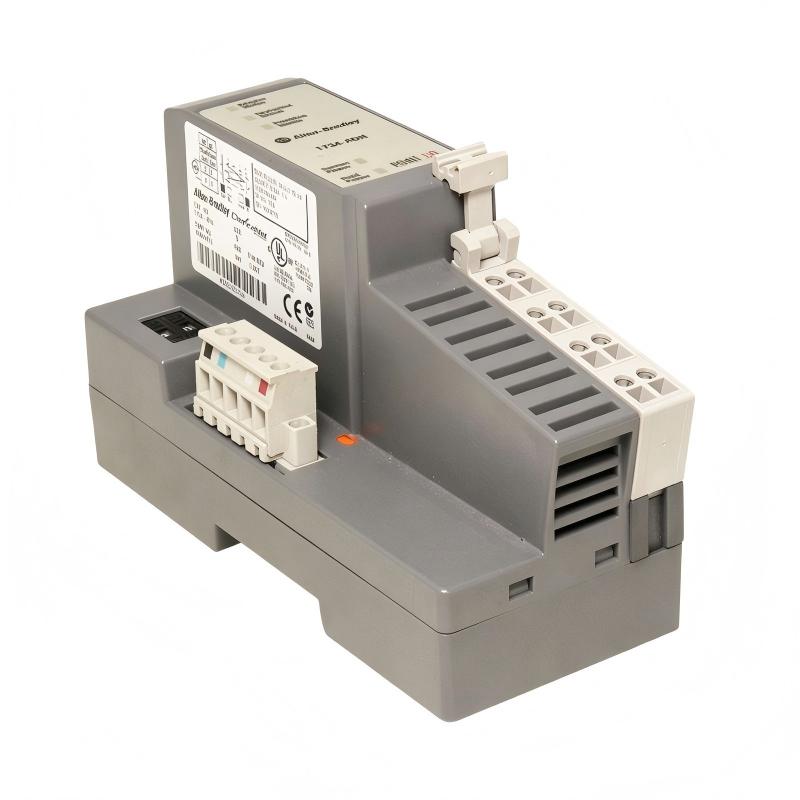
Table of Contents
- 1734-ADN/B Point I/O DeviceNet Adapter Module Overview
- Point I/O DeviceNet Adapter Industrial Application
- Installation Preparation and System Planning
- 1734-ADN/B Hardware Installation Procedure
- DeviceNet Network and Power Wiring Setup
- DeviceNet Communication Configuration
- 1734-ADN/B Commissioning Process
- Field Installation Experience and Common Issues
- FAQs on 1734-ADN/B Installation
- Engineering Summary
1734-ADN/B Point I/O DeviceNet Adapter Module Overview
The Allen-Bradley 1734-ADN/B Point I/O DeviceNet Adapter Module Installation Guide provides a practical engineering procedure for installing, wiring, configuring, and commissioning the adapter module in industrial automation systems.
The 1734-ADN/B is a POINT I/O DeviceNet network adapter that provides communication between POINT I/O modules and a DeviceNet network. It allows distributed I/O devices to exchange data with a DeviceNet master controller and supports flexible field installation in industrial control applications.
The module operates with a 24V DC power supply and uses DeviceNet communication technology to connect distributed I/O points with automation controllers. :contentReference[oaicite:0]{index=0}
A successful installation requires correct mechanical mounting, DeviceNet wiring, node configuration, I/O module installation, and communication verification.
Point I/O DeviceNet Adapter Industrial Application
The Allen-Bradley 1734-ADN/B Point I/O DeviceNet Adapter Module is commonly used in distributed control systems where remote I/O communication is required.
- Factory automation systems
- Machine control applications
- Packaging equipment
- Material handling systems
- Process monitoring equipment
The adapter allows POINT I/O modules installed in remote locations to communicate with a DeviceNet network, reducing long-distance field wiring and improving system flexibility. :contentReference[oaicite:1]{index=1}
Installation Preparation and System Planning
Before installing the 1734-ADN/B adapter module, engineers should complete the following preparation steps:
- Confirm DeviceNet network design
- Verify controller and scanner compatibility
- Check available 24V DC power supply
- Prepare network wiring documents
- Confirm POINT I/O module requirements
- Review cabinet installation conditions
Proper preparation helps prevent communication problems and reduces commissioning time.
1734-ADN/B Hardware Installation Procedure
The mechanical installation of the Point I/O DeviceNet adapter module should ensure stable connection with the I/O system.
- Select the correct DIN rail mounting position
- Install the adapter module securely
- Install required POINT I/O modules
- Verify module locking position
- Check environmental installation conditions
Correct mounting ensures reliable backplane communication between the adapter and connected I/O modules.
DeviceNet Network and Power Wiring Setup
DeviceNet wiring is a critical part of the 1734-ADN/B installation process because communication stability depends on correct network connection.
- Connect DeviceNet communication cable correctly
- Verify network polarity
- Connect 24V DC power supply
- Check network termination resistors
- Confirm grounding arrangement
- Inspect cable shielding condition
1734_ADN_INSTALL_CHECK

MODEL = 1734-ADN/B
CHECK = DEVICENET_CONNECTION
CHECK = POWER_SUPPLY
CHECK = NODE_ADDRESS
CHECK = IO_MODULE_INSTALLATION
During one industrial installation project, engineers found that the adapter could not communicate with the DeviceNet scanner after startup. Inspection showed that the network cable polarity was reversed. After correcting the wiring, communication returned to normal.
DeviceNet Communication Configuration
After hardware installation, engineers must configure the DeviceNet communication parameters.
- Set DeviceNet node address
- Configure network baud rate
- Register connected POINT I/O modules
- Configure scanner communication
- Verify I/O data mapping
The 1734-ADN/B uses DeviceNet communication and supports automatic network configuration features to simplify integration into DeviceNet systems. :contentReference[oaicite:2]{index=2}
1734-ADN/B Commissioning Process
A complete commissioning procedure includes:
- Inspect all wiring connections
- Apply 24V DC power
- Check adapter status indicators
- Verify DeviceNet communication
- Test connected I/O modules
- Confirm controller data exchange
- Record commissioning information
During commissioning, engineers should confirm that all connected POINT I/O modules are recognized correctly and that input/output data updates normally.
Field Installation Experience and Common Issues
Common installation problems found with 1734-ADN/B systems include:
- Incorrect DeviceNet wiring
- Wrong node address setting
- Missing network termination
- Insufficient 24V DC power
- Incorrect I/O module configuration
Following standardized installation procedures can significantly improve DeviceNet communication reliability and reduce future maintenance requirements.
FAQs on 1734-ADN/B Installation
What is the main function of the 1734-ADN/B?
The 1734-ADN/B provides communication between POINT I/O modules and a DeviceNet network.
Why does the adapter need correct node configuration?
Because the DeviceNet scanner identifies network devices through node addressing and communication settings.
What should be checked before startup?
Engineers should verify power supply, DeviceNet wiring, node address, I/O module installation, and communication status.
Engineering Summary
The Allen-Bradley 1734-ADN/B Point I/O DeviceNet Adapter Module Installation process requires careful attention to network wiring, power connection, module configuration, and commissioning verification. Proper installation ensures reliable communication between distributed POINT I/O modules and DeviceNet control systems, improving automation system flexibility and operational stability.