
NewsNEWCENTER
Featured products
Contact Us
Allen-Bradley 1715-A2A Redundant I/O Dual Slot Adapter Base Unit Troubleshooting Guide
2026-07-17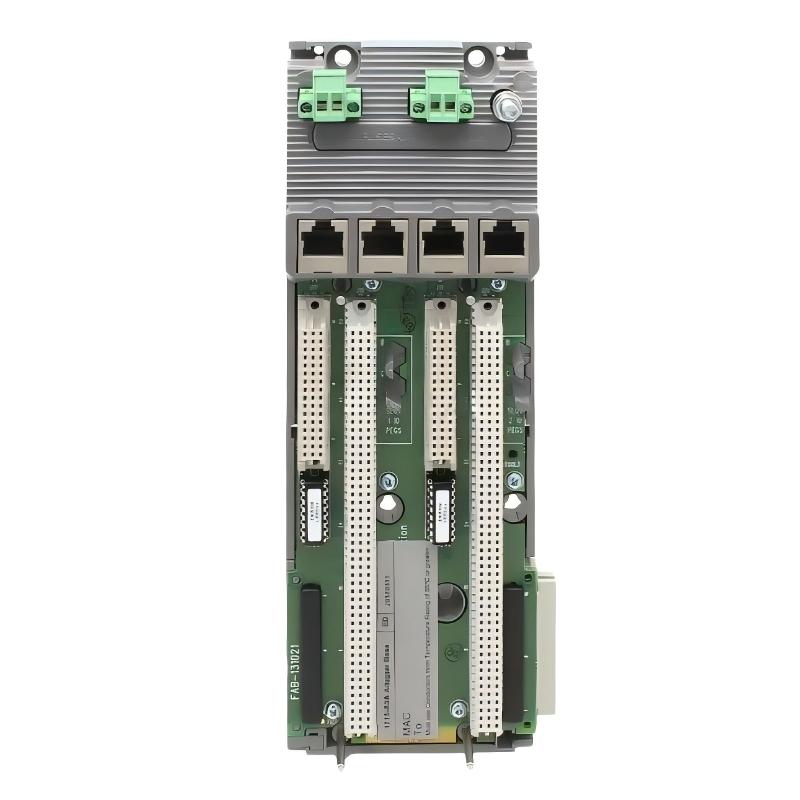
Table of Contents
- Field Case: 1715-A2A Redundant I/O Communication Fault Analysis
- 1715-A2A Adapter Base Unit Fault Symptoms
- Redundant I/O Fault Diagnosis Process
- Common Causes of 1715-A2A Faults
- 1715-A2A Troubleshooting Procedure
- Fault Repair and Recovery Actions
- Post-Repair System Verification
- FAQs on 1715-A2A Troubleshooting
- Engineering Summary
Field Case: 1715-A2A Redundant I/O Communication Fault Analysis
The Allen-Bradley 1715-A2A Redundant I/O Dual Slot Adapter Base Unit Troubleshooting process requires a complete inspection of the redundant I/O system, including power supply, module connection, communication status, and controller configuration.
In one industrial process control application, operators noticed that several I/O channels became unavailable while the control system generated communication alarms. The production system continued running, but the redundant I/O monitoring function reported an abnormal condition.
Engineers performed a systematic Fault Diagnosis process and found that the main issue was caused by an unstable module connection and incorrect communication configuration rather than a damaged adapter base unit.
This case demonstrates that troubleshooting the 1715-A2A requires checking the complete I/O architecture instead of replacing hardware immediately.
1715-A2A Adapter Base Unit Fault Symptoms
Common fault symptoms found during troubleshooting include:
- I/O module communication loss
- Redundancy status alarm
- Unexpected I/O channel failure
- Intermittent communication interruption
- Module status abnormal indication
- Controller unable to recognize I/O devices
- System diagnostic warnings
These symptoms may be caused by wiring problems, configuration errors, communication issues, or hardware connection faults.
Redundant I/O Fault Diagnosis Process
A complete Fault Diagnosis process should include the following steps:
- Review system alarm information
- Check adapter status indicators
- Verify power supply condition
- Inspect I/O module installation
- Check communication connection
- Review controller configuration
- Perform redundancy testing
This diagnostic method helps engineers determine whether the fault originates from the adapter base unit, I/O modules, communication network, or system configuration.
Common Causes of 1715-A2A Faults
The most common causes of Redundant I/O Dual Slot Adapter Base Unit faults include:
- Loose I/O module connection
- Incorrect module installation
- Power supply instability
- Communication configuration errors
- Incorrect network settings
- Poor grounding condition
- Damaged field wiring
- Improper redundancy configuration
In industrial control systems, many I/O faults are caused by external connection problems rather than internal adapter failure.
1715-A2A Troubleshooting Procedure
A practical troubleshooting workflow includes:
- Record current system alarms
- Check adapter operating status
- Inspect module seating condition
- Verify power input stability
- Check communication parameters
- Confirm I/O channel operation
- Test system recovery
1715_FAULT_DIAG

MODEL = 1715-A2A
CHECK = POWER_STATUS
CHECK = MODULE_CONNECTION
CHECK = COMMUNICATION
CHECK = CONFIGURATION
CHECK = REDUNDANCY_STATUS
During one maintenance case, the control system reported intermittent I/O communication failures. Engineers inspected the redundant I/O rack and found that one adapter connection was not fully secured. After correcting the mechanical connection and restarting the system, communication returned to stable operation.
Fault Repair and Recovery Actions
After identifying the fault source, engineers can perform the following recovery actions:
- Reconnect loose adapter or I/O modules
- Correct communication configuration
- Repair damaged wiring
- Improve grounding conditions
- Verify power supply stability
- Restore redundancy settings
Many 1715-A2A faults can be resolved through inspection and adjustment without replacing the complete adapter base unit.
Post-Repair System Verification
After completing troubleshooting, engineers should perform final verification:
- Confirm adapter status is normal
- Verify I/O communication stability
- Check redundancy operation
- Test field device signals
- Monitor system operation
- Record maintenance information
A complete verification process ensures that the redundant I/O system can continue providing reliable control performance.
FAQs on 1715-A2A Troubleshooting
Why does the 1715-A2A lose communication with I/O modules?
Possible causes include loose connections, configuration errors, communication problems, power issues, or grounding problems.
Should the adapter base unit be replaced after a communication fault?
No. Engineers should first complete a Fault Diagnosis process because many problems are caused by external system conditions.
What is the first step when troubleshooting the 1715-A2A?
The first step is reviewing system alarms and checking adapter, power, communication, and module status information.
Engineering Summary
The Allen-Bradley 1715-A2A Redundant I/O Dual Slot Adapter Base Unit Troubleshooting process requires systematic inspection of hardware connections, communication settings, power conditions, and redundancy configuration. Field experience shows that accurate Fault Diagnosis can restore reliable I/O operation while reducing unnecessary hardware replacement and improving industrial control system availability.