

ProductPRODUCT
Featured products
Contact Us
- Allen Bradley
- 1783-US6T2H
- Unmanaged Ethernet Switch
- USA
- 114.5 × 45.6 × 76.8 mm
- 0.45 kg
- Xiamen, China
- New & In Stock
- T/T, PayPal, Western Union
- 1 Year
- 1-3 Working Days
- DHL, UPS, TNT, FedEx and EMS.
- 24-Hour Service
- COO
- 11
Our advantage

Global Logistics
We have a 10-year logistics and express cooperation agreement, so our products can be shipped to any place in the world.

Brand new and original
Our products are imported in bulk from the place of origin. Because of the cooperative relationship, our products are all original and 100% new.

24-hour service
We provide 7*24 hours service to our customers. We will be there whenever you need us.

Price advantage
All our products are priced very favorably because we have our own warehouse and supply.
| Company Information | |||
| [email protected] | |||
| Mobile | +8615980777398 | ||
| +8615980777398 | |||
| 15980777398 |
Product Overview
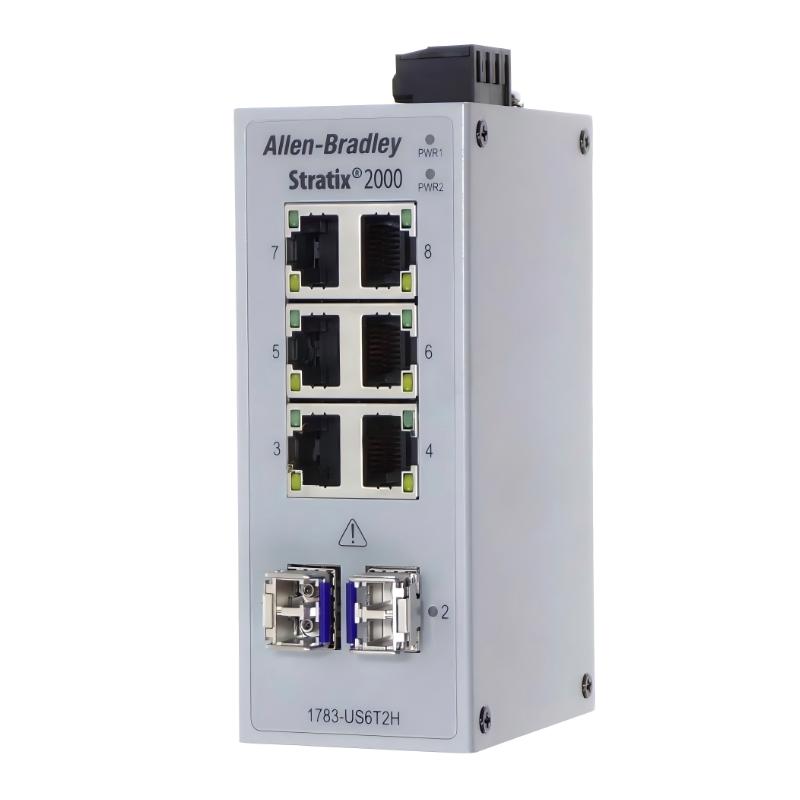
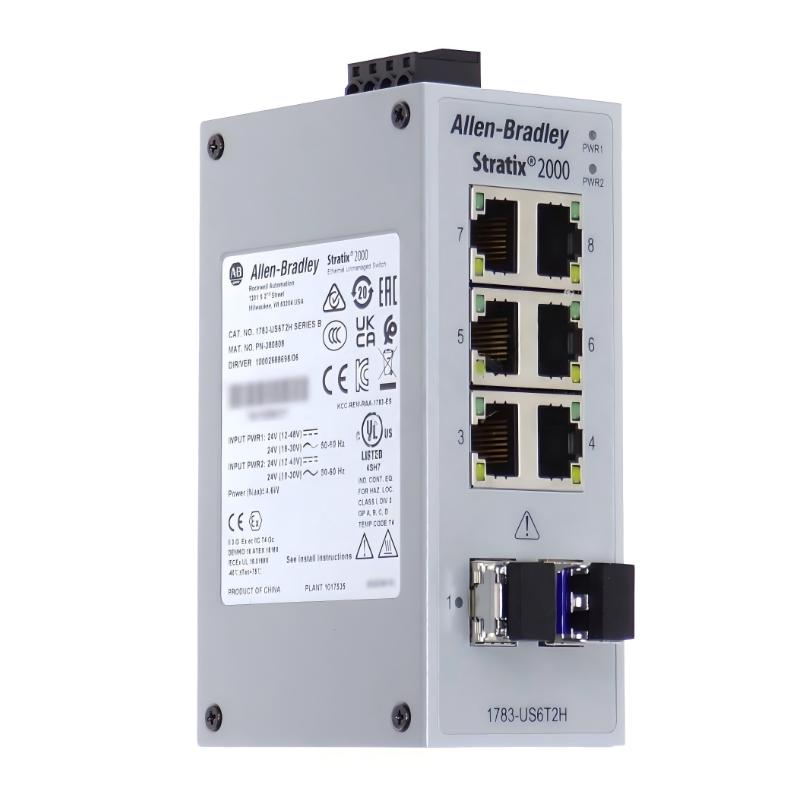
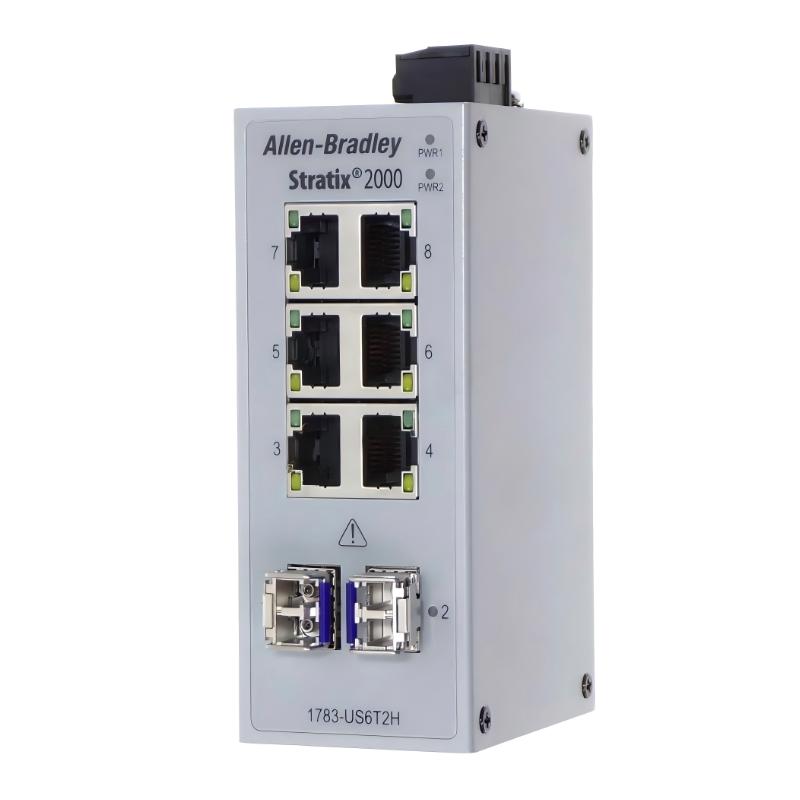
The Allen-Bradley 1783-US6T2H is a Stratix 2000 unmanaged Ethernet switch designed for industrial network connectivity. It provides eight Ethernet ports, consisting of six 10/100 Mbps copper RJ45 ports and two preinstalled 100 Mbps single-mode fiber interfaces.
Unlike models that require separately purchased SFP transceivers, the 1783-US6T2H comes with two single-mode fiber SFP modules already installed. The optical interfaces use LC connectors and allow the switch to establish fiber connections between remote industrial network locations.
As an unmanaged switching device, the 1783-US6T2H forwards Ethernet traffic without requiring advanced network configuration. Its combination of copper and single-mode fiber interfaces makes it suitable for automation systems that need both local equipment connections and longer-distance optical communication.
The switch can connect PLCs, HMIs, industrial computers, and other Ethernet-enabled equipment. It is particularly useful in distributed manufacturing environments where copper connections serve local devices while fiber links connect separate control cabinets or production areas.
Technical Specifications
| Parameter | Specification |
|---|---|
| Manufacturer | Allen-Bradley / Rockwell Automation |
| Product Type | Stratix 2000 Unmanaged Ethernet Switch |
| Model | 1783-US6T2H |
| Product Series | Stratix 2000 |
| Switch Type | Unmanaged Ethernet Switch |
| Total Number of Ports | 8 |
| Copper Ports | 6 × RJ45 |
| Copper Port Speed | 10/100 Mbps |
| Fiber Ports | 2 × Single-Mode Fiber |
| Fiber Port Speed | 100 Mbps |
| Fiber Connector | LC |
| Fiber Transceiver | Preinstalled |
| Network Standard | Fast Ethernet |
| Network Type | Ethernet |
| Configuration | Plug and Play |
| Mounting | DIN Rail |
| Dimensions | 114.5 × 45.6 × 76.8 mm |
| Weight | 0.45 kg |
Product Features
- Eight Ethernet ports: Combines six copper connections and two optical interfaces in one industrial switching device.
- Six Fast Ethernet ports: Provides 10/100 Mbps communication through standard RJ45 connections.
- Two single-mode fiber ports: Supports optical communication between network devices in separate locations.
- Preinstalled fiber transceivers: Includes two 100 Mbps single-mode fiber interfaces with LC connectors.
- Unmanaged operation: Forwards Ethernet traffic without requiring advanced network configuration.
- Mixed-media connectivity: Supports copper and fiber connections within the same industrial network.
- DIN rail installation: Integrates into industrial control cabinets and automation enclosures.
- Plug-and-play functionality: Simplifies network deployment and replacement.
- Industrial network integration: Connects PLCs, HMIs, and other Ethernet-based automation equipment.
Working Principle
The 1783-US6T2H operates as an unmanaged Layer 2 Ethernet switch. It receives Ethernet frames from connected devices, examines their destination MAC addresses, and forwards the frames through the appropriate network interfaces.
The six RJ45 ports handle copper Ethernet communication at 10/100 Mbps. These connections are suitable for local industrial equipment such as PLC controllers, operator panels, and industrial computers.
The two preinstalled single-mode fiber interfaces provide 100 Mbps optical communication through LC connectors. Each optical interface converts electrical Ethernet signals into optical signals for transmission over fiber and converts incoming optical signals back into electrical Ethernet data.
The basic communication arrangement is:
PLC / HMI / Industrial PC → 1783-US6T2H → Copper Ethernet or Single-Mode Fiber → Remote Network Devices
Because the switch is unmanaged, Ethernet frame forwarding takes place automatically without requiring manual VLAN, routing, or port-management configuration.
The combination of copper and optical interfaces allows the switch to serve as a local network connection point while maintaining communication with remote Ethernet equipment through single-mode fiber.
Role in the Stratix 2000 Industrial Ethernet Architecture
The 1783-US6T2H functions as an industrial Ethernet connectivity device within the Stratix 2000 network architecture.
Its six copper ports connect nearby automation equipment, while the two preinstalled single-mode fiber interfaces provide optical connections to remote network segments.
A typical network arrangement is:
Industrial Controller → 1783-US6T2H → Local Ethernet Devices / Single-Mode Fiber Network → Remote Industrial Equipment
| System Component | Function |
|---|---|
| 1783-US6T2H | Provides eight-port unmanaged Ethernet switching |
| PLC Controller | Executes automation logic and exchanges process data |
| HMI Panel | Displays operating conditions and operator controls |
| Industrial Computer | Supports engineering, monitoring, and data processing |
| Single-Mode Fiber Interface | Provides optical Ethernet communication |
| LC Fiber Cable | Connects remote network equipment |
| RJ45 Ethernet Cable | Connects local industrial devices |
The switch manages Ethernet frame forwarding, while connected controllers and automation devices perform their respective control and communication functions.
Industrial Applications
| Application | Typical Use |
|---|---|
| Factory Automation | Connecting PLCs and industrial Ethernet devices |
| Manufacturing Lines | Linking controllers, HMIs, and machine equipment |
| Industrial Control Cabinets | Providing local copper and fiber network connections |
| Process Automation | Connecting distributed automation equipment |
| Packaging Machinery | Supporting communication between machine controllers and operator interfaces |
| Material Handling | Linking conveyor control devices and monitoring systems |
| Water Treatment | Connecting distributed control and monitoring equipment |
| Power Distribution Facilities | Providing Ethernet connectivity between control equipment |
| SCADA Networks | Connecting local automation networks with remote communication segments |
| Industrial Network Expansion | Extending Ethernet connectivity through single-mode fiber |
Installation and Maintenance
- Verify the switch model: Confirm that 1783-US6T2H is the required Stratix 2000 unmanaged switch with six copper ports and two single-mode fiber ports.
- Select the installation location: Choose a suitable position inside the industrial control cabinet with adequate ventilation and access for maintenance.
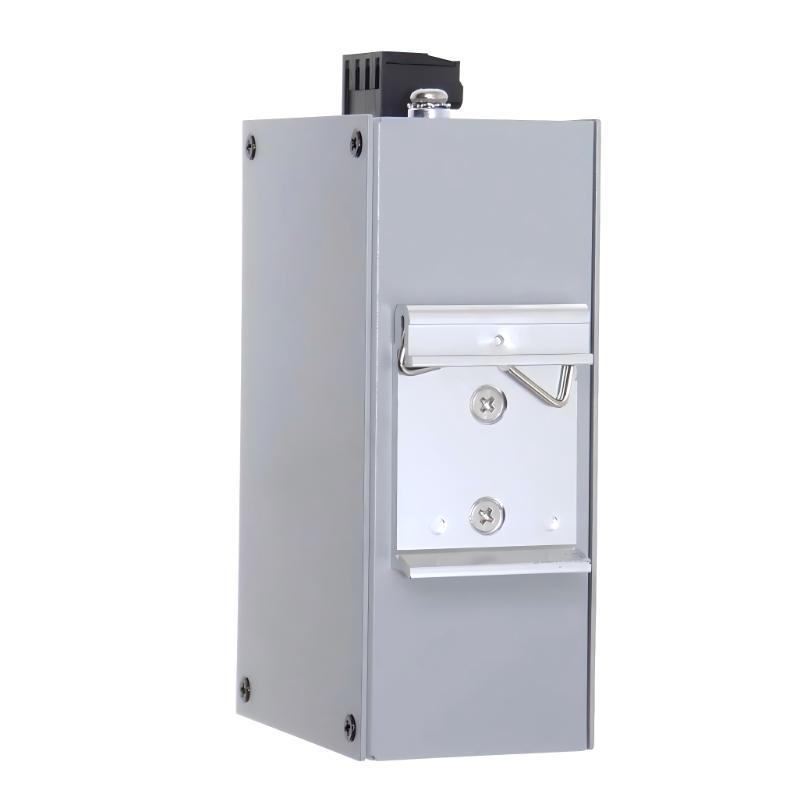
- Check DIN rail mounting: Ensure that the mounting rail and installation position are suitable for the switch.
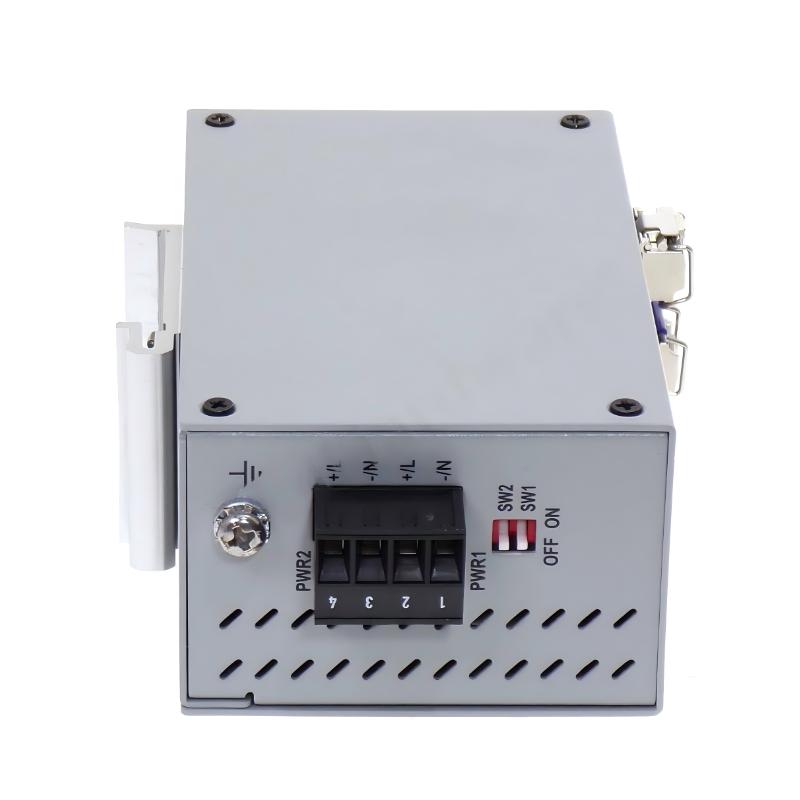
- Verify power requirements: Check the equipment nameplate and applicable installation documentation before connecting the power supply.
- Inspect RJ45 interfaces: Examine the six copper ports for contamination, damaged contacts, or physical deformation.
- Inspect optical interfaces: Check the two preinstalled fiber interfaces and their LC connectors for contamination or mechanical damage.
- Verify fiber compatibility: Use suitable single-mode fiber cables compatible with the installed optical interfaces.
- Check optical polarity: Ensure that the transmit and receive fiber paths are correctly connected between the local and remote devices.
- Connect network equipment: Use appropriate Ethernet cables to connect PLCs, HMIs, industrial computers, and other automation devices.
- Verify link indicators: Check the port status LEDs to confirm that copper and fiber connections establish the expected network links.
- Monitor communication: Test data exchange between connected equipment and investigate unexpected link interruptions or communication errors.
- Document maintenance activities: Record the switch model, port assignments, connected equipment, fiber routes, and maintenance history.
Compatible System Components
| Component | Product Type | Function |
|---|---|---|
| Allen-Bradley ControlLogix | Programmable Automation Controller | Executes industrial automation control programs |
| Allen-Bradley CompactLogix | Programmable Automation Controller | Provides machine-level automation control |
| Allen-Bradley PanelView Plus | Operator Interface Terminal | Provides machine monitoring and operator interaction |
| Allen-Bradley Stratix 2000 | Unmanaged Ethernet Switch | Extends industrial Ethernet connectivity |
| Single-Mode Fiber Cable | Optical Network Cable | Connects the switch to remote network devices |
| RJ45 Ethernet Cable | Copper Network Cable | Connects local automation equipment |
Key Advantages
- Provides eight industrial Ethernet connections.
- Combines six 10/100 Mbps copper ports with two 100 Mbps single-mode fiber ports.
- Includes two preinstalled single-mode fiber interfaces.
- Uses LC optical connectors for fiber communication.
- Supports plug-and-play unmanaged network operation.
- Provides mixed-media connectivity for distributed automation systems.
- Supports DIN rail installation in industrial control cabinets.
Recommended Related Models
- 1783-US6T2F – Stratix 2000 6T+2F Port Unmanaged Switch with Multimode Fiber
- 1783-US7T1H – Stratix 2000 7T+1H Port Unmanaged Switch with Single-Mode Fiber
- 1783-US7T1F – Stratix 2000 7T+1F Port Unmanaged Switch with Multimode Fiber
- 1783-US4T1H – Stratix 2000 4T+1H Port Unmanaged Switch with Single-Mode Fiber
- 1783-US14T2S – Stratix 2000 14T+2S Port Unmanaged Ethernet Switch
- 1783-US16T2S – Stratix 2000 16T+2S Port Unmanaged Ethernet Switch
Technical FAQs
What is the difference between the 1783-US6T2H and 1783-US6T2F?
Both models provide six 10/100 Mbps copper ports and two 100 Mbps fiber interfaces. The main difference is the optical media: the 1783-US6T2H uses preinstalled single-mode fiber interfaces, while the 1783-US6T2F uses preinstalled multimode fiber interfaces.
Are the two fiber transceivers included with the 1783-US6T2H?
Yes. The two 100 Mbps single-mode fiber interfaces are preinstalled. The switch does not require separate SFP purchases to provide its specified optical connections.
Can the 1783-US6T2H connect directly to a standard RJ45 Ethernet device?
Yes. Its six copper RJ45 ports support 10/100 Mbps Ethernet connections, allowing compatible PLCs, HMIs, computers, and other network devices to connect directly through suitable Ethernet cables.
What should be checked when the fiber connection fails?
First, inspect the LC connectors and fiber cable for contamination or damage. Then verify single-mode fiber compatibility, transmit/receive polarity, and the operating condition of the remote network interface. Also check the switch port indicators and connected equipment for link-status problems.