
NewsNEWCENTER
Featured products

Contact Us
Allen-Bradley 1738-AENT ArmorPOINT EtherNet/IP Adapter Installation and Commissioning Guide
2026-10-23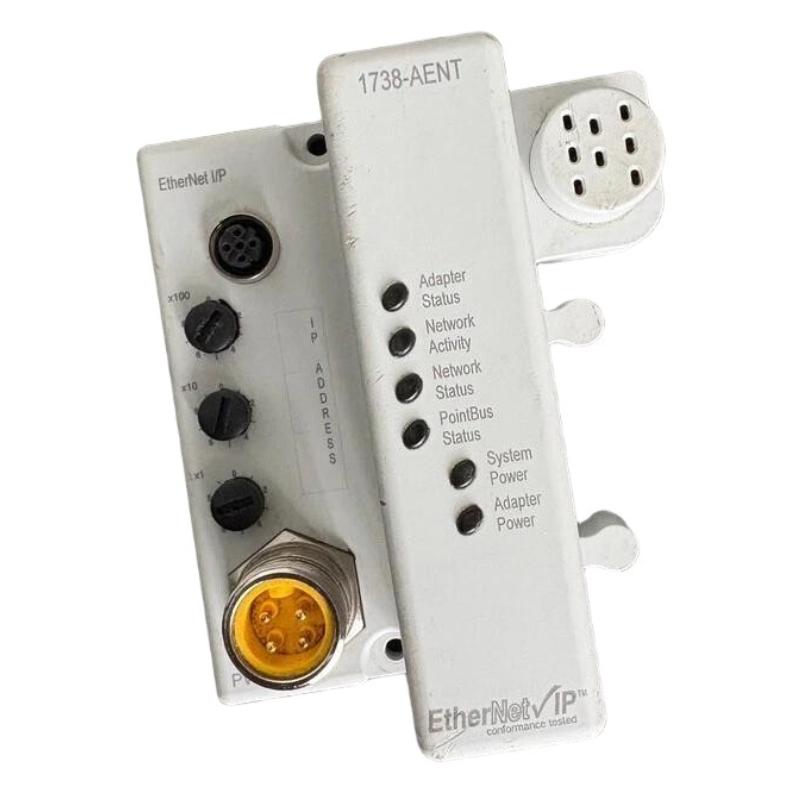
The Allen-Bradley 1738-AENT ArmorPOINT EtherNet/IP Adapter is an industrial communication adapter designed to connect compatible ArmorPOINT distributed I/O modules to an EtherNet/IP control network. It allows a PLC or industrial controller to exchange input and output data with remote field devices, helping engineers distribute I/O closer to machinery while reducing the need to route every field signal back to a central control cabinet.
This installation guide explains how to prepare, mount, wire, configure, and commission the Allen-Bradley 1738-AENT adapter. It covers network addressing, 24 V DC power, I/O expansion, grounding, communication checks, and common commissioning considerations. The 1738-AENT is a single-port EtherNet/IP adapter; it should not be confused with the dual-port 1738-AENTR model.
Product lifecycle note: Rockwell Automation lists the 1738-AENT as discontinued effective December 31, 2025, with no planned replacement category. For new projects, confirm lifecycle and support requirements before specifying this model. For existing installations, verify the exact series and firmware requirements before servicing or replacing the adapter.
Table of Contents
- 1. Product Overview
- 2. Technical Specifications
- 3. Installation Preparation
- 4. Mounting the Adapter and I/O Bases
- 5. Power Wiring and Grounding
- 6. EtherNet/IP Network Connection
- 7. Network Address Configuration
- 8. PLC Configuration and I/O Mapping
- 9. Commissioning and Functional Testing
- 10. Maintenance and Reliability
- 11. Common Installation Problems
- 12. Technical FAQs
- 13. Technical Summary
1. Product Overview
The 1738-AENT is part of the Allen-Bradley ArmorPOINT I/O family. It provides the communication interface between a supported EtherNet/IP controller and an ArmorPOINT I/O assembly. The adapter communicates with the controller over Ethernet and manages data exchange with the connected I/O modules through the local POINTBus backplane.
Primary functions
- Connects compatible ArmorPOINT I/O assemblies to an EtherNet/IP network.
- Transfers configured input and output data between the controller and remote I/O.
- Supports distributed I/O installation close to sensors, actuators, and machinery.
- Provides status indicators for adapter, network, POINTBus, and power conditions.
- Supports expansion with compatible 1738-series I/O modules within documented system limits.
The 1738-AENT is a communication adapter, not a standalone PLC CPU. Its operation depends on a compatible controller, correct network configuration, suitable power, a properly assembled I/O base, and compatible modules.
2. Technical Specifications
| Parameter | Specification |
|---|---|
| Manufacturer | Allen-Bradley / Rockwell Automation |
| Model | 1738-AENT |
| Product family | ArmorPOINT I/O |
| Device type | EtherNet/IP communication adapter |
| Ethernet ports | 1 |
| Ethernet data rate | 10/100 Mbps |
| Ethernet connector | M12 D-coded female connector |
| Adapter input supply | 24 V DC nominal; check the specified input range for the installed series |
| Input voltage range | 10–28.8 V DC for the documented Series B adapter |
| POINTBus output capacity | 5 V DC, up to 1.0 A for the documented Series B adapter |
| Maximum expansion capacity | Up to 63 I/O modules in a supported configuration; actual capacity depends on current and system constraints |
| Supported network topologies | Star and tree for the documented single-port adapter architecture |
| Mounting | Metal panel mounting with compatible I/O bases |
| Environmental protection | Enclosure rating depends on the exact product marking and installation conditions |
These figures describe the documented Series B product and must be checked against the label and technical documentation for the actual unit. The number of supported modules is not determined by module count alone: the POINTBus current budget, power distribution, connection limits, controller configuration, and any required expansion power components must also be considered.
3. Installation Preparation
3.1 Verify the adapter and series
Inspect the nameplate and confirm that the part number is 1738-AENT. Record the series, firmware information where available, and any existing network address settings. Do not substitute a 1738-AENTR or another 1738 adapter without confirming compatibility and the required network architecture.
3.2 Check controller and software compatibility
Confirm that the intended PLC or controller supports the adapter and the required I/O connection type. Verify the supported Add-On Profile or device description, controller firmware, and programming software version. Existing installations may depend on a specific combination of software, adapter series, and firmware.
3.3 Calculate I/O power requirements
Prepare a list of all planned ArmorPOINT I/O modules and their POINTBus current requirements. Add the current consumption of each module and compare the total with the adapter’s documented capacity. For the documented Series B adapter, the POINTBus output limit is 1.0 A. If the planned load exceeds the permitted capacity, use an approved power-extension arrangement such as the appropriate 1738-EP24DC and 1738-FPD components where required by the system design.
3.4 Prepare tools and materials
- Compatible mounting bases and the supplied terminating base.
- Correctly rated 24 V DC power supply and suitable protection.
- Compatible M12 D-coded Ethernet cable and connector.
- Suitable auxiliary power cordset and mating connectors.
- Appropriate grounding and bonding hardware.
- Panel layout drawings and the relevant installation instructions.
- PLC programming software and the correct device profile.
- Rated test equipment for use by qualified personnel.
3.5 Apply electrical safety procedures
Before mounting or wiring the adapter, shut down the equipment using the approved procedure. Isolate the controller supply and all external field power sources, apply lockout/tagout where required, and verify that hazardous voltage is absent. Follow electrostatic-discharge precautions when handling exposed electronic components.
4. Mounting the Adapter and I/O Bases
Step 1: Plan the panel layout
Choose a stable mounting surface that provides the required environmental protection, mechanical support, and access to the connectors. Allow enough space for the Ethernet cable, auxiliary power cable, I/O bases, field wiring, and maintenance activities.
Step 2: Prepare mounting holes
Use the mechanical drawing applicable to the exact adapter and base arrangement to determine hole locations. The documented installation instructions describe panel mounting with M4 or #8 machine or self-tapping screws. Confirm the required dimensions before drilling; do not rely on estimated spacing or another model’s mounting drawing.
Step 3: Secure the adapter and base
Mount the adapter and its I/O mounting base in the documented arrangement. Tighten mounting hardware appropriately and verify that the base is secure without distorting the housing.
Step 4: Install the I/O modules and bases
Add the compatible 1738 I/O modules and their respective mounting bases according to the intended assembly sequence. Check the module keying and latching mechanisms before engagement. Do not force an incorrectly aligned module into place.
Step 5: Install the terminating base
Install the terminating base supplied for the adapter assembly at the end of the I/O backplane instead of using a standard I/O mounting base in that final position. Confirm that the termination arrangement is complete and that the latching mechanism is secure.
Step 6: Ground the assembly
Use the designated grounding connection on the I/O base and follow the installation instructions for bonding the system to the panel or protective earth arrangement. A mechanically secure mounting point should not be assumed to provide an adequate electrical ground unless the documented bonding method is followed.
5. Power Wiring and Grounding
5.1 Confirm the power requirements
The 1738-AENT uses a nominal 24 V DC supply. The documented Series B adapter accepts an input range of 10–28.8 V DC. Confirm the applicable input range, current requirements, protection, and connector pinout before wiring the actual device.
The adapter’s power connector separates user power and adapter power conductors. For the documented connector arrangement, the reference pin functions are:
| Pin | Reference function |
|---|---|
| 1 | User power positive |
| 2 | Adapter power positive |
| 3 | Adapter power negative |
| 4 | User power negative |
These assignments are provided for the documented 1738-AENT connector arrangement. Verify the connector view, cable wiring, and product series in the applicable installation instructions before making any connection.
5.2 Connect the power supply
- Confirm that the supply output voltage and current capacity meet the requirements of the adapter and attached system.
- Identify the adapter power and user power conductors from the approved wiring diagram.
- Connect the conductors using the correct cable and connector assembly.
- Check polarity and verify that the wiring is not damaged or shorted.
- Secure the connector and confirm that its sealing features are correctly engaged.
5.3 Check field-side power distribution
The adapter’s field-side supply and the POINTBus supply serve different functions. Review the power requirements of the connected I/O modules and external loads. Where additional power distribution or extension modules are needed, install the approved components in the documented locations.
5.4 Protect the installation
Use appropriate overcurrent protection and conductor sizing. Keep power wiring organized and separate from noise-sensitive signal wiring where required by the installation design. Confirm grounding, bonding, and shielding practices for the particular cabinet and field environment.
6. EtherNet/IP Network Connection
6.1 Connect the Ethernet cable
Connect a compatible Ethernet cable to the adapter’s M12 D-coded Ethernet connector. The documented 1738-AENT uses one Ethernet port and supports 10/100 Mbps communication. Use the cable type and environmental rating appropriate for the installation.
6.2 Inspect connector sealing
Ensure that the connector is correctly aligned and tightened according to the cable and adapter instructions. Tighten unused ports or protective caps as required by the installation design to preserve the specified environmental protection. A damaged seal or loose connector can allow moisture or contamination into the assembly.
6.3 Plan the network topology
The documented single-port 1738-AENT supports star and tree network arrangements. Since the adapter has one Ethernet port, it should not be treated as an embedded two-port switch. Plan the upstream network connection through the appropriate switch or network infrastructure.
6.4 Set a unique network address
Before connecting the adapter to the production network, confirm that its IP address is unique and compatible with the subnet. Check the network mask, gateway where required, and the site’s addressing plan. Avoid connecting a device with an unknown address to a live control network until its configuration has been verified.
7. Network Address Configuration
The 1738-AENT provides rotary address switches and supports configuration methods described in its installation instructions. The correct procedure depends on the switch settings and the network configuration used by the system.
Step 1: Record the existing settings
Before changing the address, record the rotary switch positions and any known IP configuration. Check the controller project and network documentation for the expected address.
Step 2: Select the approved addressing method
Use the rotary switches, DHCP, or another documented configuration method as supported by the installed adapter series. Do not assume that the behavior of a different ArmorPOINT adapter applies to the 1738-AENT.
Step 3: Check for address conflicts
Verify that no other device on the network is using the intended IP address. Duplicate addresses can cause intermittent communication, connection failures, and confusing diagnostic results.
Step 4: Confirm communication
After applying the approved configuration and restoring power, use the site’s authorized diagnostic tools to verify that the adapter is reachable and that the network status is consistent with normal operation.
8. PLC Configuration and I/O Mapping
Step 1: Add the adapter to the controller project
Open the programming project for the supported controller. Add the 1738-AENT using the correct device profile or supported configuration method. Confirm that the selected module series and firmware assumptions match the installed hardware.
Step 2: Configure the I/O assembly
Define the connected ArmorPOINT modules and their order according to the actual physical installation. The configured module list must match the assembly, including any required termination and power-extension components.
Step 3: Configure the communication connection
Set the adapter’s IP address and configure the appropriate I/O connection type, data size, and connection parameters supported by the controller and device profile. Use the documented configuration rather than guessing data sizes or connection settings.
Step 4: Verify I/O data mapping
Confirm that the controller’s input and output tags correspond to the correct physical module and channel. Validate point assignments against the electrical drawings and I/O schedule.
Step 5: Review communication-loss behavior
Determine the intended state of outputs if the controller loses communication with the adapter. Confirm that the configured response is appropriate for the machine and that safety-critical functions do not depend solely on ordinary EtherNet/IP communication.
9. Commissioning and Functional Testing
Pre-start checklist
- Adapter model and series verified.
- Mounting hardware and terminating base correctly installed.
- Grounding and bonding completed.
- 24 V DC power wiring checked for polarity and correct connector assignment.
- POINTBus current budget calculated and within the documented limit.
- Ethernet cable correctly connected and sealed.
- IP address and subnet configuration verified.
- Controller project matches the physical I/O assembly.
- Field wiring and external power circuits checked.
Commissioning procedure
- Clear the cabinet and work area of tools and loose materials.
- Restore power according to the approved startup sequence.
- Observe adapter, network, POINTBus, and power indicators.
- Check the controller diagnostics and confirm that the expected adapter is recognized.
- Verify that the network connection is established and the configured I/O connection is healthy.
- Test representative input and output points using a controlled commissioning procedure.
- Confirm that each field device responds to its intended command and that feedback signals return correctly.
- Test the approved response to communication loss and other relevant fault conditions.
- Document the results before releasing the system for production.
Do not force outputs or bypass interlocks in a way that could create a hazardous machine state. Test equipment under controlled conditions and follow the site’s commissioning and safety procedures.
10. Maintenance and Reliability
Routine maintenance helps protect the adapter, connectors, and distributed I/O assembly from environmental and electrical problems.
- Inspect connectors, cables, and protective caps for damage and secure engagement.
- Check the cabinet environment and ensure that temperature and humidity remain within permitted limits.
- Review the adapter’s status indicators and controller diagnostics during scheduled maintenance.
- Verify that the I/O module current budget remains valid after system modifications.
- Keep an updated record of the IP address, firmware, series, and controller configuration.
- Use approved procedures when replacing modules or changing network settings.
- Confirm product lifecycle and spare-parts availability when planning long-term maintenance.
11. Common Installation Problems
| Problem | Possible cause | Recommended check |
|---|---|---|
| Adapter does not power up | Missing supply, reversed wiring, loose connector, or incorrect voltage | Verify the supply, polarity, connector wiring, and power indicators |
| Adapter is powered but not reachable | Incorrect IP address, duplicate address, wrong subnet, or cable fault | Check the address plan, cable, switch connection, and network diagnostics |
| Network is active but I/O is unavailable | Incorrect controller configuration, invalid I/O connection, or POINTBus issue | Review the device profile, module configuration, and POINTBus status |
| Some I/O modules fail to operate | Incorrect module sequence, incompatible module, or insufficient backplane current | Verify the physical assembly and recalculate the current budget |
| Intermittent communication | Loose connector, damaged cable, address conflict, or network configuration issue | Inspect the connection path and review network diagnostics |
| Environmental protection is compromised | Loose connector, damaged seal, or missing protective cap | Replace damaged accessories and restore the approved sealing arrangement |
12. Technical FAQs
What does the Allen-Bradley 1738-AENT do?
It connects compatible ArmorPOINT I/O modules to a controller over EtherNet/IP, allowing the controller to exchange distributed I/O data with field devices.
Is the 1738-AENT the same as the 1738-AENTR?
No. The 1738-AENT is a single-port EtherNet/IP adapter, while the 1738-AENTR is a dual-port version with an embedded switch. Confirm the exact model before designing the network or replacing hardware.
What supply voltage does the 1738-AENT use?
The adapter uses a nominal 24 V DC supply. The documented Series B input range is 10–28.8 V DC. Verify the rating and wiring of the specific installed unit before applying power.
How many I/O modules can it support?
The documented maximum is up to 63 modules in a supported configuration. The actual number depends on POINTBus current, connection limits, module compatibility, and the use of required power-extension components.
Which Ethernet connector does the adapter use?
The documented 1738-AENT uses an M12 D-coded female Ethernet connector. Use a compatible cable and confirm its environmental rating and sealing arrangement.
Why might the adapter appear online while the I/O connection fails?
Basic network reachability does not guarantee a valid controller-to-I/O connection. Check the controller project, device profile, module configuration, firmware compatibility, and POINTBus status.
Is the 1738-AENT still available as a current product?
Rockwell Automation lists the model as discontinued effective December 31, 2025, with no planned replacement category. Availability of existing stock and service support should be confirmed for the specific purchasing or maintenance requirement.
13. Technical Summary
The Allen-Bradley 1738-AENT ArmorPOINT EtherNet/IP Adapter provides a communication interface for compatible distributed I/O assemblies. A successful installation depends on correct panel mounting, a complete terminating-base arrangement, appropriate 24 V DC power, verified grounding, a properly configured Ethernet connection, and a controller project that matches the physical I/O assembly.
Before commissioning, check the adapter series, firmware and software compatibility, IP addressing, and POINTBus current budget. Validate I/O data exchange and communication-loss behavior under controlled conditions. Because the 1738-AENT is a discontinued product, lifecycle planning and verified spare-part compatibility should also form part of the maintenance strategy.