
NewsNEWCENTER
Featured products

Contact Us
GE 531X111PSHARG3 MCF/Power Supply Card Troubleshooting and Repair Guide
2026-10-21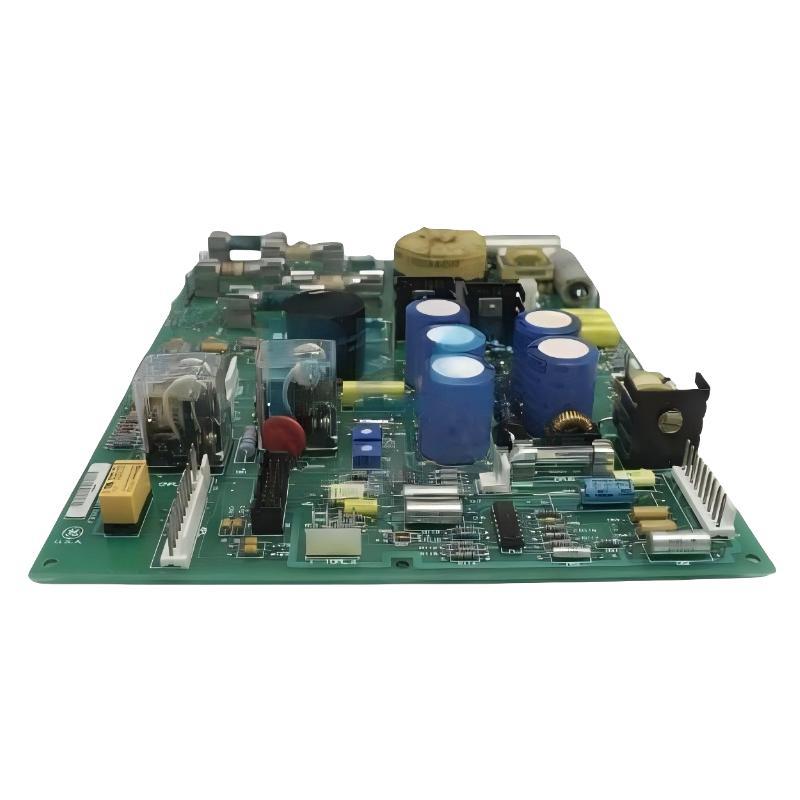
The GE 531X111PSHARG3 MCF/Power Supply Card is a motor field control and power supply board used in compatible GE industrial drive and excitation systems. It provides DC power rails for drive electronics and supports motor field circuitry, relay-based control functions, and current-feedback adjustment. A failure in this board can contribute to loss of control power, abnormal drive status, field-control problems, or unexpected system shutdowns.
This troubleshooting guide explains how to identify common faults, inspect the power supply and field-control circuits, evaluate relay behavior, and determine when repair or replacement may be necessary. Actual fault diagnosis must follow the host drive’s technical documentation because circuit arrangements and adjustment requirements can vary across equipment configurations and board revisions.
Table of Contents
- 1. Product Overview and Fault Diagnosis
- 2. Safety Precautions
- 3. Common Fault Symptoms and Causes
- 4. Power Supply Troubleshooting
- 5. Motor Field Control Faults
- 6. Relay and Status Signal Diagnosis
- 7. Current Feedback and Calibration Problems
- 8. External MOV and Surge Protection Checks
- 9. Connector and Board Inspection
- 10. Repair or Replacement Decision
- 11. Post-Repair Functional Testing
- 12. Preventive Maintenance
- 13. Technical FAQs
- 14. Technical Summary
1. Product Overview and Fault Diagnosis
The GE 531X111PSHARG3 belongs to the GE 531X replacement board family. It is identified as a motor field control and power supply card for compatible drive and excitation applications. Its functions include providing 5 VDC, 15 VDC, and 24 VDC power rails, supporting motor field circuitry through an integrated pulse transformer, and providing three onboard relays identified as K1 (RUN), K2 (MAX), and K3 (FAULT).
The board also includes potentiometers associated with field scaling and current-feedback adjustment, along with configurable jumpers. These settings may affect system behavior and must not be changed casually during fault diagnosis.
The G3 version uses externally mounted AC-line metal-oxide varistors (MOVs), rather than having these components mounted directly on the board. External surge protection therefore needs to be included in the inspection when diagnosing power-related faults.
Common troubleshooting objectives include:
- Identifying why the drive has lost control power.
- Investigating abnormal or missing DC supply outputs.
- Determining whether motor field-control problems originate in the board or elsewhere in the system.
- Checking relay states that do not match the expected operating condition.
- Investigating current-feedback readings that are incorrect or unstable.
- Distinguishing board failure from wiring, external supply, load, or configuration problems.
2. Safety Precautions
The board is installed in industrial drive or excitation equipment that may contain hazardous AC and DC voltages. Stored energy may remain after power has been disconnected. Motor field circuits and external power sources may also create hazards.
- Only qualified industrial electrical personnel should perform electrical diagnosis or repair.
- Shut down the equipment using the approved procedure and apply lockout/tagout where required.
- Wait for the specified discharge time and verify absence of hazardous voltage before handling the board.
- Use test instruments rated for the circuit and measurement category.
- Do not remove or insert the board under power unless the exact equipment documentation explicitly permits it.
- Never bypass protective circuits or force relay operation to conceal a fault.
- Use ESD precautions when handling the printed circuit board.
Some voltage measurements can only be performed with the system energized. Such tests must be carried out by qualified personnel under an approved energized-work procedure using designated test points. Do not probe arbitrary board locations.
3. Common Fault Symptoms and Causes
| Symptom | Possible causes | Initial diagnostic action |
|---|---|---|
| Drive control electronics appear unpowered | Board power-supply failure, missing input power, blown protection device, or downstream short circuit | Check system power and documented supply outputs |
| One or more DC rails are missing | Failed supply circuitry, overload, damaged connection, or external circuit fault | Verify the input supply and isolate downstream causes |
| Drive does not enter the expected RUN state | Missing permissive, control-system fault, relay issue, or supply problem | Review drive diagnostics and the documented relay logic |
| FAULT relay behavior is unexpected | Active system fault, missing supply, control logic issue, or relay/contact failure | Check fault records and the associated control circuit |
| Motor field current is abnormal | Field circuit fault, feedback issue, incorrect adjustment, or upstream control problem | Verify field-circuit conditions and feedback signals |
| Current feedback is unstable | Loose wiring, electrical interference, incorrect jumper configuration, or feedback circuit failure | Inspect wiring and verify the approved configuration |
| Fault recurs after board replacement | External supply problem, downstream overload, missing MOVs, wiring error, or incompatible replacement | Investigate the complete installation rather than replacing boards repeatedly |
These symptoms are diagnostic clues, not definitive proof of board failure. A structured test sequence helps avoid unnecessary replacement and protects the new board from the same conditions that may have damaged the original.
4. Power Supply Troubleshooting
4.1 Drive control power is completely lost
If the drive appears dead even though the main disconnect is on, do not immediately conclude that the 531X111PSHARG3 has failed. Begin with the system’s documented power path.
- Check the incoming supply and the status of the drive’s main protection devices.
- Review fault indicators and controller diagnostics, if available.
- Inspect the board and surrounding area for obvious signs of overheating, contamination, or damaged connectors after safe isolation.
- Verify the board’s required input power using the applicable wiring diagram.
- Check whether a downstream circuit is overloaded or shorted and pulling down a supply rail.
- If the external supply and connections are correct, arrange testing of the board’s power circuitry by qualified service personnel.
A failed power-supply board is one possible cause of total control-power loss, but external power failure and downstream overloads can produce similar symptoms.
4.2 One or more DC outputs are abnormal
The board is associated with 5 VDC, 15 VDC, and 24 VDC supplies. The required output tolerances, polarity, loading limits, and test points must be obtained from the applicable equipment documentation.
Use the following diagnostic sequence:
- Confirm that the board receives its specified input power.
- Inspect the relevant connectors and wiring for loose, damaged, or overheated connections.
- Measure the required output rails at designated test points, following the approved energized-work procedure.
- Compare each reading with the documented voltage range and expected operating conditions.
- If an output is low or missing, investigate downstream loads and wiring for overloads or shorts.
- If the input supply and downstream circuits are verified but the output remains abnormal, refer the board for specialist testing.
Do not assume that every abnormal output originates within the board. A shorted external load can pull down a healthy supply, and repeated replacement without correcting that load can damage the replacement card.
4.3 Power output is intermittent
Intermittent power problems can be caused by loose connectors, degraded components, unstable input power, thermal stress, or an intermittent downstream load. Record when the fault occurs and whether it correlates with temperature, machine startup, or changes in drive demand.
Do not flex the board, tap components, or move connectors while the equipment is energized to reproduce the fault. Use approved test procedures and inspect connections only after safe isolation.
5. Motor Field Control Faults
The board supports motor field circuitry through its integrated pulse transformer and related control circuitry. Field-related symptoms may also originate in the motor, excitation circuit, feedback devices, wiring, or the host drive controller.
5.1 Field current is missing or lower than expected
- Review the drive’s diagnostic records for field-related faults.
- Check the documented field-circuit supply path and connections.
- Verify that field wiring and external components are intact.
- Compare measured feedback with the expected value using the approved test method.
- Confirm that the field-control configuration and calibration settings match the application.
If the field supply and external circuit are correct but the expected field-control response is absent, the board may require specialist evaluation. Do not increase a calibration setting simply to force more field current.
5.2 Field current is unstable
Fluctuating field current may result from poor connections, an unstable power source, faulty feedback, electrical interference, or an issue elsewhere in the control loop. Determine whether the fluctuation is present in the actual field circuit, the feedback signal, or only the displayed value.
Compare the relevant measurements using the equipment’s approved diagnostic procedure. Avoid changing several adjustments at once because this can make the original fault harder to isolate.
5.3 Unexpected field-control response
Check the application-specific jumper configuration and the recorded potentiometer settings. The potentiometers associated with FIELD SCALE and current feedback should be adjusted only under the specified calibration procedure. If the correct settings are confirmed and the control response remains abnormal, investigate the feedback circuit and board hardware.
6. Relay and Status Signal Diagnosis
The GE 531X111PSHARG3 includes three relays identified as K1 (RUN), K2 (MAX), and K3 (FAULT). Their actual behavior depends on the host system’s design and operating state.
6.1 RUN relay does not indicate the expected state
Check whether the drive has satisfied its required start permissives and whether control power is available. Review the control logic and diagnostic records before investigating the relay itself. An inactive RUN indication may be the result of a genuine system interlock or fault rather than a defective contact.
6.2 FAULT relay remains active
Read the host drive’s fault records and identify the underlying condition first. Check the power supply, field circuit, control signals, and documented relay logic. Do not bypass the FAULT circuit to return the drive to operation.
6.3 MAX relay state is inconsistent
Verify the expected operating condition and the logic that controls the MAX relay. Compare the command, relevant feedback, and relay output using the system drawings. If the control condition is correct but the relay output is not, qualified personnel can assess the relay and its associated circuitry under an approved test procedure.
Never infer the correct relay contact wiring or contact state from the relay designation alone. Use the exact board and host-system documentation.
7. Current Feedback and Calibration Problems
Current-feedback problems can affect monitoring, regulation, and protective functions. The board includes potentiometers identified as P1 FIELD SCALE, P2 CFB ZERO, and P3 CFB ADJUST, along with configurable jumpers used for circuit or feedback configuration.
7.1 Feedback reading is consistently incorrect
- Confirm the correct feedback signal and reference point from the wiring diagram.
- Inspect terminals and cables for loose connections or damage.
- Compare the measured feedback with a suitable independent measurement, where the procedure permits.
- Verify the jumper settings against the approved application configuration.
- Check whether the controller’s scaling or interpretation is correct.
- Only perform calibration after the measurement path and configuration have been verified.
7.2 Feedback has an offset or drift
A persistent offset may be related to calibration, measurement reference, component degradation, or an external sensing circuit. Record the baseline reading and the test conditions before making any adjustment. If the offset changes with temperature or operating duration, document the pattern for further diagnosis.
7.3 Calibration precautions
Do not turn P1, P2, or P3 randomly, and do not copy settings from a different board revision without confirming that they are valid for the installed system. Calibration should use the specified instruments, test points, and reference conditions. Following adjustment, verify the response across the required operating range rather than checking only one point.
8. External MOV and Surge Protection Checks
The G3 version of the 531X111PSHARG3 uses external MOVs for AC-line surge protection. Because these components are mounted outside the board, replacing the card alone may not correct a fault involving the input power or surge-protection circuit.
During a safe, isolated inspection:
- Confirm that the required external MOV components are present.
- Check the associated wiring against the equipment drawings.
- Look for visible cracking, scorching, discoloration, or damaged insulation.
- Check whether any associated protective device has operated.
- Investigate possible supply surges or abnormal input conditions if damage is found.
Do not reconnect damaged surge-protection components or substitute an MOV with an unverified part. The correct rating and connection arrangement must be confirmed from the equipment documentation. If a surge event is suspected, inspect the broader input-power path before returning the system to service.
9. Connector and Board Inspection
Physical inspection can identify many faults that otherwise resemble internal circuit failure. Complete the inspection only after hazardous energy has been isolated and absence of voltage verified.
9.1 Connector inspection
- Check connector housings for cracks, discoloration, or deformation.
- Inspect pins and mating contacts for bending, corrosion, or contamination.
- Confirm that harnesses are connected to their documented locations.
- Check that wire insulation is intact and no conductor is loose.
9.2 Board condition
Look for overheated components, cracked solder joints, contamination, corrosion, and damage around power components. Visual inspection cannot prove that the board is functional, but it can help determine the next test required.
Do not scrape circuit traces, replace components, or perform improvised soldering on a board that requires controlled industrial repair. Component-level diagnosis should be performed by a qualified service provider with suitable test equipment.
9.3 Verify configuration after any intervention
Before restoring power, compare connector placement, jumpers, potentiometer settings, and external MOV wiring with the recorded configuration and applicable documentation. A small wiring or configuration error can create a new fault even when the replacement board is serviceable.
10. Repair or Replacement Decision
After the initial diagnosis, determine whether the problem is external to the board or whether the card itself requires repair.
| Diagnostic finding | Recommended action |
|---|---|
| Input power is absent or outside specification | Correct the upstream supply or protective-device issue before testing the board further. |
| A downstream circuit overloads a DC rail | Locate and correct the external load or wiring fault before reconnecting the board. |
| Loose or damaged connector is found | Repair or replace the affected connection using approved procedures. |
| External MOVs are missing or damaged | Restore the specified surge-protection arrangement before re-energizing. |
| Incorrect jumper or calibration configuration | Restore the approved configuration and complete the prescribed verification tests. |
| DC output remains abnormal with verified input and load conditions | Arrange specialist board testing or replacement. |
| Relay or field-control behavior remains abnormal after external checks | Evaluate the board and the associated control circuit using the equipment-specific procedure. |
When replacing the card, verify the full part number and revision. Do not assume that a similar 531X board is interchangeable simply because it has the same general function or connector arrangement.
11. Post-Repair Functional Testing
After repair or replacement, the board must be tested as part of the complete drive system. A successful power-up alone does not prove that field-control, feedback, and relay functions are operating correctly.
11.1 Verify supply rails
Confirm the required DC outputs using the documented test points and tolerances. If a rail is abnormal, stop and investigate the supply path and downstream load before proceeding.
11.2 Verify status and control behavior
Check the expected operation of the RUN, MAX, and FAULT relays according to the host system’s documented logic. Confirm that alarms and protective interlocks remain functional.
11.3 Verify field and feedback circuits
Complete the specified field-control and current-feedback checks. Confirm that measurements agree with expected operating conditions and that calibration settings are correct. Do not return the equipment to normal load if feedback or protection functions remain uncertain.
11.4 Record the results
Document the replacement part number, revision, identified root cause, measured supply outputs, relevant feedback values, relay behavior, and final operating status. This information supports future troubleshooting and helps identify recurring failures.
12. Preventive Maintenance
- Inspect board connectors, wiring, and cabinet cleanliness during planned shutdowns.
- Check for signs of overheating, contamination, or corrosion.
- Confirm that the external MOV arrangement remains intact and correctly connected.
- Maintain backups of drive configuration and accurate wiring drawings.
- Record baseline DC output and feedback measurements when the equipment is operating normally.
- Review repeated drive faults for possible upstream supply or downstream load problems.
- Store spare boards in ESD-safe packaging and verify part numbers before installation.
- Use approved procedures for calibration and avoid unnecessary adjustment of potentiometers or jumpers.
13. Technical FAQs
Why does a GE 531X111PSHARG3 failure cause the drive to lose control power?
The board provides DC power rails required by compatible drive electronics. If the board fails, or if its input supply is interrupted, downstream control circuits may lose power. Verify the incoming supply and downstream loads before concluding that the board is defective.
Which DC voltages are associated with this board?
The board is documented as providing 5 VDC, 15 VDC, and 24 VDC supplies. Use the applicable equipment documentation to determine the exact test points, loading conditions, and permitted voltage tolerances.
What should I check if motor field current is abnormal?
Review drive diagnostics, field-circuit wiring, power availability, feedback signals, and the approved configuration. Calibration adjustments should be made only after the measurement path and other possible causes have been verified.
What do K1, K2, and K3 represent?
They are the board’s three onboard relays, identified as RUN, MAX, and FAULT respectively. Their expected contact behavior must be confirmed from the exact board and host-system documentation.
Can I replace the board without checking the external MOVs?
No. The G3 version uses external AC-line MOVs. Verify their presence, condition, rating, and wiring before restoring power.
Why does a new replacement board show the same fault?
The underlying cause may be an external supply problem, downstream overload, wiring error, missing surge protection, or incorrect configuration. Diagnose the complete circuit before installing another replacement.
Should I adjust the feedback potentiometers to clear a fault?
No. Potentiometers should only be adjusted as part of the specified calibration procedure. Random adjustments can introduce measurement errors or unsafe control behavior.
14. Technical Summary
The GE 531X111PSHARG3 MCF/Power Supply Card provides DC power and supports motor field-control functions in compatible GE industrial drive and excitation systems. Typical diagnostic areas include the input supply, DC output rails, field circuitry, relay status, current feedback, board connections, and external MOV protection.
Effective troubleshooting begins with safe isolation and a review of system diagnostics. Verify input power, downstream loads, configuration, and wiring before determining that the board has failed. If the board requires repair or replacement, confirm the complete part number and revision, restore the documented configuration, and complete functional testing before returning the drive to service.
Always follow the applicable equipment-specific instructions for electrical measurements, calibration, repair, and commissioning. This helps prevent repeat failures and supports reliable operation of the overall drive system.