

ProductPRODUCT
Featured products
Contact Us
- Allen Bradley
- 2198-K5700-MOUNTKIT
- Kinetix 5700 System Mounting Toolkit
- USA
- 584 × 3 × 132 mm
- 1.36 kg
- Xiamen, China
- New & In Stock
- T/T, PayPal, Western Union
- 1 Year
- 1-3 Working Days
- DHL, UPS, TNT, FedEx and EMS.
- 24-Hour Service
- COO
- 5
Our advantage

Global Logistics
We have a 10-year logistics and express cooperation agreement, so our products can be shipped to any place in the world.

Brand new and original
Our products are imported in bulk from the place of origin. Because of the cooperative relationship, our products are all original and 100% new.

24-hour service
We provide 7*24 hours service to our customers. We will be there whenever you need us.

Price advantage
All our products are priced very favorably because we have our own warehouse and supply.
| Company Information | |||
| [email protected] | |||
| Mobile | +8615980777398 | ||
| +8615980777398 | |||
| 15980777398 |
Product Overview
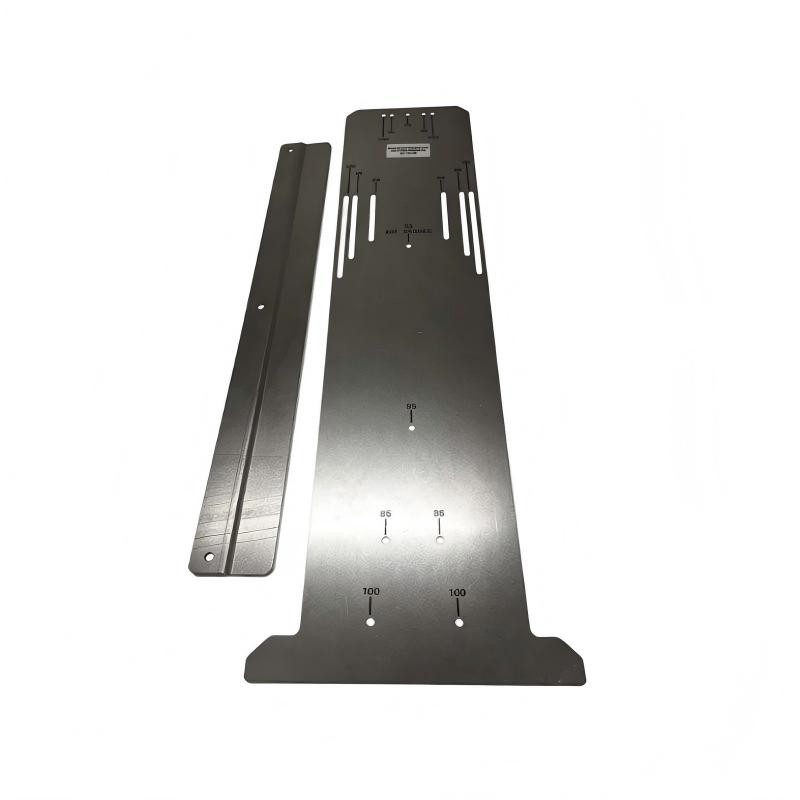
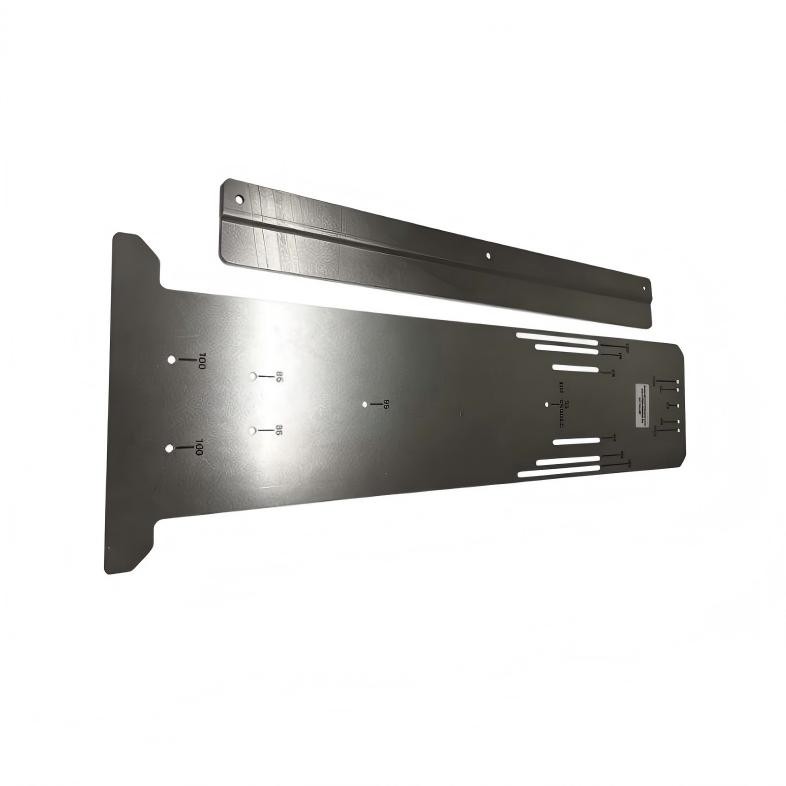
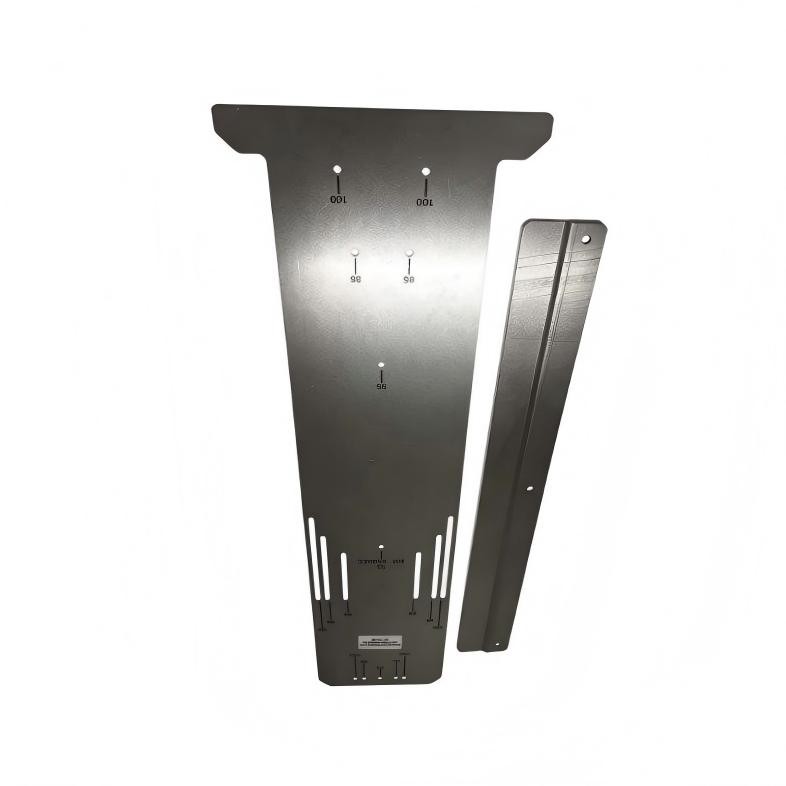
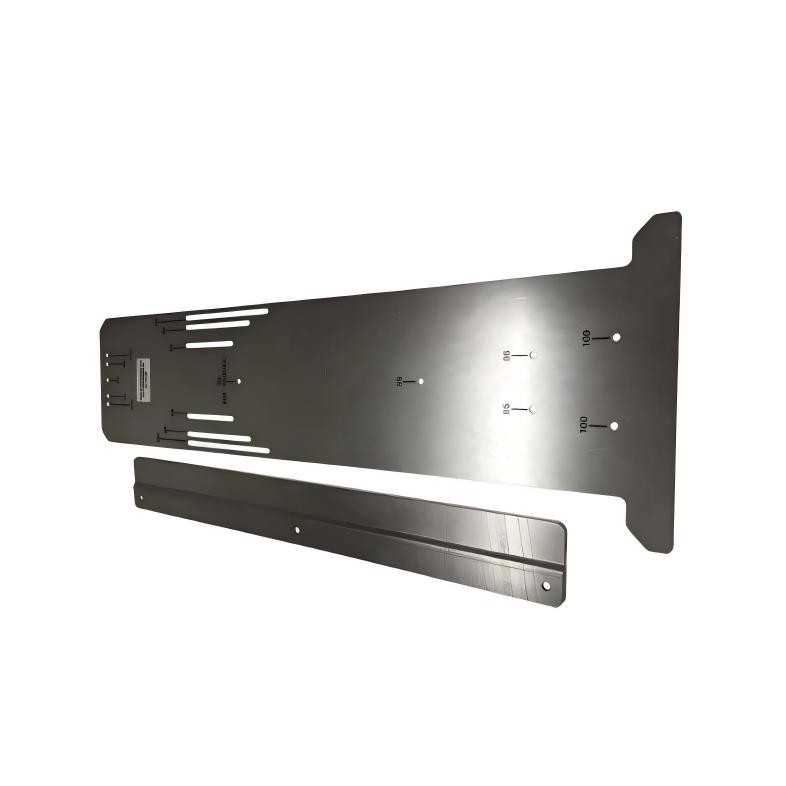
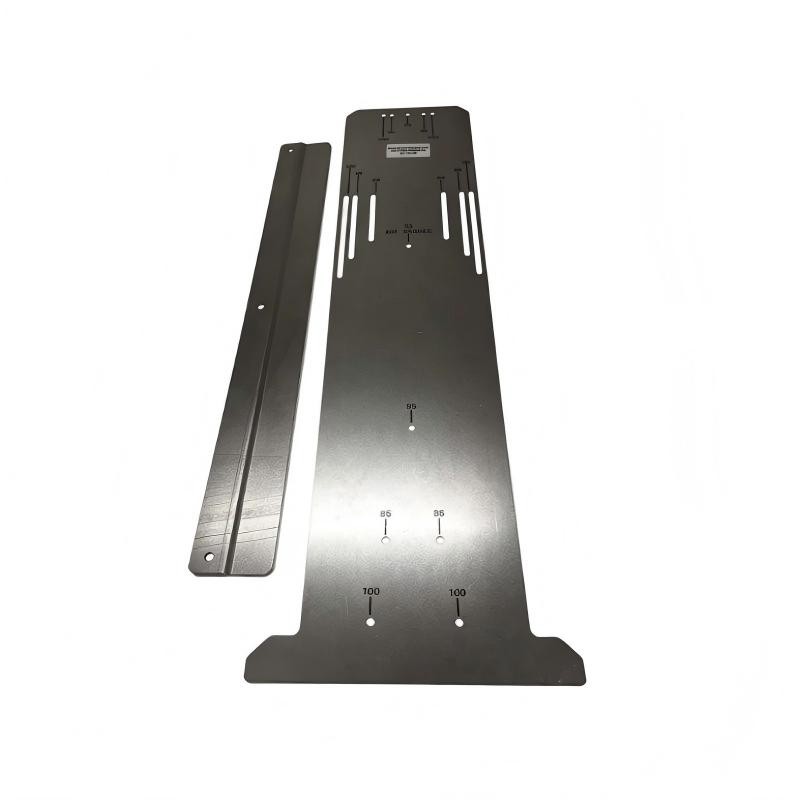
The Allen Bradley 2198-K5700-MOUNTKIT Kinetix 5700 System Mounting Toolkit is a panel-layout accessory used when installing Kinetix 5700 servo drive modules in an industrial control cabinet. Its purpose is to help technicians establish the correct mounting-hole positions before drilling the enclosure panel. Accurate hole placement is essential for assembling a drive system in which adjacent modules align correctly and their shared-bus connections fit as intended.
Unlike a servo drive, power supply, or electrical connector, this toolkit does not participate in machine control or carry operating power. It is used during the mechanical installation stage, when the cabinet layout is transferred to the mounting panel. The kit includes a drill-hole guide, a mounting bar, and two M4 thread-forming fasteners.
The mounting bar is installed horizontally on the panel. The drill-hole guide fits behind the bar and slides from side to side, allowing the installer to position the guide at the locations required by the selected drive modules. The holes and alignment slots on the guide correspond to different Kinetix 5700 module mounting patterns, including module widths of 165 mm, 220 mm, 275 mm, and 440 mm.
This arrangement is particularly useful in multi-axis servo cabinets. A machine may contain a DC-bus power supply, several single-axis or dual-axis inverters, and other compatible modules arranged in a shared-bus configuration. Their mounting positions must be planned as a coordinated group rather than marked independently. Even a small error in hole placement can make it difficult to engage the module alignment features or install the DC-bus links correctly.
The toolkit also helps reduce repeated manual measurements when a cabinet contains several drive modules. Instead of calculating and transferring every hole position separately, the installer can use the guide to establish the relevant positions along the mounting line. This is especially helpful when the system contains modules with different widths or requires a specific sequence of power supplies and inverters.
The tool does not replace the drive system’s mechanical layout instructions. The module arrangement, mounting-hole pattern, panel construction, bonding provisions, and clearance requirements still need to be established for the actual installation. Once the hole locations have been transferred to the panel and checked, the toolkit can be removed so that the drive modules can be mounted directly.
For panel builders and maintenance engineers, the main benefit is installation accuracy. Correctly positioned holes help the modules align with one another, maintain the intended spacing between shared-bus connectors, and reduce avoidable rework during cabinet assembly.
Technical Specifications
| Parameter | Specification |
|---|---|
| Manufacturer | Allen-Bradley |
| Model | 2198-K5700-MOUNTKIT |
| Product Type | Kinetix 5700 System Mounting Toolkit |
| Product Family | Kinetix 5700 Servo Drive Accessories |
| Accessory Category | Mounting and Drill-Hole Positioning Toolkit |
| Primary Function | Locating panel drill-hole positions for Kinetix 5700 drive modules |
| Main Components | Drill-hole guide and mounting bar |
| Included Fasteners | Two M4 thread-forming fasteners |
| Mounting Bar Orientation | Horizontal |
| Guide Movement | Slides horizontally behind the mounting bar |
| Supported Module Width Patterns | 165 mm, 220 mm, 275 mm, and 440 mm |
| Additional Hole Spacing References | 55 mm, 85 mm, and 100 mm module-width patterns |
| Intended Equipment | Compatible Kinetix 5700 drive modules |
| Electrical Function | None; installation tooling only |
| Dimensions | 584 × 3 × 132 mm |
| Weight | 1.36 kg |
Product Features
- Adjustable drill-hole positioning: The guide slides along the mounting bar to locate the required mounting positions for different drive modules.
- Multiple module-width patterns: Supports the hole-layout requirements associated with several Kinetix 5700 module widths.
- Shared-bus alignment support: Helps position mounting holes so that adjacent modules align and their DC-bus connections can be assembled correctly.
- Horizontal reference bar: Establishes a consistent reference line for transferring the drive layout to the cabinet panel.
- Reusable installation tooling: Can be used to lay out mounting positions for multiple modules during cabinet assembly.
- Included mounting fasteners: Supplied with two M4 thread-forming fasteners for the mounting-bar installation.
- Reduced measurement repetition: Helps simplify hole-position marking in multi-module servo systems.
- Installation-specific function: Supports mechanical preparation without becoming part of the energized drive system.
Working Principle
The 2198-K5700-MOUNTKIT works as a mechanical positioning aid. The mounting bar establishes a fixed horizontal reference on the cabinet panel, while the drill-hole guide moves along the bar to align its holes and slots with the required module mounting positions.
Cabinet Layout → Mounting Bar Installation → Drill-Hole Guide Positioning → Hole Marking → Panel Drilling
During installation, the technician first determines the planned position of the Kinetix 5700 drive system. The mounting bar is secured horizontally, and the drill-hole guide is inserted behind it. The guide can then be moved left or right to establish the mounting locations for the individual modules.
The guide contains different hole and slot positions for the supported module-width patterns. This allows the installer to account for the dimensions and mounting requirements of the selected modules without treating every unit as though it used the same hole spacing.
For example, a cabinet containing a DC-bus power supply and several servo inverters requires a mounting pattern that follows the complete drive arrangement. The installer can position the guide according to the module sequence and transfer the corresponding hole locations to the panel. Once the pattern has been checked, the panel can be drilled and prepared for the actual drive installation.
Accurate hole placement is particularly important in zero-stack configurations. The Kinetix 5700 system uses alignment features between adjacent modules, and the spacing between mounting positions affects the alignment of the DC-bus connectors. If the holes are misplaced, a module may not sit correctly against its neighbor, making it difficult to engage the intended mechanical features or fit the bus links.
The toolkit is therefore part of the mechanical preparation process rather than the electrical commissioning process. It establishes the panel geometry needed for subsequent mounting, but it does not determine the electrical order of the modules, configure the drive parameters, or verify the electrical integrity of the completed system.
After the hole pattern has been transferred and verified, the mounting bar and guide are removed as required by the installation procedure. The drive modules can then be secured to the prepared panel using the mounting hardware and procedures specified for the individual equipment.
Role in a Kinetix 5700 Cabinet Installation
The 2198-K5700-MOUNTKIT supports the mechanical layout stage of a Kinetix 5700 installation. Its position in the workflow comes before the drive modules, power supplies, and shared-bus connections are installed.
Panel Layout → Drill-Hole Positioning → Panel Preparation → Drive Mounting → Shared-Bus Assembly
| Installation Element | Function |
|---|---|
| Allen-Bradley 2198-K5700-MOUNTKIT | Establishes the required drill-hole positions |
| Control Cabinet Panel | Provides the mounting surface for the drive system |
| Mounting Bar | Creates a horizontal reference for the positioning guide |
| Drill-Hole Guide | Locates the hole positions associated with each module pattern |
| Kinetix 5700 DC-Bus Power Supply | Supplies the drive system’s DC-bus power |
| Kinetix 5700 Single-Axis Inverter | Controls a compatible servo motor axis |
| Kinetix 5700 Dual-Axis Inverter | Controls two compatible servo axes |
| Shared-Bus Connectors | Establish the intended electrical connections between compatible modules |
| Mounting Hardware | Secures the drive modules to the prepared panel |
| Cabinet Bonding Arrangement | Supports the required electrical bonding of the installed equipment |
The toolkit helps establish the physical arrangement, while the drive manuals and system design determine the final module sequence, wiring, bonding, and commissioning procedures.
Industrial Applications
| Application | Typical Use |
|---|---|
| Multi-Axis Servo Cabinets | Marking mounting positions for several Kinetix 5700 modules |
| Automated Packaging Lines | Preparing control panels for coordinated servo-driven mechanisms |
| Industrial Robotics Systems | Establishing the mounting layout for compatible in-cabinet servo modules |
| Material Handling Equipment | Positioning drive modules used for conveyor and transfer axes |
| Automated Assembly Machines | Preparing panels for multiple synchronized servo axes |
| Machine Tool Cabinets | Laying out drive and power-supply mounting patterns |
| Printing and Converting Equipment | Organizing the mechanical installation of multi-axis drive systems |
| Panel-Building Workshops | Standardizing the hole-marking process during cabinet fabrication |
| Servo System Expansion | Establishing mounting positions when adding compatible modules to a planned arrangement |
| Replacement Cabinet Assemblies | Reproducing a documented drive layout during panel rebuilding |
The toolkit is particularly useful when the mounting pattern includes modules of different widths. The actual hole locations must still follow the selected drive arrangement and the applicable installation documentation.
Installation and Maintenance
- Plan the module arrangement: Establish the intended order and mounting positions of the Kinetix 5700 power supplies and inverter modules before marking the panel.
- Prepare the mounting surface: Confirm that the cabinet panel is suitable for the drive system and that the required bonding and layout provisions have been considered.
- Establish the reference line: Mark the horizontal reference used to locate the upper mounting-hole positions according to the applicable installation instructions.
- Install the mounting bar: Secure the bar horizontally using the supplied fasteners and the specified installation procedure.
- Position the drill-hole guide: Insert the guide behind the mounting bar and confirm that it moves freely along the required range.
- Select the correct hole pattern: Match the guide positions to the module widths and mounting arrangements used in the planned system.
- Align each module position: Use the appropriate holes and slots to locate the mounting positions for each drive module.
- Mark the panel carefully: Transfer the hole locations to the panel and check the marks against the overall cabinet layout before drilling.
- Verify the complete pattern: Review the positions of adjacent modules to confirm that the intended alignment features and shared-bus connections can be accommodated.
- Drill the mounting holes: Use suitable tools and follow the required hole sizes and positions for the selected drive modules.
- Remove the positioning toolkit: Once the hole pattern is complete and checked, remove the guide and mounting bar as directed by the installation procedure.
- Inspect and store the kit: Check the guide, bar, and fasteners for damage or deformation, then store the toolkit so it remains available for subsequent panel installations.
If the drive modules do not align correctly during assembly, check the panel hole pattern and the mounting positions before forcing the modules together. Misalignment can affect the engagement of the mechanical alignment features and the fit of the shared-bus connectors.
Related Components
| Component | Function |
|---|---|
| Allen-Bradley 2198-K5700-MOUNTKIT | Positions the mounting holes for compatible Kinetix 5700 modules |
| Drill-Hole Guide | Transfers the required mounting-hole pattern to the panel |
| Mounting Bar | Provides the horizontal reference for the guide |
| M4 Thread-Forming Fasteners | Secure the mounting bar during the layout process |
| Kinetix 5700 DC-Bus Power Supply | Provides DC-bus power to the compatible drive system |
| Kinetix 5700 Single-Axis Inverter | Controls one compatible servo motor axis |
| Kinetix 5700 Dual-Axis Inverter | Controls two compatible servo motor axes |
| Kinetix 5700 Regenerative Bus Supply | Supports compatible drive systems requiring regenerative bus functionality |
| DC-Bus Link | Connects compatible modules in the shared DC-bus arrangement |
| Control Cabinet Panel | Supports the drive modules and their associated installation hardware |
Recommended Related Models
| Model / Product Reference | Product Type | Typical Application |
|---|---|---|
| Allen-Bradley 2198-K5700-MOUNTKIT | Kinetix 5700 System Mounting Toolkit | Locating mounting holes for compatible Kinetix 5700 modules |
| Allen-Bradley 2198-P031-ERS | Kinetix 5700 DC-Bus Power Supply | Supplying the DC bus in a compatible servo drive system |
| Allen-Bradley 2198-S086-ERS | Kinetix 5700 Single-Axis Inverter | Controlling a compatible single servo axis |
| Allen-Bradley 2198-D006-ERS | Kinetix 5700 Dual-Axis Inverter | Controlling two compatible servo axes |
| Allen-Bradley 2198-RP088 | Kinetix 5700 Regenerative Bus Supply | Supporting regenerative power handling in compatible systems |
Key Advantages
- Helps establish accurate mounting-hole positions before panel drilling.
- Supports several Kinetix 5700 module-width patterns.
- Reduces repeated manual measurements during multi-module installation.
- Helps maintain the alignment needed for shared-bus connections.
- Simplifies the mechanical preparation of servo drive cabinets.
- Can be reused for compatible system-layout work.
Technical FAQs
Why is the 2198-K5700-MOUNTKIT useful for a zero-stack Kinetix 5700 installation?
Zero-stack installations rely on correct positioning between adjacent modules. Accurate mounting-hole locations help the modules engage their alignment features and maintain the spacing required for DC-bus links. The toolkit helps transfer those mounting positions to the cabinet panel before the equipment is installed.
Which Kinetix 5700 module widths can the drill-hole guide accommodate?
The documented guide supports mounting patterns for 165 mm, 220 mm, 275 mm, and 440 mm module widths. The correct hole and slot positions must be selected according to the actual module and its installation requirements.
Does the 2198-K5700-MOUNTKIT remain installed after the servo drives are mounted?
No. It is an installation aid used to locate and mark the panel mounting holes. Once the layout work is complete, the toolkit is removed as directed by the installation procedure, and the drive modules are mounted to the prepared panel.
What should be checked if the DC-bus links do not align during assembly?
Check the mounting-hole positions, module spacing, and engagement of the alignment features. Incorrectly transferred hole locations can cause adjacent modules to sit out of alignment. The modules should not be forced together; the mounting layout should be corrected according to the applicable installation instructions.