

ProductPRODUCT
Featured products
Contact Us
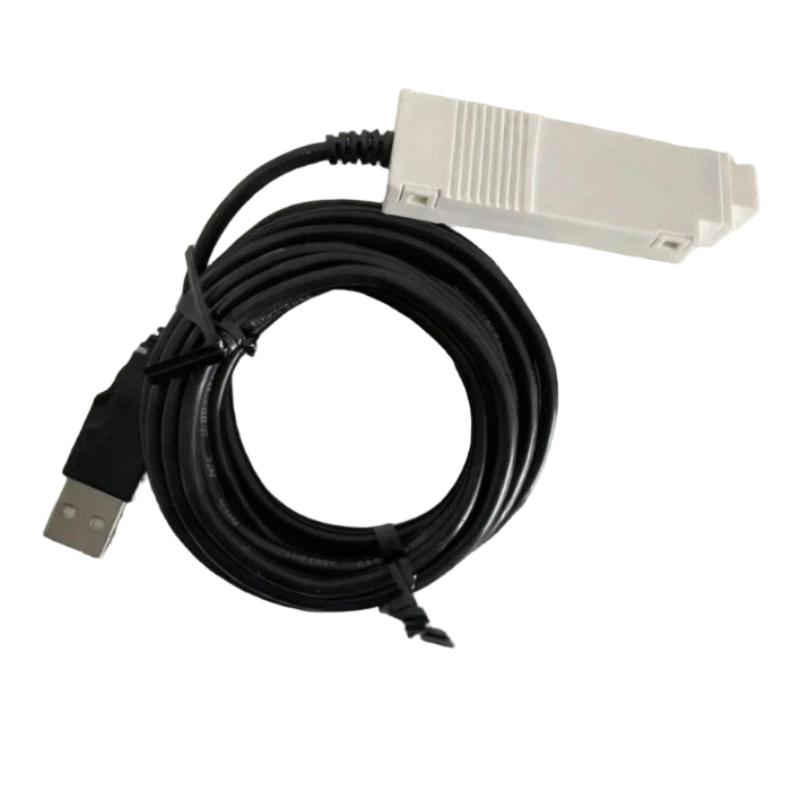
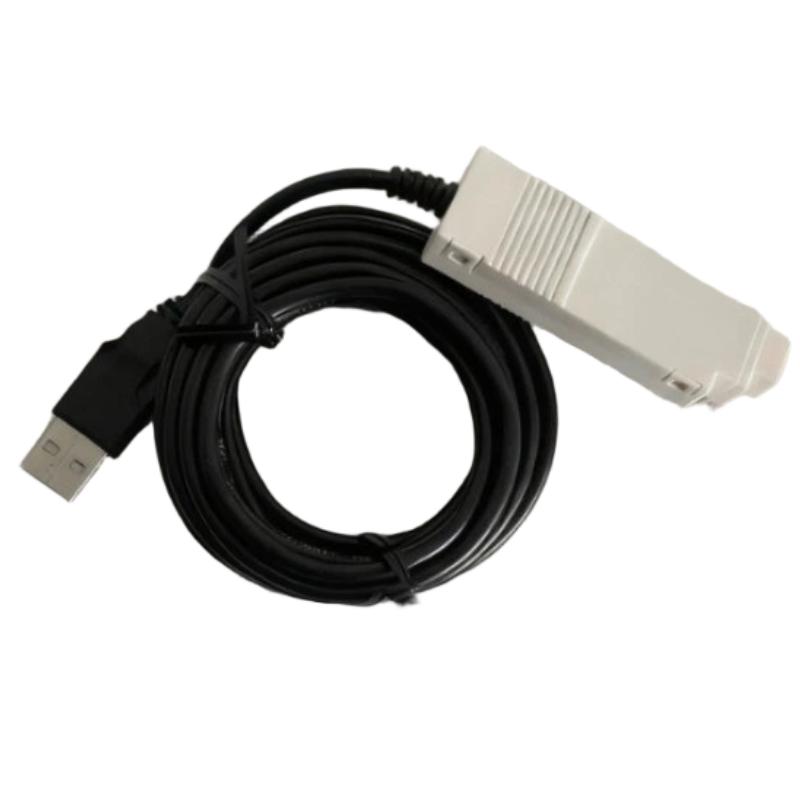
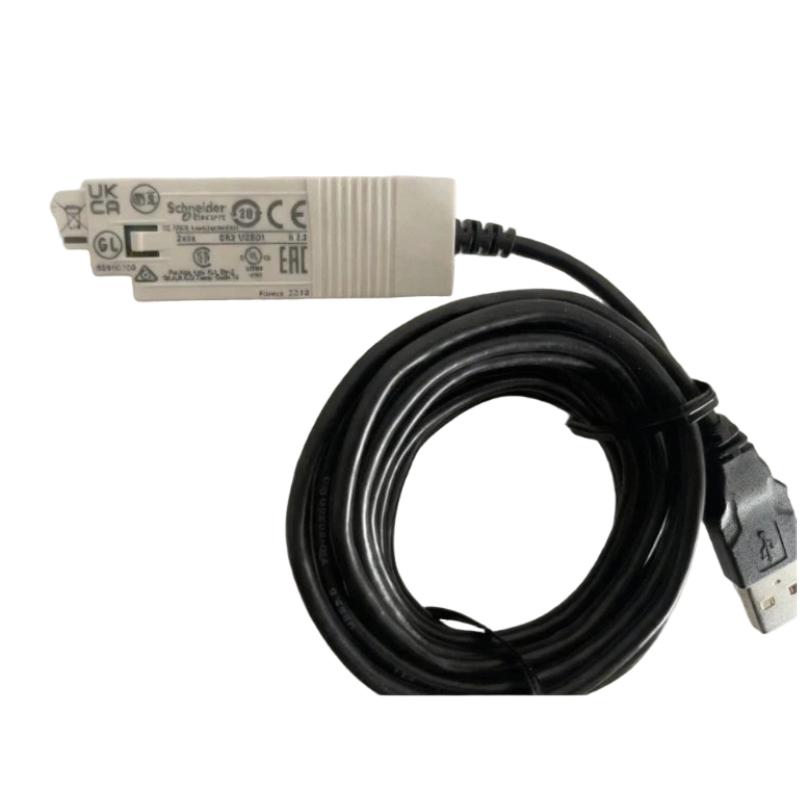
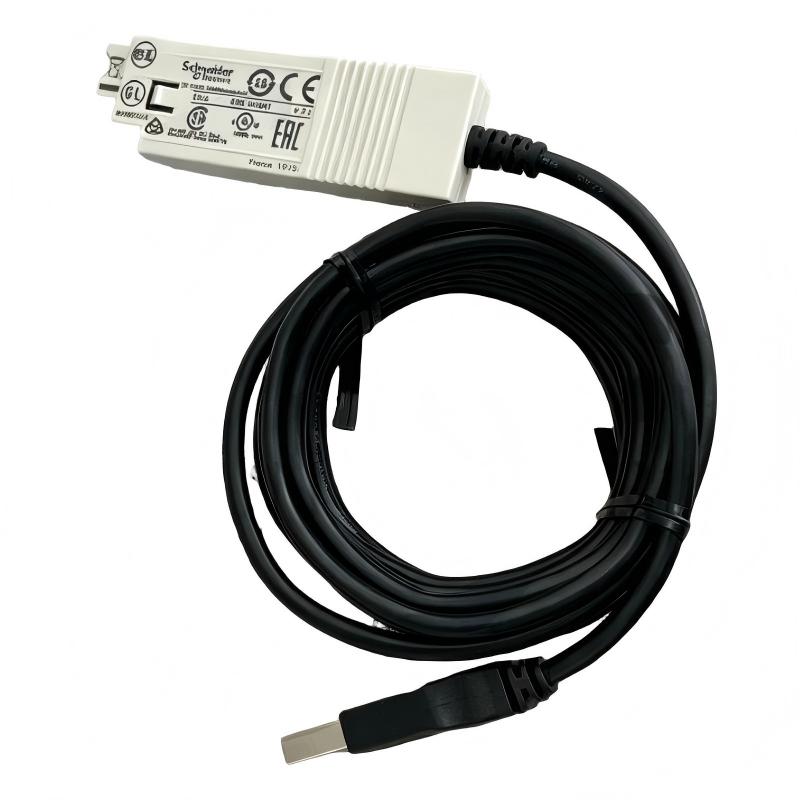
- Schneider
- SR2USB01
- USB PC Cable
- France
- 3 meters
- 0.1 kg
- Xiamen, China
- New & In Stock
- T/T, PayPal, Western Union
- 1 Year
- 1-3 Working Days
- DHL, UPS, TNT, FedEx and EMS.
- 24-Hour Service
- COO
- 5
Our advantage

Global Logistics
We have a 10-year logistics and express cooperation agreement, so our products can be shipped to any place in the world.

Brand new and original
Our products are imported in bulk from the place of origin. Because of the cooperative relationship, our products are all original and 100% new.

24-hour service
We provide 7*24 hours service to our customers. We will be there whenever you need us.

Price advantage
All our products are priced very favorably because we have our own warehouse and supply.
| Company Information | |||
| [email protected] | |||
| Mobile | +8615980777398 | ||
| +8615980777398 | |||
| 15980777398 |
Product Overview
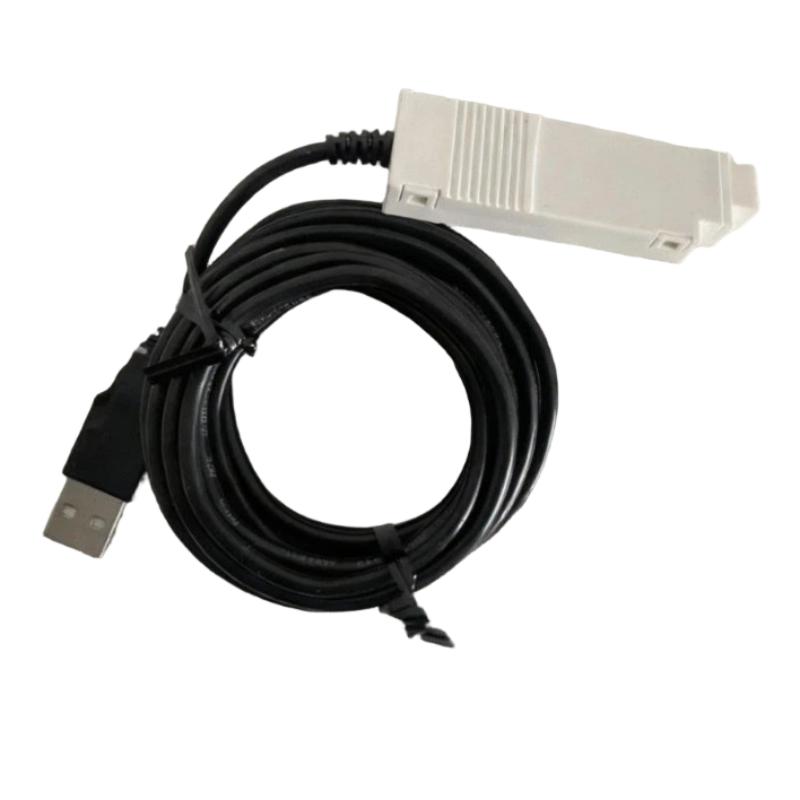
The Schneider Electric SR2USB01 USB PC Cable is a programming and communication accessory designed for connecting a compatible personal computer to supported Schneider Electric automation devices. In industrial automation environments, a dedicated PC connection cable is an important tool for configuring controllers, transferring application programs, performing maintenance, and supporting equipment diagnostics.
The SR2USB01 is associated with Schneider Electric’s Zelio Logic smart relay ecosystem, which is commonly used in compact automation applications involving simple machine control, lighting management, pump control, and small equipment sequencing. A suitable programming connection allows engineers and technicians to work with compatible devices through their engineering software without relying on manual configuration alone.
Unlike ordinary USB cables intended primarily for general-purpose data transfer or charging, an automation programming cable must be compatible with the target device’s physical interface and communication requirements. Using the correct cable helps establish the intended connection between a PC and the supported controller or smart relay.
The Schneider Electric SR2USB01 has a specified cable length of 3 meters and a listed weight of 0.1 kg. Its length provides practical flexibility when connecting a laptop or desktop computer to automation equipment located inside or near a control cabinet. The cable can be useful during commissioning, application updates, troubleshooting, and routine maintenance.
Before using the SR2USB01, technicians should verify that the target device supports this cable and that the installed programming software is compatible with the controller model and firmware version.
Technical Specifications
| Parameter | Specification |
|---|---|
| Manufacturer | Schneider Electric |
| Model Number | SR2USB01 |
| Product Type | USB PC Programming Cable |
| Product Category | Automation Programming and Communication Accessory |
| Primary Function | PC connection for compatible Schneider Electric devices |
| Interface Category | USB-based PC connection |
| Cable Length | 3 meters |
| Weight | 0.1 kg |
| Typical Application | Programming, configuration, and maintenance |
| Associated Product Family | Schneider Electric Zelio Logic smart relays, subject to compatibility verification |
| Target Device Interface | Confirm according to the supported device |
| Programming Software | Confirm according to the controller model |
| Driver Requirements | Verify according to the connected device and computer environment |
| Installation | Direct connection between a compatible PC and supported automation hardware |
The table includes the supplied cable length and weight. Connector details, supported operating systems, driver requirements, and exact device compatibility should be verified before use rather than inferred from the product name.
What Is the Schneider Electric SR2USB01?
The SR2USB01 is a PC programming cable intended for use with compatible Schneider Electric automation equipment. It provides a physical connection between a computer and a supported device, allowing engineering software to communicate with the target hardware.
In small automation systems, smart relays are often used to implement control logic without requiring a larger programmable logic controller for every application. Depending on the device, technicians may need to create or modify a control program, review settings, transfer a project, or diagnose an operating issue.
A compatible programming cable supports this workflow by linking the engineering computer to the device’s designated programming interface.
A typical connection arrangement can be represented as:
Engineering PC → SR2USB01 Cable → Compatible Schneider Electric Device → Automation Application
The exact connection procedure depends on the target device, the programming software, and the interface supported by the hardware.
Function and Working Principle
1. Establishing a PC-to-Device Connection
The SR2USB01 provides the physical connection required for communication between a compatible computer and supported automation hardware. Once connected correctly, the programming environment can attempt to identify the target device and establish communication.
The cable alone does not guarantee that communication will be available. Device compatibility, software configuration, computer permissions, and any required drivers must also be correct.
2. Supporting Program Transfer
For supported controllers or smart relays, a programming connection may be used to transfer an application from the engineering computer to the automation device. This allows technicians to implement new control logic or update an existing program.
Before transferring a program, users should verify the target device, confirm the correct project version, and follow the applicable procedure for preserving or backing up existing application data.
3. Enabling Configuration Work
Depending on the connected device and software, the PC connection may allow users to access supported configuration parameters, inspect project settings, or perform other engineering tasks.
The functions available through the cable are determined by the target hardware and software rather than by the cable itself.
4. Assisting Maintenance and Troubleshooting
A programming connection can help maintenance personnel determine whether a device is accessible through its engineering interface. Where supported, technicians may use the software to inspect configuration information, review operating status, or perform diagnostic procedures.
This can help distinguish programming or configuration problems from issues involving field wiring, power supplies, sensors, or controlled equipment.
5. Supporting Commissioning Activities
During commissioning, the cable can provide a convenient connection between the computer and the automation device. Engineers may use the supported programming environment to verify an application, transfer an approved project, and confirm that the configured logic behaves as intended.
All changes should be validated before the equipment is returned to normal operation.
Role in Industrial Automation
Programming cables are important accessories in automation systems because they provide a direct engineering interface for supported devices. While controllers and smart relays execute the application logic, the programming connection allows technicians to create, maintain, and update that logic.
The SR2USB01 can support several stages of an automation project’s lifecycle:
- Engineering: Connecting a PC to compatible automation hardware.
- Programming: Transferring supported application projects.
- Configuration: Accessing available device settings through the approved software.
- Commissioning: Verifying program loading and device communication.
- Maintenance: Supporting authorized changes and troubleshooting.
- Replacement: Assisting with setup of a compatible replacement device.
For facilities using compact relay-based automation, a suitable programming cable can reduce the effort required to connect engineering tools to the installed equipment.
Industrial Applications
Zelio Logic Smart Relay Programming
The SR2USB01 is associated with Schneider Electric’s Zelio Logic smart relay environment. Where the target model is confirmed as compatible, a programming cable can support the connection between a PC and the smart relay for applicable engineering operations.
Typical smart relay applications include small machines, simple control panels, auxiliary automation, and equipment requiring straightforward programmable logic.
Building and Lighting Control
Compact automation devices may be used for lighting sequences, timed switching, ventilation control, and other building-related functions. A compatible programming connection can assist with commissioning and later changes to the control logic.
Pump and Auxiliary Equipment Control
Small pumping installations and auxiliary equipment may use smart relays for basic sequencing and operating conditions. The programming cable can support configuration and maintenance when the installed controller supports the connection.
Small Machine Automation
Packaging auxiliaries, compact production machines, workshop equipment, and other small automated systems may use smart relays to implement simple control sequences. A suitable PC cable allows technicians to work with the supported programming environment.
Maintenance and Service Workshops
Service engineers may use a programming cable when inspecting, updating, or replacing compatible devices. A dedicated cable can be a useful item in a maintenance kit, particularly where the installed equipment uses a specific programming interface.
System Commissioning
During installation of new equipment, a programming connection may be required to transfer the approved project and verify the configuration of a supported controller or smart relay.
Installation and Connection Guide
Correct connection helps prevent communication failures and reduces the risk of interrupting an operating automation system.
Confirm Device Compatibility
Before connecting the SR2USB01, verify the exact model of the Schneider Electric device. Check the designated programming connector and confirm that the target equipment supports this cable.
Do not assume that every Schneider Electric PLC, smart relay, or controller uses the same programming cable.
Prepare the Engineering Computer
Install or open the appropriate Schneider Electric programming software for the target device. Verify software compatibility and any required drivers or operating-system permissions.
If the software cannot identify the cable or target device, consult the relevant device-specific installation procedure rather than assuming that the cable is defective.
Inspect the Cable
Before use, inspect the cable and connectors for visible damage, bent contacts, contamination, or signs of excessive strain. Do not use a cable with damaged insulation or connectors.
The SR2USB01 has a specified length of 3 meters, which should be sufficient for many local programming tasks. Plan the cable route to avoid sharp edges, hot surfaces, moving machinery, and locations where the cable could be crushed.
Connect to the Correct Interface
Connect the cable to the PC and to the designated programming interface on the compatible automation device. Confirm that each connector is fully seated and that the connection follows the device’s installation instructions.
Do not force a connector into a port that does not match its shape or interface requirements.
Establish Communication
Launch the applicable engineering software and select the correct device or communication settings. Follow the software’s procedure for connecting to the controller.
If communication cannot be established, verify the device model, connection, software version, driver status, and any required interface settings.
Transfer or Verify the Application
Before writing a program to the target device, confirm that the correct project is open and that any existing application has been backed up when required. After the operation, verify the reported transfer result and check the device’s behavior using the approved commissioning procedure.
Avoid making unapproved changes to equipment that is controlling active machinery or critical processes.
Disconnect Safely
When programming work is complete, follow the device’s recommended disconnection procedure. Remove the cable by holding the connector rather than pulling on the wire, and store it in a clean, dry location.
Troubleshooting the SR2USB01 USB PC Cable
If the computer cannot communicate with the connected automation device, investigate the entire connection path. The cause may be the cable, the PC interface, the programming software, a driver, the target device, or an incorrect configuration.
1. PC Does Not Recognize the Connection
Possible causes include:
- A loose or damaged connector
- An unavailable or incompatible driver
- A USB port problem
- An unsupported cable or target device
- An operating-system permission issue
- A cable fault
Recommended checks: Disconnect and reconnect the cable according to the device instructions, inspect both connectors, test a suitable computer port, and verify driver requirements. Confirm that the cable is supported by the target device.
2. Programming Software Cannot Find the Device
The cable may be physically connected while the engineering software still cannot establish communication.
Potential causes include incorrect device selection, incompatible software, a wrong connection setting, or an unsupported target model.
Recommended checks: Confirm the exact controller or smart relay model, select the appropriate target device in the software, and review the supported communication procedure. Check whether the device is powered and ready for programming.
3. Communication Is Intermittent
Intermittent communication may result from loose connectors, cable damage, excessive mechanical strain, a faulty computer port, or an unstable connection at the target device.
Recommended checks: Inspect the cable along its full length, ensure the connectors are secure, and remove unnecessary tension from the connection. If possible, test with a known-compatible computer and device to isolate the source of the problem.
4. Program Transfer Fails
A failed transfer may be caused by incorrect project selection, incompatible software or hardware versions, interrupted communication, or an operation that is not supported by the target device.
Recommended checks: Confirm the target model and project compatibility, check the software’s error message, and verify the connection before repeating the operation. Back up existing program data whenever applicable.
5. Cable Appears Damaged
Visible damage to the insulation, connectors, or cable body may cause intermittent operation or complete communication failure.
Recommended checks: Stop using a damaged cable. Replace it with a verified compatible unit rather than attempting an improvised repair that could create further communication or equipment problems.
Maintenance and Storage Recommendations
Although a programming cable does not contain the control logic of the connected device, proper handling helps preserve its reliability.
Inspect Before Use
Check the cable and connectors for damage, dirt, corrosion, and signs of strain before connecting it to automation hardware.
Avoid Excessive Bending
Do not sharply bend the cable near its connectors or place heavy objects on it. Repeated mechanical stress can damage internal conductors even when the outer insulation appears intact.
Keep Connectors Clean
Protect the connectors from dust, moisture, oil, and other contaminants. Avoid inserting damaged or contaminated connectors into the computer or controller interface.
Use Appropriate Cable Routing
Keep the cable away from hot equipment, moving machinery, sharp cabinet edges, and locations where it could be pinched. During temporary programming work, secure the cable to reduce accidental disconnection.
Store Correctly
After use, coil the cable loosely and store it in a clean, dry location. Avoid tight loops, heavy compression, and conditions outside the manufacturer’s storage recommendations.
Maintain Accessory Records
For industrial maintenance teams, recording the cable model and its intended compatible devices can help prevent confusion with similar-looking programming accessories. Keeping a verified cable available can also reduce delays during commissioning or troubleshooting.
Compatible System Components
The SR2USB01 is a connection accessory rather than a standalone controller. Its use depends on compatible computer hardware, engineering software, and a supported Schneider Electric target device.
| Component Category | Function |
|---|---|
| Engineering PC | Runs the applicable programming software |
| SR2USB01 USB PC Cable | Provides the physical PC-to-device connection |
| Compatible Schneider Electric Smart Relay | Target device for supported programming operations |
| Programming Software | Creates, transfers, or maintains supported applications |
| Required Drivers | Enable the appropriate computer-side connection where necessary |
| Device Power Supply | Powers the target automation device |
| Control Panel | Houses the connected automation equipment |
| Application Project File | Contains the program or configuration used by the target device |
The exact target devices, software versions, and driver requirements should be confirmed before use. Compatibility should not be inferred from a shared manufacturer name alone.
Replacement and Procurement Considerations
When purchasing a replacement Schneider Electric SR2USB01 USB PC Cable, verify the complete model designation and intended use.
Important checks include:
- Exact model number: SR2USB01
- Cable length: 3 meters
- Listed weight: 0.1 kg
- Connector compatibility
- Supported Schneider Electric target devices
- Programming software requirements
- Driver and operating-system requirements
- Cable and connector condition
- Packaging and storage condition
A generic USB cable should not automatically be treated as an equivalent replacement. Programming accessories can differ in their connector arrangement, interface implementation, and supported target devices.
If the cable is intended for a specific Zelio Logic smart relay or another Schneider Electric device, verify compatibility against that exact device model before ordering.
Key Advantages
Dedicated Programming Accessory
The SR2USB01 is intended for PC connectivity with compatible Schneider Electric automation equipment, supporting a defined programming and maintenance workflow.
Practical Cable Length
The 3-meter cable length provides flexibility for connecting a computer to nearby equipment during commissioning and service work.
Lightweight Construction
With a listed weight of 0.1 kg, the cable is convenient to carry as part of a technician’s programming and maintenance kit.
Supports Engineering Tasks
Where the target device is compatible, the cable can assist with application transfer, configuration, and troubleshooting through the supported engineering software.
Useful for Maintenance Planning
Maintaining a verified programming cable helps service teams prepare for planned controller changes, commissioning activities, and troubleshooting tasks.
Technical FAQs
What is the Schneider Electric SR2USB01?
The SR2USB01 is a USB PC programming cable designed for connecting a computer to compatible Schneider Electric automation equipment.
What is the cable length?
The specified cable length is 3 meters.
How much does the SR2USB01 weigh?
The listed weight is 0.1 kg.
What is the primary function of the SR2USB01?
Its primary purpose is to provide a PC connection for supported programming and maintenance operations on compatible automation devices.
Can the SR2USB01 be used with any Schneider Electric PLC?
No. Compatibility depends on the target device’s programming interface and the manufacturer’s supported connection requirements. Verify the exact controller or smart relay model before use.
Does the cable work without programming software?
The cable provides the physical connection, but actual programming and device communication generally require the appropriate software and any required drivers or configuration.
What should be checked if the PC cannot communicate with the device?
Check the cable connections, target-device compatibility, computer port, required drivers, software version, device power, and communication settings.
Can a standard USB cable replace the SR2USB01?
Not necessarily. A standard USB cable may not provide the interface required by the target automation device. Use a verified compatible cable.
How should the cable be maintained?
Inspect it regularly, avoid sharp bends and excessive tension, protect the connectors from contamination, and store it in a clean, dry location.
Conclusion
The Schneider Electric SR2USB01 USB PC Cable is an automation programming accessory designed to connect a computer with compatible Schneider Electric devices. It supports engineering and maintenance workflows in which technicians need to access a supported programming interface for configuration, application transfer, commissioning, or troubleshooting.
With a specified cable length of 3 meters and a listed weight of 0.1 kg, the SR2USB01 is practical for local connection tasks in control panels and industrial service environments. Its successful use depends on confirming target-device compatibility, installing the appropriate software, and following the correct connection procedure.
For procurement and replacement, verify the complete SR2USB01 model number and confirm that the intended Schneider Electric device supports the cable. Correct compatibility checks, careful handling, and proper storage help ensure that this programming accessory remains available when engineering and maintenance work is required.