
NewsNEWCENTER
Featured products
Contact Us
Allen-Bradley 1606-XLS480E-3/A Power Supply Troubleshooting and Fault Diagnosis Guide
2026-10-19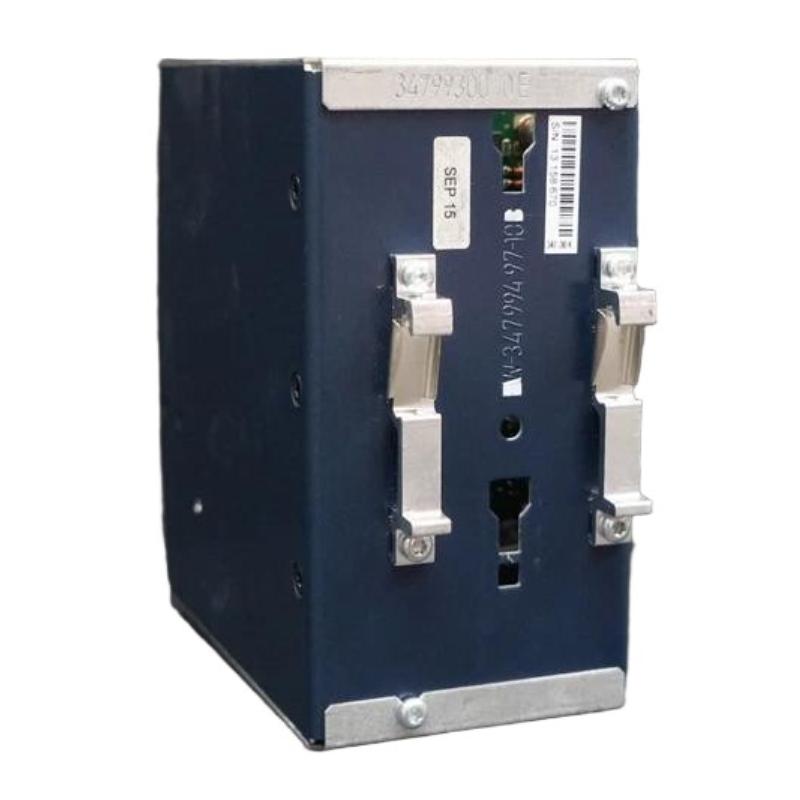
The Allen-Bradley 1606-XLS480E-3/A Power Supply is used in industrial automation systems to provide regulated DC power for control equipment, PLCs, sensors, relays, and other electrical devices. When a power supply experiences unstable output, overload, overheating, or unexpected shutdown, connected automation equipment may stop operating correctly.
This guide explains practical troubleshooting procedures for the Allen-Bradley 1606-XLS480E-3/A, including input power checks, DC output measurements, overload diagnosis, wiring inspection, thermal issues, and replacement considerations. The related 1606-XLS480E-3 base model is rated at 480W, 24V DC, and 20A, with an adjustable output range of 24–28V DC. Verify the full catalog number and nameplate of the installed unit before applying model-specific ratings or procedures.
Table of Contents
- Common Fault Symptoms
- Safety Before Troubleshooting
- Input Power Problems
- Low or Missing DC Output
- Overload and Excessive Current
- Unstable Output Voltage
- Overheating and Thermal Shutdown
- DC OK Status Problems
- Step-by-Step Diagnostic Workflow
- Repair and Replacement Decisions
- Frequently Asked Questions
- Technical Summary
1. Common Fault Symptoms
A malfunctioning industrial power supply may produce several different symptoms. Correct diagnosis requires separating an actual power supply fault from input distribution problems, wiring defects, and faults in downstream equipment.
| Observed Symptom | Possible Cause | Recommended Initial Check |
|---|---|---|
| No DC output | Missing input supply, incorrect input wiring, protection device operation, or internal failure | Verify the input source and protective devices |
| Low output voltage | Excessive load, short circuit, loose terminals, or voltage drop | Measure output at the supply and inspect the load circuit |
| Output fluctuates | Intermittent input, unstable load, loose connections, or thermal problems | Check input stability and load current |
| Power supply runs hot | High ambient temperature, blocked airflow, overload, or unsuitable installation | Inspect ventilation and operating conditions |
| PLC or I/O modules reset | DC voltage dips, excessive startup current, or poor distribution wiring | Measure voltage during startup and normal operation |
| DC OK status is abnormal | Output outside the acceptable status range, wiring problem, or status-contact circuit fault | Measure output voltage and test the monitoring circuit |
| Protective device trips | Input wiring fault, unsuitable protection, or an electrical fault | Inspect the circuit after safely isolating power |
These symptoms are diagnostic starting points rather than proof of a specific internal failure. Do not replace a power supply solely because connected equipment has stopped operating.
2. Safety Before Troubleshooting
The 1606-XLS480E-3 base model is designed for a high-voltage three-phase input. The associated input circuit can present a serious electric shock and arc-flash hazard. Its output is low voltage, but it can deliver substantial current into a short circuit.
- Only qualified electrical personnel should perform electrical fault diagnosis.
- Isolate hazardous energy and apply lockout/tagout procedures before handling conductors or terminals.
- Verify the absence of hazardous voltage using a properly rated meter and an approved test procedure.
- Account for stored energy and follow the required discharge and waiting procedures.
- Never loosen, insert, or remove conductors while the circuit is energized.
- Do not bypass protective devices, interlocks, or safety circuits to keep the equipment running.
- Do not open or attempt component-level repair of the power supply unless an authorized service procedure explicitly permits it.
Live measurements, when necessary, must be performed only by qualified personnel using appropriate instruments, protective equipment, and site-approved procedures. If safe testing conditions cannot be established, stop and arrange professional inspection.
3. Diagnosing Input Power Problems
3.1 Confirm the Correct Input Voltage
The related 1606-XLS480E-3 base model uses a three-phase 380–480V AC input at 47–63Hz. The manufacturer’s published specifications also identify a high-voltage DC operating range for the base model. Confirm the permitted input type and range on the exact unit before testing or reconnecting it.
Do not confuse this three-phase version with the similarly named 1606-XLS480E, which has a different AC input range. Connecting a unit to an incompatible supply can cause immediate damage or create a hazardous condition.
3.2 Inspect Upstream Protection
If the power supply has no output, check the upstream circuit breaker, fuse, disconnect, and supply distribution system. A tripped protective device may indicate an input fault, a wiring error, or a problem elsewhere in the circuit.
- Isolate the circuit and verify that it is safe to inspect.
- Check the status of the upstream protective device.
- Inspect accessible wiring and terminals for visible damage or overheating.
- Determine why a fuse or breaker operated before attempting to restore power.
- Use only protection devices and ratings approved for the installation.
Do not repeatedly reset a breaker or replace a fuse without identifying the underlying cause.
3.3 Check for Intermittent Supply Conditions
If the power supply starts and stops intermittently, investigate unstable incoming power, loose upstream connections, or a protective device that operates under load. Review whether the problem coincides with motor starts, switching operations, or other large electrical loads in the same installation.
If the input supply is confirmed to be within the specified range and the fault remains, proceed to output-side diagnosis.
4. Diagnosing Low or Missing DC Output
4.1 Measure the Output Voltage
The related base model provides a nominal 24V DC output adjustable within 24–28V DC. Compare the measured voltage with the required operating range of the connected equipment and the supply’s approved specifications.
Record the measurement at the power supply and, where safe and appropriate, at the affected load. A normal voltage at the source but a low voltage at the load points toward a possible distribution problem rather than an immediate power supply failure.
4.2 Inspect Output Wiring
Loose terminals, damaged conductors, incorrect polarity, undersized cables, and poor distribution connections can cause low voltage or intermittent equipment resets.
- Inspect the positive and negative DC conductors after isolating power.
- Look for discolored insulation, damaged terminals, or loose cable restraints.
- Verify conductor sizes against the load current and cable length.
- Confirm that polarity matches the markings on the power supply and connected devices.
- Check branch fuses and distribution terminals for signs of damage.
Follow the specified terminal preparation and connection procedure when correcting wiring. Do not apply arbitrary tightening torque to spring-clamp terminals.
4.3 Isolate a Suspected Downstream Fault
A short circuit or defective load may cause the output to fall or prevent connected equipment from starting correctly. After isolating hazardous energy, use the approved procedure to disconnect downstream branches and inspect them individually.
- Document the original wiring before disconnecting any branch.
- Isolate the supply and verify a safe condition.
- Inspect the branches for wiring errors, damaged devices, and short circuits.
- Disconnect only the circuits permitted by the system maintenance procedure.
- Restore power under controlled conditions after the fault has been corrected.
- Reconnect branches systematically while monitoring the system for recurrence.
Never disconnect or reconnect live DC conductors as a troubleshooting shortcut. If the output returns after a defective branch is removed, investigate that branch before returning the system to service.
5. Diagnosing Overload and Excessive Current
The 1606-XLS480E-3 base model is rated for 20A at 24V DC and 480W. The published specifications also identify a short-duration reserve capability of up to 30A for approximately four seconds under specified conditions. This temporary reserve must not be treated as a continuous operating rating.
5.1 Calculate the Connected Load
Add the normal current consumption of all connected devices. Include startup demand from relays, actuators, capacitive loads, and other equipment where relevant. Confirm that both the total load and transient demand remain within the unit’s permitted operating conditions.
5.2 Look for Recent System Changes
If an overload begins after a control cabinet modification, check whether new devices have been added or existing equipment has been replaced with higher-current versions. Review the load calculation, branch protection, and power distribution design.
5.3 Investigate Repeated Shutdowns
Repeated loss of output may indicate an overload, short circuit, unstable input, excessive temperature, or an internal power supply fault. Remove the underlying cause before returning the unit to normal operation. Do not increase protection-device ratings or alter the output setting simply to suppress an overload symptom.
6. Diagnosing Unstable Output Voltage
Unstable DC output can cause PLC restarts, communication interruptions, relay chatter, sensor faults, and unexpected machine stops. The cause may be electrical, thermal, or load-related.
6.1 Check Voltage at Different Operating Conditions
Compare the output during idle operation, normal load, and equipment startup. If the voltage dips only when a particular device starts, investigate its startup current and the capacity of the associated branch circuit.
6.2 Check Cable Voltage Drop
Long or undersized conductors can produce a measurable difference between the supply terminals and remote loads. Review cable length, conductor cross-section, current demand, and terminal condition. Correct the distribution design rather than raising the supply voltage beyond the permitted range of connected equipment.
6.3 Review Grounding and Signal Wiring
Improper protective earthing, poor bonding, or unsuitable routing of power and signal conductors can contribute to electrical interference and unreliable control signals. Inspect the cabinet grounding arrangement and follow the equipment manufacturer’s wiring recommendations. Protective earth must never be removed as a troubleshooting experiment.
7. Diagnosing Overheating and Thermal Problems
Excessive temperature can reduce service life and may cause abnormal operation. The base model has published temperature derating requirements, so operation at elevated ambient temperatures can reduce the available output capacity.
7.1 Inspect Airflow
- Check whether ventilation openings are blocked by wiring ducts or nearby components.
- Inspect the cabinet for dust accumulation and restricted air circulation.
- Review the distance between the power supply and nearby heat-producing equipment.
- Confirm that the installation orientation and clearances comply with the applicable instructions.
7.2 Verify Load and Ambient Temperature
Record the cabinet ambient temperature and the connected load. If the supply is operating near its rated capacity in a hot enclosure, assess the manufacturer’s derating requirements. Reducing unnecessary load or improving cabinet cooling may resolve the issue when the power supply itself is functioning correctly.
7.3 Identify Physical Damage
Burn marks, melted insulation, a persistent electrical odor, or visibly damaged terminals are reasons to stop operation and isolate the equipment. Do not return a visibly damaged unit to service simply because its output temporarily appears normal.
8. Diagnosing DC OK Status Problems
The related 1606-XLS480E-3 base model includes a DC OK relay contact that can be used to monitor the power supply’s status. An abnormal status signal may indicate an output problem, but it can also result from incorrect monitoring-circuit wiring or a failed input to the PLC.
8.1 Compare the Status with Actual Output
Confirm the DC output measurement and compare it with the status reported by the monitoring system. If the output is within its expected range but the PLC reports a fault, inspect the relay-contact circuit, cable continuity, input configuration, and PLC logic.
8.2 Verify Contact Ratings and Wiring
Use the exact unit’s terminal markings and approved documentation to identify the status contact. Confirm that the contact is used within its permitted voltage and current ratings. Do not assume terminal numbers or contact behavior based on another model.
8.3 Avoid Bypassing Alarms
Do not force a PLC input or disable an alarm to conceal a persistent DC OK fault. Determine whether the problem lies in the power supply, the status wiring, or the control logic before restoring normal operation.
9. Step-by-Step Diagnostic Workflow
Use the following sequence to organize fault investigation and reduce unnecessary component replacement.
- Record the symptom: Note whether the output is absent, low, unstable, or interrupted under load.
- Verify the exact model: Confirm the full catalog number and nameplate input and output ratings.
- Check the upstream circuit: Review the supply source and protective devices using approved safe-work procedures.
- Inspect the installation: Look for damaged wiring, loose connections, blocked airflow, and signs of overheating.
- Measure DC output: Compare source and load voltage with the system requirements.
- Review the load: Calculate total current and identify any recent additions or abnormal startup demands.
- Investigate downstream branches: Isolate suspected faults only after hazardous energy has been removed.
- Check status monitoring: Compare the DC OK contact state with the measured output and PLC indication.
- Evaluate the power supply: If input, wiring, load, and environmental conditions are correct but the fault persists, arrange replacement or authorized evaluation.
- Document the outcome: Record measurements, corrective actions, and the results of the final operational test.
Illustrative Diagnostic Flow
Power supply fault reported
          |
          v
Verify model and isolate hazards
          |
          v
Check input supply and protection
          |
          v
Measure DC output safely
          |
     +----+----+
     |         |
 Output OK   Output abnormal
     |         |
Check load,   Inspect input, wiring,
status wiring and load conditions
     |         |
     +----+----+
          |
          v
Correct identified fault
          |
          v
Controlled restart and verification
          |
          v
Record results and release equipment
This flow is a general troubleshooting aid, not a manufacturer-specific internal fault tree. Follow the approved site procedure whenever it imposes additional safety or testing requirements.
10. Repair and Replacement Decisions
Industrial switching power supplies contain internal electronic components that can be damaged by overvoltage, excessive temperature, short circuits, or component aging. Internal repairs should be performed only by an authorized service provider using an approved procedure.
10.1 When External Corrections May Be Sufficient
If the root cause is a loose external connection, excessive load, blocked airflow, incorrect wiring, or unsuitable upstream protection, correcting that problem may restore reliable operation without replacing the supply. After any correction, verify the output and the performance of the complete control system.
10.2 When Replacement Should Be Considered
- The unit has visible physical or thermal damage.
- The output remains abnormal after the input, load, and external wiring have been checked.
- The supply repeatedly shuts down under verified operating conditions within its permitted ratings.
- The unit cannot maintain the required output during normal operation.
- An authorized inspection identifies an internal fault.
10.3 Select the Correct Replacement
Do not select a replacement based on output wattage alone. Verify the input voltage range and phase requirements, output voltage and current, mounting arrangement, terminal style, dimensions, ambient temperature limits, approvals, and status-monitoring requirements.
In particular, distinguish the 1606-XLS480E-3 three-phase version from the similarly named 1606-XLS480E model. Their input requirements differ, and a superficially similar catalog number is not sufficient evidence of interchangeability.
10.4 Verify Operation After Replacement
After installing a compatible replacement, inspect all connections, confirm the input source, measure the DC output, and test the connected loads in a controlled sequence. Verify that the DC OK monitoring circuit operates correctly and that the original fault does not recur.
11. Frequently Asked Questions
Why does the Allen-Bradley 1606-XLS480E-3/A have no output?
Possible causes include missing input power, an upstream protective device that has operated, incorrect input wiring, a downstream short circuit, or an internal fault. Verify the exact unit ratings and investigate these possibilities systematically.
What is the normal output voltage?
The related 1606-XLS480E-3 base model provides a nominal 24V DC output adjustable from 24V to 28V DC. The correct setting depends on the connected equipment and the requirements of the application.
Can overload cause connected PLCs to restart?
Yes. Excessive current demand, startup transients, or voltage drop in the DC distribution circuit can cause the voltage at a PLC or I/O module to fall below its operating requirement. Measure the voltage under the conditions that produce the reset.
Why does the power supply become hot?
Possible causes include high ambient temperature, restricted airflow, excessive load, or damaged connections. Compare the operating conditions with the unit’s specified limits and derating requirements.
Should I increase the output voltage to correct a low-voltage fault?
Not until the cause has been identified. Low voltage may result from overload, wiring resistance, or a faulty connection. Adjusting the supply without diagnosing the problem can expose connected equipment to excessive voltage.
Can the unit be repaired by replacing internal components?
Internal repair should be left to an authorized service provider using approved procedures. For many industrial installations, replacement with a verified compatible unit is the more practical maintenance option.
12. Technical Summary
Troubleshooting the Allen-Bradley 1606-XLS480E-3/A Power Supply should begin with confirmation of the exact model, safe isolation procedures, and verification of the input supply. The related 1606-XLS480E-3 base model is rated at 480W, 24V DC, and 20A, with a 24–28V DC adjustment range and a three-phase 380–480V AC input.
When a fault occurs, check input power, protective devices, output wiring, connected load, ventilation, and DC OK monitoring before concluding that the power supply has failed. Avoid repeated resets, unsafe live wiring work, or unverified modifications. If the unit remains faulty after external causes have been eliminated, arrange authorized evaluation or replace it with a fully compatible model.
Consistent diagnostic records and controlled post-repair testing help restore dependable DC power, reduce unnecessary downtime, and protect the wider industrial automation system.