
NewsNEWCENTER
Featured products
Contact Us
ABB 07BE60R1 (GJV3074304R1) 6-Slot Rack Fault Troubleshooting Guide
2026-06-05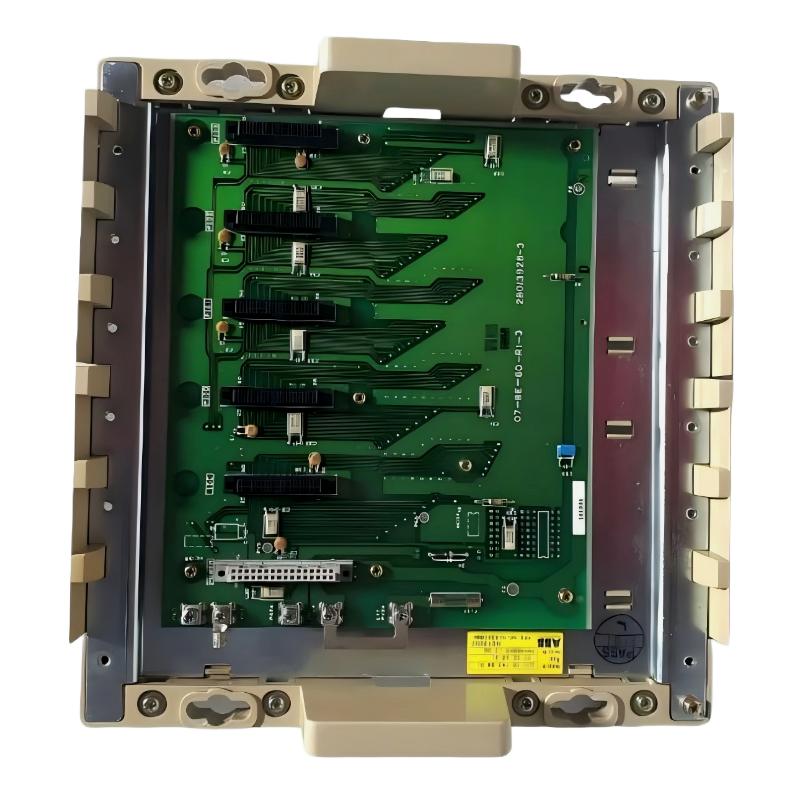
Table of Contents
- Field Case: ABB 07BE60R1 Rack Causing Intermittent Module Recognition
- Fault Symptoms in ABB 07BE60R1 Rack System
- Observed Backplane & Module Behavior
- Root Cause Analysis (Mechanical & Electrical)
- Step-by-Step Diagnostic Workflow
- Repair & Recovery Actions
- Prevention Strategy for Rack Faults
- FAQs on ABB 07BE60R1 Faults
- Engineering Summary
Field Case: ABB 07BE60R1 Rack Causing Intermittent Module Recognition
ABB 07BE60R1 (GJV3074304R1) rack faults are frequently mistaken for module or CPU failure. In one chemical plant DCS installation, modules were intermittently “missing” in engineering software despite correct insertion. Investigation revealed that vibration and loose mounting screws caused partial backplane contact, triggering repeated I/O errors.
Fault Symptoms in ABB 07BE60R1 Rack System
- Modules not recognized in engineering software randomly
- Intermittent communication errors between CPU and I/O modules
- PLC/DCS logs show “slot missing” or “backplane fault” alarms
- System instability under high-load or vibration conditions
Observed Backplane & Module Behavior
During field diagnostics, engineers noted:
BACKPLANE_CONTACT_RESISTANCE = 0.35 Ohm fluctuating
CPU_SLOT_STATUS = intermittent
MODULE_SLOT_03 = recognized 80% of time
VIBRATION_LEVEL = 1.2 g peak
POWER_SUPPLY_VOLTAGE = stable at 24 V DC
The intermittent recognition occurred mainly when nearby motor-driven equipment started, indicating mechanical vibration as a contributing factor.
Root Cause Analysis (Mechanical & Electrical)
Most rack faults are mechanical or installation-related rather than module defects:
- Loose mounting screws causing rack micro-movement
- Partial backplane connector engagement
- Inconsistent grounding across rack frame
- Cabinet vibration transmitted to modules
Step-by-Step Diagnostic Workflow
- Power down and lock out the cabinet
- Physically inspect rack mounting and screw torque
- Measure continuity across backplane connector pins
- Check grounding consistency and isolation
- Test module recognition after stabilization and vibration simulation
RACK_DIAG /MODEL=07BE60R1 /BACKPLANE_TEST /MODULE_SCAN /GROUND_CHECK
Repair & Recovery Actions
- Tightened all mounting screws to recommended torque
- Reseated each module fully in its slot
- Verified and corrected grounding points across cabinet
- Installed anti-vibration padding behind the rack to reduce movement
After these actions, module recognition became stable at 100% even under maximum vibration and full system load.
Prevention Strategy for Rack Faults
- Check rack mounting and torque periodically
- Verify backplane connector alignment during maintenance
- Maintain proper grounding and minimize multiple ground points
- Reduce cabinet vibration by isolating high-vibration equipment
- Document installation and commissioning checklist for each rack
FAQs on ABB 07BE60R1 Faults
Can loose screws really cause modules to appear missing?
Yes. Even slight micro-movements can break backplane contacts and trigger intermittent recognition errors.
How to distinguish rack faults from module defects?
Measure backplane continuity, check mechanical alignment, and observe behavior under load/vibration. Module replacement is rarely needed.
What is the most common rack fault in the field?
Misaligned or partially seated modules due to vibration or improper mounting are the most frequent causes.
Engineering Summary
The ABB 07BE60R1 6-slot rack is a robust platform for Procontic T200 modules, but field experience shows most communication or recognition faults originate from installation issues such as loose mounting, vibration, and grounding inconsistencies. Following a structured diagnostic workflow and applying proper mechanical and grounding practices ensures long-term system reliability and reduces unnecessary module replacement.