
NewsNEWCENTER
Featured products
Contact Us
Allen Bradley 1756HP-TIME Troubleshooting Guide: Time Synchronization Fault Diagnosis and Maintenance
2026-10-29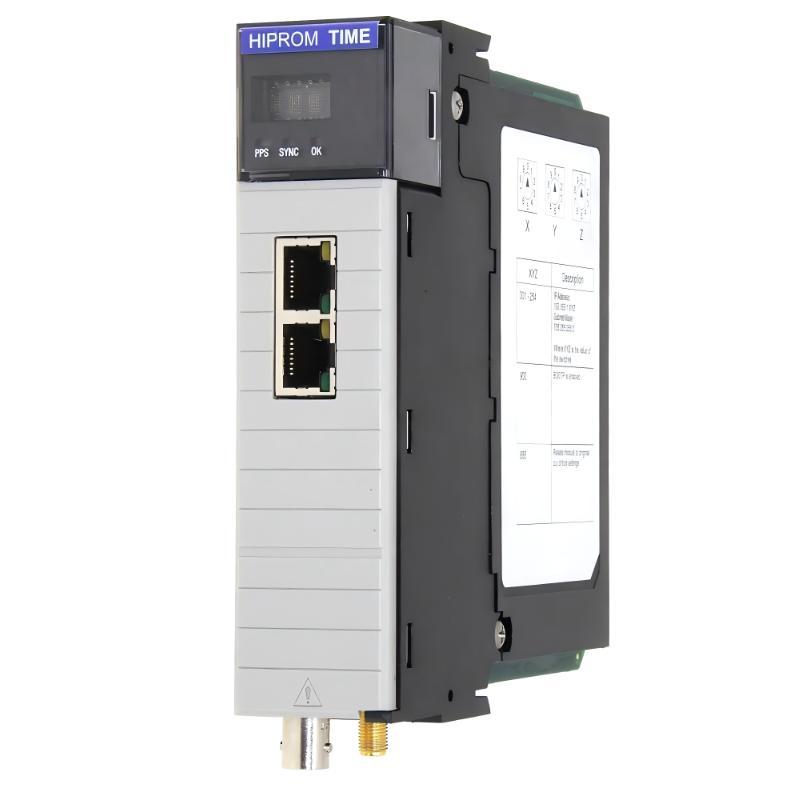
Introduction
The Allen Bradley 1756HP-TIME is a ControlLogix time synchronization module designed to provide a common time reference across industrial control systems. Depending on the system configuration, it can work with GPS, Ethernet Precision Time Protocol (PTP), Network Time Protocol (NTP), IRIG-B, and ControlLogix backplane time services. Reliable time synchronization is particularly important for sequence of events (SOE) recording, event correlation, process monitoring, and applications that require consistent timestamps across multiple controllers or devices. When the 1756HP-TIME develops a fault, the symptoms may include a loss of time-source lock, incorrect timestamps, missing GPS reception, communication problems, or unsuccessful synchronization with other devices. These symptoms do not always indicate a failed module. Antenna placement, Ethernet configuration, time-source availability, controller settings, firmware compatibility, and incorrect operating modes can produce similar problems. This troubleshooting guide explains how to identify common faults, interpret status indicators, inspect the system configuration, and determine when repair or replacement may be necessary.
Table of Contents
- 1. Safety Precautions Before Troubleshooting
- 2. Understanding the Module Status Indicators
- 3. Common Faults and Their Solutions
- 4. GPS Reception and Antenna Problems
- 5. Ethernet, PTP, and NTP Troubleshooting
- 6. IRIG-B Synchronization Problems
- 7. ControlLogix and Controller Synchronization
- 8. Maintenance and Repair Recommendations
- 9. Replacement and Compatibility Checks
- 10. Frequently Asked Questions
1. Safety Precautions Before Troubleshooting
Before inspecting the 1756HP-TIME, confirm that the work can be performed safely and without compromising the production process. Time synchronization may support event recording, interlocks, or other functions that operators depend on for reliable plant operation.
- Follow the facility’s lockout/tagout procedures whenever work involves hazardous electrical energy or cabinet wiring.
- Check with the control-system engineer before changing time-source settings, controller synchronization parameters, network configuration, or module firmware.
- Do not remove or insert the module in an energized chassis unless the exact hardware documentation and site procedures explicitly permit the operation.
- Do not disconnect GPS or IRIG-B cables, Ethernet connections, or other wiring without understanding the operational consequences.
- Record the original configuration and diagnostic messages before making changes.
- Never bypass safety interlocks or protective functions to restore time synchronization.
A controlled diagnostic process reduces the risk of creating additional faults while investigating the original problem.
2. Understanding the Module Status Indicators
The front display and status indicators provide the first clues when diagnosing an Allen Bradley 1756HP-TIME fault. Exact display messages and behavior can vary with hardware and firmware revisions, so compare the observed status with the documentation applicable to the installed unit.
| Indicator or Message | Possible Meaning | Recommended Action |
|---|---|---|
| OK indicator green | The module has started successfully. | Continue checking time-source and communication status if synchronization is still incorrect. |
| OK indicator red | A hardware fault or startup problem may be present. | Record the display message and inspect module seating, chassis condition, and applicable diagnostics. |
| SYNC indicator red | The module is not locked to its selected time source. | Check the configured source, source availability, antenna or network connection, and operating mode. |
| PPS indicator red | The GPS receiver may not have acquired lock, depending on the operating mode. | Inspect antenna connection and GPS reception. In IRIG-B slave mode, check whether reference frames are being received. |
| No Antenna | The module does not detect the expected GPS antenna connection. | Inspect the antenna cable, connector, and antenna compatibility. |
| No Clear Sky View | GPS reception may be obstructed or inadequate. | Check antenna placement and satellite visibility. |
| No Time Lock | The selected source has not provided a valid time reference. | Investigate the configured time source and its communication or signal path. |
| PTP Source Unreachable | The configured PTP source may not be reachable or available. | Verify source address, network connectivity, PTP configuration, and source status. |
An indicator identifies a condition; it does not necessarily identify the root cause. For example, a red synchronization indicator could result from a disconnected antenna, an unreachable NTP server, a missing PTP master, or an incorrect input mode.
3. Common Faults and Their Solutions
Fault 1: The module does not start normally
If the 1756HP-TIME fails to reach its normal operating state, first determine whether the problem is isolated to the module or affects the ControlLogix chassis. Potential causes include poor module seating, a chassis backplane problem, incompatible or corrupted firmware, or an internal hardware fault. Recommended troubleshooting procedure:
- Record the front display messages and the condition of the OK indicator.
- Check whether the ControlLogix chassis and other installed modules are operating normally.
- Following the approved shutdown procedure, inspect the module’s installation and seating.
- Review the controller project and module configuration for compatibility with the installed hardware and firmware.
- If the module reports a persistent hardware or firmware fault, follow the approved recovery procedure for the exact revision.
Do not repeatedly power-cycle the chassis without first recording the fault information. If a firmware update is in progress, do not interrupt power unless the applicable recovery procedure explicitly directs you to do so.
Fault 2: The module is running but has no time-source lock
A module may start successfully while remaining unable to synchronize with its configured source. The most useful first step is to identify whether the source is GPS, NTP, PTP, or IRIG-B.
- For GPS, inspect antenna connection and satellite reception.
- For NTP, confirm that the configured server is reachable and responding.
- For PTP, verify that a suitable time master is available and that the network supports the required PTP configuration.
- For IRIG-B, confirm that the correct input mode is selected and that the reference signal is present.
Check the module’s source status and diagnostic display before changing parameters. If the time source is healthy but lock is still unavailable, compare the module configuration against the actual network or signal topology.
Fault 3: The module reports valid time, but timestamps are incorrect
Incorrect timestamps can result from an invalid upstream time reference, a time-zone conversion error, inconsistent controller clock settings, or an application that interprets time fields incorrectly. Check the following:
- Compare the module’s displayed time with a trusted reference clock.
- Determine whether the application expects UTC, local time, or ControlLogix wall-clock time.
- Review time-zone offsets and daylight-saving-time handling in the controller application and connected systems.
- Confirm that the controller and other devices are using the intended synchronization mechanism.
- Check whether the timestamp is generated by the module, controller, HMI, historian, or another device.
Avoid making large clock corrections during production without assessing their effect on event ordering, historian records, and dependent applications. A time step can cause event sequences to appear out of order or create gaps and overlaps in logged data.
Fault 4: The module intermittently loses synchronization
Intermittent time-source loss may be associated with unstable GPS reception, intermittent cabling, Ethernet congestion, changing network paths, an unreliable NTP server, or an unstable PTP grandmaster. Record the time and duration of each synchronization loss. Compare these events with network alarms, power disturbances, antenna obstruction, maintenance work, and controller diagnostics. If the fault appears at regular intervals, inspect the configured update interval and the behavior of the selected time source. If it occurs unpredictably, investigate physical connections and network stability before replacing the module.
4. GPS Reception and Antenna Problems
The GPS receiver can provide a common time reference when the module is configured to use GPS. However, GPS time acquisition depends on a compatible antenna, an intact cable path, and sufficient satellite visibility.
Symptoms of GPS reception failure
Common symptoms include a “No Antenna” message, a low satellite count, a red PPS indicator, a red SYNC indicator, or the absence of a valid GPS time reference.
Diagnostic procedure
- Confirm that GPS is selected as the active time source.
- Inspect the GPS antenna connection at the module, following the manufacturer’s instructions.
- Check the cable and connector for looseness, corrosion, physical damage, or moisture ingress.
- Verify that the antenna is suitable for the module and is installed in a location with an adequate view of the sky.
- Check satellite status and time-lock indications using the supported configuration or diagnostic interface.
- Where permitted, test with a known-good compatible antenna and cable to isolate a defective component.
Do not assume that an antenna is faulty simply because the module has lost lock. Buildings, metal enclosures, nearby obstructions, cable damage, and electromagnetic installation issues can also affect reception. If the GPS signal remains unavailable after the antenna path and installation have been verified, investigate the receiver and module hardware. If GPS is not the intended time source, check whether the configured source matches the actual installation instead.
5. Ethernet, PTP, and NTP Troubleshooting
The 1756HP-TIME can use Ethernet-based time synchronization, but PTP and NTP have different requirements. Troubleshooting should begin by identifying the intended protocol and confirming that the network is configured accordingly.
NTP synchronization failures
If the module uses NTP, check:
- The configured NTP server address is correct.
- The server is running and responding to time requests.
- The module has valid network settings for the intended network.
- Network routing, access controls, and firewall rules permit the required NTP traffic.
- The configured update interval is suitable for the application.
- The server’s own clock is synchronized to a reliable reference.
A successful Ethernet link does not prove that NTP synchronization is working. The network may pass ordinary traffic while blocking or failing to route time requests. NTP accuracy also depends on the quality of the source clock and the network path. If the time source is unstable, the resulting time distribution will also be affected.
PTP synchronization failures
PTP is used to distribute time through a compatible Ethernet timing network. If the module cannot lock to a PTP source, check the following:
- Verify that the intended PTP grandmaster or time source is active.
- Confirm that the module is configured for the correct source and operating mode.
- Inspect switch configuration, VLANs, multicast handling, and network paths as applicable to the system design.
- Check whether the connected devices support compatible PTP versions and profiles.
- Review grandmaster selection and priority settings if more than one potential time master is present.
- Check the module’s diagnostic display and the controller’s time-synchronization status.
Do not assume that every Ethernet switch or connected device will transparently support the timing behavior required by a particular PTP configuration. Confirm compatibility against the actual equipment and network design.
Ethernet connection or address problems
If the module cannot be reached through its Ethernet interface, inspect the link indicators, cable condition, switch port, IP address, subnet configuration, and any applicable network access restrictions. If the display indicates that BOOTP is enabled, check whether the module is still awaiting address assignment. Use the approved address-assignment method for the site and record the final network configuration. The Ethernet ports used for time synchronization should not automatically be treated as a bridge to the ControlLogix backplane. Follow the module’s documented network architecture when planning access to other chassis devices.
6. IRIG-B Synchronization Problems
The 1756HP-TIME can be configured to receive or transmit IRIG-B timing signals, depending on the operating mode. A fault can occur when the module is configured as a master but the system expects a slave, or when the configured input format does not match the supplied signal.
Recommended checks
- Confirm whether the module should operate as an IRIG-B input or output device.
- Verify that the connected equipment supports the expected IRIG-B format.
- Inspect the coaxial cable, connectors, and termination arrangement according to the installation documentation.
- Confirm that the upstream IRIG-B source is operating and providing a valid reference signal.
- Check the PPS and SYNC indicators and review any available status messages.
- Verify that downstream equipment is configured to receive the signal rather than generate a competing reference.
If the module is configured as an IRIG-B slave, the PPS indication may behave differently from its behavior in GPS mode. Interpret the indicators according to the selected operating mode rather than assuming that all status patterns have the same meaning. If the reference signal is present but synchronization remains unavailable, verify the source configuration and compatibility before concluding that the module’s IRIG-B interface is defective.
7. ControlLogix and Controller Synchronization
A 1756HP-TIME may appear healthy while the connected controller or application continues to report incorrect time. In such cases, the fault may lie in the ControlLogix configuration rather than the physical module.
Check the controller and project configuration
- Confirm that the correct module type and revision are selected in the controller project.
- Review the module’s communication and configuration status in the programming environment.
- Verify that the intended controller time-synchronization mechanism is enabled and correctly configured.
- Check for competing time masters or conflicting synchronization settings.
- Confirm that the controller, module, and connected devices are configured to use compatible time references.
- Inspect application logic for incorrect conversions between CST, UTC, and application-specific timestamps.
The exact configuration steps depend on the controller family, firmware revision, programming software, and installed 1756HP-TIME revision. Avoid copying settings from a different ControlLogix installation without checking compatibility.
Connection or module-configuration errors
If the controller reports a module connection fault, record the complete fault code and extended status before making changes. Check the electronic keying settings, module definition, firmware compatibility, and communication path as appropriate. A connection fault is not necessarily evidence of a defective module. Incorrect project configuration, incompatible revisions, or a chassis-level issue can produce similar symptoms. If a configuration change is required, document the existing values, make one controlled change at a time, and verify the result before proceeding to the next diagnostic step.
8. Maintenance and Repair Recommendations
The 1756HP-TIME is an electronic synchronization module. Many apparent faults can be resolved through configuration correction, restoring the time-source connection, or repairing an external cable or antenna issue. Internal component-level repair should be considered only when the evidence points to a hardware failure and qualified service is available.
Recommended maintenance checklist
- Inspect the module’s front display and record recurring diagnostic messages.
- Check the GPS antenna and cable condition where GPS is used.
- Inspect Ethernet and IRIG-B connections for damage or looseness.
- Review time-source availability and synchronization status during normal operation.
- Maintain a record of the module’s catalog number, revision, firmware, and controller configuration.
- Back up the controller project and document the module’s network and timing parameters.
- Investigate recurring loss-of-lock events rather than repeatedly resetting the module.
When to consider repair or replacement
Consider specialist assessment if the module consistently reports a hardware fault, fails to complete startup, cannot acquire a valid reference from a verified compatible source, or repeatedly loses communication after the external connections and configuration have been checked. Before removing the module, determine whether the loss of time synchronization will affect SOE records, alarms, historian data, or other control-system functions. Establish an approved contingency plan if a temporary loss of synchronized time is unacceptable. Because the 1756HP-TIME is an older product, replacement planning should include the availability of compatible hardware, firmware support, engineering tools, and any required migration work. A replacement should not be selected solely because its model number appears similar.
9. Replacement and Compatibility Checks
When a 1756HP-TIME cannot be returned to reliable service, the replacement decision should be based on the complete timing architecture rather than the module name alone. Check the following before purchasing a replacement:
| Item to Verify | Why It Matters |
|---|---|
| Exact catalog number and hardware revision | Helps distinguish the installed device from similarly named time-synchronization products. |
| ControlLogix chassis compatibility | Ensures that the replacement can be installed and supported in the target system. |
| Firmware and engineering-software compatibility | Reduces the risk of configuration and communication problems. |
| Required timing interfaces | Confirms support for the installation’s required GPS, PTP, NTP, IRIG-B, or backplane timing functions. |
| Controller and application behavior | Ensures that timestamp handling, event records, and time conversions remain suitable. |
| Network design and time-source architecture | Confirms that the replacement works with the existing switches, servers, grandmaster, and connected devices. |
If the original module is no longer readily available, compare potential alternatives against the required interfaces, controller support, and time accuracy needed by the application. Do not assume that a similarly named module is a direct replacement.
10. Frequently Asked Questions
Why is the Allen Bradley 1756HP-TIME SYNC indicator red?
A red SYNC indicator generally means the module is not locked to its selected time source. Check whether the configured source is GPS, NTP, PTP, or IRIG-B, then investigate the corresponding signal, network, or configuration path.
Does a red PPS indicator always mean the module is defective?
No. In GPS operation, it can indicate that the receiver has not acquired the required lock. Antenna connection, satellite visibility, and signal quality should be checked first. The indication may have different behavior when the module operates as an IRIG-B slave.
Can an Ethernet link be active while time synchronization is unavailable?
Yes. An active Ethernet link only indicates a physical network connection. NTP requests may fail, a PTP grandmaster may be unavailable, or the timing configuration may be incorrect even when ordinary network communication works.
Why are the controller timestamps different from the module’s displayed time?
Possible causes include different time bases, incorrect UTC or local-time handling, controller synchronization settings, application logic, or a problem with the upstream time source. Compare the source time, module status, controller configuration, and timestamp-generation method.
Should the module be reset whenever synchronization is lost?
Not as a first step. Record the status messages and determine why the source is unavailable. A reset will not correct a damaged antenna cable, inaccessible NTP server, missing PTP master, or incorrect operating mode, and it may interrupt diagnostics.
Can the 1756HP-TIME be repaired?
The answer depends on the fault. External antenna, cabling, network, and configuration problems may be resolved without internal repair. Persistent hardware faults may require specialist evaluation or replacement based on the module’s condition and serviceability.
What information should be collected before requesting technical support?
Record the complete catalog number, hardware and firmware revision, controller model, programming software version, selected time source, front-display messages, indicator states, and the circumstances in which the fault occurs. Include relevant network or antenna changes and the exact fault codes shown by the controller.
Technical Summary
Troubleshooting the Allen Bradley 1756HP-TIME ControlLogix time synchronization module requires a systematic approach that separates hardware faults from time-source, network, and controller-configuration problems. The most effective first steps are to record the module’s display messages, identify the active time source, verify the physical signal or network path, and check the controller’s synchronization settings. GPS faults should prompt an inspection of antenna installation and satellite reception. NTP and PTP problems require checks of source availability and network configuration, while IRIG-B faults require verification of signal format and operating mode. If the module continues to report hardware errors after external causes have been eliminated, evaluate specialist repair or a compatible replacement. Accurate diagnosis helps restore reliable timestamps, protect event-recording integrity, and reduce unnecessary downtime in industrial automation and process-control systems.