
NewsNEWCENTER
Featured products
Contact Us
Allen Bradley 1756-CNB/E ControlLogix ControlNet Bridge Module Installation Guide
2026-10-29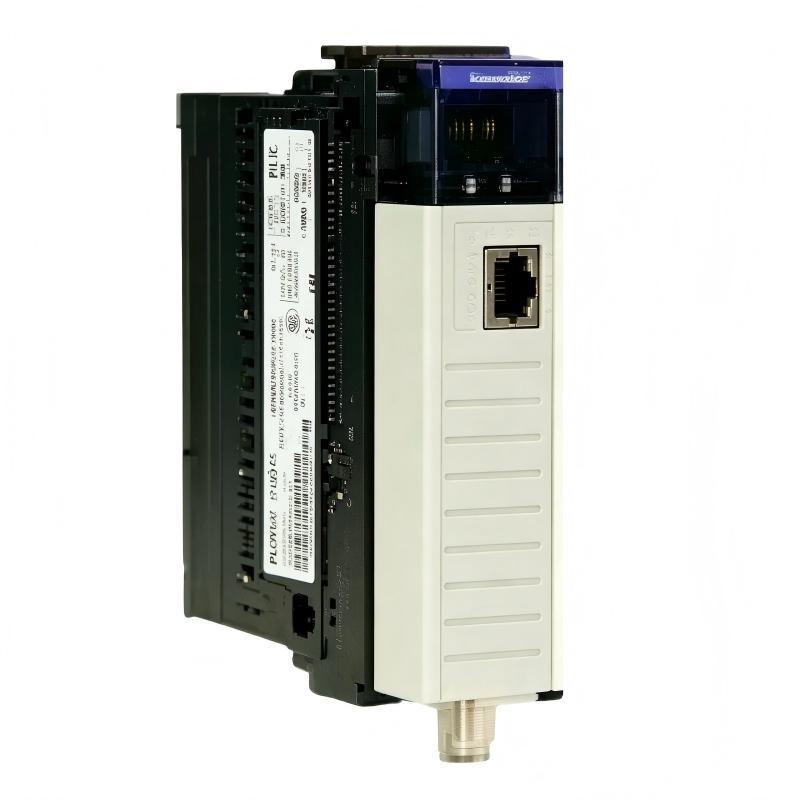
The Allen Bradley 1756-CNB/E ControlLogix ControlNet Bridge Module is a communication interface designed to connect a ControlLogix controller and chassis to a ControlNet industrial network. It supports communication between controllers, remote I/O devices, and other compatible network nodes, helping industrial automation systems exchange control data and diagnostic information.
Correct installation of the 1756-CNB/E requires attention to chassis compatibility, network addressing, ControlNet coaxial cabling, network taps, module status indicators, and controller configuration. This guide provides a practical installation and commissioning procedure for maintenance engineers, system integrators, and industrial control technicians.
Table of Contents
- 1. Product Overview
- 2. Technical Specifications
- 3. Installation Preparation
- 4. ControlNet Network Address Configuration
- 5. Installing the Module in the ControlLogix Chassis
- 6. Connecting the ControlNet Network
- 7. PLC Configuration and Network Setup
- 8. Commissioning and Functional Testing
- 9. Status Indicators and Initial Diagnostics
- 10. Maintenance and Replacement Considerations
- 11. Frequently Asked Questions
- 12. Technical Summary
1. Product Overview
The 1756-CNB/E belongs to the Allen Bradley ControlLogix communication module family. It acts as a bridge between the ControlLogix backplane and a ControlNet network, allowing compatible controllers and devices to exchange information through the network infrastructure.
In a typical installation, the module is inserted into a compatible 1756 ControlLogix chassis containing a suitable power supply and controller. A ControlNet cable connects the module to the network through the appropriate tap and connector arrangement. The controller project must then define the module and any required remote communication paths.
Common applications include distributed control systems, remote I/O communication, controller-to-controller data exchange, and legacy manufacturing installations that use ControlNet as their industrial communication backbone.
2. Technical Specifications
| Parameter | Description |
|---|---|
| Manufacturer | Allen Bradley / Rockwell Automation |
| Model | 1756-CNB/E |
| Product type | ControlLogix ControlNet Bridge Module |
| Automation platform | ControlLogix 1756 chassis system |
| Communication network | ControlNet |
| Network interface | ControlNet BNC connection for the supported media arrangement |
| Network access port | NAP service port, where provided on the module |
| Maximum supported connections | Up to 64, subject to the applicable module specification and configuration |
| Network node addressing | Unique ControlNet address; follow the limits applicable to the installation and redundancy arrangement |
| Installation method | ControlLogix chassis mounting |
| Typical network cable | Specified ControlNet RG-6 quad-shield coaxial cable and compatible taps |
These specifications provide general identification guidance. Confirm the complete catalog number, series, firmware, chassis requirements, and applicable installation documentation before installing or replacing a module. Do not assume that every 1756-CNB variant supports the same redundancy arrangement or has identical features.
3. Installation Preparation
Preparation is important because an incorrect network address, incompatible configuration, or poorly installed cable can prevent the bridge from joining the ControlNet network even when the module is physically installed correctly.
Required equipment and information
- A compatible ControlLogix 1756 chassis and correctly rated power supply.
- The 1756-CNB/E module with its front connector and hardware in good condition.
- Compatible ControlNet cable, taps, connectors, and termination components as required by the network design.
- The existing ControlNet node-address plan and network topology documentation.
- The controller project and appropriate programming software for the installed system.
- Required tools and electrostatic discharge protection equipment.
- Approved commissioning and lockout/tagout procedures.
Inspect the module before installation
Check the module housing, backplane connector, front-panel indicators, network connector, and address switches for visible damage. Confirm that the catalog number and series match the engineering documentation.
Inspect the chassis and power supply for signs of overheating, contamination, corrosion, or mechanical damage. Verify that the selected slot is permitted by the system design and that sufficient chassis power capacity is available for all installed modules.
Review the existing network
Identify whether the ControlNet network uses a standalone or redundant communication arrangement. Record existing node addresses and determine where the new bridge will connect. The module must not be assigned an address already used by another node on the same network.
4. ControlNet Network Address Configuration
The 1756-CNB/E uses hardware address switches to establish its ControlNet network address. The address must be valid for the intended system arrangement and consistent with the network design.
Address configuration procedure
- Review the network drawings and select an unused node address.
- Identify the module’s network address switches using the labeling and installation documentation for the exact series.
- Set the switches to the required address using the specified method.
- Verify the resulting address against the approved network address plan.
- Record the address in the commissioning documents and controller project where applicable.
For the Series E installation instructions, standalone configurations generally use addresses from 01 to 99, while redundant arrangements use the applicable restricted range, commonly 01 to 98. Address 00 is invalid. Confirm the exact rules for the actual system before applying power.
Where a redundant system is used, the address relationship between primary and secondary modules must follow the system’s redundancy design. Do not copy the address from another bridge without confirming that the modules belong to the intended redundant pair.
5. Installing the Module in the ControlLogix Chassis
Step 1: Establish a safe installation condition
Notify operations personnel and determine whether the installation can interrupt controller or network operation. Apply the site’s approved isolation procedure. Although some ControlLogix configurations support removal and insertion under power, this must not be assumed for every installation. Follow the exact hardware instructions and site authorization requirements.
Step 2: Verify the slot
Confirm the intended slot number and ensure the chassis is compatible with the module. Compare the planned location with the controller configuration and network drawings.
Step 3: Insert the module
- Use appropriate electrostatic discharge precautions when handling the module.
- Align the module with the selected chassis guides.
- Insert the module carefully, ensuring that the backplane connector aligns correctly.
- Press the module into position until it is fully seated and secured according to the chassis design.
- Check that the module is aligned with adjacent modules and that no connector damage is visible.
Step 4: Verify chassis power
Confirm that the chassis power supply is operating within its specified limits and that the total module load is supported. Check the chassis and controller status before proceeding with network commissioning.
Do not force the module into the slot. If it does not seat correctly, remove it under the approved procedure and inspect the guides and connector alignment.
6. Connecting the ControlNet Network
ControlNet network performance depends on correct cabling, suitable taps, proper connector installation, and adherence to the designed network topology. A physically connected cable does not necessarily indicate that the module has joined the network successfully.
Network connection procedure
- Verify the network cable type against the ControlNet design documentation.
- Inspect the cable, BNC connector, tap, and associated components for damage or contamination.
- Identify the correct network channel connector on the 1756-CNB/E.
- Connect the specified ControlNet cable arrangement using compatible taps and components.
- Check that connectors are secure and the cable is supported without excessive bending or strain.
- Verify that network termination and topology comply with the system design.
Use the required ControlNet tap and cabling arrangement rather than making improvised connections. Do not connect or disconnect communication cables in hazardous areas or while energized unless the applicable instructions and site procedures explicitly permit the operation.
Network topology considerations
ControlNet installations may contain multiple nodes, scheduled communication, and network keeper functionality. The bridge must be compatible with the existing network configuration. When adding a node to an operating system, confirm the network’s keeper arrangement and whether the planned change requires a controlled network update.
Avoid changing multiple network variables simultaneously. Install and verify the physical connection first, then investigate addressing and configuration if the module does not establish communication.
7. PLC Configuration and Network Setup
After physical installation, the controller project must reflect the actual hardware and communication arrangement. Incorrect slot definitions, network paths, or module revisions can prevent successful communication.
Configuration checklist
- Confirm that the controller project identifies the module in the correct chassis slot.
- Verify the selected module type and revision against the installed hardware.
- Confirm that the ControlNet address matches the physical switch setting.
- Verify that remote I/O and controller communication paths use the intended bridge.
- Check connection limits and the expected number of devices or connections.
- Review controller and network diagnostics for configuration mismatches.
- Save a backup of the original project before downloading or modifying configuration.
The exact software workflow depends on the controller, programming software version, firmware, and network architecture. Do not change controller operating mode or download a modified project without authorization and an approved process interruption plan.
8. Commissioning and Functional Testing
Commissioning should verify both the physical installation and the intended communication functions. A normal module status indicator alone does not prove that every configured remote device or application connection is operating correctly.
Initial commissioning procedure
- Confirm that the module is securely seated and that the chassis reports normal power status.
- Verify that the address switches are set correctly.
- Check the ControlNet cable and connector arrangement against the network drawings.
- Observe the module status indicator and alphanumeric display during startup.
- Check the network channel indicators for communication activity and fault indications.
- Inspect the controller project for module faults, connection errors, or unexpected status changes.
- Verify communication with the intended remote nodes and test the required data exchange.
- Confirm that the application behaves correctly under the approved commissioning procedure.
- Record the final node address, slot, firmware or revision information, and test results.
Illustrative communication verification flow
Physical installation complete
          |
          v
Check chassis power and module seating
          |
          v
Verify node address and ControlNet cabling
          |
          v
Inspect module and channel indicators
          |
          v
Check controller configuration and diagnostics
          |
          v
Test communication with intended nodes
          |
          v
Record results and release system
This flow is a general commissioning aid, not a substitute for the site’s approved startup and safety procedures.
9. Status Indicators and Initial Diagnostics
The front-panel module status indicator, alphanumeric display, and ControlNet channel indicators provide useful information during startup. Interpret them using the documentation for the exact module series.
| Observation | Possible Cause | Recommended Check |
|---|---|---|
| Module status indicator remains off | Chassis power issue, module not seated, or internal fault | Check chassis power, module seating, and connectors. |
| Display reports an invalid network address | Address switches set to an invalid value for the system arrangement | Verify the switch setting and applicable address range. |
| Module status indicator shows a fault | Module, backplane, or network-related diagnostic condition | Read the display and review controller diagnostics. |
| Network channel indicator shows no expected activity | Disconnected cable, faulty tap, topology issue, or inactive network | Inspect the physical connection and network status. |
| Module appears healthy but remote I/O is unavailable | Connection path, configuration, node, or application issue | Check the configured communication path and remote device status. |
Do not replace a module solely because a single indicator appears abnormal. Capture the full display message, channel status, controller diagnostics, and network condition before deciding on corrective action.
10. Maintenance and Replacement Considerations
Regular maintenance helps prevent communication interruptions and supports reliable operation of ControlLogix systems that depend on legacy ControlNet infrastructure.
- Inspect module seating, chassis condition, and network connectors during scheduled maintenance.
- Check for damaged coaxial cable, loose connectors, unsuitable cable routing, or physical strain on taps.
- Maintain accurate records of node addresses, chassis slots, network topology, and controller configuration.
- Back up controller projects and document changes before replacing modules.
- Review recurring communication faults and intermittent network symptoms instead of repeatedly resetting the system.
- Keep compatible spare parts available where ControlNet remains essential to production.
The 1756-CNB product family has been discontinued, and Rockwell Automation identifies the 1756-CN2 as an engineering replacement for the base 1756-CNB model. This does not guarantee a direct, no-change replacement for every 1756-CNB/E installation. Verify exact catalog numbers, redundancy requirements, firmware, connection capacity, network configuration, and controller compatibility before planning a substitution.
11. Frequently Asked Questions
What is the function of the Allen Bradley 1756-CNB/E?
The 1756-CNB/E provides a ControlNet communication bridge for ControlLogix systems. It supports communication between the ControlLogix backplane and compatible ControlNet network devices, including remote I/O and other controllers.
Does the 1756-CNB/E require a ControlLogix chassis?
Yes. It is a chassis-mounted ControlLogix communication module. The chassis, power supply, controller configuration, and network architecture must be compatible with the installation.
Why is the module not communicating after installation?
Common causes include an invalid or duplicated network address, incorrect slot configuration, a disconnected cable, a damaged tap, an incompatible network arrangement, or a controller configuration mismatch. Review the display, channel indicators, and controller diagnostics systematically.
Can I use any RG-6 coaxial cable for ControlNet?
No. Use the specified ControlNet cable type and compatible connectors, taps, and termination components. Cable construction and network topology must meet the requirements of the installed ControlNet system.
Can the 1756-CN2 replace the 1756-CNB/E directly?
Not automatically. The 1756-CN2 is identified as an engineering replacement for the 1756-CNB family, but the actual migration requirements depend on the system design. Verify firmware, controller support, connections, redundancy, and configuration before replacement.
12. Technical Summary
The Allen Bradley 1756-CNB/E ControlLogix ControlNet Bridge Module provides communication between a ControlLogix chassis and a ControlNet industrial network. Reliable installation depends on correct chassis mounting, valid network addressing, compatible coaxial cabling, appropriate taps, and accurate controller configuration.
During commissioning, verify the module and network indicators, confirm communication with the intended devices, and record the final configuration. When faults occur, check power, seating, addressing, cabling, network topology, and controller diagnostics before replacing hardware.
Technical Summary: The 1756-CNB/E is a legacy ControlLogix communication module used in ControlNet-based automation systems. Following a documented installation and commissioning process helps reduce network faults, improve communication reliability, and support safe maintenance of industrial control infrastructure.