
NewsNEWCENTER
Featured products
Contact Us
Schneider Electric 140ATI03000 Troubleshooting Guide: Thermocouple Input Fault Diagnosis and Repair
2026-10-28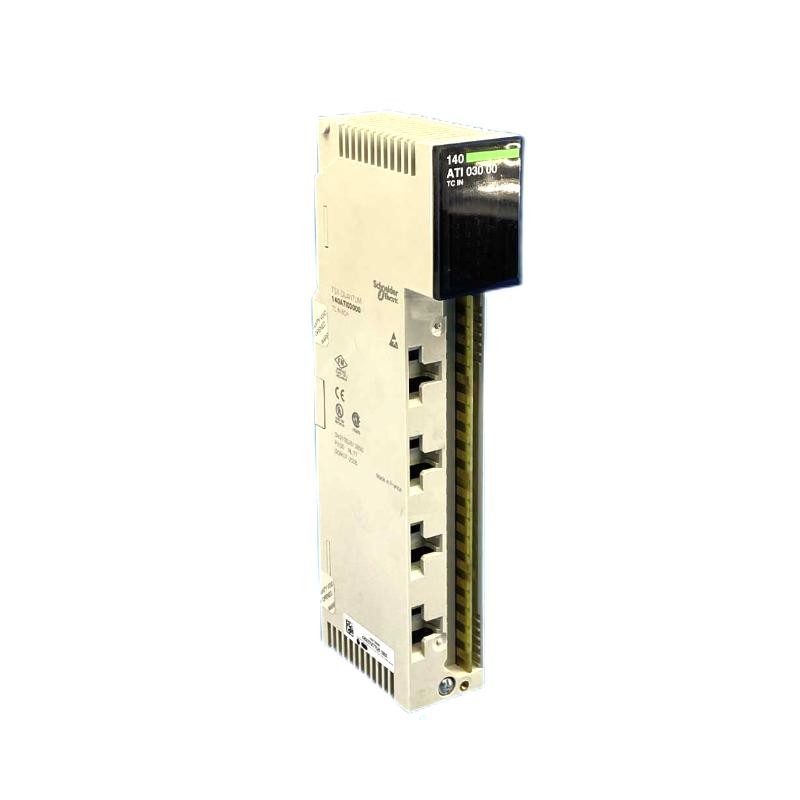
The Schneider Electric 140ATI03000 Modicon Quantum Analog Input Module is an eight-channel thermocouple input module designed to measure industrial process temperatures and transfer temperature data to a PLC control system. When the module reports an abnormal reading, a channel fault, or a communication problem, systematic troubleshooting helps maintenance engineers identify whether the cause is the thermocouple, field wiring, configuration, rack communication, or input module itself.
This guide explains practical troubleshooting procedures for the Schneider 140ATI03000, including temperature reading errors, open thermocouple detection, out-of-range indications, unstable measurements, PLC data problems, and module replacement considerations.
Table of Contents
- 1. Module Overview and Diagnostic Features
- 2. Safety Precautions Before Troubleshooting
- 3. Understanding Status Indicators
- 4. Common Faults and Possible Causes
- 5. Troubleshooting Incorrect Temperature Readings
- 6. Diagnosing Open Thermocouple and Out-of-Range Faults
- 7. Resolving Unstable or Noisy Temperature Signals
- 8. PLC Communication and Data Mapping Problems
- 9. Diagnosing Suspected Module Hardware Failure
- 10. Preventive Maintenance and Replacement
- 11. Frequently Asked Questions
- 12. Technical Summary
1. Module Overview and Diagnostic Features
The 140ATI03000 accepts thermocouple signals from eight input channels. It supports thermocouple types J, K, E, T, R, and S, subject to the configured measurement range. The module converts low-level sensor signals into digital values that the Modicon Quantum PLC can process for temperature monitoring, alarms, interlocks, and process control.
| Characteristic | Troubleshooting Relevance |
|---|---|
| Input channels | Eight independent temperature measurement channels |
| Supported thermocouples | J, K, E, T, R, and S |
| Resolution | 16-bit measurement data |
| Cold junction compensation | Internal compensation; external arrangements may be used for supported types and configurations |
| Input filtering | 50/60 Hz notch filtering and nominal 20 Hz low-pass filtering |
| PLC input allocation | Ten consecutive input words for channel data, channel status, and internal module temperature |
| Diagnostic capabilities | Channel out-of-range and broken-wire detection |
When investigating a fault, first determine whether the problem affects one channel, several channels, or all eight inputs. A single-channel problem often points to the sensor, wiring, or channel configuration. Multiple simultaneous faults may indicate a common wiring issue, incorrect configuration, rack communication problem, or module-level failure.
2. Safety Precautions Before Troubleshooting
Temperature inputs are low-level signals, but the surrounding process may involve high temperatures, hazardous machinery, electrical hazards, or safety-critical control functions.
- Follow site lockout/tagout procedures before removing a module, disconnecting field wiring, or accessing hazardous equipment.
- Place the process in an approved safe state before testing sensors used in alarms, trips, or protective sequences.
- Do not disconnect or reconnect field wiring while energized unless the system documentation explicitly permits the procedure and the work is authorized.
- Use suitable test instruments and avoid applying an external voltage to thermocouple input terminals.
- Never bypass process interlocks or suppress alarms merely to clear a diagnostic indication.
- Record the original wiring, configuration, PLC values, and fault indicators before making changes.
If the module is part of a running production system, coordinate troubleshooting with the control-room operator and follow the site’s change-management process.
3. Understanding Status Indicators
The module’s front-panel indicators help narrow down the fault. Always confirm the indicator meanings against the exact module revision and applicable system documentation.
| Indicator or Observation | Possible Meaning | Recommended Action |
|---|---|---|
| Active indicator illuminated | Bus communication is present | Check channel data and configuration if readings remain abnormal. |
| F indicator illuminated red | An external or channel-related fault has been detected | Inspect channel status, sensor wiring, and configured measurement ranges. |
| Individual channel indicator red | The indicated channel may be out of range or have an open thermocouple | Check the corresponding sensor loop and channel configuration. |
| All channel values invalid | Possible configuration, rack, communication, or module problem | Check PLC diagnostics, rack status, module seating, and input mapping. |
| Indicator pattern changes intermittently | Possible intermittent wiring, connection, or communication fault | Review fault history and inspect connectors and field cables under approved conditions. |
A red fault indicator does not automatically mean the module has failed. A thermocouple open circuit, a measurement outside the configured range, or an incorrect sensor setup can produce a fault while the module remains functional.
4. Common Faults and Possible Causes
| Symptom | Likely Causes | First Diagnostic Step |
|---|---|---|
| Temperature reading is too high | Incorrect thermocouple type, reversed or misidentified wiring, sensor fault, incorrect scaling | Compare the configured sensor type with the installed sensor and verify polarity. |
| Temperature reading is too low | Incorrect sensor range, wiring issue, poor sensor placement, incorrect engineering conversion | Compare the PLC value with an independent process measurement. |
| Reading is fixed at an extreme value | Open thermocouple, out-of-range input, invalid raw-data interpretation | Inspect the channel fault status and raw input word. |
| Reading fluctuates rapidly | Electrical noise, loose connections, damaged extension cable, grounding problems | Inspect wiring routes and terminations; compare with adjacent channels. |
| All channels show abnormal values | Module configuration, addressing, rack communication, or shared wiring problem | Review the PLC hardware configuration and module status. |
| Fault returns after clearing | Persistent sensor, wiring, range, or hardware fault | Identify the underlying condition before resetting diagnostics. |
5. Troubleshooting Incorrect Temperature Readings
Step 1: Verify the thermocouple type
Confirm whether the installed sensor is type J, K, E, T, R, or S. The selected input type must match the actual sensor. A mismatch changes the relationship between the measured thermoelectric voltage and the calculated temperature.
Check the sensor identification, instrument drawings, terminal labels, and PLC channel configuration. Do not assume that two thermocouples use the same type merely because their cable colors look similar; color conventions can differ by standard and region.
Step 2: Check polarity and terminal connections
Thermocouple signals are polarity-sensitive. Reversed connections can cause readings to move in the wrong direction as temperature changes. Inspect the positive and negative conductors, terminal tightness, and any intermediate junctions.
Where extension or compensating cable is used, confirm that it is suitable for the thermocouple type and installed with the correct polarity. Avoid using ordinary copper cable as a substitute for the specified thermocouple extension wiring unless the design explicitly permits the arrangement.
Step 3: Compare the PLC value with the raw input
Determine whether the abnormal value originates in the module data or in the PLC program. Compare the raw input word, channel status, engineering-unit conversion, and displayed temperature. Verify that the program interprets the module’s data format correctly.
If the raw data changes plausibly but the HMI temperature is wrong, investigate scaling, data type, word addressing, and conversion logic before replacing hardware.
Step 4: Verify cold junction compensation
Thermocouple measurement requires cold junction compensation (CJC). The 140ATI03000 provides internal CJC, and supported configurations may also use external compensation for certain thermocouple types. Incorrect compensation setup or an unsuitable terminal environment can introduce systematic temperature error.
Check that the terminal area and module operating environment are within the applicable specifications, that the connector cover is installed as required, and that the PLC configuration matches the intended compensation method. Do not alter compensation settings without understanding the sensor wiring arrangement.
Step 5: Check the sensor itself
Inspect the thermocouple for physical damage, corrosion, moisture ingress, loose connections, or deterioration caused by heat and vibration. If an independent test is necessary, use an approved procedure and suitable instrument. A resistance or continuity check alone cannot prove that a thermocouple provides accurate temperature measurement.
6. Diagnosing Open Thermocouple and Out-of-Range Faults
The 140ATI03000 can detect open thermocouple conditions and input values outside the supported measurement range. An open sensor circuit may cause the channel to report a high-scale diagnostic value rather than a meaningful process temperature. In the documented data format, an open thermocouple may produce a raw value of 7FFF hexadecimal (32767 decimal).
Recommended diagnostic sequence
- Identify the channel showing the fault using the front-panel indicator and PLC channel-status data.
- Confirm that the channel is configured for the correct thermocouple type and expected operating range.
- Place the process in a safe state if required, then inspect the sensor wiring and terminal connections under the approved isolation procedure.
- Check for a broken conductor, loose terminal, damaged extension cable, or disconnected sensor.
- Verify that the expected process temperature is within the configured input range.
- After correcting the cause, restore the wiring, confirm the channel status, and verify a plausible temperature reading.
Do not treat a high-scale raw value as a genuine high process temperature without checking the diagnostic status. If an alarm or shutdown function uses that value, confirm that the control logic handles invalid or faulted measurements safely.
7. Resolving Unstable or Noisy Temperature Signals
Thermocouples generate very small voltage signals and can be affected by electromagnetic interference, poor terminations, unsuitable cable, and grounding problems. The module includes filtering, but filtering cannot correct every wiring or installation defect.
Inspect the field wiring
- Separate thermocouple cables from motor leads, variable-frequency drive output cables, contactor wiring, and other high-noise conductors where practical.
- Use the specified thermocouple extension or compensating cable and maintain correct polarity.
- Check cable shielding and grounding against the plant’s instrumentation standards.
- Inspect terminal blocks for loose connections, oxidation, moisture, and mechanical damage.
- Check whether the problem began after nearby equipment, wiring, or grounding changes.
Compare channels and operating conditions
If several channels become noisy at the same time, look for a shared environmental or wiring cause. If only one channel is affected, focus on its sensor, cable, terminals, and process conditions.
The module’s nominal low-pass filtering and 50/60 Hz notch filtering may reduce some interference, but they do not eliminate the need for proper cable routing and grounding. Avoid adding extra software filtering until the original signal problem has been investigated, because excessive filtering can delay detection of real temperature changes.
8. PLC Communication and Data Mapping Problems
The 140ATI03000 requires ten consecutive input words in the documented Modicon Quantum addressing arrangement: eight words for the input channels, one channel-status word, and one word for internal module temperature. An incorrect address assignment or data interpretation can make valid hardware readings appear incorrect in the application.
Check the following items
- Module identity: Confirm that the configured module matches the installed 140ATI03000.
- Rack and slot: Verify the physical location against the PLC hardware configuration.
- Input allocation: Confirm that the full required input-word range is allocated without overlap.
- Channel order: Ensure each raw word is mapped to the intended thermocouple channel.
- Status data: Review channel-status and fault bits instead of relying only on the temperature display.
- Engineering conversion: Confirm signedness, data format, scaling, units, and any application-level offsets.
- PLC diagnostics: Check controller and rack status for module configuration or communication errors.
When the Active indicator does not show expected bus communication, inspect the rack and module configuration before focusing on individual sensors. Follow the approved procedure for reseating or replacing a module; never remove a module from an energized rack unless the specific hardware and system procedure explicitly support that action.
9. Diagnosing Suspected Module Hardware Failure
Consider a hardware fault only after checking the thermocouples, field wiring, channel configuration, PLC mapping, and rack communication. A failed input channel may show persistent errors even when the field sensor and wiring have been verified.
Controlled isolation process
- Record all fault indicators, raw values, channel-status bits, and relevant PLC diagnostics.
- Confirm that the sensor and cable are functioning through an approved independent test.
- Verify the configured input type, range, compensation method, and word addressing.
- Compare the affected channel with a known-good channel only when the sensor type, wiring method, process conditions, and configuration make the comparison valid.
- If authorized, test with a known-good compatible sensor or use an approved simulator suitable for thermocouple inputs.
- Replace the module only after evidence indicates that the fault follows the channel or module rather than the field circuit.
Before replacing the module, confirm rack compatibility, hardware configuration, firmware or software requirements, and the availability of the correct terminal accessories. A replacement may require configuration changes or a planned system migration rather than a direct substitution.
10. Preventive Maintenance and Replacement
Preventive maintenance can reduce intermittent temperature faults and help preserve reliable process measurements.
- Inspect thermocouple wiring, extension cables, terminal blocks, and sensor mounting during scheduled maintenance.
- Review recurring open-wire, range, and communication alarms rather than repeatedly clearing them.
- Keep a record of normal channel readings, expected process ranges, and configuration settings.
- Verify calibration and measurement accuracy according to the site’s instrumentation maintenance plan.
- Maintain a backup of PLC hardware configuration and application logic before replacement work.
- Confirm spare-module condition and storage requirements before installation.
The Schneider Electric 140ATI03000 is a discontinued Modicon Quantum product. Schneider lists the Modicon X80 BMXART0814 as a replacement candidate, but this should not be treated as a plug-in replacement. Evaluate the PLC platform, rack architecture, field wiring, channel characteristics, configuration, and application software before planning migration.
11. Frequently Asked Questions
Why does the Schneider 140ATI03000 show a red channel indicator?
A red channel indicator can indicate an out-of-range input or a broken thermocouple circuit. Check the channel status, sensor wiring, selected thermocouple type, and expected process range before concluding that the module is defective.
What does a raw value of 7FFF hexadecimal mean?
For the documented thermocouple input format, 7FFF hexadecimal (32767 decimal) may be reported when an open thermocouple is detected. Confirm the channel diagnostic status and inspect the field circuit before interpreting the value as a real temperature.
Why are all eight temperature readings incorrect?
Simultaneous errors across multiple channels may indicate a common configuration, addressing, rack communication, compensation, or wiring problem. Check the module configuration and PLC data mapping before replacing individual sensors.
Can incorrect thermocouple type selection cause a temperature error?
Yes. Each thermocouple type has a different voltage-to-temperature relationship. The configured type must match the installed sensor and its wiring arrangement.
Can the 140ATI03000 be replaced by BMXART0814 without changes?
Not necessarily. Although BMXART0814 is listed as a replacement candidate, the modules belong to different Modicon platform generations. Confirm hardware, software, wiring, configuration, and system integration requirements before migration.
12. Technical Summary
Effective troubleshooting of the Schneider Electric 140ATI03000 begins with identifying the affected channel and checking its diagnostic status. The most common causes of abnormal temperature readings include open thermocouples, incorrect sensor types, reversed polarity, damaged extension wiring, cold junction compensation issues, electrical interference, and PLC addressing or scaling errors.
Maintenance personnel should verify field wiring and configuration before replacing the module. Persistent faults should be documented and investigated using approved test equipment and safe isolation procedures. For legacy Modicon Quantum installations, replacement planning should also consider system compatibility and the engineering work required to migrate to a newer platform.
Technical Summary: The Schneider Electric 140ATI03000 is an eight-channel thermocouple input module for Modicon Quantum systems. Its diagnostic indicators, channel-status data, and raw input values help engineers distinguish sensor faults from configuration, communication, and hardware problems. A structured troubleshooting process improves measurement reliability, reduces unnecessary replacements, and supports safer industrial process operation.