
NewsNEWCENTER
Featured products
Contact Us
Allen-Bradley 1606-XLS480E-3/A Power Supply Installation and Setup Guide
2026-10-19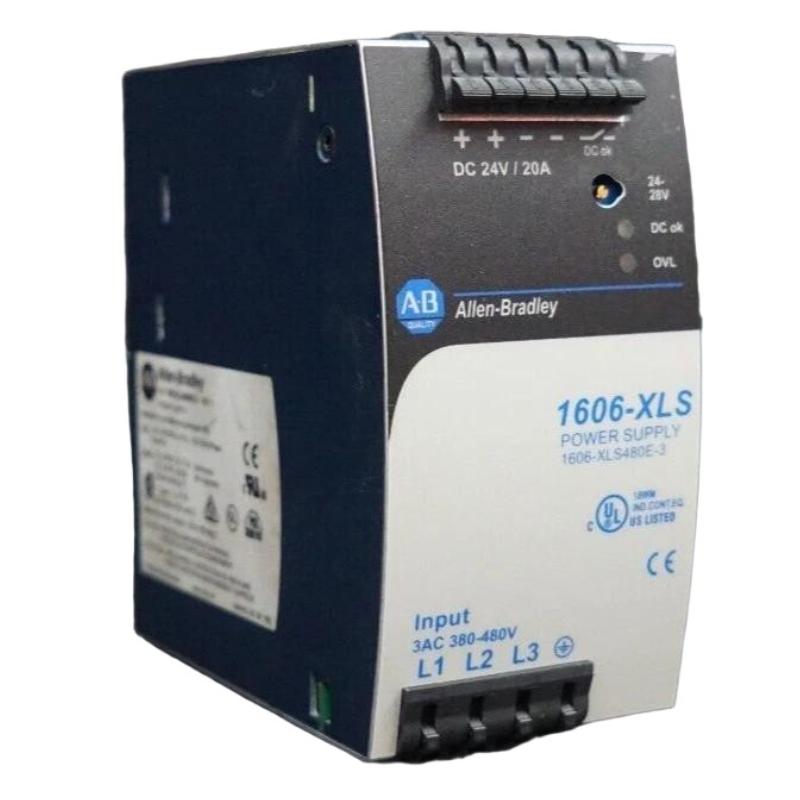
The Allen-Bradley 1606-XLS480E-3/A Power Supply is an industrial switching power supply designed to provide stable 24V DC power for automation equipment, control circuits, and industrial electrical systems. With a rated output of 480W and a nominal output current of 20A, this power supply is suitable for applications requiring dependable DC power distribution in control cabinets and industrial machinery.
This installation guide explains the preparation, mounting, electrical connection, startup, commissioning, and maintenance considerations for the Allen-Bradley 1606-XLS480E-3/A. Because the exact suffix may identify a particular product revision or ordering variant, confirm the complete catalog number and nameplate ratings before installation.
Table of Contents
- Product Overview
- Technical Specifications
- Installation Preparation
- Mounting Procedure
- Electrical Connections
- Startup and Commissioning
- System Integration
- Maintenance and Inspection
- Frequently Asked Questions
- Technical Summary
1. Product Overview
The 1606-XLS480E-3 family belongs to the Allen-Bradley Bulletin 1606 XLS industrial power supply range. It converts a suitable high-voltage AC or DC input into regulated DC power for connected equipment. Typical loads include programmable logic controllers, remote I/O systems, industrial communication devices, relays, sensors, and other 24V DC control components.
The 1606-XLS480E-3 reference is associated with a three-phase input version. Its published electrical ratings include a 380–480V AC input range, a nominal 24V DC output, an adjustable output range of 24–28V DC, and a rated output of 480W. Do not assume that every product marked with an additional suffix has identical characteristics; verify the nameplate and applicable technical documentation for the exact 1606-XLS480E-3/A unit.
2. Technical Specifications
| Parameter | Specification |
|---|---|
| Manufacturer | Allen-Bradley |
| Product category | Industrial switching power supply |
| Catalog number provided | 1606-XLS480E-3/A |
| Related base model | 1606-XLS480E-3 |
| Nominal output voltage | 24V DC |
| Output adjustment range | 24–28V DC |
| Rated output power | 480W |
| Rated output current | 20A at 24V DC |
| Input supply | Three-phase 380–480V AC for the base model; verify the exact unit label |
| AC input frequency | 47–63Hz for the base model |
| High-voltage DC input | 450–780V DC operating range for the base model; confirm applicability before use |
| Typical efficiency | Approximately 95% for the base model |
| Mounting | DIN rail |
| Electrical terminals | Spring-clamp type on the base model |
| Protection rating | IP20 for the base model |
| Dimensions | Approximately 65 × 124 × 127 mm (W × H × D) for the base model |
| Weight | Approximately 0.87kg for the base model |
These reference specifications describe the 1606-XLS480E-3 base model, not an independently verified suffix-specific data sheet. Always prioritize the actual nameplate, approved wiring diagram, and documentation for the installed unit.
3. Installation Preparation
3.1 Verify the Power Supply Model
Before beginning work, inspect the product label and confirm the full catalog number, input voltage, output voltage, rated current, and any suffix or revision markings. The three-phase 1606-XLS480E-3 must not be confused with the similarly named 1606-XLS480E, which has a different input voltage range.
3.2 Check the Electrical Environment
Confirm that the available supply voltage matches the unit’s input rating. Verify the electrical distribution arrangement, protective earth connection, upstream circuit protection, conductor sizing, and local electrical code requirements. The supply must not be connected to an unverified single-phase or three-phase source merely because the connector arrangement appears similar.
3.3 Prepare the Control Cabinet
- Choose a dry, clean, ventilated enclosure.
- Provide sufficient clearance for natural convection and routine inspection.
- Keep cable ducts and adjacent devices from obstructing ventilation openings.
- Avoid installation near strong heat sources, corrosive chemicals, excessive vibration, or conductive dust.
- Ensure that the enclosure and DIN rail provide suitable mechanical support.
3.4 Apply Electrical Safety Procedures
Isolate all hazardous input sources before mounting or wiring. Apply lockout/tagout procedures, prevent accidental re-energization, and verify the absence of hazardous voltage using an appropriately rated instrument. High-voltage DC sources may retain dangerous energy even after disconnection. Installation must be performed by qualified personnel.
4. Mounting Procedure
4.1 Install the DIN Rail
Check that the DIN rail is securely fixed and correctly aligned. The rail must support the power supply and withstand the mechanical loads created by connected conductors and normal cabinet operation.
4.2 Secure the Power Supply
- Confirm that the input source is isolated and the equipment is safe to handle.
- Inspect the power supply housing, terminals, and mounting clip for damage.
- Engage the unit with the compatible DIN rail using the manufacturer’s prescribed mounting procedure.
- Check that the housing is firmly seated and cannot move unexpectedly.
- Arrange the unit so that the input and output terminals match the approved mounting orientation.
4.3 Maintain Cooling Clearance
The base model is convection-cooled. Allow air to circulate around the housing and keep ventilation openings unobstructed. The required clearance depends on mounting orientation, ambient temperature, neighboring heat sources, and load conditions. Use the installation instructions applicable to the exact unit rather than relying on cabinet dimensions alone.
5. Electrical Connections
5.1 Input Wiring
Identify the input terminals from the markings printed on the unit and the approved wiring diagram. For the base 1606-XLS480E-3 model, the input is intended for a suitable three-phase 380–480V AC supply. Some versions also support a specified high-voltage DC input range; this must not be interpreted as permission to connect an arbitrary DC source.
- Use conductors rated for the supply voltage, current, installation environment, and applicable electrical code.
- Provide the required upstream fuse or circuit breaker according to the manufacturer’s instructions and system design.
- Connect protective earth to the designated PE terminal.
- Inspect conductor preparation and terminal engagement before energizing.
- Do not infer terminal assignments from another power supply model.
5.2 DC Output Wiring
The base model provides a nominal 24V DC output with an adjustment range of 24–28V DC. Confirm the positive and negative output terminals from the product markings before making connections.
- Observe DC polarity throughout the control circuit.
- Size conductors for the expected current, cable length, ambient temperature, and allowable voltage drop.
- Use appropriate branch protection for downstream circuits where required.
- Separate power conductors from sensitive signal wiring where practical.
- Verify that all connected devices accept the selected output voltage.
At the nominal rating, 480W corresponds to 20A at 24V DC. The total continuous load must remain within the permitted operating limits after accounting for ambient temperature, ventilation, and any manufacturer-specified derating.
5.3 DC OK Status Contact
The base model provides a DC OK relay contact for use in monitoring the output supply status. If this contact is integrated with a PLC or alarm circuit, verify the contact ratings and terminal identification for the exact product. Do not assume that the status contact can directly drive a load that exceeds its permitted electrical rating.
6. Startup and Commissioning
6.1 Pre-Energization Inspection
- Confirm the catalog number and input supply compatibility.
- Check the protective earth connection.
- Inspect input and output conductors for loose strands, incorrect polarity, or inadequate termination.
- Confirm that no tools, wire fragments, or foreign objects remain inside the cabinet.
- Verify that downstream equipment is ready for controlled startup.
6.2 Energize the Supply
- Ensure that the installation has passed the required electrical safety checks.
- Apply the input supply according to the approved startup procedure.
- Observe the power supply’s status indicators and check for abnormal noise, smell, or heating.
- Measure the DC output using a suitably rated meter and compare the result with the required system voltage.
- Check the DC OK status indication or relay circuit, where installed.
- Enable downstream loads in a controlled sequence.
6.3 Verify Output Voltage Under Load
Measure the output at the power supply and, if needed, at representative downstream terminals. A significant difference between the source and load measurements may indicate conductor voltage drop, a poor connection, or excessive current demand.
If the application requires an output setting above 24V DC, confirm the permitted voltage for every connected device before adjusting the supply. Increasing the output voltage is not an appropriate solution to an unexplained overload or wiring fault.
6.4 Record Commissioning Results
Document the input supply conditions, measured output voltage, connected load, protective device ratings, status-contact behavior, ambient conditions, and commissioning date. These records provide a useful baseline for future preventive maintenance and troubleshooting.
7. Integration with Industrial Automation Systems
The Allen-Bradley 1606-XLS480E-3 family can provide DC power to compatible control equipment, including PLCs, I/O modules, sensors, interface relays, and industrial networking components. The power supply does not replace the need to calculate the current demand of the complete DC distribution system.
7.1 Calculate the Total Load
Add the continuous current requirements of all connected devices. Include startup demand from relays, actuators, capacitive loads, and other equipment where applicable. Short-duration reserve power is not a substitute for sizing the supply to support the normal continuous load.
7.2 Consider Voltage Drop and Branch Protection
Long cable runs can cause voltage drop at remote devices. Calculate the expected drop and select suitable conductor sizes. Use branch protection and distribution arrangements appropriate for the connected equipment and fault-current characteristics.
7.3 Avoid Unverified Parallel Connections
Do not connect multiple power supply outputs in parallel unless the exact units and configuration are approved for that operating mode. Redundancy and load-sharing arrangements require compatible hardware, correct wiring, and a defined protection strategy.
8. Maintenance and Inspection
Routine maintenance helps preserve reliable operation in industrial control cabinets. Before touching wiring or mounting hardware, isolate hazardous energy and verify a safe working condition.
- Inspect the housing for discoloration, damage, corrosion, or signs of overheating.
- Check ventilation openings for dust accumulation and obstruction.
- Review the cabinet temperature and cooling conditions.
- Inspect terminal connections according to the approved maintenance procedure.
- Check output voltage and DC OK status during scheduled maintenance.
- Investigate repeated overload, unexpected shutdown, or intermittent output instead of repeatedly resetting the system.
The power supply contains no user-serviceable internal parts under normal maintenance practice. If internal damage or an electrical failure is suspected, replace the unit or arrange authorized evaluation rather than opening or modifying it.
9. Frequently Asked Questions
What is the nominal output of the Allen-Bradley 1606-XLS480E-3/A?
The related 1606-XLS480E-3 base model is rated at 24V DC, 20A, and 480W. Confirm the exact suffix-specific ratings on the installed unit.
Can this power supply be connected to a standard 120V AC outlet?
Do not connect the three-phase 1606-XLS480E-3 version to a 120V AC source. Its published input range is 380–480V AC. Similar model numbers may have different input requirements.
Does the power supply support output adjustment?
The base model has a published output adjustment range of 24–28V DC. Set the output only after checking the requirements and permitted input voltage of all connected devices.
Why is the output voltage lower at a remote device?
Possible causes include undersized conductors, long cable runs, loose connections, excessive load, or a fault in the distribution circuit. Compare measurements at the supply and load using safe, approved testing procedures.
Can the power supply be installed in a sealed cabinet?
Only if the cabinet design maintains the required temperature and cooling conditions. A sealed enclosure that traps heat may cause derating or unreliable operation.
10. Technical Summary
The Allen-Bradley 1606-XLS480E-3/A Power Supply should be installed with careful attention to model verification, input voltage compatibility, protective earthing, conductor sizing, DIN rail mounting, ventilation, and commissioning checks. The related 1606-XLS480E-3 base model provides 24V DC at up to 20A and 480W, with an adjustable output range of 24–28V DC.
For safe and reliable operation, verify the full catalog number and nameplate before wiring, follow the approved installation instructions, and confirm that the complete load remains within the unit’s permitted operating limits. Correct installation and documented commissioning help reduce power interruptions and support stable operation of industrial automation equipment.