

ProductPRODUCT
Featured products
Contact Us
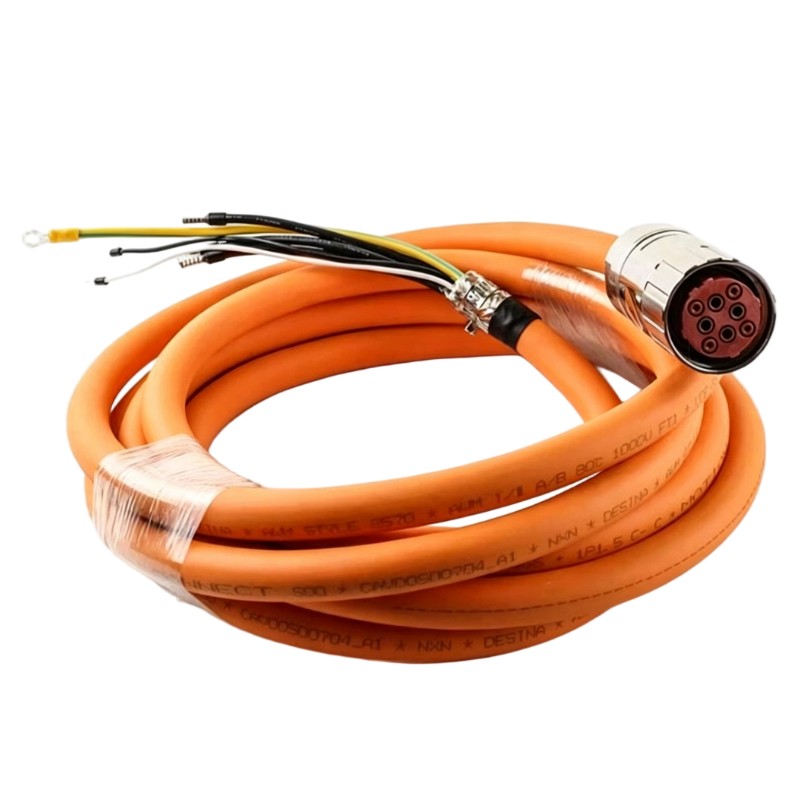
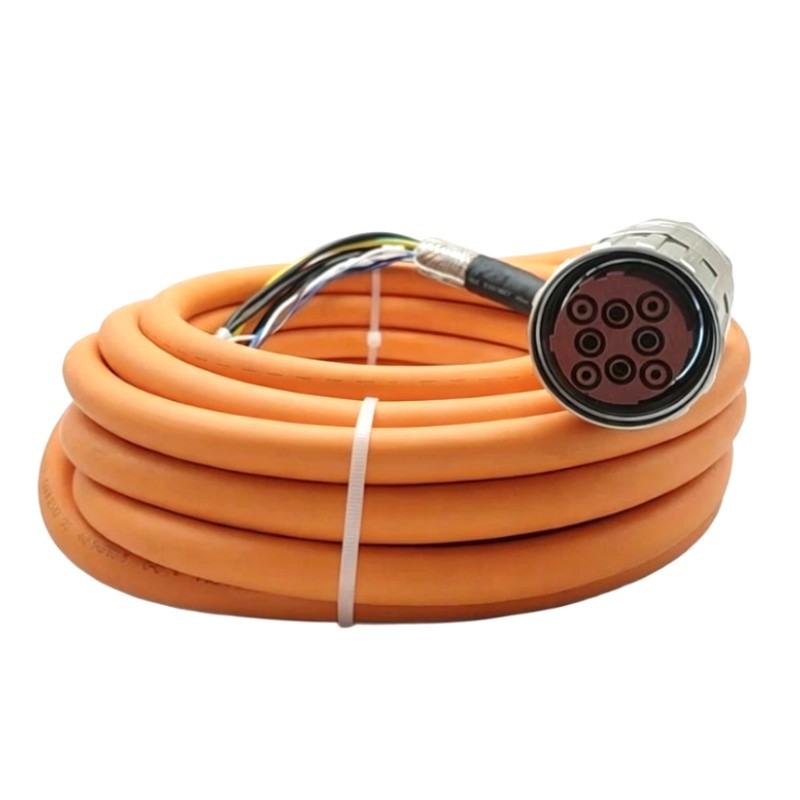
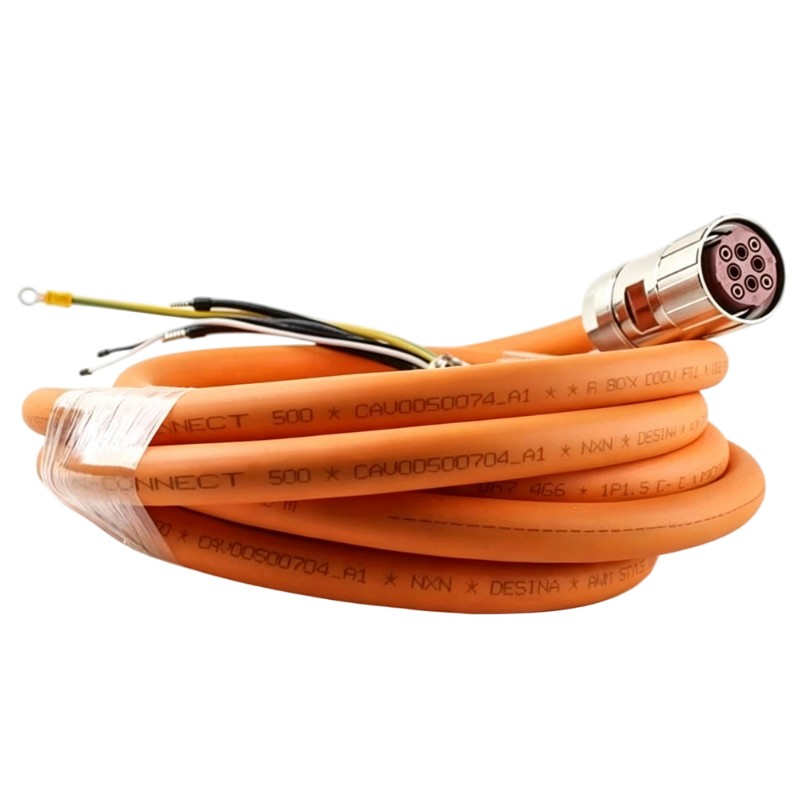
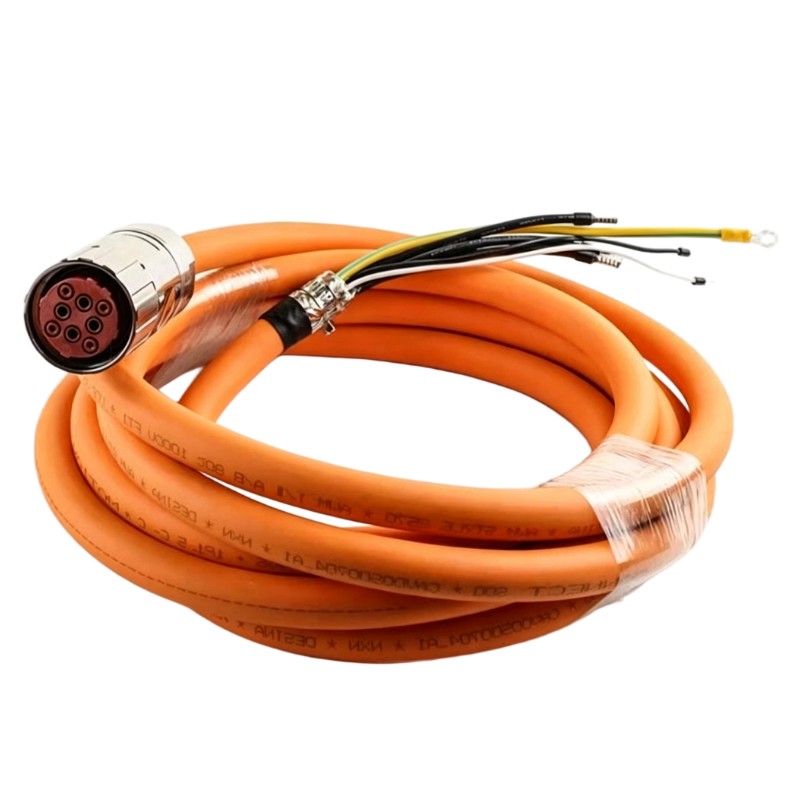
- Schneider
- VW3M5101R150
- Power Cord
- France
- 15 meters
- 3.4 kg
- Xiamen, China
- New & In Stock
- T/T, PayPal, Western Union
- 1 Year
- 1-3 Working Days
- DHL, UPS, TNT, FedEx and EMS.
- 24-Hour Service
- COO
- 15
Our advantage

Global Logistics
We have a 10-year logistics and express cooperation agreement, so our products can be shipped to any place in the world.

Brand new and original
Our products are imported in bulk from the place of origin. Because of the cooperative relationship, our products are all original and 100% new.

24-hour service
We provide 7*24 hours service to our customers. We will be there whenever you need us.

Price advantage
All our products are priced very favorably because we have our own warehouse and supply.
| Company Information | |||
| [email protected] | |||
| Mobile | +8615980777398 | ||
| +8615980777398 | |||
| 15980777398 |
1. Product Overview
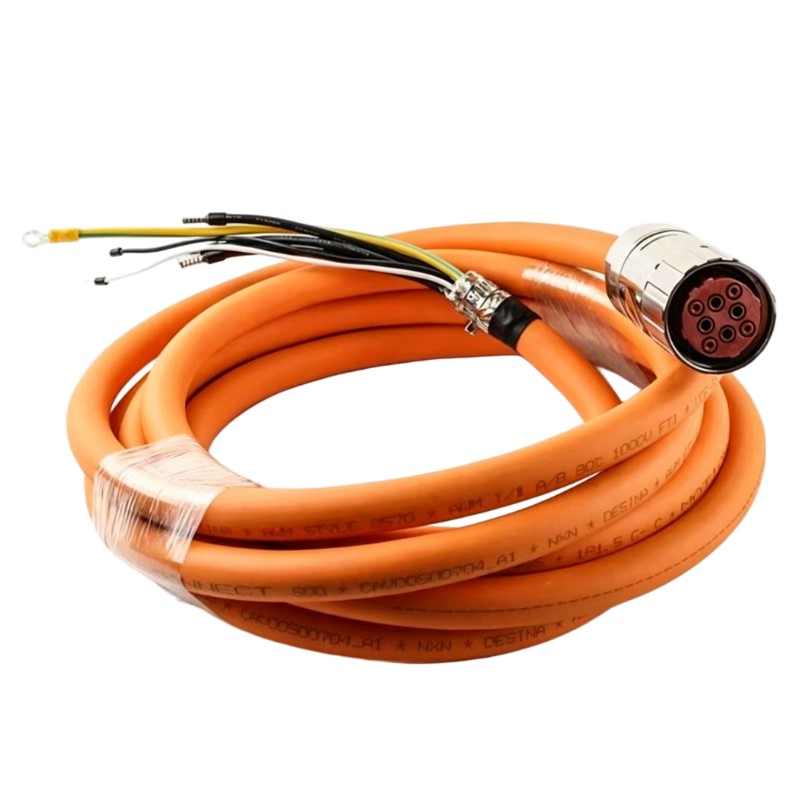
The Schneider VW3M5101R150 Power Cord is an industrial automation cable identified for power connection applications in compatible equipment installations. Power cords are essential components in industrial control and motion systems because they provide the electrical connection between designated power sources and equipment.
In industrial environments, selecting the correct power cord helps maintain safe electrical connections and supports reliable equipment operation. Factors such as cable length, connector configuration, current capacity, voltage rating, conductor arrangement, and installation conditions must be considered when selecting or replacing a power cable.
The Schneider VW3M5101R150 has a supplied cable length of 15 meters and a listed weight of 3.4 kg. Its extended length can accommodate installations where the connected equipment is positioned farther from its designated power connection point, provided the cable meets the electrical and mechanical requirements of the application.
Before installing this cable, engineers and maintenance personnel should verify its rated voltage, current capacity, connector arrangement, grounding requirements, and compatibility with the intended equipment. These technical details should be confirmed from the product label and applicable documentation rather than inferred from the model number alone.
2. Technical Specifications
| Parameter | Specification |
|---|---|
| Brand | Schneider Electric |
| Model | VW3M5101R150 |
| Product Type | Power Cord |
| Product Category | Industrial Automation Power Cable |
| Cable Length | 15 meters |
| Weight | 3.4 kg |
| Primary Function | Electrical power connection for compatible equipment |
| Typical Application | Industrial automation and equipment power connections |
| Connector Configuration | Verify from the product label and technical documentation |
| Rated Voltage | Confirm from the applicable technical documentation |
| Rated Current | Confirm from the applicable technical documentation |
| Conductor Configuration | Verify the approved cable specification |
| Grounding Requirements | Confirm the requirements for the intended equipment |
| Electrical Protection | Follow the equipment’s specified protection requirements |
| System Compatibility | Verify compatibility with the intended power source and connected equipment |
| Installation Requirements | Follow the approved electrical installation instructions |
The cable length and weight listed above are based on the supplied product information. Electrical ratings, conductor sizes, connector assignments, and compatible equipment should be verified before installation or replacement.
3. Function and Working Principle
A power cord provides the electrical connection required to supply energy to compatible equipment. Its conductors carry electrical current, while its insulation, connectors, and protective features help maintain the intended electrical connection under specified operating conditions.
In industrial automation systems, power cables may connect drives, motors, control equipment, auxiliary devices, or other electrical assemblies to their designated supply sources. The precise role of the VW3M5101R150 depends on its documented application and the equipment for which it is designed.
3.1 Electrical Power Transmission
The conductors inside a power cord carry current from the designated source to the connected equipment. The cable must have suitable electrical characteristics for the intended voltage, current, and operating environment.
Using a cable with insufficient electrical capacity may cause overheating, excessive voltage drop, insulation damage, or unreliable operation. Confirming the specified electrical ratings is therefore essential before putting the cable into service.
3.2 Connector and Equipment Interface
The cable connectors establish the physical and electrical connection between the supply arrangement and the equipment. Connector type, contact configuration, keying, locking mechanism, and electrical ratings must match the intended application.
A connector that appears physically similar may have a different electrical configuration. The correct model and connector specifications should be verified before selecting a replacement.
3.3 Importance of Cable Length
The VW3M5101R150 has a supplied length of 15 meters. This provides additional routing distance compared with shorter power cords, which may be useful in larger machinery layouts or installations where the equipment is located away from its designated connection point.
However, longer cable runs require appropriate electrical assessment. Voltage drop, current capacity, cable routing, mechanical protection, and the manufacturer’s installation requirements must all be considered.
3.4 Equipment Compatibility
A power cord must be suitable for the electrical interface and supply requirements of the connected equipment. The model designation alone does not establish its voltage rating, current capacity, connector pinout, or exact compatible equipment models.
4. Role in Industrial Automation Systems
Power cords are fundamental components in industrial installations. Automation equipment requires an appropriate electrical supply connection to operate within its specified conditions.
4.1 Supplying Power to Equipment
A correctly specified power cord connects a designated supply source to equipment designed to accept that connection. Matching the cable to the equipment helps maintain the intended electrical arrangement.
4.2 Supporting Machine Integration
Industrial machines often contain multiple electrical assemblies distributed across cabinets, machine frames, and production areas. Suitable power cords help accommodate these layouts while maintaining the required electrical connection.
4.3 Maintaining Electrical Reliability
Loose connectors, damaged insulation, unsuitable electrical ratings, or poor cable routing can interrupt power delivery and create safety risks. Proper selection and installation help reduce avoidable connection faults.
4.4 Supporting Longer Equipment Runs
The 15-meter length may provide additional flexibility when the connected equipment is positioned farther from its power connection point. The final routing must still meet the approved electrical design and environmental requirements.
4.5 Simplifying Maintenance and Replacement
Correct cable identification helps maintenance teams source suitable replacement components. Keeping accurate cable specifications and equipment records also reduces the likelihood of installing an incompatible power cord.
5. Industrial Applications
The Schneider VW3M5101R150 may be considered for applications where its verified electrical and mechanical specifications match the requirements of the intended equipment.
The following examples describe common industrial power connection environments. They do not independently confirm compatibility with every application listed.
Industrial Automation Equipment
Manufacturing facilities use controllers, drives, and other powered equipment throughout their production systems. A compatible power cord can provide the designated electrical connection for equipment designed to use it.
Motor and Drive Installations
Industrial drive systems may require specific power connection cables for their designated electrical interfaces. Cable selection should account for the drive’s documented ratings, connector configuration, and installation requirements.
Manufacturing Machinery
Production machines may position electrical assemblies at different points within a machine enclosure or production area. A 15-meter cable can provide routing flexibility when the application permits that length and the electrical design supports it.
Packaging Equipment
Packaging systems combine control equipment, motor-driven mechanisms, and auxiliary electrical devices. Appropriate power cabling helps establish the intended electrical connections and supports dependable operation.
Material Handling Systems
Conveyors, transfer mechanisms, and automated material handling equipment may require power connections at different locations. The cable must meet the electrical requirements of the connected device and withstand the mechanical conditions along its route.
Equipment Maintenance and Replacement
During maintenance, a damaged or unsuitable power cord may need to be replaced. Verifying the complete model number, cable length, connector arrangement, and electrical specifications helps reduce the risk of incorrect substitution.
These examples represent general industrial environments. Actual use of the VW3M5101R150 should be based on confirmed product specifications and the requirements of the installed equipment.
6. Installation and System Integration
Correct installation is essential for electrical safety and reliable operation. The following checklist provides general guidance and does not replace the manufacturer’s model-specific instructions.
Step 1: Verify the Cable Model
Check the product label, packaging, and equipment records to confirm the model number VW3M5101R150. Verify the supplied cable length of 15 meters and compare the connector arrangement with the intended installation.
Do not choose a replacement based only on its appearance or length.
Step 2: Isolate the Power Source
Before connecting, disconnecting, or inspecting the cable, isolate the relevant power sources according to the site’s lockout/tagout procedure. Verify that the equipment is in a safe, de-energized state before handling electrical connections.
Electrical installation work should be performed by qualified personnel.
Step 3: Inspect the Cable and Connectors
Examine the cable jacket, connectors, contact surfaces, and strain-relief areas for cuts, deformation, contamination, corrosion, or signs of overheating.
Do not install a cable with damaged insulation or defective connectors.
Step 4: Confirm Electrical Ratings
Verify that the cable’s rated voltage, current capacity, conductor arrangement, and grounding requirements match the connected equipment.
Do not infer electrical ratings from the cable length, weight, or model designation.
Step 5: Verify Connector Compatibility
Confirm that the connectors match the designated interfaces. Check connector type, keying, contact configuration, and the specified locking mechanism.
Never force a connector into an interface that does not fit correctly.
Step 6: Plan the 15-Meter Cable Route
Plan the cable route before installation. Avoid sharp edges, excessive bending, crushing, tension, hot surfaces, moving machinery, and other sources of mechanical damage.
Because the cable is 15 meters long, provide appropriate support where necessary and avoid leaving excess cable in locations where it may become tangled, damaged, or exposed to interference.
Maintain the required separation from communication and signal cables according to the installation guidelines.
Step 7: Connect the Cable
Connect the power cord according to the approved wiring diagram and equipment instructions. Ensure that the connectors are fully engaged and secured using the specified method.
Do not modify the connectors or alter conductor assignments unless an authorized procedure explicitly permits it.
Step 8: Secure and Inspect the Installation
Provide suitable cable support and strain relief where required. Confirm that the cable cannot become trapped, pulled loose, or damaged during normal equipment movement or maintenance.
Check that the cable route does not obstruct service access or create a trip hazard.
Step 9: Restore Power and Test Operation
After completing the installation and inspection, restore power according to the approved commissioning procedure. Check for normal equipment startup and any available fault indications.
If the equipment does not operate correctly, isolate power safely before investigating the cable or associated electrical connections.
7. Common Problems and Troubleshooting
Power connection problems may originate from the cable, connectors, supply source, or connected equipment. Troubleshooting should begin with a safe visual inspection and follow the equipment’s approved diagnostic procedure.
| Symptom | Possible Causes | Recommended Checks |
|---|---|---|
| Equipment does not power on | Loose connection, incorrect cable, supply problem, or damaged conductor | Verify the power source, cable model, connector engagement, and equipment requirements |
| Intermittent power supply | Loose connector, damaged cable, worn contacts, or mechanical strain | Inspect the cable route, connectors, and strain-relief points |
| Connector becomes unusually warm | Poor contact, unsuitable electrical rating, damaged contacts, or excessive current | Isolate the equipment and have qualified personnel investigate the connection and ratings |
| Cable insulation is damaged | Abrasion, crushing, excessive bending, heat exposure, or mechanical impact | Remove the cable from service and replace it if its integrity is compromised |
| Connector does not fit | Incorrect cable version or incompatible connector configuration | Compare the model number and approved connector specifications |
| Equipment trips or reports a power-related fault | Supply issue, wiring problem, unsuitable cable, or equipment fault | Review diagnostics and verify the approved electrical arrangement |
| Fault remains after cable replacement | The original problem may involve the supply source or connected equipment | Check the upstream supply, equipment connections, and relevant diagnostics |
7.1 Inspect the Cable Jacket
Look for cuts, cracks, abrasion, crushing, discoloration, or other signs of insulation damage. Pay particular attention to connector ends and locations where the cable passes through openings or moves during operation.
A cable with compromised insulation should not remain in service.
7.2 Check Connector Integrity
Inspect connectors for loose fittings, damaged contacts, corrosion, contamination, or signs of overheating. Confirm that the connectors match the intended interfaces and are fully secured.
Do not attempt to repair damaged electrical contacts unless an approved procedure specifically permits it.
7.3 Verify Supply Compatibility
Confirm that the supply source matches the connected equipment’s requirements and that the cable is suitable for the intended voltage and current.
Electrical measurements should only be performed by qualified personnel using appropriate instruments and safe procedures.
7.4 Investigate Cable Routing
Excessive bending, crushing, tension, or contact with hot and moving components can damage the cable over time. Review the complete 15-meter route and correct any installation conditions that could compromise cable integrity.
7.5 Determine Whether Replacement Is Required
If the cable has visible damage, defective connectors, or evidence of overheating, remove it from service and assess it according to the site’s electrical safety procedures.
If the fault remains after a verified replacement, investigate the supply source and connected equipment rather than repeatedly replacing the cable.
8. Preventive Maintenance and Reliability
Regular inspection helps identify cable deterioration before it causes unexpected downtime or electrical hazards.
- Inspect the cable jacket: Look for cuts, cracks, abrasion, deformation, and heat damage.
- Check connectors: Ensure that connectors remain secure, clean, and free from corrosion or visible damage.
- Review the full cable route: Inspect all accessible sections of the 15-meter cable for crushing, excessive bending, tension, or contact with moving equipment.
- Check strain relief: Confirm that cable weight and movement do not place excessive stress on the connectors.
- Maintain environmental protection: Keep the cable within its specified temperature, moisture, and contamination limits.
- Verify replacement specifications: Match the exact model, cable length, connector configuration, and electrical ratings.
- Maintain spare parts: Store spare cables in suitable conditions and protect connectors from impact and contamination.
- Document maintenance: Record inspections, replacements, and recurring electrical connection faults.
Inspection frequency should reflect the operating environment, equipment criticality, cable exposure, and site maintenance policy.
9. Compatible System Components
A power cord must match the electrical and mechanical requirements of the equipment to which it connects. The following component categories should be reviewed during installation and replacement planning.
| Component Category | Integration Considerations |
|---|---|
| Power source | Verify the required supply voltage, current, and connection arrangement |
| Drive or powered equipment | Confirm the approved power connection and cable requirements |
| Power connector or inlet | Check connector type, keying, contact configuration, and electrical ratings |
| Electrical distribution equipment | Verify the specified protection and distribution arrangements |
| Cable support and strain relief | Ensure the cable is mechanically supported as required |
| Protective grounding system | Follow the equipment’s approved grounding requirements |
| Control cabinet or machine enclosure | Confirm cable routing, access requirements, and environmental conditions |
| Electrical testing equipment | Use suitable instruments and approved procedures for inspection |
This table identifies component categories to evaluate. It does not confirm compatibility with any particular Schneider Electric drive, controller, or other part number. Actual compatibility must be verified against the installed equipment documentation.
10. Replacement and Alternative Selection
When replacing the Schneider VW3M5101R150 Power Cord, engineers should compare the complete electrical and mechanical specifications rather than selecting a substitute based only on length or appearance.
| Selection Factor | What to Verify |
|---|---|
| Exact model | Confirm VW3M5101R150 |
| Product type | Power cord |
| Cable length | 15 meters |
| Weight | 3.4 kg |
| Connector arrangement | Verify the connector type and configuration at both ends |
| Rated voltage | Confirm the required electrical rating |
| Rated current | Confirm the current capacity required by the equipment |
| Conductor configuration | Check the specified conductor arrangement and assignments |
| Grounding requirements | Verify protective grounding and connection requirements |
| Mechanical properties | Check cable routing, bending, strain relief, and environmental suitability |
| System compatibility | Confirm suitability for the intended power source and connected equipment |
| Product condition | Evaluate authenticity, storage condition, connector integrity, and warranty where applicable |
A cable with a similar length or connector appearance may not be a suitable replacement. Any alternative should meet the electrical, mechanical, and environmental requirements of the intended installation.
11. Key Benefits of Correct Power Cord Selection
Appropriate Electrical Connection
A correctly specified power cord provides the intended electrical connection between a compatible power source and the connected equipment.
Extended Installation Reach
The supplied 15-meter length can accommodate installations where equipment is positioned farther from its designated power connection point, subject to the approved electrical design.
Support for Reliable Operation
Suitable cable ratings, intact insulation, and secure connectors help reduce avoidable power interruptions and connection faults.
Flexible Equipment Layout
A longer cable may provide additional flexibility when planning machinery layouts and positioning compatible equipment. Proper cable management remains essential.
Simplified Maintenance
Accurate model identification and documented cable specifications help maintenance teams select suitable replacements and maintain equipment records.
These benefits depend on selecting a cable that matches the connected equipment and following the applicable electrical safety and installation requirements.
12. Technical FAQs
Q1: What is the Schneider VW3M5101R150?
The Schneider VW3M5101R150 is identified in the supplied product information as an industrial power cord for compatible equipment connections.
Q2: What is the cable length?
The supplied cable length is 15 meters.
Q3: How much does the VW3M5101R150 weigh?
The supplied product weight is 3.4 kg.
Q4: Can this power cord be used with any Schneider Electric drive?
No. Compatibility depends on the drive’s approved power connection, connector configuration, voltage and current requirements, and the cable’s documented specifications.
Q5: What should be checked before installing the cable?
Confirm the exact model number, cable length, connector arrangement, rated voltage, current capacity, conductor configuration, grounding requirements, and compatibility with the intended equipment.
Q6: Can another 15-meter power cable be used as a replacement?
Not automatically. The replacement must meet the required electrical ratings, connector specifications, conductor arrangement, environmental requirements, and equipment compatibility.
Q7: Why might equipment fail to power on after cable installation?
Possible causes include an unsuitable cable, a loose connection, an incorrect connector arrangement, a supply problem, or a fault in the connected equipment. Check the approved installation diagram and available diagnostic information.
Q8: What should be done if the cable becomes damaged?
Remove the equipment from service as necessary, isolate the relevant power sources, and follow the site’s electrical safety procedure. Replace the cable with a verified compatible component rather than continuing to use a cable with compromised insulation.
Q9: How can cable-related problems be prevented?
Inspect the cable regularly, maintain suitable routing and strain relief, protect connectors from damage, and use the specified replacement model or a verified equivalent.
Q10: Why does cable length matter when selecting a power cord?
Cable length affects equipment placement and routing. It can also influence electrical considerations such as voltage drop, depending on the current, conductor characteristics, and application requirements.
13. Conclusion
The Schneider VW3M5101R150 Power Cord is an industrial automation cable identified for electrical power connection applications. Its supplied cable length of 15 meters and weight of 3.4 kg provide useful reference information for equipment identification, installation planning, and replacement selection.
Reliable and safe operation depends on confirming the cable’s electrical ratings, connector configuration, conductor arrangement, and compatibility with the intended equipment. The extended cable length also makes proper routing, mechanical support, and protection from environmental damage important considerations.
Before installing or replacing the VW3M5101R150, verify its complete specifications against the requirements of the connected equipment and the approved electrical installation design. Correct selection, careful installation, and regular maintenance help reduce avoidable faults and support dependable industrial power connections.