

ProductPRODUCT
Featured products
Contact Us
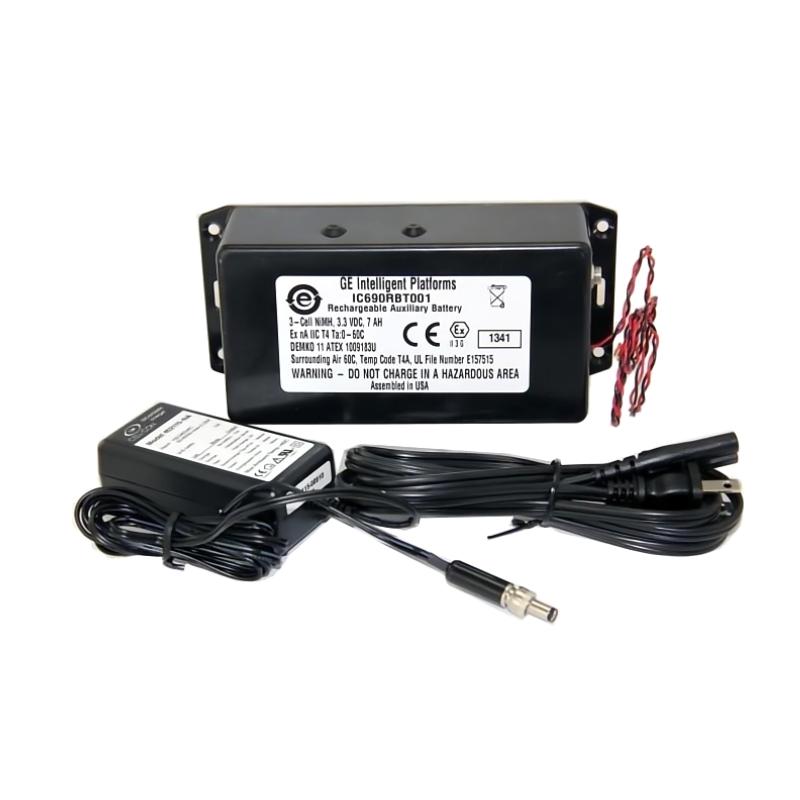
- GE
- IC690RBK001
- Rechargeable Battery Kit
- USA
- 185 × 45 × 30 mm
- 1.36 kg
- Xiamen, China
- New & In Stock
- T/T, PayPal, Western Union
- 1 Year
- 1-3 Working Days
- DHL, UPS, TNT, FedEx and EMS.
- 24-Hour Service
- COO
- 37
Our advantage

Global Logistics
We have a 10-year logistics and express cooperation agreement, so our products can be shipped to any place in the world.

Brand new and original
Our products are imported in bulk from the place of origin. Because of the cooperative relationship, our products are all original and 100% new.

24-hour service
We provide 7*24 hours service to our customers. We will be there whenever you need us.

Price advantage
All our products are priced very favorably because we have our own warehouse and supply.
| Company Information | |||
| [email protected] | |||
| Mobile | +8615980777398 | ||
| +8615980777398 | |||
| 15980777398 |
Product Overview
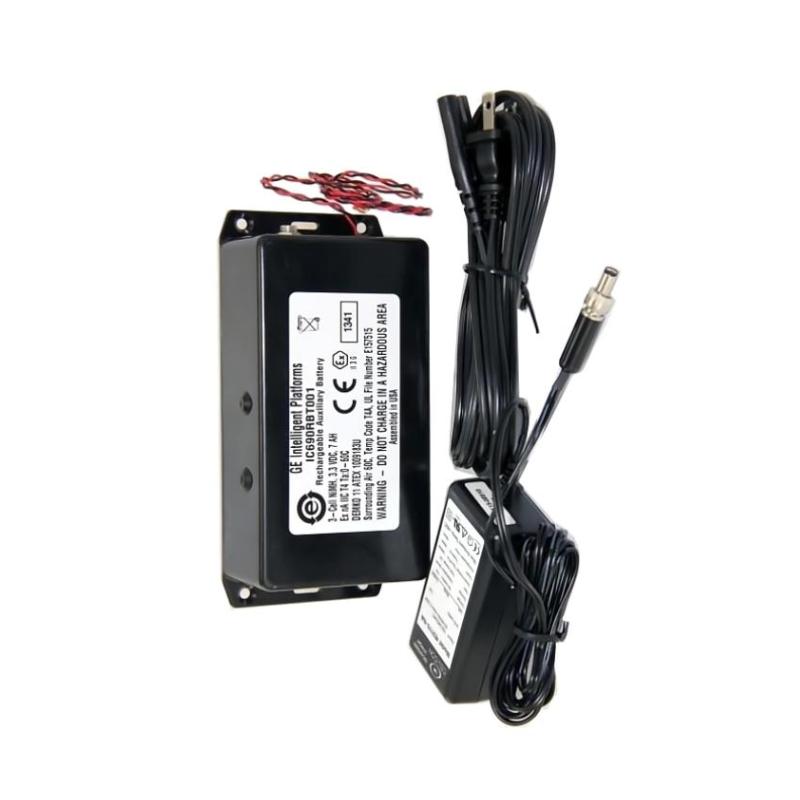
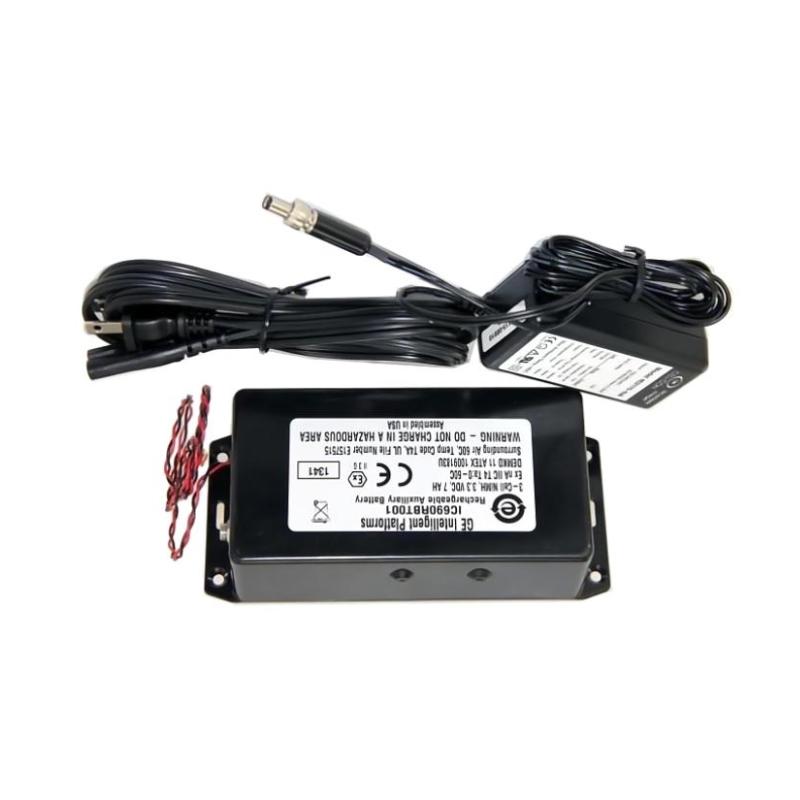
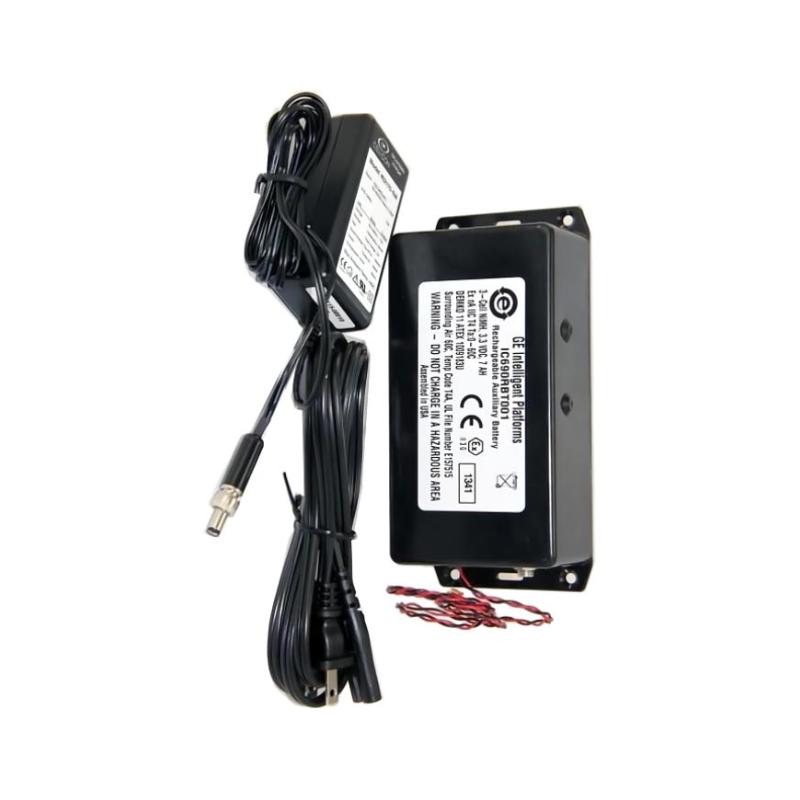
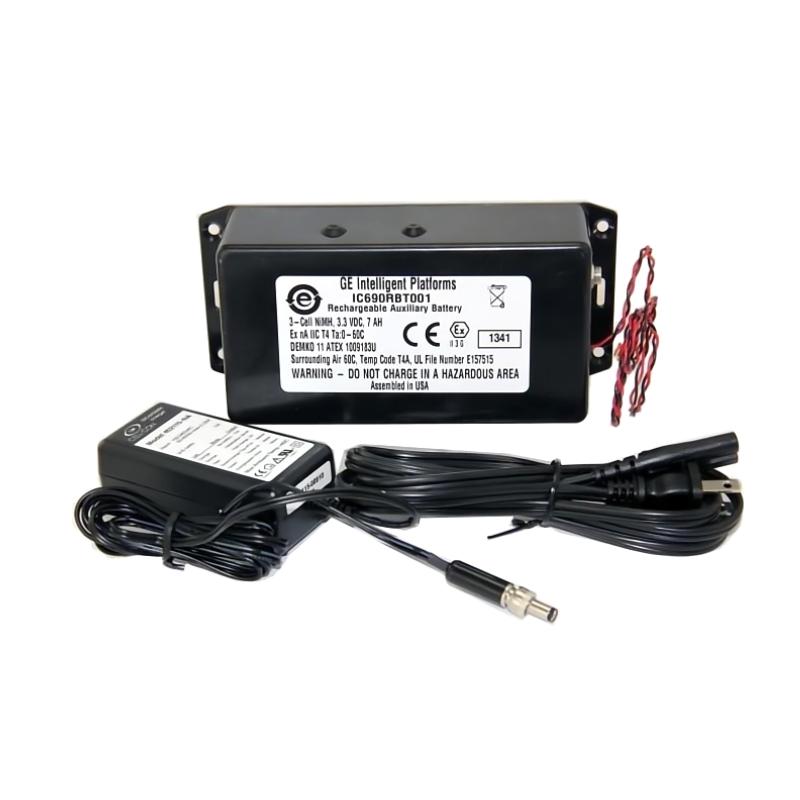
The GE IC690RBK001 Rechargeable Battery Kit is an industrial automation battery component intended to support memory retention and backup functions within compatible control-system equipment.
In PLC and industrial automation installations, backup power can be important for retaining selected controller information when the primary control-system power is removed. A rechargeable battery kit can help maintain supported memory or system-retention functions during planned shutdowns, power interruptions, equipment servicing, or cabinet maintenance.
The IC690RBK001 should be treated as a maintenance component rather than simply as a general-purpose battery. Its correct application depends on the specific controller, rack, memory-retention architecture, charging circuit, and system configuration.
The specified physical dimensions for this model are 185 × 45 × 30 mm, with a specified weight of 1.36 kg.
This guide covers product identification, installation considerations, replacement procedures, commissioning, maintenance, fault diagnosis, storage, and practical troubleshooting.
Product Identification
| Parameter | Specification |
|---|---|
| Manufacturer | GE |
| Model | IC690RBK001 |
| Product Type | Rechargeable Battery Kit |
| Application | Industrial Automation |
| Primary Function | Backup / Memory Retention Support |
| Dimensions | 185 × 45 × 30 mm |
| Weight | 1.36 kg |
| Installation Environment | Industrial Control System |
| Typical Application | PLC / Controller Backup |
| Maintenance | Battery Condition and Connection Inspection |
| Replacement Type | Maintenance Component |
Technical Specifications
| Technical Item | IC690RBK001 |
|---|---|
| Manufacturer | GE |
| Model | IC690RBK001 |
| Product Category | Rechargeable Battery Kit |
| Application | Industrial Control and Automation |
| Primary Role | Backup Power / Memory Retention |
| Length | 185 mm |
| Width | 45 mm |
| Height | 30 mm |
| Weight | 1.36 kg |
| Installation | Compatible Control Equipment |
| Maintenance | Periodic Inspection and Replacement |
| System Integration | PLC / Controller |
The exact electrical characteristics, charging requirements, connector arrangement, supported controller models, and service interval should be confirmed against the applicable equipment configuration before installation.
Role of a Rechargeable Battery in an Automation System
A PLC system normally depends on a primary power source for continuous operation.
A simplified architecture is:
AC / DC Control Power
↓
PLC / Controller
↓
Program and Retentive Data
↓
Industrial Process
A backup battery may support selected retention functions when the primary control power is unavailable.
Depending on the controller architecture, battery-backed functions can include certain types of:
- Retentive memory
- Controller configuration
- Program-related memory
- Data retention
- Clock or timing functions
The exact functions supported by the IC690RBK001 depend on the compatible host equipment.
Why Battery Maintenance Matters
A battery is a consumable maintenance component.
Even when the PLC itself is operating normally, a degraded battery can eventually create a maintenance problem.
Possible symptoms of battery deterioration include:
- Battery warning
- Low-battery indication
- Loss of retained information after power removal
- Reduced backup duration
- Controller diagnostic messages
- Unexpected retention-data loss
A preventive replacement strategy is therefore preferable to waiting for a complete battery failure.
Installation Preparation
Step 1 – Confirm the Model
Verify the component identification:
GE IC690RBK001
Before installation, compare the replacement battery kit with the existing unit.
Check:
- Model number
- Connector arrangement
- Physical configuration
- Cable routing
- Mounting arrangement
- Battery housing
- Visible condition
Do not install a battery simply because it has similar dimensions.
Electrical and system compatibility must be confirmed.
Step 2 – Confirm Controller Compatibility
Before replacing the battery, identify the exact controller or automation equipment in which the existing battery is installed.
Record:
- Controller model
- Rack or system configuration
- Existing battery type
- Connector
- Battery status
- Memory-retention requirements
- Current controller operating condition
If the controller documentation specifies a particular battery replacement procedure, that procedure should be followed.
Step 3 – Protect the Controller Program
Battery replacement can be sensitive because the battery may support retention functions while the controller is powered down.
Before removing an existing battery:
- Determine which information depends on battery retention.
- Back up the PLC program.
- Back up important configuration data.
- Record controller settings.
- Verify the backup.
- Confirm the correct replacement battery is available.
Do not begin replacement until critical controller data has been secured.
Step 4 – Check the Battery Condition
Inspect the replacement battery before installation.
Look for:
- Damaged housing
- Cracks
- Leakage
- Corrosion
- Damaged connector
- Damaged wiring
- Swelling
- Unusual odor
- Physical deformation
Do not install a damaged battery.
Step 5 – Check the Installation Environment
The IC690RBK001 should be installed in an appropriate industrial control environment.
Avoid exposure to:
- Excessive heat
- Direct sunlight
- Water
- Condensation
- Corrosive chemicals
- Excessive vibration
- Mechanical impact
Temperature is particularly important for battery service life.
Installation Procedure
Step 1 – Follow the Controller’s Battery Replacement Procedure
The correct procedure depends on the host controller.
Some systems are designed for battery replacement while the controller remains powered, while other systems require a controlled shutdown.
Therefore, the controller-specific replacement procedure should always take priority.
Step 2 – Record the Existing Connection
Before disconnecting the old battery, inspect the existing connection.
Record:
- Connector position
- Cable routing
- Polarity
- Mounting position
- Battery orientation
A photograph or maintenance record can be useful for documenting the original installation.
Step 3 – Remove the Existing Battery
If the controller’s maintenance procedure permits removal:
- Confirm the system is in the appropriate maintenance state.
- Verify that critical data has been backed up.
- Disconnect the existing battery according to the approved procedure.
- Remove the battery from its mounting location.
- Inspect the connector and surrounding area.
Do not pull on battery wires excessively.
Step 4 – Inspect the Battery Connector
Before installing the replacement:
Check for:
- Corrosion
- Bent contacts
- Loose terminals
- Contamination
- Damaged insulation
- Mechanical damage
A good battery cannot compensate for a damaged connector.
Step 5 – Install the IC690RBK001
Install the new battery in the correct orientation.
Verify:
- Correct connector
- Correct polarity
- Secure connection
- Proper mounting
- Cable routing
- No excessive cable tension
The battery should be mechanically secure and should not interfere with other controller components.
Step 6 – Restore the System
After installation:
- Confirm the battery connection.
- Check controller status.
- Verify battery diagnostics if available.
- Confirm retained data.
- Check controller configuration.
- Verify the PLC program.
- Confirm communication.
- Test normal operation.
Battery Replacement Commissioning
Initial Verification
After installing the IC690RBK001, check for:
- Battery warning
- Diagnostic alarms
- Controller fault messages
- Abnormal status indicators
- Communication problems
If the controller indicates a battery fault after replacement, verify the connector, battery installation, and controller diagnostic information.
Verify Retentive Data
Where applicable, confirm that important retained information remains available.
Check:
- PLC program
- Retentive variables
- Configuration
- Controller settings
- Clock information
- Diagnostic data
The exact data-retention behavior depends on the host controller.
Verify PLC Communication
After battery replacement, confirm communication with:
- Programming workstation
- HMI
- Supervisory system
- Remote I/O
- Industrial network
- Other connected controllers
Battery replacement should not normally require changes to communication configuration, but communication should still be verified as part of commissioning.
Troubleshooting Guide
Fault 1 – Battery Warning Remains After Replacement
Possible Causes
- Battery connector not fully inserted
- Incorrect battery installation
- Battery not recognized
- Controller requires reset or diagnostic acknowledgment
- Replacement component not compatible
- Existing controller fault
Diagnostic Procedure
Check:
- Battery model
- Connector
- Polarity
- Mounting
- Controller diagnostic status
- Battery-monitoring circuit
Fault 2 – PLC Loses Retained Data
Possible Causes
- Battery completely discharged
- Battery disconnected
- Battery replacement performed incorrectly
- Controller retention architecture
- Memory-retention problem
- Controller hardware fault
Corrective Action
First determine exactly which data has been lost.
Then restore the required program or configuration from a verified backup.
Do not assume that all controller memory is battery-backed.
Fault 3 – Controller Does Not Start Normally After Battery Replacement
Possible Causes
- Incorrect battery connection
- Controller power problem
- Configuration issue
- Memory problem
- Existing controller fault
- Wiring disturbed during maintenance
Diagnostic Procedure
Check:
- Controller power
- Battery connection
- Diagnostic indicators
- Program status
- Configuration
- Other connections affected during maintenance
Fault 4 – Battery Discharges Too Quickly
Possible Causes
- Battery deterioration
- Incorrect charging conditions
- Excessive temperature
- Charging-system problem
- Incorrect battery type
- Long storage period before installation
Corrective Action
Verify that the battery is compatible with the host controller and that the controller’s battery charging circuit is operating correctly.
Fault 5 – Battery Appears Physically Damaged
Possible Causes
- Age
- Excessive temperature
- Mechanical impact
- Improper storage
- Electrical fault
Do not install or continue using a visibly damaged battery.
Follow appropriate industrial battery-handling and disposal procedures.
Fault 6 – Battery Voltage Is Abnormal
Possible Causes
- Battery degradation
- Incorrect measurement method
- Connector problem
- Charging-system issue
- Incorrect battery
Battery measurements should be performed using an appropriate procedure and suitable test equipment.
Fault 7 – Controller Clock Resets
If the host controller uses battery-backed clock retention, clock loss may be associated with a battery problem.
Possible causes include:
- Weak battery
- Battery disconnected
- Battery replacement issue
- Controller retention fault
Verify the battery system and controller configuration.
Fault 8 – Intermittent Battery Alarm
Possible Causes
- Loose connector
- Intermittent contact
- Battery nearing end of service life
- Charging issue
- Controller monitoring problem
Inspect the physical connection before replacing other controller components.
Fault Diagnosis Flow
A systematic battery troubleshooting sequence is:
Battery Alarm
↓
Identify Host Controller
↓
Verify IC690RBK001 Compatibility
↓
Inspect Battery Condition
↓
Check Connector
↓
Verify Polarity
↓
Check Controller Diagnostics
↓
Verify Charging / Retention Function
↓
Check Retained Data
↓
Perform Controlled System Test
This approach helps distinguish between a battery problem, connector issue, controller charging problem, and memory-retention problem.
Preventive Maintenance
Battery Inspection
During scheduled maintenance, inspect:
- Battery condition
- Connector
- Cable
- Housing
- Mounting
- Corrosion
- Warning indicators
Battery Service Planning
A battery should not necessarily be replaced only after a low-battery alarm appears.
A planned replacement schedule can reduce the risk of:
- Unexpected retention loss
- Unplanned controller downtime
- Emergency maintenance
- Program restoration work
- Production interruptions
The actual replacement interval should follow the host controller’s maintenance requirements and operating environment.
Temperature Monitoring
Battery service life can be affected by environmental temperature.
Check:
- Cabinet temperature
- Local temperature around the battery
- Ventilation
- Heat-producing equipment
- Direct heat sources
Avoid installing the battery in an unnecessarily hot location.
Connector Inspection
Inspect the connector for:
- Corrosion
- Loose contacts
- Mechanical damage
- Contamination
- Poor retention
A reliable electrical connection is essential for the backup function.
Preventive Maintenance Table
| Maintenance Area | Recommended Action |
|---|---|
| Battery Housing | Inspect for damage |
| Battery Connector | Check connection integrity |
| Battery Wiring | Inspect insulation |
| Battery Condition | Monitor warnings |
| Controller Diagnostics | Review battery status |
| Retentive Data | Verify critical data retention |
| Cabinet Temperature | Monitor operating conditions |
| Mounting | Check mechanical stability |
| Program Backup | Maintain current backup |
| Configuration Backup | Maintain current configuration |
| Replacement Planning | Follow controller maintenance schedule |
| Storage | Keep replacement batteries in suitable conditions |
Storage and Handling
Replacement batteries should be stored under suitable environmental conditions.
Avoid:
- Excessive heat
- Direct sunlight
- Moisture
- Mechanical impact
- Corrosive environments
Maintain clear inventory records so that battery age and storage duration can be monitored.
Before installation, inspect stored batteries for physical damage or abnormal conditions.
Common Installation Mistakes
Installing the Wrong Battery
A battery with a similar appearance or size may not be electrically compatible.
Always verify the exact model and controller requirements.
Reversing the Connection
Incorrect polarity can damage the battery circuit or controller.
Verify the connector orientation before installation.
Removing the Battery Without a Backup
If the controller depends on battery-backed retention, removing the battery without following the correct replacement procedure can result in loss of retained information.
Ignoring Battery Warnings
A low-battery warning should be treated as a maintenance indication rather than something to be repeatedly cleared.
Storing Batteries in High Temperatures
Excessive temperature can negatively affect battery condition and service life.
Pulling on the Battery Cable
Disconnect the connector carefully rather than applying excessive force to the wiring.
Failing to Verify the Replacement
After replacement, check the controller diagnostics and confirm that important system functions remain normal.
PLC System Integration
The IC690RBK001 should be considered as part of the controller’s memory-retention architecture.
A simplified relationship is:
Primary Control Power
↓
PLC / Controller
↕
Rechargeable Backup Battery
↓
Supported Retention Functions
The battery does not replace the primary control power supply for the complete automation system.
Instead, it supports designated backup or retention functions within compatible equipment.
Maintenance Data Management
For industrial plants with many PLC systems, battery maintenance should be documented.
Useful maintenance records include:
- Controller model
- Battery model
- Installation date
- Replacement date
- Battery warning history
- Maintenance technician
- Controller program backup date
- Configuration backup date
- Observed condition
This makes battery replacement more predictable and reduces the likelihood of missed maintenance.
Replacement Considerations
When replacing a GE IC690RBK001, verify the following.
Model Compatibility
Confirm the exact battery model required by the host controller.
Physical Compatibility
The specified dimensions are:
185 × 45 × 30 mm
Ensure sufficient space is available for installation and cable routing.
Weight
The specified weight is:
1.36 kg
The mounting arrangement must safely support the component.
Electrical Compatibility
Verify:
- Battery type
- Voltage
- Connector
- Polarity
- Charging requirements
- Controller compatibility
System Compatibility
Confirm that the controller supports the battery and that the battery is intended for the required memory-retention function.
Key Advantages
- Designed for industrial automation battery-backup applications
- Rechargeable battery kit configuration
- Supports compatible controller retention functions
- Useful for PLC maintenance
- Helps maintain supported retained information during power interruptions
- Suitable for planned controller maintenance
- Compact form factor
- Dimensions: 185 × 45 × 30 mm
- Weight: 1.36 kg
- Suitable for control-system environments
- Supports preventive battery maintenance
- Can reduce unexpected battery-related downtime when properly maintained
Technical FAQs
What is the GE IC690RBK001?
The GE IC690RBK001 is a rechargeable battery kit intended for compatible industrial automation equipment where battery backup or memory-retention support is required.
What are the dimensions of the IC690RBK001?
The specified dimensions are 185 × 45 × 30 mm.
What is the weight of the IC690RBK001?
The specified weight is 1.36 kg.
What is the purpose of the IC690RBK001?
Its purpose is to provide rechargeable backup support for designated retention functions within compatible control equipment.
Does the IC690RBK001 power the entire PLC system?
No. A rechargeable backup battery should not be treated as a replacement for the primary control-system power supply. Its function is to support designated backup or retention functions.
Why is battery replacement important?
A degraded battery may eventually be unable to maintain supported retained information during loss of primary power, potentially resulting in data loss or additional commissioning work.
What should be backed up before battery replacement?
Important PLC programs, configurations, parameters, and other critical control-system information should be backed up before beginning battery maintenance.
Why does the battery warning remain after replacement?
Possible causes include an improperly connected battery, incorrect battery type, controller diagnostic status, connector problems, or an issue with the controller’s battery-monitoring circuit.
Can a weak battery cause PLC data loss?
Yes, if the affected data depends on battery-backed retention and the battery is unable to maintain the required backup function during loss of primary power.
What should be checked after battery replacement?
Check the battery connection, controller diagnostic status, retained data, PLC program, configuration, communication, and normal controller operation.
Should the battery be replaced only after a warning appears?
A planned replacement schedule is generally preferable to waiting for complete battery failure. The actual interval should follow the host controller’s maintenance requirements and operating environment.
How should replacement batteries be stored?
They should be kept in a suitable environment away from excessive heat, moisture, direct sunlight, mechanical damage, and corrosive conditions.
Conclusion
The GE IC690RBK001 Rechargeable Battery Kit is an important maintenance component for compatible industrial automation equipment requiring rechargeable backup support for selected memory-retention or controller functions.
The specified unit measures 185 × 45 × 30 mm and weighs 1.36 kg. These dimensions should be considered when planning cabinet installation, battery mounting, and cable routing.
The most important consideration during replacement is compatibility with the host controller. Technicians should verify the exact battery model, connector, polarity, charging arrangement, and retention requirements before installation.
Before replacing the battery, critical PLC programs and configurations should be backed up. After installation, the battery connection, controller diagnostics, retained information, and system communication should all be verified.
Preventive battery maintenance is preferable to waiting for complete battery failure. Regular inspection, appropriate storage, temperature control, maintenance records, and planned replacement can reduce the risk of unexpected memory-retention problems and unplanned automation downtime.
For industrial PLC systems, the IC690RBK001 should therefore be managed as part of the overall controller maintenance strategy rather than as an isolated consumable component.