

ProductPRODUCT
Featured products
Contact Us
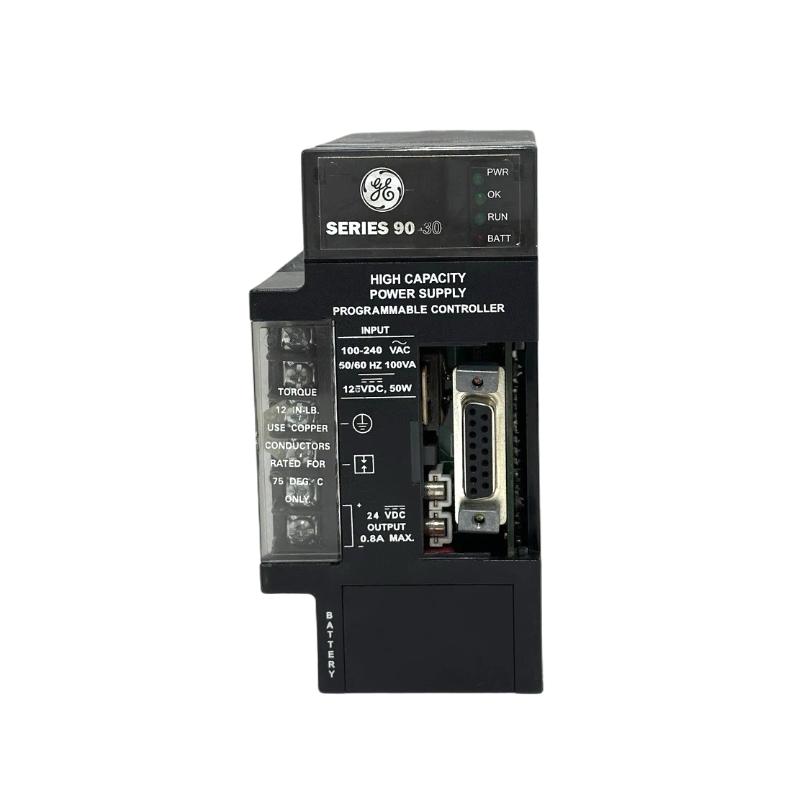
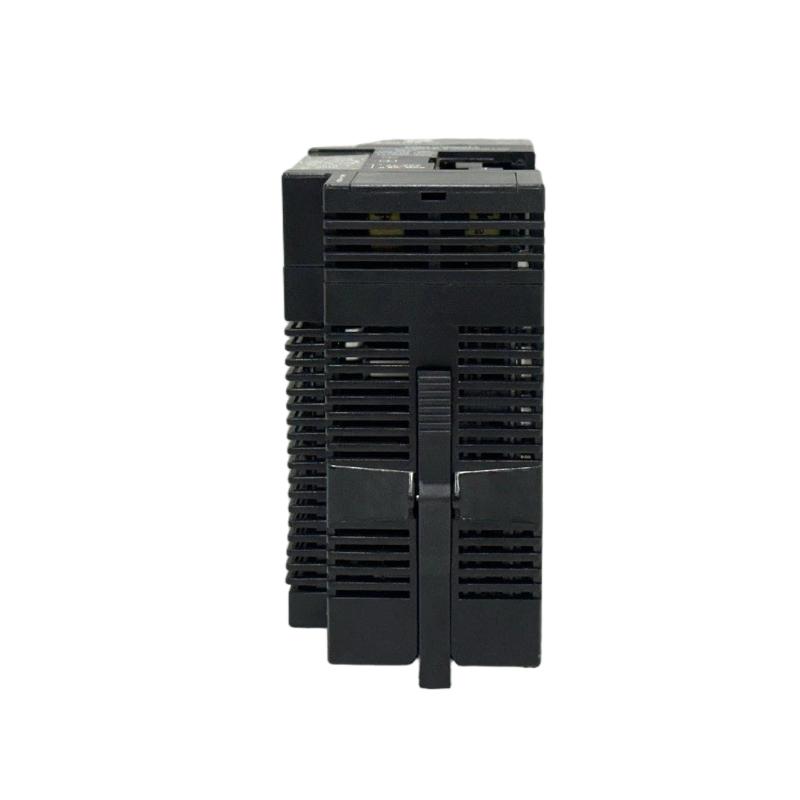
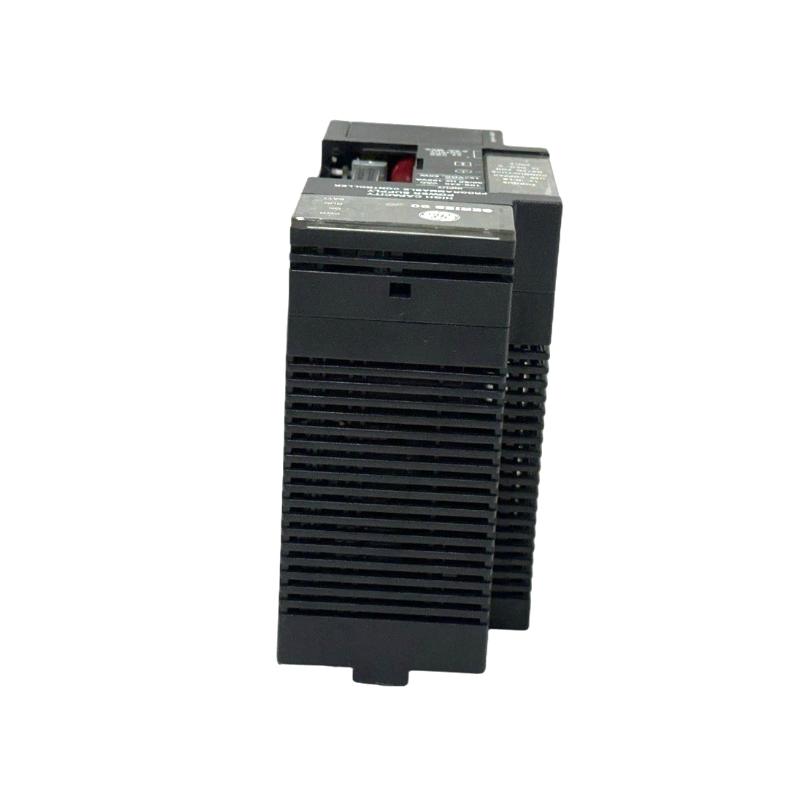
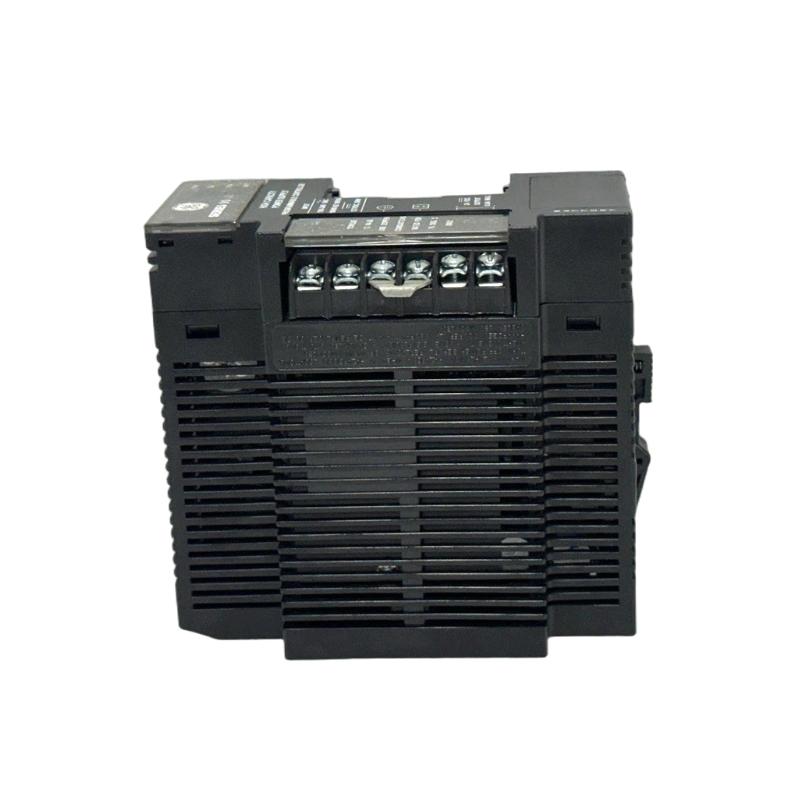
- GE
- IC690PRS010
- Power Supply
- USA
- 200 × 50 × 120 mm
- 1.36 kg
- Xiamen, China
- New & In Stock
- T/T, PayPal, Western Union
- 1 Year
- 1-3 Working Days
- DHL, UPS, TNT, FedEx and EMS.
- 24-Hour Service
- COO
- 40
Our advantage

Global Logistics
We have a 10-year logistics and express cooperation agreement, so our products can be shipped to any place in the world.

Brand new and original
Our products are imported in bulk from the place of origin. Because of the cooperative relationship, our products are all original and 100% new.

24-hour service
We provide 7*24 hours service to our customers. We will be there whenever you need us.

Price advantage
All our products are priced very favorably because we have our own warehouse and supply.
| Company Information | |||
| [email protected] | |||
| Mobile | +8615980777398 | ||
| +8615980777398 | |||
| 15980777398 |
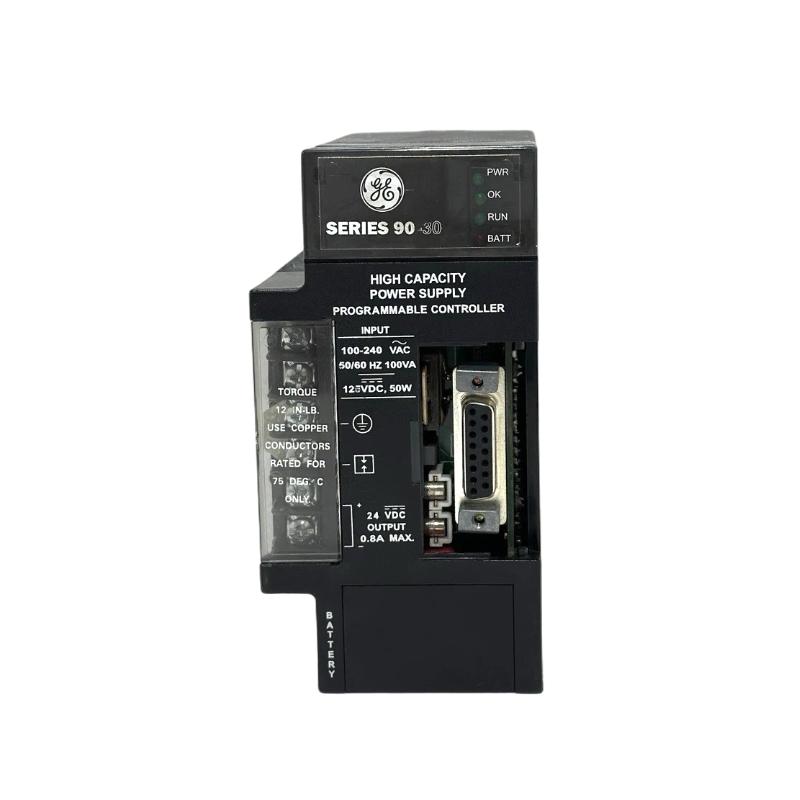
Product Overview
The GE IC690PRS010 Power Supply is an industrial automation power component intended for use in control-system environments. In an industrial PLC architecture, a dependable power supply is essential because the controller, I/O modules, communication equipment, and other control devices depend on stable electrical power for continuous operation.
The IC690PRS010 can be incorporated into industrial control cabinets where reliable power distribution is required for automation equipment. Proper installation involves more than simply mounting the unit and connecting the input supply. Engineers and technicians should also consider connected load, wiring, grounding, cabinet ventilation, environmental conditions, and maintenance accessibility.
The specified physical dimensions of the IC690PRS010 are 200 × 50 × 120 mm, and its specified weight is 1.36 kg.
This guide focuses on installation, commissioning, system integration, preventive maintenance, and troubleshooting considerations for the GE IC690PRS010.
Product Identification
| Parameter | Specification |
|---|---|
| Manufacturer | GE |
| Product Series | IC690 |
| Model | IC690PRS010 |
| Product Type | Industrial Power Supply |
| Main Function | Automation Control Power |
| Application | Industrial Automation |
| Dimensions | 200 × 50 × 120 mm |
| Weight | 1.36 kg |
| Installation | Industrial Control Cabinet |
| System Application | PLC / Automation System |
| Typical Role | Control Power Distribution |
| Maintenance | Electrical and Thermal Inspection |
Technical Specifications
| Technical Item | IC690PRS010 |
|---|---|
| Manufacturer | GE |
| Model | IC690PRS010 |
| Product Category | Power Supply |
| Application | Industrial Automation |
| Dimensions | 200 × 50 × 120 mm |
| Weight | 1.36 kg |
| Mounting Environment | Control Cabinet |
| Primary Function | Provides power within an automation system |
| System Integration | PLC / I/O / Control Equipment |
| Typical Installation | Industrial Control Panel |
| Maintenance | Periodic Inspection |
Important: The input-voltage, output-voltage, output-current, frequency, and protection characteristics should be confirmed against the exact unit and system documentation before installation or replacement. Physical dimensions alone are not sufficient to establish electrical compatibility.
Role of the IC690PRS010 in Industrial Automation
Power is one of the fundamental layers of an industrial control system.
A simplified architecture can be represented as:
Incoming AC Power
↓
Circuit Protection
↓
IC690PRS010 Power Supply
↓
PLC / Controller
↓
I/O Modules
↓
Sensors and Actuators
↓
Industrial Process
If control power becomes unstable, several devices can exhibit apparently unrelated problems at the same time.
For example, an unstable power supply can potentially result in:
- PLC resets
- I/O module interruptions
- Communication loss
- HMI restarts
- Sensor failures
- Relay dropouts
- Intermittent alarms
Consequently, power-supply inspection should be part of any comprehensive industrial automation troubleshooting procedure.
Power Supply Working Principle
An industrial power supply generally receives electrical energy from an upstream source and conditions it into a form suitable for connected automation equipment.
The basic process can be represented as:
Electrical Input
↓
Power Conversion / Conditioning
↓
Regulated Control Power
↓
PLC / I/O / Automation Equipment
The exact electrical conversion and protection characteristics depend on the specific IC690PRS010 configuration.
For replacement work, technicians should verify the original installation’s electrical requirements before connecting the replacement device.
Main Functions
Stable Control Power
The primary role of a control-system power supply is to provide suitable electrical power to connected automation equipment.
Stable power is particularly important for:
- PLC CPUs
- I/O modules
- Communication modules
- Industrial network equipment
- HMIs
- Control relays
- Sensors
- Actuators
System Power Distribution
The power supply may form part of a broader control-panel power-distribution architecture.
A properly designed system should consider:
- Total load
- Peak load
- Continuous load
- Voltage drop
- Protective devices
- Grounding
- Cable sizing
- Environmental temperature
Supporting Automation Reliability
A healthy power system can help reduce intermittent control problems.
When a machine experiences unexplained PLC resets or multiple communication failures, technicians should not automatically replace the controller. The control-power system should also be inspected.
Installation Guide
Step 1 – Confirm the Model
Before installation, verify:
GE IC690PRS010
Compare the identification information with the electrical design and existing equipment.
Inspect the unit for:
- Cracked housing
- Damaged terminals
- Bent mounting points
- Loose components
- Corrosion
- Moisture
- Burn marks
- Discoloration
- Signs of overheating
Any physically damaged unit should be evaluated before installation.
Step 2 – Verify Electrical Compatibility
Before applying power, verify the actual electrical requirements of the installation.
Check:
- Input voltage
- Input frequency
- Output voltage
- Output current
- Load requirements
- Protection requirements
- Grounding
- Wiring arrangement
Do not install the IC690PRS010 solely because its dimensions match the original power supply.
Step 3 – Calculate the Total Load
Calculate the electrical consumption of all equipment connected to the control-power system.
Potential loads include:
- PLC CPU
- I/O modules
- Communication modules
- Remote I/O
- HMIs
- Sensors
- Relays
- Contactors
- Solenoid valves
- Network equipment
- Instrumentation
Consider both continuous and transient loads.
An appropriate engineering margin should be maintained rather than operating the power supply continuously at its maximum capability.
Step 4 – Plan Cabinet Installation
The specified IC690PRS010 dimensions are:
200 × 50 × 120 mm
These dimensions should not be treated as the complete cabinet-space requirement.
Additional space may be required for:
- Wiring
- Terminal access
- Cable bending
- Ventilation
- Inspection
- Maintenance
- Adjacent components
Avoid positioning the power supply directly against other major heat-producing devices.
Step 5 – Mount the Unit
The specified weight is:
1.36 kg
The mounting structure should securely support the power supply.
Check:
- Panel rigidity
- Mounting hardware
- Correct orientation
- Mechanical stability
- Vibration
- Cable support
- Service accessibility
Step 6 – Check Environmental Conditions
Industrial control cabinets can contain heat, dust, moisture, and electrical interference.
Protect the IC690PRS010 from:
- Water
- Condensation
- Excessive humidity
- Conductive dust
- Oil contamination
- Corrosive materials
- Excessive heat
- Excessive vibration
Cabinet ventilation should be sufficient to maintain an acceptable operating temperature.
Step 7 – Isolate the Electrical Supply
Before wiring:
- Disconnect the incoming power.
- Apply appropriate lockout/tagout procedures.
- Verify that hazardous voltage is absent.
- Check for stored electrical energy.
- Isolate connected loads.
- Confirm the work area is safe.
- Use suitable electrical PPE.
Never perform power-terminal work on energized equipment.
Step 8 – Connect the Input
Connect the incoming power according to the approved electrical schematic.
Verify:
- Correct input terminals
- Correct voltage
- Correct polarity where applicable
- Circuit protection
- Grounding
- Cable size
- Terminal tightness
- Insulation condition
Incorrect input wiring can damage the power supply and downstream equipment.
Step 9 – Connect the Output
Connect the output to the intended automation system.
Before energization, verify:
- Required output voltage
- Connected load
- Current demand
- Cable size
- Protection
- Polarity where applicable
- Grounding
Do not connect equipment that exceeds the designed power capacity.
Step 10 – Verify Grounding
Grounding is important for both equipment protection and system stability.
Inspect:
- Protective earth
- Cabinet grounding
- Ground conductor continuity
- Terminal connections
- Grounding hardware
Poor grounding can contribute to:
- Electrical noise
- Communication errors
- Unstable control signals
- Unexpected controller resets
- Safety problems
Step 11 – Separate Power and Signal Wiring
Where practical, separate high-current or high-noise cables from sensitive control and communication wiring.
Avoid unnecessarily routing power cables together with:
- Analog signals
- Communication cables
- Sensor cables
- Encoder wiring
- Low-level control signals
Good cabinet wiring practices can reduce electrical interference.
Commissioning Procedure
Pre-Power Inspection
Before energizing the IC690PRS010:
- Verify the model.
- Confirm electrical requirements.
- Check input wiring.
- Check output wiring.
- Verify grounding.
- Inspect protective devices.
- Check terminal tightness.
- Confirm total connected load.
- Inspect cabinet ventilation.
- Check for accidental short circuits.
Initial Energization
Apply power under controlled conditions.
Observe:
- Power-supply status
- Output condition
- PLC status
- I/O module status
- Communication equipment
- Abnormal sound
- Unusual odor
- Excessive heating
If abnormal conditions appear immediately after energization, remove power safely and begin diagnosis.
Output Verification
Where appropriate, measure the output voltage under normal operating conditions.
Check the measured value against the required system voltage.
Testing only without a load may not reveal a power-supply problem. A unit may appear normal at no load and become unstable once the complete automation system is connected.
Connected-System Verification
After confirming stable power, check:
PLC
Verify normal startup and continuous operation.
I/O Modules
Confirm that expected modules remain operational.
Communication Equipment
Verify that connected network devices remain online.
HMI
Check that the operator interface remains stable.
Field Devices
Confirm that connected sensors and actuators receive appropriate control power.
Troubleshooting Guide
Fault 1 – IC690PRS010 Does Not Power Up
Possible Causes
- No incoming power
- Incorrect input wiring
- Open circuit protection
- Incorrect electrical conditions
- Internal power-supply fault
Diagnostic Procedure
Check:
- Incoming voltage
- Protective devices
- Input wiring
- Grounding
- Terminal connections
- Power-supply condition
Fault 2 – Output Power Is Missing
Possible Causes
- Input-power problem
- Output overload
- Downstream short circuit
- Incorrect wiring
- Internal fault
- Protection function activated
Corrective Action
Safely isolate the downstream load and determine whether the output condition changes.
Then inspect downstream wiring and connected devices.
Fault 3 – PLC Repeatedly Resets
A repeated PLC reset does not necessarily mean that the controller has failed.
Possible causes include:
- Unstable control power
- Excessive load
- Loose power terminals
- Voltage drop
- Short circuit
- Electrical interference
- Power-supply overheating
Diagnostic Procedure
Monitor the control-power system while the PLC is operating.
Inspect:
- Input voltage
- Output voltage
- Terminal connections
- Cable condition
- Load changes
- Cabinet temperature
Fault 4 – I/O Modules Intermittently Disconnect
Possible Causes
- Power instability
- Loose wiring
- Insufficient control voltage
- Communication problem
- Grounding problem
- Electrical noise
If several modules exhibit similar intermittent behavior, investigate the common power source before replacing individual I/O modules.
Fault 5 – IC690PRS010 Overheats
Possible Causes
- Excessive connected load
- Poor cabinet ventilation
- High ambient temperature
- Restricted airflow
- Dust contamination
- Nearby heat-producing equipment
Corrective Action
Check the total electrical load and cabinet thermal conditions.
Ensure ventilation paths remain unobstructed.
Fault 6 – Output Voltage Drops Under Load
Possible Causes
- Excessive load
- Downstream short circuit
- Undersized wiring
- Loose connection
- Power-supply degradation
- Excessive operating temperature
Diagnostic Procedure
Where safe and appropriate, compare output behavior under different load conditions.
A significant output change under normal load may indicate an overloaded supply, wiring problem, downstream fault, or equipment deterioration.
Fault 7 – Protective Device Repeatedly Trips
Possible Causes
- Short circuit
- Excessive load
- Wiring fault
- Incorrect protection
- Failed downstream equipment
Do not repeatedly reset the protective device without finding the cause.
Fault 8 – Automation System Becomes Unstable After Expansion
Possible Causes
- Increased power consumption
- Insufficient power capacity
- Incorrect wiring
- New module fault
- Power-distribution problem
Recalculate the total load after adding new equipment.
Fault 9 – Communication Becomes Intermittent
Possible Causes
- Unstable control power
- Grounding problems
- Electrical interference
- Loose communication wiring
- Network equipment power interruptions
When multiple communication devices fail simultaneously, investigate the common control-power source.
Fault 10 – Abnormal Noise or Odor
Possible Causes
- Overheating
- Electrical stress
- Overload
- Internal component deterioration
- Cooling problem
If abnormal noise is accompanied by burning odor, smoke, severe heating, or visible damage, disconnect the equipment safely and investigate before returning it to service.
Systematic Fault Diagnosis
A practical troubleshooting sequence is:
Incoming Power
↓
Circuit Protection
↓
IC690PRS010 Input
↓
IC690PRS010 Output
↓
Power Distribution
↓
PLC / Controller
↓
I/O Modules
↓
Communication Equipment
↓
Field Devices
This method helps determine whether the problem is located upstream, within the power supply, in the distribution wiring, or in the connected automation equipment.
Preventive Maintenance
Electrical Inspection
Inspect periodically:
- Input terminals
- Output terminals
- Ground connections
- Cable insulation
- Terminal tightness
- Discoloration
- Signs of overheating
- Corrosion
Thermal Inspection
Monitor:
- Power-supply temperature
- Cabinet temperature
- Airflow
- Ventilation openings
- Nearby heat sources
Increasing operating temperature can be an early indication of excessive loading or deteriorating cabinet cooling.
Load Inspection
Review the total connected load periodically.
Pay particular attention when:
- New I/O modules are added
- New communication devices are installed
- Additional sensors are connected
- Additional relays are installed
- Control cabinets are expanded
A power supply that was adequately sized during initial commissioning may become overloaded after system expansion.
Preventive Maintenance Table
| Maintenance Area | Recommended Action |
|---|---|
| Input Voltage | Verify stable supply |
| Output Voltage | Check under normal load |
| Input Terminals | Inspect tightness |
| Output Terminals | Inspect connection integrity |
| Grounding | Verify continuity |
| Cable Insulation | Inspect for deterioration |
| Cabinet Ventilation | Keep airflow unobstructed |
| Dust | Remove accumulated contamination |
| Temperature | Monitor operating conditions |
| Connected Load | Review periodically |
| Protective Devices | Inspect condition |
| PLC Operation | Check for unexpected resets |
| I/O System | Monitor intermittent faults |
| Communication | Check for power-related interruptions |
Common Installation Mistakes
Incorrect Electrical Input
Incorrect input conditions can damage the power supply or cause unstable operation.
Always verify the electrical design before energization.
Excessive Load
Adding PLC modules, I/O equipment, communication devices, relays, or field devices without recalculating power demand can overload the control-power system.
Poor Cabinet Ventilation
High cabinet temperature can increase thermal stress and shorten equipment life.
Loose Terminals
Loose connections can cause:
- Voltage drops
- Localized heating
- Intermittent operation
- Arcing
- Equipment damage
Inadequate Grounding
Grounding problems can contribute to electrical noise, communication errors, and unstable control behavior.
Incorrect Cable Sizing
Undersized conductors can produce voltage drop and excessive heating.
Ignoring the Power Supply During PLC Fault Diagnosis
If several automation devices experience resets or intermittent failures, the common power source should be investigated before replacing individual controllers or I/O modules.
PLC and Automation System Integration
The IC690PRS010 can be considered as part of the power architecture supporting an industrial automation installation.
A simplified system can be represented as:
AC Power
↓
Protection
↓
IC690PRS010
↓
PLC Controller
↓
I/O Modules
↓
Sensors / Actuators
↓
Industrial Process
The power supply is therefore not an isolated component. Its condition can influence the stability of multiple downstream devices.
When diagnosing system-wide problems, technicians should consider the power supply, power distribution, grounding, and connected loads as a complete system.
Supporting Components
A control system incorporating the IC690PRS010 may contain:
- PLC CPUs
- I/O modules
- Communication modules
- Remote I/O
- HMIs
- Industrial Ethernet equipment
- RS-485 devices
- Sensors
- Actuators
- Relays
- Solenoid valves
- Contactors
- Instrumentation
The actual electrical compatibility of these devices must be evaluated against the system’s power requirements.
Replacement and Maintenance Considerations
When replacing an IC690PRS010, verify more than the physical dimensions.
Physical Compatibility
Check:
- Dimensions
- Mounting arrangement
- Terminal access
- Cabinet clearance
Electrical Compatibility
Confirm:
- Input requirements
- Output requirements
- Current capacity
- Frequency
- Protection requirements
Load Compatibility
Calculate the complete downstream load before installation.
Environmental Compatibility
Consider:
- Temperature
- Humidity
- Dust
- Vibration
- Ventilation
System Compatibility
Verify that the replacement unit can properly support the controller, I/O modules, communication equipment, and other connected loads.
Key Advantages
- Industrial automation power-supply application
- Designed for control-system environments
- Compact physical dimensions
- Dimensions of 200 × 50 × 120 mm
- Weight of 1.36 kg
- Suitable for control-cabinet integration
- Supports PLC-based automation architectures
- Can support I/O systems
- Can support control-power distribution
- Suitable for industrial control applications
- Allows centralized power-system monitoring
- Supports systematic preventive maintenance
- Useful for PLC and I/O system power architectures
Technical FAQs
What is the GE IC690PRS010?
The GE IC690PRS010 is identified for industrial automation use as an IC690-series control-system component. For a replacement installation, the exact electrical function and ratings should be confirmed from the unit identification and applicable system documentation before connection.
What are the dimensions of the IC690PRS010?
The specified dimensions are 200 × 50 × 120 mm.
What is the weight of the IC690PRS010?
The specified weight is 1.36 kg.
What should be checked before installing the IC690PRS010?
Verify the model, electrical input and output requirements, total connected load, grounding, protective devices, wiring, cabinet space, ventilation, and environmental conditions.
Why does a PLC repeatedly restart?
Possible causes include unstable control power, excessive load, voltage drop, loose terminals, electrical interference, or problems in the downstream power-distribution system.
Why does output power become unstable under load?
Possible causes include excessive load, downstream short circuits, undersized wiring, loose terminals, excessive temperature, or deterioration of the power-supply unit.
Can a power-supply problem cause communication faults?
Yes. If communication equipment loses stable power or repeatedly resets, the result can appear as intermittent communication loss, network dropouts, or controller communication errors.
Should an I/O module be replaced immediately if it intermittently fails?
No. If multiple devices show similar symptoms, first check the common power supply, power distribution, grounding, and wiring.
Why is cabinet ventilation important?
A high cabinet temperature can increase thermal stress on electronic equipment and may contribute to intermittent operation or premature component deterioration.
What should be done after adding new automation modules?
Recalculate the total control-power demand. New PLC modules, I/O modules, network devices, relays, and sensors can increase the system load.
What is a good troubleshooting sequence?
Begin with the incoming supply and protective devices, then check the IC690PRS010 input, output, power distribution, PLC, I/O modules, communication equipment, and field devices.
Conclusion
The GE IC690PRS010 Power Supply is intended for industrial automation and control-system applications where dependable power is essential for PLCs, I/O equipment, communication devices, and other control components.
The specified unit measures 200 × 50 × 120 mm and weighs 1.36 kg. These dimensions should be considered during cabinet layout, mounting, wiring, ventilation, and maintenance planning.
Proper installation begins with electrical verification. Input and output requirements, total connected load, grounding, circuit protection, wiring, and cabinet conditions should all be evaluated before energization.
During troubleshooting, technicians should avoid immediately assuming that a PLC, I/O module, or communication device has failed. If multiple automation components experience resets, intermittent operation, or communication interruptions, the common control-power system should be examined first.
Regular inspection of terminals, wiring, grounding, ventilation, temperature, and connected load can help maintain reliable operation and reduce unexpected downtime in industrial automation systems.