

ProductPRODUCT
Featured products
Contact Us
- Schneider
- TWDXCPODM
- Display Module
- France
- 94.5 x 71 x 51.9 mm
- 0.105 kg
- Xiamen, China
- New & In Stock
- T/T, PayPal, Western Union
- 1 Year
- 1-3 Working Days
- DHL, UPS, TNT, FedEx and EMS.
- 24-Hour Service
- COO
- 3
Our advantage

Global Logistics
We have a 10-year logistics and express cooperation agreement, so our products can be shipped to any place in the world.

Brand new and original
Our products are imported in bulk from the place of origin. Because of the cooperative relationship, our products are all original and 100% new.

24-hour service
We provide 7*24 hours service to our customers. We will be there whenever you need us.

Price advantage
All our products are priced very favorably because we have our own warehouse and supply.
| Company Information | |||
| [email protected] | |||
| Mobile | +8615980777398 | ||
| +8615980777398 | |||
| 15980777398 |
1. Product Overview
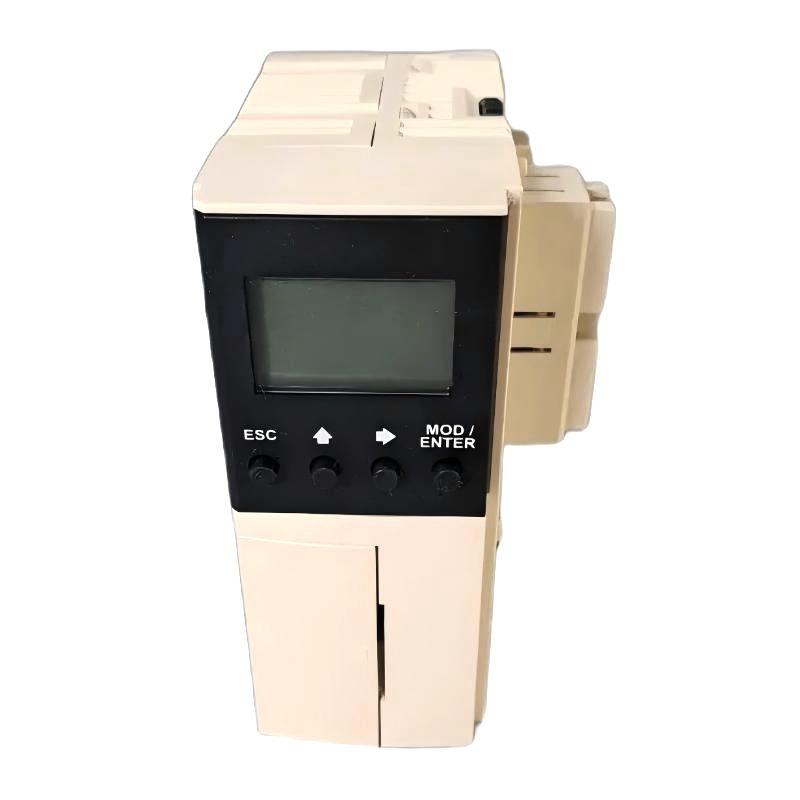
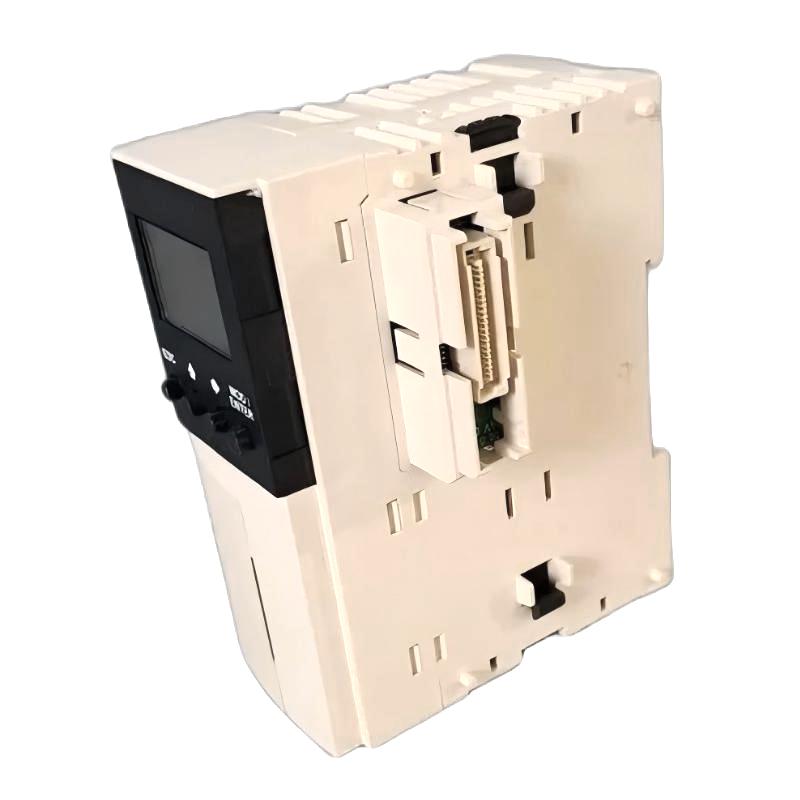
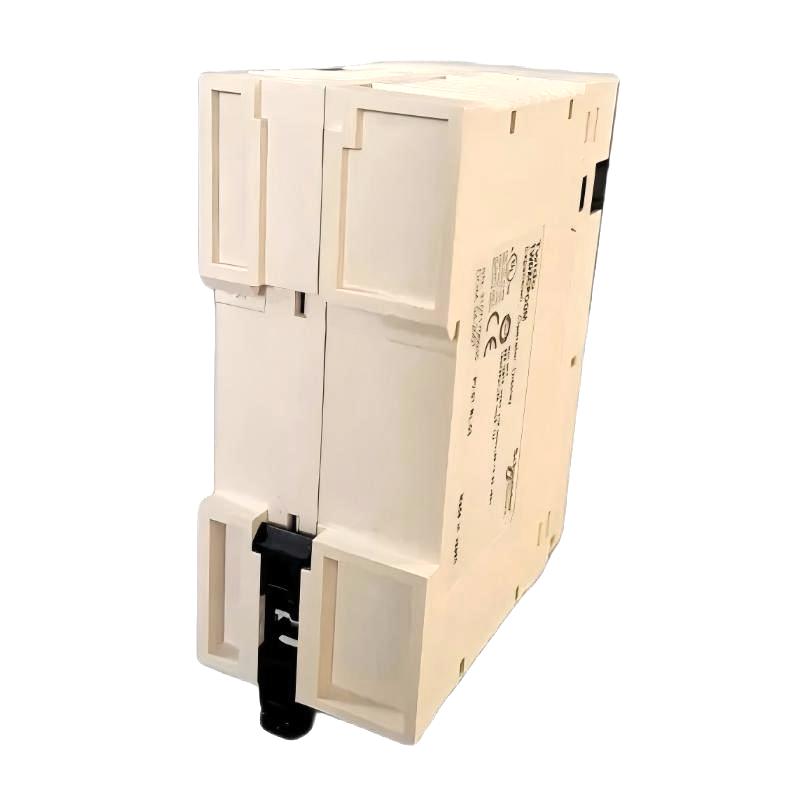
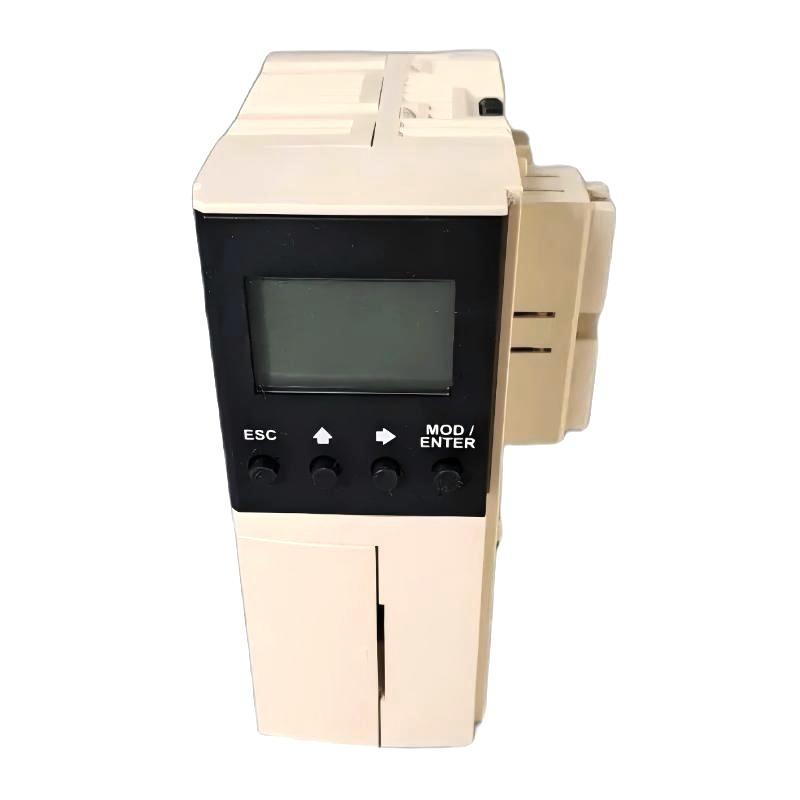
The Schneider Electric TWDXCPODM Display Module is an industrial automation component identified by the model number TWDXCPODM. Display-related modules are used in automation environments to provide visual information or operator interaction, depending on the design and capabilities of the associated control platform.
In industrial control systems, display interfaces can help operators monitor equipment status, review operating information, and interact with supported controller functions. Their practical capabilities vary by model, including the information displayed, available controls, communication method, and configuration requirements.
The TWDXCPODM should be identified and evaluated according to its exact product designation and intended controller platform. Before installation or replacement, confirm the supported hardware, interface requirements, mounting arrangement, and operating functions using the technical documentation for the specific model.
The supplied dimensions are 94.5 × 71 × 51.9 mm, and the listed weight is 0.105 kg. These specifications are useful for preliminary identification, cabinet planning, and spare-parts management. They do not independently establish the module’s display technology, communication interface, or compatibility with a particular controller.
For industrial automation buyers and maintenance engineers, verifying the complete model number and system requirements is essential to selecting the correct display accessory and avoiding incompatible replacements.
2. Technical Specifications
| Parameter | Specification |
|---|---|
| Brand | Schneider Electric |
| Model Number | TWDXCPODM |
| Product Type | Display Module |
| Product Category | Industrial automation display accessory |
| Dimensions | 94.5 × 71 × 51.9 mm |
| Weight | 0.105 kg |
| Primary Function | Display-related functionality, subject to model-specific verification |
| Display Technology | Confirm from the applicable technical documentation |
| Operator Interface | Verify whether the model supports buttons, a keypad, or other input methods |
| Communication Interface | Confirm the supported connection method |
| Compatible Controller | Verify the exact controller models and hardware configuration |
| Mounting Arrangement | Follow the approved installation procedure |
| Configuration Requirements | Confirm the required controller settings and software support |
| Operating Conditions | Check the applicable environmental specifications |
The dimensions and weight above are based on the supplied product information. Other specifications, including screen characteristics, supported languages, communication protocols, input methods, and controller compatibility, should be verified before purchasing or commissioning the module.
3. Function and Working Principle
A display module in an industrial automation system can provide a visual interface between a control platform and an operator. Depending on its design, it may display selected operating values, system messages, diagnostic information, or other data made available by the connected controller.
The precise working principle and available functions of the TWDXCPODM must be confirmed for the exact model. The term “Display Module” alone does not establish whether the device is an operator terminal, a controller display accessory, or an interface with a more specialized function.
3.1 Visual Information Presentation
Industrial displays can make selected system information easier for operators and maintenance personnel to review. Depending on the supported platform, displayed information may include operating states, process values, warnings, or diagnostic messages.
The information available through the TWDXCPODM depends on its actual capabilities and the connected controller configuration.
3.2 Operator Interaction
Some industrial display modules provide buttons or other input mechanisms that allow users to navigate screens, acknowledge messages, or enter supported values. Other display components may be intended primarily for visual indication.
Before using the TWDXCPODM for operator interaction, verify whether it supports input functions and which operations are permitted.
3.3 Controller Communication
Where a display module exchanges information with a controller, the connection and data presentation depend on the supported interface and system architecture. Correct hardware compatibility and configuration are necessary for reliable operation.
The communication method and required controller settings for the TWDXCPODM should be confirmed before integration.
3.4 Diagnostic Support
A compatible display interface may help maintenance personnel identify operating states or review selected fault information. This can assist with troubleshooting when the displayed information corresponds to the controller’s actual diagnostic functions.
The availability and interpretation of diagnostic information must be established from the documentation for the installed system.
4. Role in Industrial Automation Systems
Display interfaces can support communication between industrial equipment and the people responsible for operating or maintaining it. Their specific role depends on the functions supported by the display and the associated control platform.
Machine Status Monitoring
Industrial machinery often requires operators to monitor equipment states and identify changes during production. Where supported, a display module can make selected status information available at an appropriate location.
The exact information provided by the TWDXCPODM depends on its verified functionality and controller configuration.
Operator Access to Control Information
Some automation interfaces allow authorized users to view or change selected operating parameters. Such functions can help simplify routine operation, but the available controls and access restrictions depend on the equipment design.
Any control or adjustment function should be confirmed before the module is used in an operational environment.
Maintenance and Fault Investigation
Maintenance technicians may use supported display information to review equipment status, identify abnormal conditions, and determine whether additional diagnostic checks are necessary.
A display should be treated as one source of information rather than a substitute for the controller’s diagnostic tools or approved maintenance procedures.
Control-System Integration
A display module must work with the intended controller, mounting arrangement, electrical interface, and configuration. Correct selection helps ensure that the component performs its assigned role within the larger automation system.
5. Industrial Applications
The suitability of the TWDXCPODM for a particular application depends on its confirmed technical function and compatibility with the installed control system. The following examples describe common environments where compatible display components may be useful.
Manufacturing Equipment
Manufacturing lines use control systems to coordinate machine sequences, monitor production states, and manage interactions between equipment. Compatible display interfaces can help operators review selected operating information.
Before installation, engineers should verify that the display supports the required controller and intended use.
Packaging Machinery
Packaging systems often combine sensors, motors, actuators, and programmable controllers. Operators may need access to machine states, process information, or diagnostic messages.
A suitable display interface can support these activities when its functions match the machine’s control architecture.
Material Handling Systems
Conveyors, transfer equipment, and sorting systems may use operator interfaces to provide information about machine operation. A compatible display component can help make relevant system information accessible to maintenance staff and operators.
Its actual role must be determined from the installed equipment design.
Process Automation
Process equipment may require personnel to review operating conditions, equipment states, and system messages. Display interfaces can support this work when the required information is available through the connected controller.
System designers should verify the module’s supported functions and ensure that any operator actions comply with process-safety requirements.
Equipment Modernization
When upgrading an existing control panel, engineers may need to retain or replace legacy display components. Compatibility is especially important when the replacement must operate with an established controller or existing system configuration.
The TWDXCPODM should not be selected solely because its dimensions appear suitable. Its functional and electrical compatibility must also be confirmed.
6. Installation and System Integration
Correct installation helps prevent physical damage, connection problems, and configuration errors. The following workflow provides a general checklist; the model-specific installation instructions and site safety procedures take precedence.
Step 1: Verify the Model
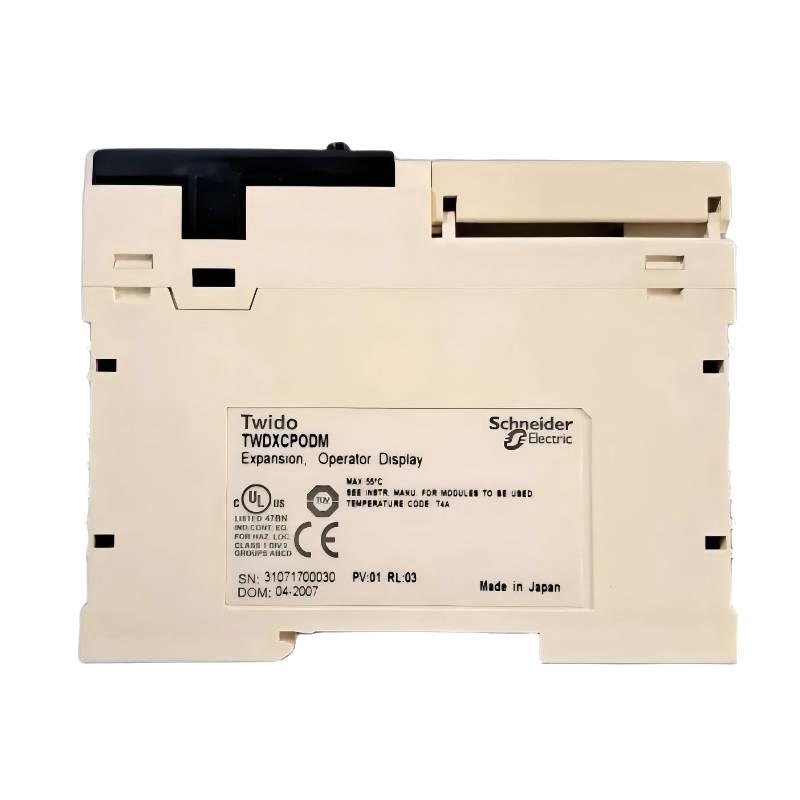
Inspect the product label and confirm that the complete part number is TWDXCPODM. Compare it with the existing module, equipment drawings, and spare-parts records.
Do not substitute a visually similar display component without checking its technical compatibility.
Step 2: Identify the Compatible Controller
Determine the exact controller model and hardware arrangement. Verify that the controller supports the TWDXCPODM and that the intended display functions are available.
If compatibility cannot be confirmed, pause installation until the correct requirements are established.
Step 3: Isolate the Equipment
Place the machine in a safe state and isolate the relevant energy sources according to the site’s lockout/tagout procedures. Verify that the equipment is in the required condition before handling electrical connections or removing an existing module.
Follow the manufacturer’s instructions regarding any special installation requirements.
Step 4: Inspect the Module and Mounting Area
Check the module housing, connectors, mounting features, and surrounding installation area for visible damage or contamination.
Confirm that the mounting location provides the required clearance and that the module can be installed using the approved method.
Step 5: Confirm Electrical and Interface Requirements
Review the applicable wiring diagrams and technical specifications. Identify the required power connections, communication interface, and any associated hardware.
Do not infer voltage ratings, terminal assignments, or connector pinouts from the model number or physical appearance.
Step 6: Install the Module
Install the display module according to the specified procedure. Ensure that its mechanical connections are properly engaged and that wiring or connectors are secured as required.
Avoid excessive force, which may damage the module or its interface.
Step 7: Restore Power and Check Status
After completing the installation and inspection, restore power according to the approved commissioning procedure.
Check the display and controller for expected startup behavior, available status indications, or diagnostic messages. Interpret these indications using the documentation for the exact equipment.
Step 8: Validate Operation
Confirm that the module is recognized by the control system and performs its intended function. If display or operator-input functions are supported, test them using the approved commissioning procedure.
Document the installation and complete the required functional checks before returning the equipment to normal operation.
7. Common Problems and Troubleshooting
Problems involving a display module may arise from incompatible hardware, incorrect installation, power or connection issues, configuration errors, or a fault elsewhere in the control system.
| Symptom | Possible Cause | Recommended Action |
|---|---|---|
| Display does not start | Power issue, incorrect connection, or hardware fault | Verify the specified power requirements and inspect the approved connections |
| Display is not recognized | Unsupported controller or interface incompatibility | Confirm the complete model number and supported system configuration |
| Displayed information is incorrect or unavailable | Configuration issue or missing data from the controller | Review the controller configuration and available diagnostics |
| Display operates intermittently | Loose connection, unstable power, or environmental conditions | Inspect connections and verify that operating conditions meet requirements |
| Operator input does not work | Input function not supported, incorrect configuration, or interface fault | Confirm the module’s input capabilities and review the applicable configuration |
| Abnormal message or indicator appears | Controller fault, communication issue, or module-specific condition | Record the message and interpret it using the relevant technical documentation |
| Fault remains after module replacement | Underlying problem may be external to the display | Check the controller, wiring, power supply, configuration, and associated hardware |
7.1 Check Power and Connections
Verify the specified electrical supply and inspect the relevant connectors and wiring. Look for loose connections, visible damage, contamination, or incorrect termination.
Perform electrical measurements only with suitable instruments and according to safe working procedures.
7.2 Confirm Hardware Compatibility
A module may fit mechanically without being functionally compatible. Confirm the controller model, supported display accessory, interface requirements, and configuration restrictions.
Do not assume that a similar model number or product appearance indicates equivalence.
7.3 Review Controller Diagnostics
Record error messages and system status before changing settings or replacing additional components. Controller diagnostics may help identify whether the problem originates in the display, the communication path, or another part of the automation system.
Use the diagnostic methods supported by the installed equipment.
7.4 Verify Configuration
If the display starts but does not show the expected information, check whether the controller and interface are configured correctly. Confirm that the required data and display functions are supported by the specific hardware combination.
Avoid changing unrelated controller settings during troubleshooting.
7.5 Evaluate Environmental Conditions
Excessive temperature, vibration, moisture, dust, or electrical interference may affect industrial electronic equipment. Check that the installation environment complies with the module’s specified operating conditions.
If the fault persists after basic checks, follow an approved diagnostic or replacement procedure.
8. Preventive Maintenance and Reliability
Preventive maintenance helps preserve the condition of display components and supports dependable operation of industrial control systems.
- Inspect the housing: Check for visible cracks, damage, or signs of overheating.
- Check connections: Inspect the relevant wiring and connectors during scheduled maintenance.
- Keep the installation clean: Prevent excessive dust and contamination from accumulating around the module.
- Monitor system diagnostics: Record recurring faults and investigate their causes rather than repeatedly resetting alarms.
- Maintain configuration records: Keep accurate controller details, module lists, wiring diagrams, and project backups.
- Protect spare components: Store replacement modules in suitable packaging and protect them from moisture, impact, and electrostatic discharge where applicable.
- Document replacements: Record the model number, replacement date, and commissioning results.
- Follow approved procedures: Use the manufacturer’s instructions and the site’s electrical safety and maintenance requirements.
The appropriate inspection frequency depends on the equipment’s operating environment, application criticality, and maintenance policy.
9. Compatibility and Replacement Considerations
Selecting a replacement for the Schneider Electric TWDXCPODM requires verification of the intended function, electrical interface, controller support, and mechanical arrangement.
| Selection Factor | What to Verify |
|---|---|
| Exact model | Confirm TWDXCPODM and any applicable hardware revision |
| Functional role | Establish whether the module provides the required display or operator-interface function |
| Controller compatibility | Verify support for the target controller and system configuration |
| Electrical requirements | Confirm the specified supply and electrical limits |
| Communication interface | Check the required connection method and supported interface |
| Physical dimensions | Compare the supplied dimensions of 94.5 × 71 × 51.9 mm with the available installation space |
| Mounting arrangement | Confirm the approved mounting method and required clearance |
| Configuration requirements | Check software, controller settings, and any necessary commissioning steps |
| Product condition | Inspect the housing, connectors, and overall condition of the replacement |
| System validation | Confirm correct operation before returning the equipment to service |
Selecting an Alternative Module
An alternative should only be considered after technical equivalence has been established. Similar dimensions or a comparable product description do not prove that another module supports the same controller, interface, or functions.
For legacy automation equipment, maintaining the original supported model may simplify replacement and reduce the need for system changes. If an alternative is necessary, document the selection and validate its operation in the intended configuration.
10. Key Benefits of Correct Display Module Selection
Selecting a display module that matches the installed control system offers several general maintenance and integration benefits.
Appropriate System Integration
A correctly matched component supports the intended control-system architecture and reduces the risk of hardware incompatibility.
Efficient Panel Planning
The supplied dimensions help engineers assess available space and plan the physical arrangement of equipment within a control panel or installation.
Clearer Maintenance Procedures
Accurate identification and documentation help technicians distinguish the required component from similar accessories during servicing.
More Systematic Troubleshooting
Correct module identification, configuration records, and diagnostic procedures make it easier to investigate faults and isolate their causes.
Improved Spare-Parts Management
Recording the complete model number supports inventory accuracy and reduces the risk of purchasing an unsuitable replacement.
These benefits depend on confirming the module’s actual specifications and installing it in a compatible system.
11. Technical FAQs
Q1: What is the Schneider Electric TWDXCPODM?
The TWDXCPODM is identified in the supplied product information as a Schneider Electric Display Module. Its exact display functions and system role should be confirmed from the technical documentation for the specific model.
Q2: What are the dimensions of the TWDXCPODM?
The supplied dimensions are 94.5 × 71 × 51.9 mm.
Q3: How much does the TWDXCPODM weigh?
The supplied product weight is 0.105 kg.
Q4: Is the TWDXCPODM a touchscreen display?
Touchscreen functionality has not been established by the supplied product information. Verify the supported display and input features before purchasing or integrating the module.
Q5: Which controllers are compatible with the TWDXCPODM?
Compatibility must be confirmed against the exact controller model, hardware configuration, and supported accessory list. Do not assume universal compatibility across Schneider Electric automation products.
Q6: Can the module display alarms and diagnostic messages?
That capability depends on the functions supported by the module and its connected control system. Confirm the available display features and configuration requirements before commissioning.
Q7: What should be checked if the display does not start?
Verify the specified power supply, connections, model compatibility, and installation procedure. Then review the controller’s diagnostic information and follow the approved troubleshooting process.
Q8: Can a similar display module replace the TWDXCPODM?
Only if the alternative is confirmed to match the required functional role, electrical interface, controller compatibility, and mounting arrangement. Physical similarity alone is not sufficient.
Q9: Does the TWDXCPODM require software configuration?
Configuration requirements depend on the exact module and target controller. Check the applicable instructions to determine whether controller settings, software support, or other commissioning steps are required.
Q10: What precautions should be taken before replacing the module?
Place the equipment in a safe state, follow the required isolation procedure, verify the replacement model, and check the installation and electrical requirements. After installation, validate the intended function before returning the equipment to service.
12. Conclusion
The Schneider Electric TWDXCPODM Display Module is an industrial automation component identified for display-related applications. Its supplied dimensions of 94.5 × 71 × 51.9 mm and weight of 0.105 kg provide useful information for product identification, equipment planning, and spare-parts management.
Before installation or replacement, confirm the module’s precise function, supported controller models, electrical requirements, interface, and configuration needs. Correct installation, systematic troubleshooting, and documented maintenance procedures help reduce avoidable downtime and support reliable operation of industrial automation equipment.
For industrial automation engineers, maintenance teams, and spare-parts buyers, verifying the complete model designation and system compatibility is essential to selecting the TWDXCPODM for its intended application.