

ProductPRODUCT
Featured products
Contact Us
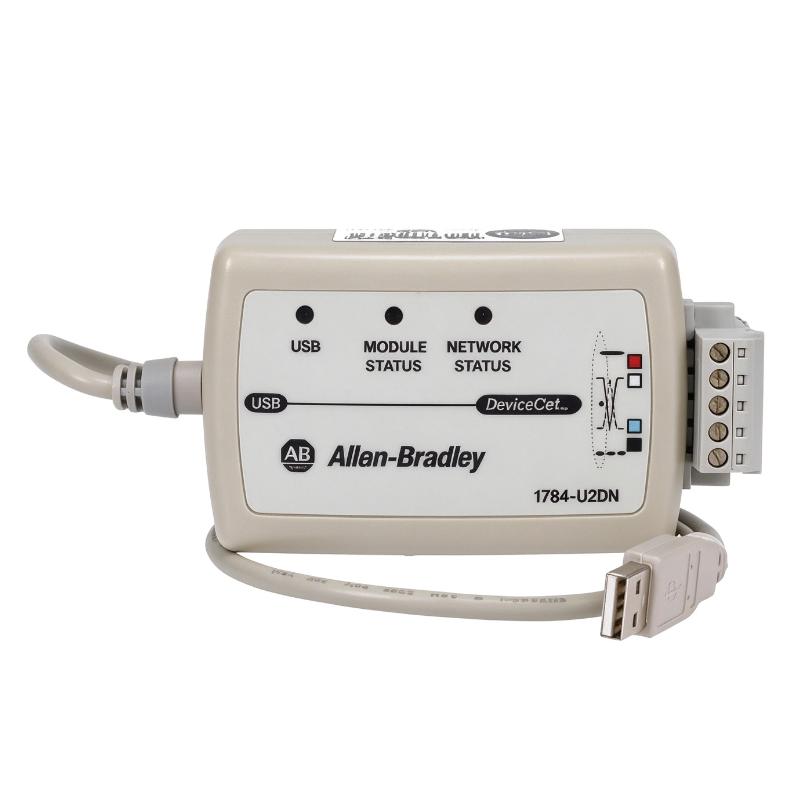
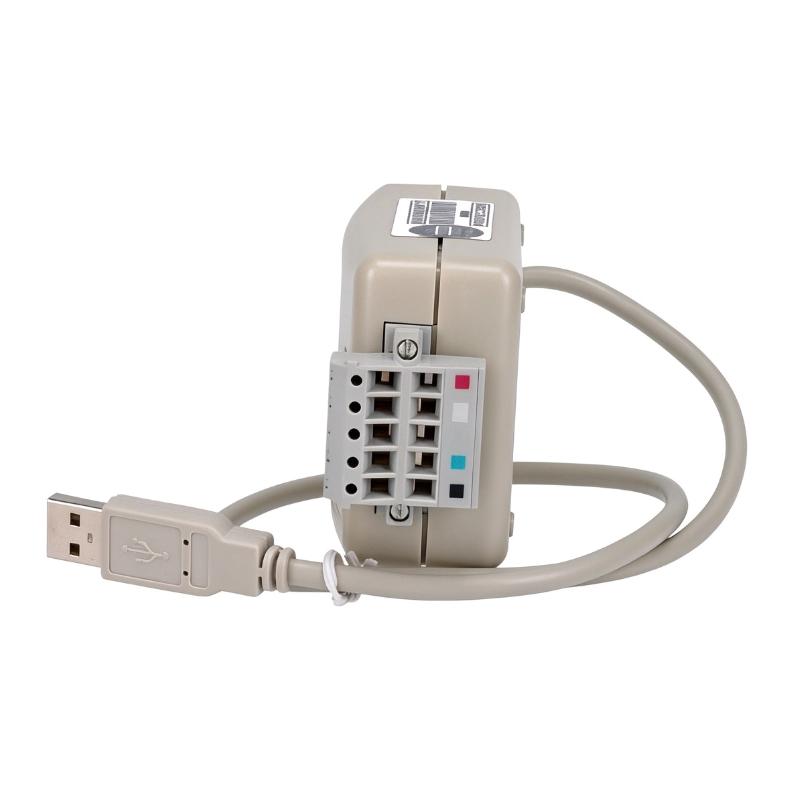
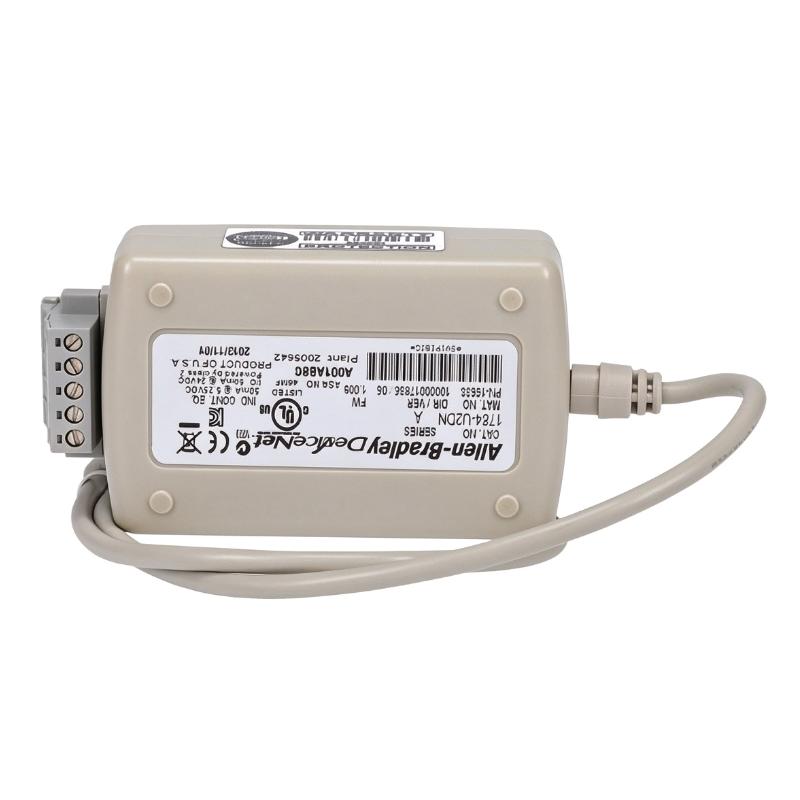
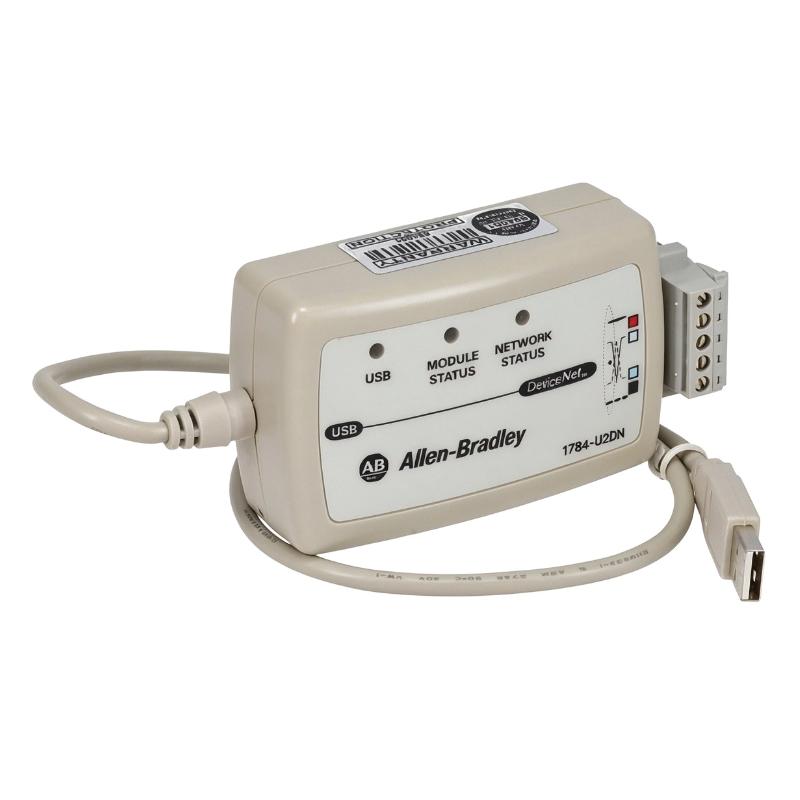
- Allen Bradley
- 1784-U2DN
- DeviceNet USB Communication Cable
- USA
- 2 feet
- 0.11 kg
- Xiamen, China
- New & In Stock
- T/T, PayPal, Western Union
- 1 Year
- 1-3 Working Days
- DHL, UPS, TNT, FedEx and EMS.
- 24-Hour Service
- COO
- 5
Our advantage

Global Logistics
We have a 10-year logistics and express cooperation agreement, so our products can be shipped to any place in the world.

Brand new and original
Our products are imported in bulk from the place of origin. Because of the cooperative relationship, our products are all original and 100% new.

24-hour service
We provide 7*24 hours service to our customers. We will be there whenever you need us.

Price advantage
All our products are priced very favorably because we have our own warehouse and supply.
| Company Information | |||
| [email protected] | |||
| Mobile | +8615980777398 | ||
| +8615980777398 | |||
| 15980777398 |
Product Overview
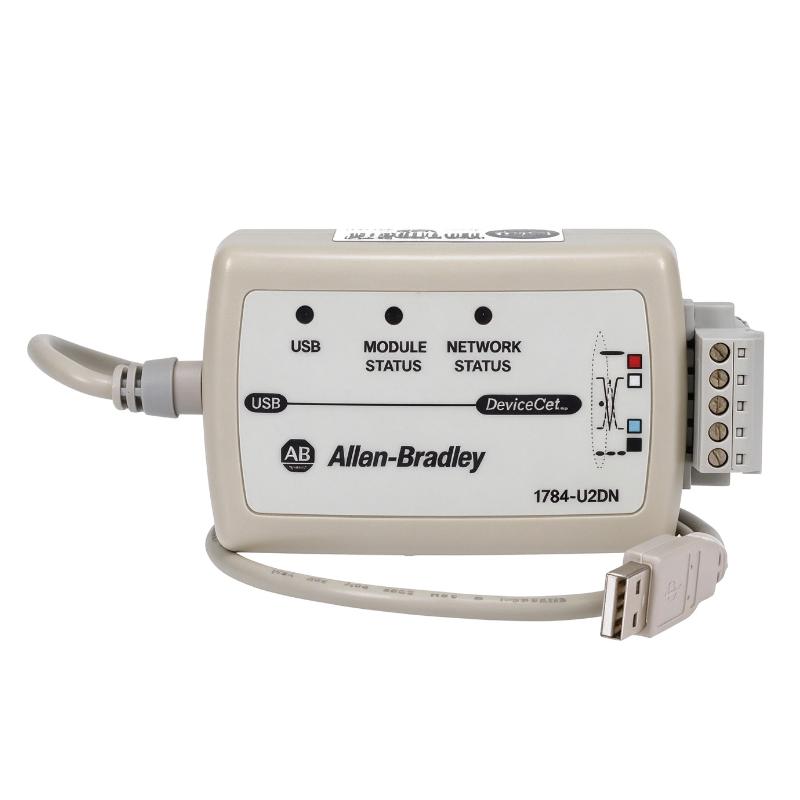
The Allen-Bradley 1784-U2DN is a USB-to-DeviceNet communication cable used to connect a personal computer directly to an industrial DeviceNet network. It provides an engineering interface for accessing, configuring, monitoring, and troubleshooting DeviceNet-connected automation equipment.
The cable combines a USB computer connection with a DeviceNet communication interface housed in an integrated adapter pod. The USB side connects to the computer, while the network side uses a 5-pin Phoenix-style terminal connection for DeviceNet wiring.
Unlike a passive communication cable, the 1784-U2DN contains communication electronics and firmware that manage the connection between the computer and the DeviceNet network. Its integrated adapter also includes status indicators and rotary switches for network node address configuration.
The 1784-U2DN supports communication at 125, 250, and 500 kbps. Engineers can select the network data rate using the built-in configuration switch or use the supported automatic detection function.
For industrial maintenance teams, this interface is useful when accessing DeviceNet networks without installing a dedicated PCI or PCMCIA communication card. It provides a direct computer connection for commissioning, device configuration, network diagnostics, and routine maintenance.
Technical Specifications
| Parameter | Specification |
|---|---|
| Manufacturer | Allen-Bradley |
| Model | 1784-U2DN |
| Product Type | DeviceNet to PC USB Interface Cable |
| Product Family | DeviceNet Network and Communication Products |
| Device Function | USB-to-DeviceNet Adapter |
| Computer Interface | USB |
| Network Protocol | DeviceNet |
| Network Connector | 5-Pin Phoenix Terminal Connector |
| USB Supply | 75 mA @ 5 V DC |
| DeviceNet Supply | 70 mA @ 24 V DC |
| Power Consumption | 0.5 W |
| Power Dissipation | 0.5 W |
| Supported Data Rates | 125 / 250 / 500 kbps |
| Network Distance Support | Up to 500 m |
| Isolation Voltage | 30 V continuous |
| Enclosure Rating | IP30 |
| Operating Temperature | 0–55 °C |
| Nonoperating Temperature | -10–85 °C |
| USB Cable Length | 2 feet |
| Shipping Weight | 0.11 kg |
Product Features
- USB-to-DeviceNet communication interface for direct PC network access.
- Supports DeviceNet data rates of 125, 250, and 500 kbps.
- Integrated adapter pod containing communication firmware.
- Five-pin Phoenix terminal connection for DeviceNet network wiring.
- Built-in rotary switches for node address configuration.
- Selectable baud rate with automatic detection capability.
- LED indicators for USB and DeviceNet communication status.
- Supports RSNetWorx for DeviceNet and compatible Rockwell software.
- Firmware can be flash upgraded when supported updates are available.
- Provides a portable interface for DeviceNet commissioning and maintenance.
Working Principle
The 1784-U2DN operates as an active communication interface between a computer and a DeviceNet network. It converts the computer-side USB communication into the network communication required by connected DeviceNet equipment.
When the USB connector is connected to a computer, the adapter receives its operating power through the USB interface. The DeviceNet side connects to the network through the five-pin Phoenix terminal connection, which carries the required communication and network power connections.
The integrated adapter pod contains the firmware responsible for managing communication between the two interfaces. It also handles network configuration parameters, including the node address and communication data rate.
The node address is configured using the rotary switches on the adapter. The communication speed can be selected using the built-in switch or configured through the supported automatic detection function.
Once communication is established, compatible Rockwell Automation software can access DeviceNet devices through the USB connection. Engineers can use the interface to monitor network activity, configure devices, commission nodes, and investigate communication faults.
Typical Communication Sequence:
- Connect the USB end of the 1784-U2DN to a compatible computer.
- Connect the five-pin terminal side to the DeviceNet network wiring.
- Confirm that the adapter receives the required USB and DeviceNet power.
- Set the node address using the rotary switches.
- Select the appropriate communication data rate.
- Start RSNetWorx for DeviceNet or other supported software.
- Establish communication with the connected DeviceNet network.
- Access network devices for configuration, monitoring, and troubleshooting.
Role in Allen-Bradley DeviceNet Communication Architecture
Within an Allen-Bradley DeviceNet architecture, the 1784-U2DN serves as the computer-side communication interface. It allows an engineering workstation to access the network without relying on a dedicated internal communication card.
The adapter connects the computer’s USB port to the DeviceNet trunk line. Through this connection, engineers can access PLC scanners, distributed I/O adapters, motor starters, sensors, and other network devices.
The 1784-U2DN is particularly useful during commissioning and maintenance because it provides direct network access for configuration and diagnostic operations.
| Component | Product Description | Function |
|---|---|---|
| 1784-U2DN | USB-to-DeviceNet Communication Cable | Connects a PC to DeviceNet |
| 1756-DNB | ControlLogix DeviceNet Scanner Module | Connects ControlLogix to DeviceNet |
| 1747-SDN | SLC 500 DeviceNet Scanner Module | DeviceNet communication for SLC 500 |
| 1769-SDN | CompactLogix DeviceNet Scanner Module | DeviceNet communication for CompactLogix |
| 1787-PLUG10R | DeviceNet 5-Pin Linear Plug | Provides network connections |
| 1787-MCABL | DeviceNet Sealed Mini-Male Cable | Connects DeviceNet network segments |
Industrial Applications
| Application | Typical Use |
|---|---|
| Automotive Manufacturing | Configuring DeviceNet-connected production equipment |
| Packaging Machinery | Monitoring distributed machine devices |
| Material Handling | Troubleshooting DeviceNet conveyor networks |
| Factory Automation | Accessing PLC scanners and distributed I/O |
| Process Automation | Configuring networked instrumentation |
| Industrial Robotics | Diagnosing DeviceNet communication problems |
| Machine Commissioning | Assigning node addresses and network data rates |
| Distributed I/O Systems | Monitoring remote DeviceNet adapters |
| Industrial Maintenance | Investigating network communication faults |
| Legacy Automation Systems | Maintaining existing DeviceNet installations |
Installation and Maintenance
- Verify Part Number: Confirm that the communication interface is Allen-Bradley 1784-U2DN.
- Check Computer Compatibility: Verify that the computer has a compatible USB port and supports the required communication drivers.
- Inspect the Adapter: Examine the USB connector, cable covering, terminal pod, and network connection for physical damage.
- Check Network Wiring: Identify the DeviceNet communication and power conductors before connecting the five-pin terminal.
- Connect the USB Interface: Insert the USB connector into the computer and allow the required interface driver to initialize.
- Connect DeviceNet Wiring: Attach the network conductors to the appropriate Phoenix terminal positions according to the installation instructions.
- Configure Node Address: Set the required DeviceNet node address using the integrated rotary switches.
- Select Network Data Rate: Match the adapter’s communication speed to the existing DeviceNet network or use the supported automatic detection setting.
- Verify Power Supply: Confirm that the USB and DeviceNet supply conditions meet the specified operating requirements.
- Establish Network Communication: Start compatible Rockwell Automation software and verify that the adapter can access the DeviceNet network.
- Inspect Communication Indicators: Check the LED status indicators for normal operation and investigate abnormal conditions before continuing.
- Document Configuration: Record the adapter model, node address, data rate, connected network, and maintenance test results.
Compatible System Components
| Model | Product Description | Application |
|---|---|---|
| 1784-U2DN | Allen-Bradley USB-to-DeviceNet Communication Cable | Computer-to-DeviceNet interface |
| 1756-DNB | ControlLogix DeviceNet Scanner Module | DeviceNet network scanning |
| 1747-SDN | SLC 500 DeviceNet Scanner Module | SLC 500 network communication |
| 1769-SDN | CompactLogix DeviceNet Scanner Module | CompactLogix network communication |
| 1787-PLUG10R | DeviceNet 5-Pin Linear Plug | DeviceNet connection |
| 1787-MCABL | DeviceNet Sealed Mini-Male Cable | DeviceNet network wiring |
Recommended Related Models
| Model | Product Description |
|---|---|
| 1784-PCD1 | Allen-Bradley DeviceNet PCMCIA Communication Cable |
| 1784-PCC1 | Allen-Bradley ControlNet PCMCIA Interface Cable |
| 1784-PCD | Allen-Bradley DeviceNet PCMCIA Communication Card |
| 1756-DNB | Allen-Bradley ControlLogix DeviceNet Scanner Module |
| 1747-SDN | Allen-Bradley SLC 500 DeviceNet Scanner Module |
| 1769-SDN | Allen-Bradley CompactLogix DeviceNet Scanner Module |
Key Advantages
- USB-to-DeviceNet interface for direct computer network access.
- Supports 125, 250, and 500 kbps communication rates.
- Integrated communication electronics and firmware.
- Five-pin Phoenix terminal connection for DeviceNet wiring.
- Built-in rotary switches for node address configuration.
- LED indicators for communication status monitoring.
- Compatible with supported Rockwell Automation DeviceNet software.
- Supports device configuration, network monitoring, and troubleshooting.
Technical FAQs
1. What is the difference between the 1784-U2DN and a passive USB cable?
The 1784-U2DN is an active communication adapter containing firmware and electronic circuitry. It performs the interface functions required to connect a computer’s USB port to a DeviceNet network. A standard passive USB cable cannot perform this network communication function.
2. Which software can be used with the 1784-U2DN?
The adapter supports Rockwell Automation software products, including RSNetWorx for DeviceNet. Compatible software and communication drivers are required for network configuration, monitoring, and diagnostics.
3. How is the DeviceNet node address configured?
The node address is configured using the rotary switches integrated into the adapter pod. Unlike the communication data rate, the node address cannot be changed through software according to the installation instructions.
4. What communication speeds does the 1784-U2DN support?
The adapter supports 125 kbps, 250 kbps, and 500 kbps DeviceNet communication. Its selected or automatically detected data rate must match the network configuration to establish communication correctly.