

ProductPRODUCT
Featured products
Contact Us
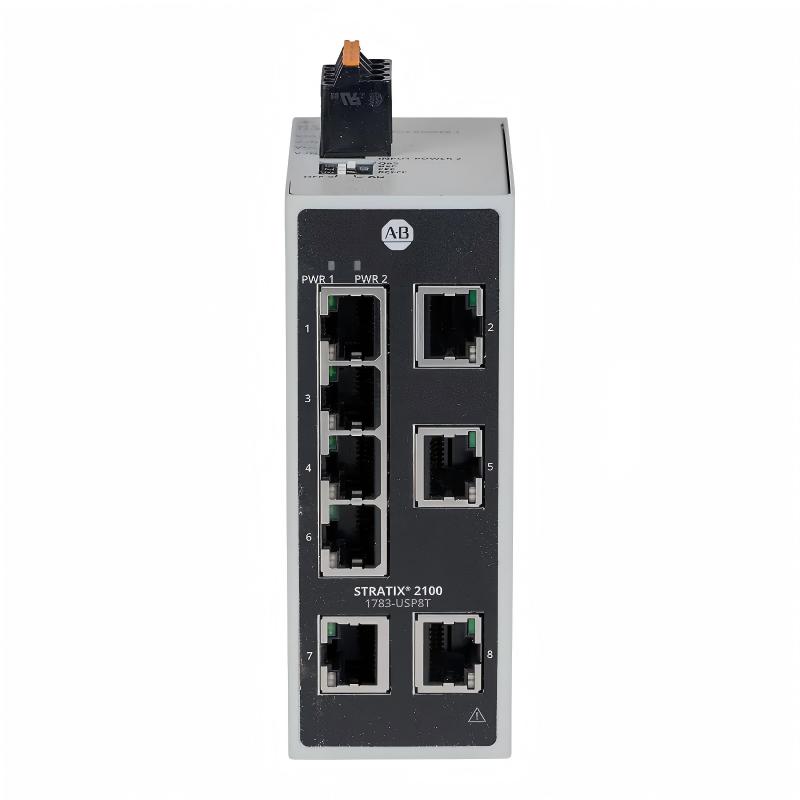
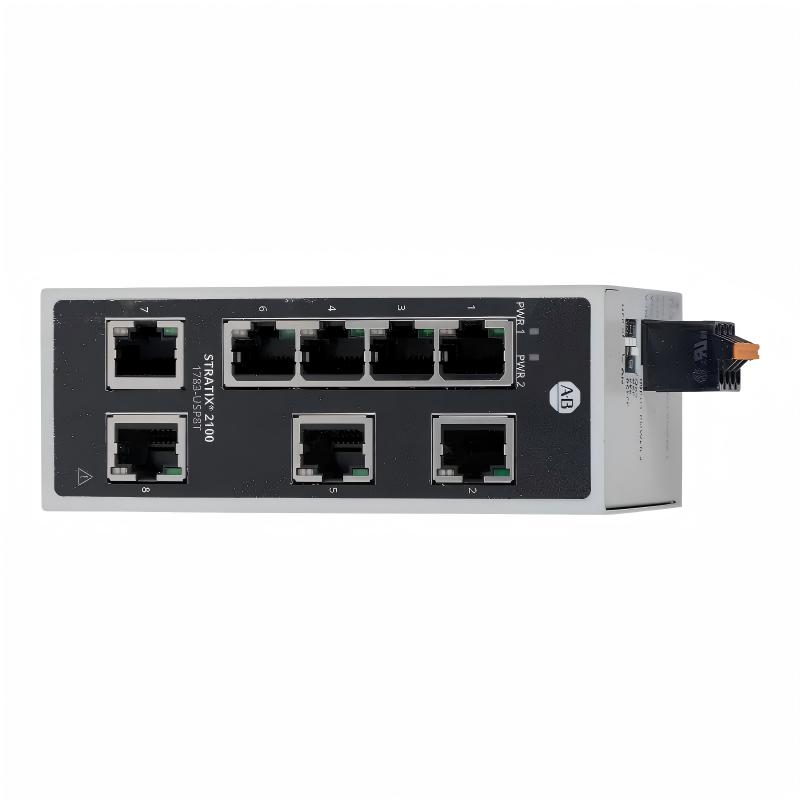
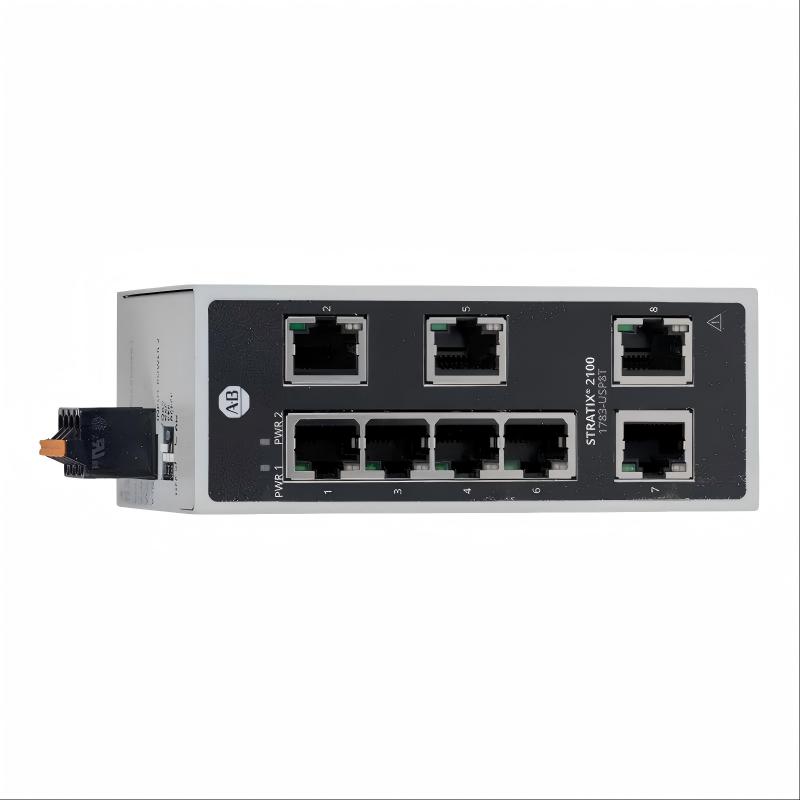
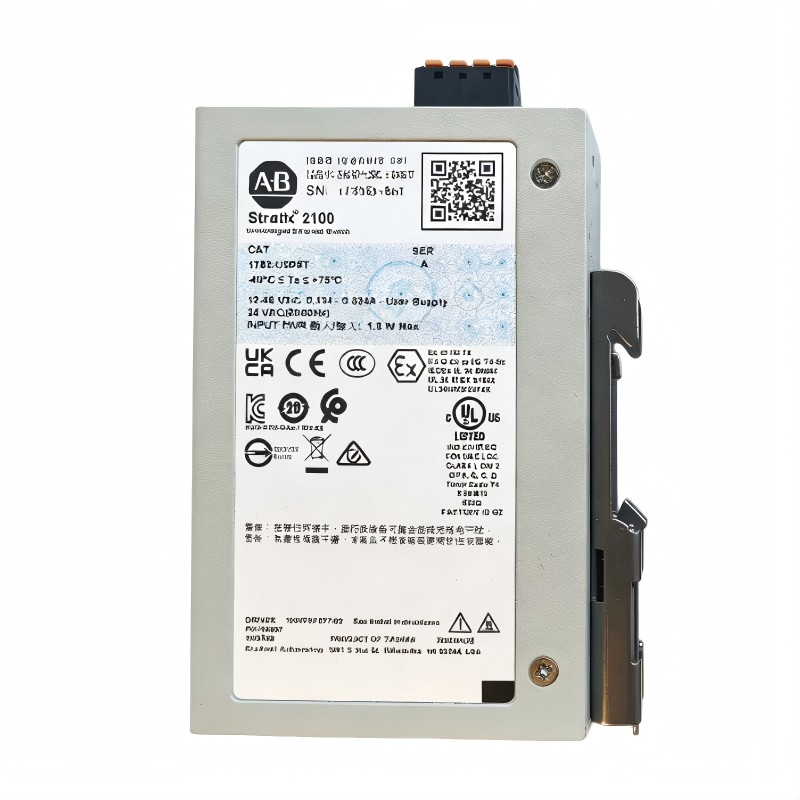
- Allen Bradley
- 1783-USP8T
- Stratix 2000 Unmanaged Ethernet Switch
- USA
- 114 x 26 x 70 mm
- 0.353 kg
- Xiamen, China
- New & In Stock
- T/T, PayPal, Western Union
- 1 Year
- 1-3 Working Days
- DHL, UPS, TNT, FedEx and EMS.
- 24-Hour Service
- COO
- 5
Our advantage

Global Logistics
We have a 10-year logistics and express cooperation agreement, so our products can be shipped to any place in the world.

Brand new and original
Our products are imported in bulk from the place of origin. Because of the cooperative relationship, our products are all original and 100% new.

24-hour service
We provide 7*24 hours service to our customers. We will be there whenever you need us.

Price advantage
All our products are priced very favorably because we have our own warehouse and supply.
| Company Information | |||
| [email protected] | |||
| Mobile | +8615980777398 | ||
| +8615980777398 | |||
| 15980777398 |
Product Overview
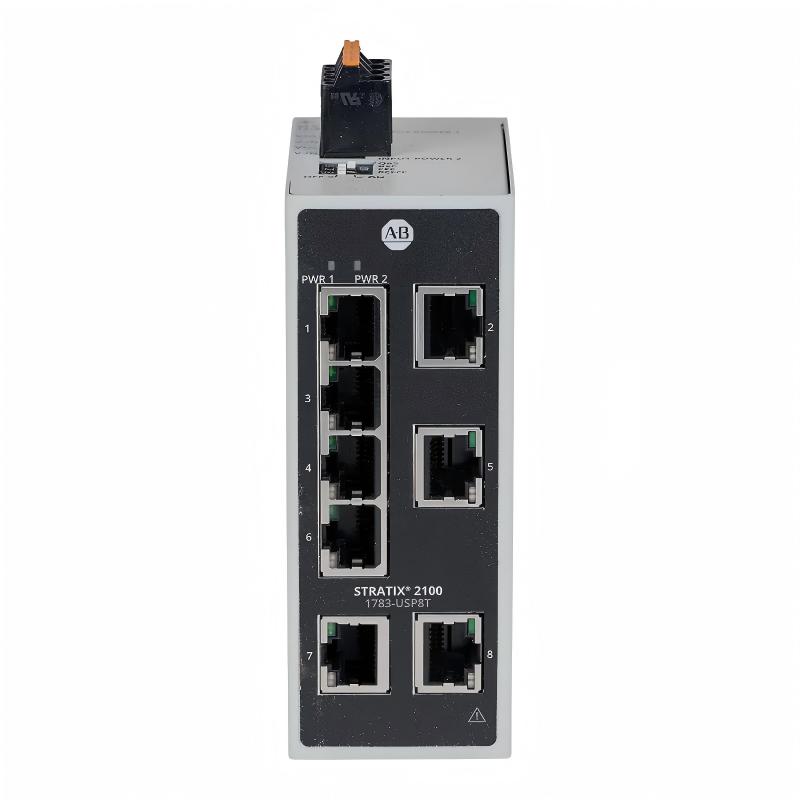
The Allen-Bradley 1783-USP8T Stratix Ethernet Switch is an industrial unmanaged Ethernet switch designed to provide reliable network connectivity for automation equipment. It belongs to the Stratix 2100 product family in current Rockwell Automation documentation and is associated with the earlier Stratix 2000 naming used in some product listings.
Featuring eight 10/100 Mbps copper Ethernet ports, the 1783-USP8T allows multiple industrial devices to communicate over a shared Ethernet network without requiring complex switch configuration. Its unmanaged architecture makes it suitable for applications where straightforward network expansion and basic Layer 2 switching are the primary requirements.
In industrial automation systems, Ethernet connectivity is essential for communication between programmable logic controllers (PLCs), human-machine interfaces (HMIs), engineering workstations, industrial computers, and other network-enabled devices. A compact industrial switch helps organize these connections and provides a practical way to expand the network inside a control cabinet.
The 1783-USP8T is designed for DIN rail installation and industrial environments. Its compact form factor makes it suitable for control panels where space is limited. For maintenance teams supporting existing Allen-Bradley installations, this model can provide an option for maintaining or expanding compatible Ethernet networks.
When selecting this switch, engineers should confirm the exact catalog number, power requirements, mounting clearances, port specifications, and environmental conditions. The 1783-USP8T is an unmanaged switch, so it should not be treated as a substitute for a managed industrial switch when advanced network configuration, detailed diagnostics, or specific redundancy functions are required.
Technical Specifications
| Parameter | Specification |
|---|---|
| Brand | Allen-Bradley |
| Manufacturer | Rockwell Automation |
| Model Number | 1783-USP8T |
| Product Family | Stratix Ethernet Switches |
| Product Series | Stratix 2100 in current official documentation |
| Legacy Product Description | Stratix 2000 Unmanaged Ethernet Switch |
| Product Type | Unmanaged Industrial Ethernet Switch |
| Switching Layer | Layer 2 |
| Ethernet Ports | 8 copper ports |
| Port Interface | RJ45 |
| Ethernet Speed | 10/100 Mbps |
| Network Medium | Copper Ethernet |
| Mounting Type | DIN Rail |
| Enclosure Rating | IP30, according to current product specifications |
| Power Input | Check the applicable product revision and nameplate |
| Dimensions | 114 × 26 × 70 mm, as supplied |
| Weight | 0.353 kg, as supplied |
| Typical Applications | PLC, HMI, industrial computer, and automation network connectivity |
Note: Verify the exact dimensions, power input range, and environmental ratings against the nameplate and technical documentation for the unit being purchased. Published dimensions can vary in how height, width, depth, and mounting features are represented.
Function and Working Principle
1. Industrial Ethernet Connectivity
The main function of the 1783-USP8T is to connect multiple Ethernet-enabled devices within an industrial network. Each of its eight RJ45 copper ports provides a physical interface for compatible Ethernet equipment.
For example, a control cabinet may contain a PLC, an HMI, an engineering computer, and several network-enabled devices. The switch provides a central connection point for these devices, allowing supported Ethernet traffic to pass between them.
This arrangement can simplify cabinet wiring compared with connecting each device through separate network connections to a distant switch.
2. Layer 2 Switching
The 1783-USP8T operates as a Layer 2 Ethernet switch. It forwards Ethernet frames within the local network based on Ethernet addressing information.
This allows connected devices to exchange data without requiring the switch to perform IP routing. Communication between different IP subnets, when required, must be handled by a suitable router or Layer 3 device elsewhere in the network.
For many small industrial networks, Layer 2 switching is sufficient to connect controllers, operator interfaces, and supervisory devices.
3. Unmanaged Network Operation
An unmanaged switch is intended to operate with minimal configuration. It does not normally require administrators to configure VLANs, routing policies, or individual port settings through a management interface.
This makes the 1783-USP8T suitable for straightforward network installations where the connected devices use compatible Ethernet settings and the network design does not require advanced management functions.
However, unmanaged operation also limits visibility and control compared with a managed switch. Network administrators should consider the need for diagnostics, traffic monitoring, access control, and redundancy before choosing the switch for a critical application.
4. Automatic Ethernet Communication
Compatible Ethernet devices can establish communication through the switch using their network interfaces. The exact data rate depends on the capabilities of the connected device, cable, and port.
The 1783-USP8T supports 10/100 Mbps copper Ethernet. It is not a gigabit Ethernet switch, so applications requiring gigabit throughput should use a suitably rated alternative.
5. Network Expansion
The eight-port design enables several devices to share a local network connection. When additional Ethernet ports are needed, an appropriately designed network may incorporate additional switches.
Before expanding a control network, engineers should assess traffic volume, topology, cable lengths, network segmentation, and the consequences of a switch failure. Adding more devices does not automatically guarantee adequate network performance or availability.
Role in Industrial Automation Systems
Industrial automation depends on reliable communication between control devices and operator interfaces. The Allen-Bradley 1783-USP8T can provide local Ethernet connectivity in installations where simple switching is sufficient.
A typical architecture may include a PLC that executes machine-control logic, an HMI that displays process information, and an engineering workstation used for programming and diagnostics. The switch connects these devices so that compatible network traffic can be exchanged.
The switch does not execute PLC logic, control motor outputs, or replace a controller. Its role is to forward Ethernet traffic between connected devices.
PLC Network Integration
A PLC can use Ethernet to communicate with operator interfaces, engineering systems, remote devices, and other controllers. The 1783-USP8T can provide the local switching infrastructure for such connections when the required bandwidth and network functions are compatible.
Engineers should verify the supported communication protocols and network architecture of the connected equipment. A switch provides Ethernet connectivity, but it does not guarantee that devices using different protocols or IP configurations will communicate correctly.
HMI and Operator Interface Connectivity
An HMI can use an Ethernet connection to access controller data, display alarms, and provide operator commands. Connecting an HMI and PLC through the switch creates a local network path for this communication.
Correct IP addressing, compatible software, and proper controller configuration remain necessary.
Engineering and Maintenance Access
Engineering workstations often need network access to PLCs and other automation devices for programming, configuration, and troubleshooting. The switch can provide a convenient physical connection point for these devices.
Where maintenance access introduces cybersecurity risks, the overall network should include suitable access controls and segmentation. An unmanaged switch alone does not provide comprehensive cybersecurity protection.
Industrial Applications
1. Factory Automation
Manufacturing facilities use Ethernet networks to connect controllers, HMIs, industrial PCs, and other automation devices. The 1783-USP8T can support local connectivity in compact machine-control cabinets.
Typical applications include packaging equipment, assembly stations, material-handling systems, and general production machinery.
2. PLC and HMI Communication
In control panels containing Allen-Bradley PLCs and Ethernet-enabled HMIs, the switch can provide a shared local network connection. This can help organize network cabling and make it easier to connect additional compatible devices.
The exact PLC model, communication requirements, and network layout should be confirmed during system design.
3. Industrial Equipment Networking
Individual machines often contain several Ethernet-enabled components. An unmanaged switch can connect these devices locally when the network does not require advanced management features.
The switch can be used in equipment such as automated inspection stations, machine tools, conveyors, and industrial assembly systems.
4. Process Monitoring
Industrial process systems may use Ethernet to transmit monitoring information between controllers, HMIs, and supervisory computers. The 1783-USP8T can provide local connectivity for compatible devices in a suitable network architecture.
For applications involving critical process control, engineers should evaluate whether unmanaged switching meets the system’s availability, diagnostic, and security requirements.
5. Control Cabinet Network Expansion
When an existing control cabinet requires additional Ethernet ports, an eight-port switch can provide a practical expansion option. The compact DIN rail format is useful where panel space is restricted.
Before adding a switch to an operating installation, review available power capacity, cable routing, network topology, and the effect of a single switch failure on connected devices.
Installation and System Integration
Correct installation helps ensure stable Ethernet communication and long-term serviceability.
Step 1: Confirm the Exact Model
Check the label for the full catalog number, 1783-USP8T, and record any applicable revision information. Verify that the product is the intended unmanaged eight-port copper Ethernet switch.
Do not confuse it with similarly named Stratix models that have different port counts, gigabit capabilities, fiber interfaces, or management features.
Step 2: Check the Power Requirements
Verify the input power requirements on the product label and the applicable installation documentation. Confirm that the available supply is compatible with the switch.
Do not assume that all Stratix switches use the same power input range or terminal arrangement. Incorrect power connections can damage equipment or create a safety hazard.
Step 3: Install on the DIN Rail
Mount the switch on a suitable DIN rail according to the manufacturer’s installation instructions. Ensure that it is securely attached and that there is sufficient room for power wiring, Ethernet cables, and maintenance access.
Maintain the specified environmental clearances and avoid obstructing ventilation paths.
Step 4: Connect the Ethernet Devices
Use compatible Ethernet cables and connect the PLC, HMI, engineering workstation, or other intended devices to the RJ45 ports.
Select cable types suitable for the industrial environment. Consider electromagnetic interference, vibration, oil exposure, temperature, cable routing, and required cable lengths.
Step 5: Verify IP Configuration
The switch itself does not normally require an IP address for basic unmanaged switching. However, the connected network devices still require appropriate IP addresses and compatible network settings.
Check for duplicate IP addresses, incorrect subnet masks, and incompatible network configurations if devices cannot communicate.
Step 6: Test Network Communication
After powering the switch, inspect the available status indicators and confirm that the connected devices establish Ethernet links. Test communication between the intended endpoints using the appropriate diagnostic tools.
If communication fails, inspect the power supply, cable condition, link indicators, device configuration, and network topology before replacing the switch.
Step 7: Document the Network
Record the switch location, connected devices, port assignments, cable identifiers, and power source. Clear documentation can reduce troubleshooting time during future maintenance.
For critical installations, also document the consequences of switch failure and the procedures for restoring network connectivity.
Compatible System Components
The following components represent common equipment categories that may be connected through an industrial Ethernet switch. They are examples of system roles, not a guarantee of direct compatibility with every installation.
| Component | Role in the Network |
|---|---|
| Allen-Bradley PLC | Executes machine or process control logic |
| Ethernet-enabled HMI | Displays process information and accepts operator commands |
| Engineering workstation | Supports programming, configuration, and troubleshooting |
| Industrial computer | Runs supervisory applications or data collection software |
| Ethernet-enabled drive | Exchanges supported control or monitoring data |
| Remote I/O adapter | Communicates with compatible distributed I/O equipment |
| Ethernet cables with RJ45 connectors | Provide the physical network connections |
| Compatible DC power supply | Supplies power according to the switch specifications |
| Router or Layer 3 switch | Provides routing between different IP networks when required |
Confirm the communication protocol, network speed, cable requirements, and power specifications for each connected device before commissioning the installation.
Alternative Models and Replacement Considerations
When replacing the 1783-USP8T, selecting a switch solely because it has eight ports is not sufficient. Engineers should consider Ethernet speed, management capabilities, power input, mounting, environmental ratings, and the network’s operational requirements.
| Model or Product Family | General Description | Key Consideration |
|---|---|---|
| Allen-Bradley 1783-USP8T | Eight-port unmanaged copper Ethernet switch | Original model; confirm condition and exact specifications |
| Allen-Bradley Stratix 2100 family | Unmanaged industrial Ethernet switching | Check port count, speed, power, and physical dimensions |
| Allen-Bradley Stratix managed switch families | Industrial switches with management capabilities | Consider when diagnostics, segmentation, or advanced network control is required |
| Industrial unmanaged 10/100 Ethernet switch | General-purpose unmanaged network expansion | Verify industrial ratings, power compatibility, and mounting |
| Industrial gigabit Ethernet switch | Higher-bandwidth industrial switching | Suitable only after confirming network speed and device requirements |
These are selection categories, not confirmed direct replacements. A newer model may require changes to wiring, mounting, power, or network design. Obtain a compatibility confirmation before using an alternative in a critical control system.
Key Advantages
Eight Copper Ethernet Ports
The eight RJ45 ports allow multiple Ethernet-enabled devices to connect to the same local network, supporting compact automation network layouts.
Simple Unmanaged Operation
Basic switching can be deployed without extensive configuration, which is useful for straightforward industrial networks that do not need advanced management functions.
DIN Rail Installation
DIN rail mounting supports integration into industrial control cabinets and machine panels, helping keep network equipment organized.
Compact Form Factor
The supplied dimensions make the unit suitable for consideration in space-constrained control panels, subject to checking the manufacturer’s mounting drawing and required clearances.
Integration with Automation Networks
The switch can connect compatible PLCs, HMIs, engineering workstations, and other Ethernet devices. This supports the communication infrastructure used by industrial control systems.
Practical Maintenance Option
For existing installations, identifying the correct catalog number can help maintenance teams source an appropriate replacement and restore network connectivity without unnecessary changes to the wider system.
Technical FAQs
1. What is the Allen-Bradley 1783-USP8T?
The Allen-Bradley 1783-USP8T is an unmanaged industrial Ethernet switch with eight 10/100 Mbps copper RJ45 ports. Current Rockwell Automation documentation identifies it as a Stratix 2100 model, although some older product listings refer to the Stratix 2000 family.
2. How many Ethernet ports does the 1783-USP8T have?
It has eight copper Ethernet ports with RJ45 interfaces. Each port supports 10/100 Mbps Ethernet, subject to the capabilities of the connected device and cable.
3. Is the 1783-USP8T a managed switch?
No. It is an unmanaged switch intended for basic Layer 2 Ethernet connectivity. It is not designed to provide the full configuration and monitoring functions available on managed industrial switches.
4. Does the switch require an IP address?
Basic unmanaged switching normally does not require the switch itself to have an IP address. Connected PLCs, HMIs, and other network devices still require suitable network configurations.
5. Can the switch connect an Allen-Bradley PLC and HMI?
It can provide Ethernet connectivity between compatible PLCs and HMIs when their communication interfaces, protocols, IP settings, and network requirements are suitable.
6. What are the dimensions and weight?
The supplied product information lists dimensions of 114 × 26 × 70 mm and a weight of 0.353 kg. Confirm the measurement orientation and physical dimensions against the manufacturer’s drawing and the actual product before installation.
7. What power supply does the 1783-USP8T require?
The correct supply depends on the model’s specifications and revision. Verify the input range and terminal arrangement on the product label and in the relevant installation instructions before applying power.
8. Can it be used for gigabit Ethernet?
No. The 1783-USP8T is specified as an eight-port 10/100 Mbps copper switch. If gigabit throughput is required, select a switch with compatible gigabit ports.
9. Can it replace any eight-port industrial switch?
No. Port count alone does not establish compatibility. Check the Ethernet speed, power input, environmental rating, mounting method, physical dimensions, and required network features.
10. What should be checked if network communication fails?
Check the switch power supply, Ethernet link indicators, cables, port connections, device IP settings, and network topology. If only one device is affected, investigate that device and its cable before concluding that the switch has failed.
Procurement and Maintenance Recommendations
Before purchasing an Allen-Bradley 1783-USP8T, verify the catalog number and request clear photographs of the product label, ports, power terminals, and mounting features when buying from surplus or refurbished inventory.
Ask the supplier to confirm the unit’s condition, test status, warranty, and return policy. For equipment used in a production-critical network, consider keeping a verified spare if a switch failure would interrupt machine operation.
During maintenance, label the Ethernet cables and record which device is connected to each port. This documentation can help technicians restore the original network layout after a replacement.
For any modernization project, evaluate whether the existing unmanaged design remains appropriate. Applications that need advanced diagnostics, network segmentation, managed redundancy, or higher bandwidth may benefit from a different industrial switching architecture.
Conclusion
The Allen-Bradley 1783-USP8T is an eight-port unmanaged industrial Ethernet switch designed to connect compatible automation devices through 10/100 Mbps copper Ethernet. Its DIN rail mounting and straightforward Layer 2 switching make it suitable for basic industrial network connectivity in control cabinets and machine systems.
For reliable integration, verify the exact catalog number, power requirements, mounting dimensions, and connected-device configuration. Where the switch is being used in a critical control network, assess the impact of switch failure and determine whether unmanaged switching meets the application’s availability and diagnostic requirements.