

ProductPRODUCT
Featured products
Contact Us
- Allen Bradley
- 1420-V1P-ENT
- Powermonitor 500 Ethernet Power Meter
- USA
- 89.5 x 20 x 63 mm
- 0.4 kg
- Xiamen, China
- New & In Stock
- T/T, PayPal, Western Union
- 1 Year
- 1-3 Working Days
- DHL, UPS, TNT, FedEx and EMS.
- 24-Hour Service
- COO
- 5
Our advantage

Global Logistics
We have a 10-year logistics and express cooperation agreement, so our products can be shipped to any place in the world.

Brand new and original
Our products are imported in bulk from the place of origin. Because of the cooperative relationship, our products are all original and 100% new.

24-hour service
We provide 7*24 hours service to our customers. We will be there whenever you need us.

Price advantage
All our products are priced very favorably because we have our own warehouse and supply.
| Company Information | |||
| [email protected] | |||
| Mobile | +8615980777398 | ||
| +8615980777398 | |||
| 15980777398 |
Product Overview
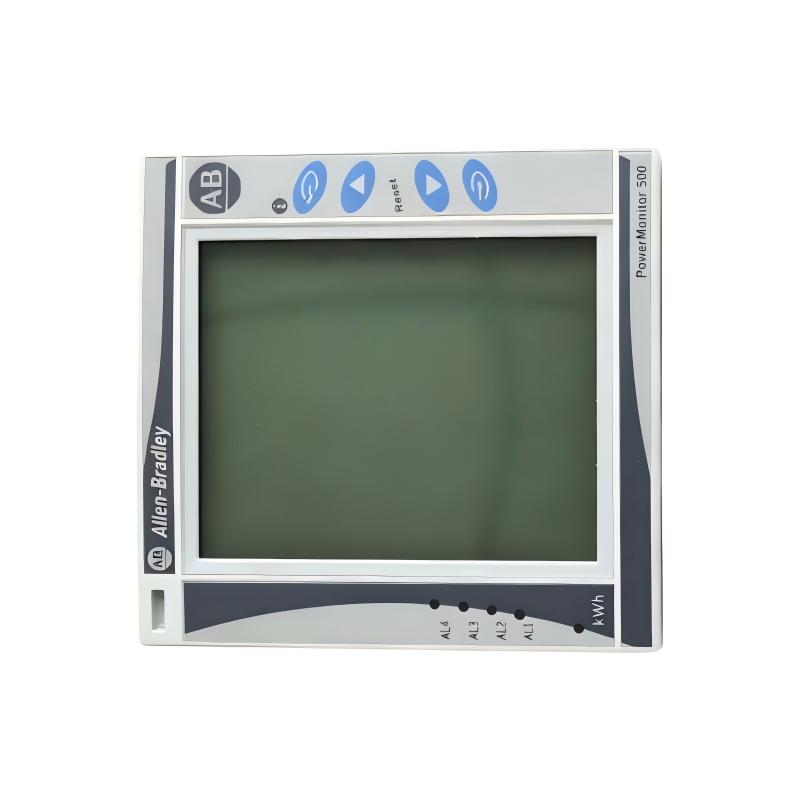
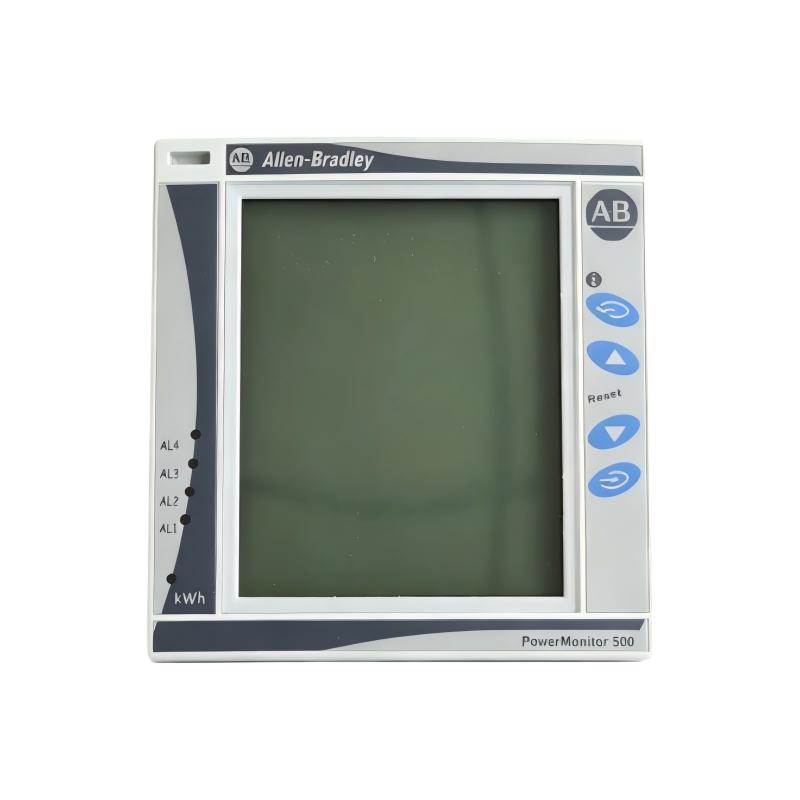
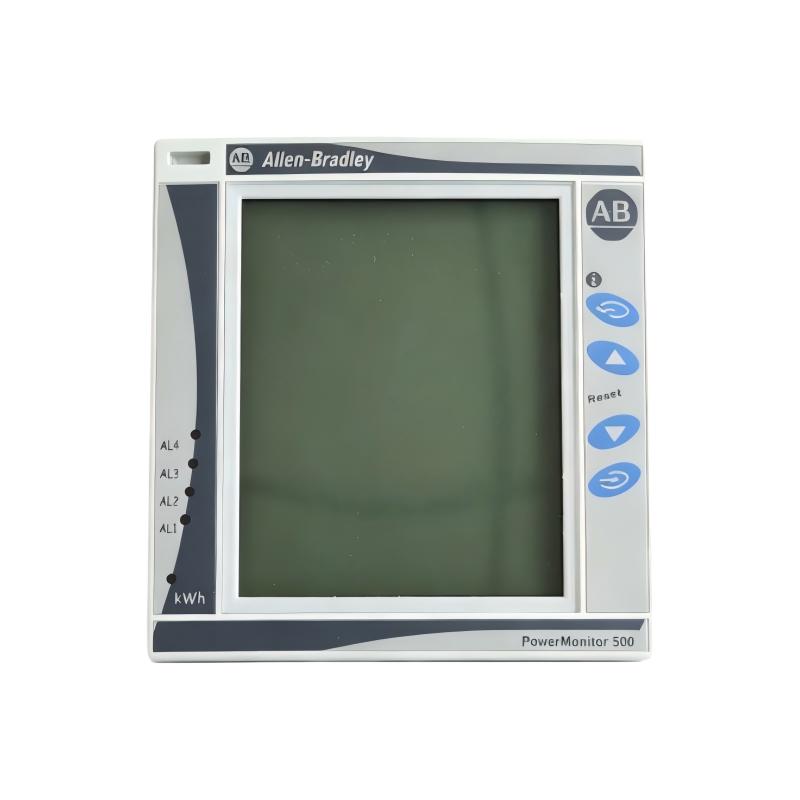
The Allen-Bradley 1420-V1P-ENT PowerMonitor 500 is an industrial power monitoring device manufactured by Rockwell Automation. Designed for electrical measurement and energy monitoring applications, it combines a digital display with EtherNet/IP communication capabilities, allowing electrical data to be integrated into compatible industrial automation and supervisory systems.
Electrical energy monitoring is an important part of modern industrial operations. Manufacturing facilities, process plants, commercial buildings, and utility installations need accurate information about voltage, current, power consumption, and operating conditions to understand electrical performance and identify opportunities for improved efficiency. The PowerMonitor 500 provides measurement data that can support these activities.
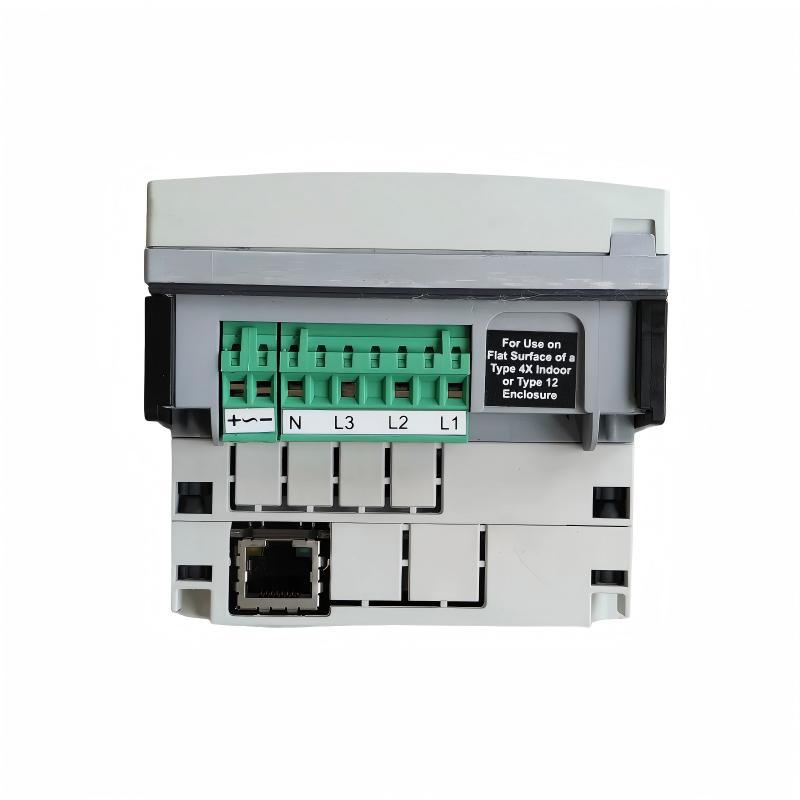
The 1420-V1P-ENT is equipped with two relay outputs and an LCD interface. It supports measurement of electrical quantities including voltage, current, real power, reactive power, apparent power, power factor, frequency, and accumulated energy. Its communication capability makes it suitable for installations where power information needs to be shared with a PLC, industrial computer, or energy management system.
Unlike a conventional electrical meter that is used only for local readings, an Ethernet-enabled power monitor can contribute to a wider monitoring architecture. Engineers can use the available measurements to observe electrical demand, investigate abnormal operating conditions, compare consumption across equipment, and improve visibility into facility energy usage.
The 1420-V1P-ENT is particularly relevant to industrial facilities using Allen-Bradley automation equipment and EtherNet/IP networks. Before installation or replacement, users should confirm the complete catalog number, communication configuration, voltage measurement requirements, current transformer arrangement, and relay-output functions.
Technical Specifications
| Parameter | Specification |
|---|---|
| Brand | Allen-Bradley |
| Manufacturer | Rockwell Automation |
| Model Number | 1420-V1P-ENT |
| Product Family | PowerMonitor 500 |
| Product Type | Ethernet Power Meter |
| Communication Interface | EtherNet/IP |
| Additional Protocol Support | Modbus TCP/IP capability is identified in the product documentation |
| Display | Built-in LCD |
| Measurement System | Single-phase and three-phase systems, subject to configuration |
| Voltage Measurement | Direct connection or voltage transformer, within specified limits |
| Current Measurement | Current transformer connection |
| Nominal Current Input | 5 A |
| Maximum Current Input | 6 A |
| Measurement Parameters | Voltage, current, real power, reactive power, apparent power, power factor, frequency, and energy |
| Energy Measurement | Imported/exported kWh and kVARh |
| Relay Outputs | Two relay outputs |
| Alarm Functions | Configurable alarms |
| Power Supply | Verify the applicable AC/DC input ratings and wiring instructions |
| Front Protection | IP65, NEMA 4X, NEMA 12, according to published specifications |
| Dimensions | 89.5 × 20 × 63 mm, as supplied; confirm the measured component |
| Weight | 0.4 kg, as supplied |
| Typical Applications | Industrial energy monitoring, electrical distribution, and power consumption analysis |
Dimension clarification: The supplied dimensions of 89.5 × 20 × 63 mm appear consistent with the published dimensions of the serial/Ethernet communication module rather than the complete meter. The complete module holder is listed at 96 × 96 × 50 mm, with a maximum panel depth behind the mounting surface of 81.7 mm. Confirm the exact component represented by the dimensions before using them for panel design or shipping documentation.
Function and Working Principle
1. Electrical Parameter Measurement
The primary function of the PowerMonitor 500 is to measure electrical quantities within a compatible power distribution system.
Depending on the configured system and connected measurement circuits, the device can measure or calculate:
- Line-to-line and line-to-neutral voltage
- Phase and system current
- Real power in kW
- Reactive power in kVAR
- Apparent power in kVA
- Power factor
- Electrical frequency
- Accumulated electrical energy in kWh and kVARh
These values help engineers understand the electrical conditions of connected equipment. For example, current and power measurements can help identify changes in operating load, while voltage and frequency measurements can assist with investigating electrical supply conditions.
2. True RMS Measurement
The PowerMonitor 500 uses true RMS measurement methods for distorted waveforms. This is important in industrial environments where variable frequency drives, switched-mode power supplies, electronic controls, and other nonlinear loads can cause current or voltage waveforms to differ from ideal sinusoidal shapes.
True RMS measurement provides a useful basis for evaluating electrical quantities under these conditions, within the instrument’s specified measurement range and accuracy.
3. Energy Consumption Monitoring
The meter supports electrical energy measurements, including kWh and kVARh. Accumulated energy information can be used to evaluate consumption over time and compare different operating periods.
In a manufacturing plant, engineers may use energy measurements to compare consumption between production lines, monitor utility equipment, or investigate changes in energy demand. Such analysis can help identify areas where operational improvements may be worthwhile.
The meter provides measurement data; determining the causes of energy changes requires analysis of production output, operating schedules, equipment conditions, and other relevant factors.
4. EtherNet/IP Communication
EtherNet/IP allows the power meter to communicate with compatible industrial automation systems over an Ethernet network. This makes it possible to incorporate power measurement data into a wider monitoring or control architecture.
Depending on the system configuration and supported data interface, a PLC, industrial computer, or supervisory application may retrieve measurements for display, logging, reporting, or alarm handling.
The network configuration must be designed correctly. IP addressing, communication settings, data mapping, and controller or software compatibility should be verified before commissioning.
5. Relay Outputs and Alarm Functions
The 1420-V1P-ENT includes two relay outputs. Relay outputs can support external signaling or control functions when configured for the intended application.
The meter also supports configurable alarms. These features can help indicate selected electrical conditions or measurement thresholds, depending on the available configuration and the programmed settings.
Relay outputs should not automatically be treated as safety-rated protection devices. Critical electrical protection must be provided by equipment designed and approved for that purpose.
Role in Industrial Automation and Energy Management
The Allen-Bradley 1420-V1P-ENT provides a measurement interface between an electrical distribution system and an industrial monitoring network.
In a typical installation, the meter receives voltage measurement inputs and current signals from suitable current transformers. It processes the measurement signals and displays the results locally. Where configured, the meter also communicates available data to compatible devices over Ethernet.
A plant monitoring system can use this information to improve visibility into electrical consumption and operating conditions.
PLC Integration
A PLC can collect power data from a compatible PowerMonitor 500 through the supported communication interface and configuration. The measurements can then be used in dashboards, equipment status screens, energy reports, or selected automation functions.
For example, a PLC-based system might display the power consumption of a production line alongside machine operating status. This can help operators compare energy demand with production activity.
The meter does not replace the PLC. Its primary role is electrical measurement and communication, while the PLC executes the configured control logic.
HMI and SCADA Monitoring
When integrated with a compatible HMI or SCADA application, power measurements can be displayed in an operator-friendly format. Screens may include voltage, current, power, energy totals, and selected alarms.
Historical logging can help maintenance and engineering teams compare electrical conditions over different shifts or operating periods. The availability of historical trends depends on the connected software and data storage configuration.
Facility Energy Management
Power measurement data can support energy management initiatives by making electrical consumption more visible. Facilities can use this information to compare equipment, review demand patterns, and identify areas for further investigation.
Meaningful energy analysis generally requires consistent measurement points, reliable timestamps, appropriate data retention, and an understanding of production activity.
Industrial Applications
1. Manufacturing Plants
Manufacturing facilities operate numerous electrical loads, including conveyors, machining equipment, pumps, fans, and production machinery. The PowerMonitor 500 can provide measurement data for selected distribution circuits or equipment groups.
Comparing energy use with production schedules may help identify unusual consumption patterns and support operational efficiency reviews.
2. Electrical Distribution Panels
The meter can be installed in a suitable electrical panel to monitor a compatible distribution circuit. Voltage and current measurements provide information about electrical operating conditions, while power and energy values help quantify demand and consumption.
Correct selection of voltage inputs, current transformers, and protection devices is essential for safe and reliable operation.
3. Process Industries
Chemical plants, water treatment facilities, food processing operations, and other process industries rely on electrical equipment that often operates for extended periods.
Power monitoring can help maintenance and energy teams evaluate the consumption of selected pumps, fans, compressors, and other equipment. The data may also help identify changes in operating load that warrant further investigation.
4. Commercial and Industrial Buildings
Large buildings often contain multiple electrical distribution circuits serving HVAC equipment, lighting, pumps, and other building services.
A PowerMonitor 500 can provide measurement data for a selected circuit, helping facility teams understand energy usage and compare operating periods. A broader building energy management system may be required to consolidate data from multiple meters.
5. Energy Audits and Consumption Analysis
Power measurement devices can support energy audits by providing quantitative data about electrical loads. Engineers can use the measurements to compare equipment consumption, investigate demand peaks, and assess the effect of operational changes.
The meter’s accuracy, installation arrangement, and measurement configuration should be considered when the data will be used for formal reporting or billing-related decisions.
6. Industrial Equipment Monitoring
Power consumption can provide useful context when diagnosing changes in equipment operation. For example, a change in current or real power may indicate a change in load, operating conditions, or equipment behavior.
However, electrical measurements alone do not establish the cause of a fault. They should be evaluated alongside process data, equipment specifications, operating history, and other diagnostic information.
Installation and System Integration
Correct installation is important for measurement accuracy, electrical safety, and dependable network communication.
Step 1: Verify the Catalog Number
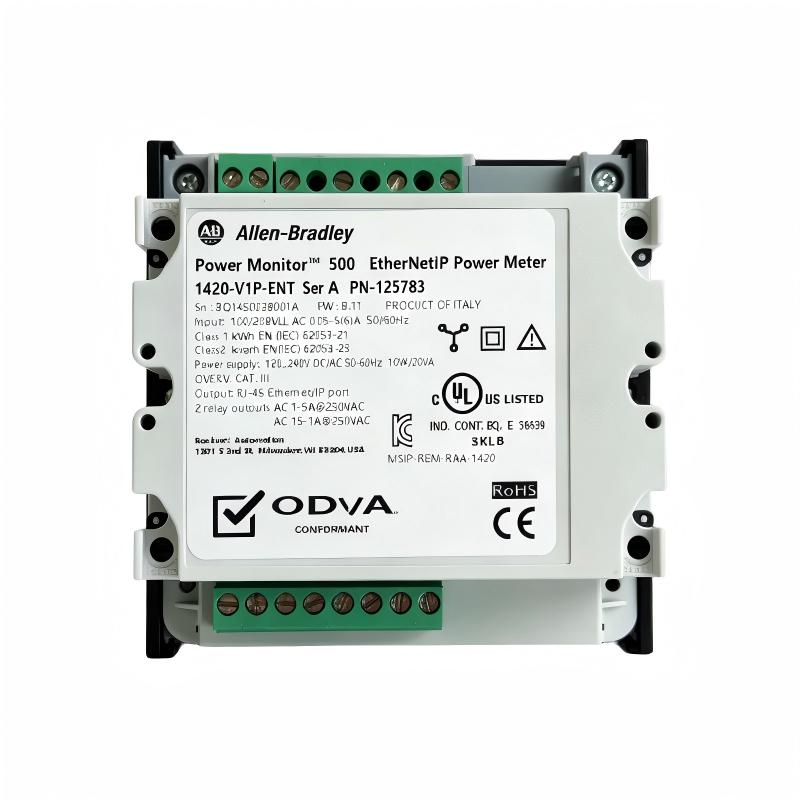
Confirm that the product label reads 1420-V1P-ENT. The suffix is important because related PowerMonitor 500 models may have different communication capabilities or output configurations.
Check the exact product revision and documentation before planning a replacement or modifying an existing panel.
Step 2: Confirm Panel Dimensions and Mounting
The complete PowerMonitor 500 uses a panel-mounted module holder with front dimensions of approximately 96 × 96 mm. The published dimensions of the communication module are different from those of the complete assembly.
Measure the panel cutout, available mounting depth, clearance around terminals, and space for wiring. Do not use the dimensions of an individual communication module as the dimensions of the complete meter.
Step 3: Verify the Power Supply
Confirm the meter’s auxiliary power requirements from the product label and the applicable wiring documentation. Although the product family supports specified AC/DC supply arrangements, the installed configuration must be verified before connecting power.
Use an appropriate protective arrangement and follow applicable electrical installation regulations.
Step 4: Connect Voltage Measurement Inputs
Connect the voltage measurement circuits according to the system configuration and the manufacturer’s wiring instructions. Verify the nominal voltage, phase arrangement, and whether direct measurement or a suitable voltage transformer is required.
Incorrect wiring can result in inaccurate measurements, equipment damage, or hazardous conditions.
Step 5: Install Current Transformers
The PowerMonitor 500 uses current transformer connections for current measurement. Select suitable CTs for the expected load and ensure that their ratings and secondary connections match the meter’s specifications.
Observe the correct CT polarity and phase association. Incorrect CT orientation or phase matching can cause misleading power and power factor readings.
Current transformer secondary circuits can present serious hazards if handled incorrectly. Installation and servicing should be performed by qualified personnel following the applicable safety procedures.
Step 6: Configure Ethernet Communication
Connect the meter to a compatible Ethernet network and configure the required communication parameters. Confirm IP addressing and verify that the PLC, SCADA system, or other monitoring application supports the intended communication method.
Where Modbus TCP/IP is used, check the applicable communication documentation and data register mapping. Do not assume that every connected controller automatically recognizes all meter measurements.
Step 7: Configure Alarms and Relay Outputs
Review the alarm requirements and configure supported functions according to the application. Confirm the relay contact ratings and ensure that any connected external circuit remains within the specified electrical limits.
If relay outputs are used for external signaling, document the intended response and test the behavior under controlled conditions.
Step 8: Commission and Validate Measurements
After installation, verify the displayed voltage, current, power, and energy values against expected operating conditions or an appropriate reference instrument.
Check phase assignments, CT ratios where applicable, communication status, and alarm behavior. Unexpected readings should be investigated before the data is used for operational decisions.
Compatible System Components
The following table describes common equipment categories used alongside an industrial power meter. Specific compatibility depends on the application and the selected configuration.
| Component | Function |
|---|---|
| Allen-Bradley PLC | Collects available meter data and executes application logic |
| HMI operator terminal | Displays electrical measurements and alarm information |
| SCADA software | Provides centralized monitoring, logging, and reporting |
| Ethernet switch | Connects the meter to compatible network devices |
| Current transformers | Provide current measurement signals |
| Voltage transformers, where required | Adapt voltage measurement circuits to the required input range |
| Electrical distribution panel | Houses the meter and associated measurement circuits |
| Industrial power supply | Provides the required auxiliary power |
| Energy management software | Analyzes and reports energy consumption data |
| Protective devices | Provide electrical protection appropriate to the installation |
Each component should be selected according to its electrical ratings, communication requirements, and intended function. The power meter is a measurement device and should not replace dedicated circuit protection.
Alternative Models and Replacement Considerations
The following related models and product categories may be relevant when reviewing a replacement or a new monitoring design. They are not guaranteed direct replacements for the 1420-V1P-ENT.
| Model or Product Family | General Description | Key Consideration |
|---|---|---|
| Allen-Bradley 1420-V1P-ENT | PowerMonitor 500 with EtherNet/IP and two relay outputs | Original model; verify the exact communication and output configuration |
| Allen-Bradley 1420-V1-ENT | PowerMonitor 500 with EtherNet/IP communication | Compare output configuration and other catalog-specific features |
| Allen-Bradley 1420-V1P | PowerMonitor 500 without the Ethernet communication option listed for the ENT model | Not a direct substitute where network communication is required |
| Allen-Bradley PowerMonitor family | Industrial power and energy monitoring products | Select according to measurement, communication, accuracy, and integration requirements |
| Compatible industrial power meter | Third-party meter with suitable Ethernet communication | Verify data mapping, protocol compatibility, electrical ratings, and panel requirements |
When evaluating a replacement, compare the complete catalog number, communication protocol, measurement inputs, relay outputs, power supply, display, accuracy requirements, and mechanical dimensions.
A device that measures the same electrical quantities may still require controller programming changes or modifications to the network configuration. Obtain technical confirmation before substituting another model in an operating installation.
Key Advantages
Comprehensive Electrical Measurements
The PowerMonitor 500 supports measurement of multiple electrical quantities, giving maintenance and energy management teams a broader view of electrical operating conditions than a simple current or voltage indicator.
Ethernet-Based Data Integration
EtherNet/IP communication enables the meter to be incorporated into compatible industrial networks. This can reduce the need for manual data collection and support automated monitoring workflows.
Local LCD Display
The integrated display allows personnel to review measurement values locally during inspection, commissioning, and troubleshooting.
Configurable Alarms
Supported alarm functions can help identify selected electrical conditions that require attention. Correct configuration and suitable response procedures are necessary to make these functions useful.
Relay Output Capability
The two relay outputs provide additional interface options for supported external signaling or control applications, subject to the published contact ratings.
Support for Energy Management
Accumulated energy measurements can support consumption comparisons and energy reporting when the data is collected and interpreted appropriately.
Integration with Industrial Automation
The device can provide electrical measurement information to compatible PLC, HMI, SCADA, and energy monitoring systems, allowing power data to be considered alongside process information.
Technical FAQs
1. What is the Allen-Bradley 1420-V1P-ENT?
It is an Allen-Bradley PowerMonitor 500 Ethernet power meter used to measure electrical quantities and communicate measurement data through EtherNet/IP.
2. What parameters can the meter measure?
Supported measurements include voltage, current, real power, reactive power, apparent power, power factor, frequency, and accumulated energy. Available values depend on the configured system and connected measurement circuits.
3. Does the 1420-V1P-ENT support EtherNet/IP?
Yes. EtherNet/IP is a listed communication capability for this catalog number. The device can be integrated into a compatible network after the necessary communication and application configuration is completed.
4. Does it have relay outputs?
Yes. The model is listed with two relay outputs. Confirm the specific contact ratings and configured functions before connecting external equipment.
5. What is the nominal current input?
The published specification identifies a nominal current input of 5 A and a maximum of 6 A. The meter uses current transformer connections, so the CT selection and secondary wiring must match the meter’s requirements.
6. What is the power supply requirement?
The product documentation identifies supported auxiliary power arrangements within the PowerMonitor 500 family. Check the exact device label and installation manual for the applicable input range and wiring before applying power.
7. What are the dimensions and weight?
The supplied dimensions are 89.5 × 20 × 63 mm and the supplied weight is 0.4 kg. The published dimensions for the Ethernet communication module are 89.5 × 63 × 20 mm, while the complete module holder is approximately 96 × 96 × 50 mm. Confirm which physical component is being measured.
8. Can the meter connect directly to a PLC?
It can communicate with compatible automation systems through the supported network interface. Correct IP settings, supported data access methods, and suitable controller configuration are required.
9. Can it be used for energy efficiency analysis?
Yes. Its electrical and energy measurements can support energy monitoring and consumption analysis. Reliable conclusions require appropriate measurement placement, data collection, and comparison with operating conditions.
10. Is the meter a protective relay?
It is primarily a power measurement and monitoring device. Although it supports alarms and relay outputs, it should not be treated as a replacement for dedicated protective relays or circuit protection equipment unless a specific application is explicitly approved for that purpose.
Procurement and Maintenance Recommendations
When purchasing the Allen-Bradley 1420-V1P-ENT, verify the complete catalog number and ask the supplier to confirm the Ethernet communication capability and two-relay-output configuration.
For used or refurbished equipment, request clear photographs of the product label, front display, rear terminals, and communication connections. Ask about testing, warranty, return conditions, and the availability of technical documentation.
Before installation, verify the required auxiliary power, voltage measurement range, CT ratio, phase configuration, network parameters, and relay contact ratings. Record the original settings before replacing an existing meter so that the new unit can be configured consistently.
During operation, compare measurements against expected load conditions and investigate unusual changes. Keep the meter’s configuration, wiring diagrams, communication settings, and maintenance history available for future troubleshooting.
Conclusion
The Allen-Bradley 1420-V1P-ENT PowerMonitor 500 is an industrial Ethernet power meter designed to provide electrical measurement data and support network-based monitoring. Its EtherNet/IP interface, LCD display, configurable alarms, and relay outputs make it useful for compatible industrial energy monitoring and electrical distribution applications.
For successful integration, confirm the exact model, measurement circuit configuration, power supply, relay requirements, and communication settings. Correct installation and commissioning help ensure that the collected electrical data is reliable and useful for maintenance, monitoring, and energy management.