

ProductPRODUCT
Featured products
Contact Us
- ABB
- ACS-CP-A 3ABD64691473
- Auxiliary Control Panel
- Sweden (SE)
- 250 × 80 × 110 mm
- 0.1 kg
- Xiamen, China
- New & In Stock
- T/T, PayPal, Western Union
- 1 Year
- 1-3 Working Days
- DHL, UPS, TNT, FedEx and EMS.
- 24-Hour Service
- COO
- 1
Our advantage

Global Logistics
We have a 10-year logistics and express cooperation agreement, so our products can be shipped to any place in the world.

Brand new and original
Our products are imported in bulk from the place of origin. Because of the cooperative relationship, our products are all original and 100% new.

24-hour service
We provide 7*24 hours service to our customers. We will be there whenever you need us.

Price advantage
All our products are priced very favorably because we have our own warehouse and supply.
| Company Information | |||
| [email protected] | |||
| Mobile | +8615980777398 | ||
| +8615980777398 | |||
| 15980777398 |
Product Overview
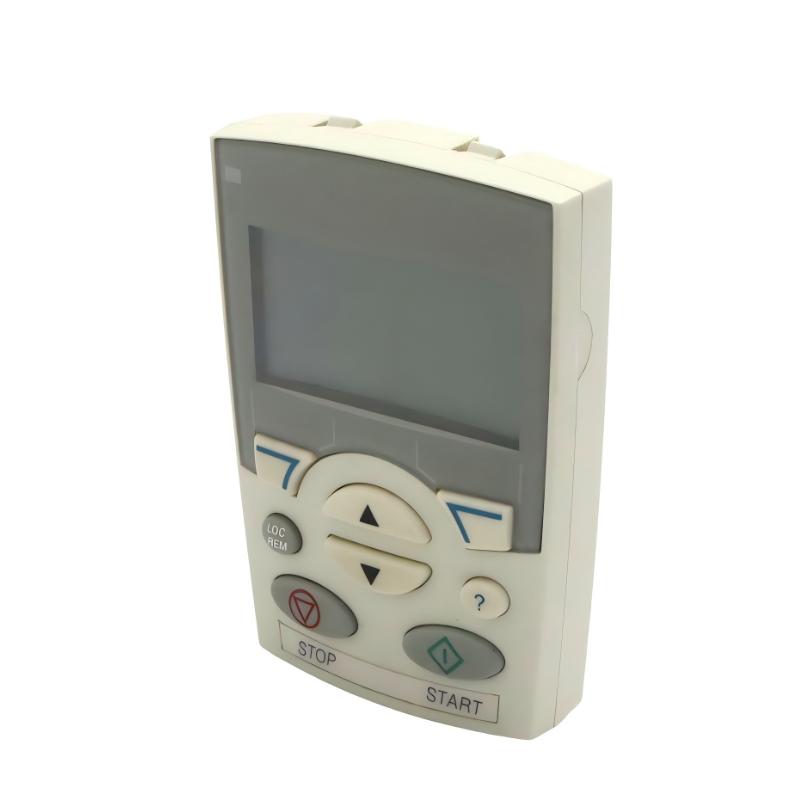
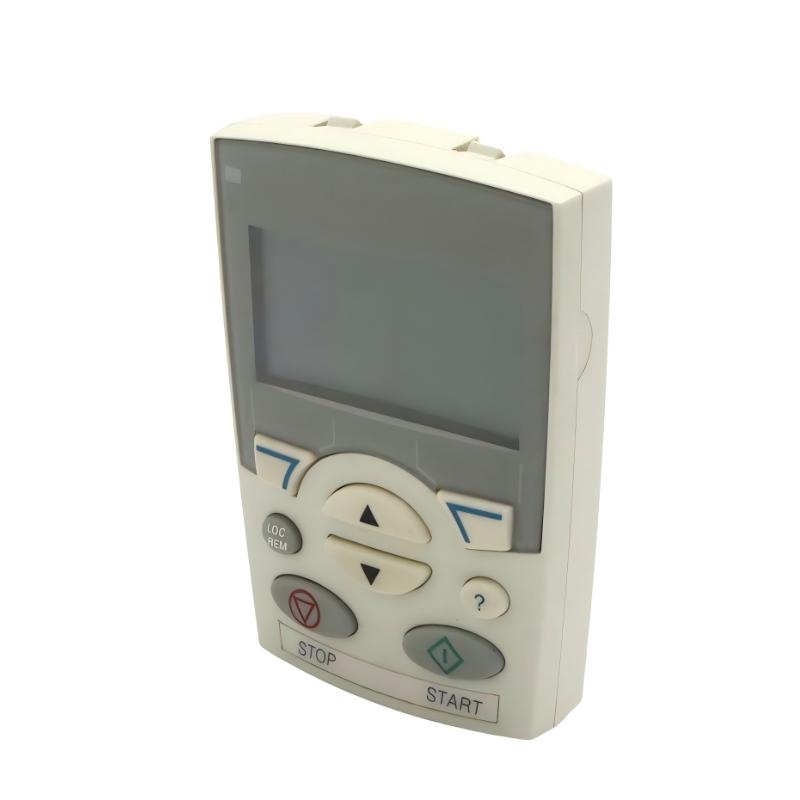
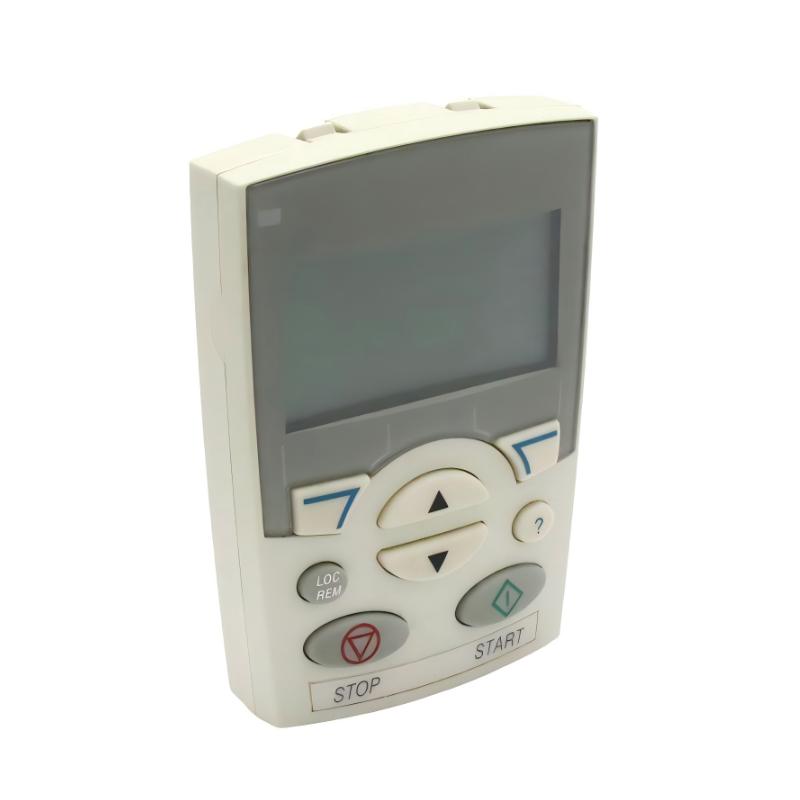
The ABB ACS-CP-A 3ABD64691473 Assistant Control Panel is an operator interface accessory designed for compatible ABB low-voltage AC drives. It provides a convenient way for technicians and operators to access drive parameters, monitor operating information, and perform commissioning and maintenance tasks.
Unlike a variable frequency drive, the ACS-CP-A does not directly control motor power. Instead, it functions as a local human-machine interface between the user and the connected drive. Through its display and keypad, users can navigate drive menus, adjust supported parameters, review operating conditions, and access available diagnostic information.
The ACS-CP-A is identified as an Assistant Control Panel for ABB drive systems. Its documented applications include compatible models in the ACS310, ACS350, ACS355, and ACS550 families. Compatibility should always be checked against the exact drive model and hardware configuration before installation.
The panel is particularly useful in industrial environments where technicians need direct access to drive settings without relying exclusively on a separate PLC or supervisory control system. During commissioning, it can help configure motor parameters and operating references. During maintenance, it can provide access to fault information and supported diagnostic functions.
The assistant interface also supports parameter transfer between compatible drives, which can simplify configuration work when several drives use similar operating settings. This function is useful for maintenance teams managing multiple machines or replacing an existing drive.
With its compact design and approximately 0.1 kg product weight, the ACS-CP-A is a lightweight accessory for ABB drive installations. It is commonly considered for motor-control panels, industrial machinery, conveyor systems, pumps, fans, and other applications using compatible ABB drives.
Technical Specifications
| Parameter | Specification |
|---|---|
| Brand | ABB |
| Product Model | ACS-CP-A |
| ABB Part Number | 3ABD64691473 |
| Product Type | Assistant Control Panel |
| Product Category | Drive Operator Interface / Control Panel |
| Application | ABB Low-Voltage AC Drives |
| Display | LCD display |
| User Interface | Keypad with navigation and function keys |
| Control Functions | Drive operation and parameter access, subject to drive compatibility |
| Commissioning Support | Start-up assistant |
| Diagnostic Support | Diagnostic assistant and available fault information |
| Maintenance Support | Maintenance assistant |
| Parameter Transfer | Parameter copying between compatible drives |
| Real-Time Clock | Supported |
| Compatible Drive Families | ACS310, ACS350, ACS355, ACS550 |
| Power Source | Supplied through the compatible drive interface |
| Product Weight | Approximately 0.1 kg |
| Dimensions Provided | 250 × 80 × 110 mm |
| ABB Product Identification | 64691473 |
| Typical Application | Drive setup, operation, monitoring, and maintenance |
Important: The supplied dimensions of 250 × 80 × 110 mm should be checked against the physical product. ABB product information and distributor specifications commonly list a much smaller panel body, approximately 102 × 70 × 20 mm. The supplied dimensions may represent a different measurement or packaging information.
Function and Working Principle
The ACS-CP-A operates as a user interface connected to a compatible ABB variable frequency drive. It allows users to interact with the drive’s internal control functions through the display and keypad.
The panel does not independently generate motor-control signals or convert electrical power. Instead, it provides access to functions implemented by the connected drive.
1. Drive Parameter Access
Industrial AC drives contain configurable parameters that determine how the connected motor operates. These parameters may include motor rated voltage, current, frequency, acceleration time, deceleration time, speed references, and control-command sources.
The ACS-CP-A provides a menu-based interface for accessing supported parameters. Technicians can navigate through the available menus, review existing values, and modify settings where permitted by the connected drive.
Correct parameter configuration is important for motor performance, operational stability, and equipment protection.
2. Start-Up Assistance
The assistant control panel provides start-up support for compatible ABB drives. During commissioning, technicians can use the available assistant functions to work through relevant configuration steps.
Typical commissioning activities include:
- Reviewing drive identification and operating information.
- Entering motor nameplate data.
- Configuring basic operating parameters.
- Setting acceleration and deceleration times.
- Checking command and reference sources.
- Reviewing available operating information before testing.
The exact sequence and available assistant functions depend on the connected drive model and firmware.
3. Drive Monitoring
The panel allows users to view information made available by the connected drive. Depending on the drive model and configuration, displayed information may include operating frequency, motor speed, current, voltage, drive status, and fault indications.
This information helps operators understand the operating condition of the motor-control system without requiring a separate monitoring computer for every routine check.
4. Diagnostic Assistance
When a drive encounters an abnormal operating condition, the assistant panel can provide access to supported diagnostic information.
Technicians can use the displayed information to identify reported faults and determine which inspection or troubleshooting procedures may be necessary.
The control panel does not independently repair faults. Electrical measurements, wiring inspection, motor testing, and other diagnostic procedures may still be required.
5. Parameter Copying
The ACS-CP-A supports parameter copying between compatible drives. This function can help technicians transfer configuration settings when commissioning multiple machines with similar drive arrangements.
Parameter copying may reduce repeated manual configuration and help maintain consistent settings across equipment.
However, copied parameters should always be reviewed before a drive is placed into service. Differences in motor ratings, mechanical loads, control wiring, and application requirements may require individual adjustments.
6. Real-Time Clock and Fault Information
The assistant panel includes a real-time clock function. This can support time-related information and fault records where the connected drive provides the corresponding functionality.
Time information can help maintenance teams understand when operating events occurred and compare fault records with production activities.
Role in Industrial Control Systems
The ACS-CP-A is an operator interface component within an ABB motor-control system. It complements the drive by providing local access to its configuration and operating information.
Local Drive Operation
In installations where operators need direct access to a drive, the ACS-CP-A provides a local keypad and display.
Depending on the connected drive and configuration, users can access supported operating commands, review status information, and adjust permitted parameters.
This is particularly useful for standalone machines or auxiliary motor-control systems where local access is important.
PLC and HMI Integration
A PLC typically manages machine sequences, sensor signals, interlocks, and production logic. The drive controls motor operation according to its configured commands and references.
The ACS-CP-A serves a different purpose: it provides direct access to the drive’s own interface.
A typical arrangement may include:
- PLC for machine-level control.
- ABB AC drive for motor speed regulation.
- ACS-CP-A for local drive configuration and monitoring.
- HMI for centralized operator interaction.
- Sensors and actuators for process feedback.
The ACS-CP-A should not be treated as a replacement for a PLC or a complete machine-level HMI system.
Commissioning and Maintenance
During commissioning, technicians can use the assistant panel to configure supported drive parameters and review operating information.
During maintenance, the same interface can help technicians inspect drive status, review fault information, and verify parameter settings.
This makes the panel useful throughout the operational lifecycle of compatible ABB drive installations.
Industrial Applications
The ACS-CP-A is suitable for applications using compatible ABB low-voltage AC drives. Its role is to provide an accessible interface for drive operation, configuration, and maintenance.
1. Conveyor Systems
Conveyor systems often use variable frequency drives to control material movement and coordinate production processes.
The ACS-CP-A can provide local access to supported drive parameters, allowing maintenance technicians to review speed settings, acceleration times, and operating information.
This can be useful when conveyor speed needs to be adjusted during commissioning or maintenance.
2. Pumping Systems
Industrial pumping equipment may use ABB drives to regulate motor speed according to flow or pressure requirements.
The assistant control panel can help technicians access drive parameters and review available operating information during system setup and maintenance.
3. HVAC and Ventilation Systems
Fans and ventilation equipment commonly use variable frequency drives to adjust airflow according to building or process requirements.
When installed with a compatible ABB drive, the ACS-CP-A can support local parameter access and troubleshooting.
4. Packaging Machinery
Packaging machines often contain several motors responsible for feeding, conveying, positioning, and auxiliary movement.
Technicians can use the panel to access the settings of compatible ABB drives and review their operating conditions during machine commissioning and maintenance.
5. General Manufacturing Equipment
The ACS-CP-A can be used in manufacturing installations where compatible ABB drives control motors in processing machinery, material-handling equipment, and auxiliary systems.
Its local interface can make routine drive configuration and troubleshooting more convenient for maintenance personnel.
Installation and System Integration
Correct installation and compatibility verification are essential when connecting the ACS-CP-A to an ABB drive.
1. Verify Drive Compatibility
Before installation, confirm that the target drive supports the ACS-CP-A.
The documented compatible drive families include:
- ABB ACS310.
- ABB ACS350.
- ABB ACS355.
- ABB ACS550.
Do not assume that every ABB drive accepts this panel. Other ABB drive families may require different control-panel models or interface arrangements.
2. Inspect the Connection Interface
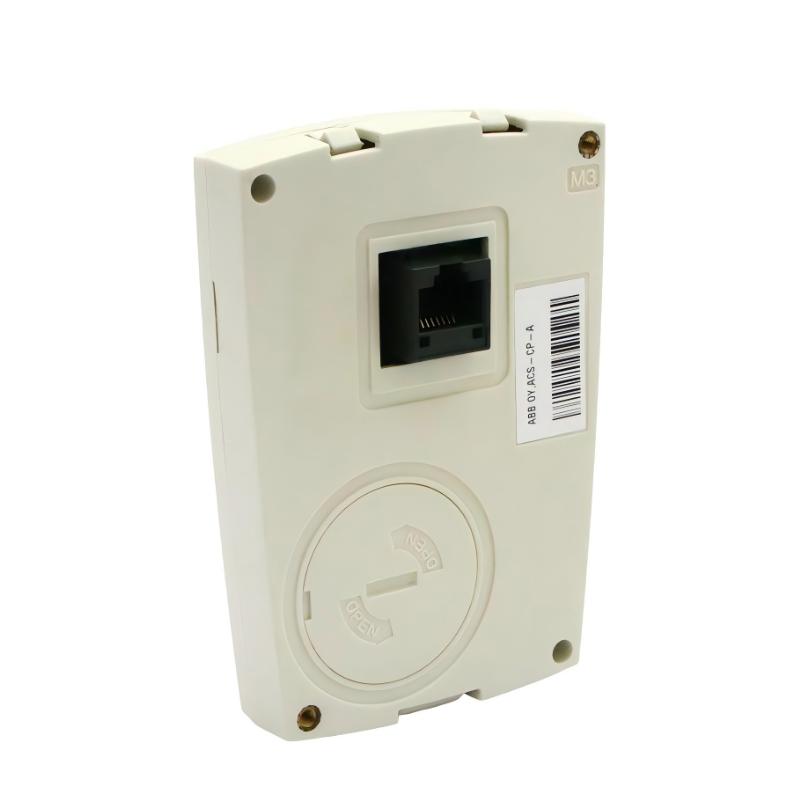
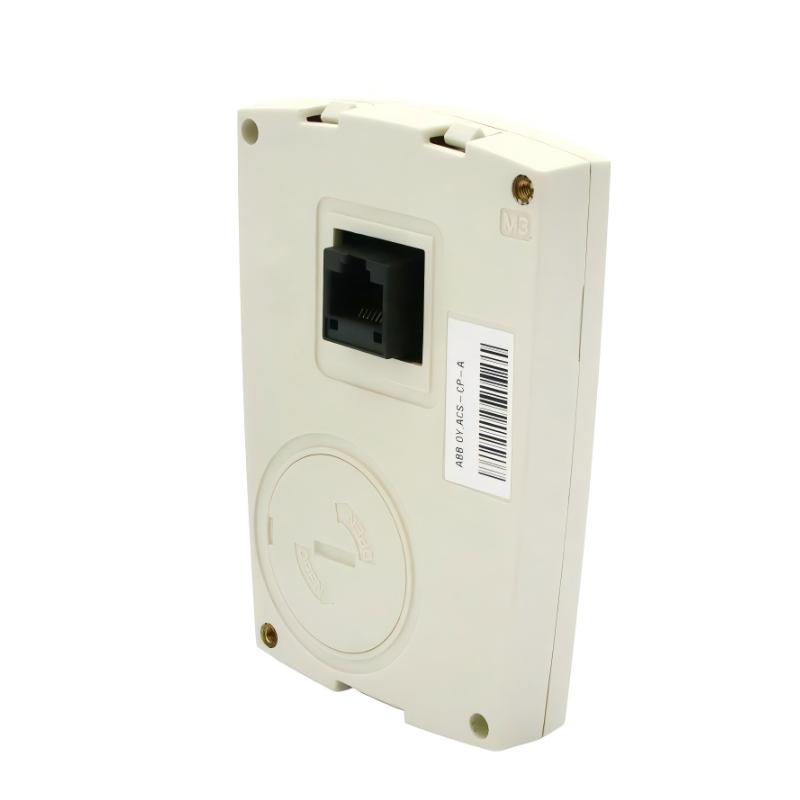
Check the panel connector, mounting arrangement, and corresponding drive interface before installation.
Ensure that the connector is clean and undamaged. Do not force the panel into a connection that does not match the intended interface.
Follow the installation instructions for the specific drive model.
3. Mounting and Accessibility
Install the panel where operators and maintenance personnel can access the display and keypad safely.
If the panel is intended for cabinet-door mounting, use the appropriate mounting accessories and confirm that the installation method is approved for the selected drive and panel.
The supplied dimensions are 250 × 80 × 110 mm, but these should be verified before designing a mounting opening or panel bracket. The actual ACS-CP-A panel body is commonly listed at approximately 102 × 70 × 20 mm.
4. Parameter Configuration
After connection, review the available drive parameters and confirm that the displayed information corresponds to the intended drive.
When changing settings, use the motor nameplate, application requirements, and drive documentation as references. Avoid changing unfamiliar parameters without understanding their effects on motor operation and machine safety.
5. Parameter Transfer
When copying parameters between drives, verify that the source and destination drives are suitable for the same configuration.
Check motor ratings, application requirements, control wiring, and any drive-specific options before applying copied settings.
6. Functional Testing
After installation, verify that the panel communicates correctly with the drive.
Check display operation, menu navigation, parameter access, and available monitoring functions. If the panel is used during commissioning, confirm that the connected drive operates correctly under the intended control conditions.
Compatible System Components
The ACS-CP-A is an accessory for compatible ABB drive systems. It can be used alongside other components in an industrial motor-control installation.
| Component | Function | Integration Considerations |
|---|---|---|
| ABB ACS310 Drive | Variable-speed motor control | Confirm panel compatibility and drive version |
| ABB ACS350 Drive | Machinery motor control | Verify the supported control-panel interface |
| ABB ACS355 Drive | Compact machinery drive | Confirm the correct panel connection |
| ABB ACS550 Drive | General-purpose motor control | Check drive configuration and interface |
| PLC | Machine sequence and process control | Coordinates drive commands and production logic |
| HMI | Centralized operator interface | May provide machine-level monitoring separately |
| AC Motor | Converts electrical energy into mechanical motion | Drive parameters must match motor nameplate data |
| Control Cabinet | Houses drive and control equipment | Provide suitable mounting and environmental protection |
| Drive Communication Interface | Supports communication with other automation equipment | Depends on the installed drive and communication options |
The listed components are examples of equipment used in compatible ABB drive installations. They are not necessarily included with the ACS-CP-A.
Alternative Models and Replacement Considerations
When replacing an existing control panel, it is important to verify the exact ABB part number and the drive family.
| Alternative Model | Product Description | Replacement Considerations |
|---|---|---|
| ABB ACS-CP-C | Basic Control Panel | Different interface and functionality; verify drive compatibility |
| ABB ACS-CP-D | Basic Control Panel | Check regional version and supported drive models |
| ABB ACS-AP-I | Assistant Control Panel | Intended for different ABB drive families; not an automatic replacement |
| ABB ACS-AP-W | Assistant Control Panel with wireless functionality | Verify supported drive series and connection requirements |
| ABB ACH-CP-B | HVAC Assistant Control Panel | Designed for HVAC-related drive applications; verify exact compatibility |
The ACS-CP-A should not be replaced solely on the basis of appearance or connector similarity.
Before selecting an alternative, compare:
- Complete ABB part number.
- Compatible drive model and firmware.
- Connector and mounting arrangement.
- Display and keypad functionality.
- Available commissioning assistants.
- Parameter backup and transfer functions.
- Regional or application-specific requirements.
A different ABB control panel may require a different drive interface or may not support the same functions.
Key Advantages
Convenient Drive Access
The ACS-CP-A provides a local interface for accessing supported drive settings and operating information.
Commissioning Assistance
Built-in assistant functions can help technicians work through supported drive setup procedures.
Diagnostic Support
The panel provides access to available drive diagnostic information, helping maintenance teams investigate reported faults.
Parameter Copying
Parameter transfer can simplify configuration work when several compatible drives use similar settings.
Real-Time Clock
The integrated clock supports time-related functions and fault-recording capabilities where supported by the connected drive.
Compact Operator Interface
The panel combines a display and keypad in a lightweight accessory designed for compatible ABB drive installations.
Support for Industrial Maintenance
The interface provides technicians with a practical way to review settings and operating information during routine service and troubleshooting.
Technical FAQs
1. What is the ABB ACS-CP-A 3ABD64691473?
The ACS-CP-A is an Assistant Control Panel designed for compatible ABB low-voltage AC drives. It provides a display and keypad interface for drive configuration, operation, monitoring, and maintenance.
2. Which ABB drives are compatible with the ACS-CP-A?
Documented compatible drive families include ACS310, ACS350, ACS355, and ACS550. Always check the exact drive model and interface requirements before installation.
3. Is the ACS-CP-A a PLC module?
No. It is a drive operator interface accessory. It does not independently execute PLC logic or provide motor power conversion.
4. Can the ACS-CP-A adjust drive parameters?
Yes. On compatible ABB drives, it provides access to supported parameters through its display and keypad.
5. Does the panel support parameter copying?
Yes. It supports parameter copying between compatible drives. The transferred settings should be reviewed to ensure that they match the destination drive and motor.
6. Can the ACS-CP-A be used for drive troubleshooting?
Yes. It provides access to supported diagnostic functions and fault information from the connected drive. Additional inspection and testing may still be required to identify the root cause of a fault.
7. Does the ACS-CP-A have a real-time clock?
Yes. The assistant control panel includes a real-time clock function. Available time-related and fault-recording features depend on the connected drive.
8. Does the panel control the motor directly?
No. The panel provides an interface to the connected drive. The drive performs the electrical power conversion and motor-control functions.
9. What should be checked before purchasing this control panel?
Verify the complete part number, product condition, connector, mounting arrangement, and compatibility with the target ABB drive. Confirm whether any mounting accessories are required.
10. Can the ACS-CP-A replace the ACS-CP-C?
Not automatically. The two panels have different product designations and functionality. Confirm the drive compatibility and required features before selecting a replacement.
Procurement and Maintenance Recommendations
When purchasing the ABB ACS-CP-A 3ABD64691473, verify the complete part number and ensure that it matches the control-panel interface required by the installed ABB drive.
For replacement projects, confirm the compatible drive family, connector condition, display operation, keypad response, and mounting requirements. If the panel is used for parameter backup or transfer, verify that the relevant functions operate correctly with the intended drive.
For used or refurbished units, request clear photographs of the front display, keypad, rear connector, and product label. Check for damaged buttons, cracked housing, display defects, or connector wear.
During maintenance, keep the panel clean and protect its connector from dust, moisture, and mechanical damage. Avoid applying excessive force when connecting or removing the accessory.
For industrial installations, maintain a record of important drive parameters and commissioning settings. This information can help technicians restore the correct configuration after drive replacement or maintenance.
Conclusion
The ABB ACS-CP-A 3ABD64691473 Assistant Control Panel is a drive operator interface designed for compatible ABB low-voltage AC drives, including the ACS310, ACS350, ACS355, and ACS550 families.
Its display and keypad provide access to supported drive parameters, commissioning assistants, diagnostic information, maintenance functions, and parameter-copying capabilities. These features make it a useful accessory for industrial motor-control systems where convenient local drive access is required.
For procurement and replacement applications, verifying the exact part number and drive compatibility is essential. Correct identification helps ensure that the control panel can be integrated into the intended ABB drive installation.