

ProductPRODUCT
Featured products
Contact Us
- Siemens
- 6AG1124-2DC01-4AX0
- SIPLUS HMI KP1200 Comfort
- Germany
- 140 × 116 × 49 mm
- 0.68kg
- Xiamen, China
- New & In Stock
- T/T, PayPal, Western Union
- 1 Year
- 1-3 Working Days
- DHL, UPS, TNT, FedEx and EMS.
- 24-Hour Service
- COO
- 9
Our advantage

Global Logistics
We have a 10-year logistics and express cooperation agreement, so our products can be shipped to any place in the world.

Brand new and original
Our products are imported in bulk from the place of origin. Because of the cooperative relationship, our products are all original and 100% new.

24-hour service
We provide 7*24 hours service to our customers. We will be there whenever you need us.

Price advantage
All our products are priced very favorably because we have our own warehouse and supply.
| Company Information | |||
| [email protected] | |||
| Mobile | +8615980777398 | ||
| +8615980777398 | |||
| 15980777398 |
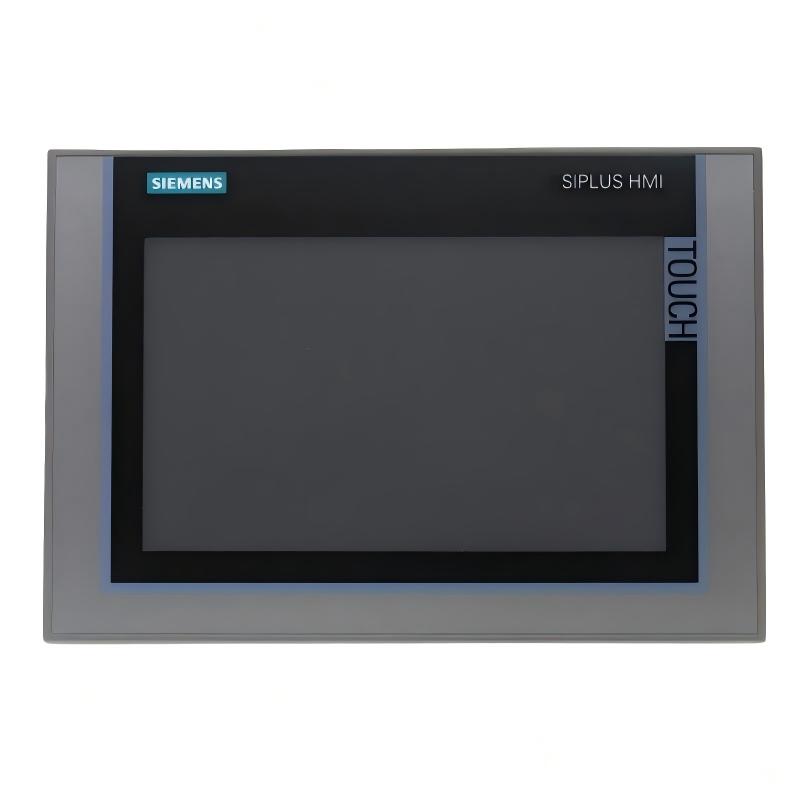
Siemens 6AG1124-2DC01-4AX0 — Product Overview, Technical Specifications, Applications, Advantages, and Related Models
1. Product Overview
The Siemens 6AG1124-2DC01-4AX0 is a model number that should be checked carefully against the exact hardware designation before it is used for equipment replacement, system design, or procurement. The 6AG product-number prefix is associated with the SIPLUS industrial product range, which includes equipment designed for demanding industrial environments.
For this specific part number, the exact product name, hardware configuration, interface arrangement, dimensions, and weight cannot be established confidently from the model number alone. To avoid presenting incorrect technical data as fact, the specifications below distinguish information that needs confirmation from the general characteristics of related SIMATIC HMI equipment.
This distinction matters in industrial automation. Two devices may look similar or belong to a related product family but have different display sizes, communication interfaces, mounting dimensions, firmware requirements, and environmental ratings.
2. Brand and Product Series
| Item | Description |
|---|---|
| Brand | Siemens |
| Product identification | 6AG1124-2DC01-4AX0 |
| Product range | SIPLUS industrial automation products |
| Possible related equipment family | SIMATIC HMI operator panels |
| Exact product designation | Requires confirmation against the full ordering number |
| Device type | Must be confirmed before assigning a specific HMI panel type |
| Primary industrial role | Depends on the confirmed device configuration |
| Installation type | To be determined from the product drawing |
| Configuration software | Depends on the confirmed hardware and firmware version |
| Dimensions | Must be confirmed for this exact order number |
| Net weight | Must be confirmed for this exact order number |
SIPLUS products are intended for industrial applications in which environmental conditions may require additional protection beyond that of a standard automation product. The exact protection level varies by product and must not be assumed to be identical across the entire range.
If this model is being considered as a replacement for an installed operator panel, the complete order number should be matched before comparing it with another unit. Similar-looking model numbers do not guarantee electrical, mechanical, or software compatibility.
3. Detailed Product Parameters
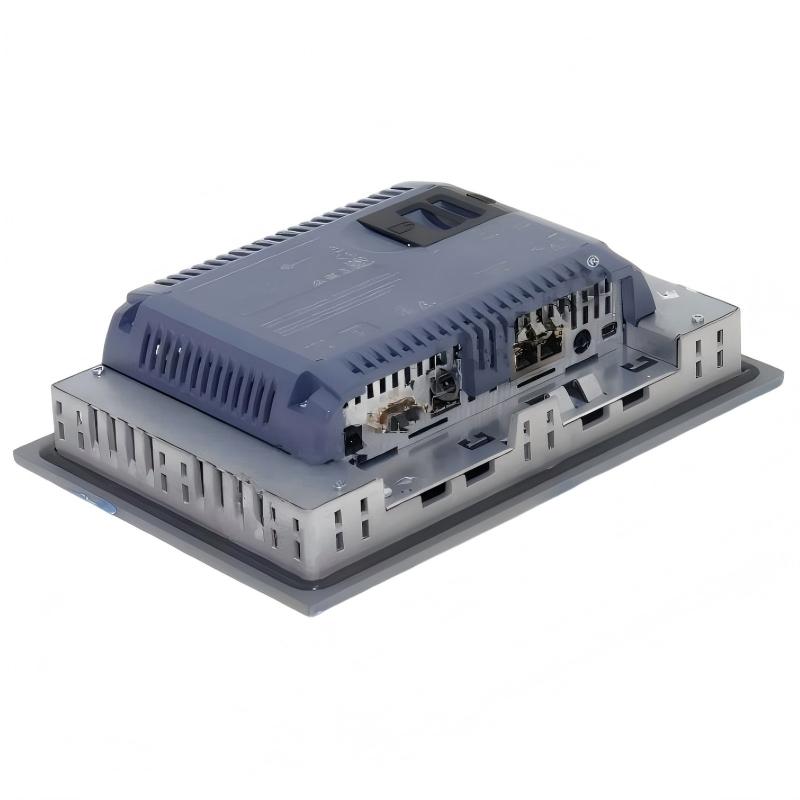
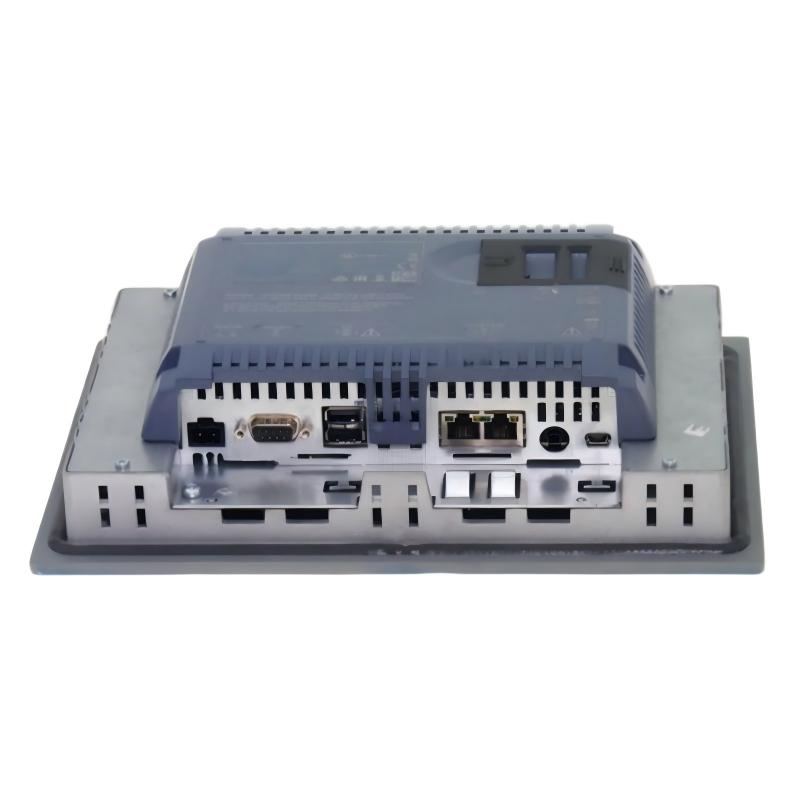
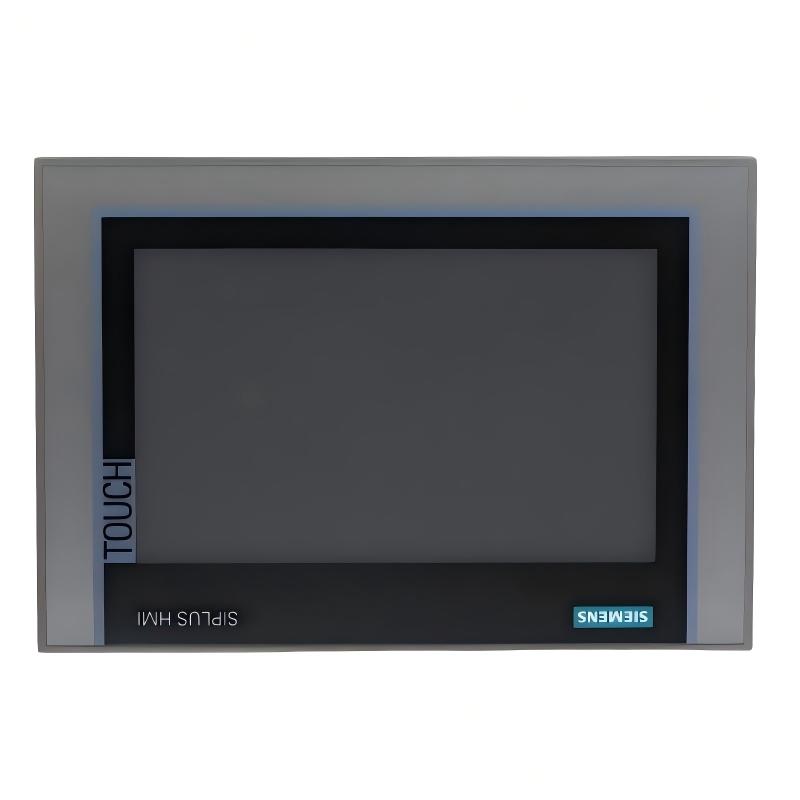
The exact product designation is SIPLUS HMI KTP400 Comfort, based on the standard SIMATIC HMI KTP400 Comfort hardware. It is a compact operator panel with a touchscreen, physical function keys, and a conformal coating intended for specified industrial environmental conditions.
The dimensions below are the device’s front width, front height, and installation depth. Packaging dimensions are different and should not be used to prepare the panel cutout.
| Parameter | Specification |
|---|---|
| Product model | 6AG1124-2DC01-4AX0 |
| Product type | SIPLUS HMI KTP400 Comfort |
| Brand | Siemens |
| Product family | SIPLUS Comfort Panels |
| Base hardware model | 6AV2124-2DC01-0AX0 |
| Device category | HMI operator panel |
| Display type | TFT color display |
| Screen diagonal | 4.3 inches |
| Display resolution | 480 × 272 pixels |
| Number of display colors | 16,777,216 |
| Touch operation | Yes |
| Physical function keys | 4 |
| Function keys with LEDs | 4 |
| System keys | No dedicated system keys |
| Numeric input | Supported through the on-screen keyboard |
| Alphanumeric input | Supported through the on-screen keyboard |
| Rated supply voltage | 24 V DC |
| Permissible supply voltage | 19.2–28.8 V DC |
| Industrial Ethernet | 1 interface |
| PROFINET | Supported through the Ethernet interface |
| RS-422 / RS-485 | Supported |
| USB | 1 interface |
| Front protection | IP65 |
| Rear protection | Confirm against the applicable technical documentation |
| Environmental protection feature | Conformal coating |
| Specified operating temperature | 0 to +50°C under the stated installation conditions |
| Front width | 140 mm |
| Front height | 116 mm |
| Installation depth | 49 mm |
| Mounting cutout | Confirm using the installation drawing before panel machining |
| Net weight | 0.684 kg |
| Configuration software | WinCC in TIA Portal, with compatible device support |
| Typical installation | Panel-mounted industrial equipment |
| Primary function | Machine operation, status monitoring, alarms, and process visualization |
Electrical and communication characteristics
The panel uses a nominal 24 V DC supply, with an allowable voltage range of 19.2–28.8 V DC. This is suitable for many industrial control cabinets that use a regulated 24 V DC power supply. The supply should be checked for adequate capacity and appropriate overcurrent protection before commissioning.
Its Ethernet interface supports network communication with compatible automation equipment. PROFINET and other supported communication functions depend on the connected controller, configured protocols, and the project software. The presence of an Ethernet interface does not mean that every industrial protocol is available simultaneously.
The serial communication capabilities are useful when integrating compatible controllers or other equipment that uses RS-422 or RS-485. Cable wiring, connector pin assignments, baud rate, parity, and protocol settings must match the connected device.
Display and operator controls
The 4.3-inch TFT display provides a resolution of 480 × 272 pixels and supports 16.7 million colors. Its compact format makes it suitable for applications where the operator needs clear access to essential process values, operating states, alarms, and machine commands without requiring a large panel.
The four physical function keys provide direct access to frequently used actions. Since the keys include LED indicators, a project can use them to communicate selected machine states when the hardware and configuration support the required behavior.
Touch operation and physical keys can be combined in the same interface design. For example, the touchscreen can display machine status and navigation controls while physical keys are assigned to frequently used functions.
Mechanical dimensions and installation
| Mechanical item | Value |
|---|---|
| Front width | 140 mm |
| Front height | 116 mm |
| Installation depth | 49 mm |
| Net weight | 0.684 kg |
| Display diagonal | 4.3 inches |
| Mounting method | Panel mounting |
| Panel cutout | Use the official installation drawing |
| Mounting orientation | Follow the permitted orientations in the installation instructions |
The relatively small front dimensions make the KTP400 Comfort appropriate for compact machine panels, local control stations, and equipment with limited mounting space. The 49 mm installation depth should be considered alongside connector clearance, cable bend radius, ventilation, and access for maintenance.
The listed 0.684 kg value is the nominal net weight. Packaging, mounting accessories, wiring, and other supplied components can increase the total shipping or installed weight.
4. Product Introduction
The Siemens SIPLUS HMI KTP400 Comfort is a compact human-machine interface designed to provide a practical connection between an operator and an automated machine. It allows operators to view operating information, enter values, navigate screen pages, acknowledge alarms, and issue configured commands through a combination of touch controls and physical keys.
In a typical automation system, a programmable logic controller handles machine logic and exchanges process data with field devices. The HMI provides the operator-facing layer, presenting selected controller data in a form that can be understood and acted upon. This arrangement helps operators monitor equipment without needing direct access to the controller program.
The KTP400 Comfort is especially relevant where a full-size industrial display would be unnecessary or difficult to install. Its compact screen can accommodate focused interfaces, such as a machine overview, operating mode selection, a small alarm list, production counters, or a maintenance page.
The SIPLUS designation identifies the device as part of an industrial product range that includes environmental protection features. For this model, the conformal coating is an important distinction from the corresponding standard hardware. It is intended to improve suitability for specified environmental conditions, but it does not make the panel universally resistant to every chemical, liquid, contaminant, or extreme temperature.
The panel should therefore be selected according to the actual installation environment. Humidity, condensation, airborne contaminants, vibration, temperature, and cleaning procedures all affect equipment suitability. The product’s stated environmental limits remain applicable even when additional protective features are present.
5. Product Applications
5.1 Machine operation and local control
The KTP400 Comfort can be installed on compact production machines to provide operators with a local interface for starting configured sequences, selecting operating modes, monitoring status, and acknowledging alarms.
Typical screen pages may include a machine overview, a manual-operation page, a setup page, and an alarm screen. The exact controls depend on the application program and the interlocks implemented in the controller.
5.2 Packaging and assembly equipment
Packaging machines and assembly stations often require a compact interface for product selection, cycle monitoring, counters, and fault messages. A small panel can present the most important operating information without taking up excessive space on the machine enclosure.
For example, an operator interface may display the current operating mode, production count, machine-ready state, and a message indicating which subsystem requires attention.
5.3 Small process-control stations
The device can serve as a local monitoring interface for small process skids, utility equipment, dosing stations, and similar installations where a limited number of process values need to be displayed.
Temperature, pressure, level, flow, and equipment status can be shown when those values are supplied by the control system and included in the HMI project. The panel itself does not directly measure these process variables; it displays data made available through the configured automation system.
5.4 Maintenance and troubleshooting
A dedicated maintenance page can display fault messages, selected operating values, sensor states, and maintenance instructions. Physical function keys can be assigned to frequently used navigation or operating functions where appropriate.
This can help technicians identify a fault more quickly and reduce the need to connect a separate computer for routine checks. Access to maintenance functions should be restricted according to the operational risks of the machine.
5.5 Environmental industrial installations
The conformal-coated SIPLUS configuration may be considered for installations where environmental conditions are more demanding than those expected for ordinary indoor control equipment.
Potential applications include industrial equipment exposed to specified levels of humidity or airborne contaminants. The suitability of any particular location must be checked against the product’s environmental ratings and the conditions expected during operation, storage, cleaning, and shutdown.
5.6 Equipment upgrades and replacement projects
The panel may be considered during the refurbishment of an existing machine using a compatible KTP400 Comfort configuration. Before replacing an installed device, engineers should compare the complete order number, mounting cutout, power requirements, communication settings, project compatibility, and available interfaces.
A replacement panel may require a project conversion, a software version change, or updated communication settings. Mechanical similarity alone is not enough to establish that a replacement is suitable.
6. Main Product Advantages
Compact installation footprint
The front dimensions of 140 × 116 mm make the panel practical for small control stations and machines with restricted space. Its compact format can also make it easier to allocate separate space for indicators, switches, emergency-stop equipment, and other required controls.
Combined touchscreen and physical keys
Touch operation provides flexible screen navigation, while physical function keys offer direct access to selected functions. This combination can make an interface easier to operate when a small number of commands are used frequently.
High color count for a compact display
The 16.7-million-color display supports visual distinctions between operating states, warnings, and fault conditions. A carefully designed interface can use color, text, symbols, and consistent screen layouts to help operators recognize important information.
Industrial communication options
Ethernet-based communication supports integration with compatible automation networks. Serial communication options can also be useful in installations involving compatible legacy or third-party equipment.
The available protocols and configuration options must be verified for the particular controller and project rather than assumed from the physical interface alone.
Conformal coating
The conformal-coated SIPLUS configuration is intended for specified environmental conditions that may be challenging for standard equipment. This can be an advantage when selecting a panel for installations with defined exposure to humidity or contaminants.
The coating is not a substitute for suitable enclosure design, proper installation, or compliance with the manufacturer’s environmental limits.
Integrated operator interface
The panel can combine machine status, alarms, parameter entry, operating commands, and maintenance information in a single device. This reduces the need to distribute basic operator functions across several separate devices.
Flexible screen design
The project can organize functions into separate pages for production, setup, alarms, and maintenance. This makes it possible to present only the information relevant to the current task, provided the project is designed and tested appropriately.
Support for structured troubleshooting
A well-designed HMI project can present alarm messages and selected process values in a consistent format. This improves the operator’s ability to identify the affected subsystem and follow established troubleshooting procedures.
Practical for small and medium-sized machines
The KTP400 Comfort is best suited to applications that need a focused interface rather than a large overview display. When the machine has many simultaneous trends, detailed diagrams, or extensive recipe information, a larger panel may be more appropriate.
7. Recommended Related Models in the Same or a Similar Series
The following models are relevant candidates for comparison. Their specifications vary by display size, hardware design, interfaces, and environmental configuration. The dimensions and weights marked as requiring verification should be checked against the exact ordering number before purchase or installation.
| Model | Product designation | Main specifications | Dimensions | Weight |
|---|---|---|---|---|
| 6AG1124-2DC01-4AX0 | SIPLUS HMI KTP400 Comfort | 4.3-inch TFT, 480 × 272 pixels, touch operation, 4 physical function keys, 24 V DC | 140 × 116 × 49 mm | 0.684 kg |
| 6AG1124-0GC01-4AX0 | SIPLUS HMI TP700 Comfort | 7-inch-class touch panel; larger screen for machine visualization; exact interfaces depend on configuration | Verify exact drawing | Verify exact variant |
| 6AG1124-0JC01-4AX0 | SIPLUS HMI TP900 Comfort | 9-inch-class touch panel; suitable for applications requiring more screen area | Verify exact drawing | Verify exact variant |
| 6AG1124-0MC01-4AX0 | SIPLUS HMI TP1200 Comfort | 12-inch-class touch panel; suited to more detailed operator pages | Verify exact drawing | Verify exact variant |
| 6AG1124-0QC02-4AX1 | SIPLUS HMI TP1500 Comfort | 15-inch-class touch panel; intended for applications requiring a larger visualization area | Verify exact drawing | Verify exact variant |
How to choose among these related models
– KTP400 Comfort: A good candidate when the interface is compact and the number of displayed values is limited.
– TP700 Comfort: Worth considering when operators need a larger screen for more clearly separated controls and status information.
– TP900 Comfort: Suitable for interfaces with more operating pages, diagnostic messages, or process values visible at once.
– TP1200 Comfort: Better suited to applications with detailed process diagrams, more extensive alarm information, or broader machine overviews.
– TP1500 Comfort: Appropriate when a large screen is a priority, particularly for equipment that requires substantial visualization space.
The listed models are not automatically interchangeable. Confirm the hardware generation, software compatibility, communication interfaces, mounting dimensions, and environmental specifications before choosing a replacement.
8. Five Additional Popular Models from the Same Brand
The following Siemens models are useful comparison options across the broader SIMATIC HMI and industrial automation range. They cover different operator-panel sizes and control applications. The listed technical values are intended for initial selection; verify the complete ordering number for final engineering and procurement.
| Model | Product designation | Key parameters | Dimensions | Weight |
|---|---|---|---|---|
| 6AV2124-2DC01-0AX0 | SIMATIC HMI KTP400 Comfort | 4.3-inch TFT, 480 × 272 pixels, touchscreen, 4 physical function keys, 24 V DC | 140 × 116 × 49 mm | Approx. 0.5 kg; verify variant |
| 6AV2124-0GC01-0AX0 | SIMATIC HMI TP700 Comfort | 7-inch-class touchscreen; Ethernet-based automation communication; 24 V DC | Verify exact drawing | Verify exact variant |
| 6AV2124-0JC01-0AX0 | SIMATIC HMI TP900 Comfort | 9-inch-class touchscreen; suitable for larger machine interfaces | Verify exact drawing | Verify exact variant |
| 6AV2124-0MC01-0AX0 | SIMATIC HMI TP1200 Comfort | 12-inch-class touchscreen; larger visualization area for complex machine pages | Verify exact drawing | Verify exact variant |
| 6AV2124-0QC02-0AX1 | SIMATIC HMI TP1500 Comfort | 15-inch-class touchscreen; designed for applications requiring a large operator display | Verify exact drawing | Verify exact variant |
The 6AV models shown above are standard SIMATIC HMI variants, while the 6AG model in the main product description belongs to the SIPLUS range. Although a SIPLUS product may be based on a standard SIMATIC model, differences in environmental protection, product configuration, and operating conditions should be taken into account.
9. Product Selection and Replacement Considerations
Hardware compatibility
Check the full order number rather than relying on the product family name. Pay particular attention to the display type, physical keys, communication ports, supply voltage, and mounting dimensions.
Software and project compatibility
Confirm which version of WinCC in TIA Portal supports the target panel and whether the existing HMI project can be transferred directly. Older projects may require conversion or adjustment, and a project that compiles successfully may still need operational testing on the target hardware.
Communication with the controller
Verify that the panel can communicate with the installed PLC using the intended protocol. Check the network address, subnet, connection settings, cable type, and any serial communication parameters that apply.
Environmental conditions
For a SIPLUS device, assess the actual installation conditions against the model’s stated limits. Do not interpret conformal coating as permission to expose the panel to unrestricted moisture, direct liquid ingress, corrosive chemicals, or temperatures outside the specified range.
Mechanical fit
Use the installation drawing to confirm the panel cutout and rear clearance. The front dimensions alone do not establish that a new panel will fit an existing enclosure, especially if the replacement uses a different mounting system or connector arrangement.
Spare-parts planning
If the panel is part of a long-lived machine, it is worth documenting the full model number, firmware or hardware revision where relevant, project version, connector details, and commissioning settings. This makes future maintenance and replacement less dependent on trial and error.
10. Summary of the Main Model
| Item | Summary |
|---|---|
| Model | 6AG1124-2DC01-4AX0 |
| Product | SIPLUS HMI KTP400 Comfort |
| Brand | Siemens |
| Series | SIPLUS Comfort Panels |
| Display | 4.3-inch TFT color display |
| Resolution | 480 × 272 pixels |
| Operation | Touchscreen and 4 physical function keys |
| Power supply | 24 V DC nominal; 19.2–28.8 V DC permitted |
| Communication | Ethernet, PROFINET support, RS-422/RS-485, USB |
| Environmental feature | Conformal coating |
| Front protection | IP65 |
| Operating temperature | 0 to +50°C under specified conditions |
| Dimensions | 140 × 116 × 49 mm |
| Net weight | 0.684 kg |
| Typical uses | Compact machine control, alarms, status monitoring, parameter entry, maintenance pages |
| Main advantage | Compact operator interface with touchscreen, physical keys, and an industrial environmental-protection configuration |
Conclusion
The Siemens 6AG1124-2DC01-4AX0 SIPLUS HMI KTP400 Comfort is a compact operator panel intended for machine-level operation and visualization. Its 4.3-inch display, physical function keys, Ethernet communication, serial interfaces, and conformal-coated configuration make it a practical candidate for applications requiring a small industrial HMI.
Its strongest use case is a machine or control station that needs a focused interface for status monitoring, operator commands, alarms, and parameter entry. For applications requiring extensive diagrams or a large number of simultaneous process values, a larger TP700, TP900, TP1200, or TP1500 panel may be a better fit.
For purchasing or replacement, the most important checks are the complete order number, the mounting drawing, the communication requirements, the software version, and the environmental ratings. These checks help ensure that the selected panel fits the enclosure and works with the existing automation system.