

ProductPRODUCT
Featured products
Contact Us
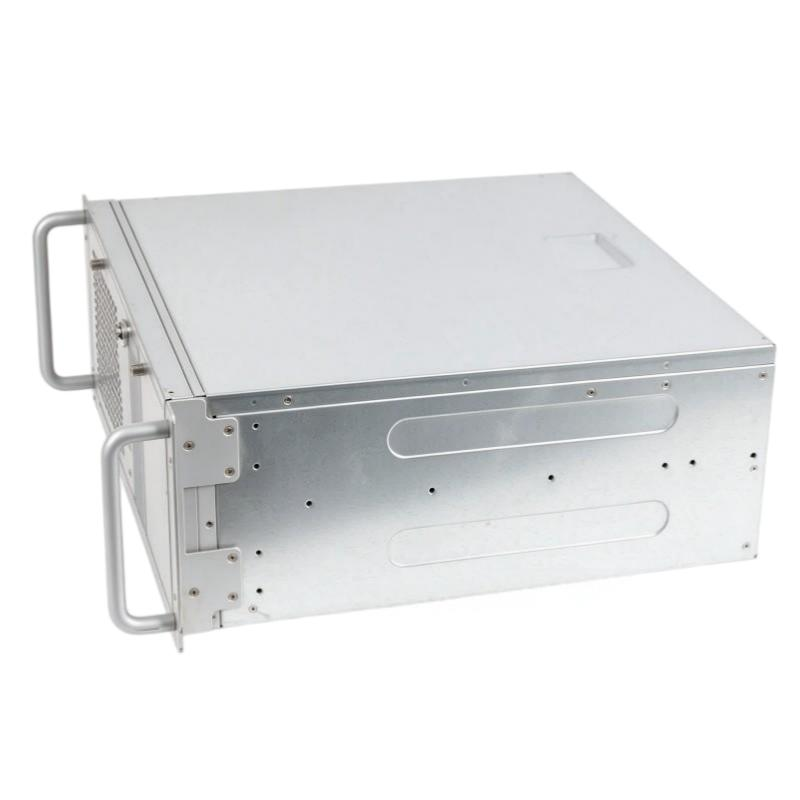
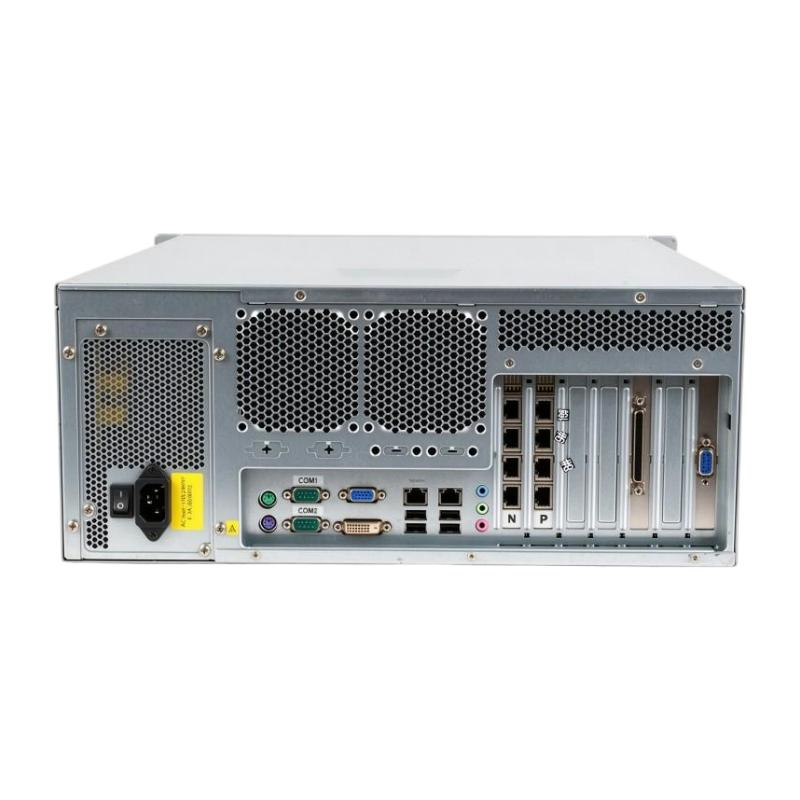
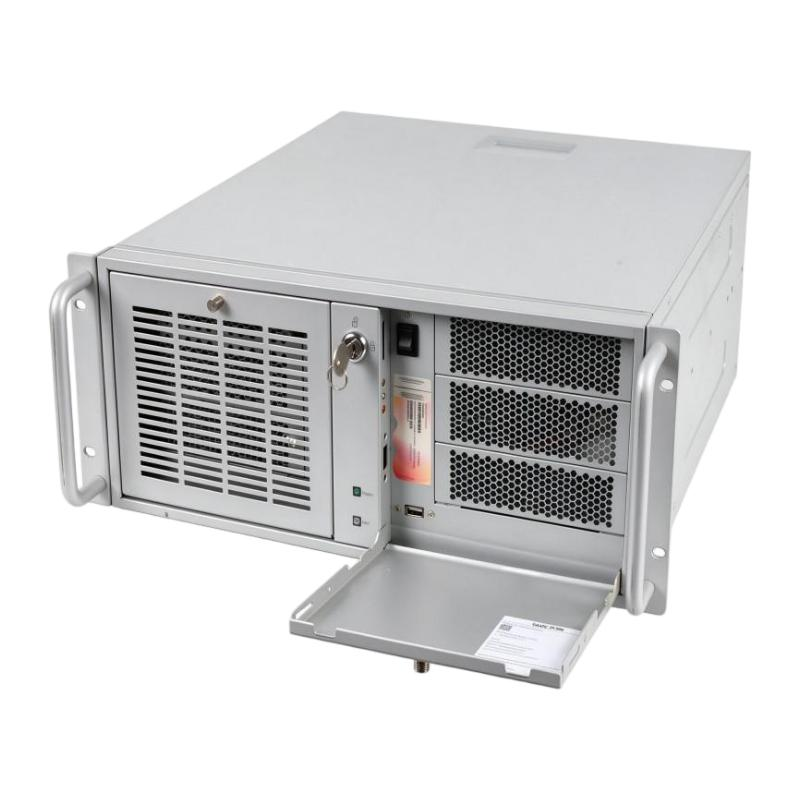
- Siemens
- 6AG4010-4BB30-0XX5
- SIMATIC IPC3000 SMART
- Germany
- 59.00 x 55.4 x 29.3 cm
- 13kg
- Xiamen, China
- New & In Stock
- T/T, PayPal, Western Union
- 1 Year
- 1-3 Working Days
- DHL, UPS, TNT, FedEx and EMS.
- 24-Hour Service
- COO
- 8
Our advantage

Global Logistics
We have a 10-year logistics and express cooperation agreement, so our products can be shipped to any place in the world.

Brand new and original
Our products are imported in bulk from the place of origin. Because of the cooperative relationship, our products are all original and 100% new.

24-hour service
We provide 7*24 hours service to our customers. We will be there whenever you need us.

Price advantage
All our products are priced very favorably because we have our own warehouse and supply.
| Company Information | |||
| [email protected] | |||
| Mobile | +8615980777398 | ||
| +8615980777398 | |||
| 15980777398 |
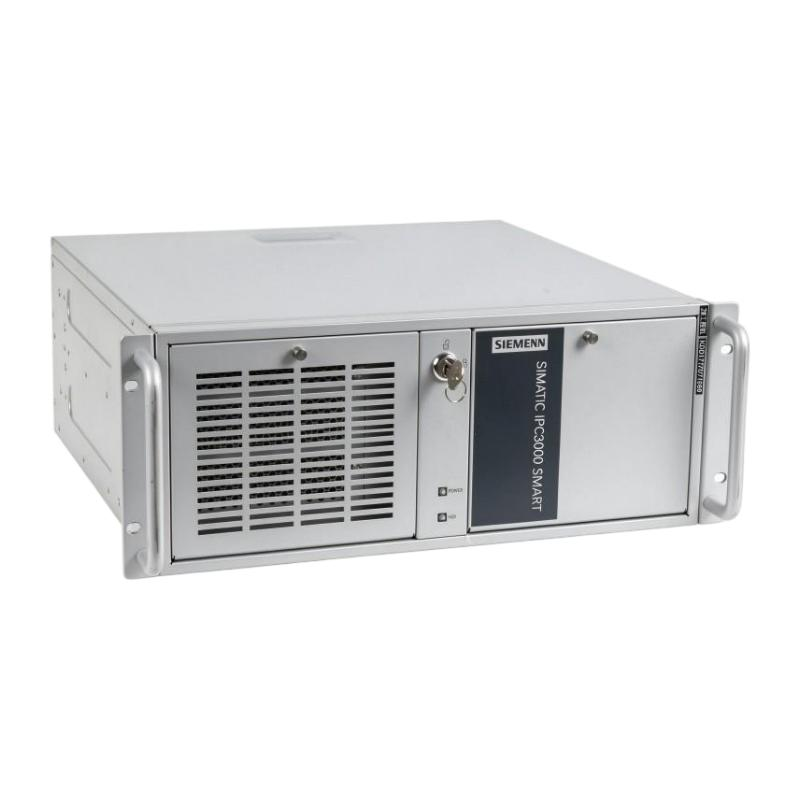
Siemens 6AG4010-4BB30-0XX5 Industrial Product Profile and Related Model Recommendations
1. Product Overview
The Siemens 6AG4010-4BB30-0XX5 is a product identified by a Siemens industrial equipment ordering number. To describe it accurately, the complete model number must be distinguished from similar numbers used for industrial computers, automation equipment, and other industrial electronic products.
For industrial purchasing, engineering, maintenance, and equipment replacement, the most important considerations are the product’s hardware configuration, operating temperature range, power requirements, physical dimensions, weight, installation method, and compatibility with the existing system.
Important technical note: The exact hardware configuration and official specification of 6AG4010-4BB30-0XX5 cannot be confirmed from the model number alone without a verified product record. The following profile therefore distinguishes general product characteristics and potential applications from specifications that require confirmation. Exact dimensions, weight, processor configuration, memory capacity, and interface details should not be treated as confirmed values.
2. Basic Product Information
The following table summarizes the identification information for the requested product. The exact ordering number should be checked carefully because similar numbers in the same industrial computer family can represent different hardware configurations.
| Parameter | Product Information |
|---|---|
| Product Model | 6AG4010-4BB30-0XX5 |
| Brand | Siemens |
| Product Category | Industrial Computing Equipment — identification requires confirmation |
| Product Family | SIMATIC Industrial PC family — exact model assignment requires confirmation |
| Product Type | Industrial computer, subject to verification of the complete ordering number |
| Product Structure | Hardware configuration to be confirmed |
| Application Environment | Industrial automation, monitoring, data processing, and equipment control, depending on the confirmed configuration |
| Installation Method | To be confirmed from the product label and mechanical drawings |
| Processor | Not verified for the exact model |
| Memory Capacity | Not verified for the exact model |
| Storage Capacity | Not verified for the exact model |
| Network Interfaces | Not verified for the exact model |
| Serial Interfaces | Not verified for the exact model |
| USB Interfaces | Not verified for the exact model |
| Video Interfaces | Not verified for the exact model |
| Power Supply | Not verified for the exact model |
| Operating System | Not verified for the exact model |
| Dimensions (W × H × D) | Not verified for the exact model |
| Net Weight (kg) | Not verified for the exact model |
| Product Status | Requires confirmation against the complete ordering number |
| Intended Market | To be confirmed |
| Recommended Purchasing Check | Verify the full model number, hardware configuration, and regional version before ordering |
The distinction between a product family and a specific model is important. Products belonging to the same industrial computer family may share a similar enclosure and installation method while differing substantially in processing power, memory, storage, interfaces, and operating system support.
For this reason, the information above should be treated as an identification profile rather than a complete, verified technical datasheet.
3. Detailed Product Introduction
3.1 Product Positioning
Siemens SIMATIC industrial computers are designed for industrial computing tasks where reliability, compatibility, and continuous operation are important. Depending on the specific model, they can be used for production monitoring, industrial data collection, machine control interfaces, process visualization, and communication between automation equipment and higher-level information systems.
Compared with an ordinary office computer, an industrial computer is generally selected according to its installation requirements, operating environment, interface configuration, service life, and compatibility with industrial software.
An industrial computer may serve as a local processing platform, a monitoring terminal, a data collection device, or a computing node within a larger automation architecture.
However, these capabilities depend on the installed hardware and software. The exact functions of model 6AG4010-4BB30-0XX5 must be established before it is specified for a particular project.
3.2 Hardware Configuration
The hardware configuration is one of the most important factors when selecting an industrial computer.
The processor determines the computer’s ability to handle calculations, execute applications, process production data, and support multiple software tasks. Memory affects application responsiveness and the amount of information that can be processed simultaneously. Storage capacity determines how much operating system data, application software, production history, and diagnostic information can be retained.
The network and serial interfaces determine how the computer can communicate with other industrial equipment.
For example, an industrial computer with Ethernet and serial interfaces may be suitable for applications that need to communicate with programmable logic controllers, monitoring systems, measurement instruments, or legacy equipment.
Nevertheless, interface availability must be confirmed from the actual configuration. It should not be assumed that every model in a product family provides identical ports or expansion options.
3.3 Industrial Installation
Industrial computing equipment may be installed in electrical cabinets, equipment racks, control rooms, or dedicated machine enclosures.
The installation method depends on the enclosure design, mounting arrangement, cooling requirements, and available cabinet space.
Before installation, engineers should confirm the product’s width, height, depth, mounting clearances, ventilation requirements, cable access, and maintenance space.
If the intended model is a rack-mounted industrial computer, its rack height and chassis depth are particularly important. A nominally similar replacement may still be unsuitable if its mounting dimensions or connector positions differ from those of the original equipment.
3.4 Operating Environment
Industrial equipment is often selected for use in environments where operating hours are long and equipment availability is important.
Relevant environmental considerations include ambient temperature, humidity, vibration, dust exposure, ventilation, and the stability of the electrical supply.
The actual permissible operating conditions must be taken from the specification of the exact model. Industrial classification alone does not establish a particular temperature range, vibration rating, or ingress-protection rating.
For installations in hot electrical cabinets, sufficient airflow and heat dissipation should be provided. For dusty environments, the enclosure and its ventilation arrangements should be assessed to ensure that the computer can operate within its specified conditions.
3.5 Software Compatibility
Software compatibility is another key consideration.
Industrial computers may run monitoring applications, production-management software, data acquisition programs, engineering tools, or other specialized applications.
Before purchasing a replacement, engineers should check the required operating system, processor architecture, driver availability, communication libraries, application licensing, and compatibility with the existing automation software.
An industrial computer with higher processing performance is not automatically a suitable replacement. If the existing software depends on a particular operating system or hardware interface, compatibility may be more important than raw computing power.
4. Technical Parameters
The following table organizes the main parameters that should be confirmed before the product is used in a technical design, equipment replacement, or purchasing specification.
| Technical Parameter | Specification for 6AG4010-4BB30-0XX5 | Engineering Significance |
|---|---|---|
| Model Number | 6AG4010-4BB30-0XX5 | Identifies the requested configuration |
| Brand | Siemens | Identifies the product brand |
| Product Family | Exact assignment unconfirmed | Determines the relevant product documentation |
| Processor Type | Unverified | Determines computing performance |
| Processor Frequency | Unverified | Relevant to application response and processing load |
| Number of Processor Cores | Unverified | Relevant to parallel workloads |
| Installed Memory | Unverified | Affects application capacity and responsiveness |
| Memory Type | Unverified | Determines hardware compatibility |
| Maximum Memory | Unverified | Determines potential memory expansion |
| Storage Type | Unverified | Determines storage performance and reliability characteristics |
| Storage Capacity | Unverified | Determines available space for applications and data |
| Graphics Capability | Unverified | Relevant to visualization and display requirements |
| Ethernet Interfaces | Unverified | Determines network connectivity |
| Ethernet Speed | Unverified | Determines supported network transmission rates |
| Serial Interfaces | Unverified | Relevant to communication with industrial devices |
| USB Interfaces | Unverified | Supports compatible peripherals and service devices |
| Display Interfaces | Unverified | Determines monitor compatibility |
| Expansion Slots | Unverified | Determines possible hardware expansion |
| Operating System | Unverified | Determines software compatibility |
| Rated Power Consumption | Unverified | Required for electrical and thermal calculations |
| Power Supply Input | Unverified | Required for electrical installation |
| Cooling Method | Unverified | Determines ventilation and maintenance requirements |
| Mounting Method | Unverified | Determines installation compatibility |
| Protection Rating | Unverified | Determines suitability for the installation environment |
| Operating Temperature | Unverified | Determines environmental suitability |
| Storage Temperature | Unverified | Determines transport and storage conditions |
| Dimensions (W × H × D) | Not confirmed (mm) | Required for mechanical installation |
| Net Weight (kg) | Not confirmed | Required for rack loading, handling, and transport planning |
Technical verification requirement: The requested number, 6AG4010-4BB30-0XX5, should not be confused with the similar number 6AG4010-6BB30-0XX5. A difference in the ordering number can indicate a different product generation or configuration. The latter number is associated with the SIMATIC IPC3000 SMART V3 product family, but that information does not establish the specifications of the former.
5. Product Dimensions and Weight
Dimensions and net weight are essential when an industrial computer must fit into an existing cabinet or replace a failed unit.
Incorrect dimensions can lead to installation difficulties, while an incorrect weight can affect rack loading, transport planning, and mechanical support requirements.
For the requested model, the exact dimensions and net weight have not been established. The table below provides the information that should be recorded during product identification.
| Parameter | Value | Unit | Notes |
|---|---|---|---|
| Overall Width | Not confirmed | mm | Verify against the mechanical drawing |
| Overall Height | Not confirmed | mm | Include the complete installed chassis |
| Overall Depth | Not confirmed | mm | Check connector and cable clearance |
| Mounting Width | Not confirmed | mm | Required for rack or cabinet installation |
| Mounting Height | Not confirmed | mm | Confirm the mounting standard |
| Required Installation Depth | Not confirmed | mm | Allow sufficient rear clearance |
| Net Weight | Not confirmed | kg | Confirm the weight of the complete unit |
| Shipping Weight | Not confirmed | kg | May include packaging and accessories |
| Installation Orientation | Not confirmed | — | Follow the specified mounting requirements |
| Cooling Clearance | Not confirmed | mm | Follow the equipment ventilation requirements |
For engineering purposes, the net weight and shipping weight should be treated as different measurements. The net weight refers to the equipment itself, whereas the shipping weight can include protective packaging, accessories, and other supplied components.
If the product label confirms that the intended equipment is a 19-inch, 4U rack computer, that information can be used as a starting point for installation planning. It should not, however, be used to infer the exact depth or weight of an unverified model.
6. Product Applications
Industrial computers can be used in a wide range of industrial and commercial environments. The following applications describe potential uses for a compatible SIMATIC industrial computer; they do not establish that every application is supported by the exact requested model.
6.1 Industrial Automation Systems
Industrial automation systems frequently require computers to exchange information with controllers, sensors, instruments, and production equipment.
A suitably configured industrial computer can collect data from connected devices, execute supervisory software, display equipment status, and provide an interface for operators and maintenance personnel.
In a production line, the computer may help consolidate information from several machines, allowing operators to monitor production progress and identify equipment abnormalities.
Its actual role depends on the control architecture. A general-purpose industrial computer should not automatically be treated as a substitute for a dedicated PLC or safety controller.
6.2 Manufacturing and Production Monitoring
Manufacturing facilities often need to collect production information continuously.
A compatible industrial computer can host software for displaying machine operating status, recording production quantities, monitoring process variables, and storing diagnostic information.
These functions can improve the visibility of production activities and make it easier to investigate downtime.
For example, a production-monitoring application may collect equipment status, record operating events, and provide historical information for production analysis.
The availability of these functions depends on the software installed and the interfaces supported by the computer.
6.3 Human-Machine Interface Applications
An industrial computer can be used as a computing platform for a human-machine interface when the required display hardware and software are supported.
An HMI application allows operators to view operating conditions, review alarms, inspect process variables, and interact with permitted machine functions.
The computer’s processor, memory, display interfaces, and operating system should be selected according to the HMI software’s requirements.
Where the application includes critical machine operations, access control, interlocks, and the underlying safety functions must be designed independently and appropriately.
6.4 Industrial Data Acquisition
Industrial facilities often collect information from sensors, meters, instruments, and control systems.
A compatible computer can receive, organize, and process this information before transferring it to a database, monitoring application, or higher-level management system.
Potential uses include equipment-status recording, energy monitoring, production statistics, temperature logging, and maintenance data collection.
Storage capacity, communication interfaces, and software compatibility should be evaluated according to the expected data volume and retention period.
6.5 Equipment Integration
Older industrial installations may contain a mixture of modern Ethernet-based equipment and legacy devices that use serial communication.
An industrial computer with the necessary interfaces can serve as an integration platform between compatible devices and supervisory applications.
This can be particularly useful when a facility needs to retain existing machinery while adding centralized monitoring or data collection.
The communication protocol, electrical interface, software driver, and supported data format must all be checked before implementation.
6.6 Energy and Utility Monitoring
Industrial facilities may monitor electricity consumption, equipment utilization, process conditions, and operating hours.
A suitably configured computer can collect readings from supported meters and controllers, display trends, and retain historical records.
Such information can help maintenance teams identify unusual consumption patterns and support energy-management activities.
The computer itself does not guarantee energy savings. Results depend on the accuracy of the collected data, the quality of the analysis, and the actions taken by the operating team.
6.7 Centralized Equipment Monitoring
Where multiple machines are installed in one facility, a compatible industrial computer may be used to consolidate monitoring information.
Depending on the application, it can provide a central display for machine status, alarms, operating history, and maintenance information.
Centralized monitoring can reduce the need to inspect every machine individually, but network architecture, cybersecurity, software licensing, and system availability must be considered during implementation.
7. Product Advantages
The following advantages describe the potential benefits of using a correctly specified industrial computer. Actual performance and environmental capabilities depend on the confirmed hardware configuration.
7.1 Industrial Application Flexibility
Industrial computers can support different software applications according to the installed operating system, processor, memory, storage, and interfaces.
This flexibility makes them useful for applications that require more general-purpose computing capability than a dedicated control device provides.
The same hardware platform may support monitoring, data processing, reporting, or communication tasks, provided that the relevant software and hardware requirements are satisfied.
7.2 Integration with Automation Equipment
When the required interfaces and protocols are available, an industrial computer can connect to controllers, instruments, networks, and supervisory systems.
This can simplify data collection and make production information easier to access.
The main advantage is the ability to combine information from different sources within a compatible software environment rather than relying on separate, isolated monitoring devices.
7.3 Support for Long Operating Hours
Industrial applications may require equipment to operate for extended periods.
An industrial computer can be selected for such workloads when its thermal design, power supply, storage, and environmental ratings meet the intended operating conditions.
Continuous operation still requires proper installation, sufficient cooling, suitable power quality, and an appropriate maintenance plan.
No specific continuous-operation guarantee should be assumed without confirmation of the model’s documentation.
7.4 Flexible System Configuration
Depending on the product variant, industrial computers may offer different processor, memory, storage, and interface configurations.
This allows equipment to be selected according to application complexity and budget.
A relatively simple monitoring task may not require the same hardware as a system processing large quantities of production data or running several applications simultaneously.
Choosing the correct configuration can help avoid unnecessary hardware expenditure while retaining adequate performance.
7.5 Maintenance and Replacement Planning
Industrial installations benefit from accurate equipment identification and documented hardware configurations.
When the model number, operating system, storage, interfaces, and installation dimensions are recorded, maintenance personnel can more easily evaluate replacement options.
This is particularly important when a computer fails and the production system must be restored without extensive modification.
Using an identical configuration, where available and appropriate, may reduce engineering changes. A substitute model should still undergo compatibility testing before deployment.
7.6 Support for Industrial Data Processing
A suitably configured industrial computer can process information from machines and applications locally.
Local processing can reduce the need to transmit every raw measurement to another system, depending on the application architecture.
It can also support local data storage and display functions when network connectivity to a central server is limited.
The suitability of this approach depends on processor performance, available memory, storage reliability, and the software’s ability to operate locally.
7.7 Potential for System Expansion
Some industrial computer configurations provide expansion slots or additional interfaces.
Where supported, these can allow the system to accommodate specific communication cards or other compatible hardware.
Expansion capability should be checked carefully because it varies between models. Available physical space, power capacity, driver support, and operating-system compatibility all affect whether an expansion is practical.
8. Product Brand and Series
8.1 Brand
Brand: Siemens
The SIMATIC product portfolio includes industrial automation and computing products intended for use in manufacturing, process monitoring, and industrial control environments.
The brand alone does not establish the technical characteristics of an individual product. Hardware configuration, operating conditions, and supported applications must be determined from the exact model.
8.2 Product Family
The model number provided requires confirmation before its precise product family can be stated definitively.
A similar ordering number, 6AG4010-6BB30-0XX5, is associated with the SIMATIC IPC3000 SMART V3 industrial computer family.
The earlier SIMATIC IPC3000 SMART family includes industrial rack-computer configurations with different hardware options. However, the relationship between those models and the requested 6AG4010-4BB30-0XX5 cannot be established solely from the similarity of their ordering numbers.
For purchasing and technical documentation, the correct series should be confirmed from the original nameplate or product identification record.
8.3 Product Selection Considerations
When selecting a model within an industrial computer family, the following factors should be compared:
- Processor generation and performance.
- Installed memory and maximum supported memory.
- Storage type, capacity, and available drive bays.
- Number and type of network interfaces.
- Serial communication support.
- USB and display interfaces.
- Expansion slots and supported expansion cards.
- Operating-system availability and compatibility.
- Electrical supply requirements.
- Cooling and ventilation requirements.
- Mounting dimensions and net weight.
- Intended market and regional configuration.
- Availability of suitable replacement parts.
A model that appears similar in name or enclosure may still differ in several of these areas.
9. Five Related Models for Comparison
The following five ordering numbers are related to the SIMATIC IPC3000 SMART industrial computer family or its later configurations.
They are provided as comparison candidates, not as confirmed direct replacements for 6AG4010-4BB30-0XX5.
The technical information is deliberately separated into verified identification points and items that require further confirmation. Dimensions and weight are not invented where reliable, exact-model data is unavailable.
9.1 Related Model Comparison Table
| Model | Product Family / Configuration | Processor | Memory | Storage | Network and Other Interfaces | Dimensions (W × H × D) | Weight (kg) |
|---|---|---|---|---|---|---|---|
| 6AG4010-4AA11-0XX5 | SIMATIC IPC3000 SMART, entry configuration | Intel Pentium G2010, 2.80 GHz | 2 GB DDR3-1600 | 250 GB HDD | 2 Ethernet ports; USB; serial; VGA; DVI-D | Exact dimensions not confirmed | Not confirmed |
| 6AG4010-4AA20-0XX5 | SIMATIC IPC3000 SMART, alternative configuration | Exact processor configuration requires confirmation | 4 GB DDR3-1600 in the documented configuration | Exact capacity requires confirmation | Interface configuration requires confirmation | Exact dimensions not confirmed | Not confirmed |
| 6AG4010-4AB22-0XX5 | SIMATIC IPC3000 SMART, higher configuration | Exact processor configuration requires confirmation | Exact capacity requires confirmation | 500 GB HDD in the documented configuration | Interface configuration requires confirmation | Exact dimensions not confirmed | Not confirmed |
| 6AG4010-4AB22-0FX5 | SIMATIC IPC3000 SMART, alternative configuration | Exact processor configuration requires confirmation | Exact capacity requires confirmation | Exact capacity requires confirmation | Interface configuration requires confirmation | Exact dimensions not confirmed | Not confirmed |
| 6AG4010-6BB30-0XX5 | SIMATIC IPC3000 SMART V3, rack PC | Intel Core i5-6500, 3.6 GHz, 4 cores | 8 GB DDR4 | 1 TB SATA HDD | 2 Ethernet; serial; USB; VGA; DisplayPort; PS/2; audio | Exact dimensions not confirmed | 13 kg, reported net weight |
The processor and memory information for the first model reflects a documented configuration of the older IPC3000 SMART family. The exact configurations of the other models should be checked against their complete ordering records.
The 6AG4010-6BB30-0XX5 is included as a related comparison model, not as proof that 6AG4010-4BB30-0XX5 has the same specifications.
9.2 Model 6AG4010-4AA11-0XX5
This model is a useful comparison point for applications that require a relatively basic industrial computing platform.
Its documented configuration includes an Intel Pentium G2010 processor, 2 GB DDR3-1600 memory, and a 250 GB hard drive.
The listed hardware also includes Ethernet, serial, USB, and display interfaces, which are relevant to industrial monitoring and equipment integration.
Its older processor and memory configuration may be adequate for certain legacy applications, but suitability depends on the software requirements and expected workload.
Recommended evaluation: Check whether the processor, memory, storage, and operating system are sufficient for the intended application before considering this model as an alternative.
9.3 Model 6AG4010-4AA20-0XX5
This model belongs to the earlier IPC3000 SMART family and is associated with a 4 GB DDR3-1600 memory configuration.
Memory capacity can affect the responsiveness of monitoring software and the ability to run multiple applications.
However, the processor, storage, interfaces, and dimensions should be verified for the exact order number before making a purchasing decision.
Recommended evaluation: Consider this configuration when comparing older industrial computer options, particularly where the existing application has established hardware and software requirements.
9.4 Model 6AG4010-4AB22-0XX5
This model is another comparison candidate within the earlier IPC3000 SMART family.
A 500 GB hard drive is associated with the documented configuration, making storage capacity one of the points worth checking when evaluating it for data collection or industrial monitoring.
Storage capacity alone does not establish performance or suitability. Drive type, interface, operating system, memory, and application requirements should also be considered.
Recommended evaluation: Compare the storage configuration and the remaining hardware against the existing system before choosing this model for a replacement project.
9.5 Model 6AG4010-4AB22-0FX5
This ordering number represents another configuration within the same earlier product family.
Its exact hardware specification should be checked independently rather than inferred from the closely related 4AB22 model number.
This distinction is particularly important for the operating system, storage, memory, and supplied accessories.
Recommended evaluation: Confirm the full product label and technical configuration before deciding whether it can support the existing application.
9.6 Model 6AG4010-6BB30-0XX5
This model belongs to the SIMATIC IPC3000 SMART V3 family.
Its reported configuration includes an Intel Core i5-6500 processor, 8 GB DDR4 memory, and a 1 TB SATA hard drive.
The listed interface configuration includes Ethernet, serial communication, USB, VGA, DisplayPort, PS/2, and audio connections.
Its reported net weight is 13 kg.
These specifications make it a useful comparison point when evaluating a later industrial computer configuration. However, the processor generation, memory type, storage arrangement, operating system, and regional configuration must all be considered before replacement.
Recommended evaluation: Confirm mechanical compatibility, application compatibility, and the availability of required drivers before treating this model as an upgrade or replacement.
10. Five Additional Models for Brand-Wide Comparison
The following five models provide additional comparison options within the Siemens industrial computer range.
They are not necessarily direct replacements for the requested model. Some are configurations of the same IPC3000 SMART V3 family, while their hardware options differ.
10.1 Additional Model Comparison Table
| Model | Product Family | Processor | Memory | Storage | Network and Other Interfaces | Dimensions (W × H × D) | Weight (kg) |
|---|---|---|---|---|---|---|---|
| 6AG4010-6AB20-0XX5 | SIMATIC IPC3000 SMART V3 | Intel Pentium G4400, 3.3 GHz, 2 cores | 4 GB DDR4 | 1 TB SATA HDD | 2 Ethernet; serial; USB; VGA; DisplayPort; PS/2; audio | Exact dimensions not confirmed | 13 kg, reported net weight |
| 6AG4010-6BC30-0XX5 | SIMATIC IPC3000 SMART V3 | Intel Core i5-6500, 3.6 GHz, 4 cores | 8 GB DDR4 | 2 × 1 TB HDD | 2 Ethernet; serial; USB; VGA; DisplayPort; PS/2; audio | Exact dimensions not confirmed | 14.1 kg, reported net weight |
| 6AG4010-6BC40-0XX5 | SIMATIC IPC3000 SMART V3 | Intel Core i5-6500 configuration reported; confirm exact specification | 16 GB DDR4, reported configuration | 2 × 1 TB HDD, reported configuration | 2 Ethernet; serial; USB; VGA; DisplayPort; PS/2; audio | Exact dimensions not confirmed | 14.1 kg, reported net weight |
| 6AG4010-6EC50-0XX5 | SIMATIC IPC3000 SMART V3 | Intel Core i7-6700, 3.4 GHz base frequency, up to 4.0 GHz | 32 GB DDR4, reported configuration | 2 × 1 TB HDD | 2 Ethernet; serial; USB; VGA; DisplayPort; PS/2; audio | Exact dimensions not confirmed | 14.1 kg, reported net weight |
| 6AG4010-6BB30-0FX5 | SIMATIC IPC3000 SMART V3 family; exact configuration requires confirmation | Not confirmed | Not confirmed | Not confirmed | Exact interface configuration requires confirmation | Exact dimensions not confirmed | Not confirmed |
The specifications above should be treated as configuration-level comparison information. The exact processor, storage arrangement, memory installation, and accessories must be confirmed before ordering.
10.2 Model 6AG4010-6AB20-0XX5
This model is a lower-configuration option within the IPC3000 SMART V3 family.
Its reported hardware includes an Intel Pentium G4400 processor, 4 GB DDR4 memory, and a 1 TB SATA hard drive.
For applications involving relatively simple monitoring, data display, or equipment communication, a lower-configuration computer may be worth considering if its performance meets the software requirements.
Its suitability will depend on the workload, operating system, and application requirements rather than on its position within the product family alone.
10.3 Model 6AG4010-6BC30-0XX5
This model is associated with a Core i5-6500 processor, 8 GB DDR4 memory, and two 1 TB hard drives.
The two-drive arrangement may be useful for applications that require additional storage capacity or a particular storage configuration.
However, two drives do not automatically provide redundancy or data protection. Those functions depend on the supported storage architecture and software configuration.
For industrial data collection or monitoring, the required retention period, backup arrangements, and acceptable downtime should be evaluated alongside the hardware specifications.
10.4 Model 6AG4010-6BC40-0XX5
This configuration is associated with 16 GB DDR4 memory and two 1 TB hard drives.
Compared with a configuration containing less memory, additional memory may improve performance when applications maintain larger working datasets or run several processes simultaneously.
The exact processor and storage arrangement should still be verified before selecting the unit.
For replacement projects, the existing application’s memory consumption and storage requirements should be measured rather than estimated solely from the specifications of the old computer.
10.5 Model 6AG4010-6EC50-0XX5
This model is associated with an Intel Core i7-6700 processor, 32 GB DDR4 memory, and two 1 TB hard drives.
The reported processor configuration offers a higher-performance comparison point within this family.
Such a configuration may be worth evaluating for applications that perform more demanding calculations, process larger quantities of data, or run multiple industrial software components.
However, a higher-performance processor does not necessarily improve every application. Software compatibility, storage performance, thermal requirements, and system configuration must also be considered.
10.6 Model 6AG4010-6BB30-0FX5
This ordering number is included as a comparison candidate because of its relationship to the IPC3000 SMART V3 naming pattern.
Its exact processor, memory, storage, dimensions, and weight have not been established here.
The configuration should not be assumed to match the 6BB30-0XX5 variant merely because the model numbers are similar.
Before purchasing, verify the complete ordering number and the exact hardware configuration against the intended application’s requirements.
11. Comparison of the Related Product Configurations
The following table summarizes the main selection considerations across the comparison models.
| Selection Factor | Entry-Level Configuration | Mid-Range Configuration | Higher-Performance Configuration |
|---|---|---|---|
| Typical Processor Class | Pentium-class configuration | Core i5-class configuration | Core i7-class configuration |
| Memory Configuration | Lower-capacity memory | Moderate memory capacity | Higher memory capacity |
| Storage | Single-drive configurations may be available | Single- or dual-drive configurations may be available | Dual-drive configurations may be available |
| Potential Application Focus | Basic monitoring and communication | General industrial computing and data processing | More demanding computing and multi-application workloads |
| Software Compatibility | Depends on operating system and application requirements | Depends on operating system and application requirements | Depends on operating system and application requirements |
| Physical Dimensions | Must be confirmed | Must be confirmed | Must be confirmed |
| Net Weight (kg) | Must be confirmed | Must be confirmed | Must be confirmed |
| Replacement Suitability | Requires engineering verification | Requires engineering verification | Requires engineering verification |
| Primary Selection Consideration | Cost and basic functionality | Balanced performance and capacity | Processing capability and memory capacity |
This table describes broad hardware selection principles rather than fixed performance classifications for every model.
The most appropriate configuration is the one that satisfies the actual application’s requirements while remaining compatible with the existing installation.
12. How to Select the Most Suitable Model
12.1 When Replacing an Existing Computer
When replacing a failed industrial computer, the first priority is compatibility rather than upgrading the processor.
The replacement should be evaluated against the original unit’s physical dimensions, mounting arrangements, power requirements, interfaces, operating system, drivers, and application software.
A different model may require modifications to the cabinet, cabling, or software environment. Those changes can increase the time and cost required to restore the equipment.
For this reason, the complete original model number should be confirmed before comparing alternatives.
12.2 When Building a New Industrial System
For a new installation, the hardware should be selected according to the expected workload and operating environment.
A basic monitoring application may require relatively modest processing power, while applications involving large datasets, multiple software services, or intensive calculations may require more memory and processing capacity.
Storage should be sized according to the amount of data generated, the required retention period, and the backup strategy.
The number and type of communication interfaces should be determined from the devices that the computer must connect to.
12.3 When Expanding an Existing System
Expansion projects should begin with an assessment of the current system’s limitations.
If the main limitation is insufficient memory, a supported memory upgrade may be more practical than replacing the entire computer.
If the problem is inadequate storage, the available drive interfaces and supported storage configurations should be examined.
If additional communication interfaces are required, the availability of suitable expansion options should be checked.
An upgrade should only be implemented after verifying hardware support, operating-system compatibility, and the consequences for the existing application.
12.4 When Purchasing for Long-Term Maintenance
For long-term maintenance planning, the availability of replacement hardware, operating-system support, spare parts, and technical documentation should be considered.
It is also useful to maintain a record of the installed computer’s model number, hardware configuration, software version, network settings, and application dependencies.
These records can reduce the time needed to diagnose faults and evaluate replacement options.
13. Installation and Maintenance Considerations
13.1 Installation Space
Before installation, measure the available cabinet or rack space and compare it with the equipment’s mechanical drawing.
The overall dimensions should include the depth required for connectors and cables, not just the chassis itself.
Adequate ventilation space should be maintained according to the equipment’s installation requirements.
13.2 Power Supply
The power supply should meet the exact model’s electrical requirements.
Before connecting the computer, verify the rated input voltage, frequency, power consumption, protective grounding, and the requirements of any connected peripheral devices.
The electrical installation should be designed to accommodate the expected load and applicable industrial safety requirements.
13.3 Cooling and Ventilation
Heat accumulation can reduce equipment reliability and may cause unexpected shutdowns or performance problems.
The installation should provide sufficient airflow, with ventilation openings kept clear of obstructions.
Periodic inspection should check for dust accumulation, blocked air passages, abnormal fan noise, and signs of overheating.
The required cooling method and operating temperature limits must be confirmed for the exact model.
13.4 Storage and Data Protection
Industrial computers may store production records, application settings, diagnostic logs, and other important information.
A maintenance plan should identify which data must be backed up and how the data can be restored after hardware failure.
Storage capacity should be monitored so that insufficient disk space does not interrupt the application.
Where required, a tested backup and recovery procedure should be maintained independently of the computer itself.
13.5 Software and Configuration Records
The operating system, drivers, application versions, and communication settings should be documented.
Before replacing or upgrading the computer, verify that the necessary installation media, configuration files, software licenses, and recovery procedures are available.
Changes to the operating system or hardware should be tested in an appropriate environment before they are introduced into production.
13.6 Preventive Maintenance
Preventive maintenance should be based on the equipment’s operating environment and the manufacturer’s instructions.
Typical activities include checking ventilation, inspecting cables, reviewing system alarms, monitoring storage health, verifying backup integrity, and confirming that the equipment remains securely installed.
The maintenance interval should reflect the actual environment and workload rather than relying on a universal schedule.
14. Final Product Evaluation
The Siemens 6AG4010-4BB30-0XX5 requires further identification before a fully verified technical specification can be assigned to it.
The main limitation is the exact ordering number. A closely related number, 6AG4010-6BB30-0XX5, is associated with the SIMATIC IPC3000 SMART V3 family, but its specifications cannot be transferred to the requested model.
The related models presented above offer a useful starting point for comparing industrial computer configurations. Their suitability depends on processor performance, memory capacity, storage, communication interfaces, operating-system compatibility, and installation requirements.
For purchasing and engineering purposes, the most important next step is to confirm the complete model number from the physical product label or the original equipment documentation.
Once the number has been confirmed, the dimensions, weight, power requirements, hardware configuration, and operating conditions can be established without relying on assumptions drawn from similar models.
Final recommendation: Do not finalize a purchase, mechanical design, or equipment replacement based solely on the unconfirmed model number. Confirm the exact product identity first, then select the related model that best matches the application’s technical requirements and installation constraints.