
NewsNEWCENTER
Featured products
Contact Us
GE DS200IMCPG1CGC Troubleshooting Guide: Mark V Power Supply Interface Board Fault Diagnosis and Repair
2026-10-30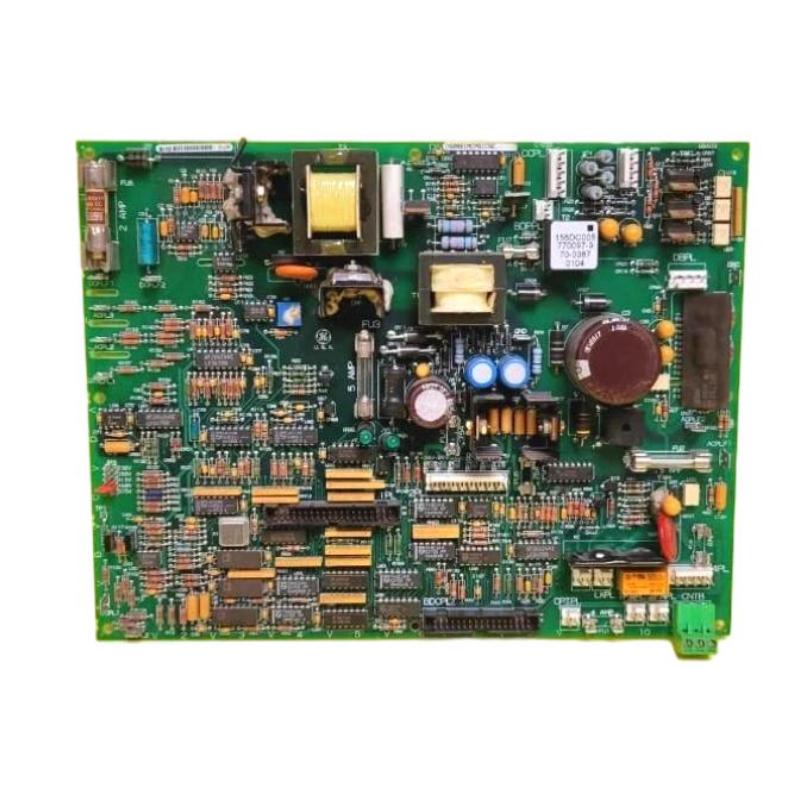
1. Introduction
The GE DS200IMCPG1CGC is a Power Supply Interface Board belonging to the GE Mark V DS200 control board family. It is also identified as an IGBT Power Supply Board and is used in compatible turbine and drive-control installations. The board forms part of the power interface arrangement in the Mark V control architecture. It has a documented cable connection to the DS200SDCC Drive Control Board through the 1PL connector. Consequently, problems involving the DS200IMCPG1CGC may be associated with the board itself, its interface cable, the connected drive-control board, or the wider power circuit. When a power-interface problem occurs, symptoms may include system alarms, abnormal power-related indications, intermittent operation, or faults that remain after a board replacement. However, these symptoms do not automatically confirm that the IMCP board has failed. External wiring problems, incorrect board revisions, damaged connectors, and faults in associated circuits can produce similar results. This guide explains how to troubleshoot the GE DS200IMCPG1CGC, inspect its connections, identify common fault causes, evaluate possible hardware damage, and determine when repair or replacement is appropriate.
2. Understanding the Board and Its Interfaces
Before troubleshooting, it is important to understand the board’s position within the Mark V system.
| Item | Description |
|---|---|
| Manufacturer | General Electric (GE) |
| Model | DS200IMCPG1CGC |
| Product Type | Power Supply Interface Board |
| Functional Description | IGBT Power Supply Board |
| Product Family | DS200IMCPG1 |
| Associated Board | DS200SDCC Drive Control Board |
| Documented Interface | 1PL cable connection on the DS200SDCC |
| Application | Compatible GE Mark V drive-control systems |
The exact electrical characteristics, connector pin assignments, protective-component ratings, and test procedures must be checked against the documentation for the installed board revision. Do not transfer specifications from another IMCP variant without confirming compatibility.
3. Safety Precautions Before Troubleshooting
The DS200IMCPG1CGC is used in equipment associated with industrial power electronics. Troubleshooting may involve hazardous voltages and stored electrical energy. Before starting any inspection:
- Coordinate the work with plant operations and the responsible control-system engineer.
- Follow the approved shutdown procedure for the associated drive or turbine equipment.
- Apply lockout/tagout procedures and verify electrical isolation.
- Allow stored energy to discharge according to the equipment manufacturer’s instructions.
- Use appropriate personal protective equipment and ESD protection.
- Never disconnect or reconnect the board while energized unless explicitly authorized by the exact equipment documentation.
- Do not bypass fuses, protective circuits, or safety interlocks.
- Only qualified personnel should perform electrical measurements and board-level repairs.
A power-interface board must not be treated as a low-voltage electronic component without first checking the electrical architecture of the equipment in which it is installed.
4. Common Fault Symptoms
4.1 Power-related system alarms
A power-related alarm may indicate an abnormal condition in the associated drive-control or power-interface arrangement. Possible causes include:
- Incorrect board installation.
- Damaged interface cable or connector.
- Incorrect board revision.
- Faults in the associated power circuit.
- Failed protective components.
- Internal PCB component damage.
Record the exact alarm message and related diagnostic information before making any changes. A general power alarm does not establish that the DS200IMCPG1CGC is defective.
4.2 Repeated fuse operation
If a protective fuse associated with the circuit opens repeatedly, the underlying cause must be identified before another fuse is installed. Possible causes include an abnormal downstream load, short circuit, damaged wiring, component failure, or incorrect replacement fuse specification. Never install a fuse with a higher rating to prevent repeated operation. This can remove an important layer of circuit protection and increase the risk of equipment damage.
4.3 Intermittent interface faults
Intermittent faults may occur when a connector is loose, cable insulation is damaged, contacts are contaminated, or an external circuit is unstable. Check whether the fault appeared after maintenance, board replacement, cabinet work, or changes to the associated drive equipment. A fault that occurs intermittently should be documented carefully. Its timing and relationship to other system events can help identify the affected connection or component.
4.4 Board-related faults after replacement
If a system fault remains after installing another DS200IMCPG1CGC, investigate the surrounding system rather than immediately replacing the new board. Potential causes include:
- Incorrect replacement revision.
- Incorrect or incomplete cable connection.
- Faulty DS200SDCC Drive Control Board.
- External wiring or power-circuit problems.
- Incorrect configuration or installation procedure.
Repeated replacement without identifying the root cause can increase maintenance costs and may damage additional components.
5. Step-by-Step Troubleshooting Procedure
Step 1: Collect fault information
Begin by recording the system condition before performing any maintenance. Collect the following information:
- Complete board number: DS200IMCPG1CGC.
- Functional and artwork revision markings.
- Exact system alarm messages and fault codes.
- Associated drive-control board information.
- Time and operating conditions when the fault occurred.
- Recent maintenance, replacement, or wiring changes.
- Any available diagnostic records from the Mark V system.
This information helps establish whether the problem is isolated to the IMCP board or related to another part of the power interface arrangement.
Step 2: Inspect the physical condition
After the equipment has been safely isolated, inspect the DS200IMCPG1CGC for visible signs of damage. Look for:
- Burn marks or abnormal discoloration.
- Cracked or damaged electronic components.
- Corrosion or moisture contamination.
- Loose components or damaged solder joints.
- Cracks in the printed circuit board.
- Damaged connector housings or contacts.
Visible damage should be documented before any repair is attempted. If the board shows signs of serious overheating or electrical failure, do not return it to service without specialist evaluation.
Step 3: Inspect the DS200SDCC interface cable
The DS200IMCPG1CGC has a documented cable connection to the DS200SDCC Drive Control Board through the 1PL connector. Inspect the cable and both mating interfaces for:
- Damaged insulation.
- Loose or displaced connector contacts.
- Corrosion or contamination.
- Incorrect routing or mechanical stress.
- Signs of overheating.
- Evidence of incorrect cable identification or connection.
Confirm the cable arrangement against the applicable wiring diagram. Do not assume that a cable with a physically similar connector is suitable for this interface.
Step 4: Verify board compatibility
Check the full catalog number and revision of the installed board. The DS200IMCPG1CGC belongs to a family of related boards, but other suffix combinations should not automatically be considered equivalent. Compare the installed hardware with the system bill of materials and approved engineering records. If the board has been replaced recently, confirm that the replacement was selected for the correct host configuration.
Step 5: Check protective components
If the applicable board revision contains fuses or other protective devices, inspect them according to the manufacturer’s maintenance instructions. If a fuse is open, investigate the associated circuit before replacing it. Check for wiring faults, abnormal load conditions, and possible component damage. Only use a replacement fuse with the exact specified characteristics. Do not bridge a fuse holder or use an unapproved substitute.
Step 6: Review the associated drive-control board
Because the DS200IMCPG1CGC interfaces with the DS200SDCC, faults in the associated drive-control hardware may affect the overall system. Review the DS200SDCC diagnostic information and inspect its relevant connector interface. Check for visible damage and compare the cable arrangement with the approved system drawings. Do not conclude that the SDCC or IMCP board is defective based only on an alarm description. Use the system diagnostics and approved test procedures to isolate the affected component.
Step 7: Perform approved electrical checks
Electrical measurements should only be performed when the relevant circuit diagrams and test procedures identify the correct measurement points and expected values. Use calibrated instruments suitable for the electrical environment. Follow the specified isolation and measurement requirements. Avoid applying arbitrary voltage or resistance tests to unidentified terminals. Incorrect testing can damage sensitive electronic components or expose technicians to hazardous energy.
Step 8: Determine whether the PCB has an internal fault
If the board installation, cable connections, protective components, and external circuits have been checked but the fault remains, consider internal board failure. Potential causes include:
- Damaged electronic components.
- Defective solder joints.
- Damaged PCB tracks.
- Electrical overstress.
- Long-term component deterioration.
- Thermal damage caused by abnormal operating conditions.
A qualified repair specialist can determine whether the board is suitable for component-level repair or whether replacement is the more reliable option.
6. Common Faults and Recommended Solutions
| Fault Symptom | Possible Cause | Recommended Troubleshooting |
|---|---|---|
| Power-related alarm | Power-interface fault, incorrect installation, or external circuit problem. | Record the diagnostic information and inspect the complete power-interface path. |
| Repeated fuse operation | Short circuit, abnormal load, or failed component. | Investigate the underlying electrical fault before installing an approved replacement fuse. |
| Intermittent interface problem | Loose cable, damaged connector, or unstable external circuit. | Inspect the 1PL cable path and associated connections. |
| Fault remains after board replacement | Incorrect replacement revision or fault elsewhere in the system. | Verify board compatibility and investigate the DS200SDCC and external circuits. |
| Visible overheating | Electrical stress, component failure, or poor operating conditions. | Remove the board from service according to procedure and arrange specialist inspection. |
| Connector damage | Mechanical stress, incorrect insertion, or repeated handling. | Inspect both mating interfaces and repair or replace damaged hardware as approved. |
| Board unavailable or not functioning normally | Installation error, incompatible revision, or internal hardware failure. | Check the part number, cable connections, and system diagnostic records. |
7. Repair and Maintenance Recommendations
7.1 Connector inspection and repair
Connector problems can produce intermittent faults or interrupt the interface between the power-interface board and the associated control hardware. If damage is found, inspect both sides of the connection. PCB connector replacement should be performed by a technician with suitable electronic rework experience and equipment. After repair, verify mechanical stability and inspect the solder joints before returning the board to service.
7.2 Component-level repair
If internal component damage is suspected, the board should be evaluated using appropriate diagnostic procedures. Repair work may involve component inspection, solder-joint examination, PCB track assessment, and replacement of confirmed defective components. Use components that meet the required electrical and environmental specifications. Unverified substitutions can affect the reliability of the power interface.
7.3 Preventive maintenance
Recommended maintenance activities include:
- Inspect the PCB for corrosion, overheating, and physical damage.
- Check the interface cable and connector condition.
- Review recurring power-related alarms.
- Inspect protective components according to the applicable revision documentation.
- Keep cabinet interiors clean and dry.
- Maintain board identification and revision records.
- Store spare boards in antistatic packaging.
- Document all repairs and replacement activities.
Regular inspections can help identify deterioration before it develops into a more serious drive-control problem.
8. Replacement and Compatibility Considerations
If the DS200IMCPG1CGC has an internal fault that cannot be reliably repaired, a replacement may be required. Before selecting a replacement, verify the following:
| Verification Item | Importance |
|---|---|
| Complete catalog number | Confirms the required DS200IMCPG1CGC identification. |
| Functional and artwork revision | Helps prevent revision-related compatibility errors. |
| Host system configuration | Ensures suitability for the target Mark V drive arrangement. |
| DS200SDCC interface | Confirms that the documented 1PL cable connection is compatible. |
| Protective component arrangement | Ensures that fuse and protection specifications are appropriate. |
| Physical condition | Helps identify damaged, corroded, or previously repaired boards. |
A similar model number is not sufficient evidence of interchangeability. Confirm the replacement against the exact equipment documentation and engineering configuration.
9. Frequently Asked Questions
What is the GE DS200IMCPG1CGC used for?
The DS200IMCPG1CGC is a Power Supply Interface Board used in compatible GE Mark V turbine and drive-control installations. It is also identified as an IGBT Power Supply Board.
Which board is connected to the DS200IMCPG1CGC?
The board has a documented cable connection to the DS200SDCC Drive Control Board through the 1PL connector. The actual cable arrangement should be checked against the wiring drawings for the installed system.
What should I check if the board produces a power-related alarm?
Start by recording the exact alarm and inspecting the board installation, interface cable, connector condition, and associated power circuit. Also verify the board revision and check the diagnostic information from the connected drive-control hardware.
Why does a fuse keep opening after replacement?
Repeated fuse operation may indicate a short circuit, abnormal load, damaged wiring, or defective electronic component. The underlying cause must be identified before another fuse is installed.
Can the DS200IMCPG1CGC be replaced with another DS200IMCPG1 board?
Not automatically. Different suffixes may identify different revisions or configurations. Confirm the complete part number and compatibility with the host equipment before substitution.
Can a faulty DS200IMCPG1CGC be repaired?
Repairability depends on the type and extent of damage. Connector or component problems may be repairable by a qualified specialist, while severe PCB damage or unavailable components may make replacement more appropriate.
What information should be provided when requesting technical support?
Provide the complete model number, revision markings, photographs of the board, system alarm messages, associated DS200SDCC information, and a description of the operating conditions when the fault occurs.
Technical Summary
The GE DS200IMCPG1CGC Mark V Power Supply Interface Board is an important component in compatible GE turbine and drive-control installations. Its documented interface with the DS200SDCC Drive Control Board through the 1PL connector makes cable condition, connector integrity, and system compatibility important troubleshooting considerations. When a fault occurs, technicians should first review the system alarms and inspect the board, interface cable, protective components, and associated circuits. Internal PCB failure should only be considered after external causes and installation errors have been investigated. A structured troubleshooting and maintenance process helps identify the actual fault source, avoid unnecessary replacement, and support reliable operation of legacy GE Mark V control equipment.