
NewsNEWCENTER
Featured products
Contact Us
Allen-Bradley 1203-GU6 Enhanced DeviceNet Communication Module Fault Diagnosis Guide
2026-06-12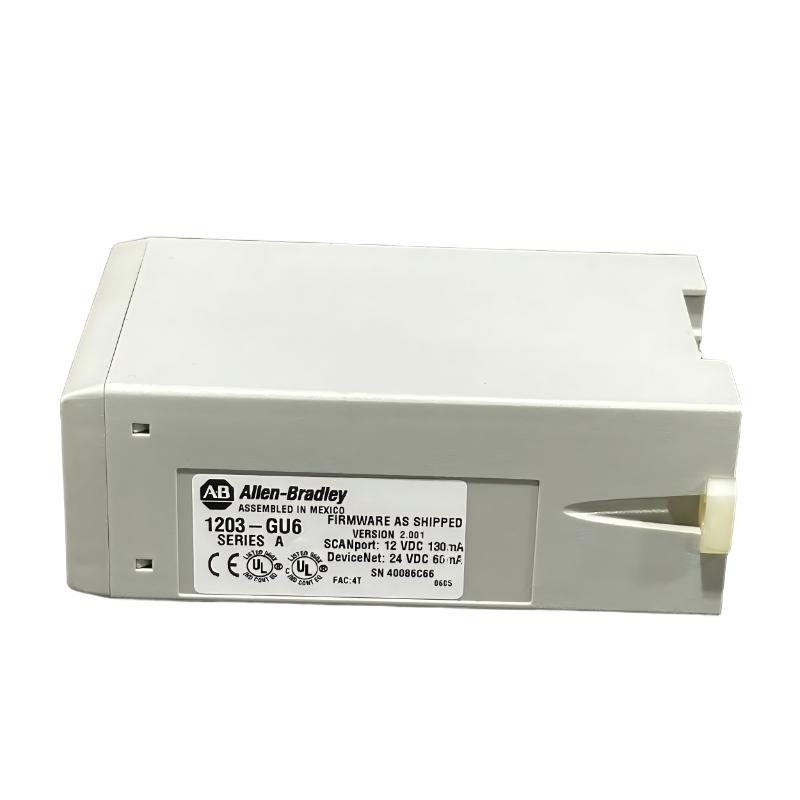
Table of Contents
- Field Case: Intermittent DeviceNet Dropout in 1203-GU6 Gateway System
- Fault Symptoms of 1203-GU6 Communication Module
- Observed Network Behavior & SCANport Conversion Issues
- Root Cause Analysis (DeviceNet, SCANport & Power Instability)
- Diagnostic Workflow for 1203-GU6 Module
- Repair & Recovery Actions
- Prevention Strategy for DeviceNet Gateway Systems
- FAQs on 1203-GU6 Faults
- Engineering Summary
Field Case: Intermittent DeviceNet Dropout in SCANport Gateway Architecture
Allen-Bradley 1203-GU6 Enhanced DeviceNet communication module faults are often misinterpreted as drive or PLC failures. In one packaging line, multiple SCANport-enabled drives intermittently disappeared from the DeviceNet scanner, causing unpredictable conveyor stops. Initial replacement of drives did not resolve the issue until the 1203-GU6 gateway and network layer were analyzed.
Fault Symptoms of 1203-GU6 Communication Module
Typical field symptoms include:
- DeviceNet nodes randomly going offline in scanner diagnostics
- SCANport devices not updating parameters or feedback values
- Intermittent “timeout” or “communication idle” alarms
- Drive status inconsistent between local and PLC view
Observed Network Behavior & SCANport Conversion Issues
During field troubleshooting, engineers observed unstable translation between DeviceNet and SCANport layers:
DEVICENET_NODE_STATUS = intermittent OFFLINE
SCANPORT_RESPONSE = delayed / missing datalinks
I/O_UPDATE_RATE = inconsistent under load
BUS_VOLTAGE = fluctuating 22.0–23.6V DC
EMI_LEVEL = high near VFD and motor feeders
Failures often increased during motor acceleration cycles, indicating combined communication and electrical noise stress.
Root Cause Analysis (DeviceNet, SCANport & Power Instability)
Most 1203-GU6 faults are system-level issues rather than internal module failure:
- Improper DeviceNet termination causing reflection and signal distortion
- SCANport cable degradation or poor connector seating
- Voltage drop on 24V DC supply under multi-node load conditions
- High EMI coupling from VFD-driven motor cables into network trunk
In one commissioning case, replacing only the DeviceNet trunk cable and re-terminating endpoints restored stable communication without replacing the module.
Diagnostic Workflow for 1203-GU6 Module
A structured approach is required to avoid unnecessary gateway replacement:
- Check DeviceNet scanner diagnostics for node stability
- Verify node address consistency (factory default often 63)
- Inspect termination resistors at both ends of trunk line
- Measure 24V DC supply under full system load
- Test SCANport cable continuity and connector integrity
GU6_DIAG /MODEL=1203-GU6 /SCANPORT_TEST /DEVICENET_CHECK /POWER_ANALYSIS
Repair & Recovery Actions
- Re-terminated DeviceNet network with correct 121Ω resistors
- Replaced damaged SCANport communication cables
- Improved grounding structure for cabinet and trunk cable shield
- Separated DeviceNet routing from VFD and motor power cables
After corrective actions, communication stability improved from intermittent dropout to continuous stable operation across extended runtime testing.
Prevention Strategy for DeviceNet Gateway Systems
- Maintain strict separation between DeviceNet and power cabling
- Ensure proper termination at both ends of DeviceNet trunk
- Use high-quality shielded cables for SCANport and network lines
- Monitor 24V DC stability under peak load conditions
- Regularly inspect connectors for oxidation or mechanical looseness
FAQs on 1203-GU6 Faults
Why do SCANport drives disappear from DeviceNet?
This is typically caused by communication instability in the gateway or noise on the DeviceNet trunk, not drive failure.
Can a bad termination cause full network loss?
Yes. Incorrect or missing termination can cause repeated retries and node dropout across the entire segment.
Is replacing the module usually necessary?
In most field cases, no. Over 80% of issues are resolved through wiring, grounding, and power stabilization corrections.
Engineering Summary
The Allen-Bradley 1203-GU6 Enhanced DeviceNet communication module is a critical SCANport-to-DeviceNet gateway, but field issues are typically caused by wiring quality, termination errors, EMI interference, and power instability rather than internal module defects. Proper installation discipline and structured troubleshooting significantly improve system uptime and reduce unnecessary replacements in industrial automation environments.